

An identity theft prevention checklist gives you a clear starting point for protecting your credit, securing your accounts, and keeping personal information private. This guide brings together 20 practical steps, a free printable checklist, and a monthly review routine to help you stay organized. You’ll also learn which protections you can set up for free—and when paid monitoring or recovery support may be worth the cost.
Table of Contents
Quick Answer: What Should An Identity Theft Prevention Checklist Include?
An identity theft prevention checklist should cover your credit, financial accounts, online logins, personal documents, and everyday privacy habits. It should also help you decide whether paid monitoring and recovery support would add value beyond the protections you can set up yourself.
Start with these essential actions:
- Freeze your credit at all three major bureaus. Place a freeze separately with Equifax, Experian, and TransUnion to help prevent criminals from opening new credit accounts in your name. The Federal Trade Commission’s (FTC) credit freeze guidance explains this free protection.
- Review financial activity and credit reports. Check for unfamiliar transactions, accounts, and credit inquiries. Turn on transaction alerts through your bank and card providers.
- Secure your online accounts. Use a unique, strong password for each account, store passwords in a reputable password manager, and enable multifactor authentication wherever available. These are core steps in Cybersecurity and Infrastructure Security Agency’s (CISA) Secure Our World guidance.
- Protect sensitive personal information. Store identification documents securely, shred paperwork containing private details, and verify requests before sharing your Social Security number.
- Reduce unnecessary exposure. Limit public personal details, review app permissions, and request removal from people-search websites.
- Keep devices protected. Enable automatic updates and screen locks on your smartphone, tablet, and computer.
- Schedule regular reviews. Use a monthly identity protection checklist to revisit account activity, security alerts, and unfinished tasks.

Considering paid protection? Use your identity theft prevention checklist to identify what you need help managing. Before subscribing, compare which credit bureaus a plan monitors, what personal information it checks, what hands-on recovery assistance it provides, and the renewal price.
A printable personal information security checklist makes those gaps easier to track. Complete the free protections first, then choose paid support that fits your needs and budget. Monitoring can help flag potential problems, but it does not guarantee that identity theft will be prevented.
Download Your Free Printable Identity Theft Prevention Checklist
Turn the steps in this guide into a plan you can follow with our free printable identity theft prevention checklist. Keep a copy nearby so you can mark completed tasks, spot unfinished steps, and set a date to review your progress.
Download Your Free Printable Checklist (PDF)
You can use this personal information security checklist on your own or work through it with your household. Start with the highest-priority tasks, then tackle the remaining items at a manageable pace.
- Check off completed actions. Mark a task complete only after you have finished the setup.
- Write down your next step. A short reminder such as “enable bank alerts” makes it easier to follow through.
- Schedule a monthly review. Revisit account security, financial activity, and any alerts that need attention.
- Keep sensitive details off the page. Never write passwords, Social Security numbers, account numbers, or recovery codes on your checklist.
For help completing the online account security steps, CISA’s Secure Our World guidance explains strong passwords, password managers, and multifactor authentication.

Use your checklist before buying protection. Identify which tasks you can manage yourself and where you would value additional help. If you decide to compare paid services, look at monitoring coverage, recovery assistance, family coverage, and the price after promotional discounts end.
Your identity theft prevention checklist can help you make a focused purchase: choose a service that addresses your remaining needs and fits your budget.
Protect Your Credit Reports And Financial Accounts
Your identity theft prevention checklist should address two different risks: someone opening credit in your name and someone misusing an account you already have. Credit freezes help with the first risk. Transaction alerts and regular account reviews help you spot the second.
Freeze Your Credit Before A Problem Happens
Place a free credit freeze separately with Equifax, Experian, and TransUnion. A freeze restricts access to your credit report, making it harder for criminals to open new credit accounts using your information.
For step-by-step instructions, follow our guide on how to freeze your credit at all three major credit bureaus.
You do not need a paid subscription to freeze your credit. According to the Federal Trade Commission, placing or lifting a freeze is free and does not affect your credit score. When applying for credit, ask which bureau the lender uses so you can temporarily lift the appropriate freeze.
A credit freeze does not stop unauthorized transactions on an existing bank account or credit card. Keep those accounts under review even after your freezes are in place.
Review Reports And Enable Useful Alerts
Make these actions part of your financial identity protection checklist:
- Review all three credit reports. Look for unfamiliar accounts, unexpected credit inquiries, and incorrect addresses. Access your reports through AnnualCreditReport.com.
- Enable transaction notifications. Turn on available alerts for purchases, withdrawals, transfers, and new payees.
- Watch for account changes. Enable notifications for changes to your password, contact information, or security settings when offered.
- Read your statements. Review small charges as carefully as larger ones, and investigate transactions you cannot identify.
- Keep contact details current. Make sure your bank can reach you through a phone number and email address you control.
If you receive a suspicious alert, open the provider’s official app or contact it using the number on your card. Avoid signing in through an unexpected message.

Consider A Fraud Alert If You Suspect Identity Theft
An initial fraud alert tells lenders to take steps to verify your identity before granting credit. It is free, lasts one year, and can be renewed. You only need to contact one major credit bureau; that bureau must notify the other two. You can also have a fraud alert alongside a credit freeze.
Compare Paid Monitoring By What It Adds
If you want additional monitoring and recovery support, use your identity theft prevention checklist to identify what your existing bank alerts and benefits do not cover.
Before subscribing, check:
- Bureau coverage: Does the specific plan monitor one credit bureau or all three?
- Alert scope: Which report changes and account activities can trigger notifications?
- Recovery assistance: Will a specialist actively help resolve identity theft, or mainly provide instructions?
- Ongoing cost: What will you pay after introductory discounts expire?
- Insurance terms: Which expenses qualify, and what exclusions or limits apply?
Three-bureau credit monitoring does not automatically mean every bank transaction is monitored. Verify any financial account monitoring features separately.
Choose paid protection when its additional coverage or assistance meets a clear need. Keep your freezes, account alerts, and regular reviews in place regardless of which service you buy.
Secure Your Passwords, Email, And Online Accounts
Your email account often holds the reset links for your banking, shopping, and social media accounts. That makes securing it a priority on your identity theft prevention checklist. Start with your primary inbox, then strengthen the accounts connected to it.
Replace Reused Passwords With Unique Ones
Using the same password across several accounts creates an avoidable risk: if one service exposes it, criminals may try that combination elsewhere.
Use a different, randomly generated password for every account. CISA’s password guidance recommends passwords that are long, random, and unique, with at least 16 characters.
Work through your online account security checklist in this order:
- Primary email: Protect the inbox used for account recovery.
- Financial accounts: Secure banking, credit card, payment, and investment logins.
- Accounts with saved payment details: Update shopping, travel, and subscription passwords.
- Social media and cloud storage: Protect private messages, photos, and documents.
If a password has been exposed or reused, replace it wherever you used it. Slight changes, such as adding a different number at the end, are not a reliable substitute for genuinely different passwords.
Choose A Password Manager That Fits Your Needs
A password manager can generate and store unique passwords so you do not have to memorize each one. Before purchasing a subscription, compare:
- Device support: Does it work with your phone, computer, and preferred browser?
- Security features: Can you protect the vault with multifactor authentication?
- Account recovery: What happens if you forget your master password or lose your device?
- Household features: Does a family plan provide separate vaults and secure sharing?
- Renewal pricing: What will it cost after the introductory offer?
Protect the vault with a strong, unique master password and enable multifactor authentication.
👉 Ready to replace reused passwords? Explore NordPass plans and pricing to see whether its features fit your devices and daily routine.
A reputable free option may cover your basic needs. A paid plan makes more sense when you will use its additional features. Also check whether a password manager is already included in a subscription you have.
Compare the best password managers to find an option that fits your devices, household, and budget.
Add Another Layer Of Login Protection
Turn on multifactor authentication, or MFA, wherever available. It adds another verification step, making a stolen password less useful to an attacker.
When supported, consider a phishing-resistant option such as a security key or passkey. An authenticator app is another useful option; SMS verification is generally better than relying on a password alone.
Never approve a login prompt you did not initiate or share a verification code with an unexpected caller. Save recovery codes securely so losing your phone does not also mean losing access to your accounts.

Check Your Email Settings And Recovery Options
A strong password is only part of protecting your inbox. Review these settings as part of your identity theft prevention checklist:
- Confirm that recovery email addresses and phone numbers belong to you.
- Review signed-in devices and sign out unfamiliar sessions.
- Remove forwarding rules you did not create.
- Revoke access for connected apps you no longer use.
- Enable available alerts for new sign-ins and security changes.
The FTC’s account recovery guidance specifically recommends checking recovery information and email forwarding settings after an account compromise.
Keep passwords and recovery codes off your printable checklist. Record only whether each security task is complete.
Before buying additional protection, secure the accounts you already have. If you later choose identity monitoring, evaluate it for exposure alerts and recovery support. Those features can complement your account security habits, but you still need unique passwords, stronger authentication, and secure recovery settings.
Protect Your Social Security Number And Personal Documents
Your identity theft prevention checklist should cover the information stored in your wallet, filing cabinet, and digital folders. Social Security numbers, passports, birth certificates, and tax records deserve careful handling because they can help criminals impersonate you.
Start by limiting what you carry, checking who requests your information, and securing the documents you keep.
Share Your Social Security Number Carefully
A request for your Social Security number does not automatically mean you must provide it. Before sharing it, ask:
- Why is it needed?
- Is providing it required or optional?
- Can another identifier be used?
- How will it be stored and protected?
Some legitimate organizations need your number for specific purposes. Verify the organization and use its secure submission process instead of sending sensitive details through an unexpected email or text.
For additional safeguards beyond document storage, read our guide on how to protect your Social Security number.
The Social Security Administration recommends keeping your Social Security card with your important papers and carrying it only when needed. Apply the same caution to other documents displaying your number.
Give Important Documents A Secure Home
Use this personal information security checklist to reduce unnecessary exposure:
- Store originals securely. Keep Social Security cards, birth certificates, passports, and sensitive records in locked storage.
- Carry only what you need. Remove unnecessary identification documents from your everyday wallet or bag.
- Collect mail promptly. Avoid leaving financial statements, replacement cards, or official notices unattended.
- Shred sensitive paperwork. Destroy documents you no longer need instead of placing them intact in the trash.
- Protect household records. Include children’s documents and records belonging to other family members in your storage plan.
If you buy a document safe, compare its lock, anchoring options, capacity, and independently tested fire or water resistance. A portable storage box may organize paperwork without providing strong theft protection.

Protect Digital Copies, Too
Scanned identification and tax documents need protection even when the originals are locked away.
Store necessary copies in encrypted storage, secure the account with multifactor authentication, and review sharing permissions. Avoid leaving sensitive scans in shared folders or ordinary photo albums. Remove unnecessary copies from downloads and messages once you have securely stored what you need.
When an organization requests a document, confirm the recipient and use its verified secure upload portal when available. Ask whether information unrelated to the request can be redacted before submission.
Consider An IRS Identity Protection PIN
For additional protection against tax-related identity theft, consider a free IRS Identity Protection PIN, or IP PIN. This six-digit number helps prevent someone from filing a fraudulent federal income tax return using your Social Security number or Individual Taxpayer Identification Number.
The IRS IP PIN program is available to eligible individuals who can verify their identity. It addresses tax-return fraud; it does not protect every use of your personal information.
Evaluate Paid Monitoring By Its Actual Coverage
If you are considering identity theft protection, use your identity theft prevention checklist to identify the support you want before choosing a plan.
Look beyond the phrase “Social Security number monitoring” and check:
- What is monitored: Which sources and types of activity does the service check?
- What alerts mean: Does an alert indicate exposed information, possible misuse, or another event requiring investigation?
- What recovery help includes: Will a specialist assist with contacting organizations and resolving fraudulent records?
- What you will pay: Review renewal pricing, household coverage, and cancellation terms.
Monitoring cannot make an exposed Social Security number private again or detect every misuse. Its value depends on the alerts and assistance it provides. Combine any paid service with careful document handling, credit freezes, and prompt action when something looks wrong.
Reduce Your Exposure On Data Broker Websites
Your identity theft prevention checklist should include checking how easily strangers can find your personal information online. People-search websites, a type of data broker, may display your phone number, home address, previous addresses, and relatives in one searchable profile.
Reducing these listings can make your information harder to find. It will not erase your identity from the internet, but it can limit details that someone could use to make an impersonation attempt more convincing.
Find The Listings That Reveal Your Information
Start by searching your name alo_ngside your city or state. Then search your phone number and any previous names you have used.
As part of your personal information security checklist:
- Confirm the profile belongs to you. Similar names can produce misleading matches.
- Prioritize sensitive listings. Focus on pages exposing your current address, phone number, or family connections.
- Save the listing URL. You may need it when submitting a removal request.
- Track your progress. Record the website, request date, and whether the listing remains visible.
Avoid purchasing a background report just to begin an opt-out request. First check the website’s removal instructions.
Submit Opt-Out Requests Carefully
Look for links labeled “Opt Out,” “Privacy,” or “Remove My Information.” The Federal Trade Commission’s people-search guidance also suggests searching the website’s name alongside “opt out” or “remove my information” if you cannot locate its instructions.
Follow the verification steps, but review what the site requests before submitting additional personal information. Use the official removal page, provide only what is necessary, and check whether an email confirmation is required.
Keep removal requests on your monthly review list. A submitted request is not proof that a listing has disappeared, and information may return after a website updates its records.
👉 Prefer help managing removal requests? Check Incogni’s coverage and pricing to see whether it covers the data broker sites you want to address.
Decide Whether Paid Data Removal Is Worth It
Manual opt-outs may be manageable when you have only a few listings to address. A paid data removal service may be useful if your details appear across many websites or you want help with repeated requests and follow-up checks.
👉 If you want help removing your personal information from data broker websites without handling every request yourself, explore DeleteMe’s plans to see whether its ongoing removal service fits your privacy needs.
Before subscribing, compare these features:
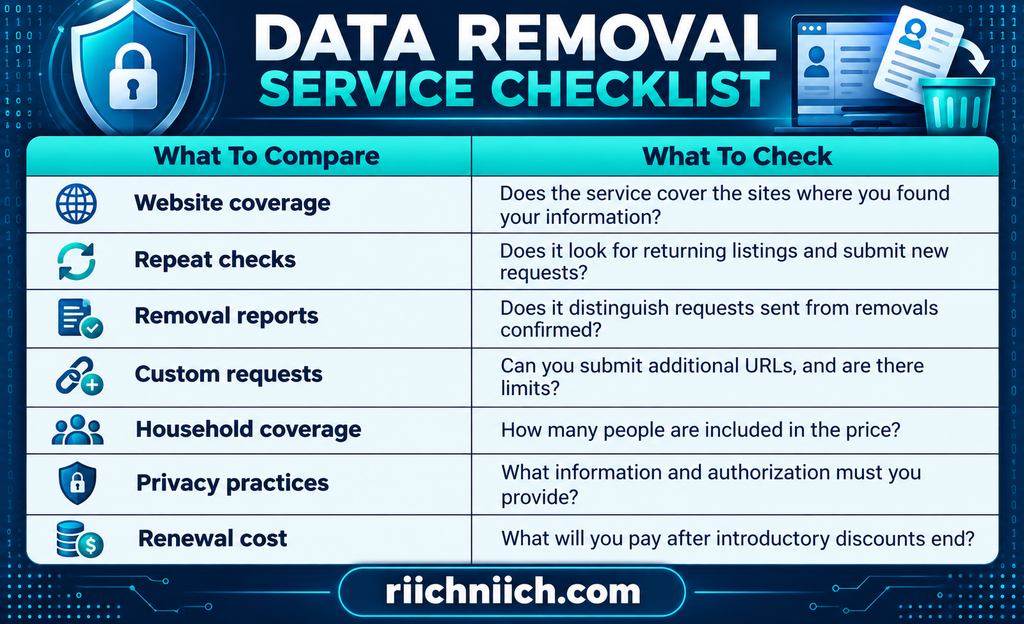
Prioritize relevant coverage over the largest advertised website count. A service’s value depends on whether it addresses your actual exposure and clearly explains its results.
Our comparison of the best data removal services can help you evaluate coverage, ongoing removal work, and pricing before subscribing.
Understand What Removal Cannot Do
Data removal services cannot guarantee that every copy of your information disappears. Removing a people-search profile generally does not delete the underlying government record, retrieve information someone already downloaded, or erase data exposed in a breach.
Also check whether an identity protection subscription includes actual removal requests or only alerts about exposed information. Those are different services.
Use your identity theft prevention checklist to combine removal efforts with tighter social media settings and fewer unnecessary public details. If you choose paid help, buy it for clearly defined removal work and ongoing follow-up—not a promise of complete invisibility.
Protect Your Smartphone And Other Devices
Your smartphone may hold banking apps, private messages, saved passwords, and account recovery tools. Your identity theft prevention checklist should protect that information on every device you use—including laptops, tablets, and shared household computers.
Start with built-in security settings, then consider paid tools that address a specific need.
Lock Your Devices And Hide Sensitive Notifications
Use a strong screen-lock PIN or password, and set devices to lock automatically after a short period of inactivity. Avoid easily guessed combinations such as birthdays or repeated numbers.
Fingerprint or face recognition can make unlocking convenient, but you still need a strong backup passcode. Also hide sensitive notification previews so someone cannot read verification codes, financial alerts, or private messages from your locked screen.
The FTC’s phone security guidance recommends locking your phone, keeping software updated, backing up data, and enabling tools to locate or secure a missing device.
Keep Software Updated And Check Device Support
Enable automatic updates for your operating system, browser, and apps. Complete any required restart so downloaded updates can finish installing.
CISA’s software update guidance explains that updates fix security weaknesses, making them an important part of protecting personal information.
Include these tasks in your monthly identity protection checklist:
- Check for pending updates. Automatic updates may still need your attention.
- Remove unused apps and browser extensions. Keep only what you need and trust.
- Review permissions. Limit access to contacts, photos, location, microphones, and cameras.
- Confirm security support. Check the manufacturer’s support information for your device and operating system.
Paid security software cannot replace security updates for an unsupported operating system. If you need a replacement device, compare its remaining update support alongside its price and features.

Prepare For A Lost Or Stolen Device
Enable your device’s built-in location and remote-lock features before you need them. Learn how to access those controls from another device, and keep account recovery options somewhere you can reach without the missing phone.
Back up important files regularly and confirm that the backups are completing. Protect cloud backup accounts with multifactor authentication.
Remote locking or erasing may depend on the device’s settings and connectivity, so treat these features as additional safeguards. A strong screen lock remains essential.
Protect Your Phone Number And App Downloads
Your mobile number may receive account recovery messages. Set a unique carrier account PIN and ask about available number-lock or port-out protections.
Download apps through official stores or verified developer websites, and check the publisher before installing. Avoid installing “security updates” promoted through unexpected messages or alarming pop-ups.
Never give an unexpected caller remote access to your device. Someone claiming to provide technical support may instead be trying to access your accounts.
Compare Paid Device Protection Before Subscribing
Use your identity theft prevention checklist to identify what your existing protections already cover. If you need additional security software, compare:
- Device compatibility: Confirm support for each operating system you use.
- Features by platform: A package may provide different protections on phones and computers.
- Useful protection: Look for relevant features such as malicious-site warnings or malware detection where supported.
- Household coverage: Check device limits and whether family members are included.
- Renewal pricing: Review the ongoing cost and any overlap with existing subscriptions.
If you need security software for several household devices, compare the best antivirus for families and check the features available for each operating system.
If you are considering a VPN, understand its role: it protects traffic between your device and the VPN server, but it does not prevent every scam, malicious download, or account takeover.
Choose paid tools to fill a clear gap. Keep device locks, supported software, careful app permissions, and reliable backups at the center of your protection plan.
Adapt Your Identity Theft Prevention Checklist For Your Family
An identity theft prevention checklist works best when it accounts for everyone you want to protect. Adults, children, and older relatives have different accounts, documents, and support needs. Completing your own security tasks does not automatically protect the rest of your household.
Use a separate checklist for each person, then identify shared responsibilities such as securing devices, storing documents, and reviewing suspicious messages.
Match The Tasks To Each Family Member
Adapt your family identity protection routine to the accounts and information each person uses:
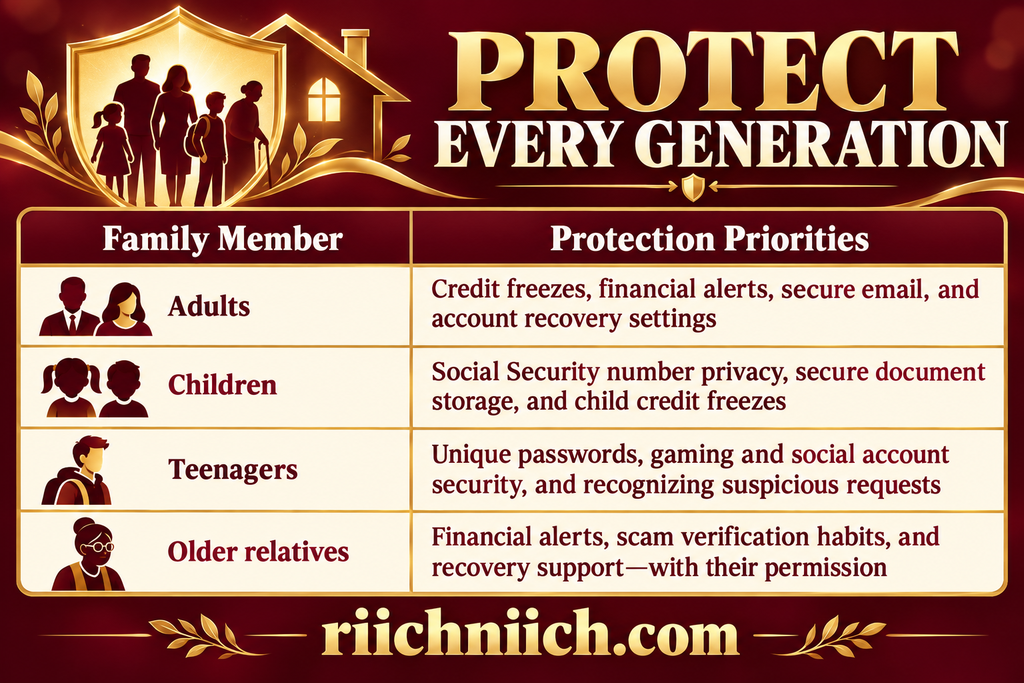
Each adult should manage their own account credentials. When someone needs help, use authorized access or secure sharing features instead of circulating passwords through texts or email.
Protect Children Before They Apply For Credit
Children can experience identity theft even when they have never borrowed money. Someone may misuse their information to obtain credit, services, or benefits.
The FTC’s child identity theft guidance recommends requesting free credit freezes for children under 16 through all three major credit bureaus. The process requires documentation and differs from an adult freeze.
Also add these actions to your household’s personal information security checklist:
- Question requests for a child’s Social Security number. Ask why it is needed and whether another identifier will work.
- Secure school and medical paperwork. Store sensitive documents safely and shred unnecessary copies.
- Limit public details. Avoid posting documents or photos that expose identification numbers, home addresses, or account information.
- Investigate unexpected notices. Bills for unfamiliar accounts or tax notices involving your child deserve prompt attention.
Create A Simple Family Verification Rule
Agree that unexpected requests for money, passwords, or verification codes require a pause—even when they appear to come from someone familiar.
Call the person using a number you already know before acting on an urgent request. Encourage children and relatives to ask for help without fear of embarrassment. Reporting a suspicious message early is more useful than hiding a mistake.
Compare Family Plans By Who Actually Gets Covered
If managing protection for several people feels time-consuming, a paid family identity theft protection plan may offer useful monitoring and recovery assistance. Before subscribing, check the details behind the word “family.”
- Adult limits: How many adults can enroll?
- Child eligibility: What ages qualify, and what changes when a child becomes an adult?
- Address requirements: Can covered relatives live in separate households?
- Monitoring differences: Which features apply to adults, and which apply to children?
- Recovery assistance: Is hands-on support available for every enrolled family member?
- Insurance terms: Are limits per person or shared, and what exclusions apply?
- Total renewal cost: What will the whole family pay after promotional pricing ends?
👉 Looking for one plan for your household? Explore Aura’s family plans and check the member limits, included protections, and renewal price before enrolling.
Do not assume purchasing a family plan automatically activates protection for everyone. Confirm enrollment requirements and complete each person’s setup.
Explore our guide to the best identity theft protection for families to compare options for the adults and children you want to cover.
Make Security A Shared Monthly Habit
Set a short monthly check-in to review unfinished tasks, device updates, and alerts requiring attention. Revisit the plan when someone gets a new phone, opens an account, moves, or leaves for college.
Keep passwords and identification numbers off the printed pages. Use your identity theft prevention checklist to track completed actions and responsibilities, then choose paid support only where it adds useful coverage or assistance for your family.
What You Can Do For Free Before Paying For Protection
You can complete many important tasks on your identity theft prevention checklist without buying a subscription. Start with free protections that restrict access to your credit, strengthen your accounts, and help you notice suspicious activity. Then decide whether paid monitoring or recovery assistance would fill a remaining need.
Put These Free Protections In Place First
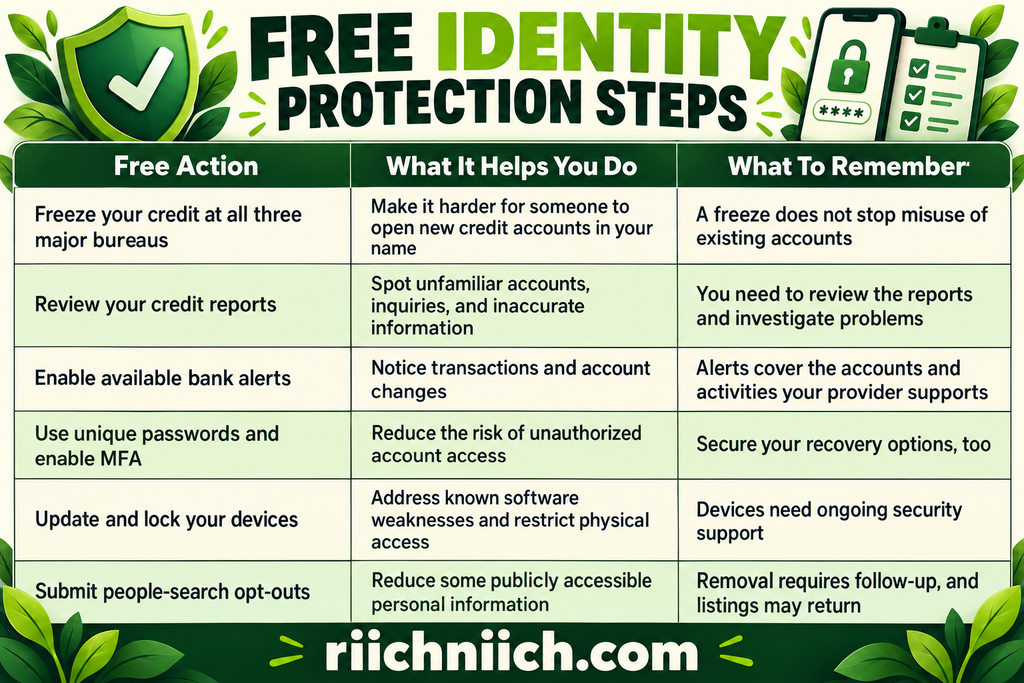
According to the FTC’s credit freeze guidance, placing or lifting a freeze is free and does not affect your credit score. Contact Equifax, Experian, and TransUnion separately—you do not need to purchase a plan to use this protection.
You can also access free weekly credit reports from each major bureau through AnnualCreditReport.com, as confirmed by the FTC. Reviewing all three matters because their information may differ.
Check The Benefits You Already Have
Before purchasing another service, review benefits available through your bank, credit card, employer, insurance policy, or existing security subscription.
You may already have access to credit alerts, a password manager, or identity recovery assistance. Availability varies, so confirm:
- What is included: A free credit score is not the same as credit monitoring.
- Who is covered: Benefits may apply only to the account holder.
- Whether activation is required: An available feature may need enrollment.
- When coverage ends: Promotional or breach-related monitoring may expire.
- What happens after an alert: Check whether help includes practical recovery assistance or only general guidance.
Record these benefits alongside your printable identity theft prevention checklist. This makes overlapping subscriptions easier to spot.
Know What You Would Be Paying For
Free protections can accomplish a great deal, but managing them takes attention. Paid services may add automated alerts, monitoring beyond credit reports, repeated data removal requests, or hands-on recovery support, depending on the plan.
If you are unsure which type of service fills your remaining needs, our guide to credit monitoring vs identity theft protection explains the differences.
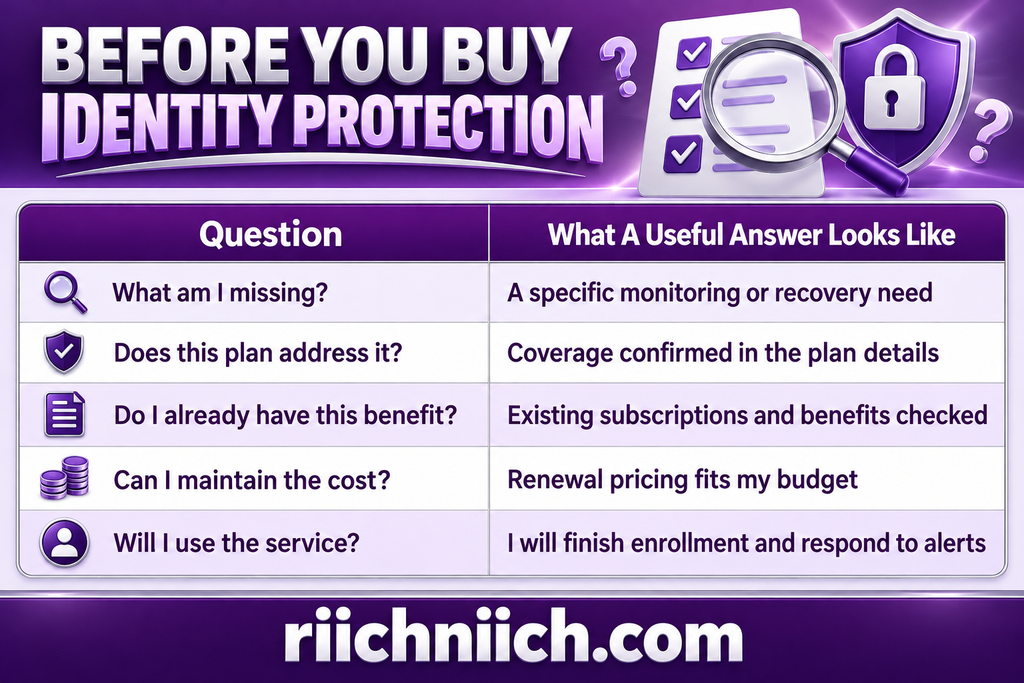
Use three questions to guide your purchase:
- What task do I need help managing? Identify a specific need, such as repeated removal requests or broader exposure alerts.
- Does this plan actually address it? Check the coverage details rather than relying on the product name.
- Is the ongoing price worth the added support? Compare renewal costs with the features you expect to use.
You do not need to buy protection simply because a checklist item remains unfinished. Complete the free setup tasks first, then choose paid support that adds useful coverage or saves you meaningful effort.
Your goal is an affordable routine you can maintain: strong account security, regular reviews, and additional assistance where it helps most.
When Is Paid Identity Theft Protection Worth It?
Paid identity theft protection may be worth it when you want additional monitoring, help managing your family’s protection, or hands-on assistance if fraud occurs. Use your identity theft prevention checklist to identify those needs before committing to a subscription.
The strongest reason to buy is a specific benefit you will use—not a promise that identity theft can never happen.
When You Want Monitoring Beyond Your Credit Reports
Reviewing your credit reports is useful, but it does not reveal every type of identity misuse. Depending on the plan, paid identity monitoring may check additional sources for exposed personal information or suspicious activity.
The FTC’s guide to identity protection services distinguishes credit monitoring from broader identity monitoring and recovery assistance. These features serve different purposes, so check what the specific subscription includes.
A paid plan may deserve consideration if:
- Your information has been exposed repeatedly. You want help watching for additional warning signs, while continuing your own security checks.
- You manage many accounts. Consolidated alerts could make some monitoring tasks easier to maintain.
- You want broader coverage. Your existing benefits provide only limited credit alerts.
- You need family support. A suitable plan covers the adults and children you intend to enroll.
An exposure alert does not necessarily mean fraud has occurred. Its value depends on whether it gives you useful information and a clear next step.
When Recovery Assistance Matters To You
Resolving identity theft can involve contacting creditors, disputing records, gathering documents, and following up on unresolved issues.
If you would value help with that work, prioritize recovery assistance when comparing plans. Ask whether the provider offers:
- A dedicated case manager.
- Help preparing disputes and supporting documents.
- Assistance contacting affected organizations.
- Authority to act on your behalf when you provide the required authorization.
- Support for the types of identity theft that concern you.
Access to advice and hands-on case management are not the same benefit. Confirm how much work the service actually handles.
Free recovery guidance is also available through IdentityTheft.gov, which provides personalized recovery plans and supporting forms. Paid assistance may add convenience and individual support rather than access to an otherwise unavailable recovery process.
When The Price Fits Your Actual Needs
Judge a subscription by its ongoing cost and useful features. Compare the annual renewal price, covered family members, monitoring scope, and recovery support.
Treat insurance as one part of the decision. Read the policy’s covered expenses, exclusions, deductibles, and claim requirements. Do not assume a large advertised limit guarantees reimbursement for every loss.
Before purchasing, complete this short buying check:
👉 If additional monitoring fits your needs, review Identity Guard’s plans and pricing and compare the included coverage with the protections you already have.
When You Can Wait Before Subscribing
You may not need a paid plan yet if your existing benefits meet your needs, you consistently review your accounts, and you are comfortable handling follow-up tasks yourself.
For help weighing that decision, read Do You Really Need Identity Theft Protection? and consider how much additional monitoring and recovery support you would use.
If fraud is already happening, start responding immediately. Before buying a service for an existing incident, confirm whether its recovery assistance applies; do not assume a new subscription or insurance policy covers earlier events.
Paid protection is worth considering when it adds useful coverage or practical help at an affordable price. Keep your identity theft prevention checklist active either way—credit freezes, secure accounts, and prompt responses remain essential parts of your routine.
How To Choose An Identity Theft Protection Service For Your Needs
Use your identity theft prevention checklist as a shopping guide. Identify the tasks you already handle, the benefits you already receive, and the areas where you want additional help. Then compare plans against those needs instead of choosing the longest feature list.
Start With Your Main Protection Priority
Write down your top two or three priorities before comparing subscriptions.
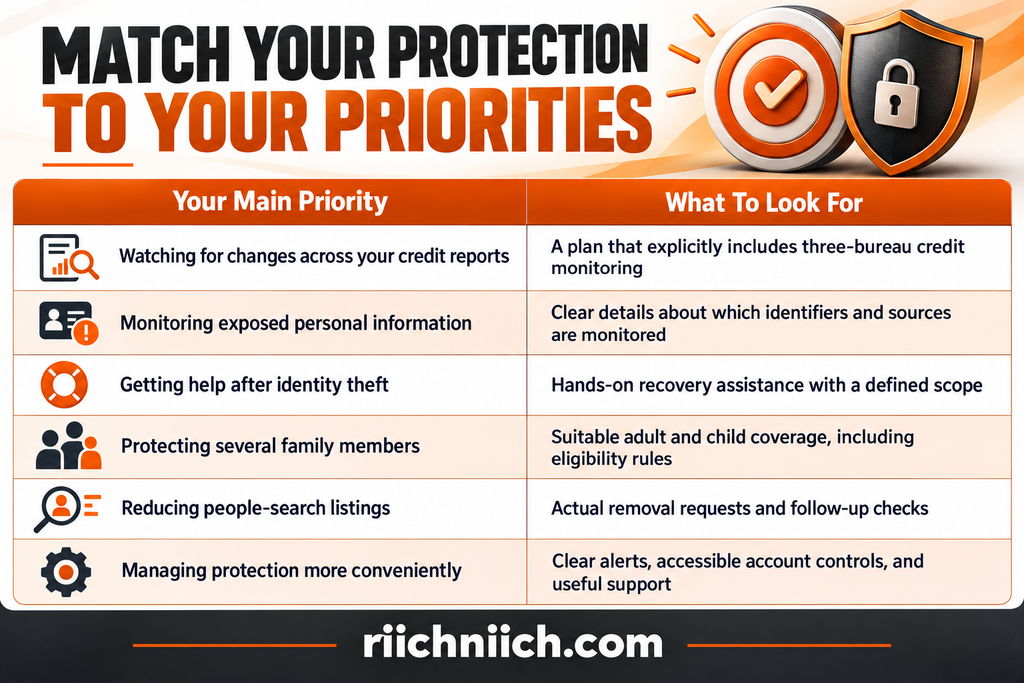
The FTC’s overview of identity protection services explains that credit monitoring, identity monitoring, and recovery services provide different benefits. Confirm which ones appear in the exact plan you intend to purchase.
Check The Plan Details Before The Brand Name
A provider may sell several subscription levels with different coverage. Features advertised on its homepage may belong only to a higher-priced tier.
Before signing up, verify:
- What the selected tier includes.
- Which features require additional payment.
- Whether coverage applies to every enrolled person.
- Which tools require separate activation or account linking.
- Whether your devices and location are supported.
For example, a plan that includes identity monitoring may not include data removal. Similarly, “family protection” does not tell you how many adults qualify or whether they can live at different addresses.
Look For Clear Alerts And Useful Support
An alert should help you understand what happened and what to do next. Look for sample notifications or product demonstrations that explain how the service distinguishes exposed information from possible fraudulent activity.
Ask practical questions before purchasing:
- Can I choose how I receive alerts?
- Does the service explain the information behind an alert?
- How do I reach someone if I do not recognize the activity?
- What are the support hours?
- Can a recovery specialist help manage the problem, or only explain the steps?
Choose a service you can realistically use. Complicated controls or unclear notifications can make an otherwise useful subscription harder to manage.
Compare The Full Cost And Commitment
Calculate the price for everyone you want covered over a full year. Check both the introductory cost and the renewal cost.
Also review the billing frequency, cancellation process, refund conditions, and any trial that automatically becomes a paid subscription. A price displayed “per month” may require an annual payment upfront.
Save the plan summary and purchase terms. They give you a reference for the coverage and price you selected.
Use Your Checklist To Make The Final Choice
Return to your identity theft prevention checklist and ask: Which service addresses my most important remaining needs at a sustainable price?
Choose the plan that gives you clear coverage, usable support, and features you expect to use. After enrollment, activate the included protections and confirm that the intended family members and information have been added. Purchasing the subscription is only the beginning of the setup.
When you are ready to compare providers, explore our best identity theft protection services guide with your coverage priorities and renewal budget in mind.
Compare Monitoring, Recovery Support, And Insurance Before You Buy
Before choosing a subscription, use your identity theft prevention checklist to evaluate three separate benefits: monitoring, recovery support, and insurance. Each addresses a different need, and a strong offering in one area does not guarantee equally useful coverage in the others.
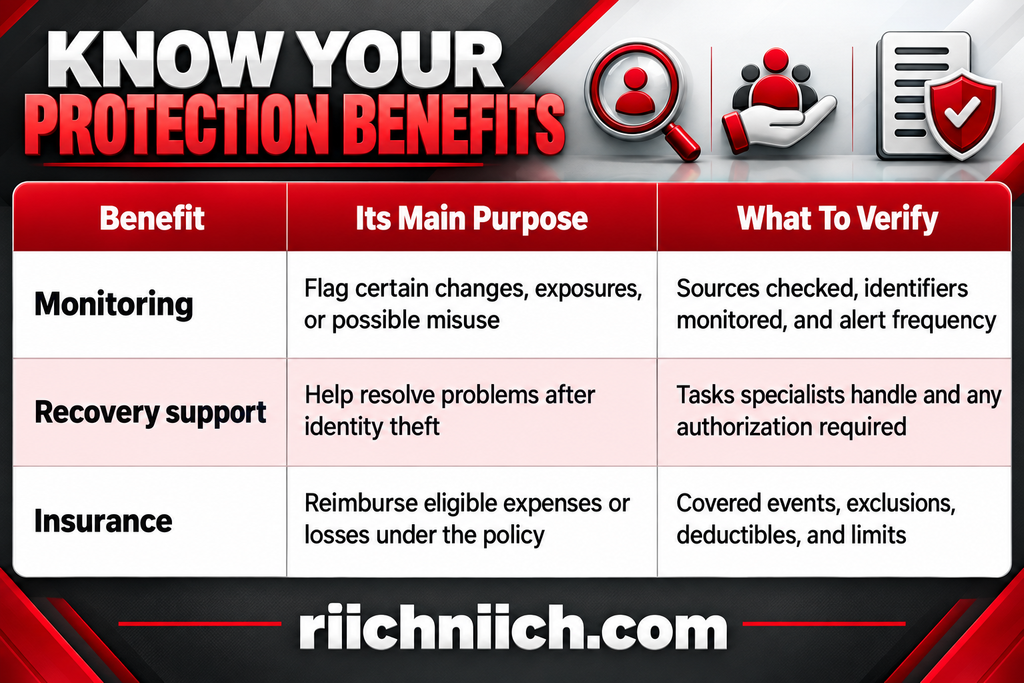
The FTC’s guide to identity protection services explains these distinctions. Use the provider’s detailed plan terms to establish exactly what you would receive.
Monitoring: What Will Actually Trigger An Alert?
Look beyond broad phrases such as “complete monitoring.” Ask which activities the selected plan checks and which remain your responsibility.
For credit monitoring, confirm whether coverage includes Equifax, Experian, and TransUnion. For broader identity monitoring, check which personal identifiers you can enroll and what sources the service searches.
Before buying, ask:
- How frequently does the service check for changes?
- How are alerts delivered?
- Does an alert explain what happened and what to do next?
- Are financial transaction alerts included, or is monitoring limited to credit reports?
- Must you register additional information or connect accounts to activate certain features?
A monitoring alert is a signal to investigate, not proof that fraud occurred. No service can observe every use of your identity.
Recovery Support: Who Does The Work?
Recovery assistance can range from general instructions to a specialist helping manage disputes and contact affected organizations.
Ask the provider to explain what happens after you report identity theft. Find out whether you receive a dedicated case manager, help preparing documents, and assistance following up with creditors or other institutions.
Also confirm:
- Whether recovery support is included or costs extra.
- Which types of identity theft the service handles.
- Whether every covered family member receives assistance.
- Whether incidents that began before enrollment qualify.
- What permission the provider needs to act on your behalf.
Free recovery plans and supporting forms are available through IdentityTheft.gov. Compare paid assistance by the additional work and individual support it provides.
Insurance: Read Beyond The Advertised Limit
A large insurance limit does not tell you which expenses qualify or how much a particular claim would pay. Review the policy or certificate of insurance before subscribing.
Check these details carefully:
- Covered expenses: Which recovery costs, legal fees, or lost wages are eligible?
- Stolen-funds coverage: Is it explicitly included, and which circumstances qualify?
- Exclusions: What events, losses, or pre-existing incidents are excluded?
- Deductibles and smaller limits: Do particular benefits have separate caps?
- Family limits: Is coverage allocated per person or shared?
- Claim requirements: What records, reporting deadlines, and documentation are required?
Do not assume every scam loss qualifies as identity theft under the policy. Ask for written clarification if a benefit is important to your decision.
Choose A Balanced Plan For Your Priorities
Return to your identity theft prevention checklist and identify which benefit matters most. If you want help resolving fraud, prioritize practical recovery assistance. If you want broader alerts, verify monitoring scope. If insurance influences your purchase, confirm the applicable terms.
Choose a plan whose monitoring, assistance, and coverage justify the renewal price together. Keep your account security and monthly identity protection checklist in place after enrollment—the subscription supports those habits.
Your Monthly Identity Theft Prevention Checklist Review
Your identity theft prevention checklist should become a routine you revisit. New accounts, device changes, and expired benefits can leave tasks unfinished even after your initial setup.
Set a recurring monthly reminder to review your progress. Investigate suspicious activity as soon as you notice it—do not wait for your scheduled check-in.
Keep our guide to the 13 warning signs someone stole your identity handy so you know which changes deserve closer attention.
Review Financial Activity And Credit Reports
Start with your bank and credit card activity. Look for unfamiliar transactions, recurring charges you cannot explain, and changes to contact information or payment settings.
Next, review your credit reports for unfamiliar accounts, inquiries, or inaccurate personal details. Free weekly reports are available from all three major bureaus through AnnualCreditReport.com, according to the FTC. You do not need a paid subscription to access them.
If you temporarily lifted a credit freeze for an application, confirm that it is back in place when access is no longer needed.
Work Through Your Monthly Security Review
Use this monthly identity protection checklist to keep the review focused:
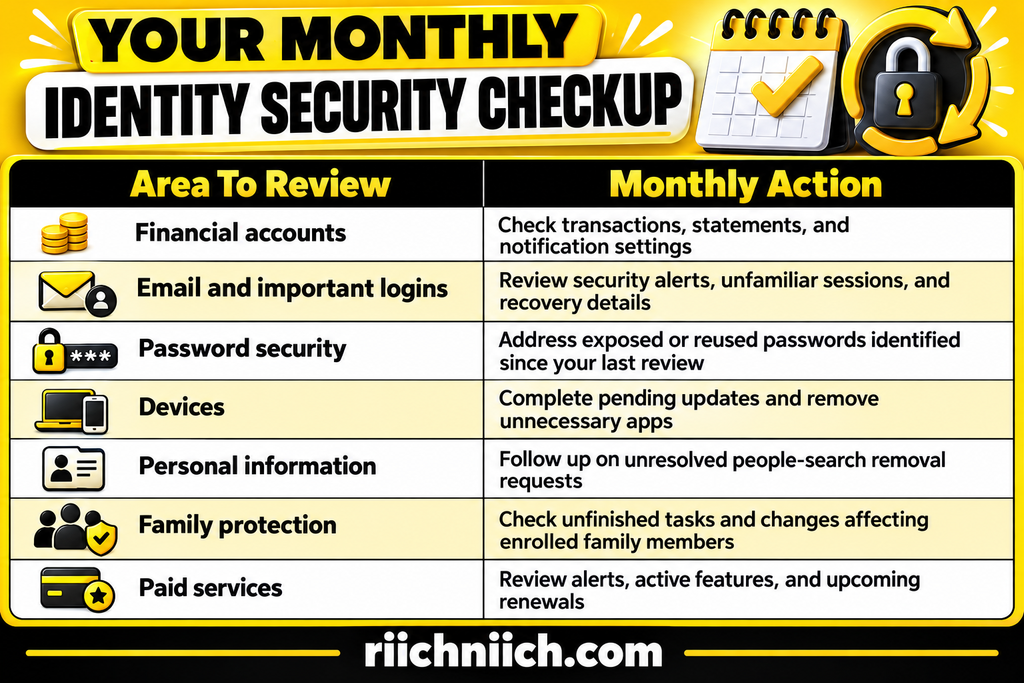
You do not need to change every password each month. Focus on passwords that are exposed, reused, weak, or associated with suspicious activity.
Confirm Your Paid Protection Is Doing Useful Work
If you subscribe to identity monitoring or data removal, check more than whether the payment went through.
Open your dashboard and confirm that the information you want monitored is enrolled, notifications are enabled, and family members have completed their setup. Read unresolved alerts and check whether removal reports distinguish requests submitted from removals confirmed.
Before renewal, ask:
- Am I using the features I pay for?
- Does this plan still cover my household’s needs?
- Have I gained overlapping benefits elsewhere?
- Is the renewal price reasonable for the support provided?
A month without alerts does not prove a service is ineffective—or that your identity is completely safe. Judge its value by its coverage, usability, reporting, and available assistance.
Refresh Your Checklist After Important Changes
Some events deserve an extra review between monthly reminders:
- Getting a new phone or computer.
- Opening a financial account.
- Moving or changing your phone number.
- Receiving a data-breach notice.
- Adding a family member to a protection plan.
- Losing identification documents or a device.
Update the relevant security and recovery settings while the change is fresh. For example, make sure you can access your authenticator and recovery options before retiring an old phone.
Record Your Next Action
Finish your identity theft prevention checklist review by recording what still needs attention:
Review Completed On: ____________________
Next Task To Complete: ____________________
Next Review Date: ____________________
Keep passwords, recovery codes, and identification numbers off the printed page. The goal is a clear record of actions—not another place to store sensitive information.
A consistent review helps you maintain free protections and assess whether paid tools continue to earn their place in your budget.
Frequently Asked Questions About Identity Theft Prevention
Can Someone Steal My Identity Even If My Credit Score Is Good?
Yes. A good credit score does not prove that your identity is safe. Unauthorized activity may not have reached your credit reports, and some forms of identity misuse do not affect your score.
Use your identity theft prevention checklist to review account activity, unfamiliar bills, and security notifications—not just your score. If you purchase monitoring, check what it covers beyond credit information.
Will Checking My Credit Reports Frequently Lower My Score?
No. Checking your own credit reports does not lower your credit score. The Consumer Financial Protection Bureau confirms that reviewing your report is not an inquiry for new credit.
You can make report reviews part of your monthly identity protection checklist without worrying about damaging your score.
Should I Accept Free Monitoring Offered After A Data Breach?
A legitimate free offer can provide useful monitoring without adding another bill. The FTC recommends taking advantage of free protection services offered after a breach. Verify the offer through the affected organization’s official website or a trusted contact number before submitting personal information.
Check the enrollment deadline, coverage, expiration date, and whether any optional upgrade requires payment. Before buying a separate plan, compare what the free offer already provides.
Do I Need Two Identity Theft Protection Subscriptions?
Usually, start by checking whether the second subscription adds a meaningful benefit. Two plans may overlap heavily while creating extra costs and duplicate alerts.
Compare their monitoring scope, covered family members, and recovery assistance. Do not assume that buying two plans doubles insurance reimbursement; applicable policy terms determine how overlapping coverage works.
A single suitable plan, combined with consistent security habits, may be easier to manage.
Can I Use This Checklist If I Do Not Have A Credit Card?
Yes. Your email, phone number, Social Security number, bank accounts, and personal documents still need protection. Identity theft is not limited to credit card fraud.
Work through the relevant parts of the identity theft prevention checklist and mark genuinely inapplicable tasks accordingly. Having no credit card does not mean someone cannot attempt to open credit in your name.
Why Does An Identity Protection Service Ask For My Social Security Number?
Some monitoring and identity-verification features require sensitive information to match records to the correct person. That makes verifying the provider especially important.
Before entering your number, confirm that you are using the official website, read the privacy policy, and understand why the information is requested. Ask how it is protected, retained, and handled after cancellation. Do not provide it through an unsolicited enrollment message.
Will Canceling My Subscription Remove My Credit Freezes?
Canceling a monitoring subscription does not, by itself, lift a separately placed credit freeze. A freeze stays in place until you request its removal.
However, a commercial credit lock bundled with a subscription may have different terms. Confirm whether you have a freeze or a lock before canceling, and check its status directly with each bureau.
Can I Complete The Printable Checklist Over Several Days?
Yes. Prioritize your email security, financial alerts, and credit freezes, then work through the remaining tasks at a manageable pace. Address suspected fraud immediately.
Use the printable identity theft prevention checklist to track completed actions and your next unfinished task. You do not need to purchase every suggested type of tool—choose paid assistance only where it addresses a clear need.
Conclusion: Put Your Identity Theft Prevention Checklist Into Action
An identity theft prevention checklist is most useful when you turn it into completed actions. Start with the essentials: freeze your credit, secure your primary email, enable multifactor authentication, and activate financial account alerts. Then work through document protection, device security, and reducing unnecessary public information.
You can make meaningful progress without buying a subscription. The Federal Trade Commission confirms that credit freezes are free to place and lift. You can also review your credit reports through AnnualCreditReport.com without purchasing monitoring.
Consider paid protection when it addresses a specific need. That might mean broader monitoring, hands-on recovery assistance, or help managing protection for your family. Before subscribing, compare the exact plan’s coverage, support, insurance terms, and renewal price. Check existing benefits so you do not pay twice for similar features.

Use your printable identity theft prevention checklist to record progress, choose your next unfinished task, and schedule a monthly review. Keep passwords and sensitive identification numbers off the page.
Your next step: download the checklist and complete one unfinished action today. If you decide to buy additional protection, choose a service that supports the routine you are building—and provides help you will actually use.