
Why am I getting so many spam emails is a question millions of people ask after noticing their inbox suddenly filling with unwanted messages. While some spam is harmless advertising, a sudden increase can also be a warning sign that your email address has been exposed in a data breach, shared by data brokers, or targeted by cybercriminals.
In this guide, you’ll learn the most common reasons you’re receiving more spam emails, how hackers and scammers get your email address, how to check if your information has been leaked, and the best ways to protect your inbox from phishing scams and identity theft. By the end, you’ll know exactly what steps to take to reduce spam and better secure your personal information.
Table of Contents
The Most Common Reasons You’re Getting So Many Spam Emails
If you’re asking yourself, why am I getting so many spam emails, the answer is usually more than just bad luck. Spam doesn’t appear randomly. In most cases, there’s a specific reason why your inbox is suddenly filling up with junk mail, phishing attempts, fake invoices, and scam messages.
Understanding what’s causing the increase can help you stop spam at its source and reduce the chances of becoming a victim of identity theft or online fraud.
Your Email Address Was Exposed in a Data Breach
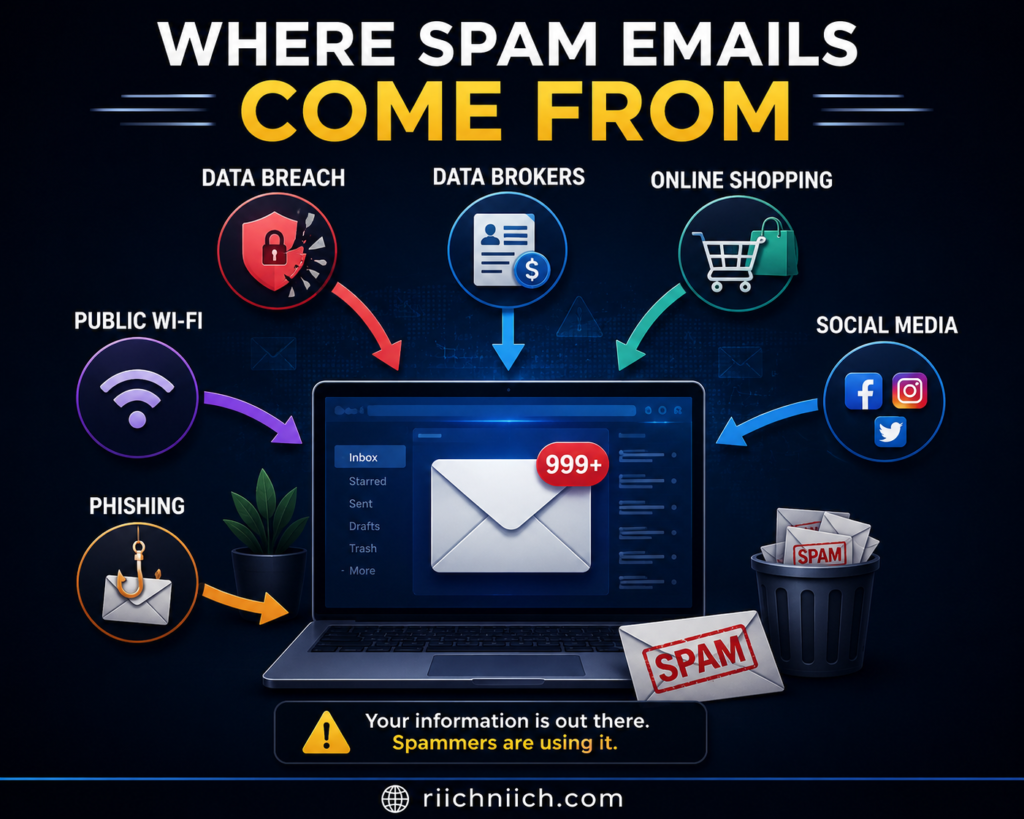
One of the biggest reasons people wonder why am I getting so many spam emails is because their email address has been exposed in a data breach.
When companies experience cyberattacks, criminals often steal customer information, including email addresses, passwords, phone numbers, and other personal details. This stolen information is frequently sold on underground marketplaces or shared among scammers who use it to launch spam campaigns.
If you’ve noticed a sudden increase in spam after signing up for a service or hearing about a company breach, there’s a good chance your email address was included.
Common signs include:
- A sudden flood of spam emails overnight.
- More phishing emails pretending to be banks or delivery companies.
- Password reset emails you didn’t request.
- Security alerts from accounts you don’t recognize.
If your information has been exposed, it’s also a good idea to check whether your passwords need updating and enable multi-factor authentication on important accounts.
Your Email Address Was Sold by Data Brokers
Many legitimate companies collect personal information and share or sell it to advertising networks and data brokers. While not all data brokers sell information directly to scammers, the wider your email address is distributed, the greater the chance it eventually reaches malicious actors.
This is another major reason why am I getting so many spam emails even if you’ve never been hacked.
Your email address may have been collected through:
- Online shopping websites
- Sweepstakes and giveaways
- Newsletter subscriptions
- Mobile apps
- Loyalty programs
- Marketing surveys
Over time, your information spreads across hundreds of databases, increasing unwanted marketing emails and making your address easier for scammers to obtain.
👉 If you want to reduce where your personal information appears online, a data removal service like Incogni can automatically request the removal of your information from many data broker websites.
You Signed Up for Too Many Online Accounts
Every new website you join creates another opportunity for your email address to be shared, leaked, or compromised.
Think about how many accounts you’ve created over the years:
- Shopping websites
- Streaming services
- Forums
- Gaming platforms
- Travel websites
- Financial apps
Even if these companies have good security practices today, they could experience a breach years later.
Using separate email addresses for shopping, banking, and personal communication can significantly reduce your exposure if one account becomes compromised.
Scammers Collected Your Email from Public Sources
Sometimes criminals don’t need sophisticated hacking tools at all.
They simply gather publicly available email addresses from:
- Social media profiles
- Personal websites
- Online forums
- Business directories
- Public contact pages
Automated bots continuously scan the internet looking for exposed email addresses. Once collected, those addresses often end up on spam mailing lists.
If your email is publicly visible online, consider removing it where possible or replacing it with a contact form.
You Opened or Responded to Spam Emails
Many people believe opening a spam email automatically infects their computer. While that’s not always true, interacting with spam can confirm to scammers that your email address is active.
Actions that increase future spam include:
- Replying to spam messages
- Clicking “Unsubscribe” on suspicious emails
- Downloading unknown attachments
- Clicking fake links
- Completing fraudulent surveys
Once scammers know a real person is monitoring the inbox, they may send even more phishing attempts.
Your Email Address Was Shared with Third Parties
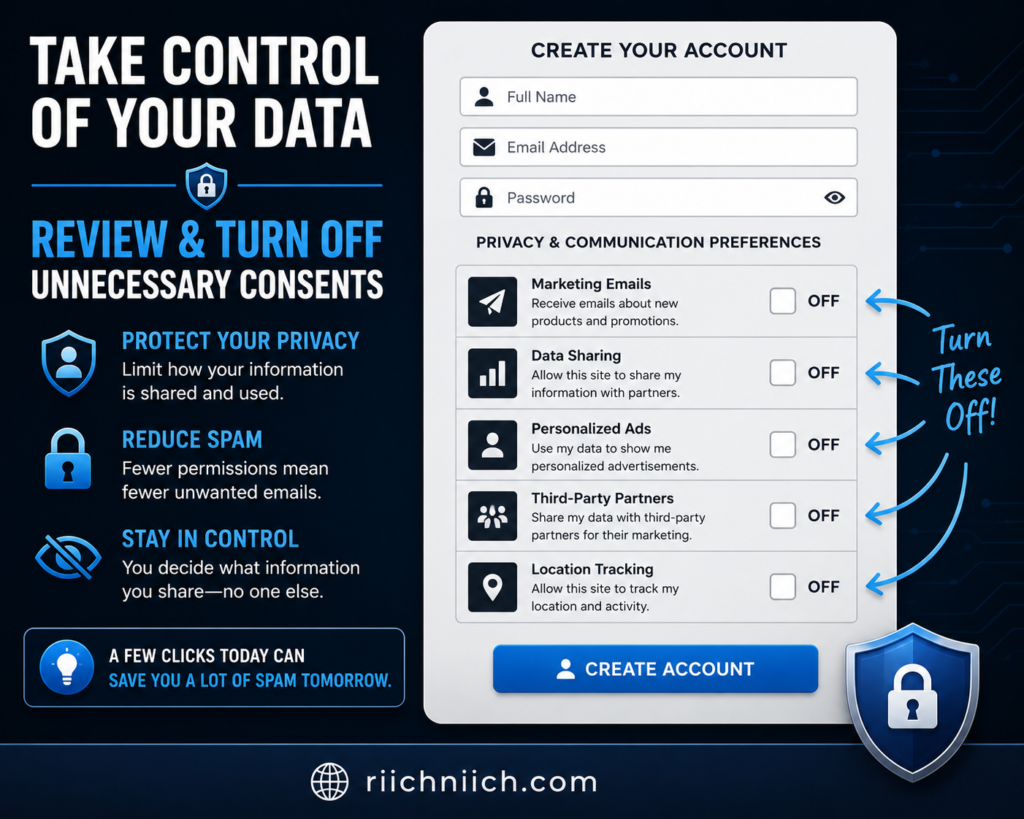
Many websites include language in their privacy policies allowing them to share customer information with marketing partners.
While these companies may not intend to expose you to scams, each additional organization handling your information increases the chances of future spam.
Before creating new accounts, consider:
- Reviewing privacy settings.
- Opting out of marketing communications.
- Limiting optional information during registration.
These small steps can reduce how widely your email address is distributed.
Your Device Was Infected with Malware
Although less common than data breaches, malware can also explain why am I getting so many spam emails.
Certain types of malicious software collect:
- Email addresses
- Contact lists
- Browser data
- Login credentials
Criminals may use this information to send spam from compromised accounts or target you with more convincing phishing attacks.
If you notice unusual login alerts, unexpected sent messages, or strange account activity, run a full antivirus scan immediately.
Your Information Was Combined from Multiple Data Leaks
Cybercriminals rarely rely on a single source of information.
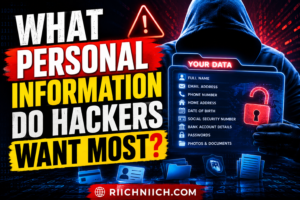
Instead, they combine data from multiple breaches to build detailed personal profiles that include:
- Email addresses
- Phone numbers
- Passwords
- Home addresses
- Dates of birth
- Security question answers
This allows scammers to create highly personalized phishing emails that appear legitimate.
If you receive spam containing your real name or other personal details, it may be a sign your information has appeared in more than one leaked database.
Is It Worth Protecting Your Email?
If you’ve been asking why am i getting so many spam emails, protecting your email account is absolutely worth it.
Your email is connected to nearly every important online account you own, including:
- Banking
- Shopping
- Healthcare
- Social media
- Government services
- Password resets
Once criminals gain access to your email, they often attempt to access many of your other accounts as well.
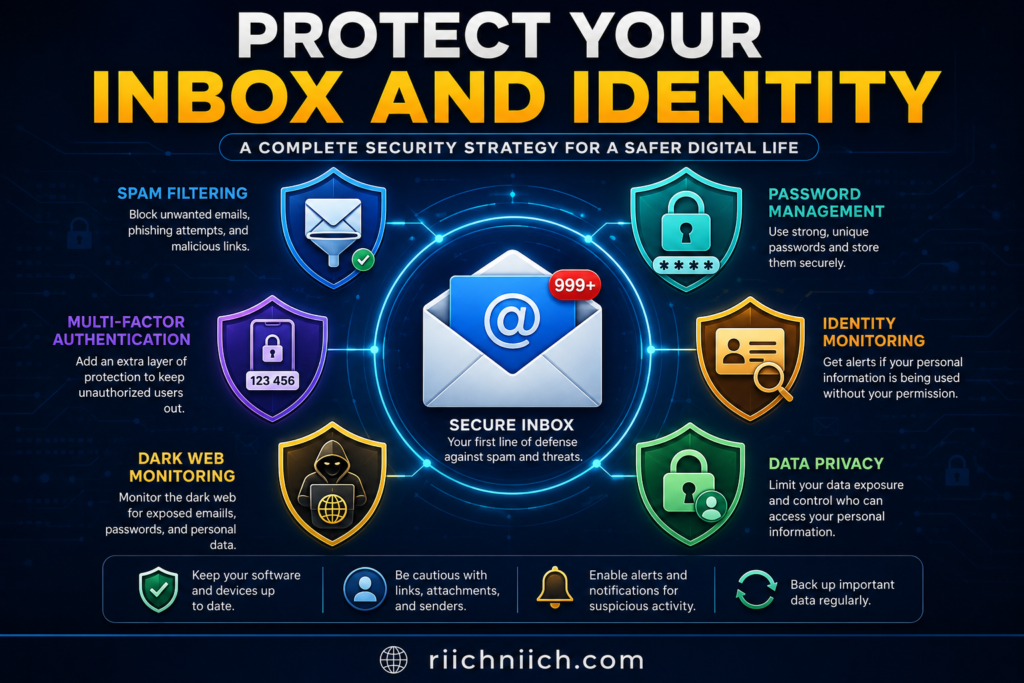
Using identity monitoring, password managers, dark web monitoring, and data removal services can greatly reduce your overall risk while providing early alerts if your information is exposed again.
External Resources
For additional information about protecting your email and recognizing online scams, review these trusted resources:
Does Getting Lots of Spam Emails Mean Your Information Was Leaked?
If you’re wondering why am I getting so many spam emails, one of the first questions you may have is whether your personal information has been leaked. While receiving spam doesn’t automatically mean your data was exposed, a sudden increase in unwanted emails can be an important warning sign that your email address or other personal information is circulating online.
The key is understanding the difference between normal marketing emails and suspicious spam that could indicate your information has been compromised.
Spam Doesn’t Always Mean Your Information Was Leaked
Not every spam email is the result of a data breach.
Companies send millions of promotional emails every day, especially if you’ve signed up for newsletters, online stores, rewards programs, or free trials. These marketing emails may be annoying, but they’re generally legitimate and can usually be managed by adjusting your subscription preferences.
Spam, however, is different.
Spam emails often come from unknown senders and may attempt to:
- Steal your passwords.
- Trick you into downloading malware.
- Collect financial information.
- Impersonate trusted companies.
- Convince you to click dangerous links.
If you’re asking why am I getting so many spam emails, it’s important to determine whether you’re simply receiving more advertisements or whether you’re being specifically targeted by scammers.
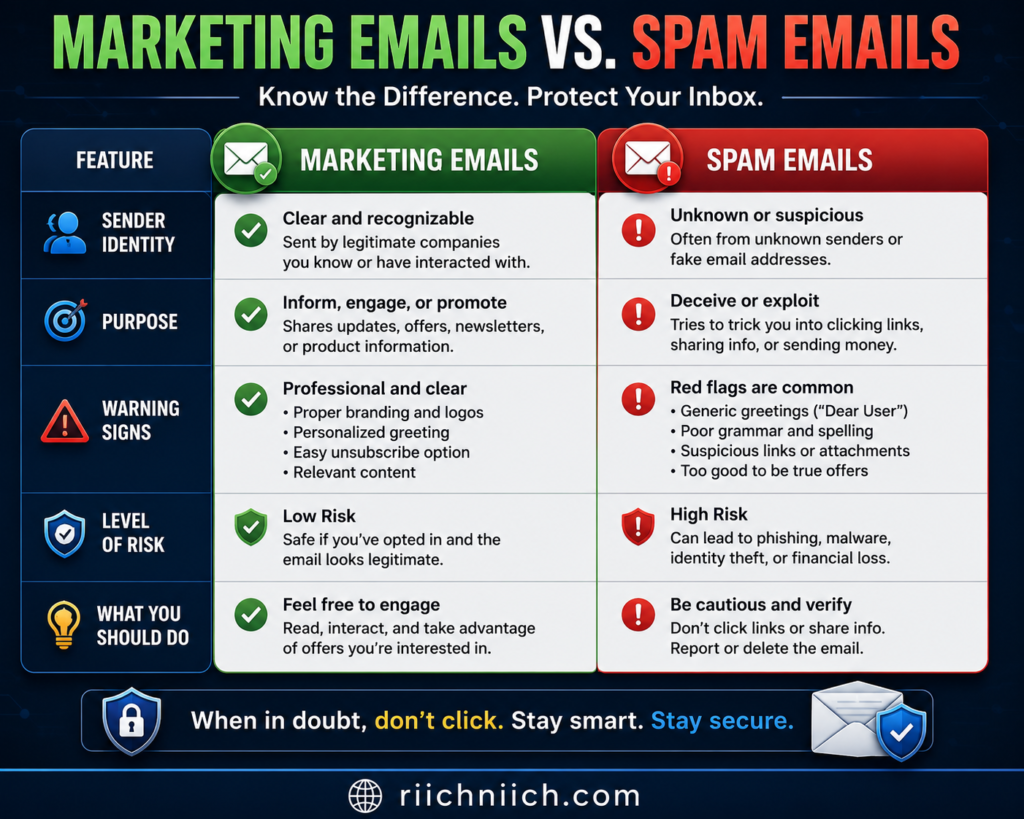
A Sudden Spike in Spam Can Be a Warning Sign
One of the strongest indicators that your information may have been exposed is a sudden increase in spam emails over a short period of time.
For example, if you normally receive only a few junk emails each week but suddenly begin receiving dozens every day, your email address may have recently appeared in:
- A data breach.
- A leaked customer database.
- A phishing campaign.
- A newly sold marketing list.
- A collection of stolen email addresses traded by cybercriminals.
While this doesn’t guarantee your identity has been stolen, it does suggest that your email address has become more widely available than before.
Your Email Address May Have Been Included in a Data Breach
Data breaches remain one of the most common reasons people experience an increase in spam.
When organizations suffer cyberattacks, criminals may steal:
- Email addresses
- Passwords
- Phone numbers
- Home addresses
- Dates of birth
- Payment information
Even if the stolen information isn’t immediately used, it may later be sold to multiple criminal groups who launch large-scale spam and phishing campaigns.
This is one of the biggest reasons people search why am I getting so many spam emails after hearing about a company breach.
Scammers Often Test Active Email Addresses
Cybercriminals regularly send millions of spam emails to determine which email addresses are still active.
If you:
- Open suspicious emails,
- Reply to scammers,
- Click unknown links,
- Download attachments,
your address may be marked as active.
Once scammers know someone is reading messages from that account, they often increase the number of phishing attempts they send.
This is why cybersecurity experts recommend deleting suspicious emails rather than interacting with them.
Personalized Spam Is a Bigger Red Flag
Generic spam emails are common.
However, spam that includes your:
- Full name
- Home address
- Employer
- Phone number
- Recent purchases
- Financial institution
may indicate your personal information has been collected from one or more data breaches.
Personalized phishing attacks—often called spear phishing—are designed to appear more trustworthy because they contain information only you would expect legitimate companies to know.
If you’re asking why am I getting so many spam emails, and many of those emails already know personal details about you, it’s wise to assume some of your information has been exposed.
Spam Emails Can Be the First Sign of Identity Theft
For many victims, spam arrives before any obvious financial fraud occurs.
Criminals often begin by collecting information through phishing emails before attempting to:
- Open credit accounts.
- Access online banking.
- Reset passwords.
- Take over social media accounts.
- Steal tax refunds.
- Commit identity theft.
If you’ve recently noticed significantly more spam along with unusual account alerts or unfamiliar login attempts, it’s important to investigate immediately.
What Should You Do If You Think Your Information Was Leaked?
If you suspect your email address has been exposed, take action as soon as possible.
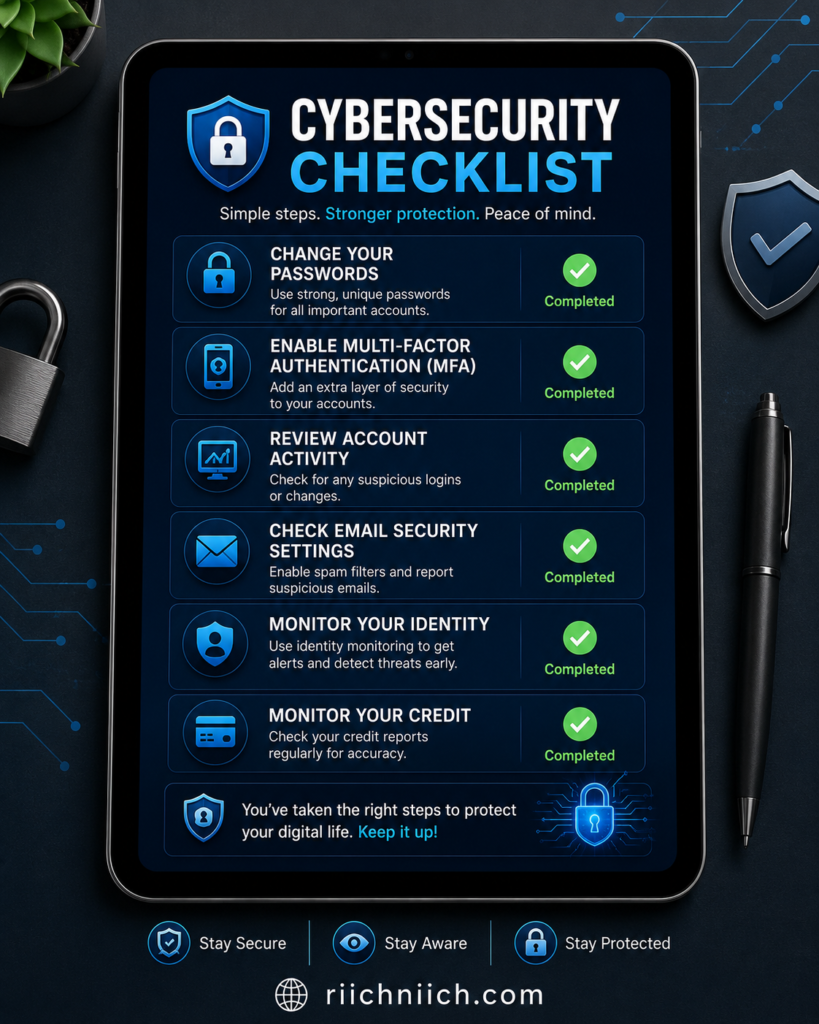
Consider these steps:
- Change passwords for important online accounts.
- Enable multi-factor authentication.
- Monitor financial and credit accounts regularly.
- Watch for password reset requests you didn’t initiate.
- Review recent account login history.
- Scan your devices for malware.
- Begin monitoring your identity for suspicious activity.
These actions can significantly reduce the likelihood that spam campaigns turn into more serious identity theft.
Is It Worth Using Identity Monitoring After a Possible Data Leak?
If you’ve been asking why am I getting so many spam emails because the increase happened suddenly, identity monitoring can provide valuable peace of mind.
Many identity protection services monitor for:
- New credit activity.
- Dark web exposure.
- Data breach notifications.
- Identity theft warning signs.
- Suspicious use of your personal information.
Instead of discovering fraud months later, you’ll often receive alerts much earlier, giving you time to respond before more serious damage occurs.
For individuals whose information has already appeared in previous breaches, identity monitoring is often one of the most practical investments for long-term protection.
How Hackers and Scammers Get Your Email Address
If you’ve been asking, “Why am I getting so many spam emails?”, one of the biggest questions is how scammers found your email address in the first place. Many people assume hackers personally target individual inboxes, but that’s rarely how it works.
Instead, cybercriminals collect millions of email addresses through automated methods, data breaches, and information that’s already available online. Once your email address is added to these databases, it can be sold, traded, and reused repeatedly, leading to a steady stream of spam, phishing emails, and scam attempts.
Understanding how hackers and scammers obtain your email address is one of the best ways to reduce future spam and protect yourself from identity theft.
Want to learn exactly how cybercriminals collect email addresses in the first place? Read our complete guide on How Hackers Get Your Email Address.
Data Breaches Are the Number One Source
The most common way criminals obtain email addresses is through data breaches.
When a company experiences a cyberattack, hackers may steal customer databases containing:
- Email addresses
- Passwords
- Usernames
- Phone numbers
- Billing information
- Security questions
These stolen databases are often sold to multiple criminal groups, meaning your email address can continue circulating years after the original breach.
This is one of the primary reasons people search why am I getting so many spam emails after hearing about a retailer, bank, or social media platform being hacked.
Data Brokers Collect More Information Than Most People Realize
Not every company selling or sharing your information is a criminal organization.
Data brokers legally collect information from:
- Public records
- Shopping history
- Mobile apps
- Online forms
- Loyalty programs
- Marketing surveys
While many data brokers operate legally, the more companies that possess your email address, the greater the chance it eventually ends up in the wrong hands through accidental exposure, weak security, or unauthorized sharing.
Reducing your digital footprint can significantly lower future spam.
Social Media Profiles Can Reveal Your Email Address
Many people unknowingly expose their email addresses on social media.
This can happen through:
- Public profile information
- Business contact pages
- Biography sections
- Public comments
- Marketplace listings
Cybercriminals use automated software known as web crawlers to scan millions of public pages every day, collecting email addresses that can later be used in spam campaigns.
Even if your email address isn’t displayed directly, other publicly available information can help scammers identify and target you.
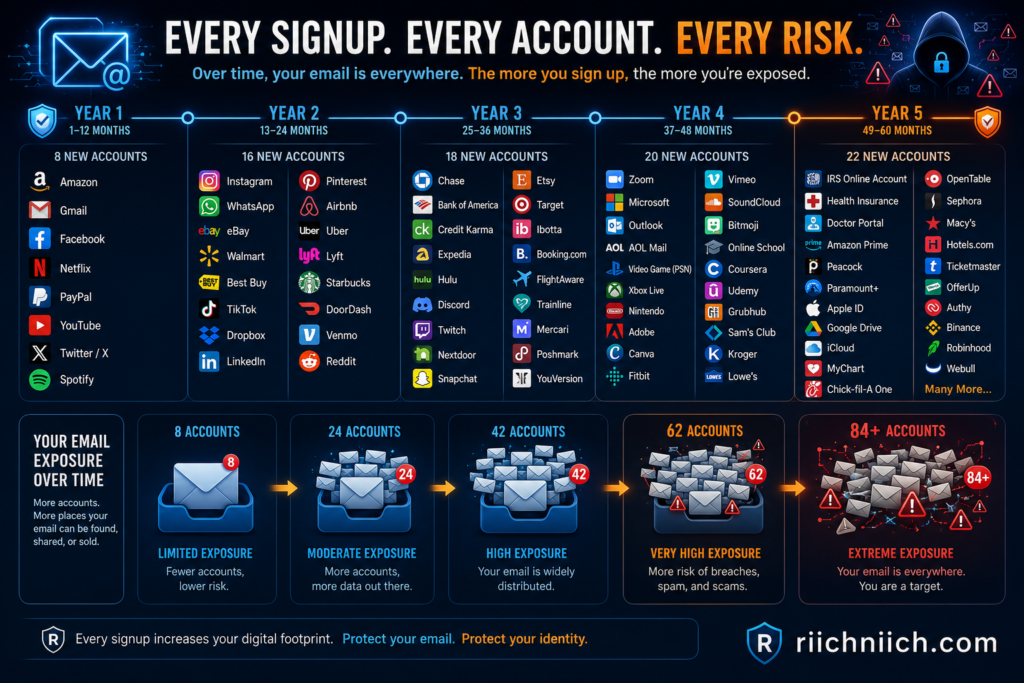
Online Shopping and Newsletter Signups Increase Exposure
Every time you create an online account, your email address is stored somewhere.
Over time, you may register with hundreds of websites for:
- Online shopping
- Coupons
- Newsletters
- Streaming services
- Food delivery
- Travel bookings
- Financial services
Although many businesses handle customer data responsibly, every additional account increases your overall exposure if one of those companies later experiences a security incident.
The more websites that store your email address, the more opportunities criminals have to obtain it.
Phishing Scams Help Criminals Build Larger Email Lists
Some scammers don’t steal your email address—they convince you to give it to them.
Fake websites, fraudulent surveys, giveaway scams, and counterfeit login pages often ask users to enter:
- Email addresses
- Passwords
- Phone numbers
- Personal information
Even if you stop before submitting sensitive information, simply entering your email into a fake form may place you on future spam lists.
This is why it’s important to verify websites before entering any personal information.
Malware Can Steal Contact Lists
Certain types of malware search infected devices for stored email addresses.
If a computer or smartphone becomes infected, malicious software may collect:
- Contact lists
- Email conversations
- Saved login information
- Browser data
The stolen information can then be used to launch larger phishing campaigns against family members, friends, and coworkers.
Keeping your operating system and antivirus software updated helps reduce this risk.
Email Harvesting Bots Scan the Internet Automatically
Cybercriminals rarely search for email addresses manually.
Instead, they use automated harvesting bots that continuously scan:
- Websites
- Blogs
- Forums
- Public directories
- Comment sections
- Online resumes
Whenever an email address appears publicly, these bots can capture it within minutes.
If you operate a website or business, using a contact form instead of displaying your email address publicly can significantly reduce automated harvesting.
Criminals Buy and Sell Email Lists
Email addresses have value.
Underground marketplaces regularly sell databases containing millions of verified email addresses gathered from previous breaches and online scams.
Some lists include additional information such as:
- Full names
- Physical addresses
- Passwords
- Phone numbers
- Employer information
The more complete the profile, the more convincing phishing emails become.
This explains why some scam emails already know your name or reference companies you actually use.
Is It Worth Protecting Your Email Address?
If you’ve ever asked yourself why am I getting so many spam emails, protecting your email address is one of the smartest investments you can make.
Your email account controls access to many of your most valuable online accounts through password resets and security notifications. If criminals gain access to your inbox, they may also gain access to your:
- Financial accounts
- Shopping accounts
- Healthcare portals
- Cloud storage
- Social media accounts
- Government services
Using identity monitoring, a password manager, dark web monitoring, and data removal services can dramatically reduce your long-term risk while helping you detect suspicious activity much sooner.
The goal isn’t just to reduce spam—it’s to protect your digital identity before a minor inconvenience becomes a serious security problem.
Signs Your Email Address Has Been Exposed in a Data Breach
If you’re wondering why am I getting so many spam emails, there’s a good chance you’re also asking whether your email address has been exposed in a data breach. While an increase in spam doesn’t always mean your information was leaked, it can be one of the earliest warning signs that your email address is circulating among cybercriminals.
The sooner you recognize these warning signs, the sooner you can secure your accounts, change vulnerable passwords, and reduce the risk of identity theft.
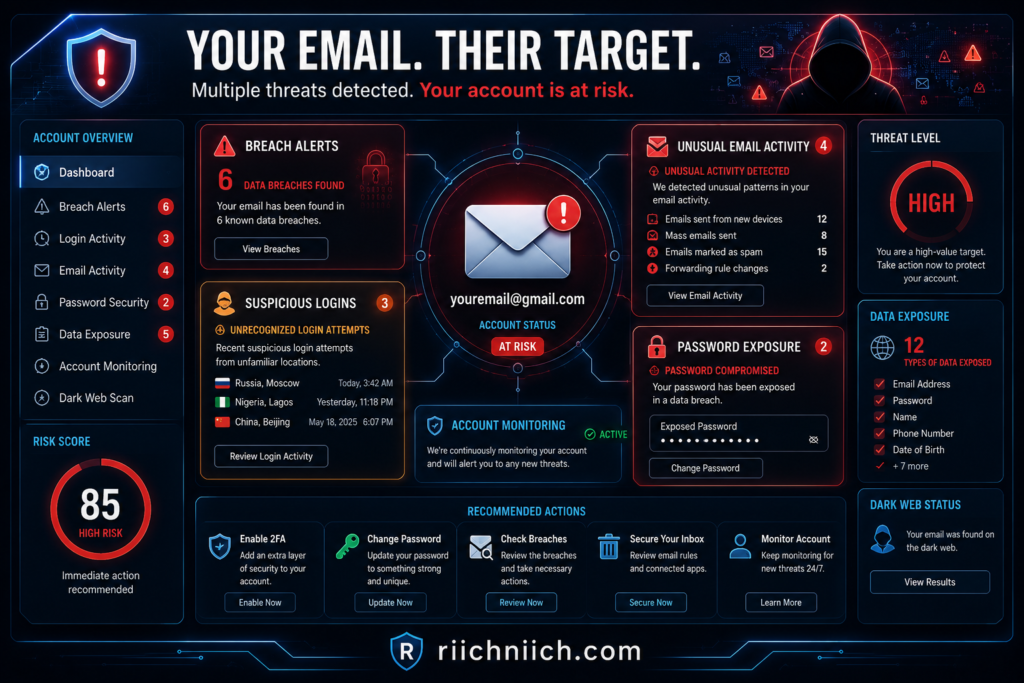
You Suddenly Receive Much More Spam Than Normal
One of the clearest signs your email address may have been exposed is a dramatic increase in spam.
For example, you may go from receiving only a few unwanted emails each week to dozens every day.
Common examples include:
- Fake package delivery notifications
- Cryptocurrency investment scams
- Lottery or prize scams
- Tech support scams
- Fake banking alerts
- Fraudulent invoices
If the increase happens suddenly without any obvious reason, your email address may have recently appeared in a leaked database or been added to spam mailing lists.
If your information was exposed, learn what typically happens next in our guide to What Happens After a Data Breach.
You Receive Password Reset Emails You Didn’t Request
Unexpected password reset emails are another major warning sign.
If you begin receiving password reset requests for accounts you didn’t attempt to access, someone may already know your email address and be trying to gain access to your online accounts.
Pay close attention to reset requests involving:
- Banking websites
- Email providers
- Shopping accounts
- Social media platforms
- Cryptocurrency exchanges
Even unsuccessful attempts indicate that criminals are actively targeting your account.
Companies Notify You About a Data Breach
Sometimes the warning is direct.
Many organizations are legally required to notify customers after discovering certain types of data breaches.
These notifications may explain that exposed information included:
- Email addresses
- Passwords
- Phone numbers
- Account usernames
- Payment information
Never ignore these notices.
Even if no fraudulent activity has occurred yet, changing your password immediately and enabling multi-factor authentication can significantly reduce future risk.
You Start Receiving Personalized Phishing Emails
Generic spam is common.
Personalized phishing emails are much more concerning.
If scam emails suddenly include your:
- Full name
- Home address
- Employer
- Recent purchases
- Financial institution
- Phone number
it’s possible criminals obtained additional personal information during a data breach.
These attacks are designed to appear trustworthy because they use real information to convince victims that the message is legitimate.
If you’re asking why am I getting so many spam emails, personalized phishing should never be ignored.
You Notice Suspicious Login Alerts
Many online services send security notifications whenever someone attempts to sign in from a new location or device.
Unexpected login alerts may indicate someone is attempting to access your account using information obtained from previous breaches.
Watch for notifications involving:
- Unknown locations
- New devices
- Failed login attempts
- Security verification requests
- Multi-factor authentication prompts you didn’t initiate
These alerts should always be investigated immediately.
Your Password Appears in Multiple Data Breaches
Many people reuse the same password across multiple websites.
If one website experiences a breach, criminals often test those same credentials on hundreds of other online services.
This tactic, known as credential stuffing, remains one of the most successful forms of account takeover.
Changing passwords after every confirmed breach—and using unique passwords for every account—helps reduce this risk considerably.
Friends or Family Receive Strange Emails From You
If people you know report receiving unusual emails from your address that you never sent, your email account may have been compromised.
These emails often contain:
- Suspicious links
- Fake invoices
- Malware attachments
- Requests for money
- Urgent account verification messages
Even if your email account hasn’t been fully hijacked, criminals may be spoofing your email address to deceive your contacts.
Either situation deserves immediate attention.
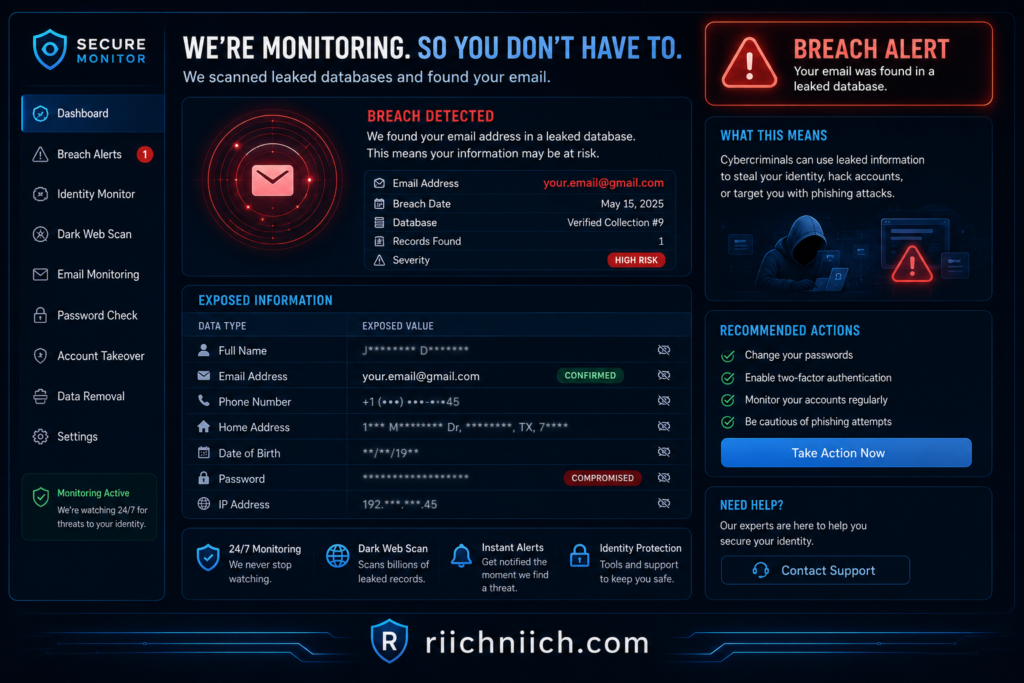
You Discover Your Email Address on the Dark Web
Following a major breach, stolen customer databases are often offered for sale on dark web marketplaces.
Many identity protection services and dark web monitoring tools can alert you if your email address appears in these leaked databases.
Early detection gives you an opportunity to:
- Change passwords.
- Monitor financial accounts.
- Watch for identity theft.
- Secure connected accounts before criminals exploit them.
Is It Worth Monitoring Your Email for Future Breaches?
If you’ve been searching why am I getting so many spam emails, ongoing monitoring is one of the smartest ways to stay ahead of future threats.
Modern identity protection services can monitor for:
- Data breach exposure
- Dark web activity
- Identity theft warning signs
- Suspicious account activity
- New fraud attempts
Rather than waiting until someone opens a credit account or steals your identity, monitoring services can provide early alerts that allow you to respond much faster.
For anyone who has already experienced a data breach—or simply wants greater peace of mind—email and identity monitoring are valuable layers of protection.
What to Do If You’re Suddenly Receiving More Spam Emails
If you’ve been asking why am I getting so many spam emails, don’t ignore the sudden increase. While more spam doesn’t always mean your accounts have been compromised, it can be an early warning sign that your email address was exposed in a data breach, shared by data brokers, or added to spam lists used by scammers.
The good news is that you can take several practical steps to secure your email account, reduce unwanted messages, and lower your risk of identity theft. Acting quickly can prevent a minor inconvenience from turning into a much bigger security problem.
Check Whether Your Email Address Was Exposed in a Data Breach
Your first step should be determining whether your email address has been involved in a known data breach.
Not sure where to begin? Follow our step-by-step guide on How to Know If Your Email Was Leaked.
Many companies notify affected customers after a breach, but not everyone notices these alerts. Identity monitoring services and breach notification tools can also alert you if your email address appears in leaked databases.
If your email has been exposed, take action immediately instead of waiting for suspicious activity to appear.
Warning signs include:
- A sudden spike in spam emails.
- Password reset requests you didn’t initiate.
- Login alerts from unfamiliar devices.
- Phishing emails pretending to come from companies you use.
Finding out your email was exposed early gives you more time to secure your accounts before criminals can misuse your information.
Change Passwords for Your Most Important Accounts
If you’re wondering why am I getting so many spam emails, updating your passwords should be one of your highest priorities.
Start with accounts that protect your most sensitive information, including:
- Your primary email account.
- Online banking.
- Credit card accounts.
- Shopping websites.
- Cloud storage.
- Social media profiles.
Use a unique password for every account. Reusing passwords allows criminals to perform credential stuffing attacks, where stolen passwords from one breach are tested across dozens of other websites.
A password manager can help you generate and securely store strong, unique passwords.
Enable Multi-Factor Authentication (MFA)
Even if someone discovers your password, multi-factor authentication provides another layer of protection.
MFA requires an additional verification step before someone can access your account, such as:
- An authentication app.
- A security key.
- A text message verification code.
- A biometric login.
Whenever possible, use an authentication app instead of SMS verification, as it generally offers stronger protection.
Enabling MFA significantly reduces the likelihood of unauthorized account access.
Don’t Click Links or Open Attachments in Suspicious Emails
One of the biggest mistakes people make after noticing more spam is becoming curious about the messages.
Avoid:
- Clicking unknown links.
- Opening unexpected attachments.
- Replying to suspicious senders.
- Downloading files from unfamiliar emails.
Many phishing emails are designed to install malware or steal login credentials after a single click.
If you’re unsure whether an email is legitimate, visit the company’s official website directly instead of using links provided in the email.
Mark Spam Emails Correctly
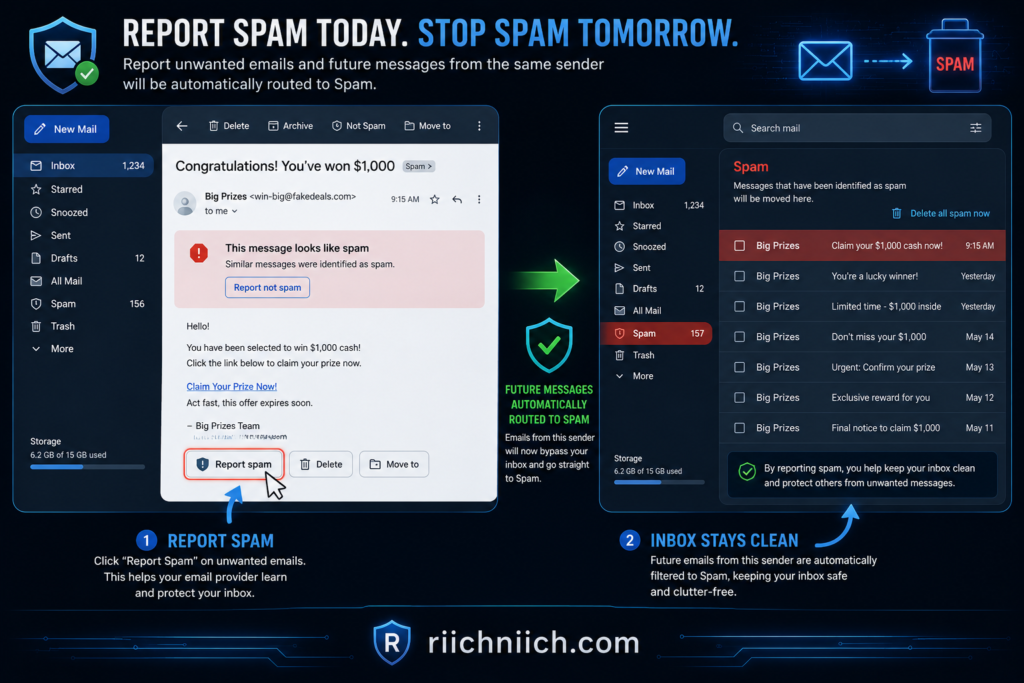
Rather than simply deleting unwanted emails, use your email provider’s “Report Spam” or “Report Phishing” feature whenever appropriate.
Doing so helps improve spam filtering and may reduce similar emails in the future.
Most major email providers continually learn from reported spam to better identify suspicious messages before they reach your inbox.
Review Your Account Security Settings
If you’ve been asking why am I getting so many spam emails, now is a good time to review your overall account security.
Check for:
- Unknown recovery email addresses.
- Unrecognized phone numbers.
- Unauthorized forwarding rules.
- Recently connected third-party apps.
- Active login sessions on unfamiliar devices.
Removing unauthorized access immediately can prevent future account takeovers.
Reduce Where Your Email Address Is Shared
The more places your email address appears online, the greater your exposure.
Consider reducing future spam by:
- Unsubscribing from newsletters you no longer read.
- Using separate email addresses for shopping and personal accounts.
- Avoiding unnecessary online giveaways.
- Limiting public sharing of your email address.
- Reviewing privacy settings on websites and apps.
These small changes won’t eliminate spam overnight, but they can reduce future exposure significantly.
Monitor Your Identity for Suspicious Activity
Spam emails are sometimes the first visible sign of a larger problem.
If your personal information has already been exposed, criminals may eventually attempt to:
- Open new credit accounts.
- Apply for loans.
- Access financial accounts.
- Commit tax fraud.
- Take over online accounts.
Identity monitoring services can alert you when suspicious activity involving your personal information is detected, allowing you to respond before significant damage occurs.
This proactive approach is especially valuable if you’ve already experienced a data breach.
Is It Worth Investing in Email and Identity Protection?
If you’re repeatedly searching why am I getting so many spam emails, investing in email and identity protection may be well worth considering.
Many modern security services provide features such as:
- Data breach monitoring.
- Dark web monitoring.
- Identity theft alerts.
- Credit monitoring.
- Password security tools.
- Identity restoration assistance.
These services don’t stop every spam email, but they can help you detect and respond to security threats much earlier than relying on your inbox alone.
For individuals who manage sensitive financial accounts, online banking, healthcare records, or business information through email, the added protection can provide valuable peace of mind.
How to Stop Spam Emails and Protect Your Inbox
If you’ve been searching why am I getting so many spam emails, you’re probably ready for more than just an explanation—you want solutions. While it’s nearly impossible to eliminate spam completely, you can dramatically reduce the number of unwanted emails you receive and make it much harder for scammers to target you.
The best approach combines good email habits, stronger account security, and proactive identity protection. By taking the following steps, you’ll create multiple layers of defense that keep your inbox cleaner and your personal information safer.
For even more ways to lock down your inbox, check out our guide on How to Protect Your Email From Hackers.
Report Spam Instead of Simply Deleting It
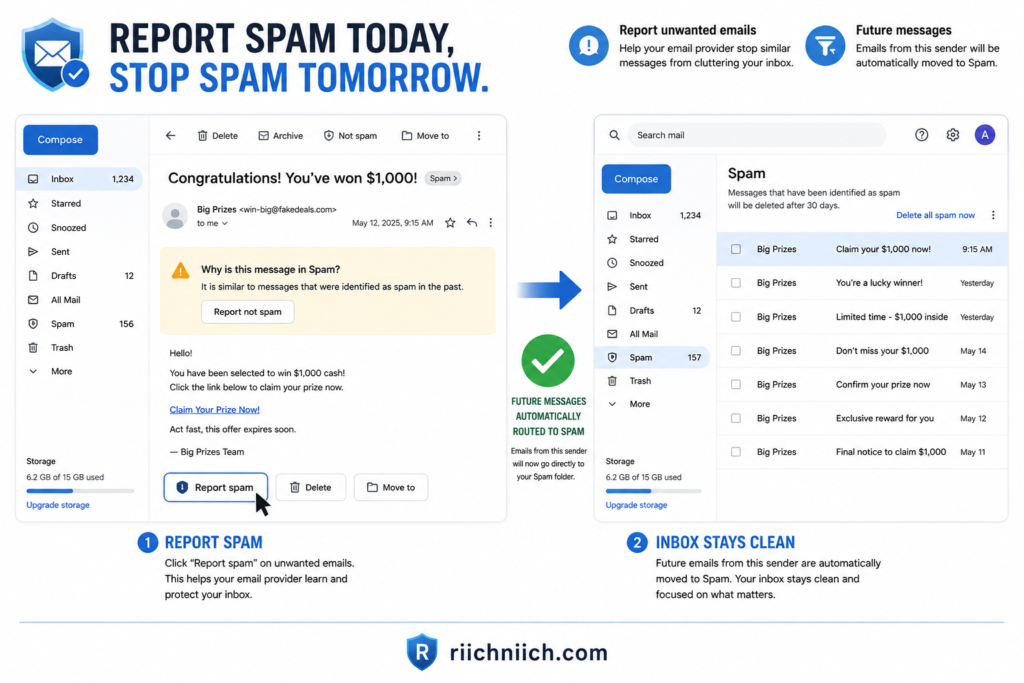
One of the easiest ways to reduce future spam is to report unwanted emails through your email provider instead of just deleting them.
Most email services use reports from millions of users to improve their spam detection systems. Reporting suspicious messages helps identify malicious senders and prevents similar emails from reaching your inbox in the future.
Whenever possible:
- Mark unwanted messages as Spam.
- Report phishing emails separately if that option is available.
- Delete the message after reporting it.
Over time, your email provider will become better at recognizing the types of spam you receive.
Avoid Clicking Links in Suspicious Emails
One of the biggest mistakes people make after asking why am I getting so many spam emails is clicking links out of curiosity.
Scammers often disguise malicious links as:
- Delivery updates
- Banking alerts
- Tax notices
- Password reset requests
- Account verification messages
- Prize notifications
Clicking these links may:
- Install malware.
- Direct you to fake login pages.
- Confirm your email address is active.
- Lead to identity theft.
If you need to verify an account, open your browser and visit the company’s official website directly instead of using links contained in the email.
Unsubscribe Only from Legitimate Companies
Unsubscribing can reduce unwanted marketing emails—but only when the sender is legitimate.
If an email comes from a company you recognize and trust, using the unsubscribe link is generally safe.
However, avoid clicking unsubscribe links in suspicious emails because scammers sometimes use them to verify that your email address belongs to an active user. Once confirmed, they may send even more spam.
When in doubt, simply report the message as spam instead.
Create Strong, Unique Passwords
Your email account serves as the gateway to many of your most important online accounts.
If criminals gain access to your inbox, they may also reset passwords for:
- Banking accounts
- Shopping websites
- Social media
- Healthcare portals
- Cloud storage
- Government services
Protect your inbox by using:
- Long passwords.
- Unique passwords for every account.
- A trusted password manager to store credentials securely.
Avoid reusing passwords across multiple websites, as a single data breach could expose numerous accounts.
Turn On Multi-Factor Authentication
Multi-factor authentication (MFA) adds another layer of protection beyond your password.
Even if someone steals your login credentials during a phishing attack or data breach, MFA requires an additional verification step before access is granted.
Whenever available, enable MFA for:
- Your primary email account.
- Financial accounts.
- Password manager.
- Cloud storage.
- Social media platforms.
This simple security feature blocks many common account takeover attacks.
Keep Your Email Address Private Whenever Possible
Reducing your online exposure helps reduce future spam.
Avoid posting your email address publicly on:
- Social media profiles.
- Discussion forums.
- Online directories.
- Personal websites.
- Marketplace listings.
If you operate a website or business, consider using a contact form instead of displaying your email address directly.
This makes it much more difficult for automated bots to harvest your information.
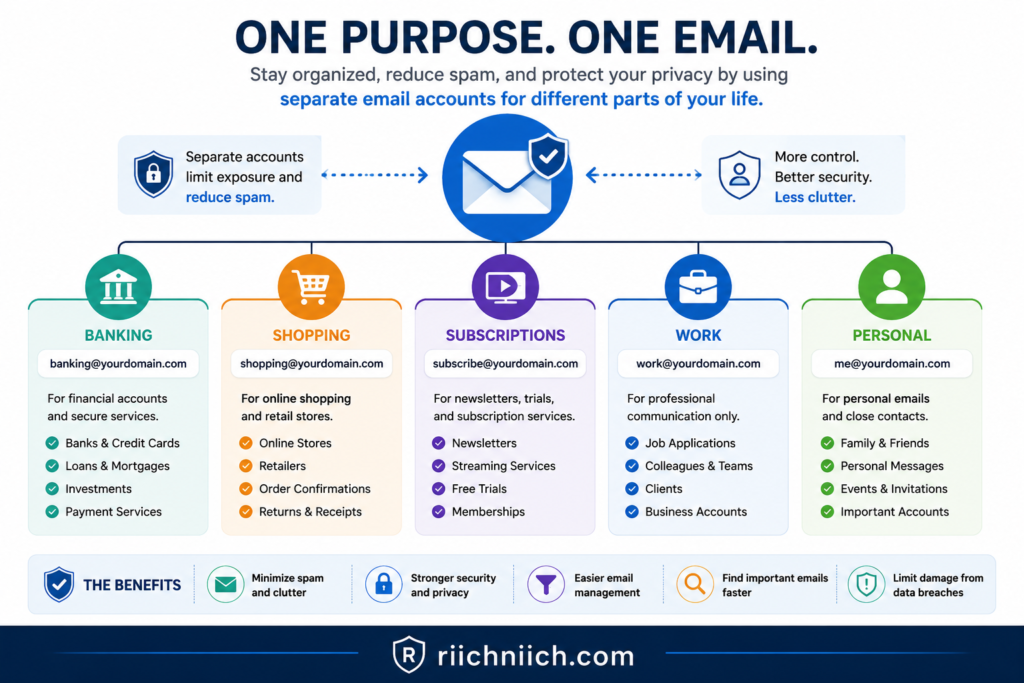
Use Separate Email Addresses for Different Activities
Using one email address for everything increases your exposure.
Instead, consider creating separate email accounts for:
- Online shopping.
- Banking and financial services.
- Personal communication.
- Newsletter subscriptions.
- Online accounts and free trials.
If one email address becomes overwhelmed with spam, your most important accounts remain better protected.
Monitor Your Email for Signs of Identity Theft
Sometimes spam is more than just an annoyance.
A sudden increase may be the first indication that criminals have access to some of your personal information.
Watch for:
- Password reset emails you didn’t request.
- Security alerts.
- Unknown login attempts.
- Verification codes you didn’t initiate.
- New account confirmations.
These warning signs deserve immediate attention because they may indicate someone is attempting to access your online accounts.
Consider Identity Protection and Dark Web Monitoring
If you’ve continued asking why am I getting so many spam emails, it may be time to think beyond spam filters.
👉 If you’re comparing your options, check out our recommendations for the Best Identity Theft Protection Services to find a solution that matches your budget and the level of protection you need.
Identity protection services can monitor for:
- Data breach exposure.
- Dark web listings.
- Identity theft activity.
- Credit-related fraud.
- Suspicious use of your personal information.
Many services also provide identity restoration assistance if your information is ever misused.
While these tools won’t eliminate spam entirely, they can provide early warnings that help prevent much larger problems.
Is It Worth Taking Steps to Stop Spam Emails?
Absolutely.
If you’re searching why am I getting so many spam emails, the issue often extends beyond an overflowing inbox. Spam emails can expose you to phishing attacks, malware, financial scams, and identity theft if you’re not careful.
Fortunately, many of the best protections are simple:
- Report suspicious emails.
- Strengthen your passwords.
- Enable multi-factor authentication.
- Limit where you share your email address.
- Monitor your identity for unusual activity.
Combined, these habits create a much stronger defense against both everyday spam and more serious cyber threats, helping you keep your inbox—and your personal information—safe over the long term.
How to Check If Your Email Address Was Leaked
If you’ve been asking why am I getting so many spam emails, one of the smartest things you can do is find out whether your email address has been exposed in a data breach. A leaked email address doesn’t automatically mean your identity has been stolen, but it does increase your risk of phishing attacks, account takeovers, and identity fraud.
Fortunately, checking whether your email address has been compromised is quick and can help you take action before criminals misuse your personal information.
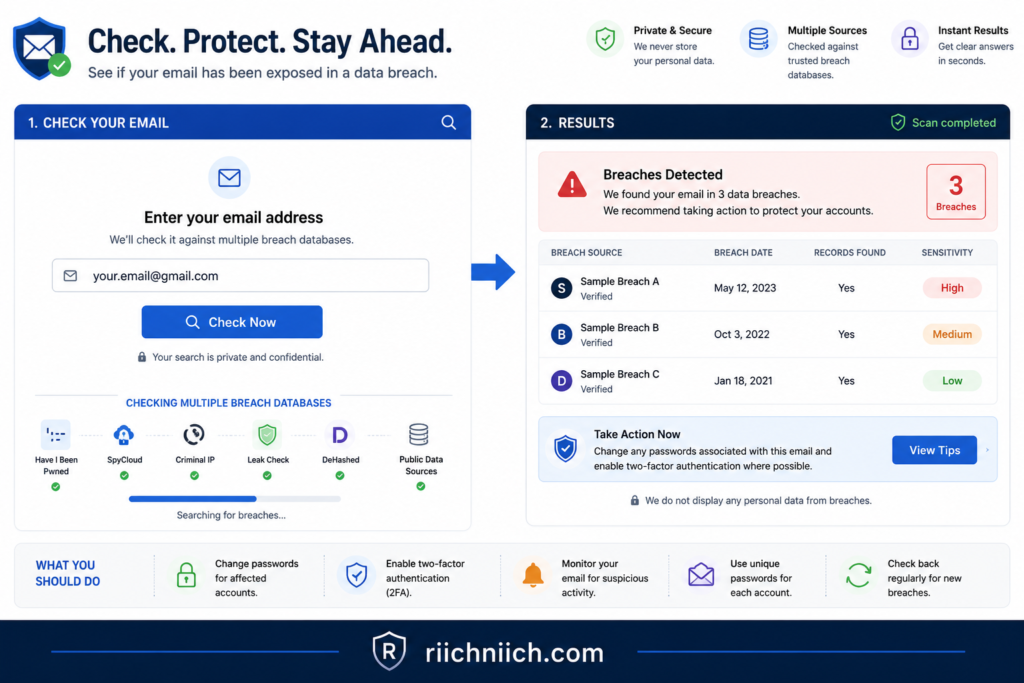
Use a Trusted Data Breach Checker
One of the easiest ways to determine whether your email address has been exposed is by using a reputable data breach notification service.
These services compare your email address against databases of known security breaches and can tell you whether it has appeared in leaked records.
If a breach is detected, you may also learn:
- Which company experienced the breach.
- When the breach occurred.
- What types of information were exposed.
- Whether passwords or other sensitive data were included.
If your email address appears in one or more breaches, don’t panic—but don’t ignore it either.
Review Security Alerts from Your Email Provider
Major email providers often notify users about suspicious account activity.
Check your email account for:
- Login alerts from unfamiliar devices.
- Password change confirmations you didn’t request.
- Recovery email modifications.
- Multi-factor authentication prompts.
- Security warnings about unusual account activity.
These notifications may indicate someone has attempted to access your account using information obtained during a previous data breach.
Even unsuccessful login attempts deserve immediate attention.
Check Whether Your Password Has Been Compromised
Sometimes your email address isn’t the only thing exposed.
Many data breaches also include passwords.
If you’ve reused the same password across multiple websites, criminals may attempt credential stuffing attacks by testing that password on other accounts.
This is one of the biggest reasons people continue asking why am I getting so many spam emails after a breach—the exposed information often leads to additional phishing attempts designed to steal even more credentials.
If you discover a compromised password, replace it immediately with a unique, strong password that isn’t used anywhere else.
👉 Using a password manager like NordPass makes it easy to create strong, unique passwords for every account without having to remember them yourself.
Monitor Your Accounts for Unusual Activity
Even if no breach notification appears, unusual account activity may indicate your email address has already been exposed.
Watch for:
- Password reset emails you didn’t request.
- New device login notifications.
- Unrecognized account changes.
- Unexpected verification codes.
- Security alerts from online services.
These warning signs often appear before more serious identity theft occurs.
The earlier you notice suspicious activity, the faster you can secure your accounts.
Look for Signs on the Dark Web
Following major breaches, stolen email addresses often appear on dark web marketplaces where cybercriminals buy and sell personal information.
Many identity monitoring services scan these marketplaces and notify you if your email address is found.
Dark web monitoring may also detect exposure of:
- Passwords.
- Phone numbers.
- Social Security numbers.
- Financial account information.
- Other personal identifiers.
Receiving an early warning gives you valuable time to change passwords and strengthen your security before criminals attempt to exploit the leaked information.
Review Your Online Accounts
Take a few minutes to review your most important online accounts.
Look for:
- Unknown recovery email addresses.
- Unauthorized forwarding rules.
- Connected third-party applications you no longer recognize.
- Recently logged-in devices.
- Security settings that have changed unexpectedly.
These reviews help identify whether someone has already gained partial access to your accounts.
If anything appears unfamiliar, remove unauthorized access immediately and update your credentials.
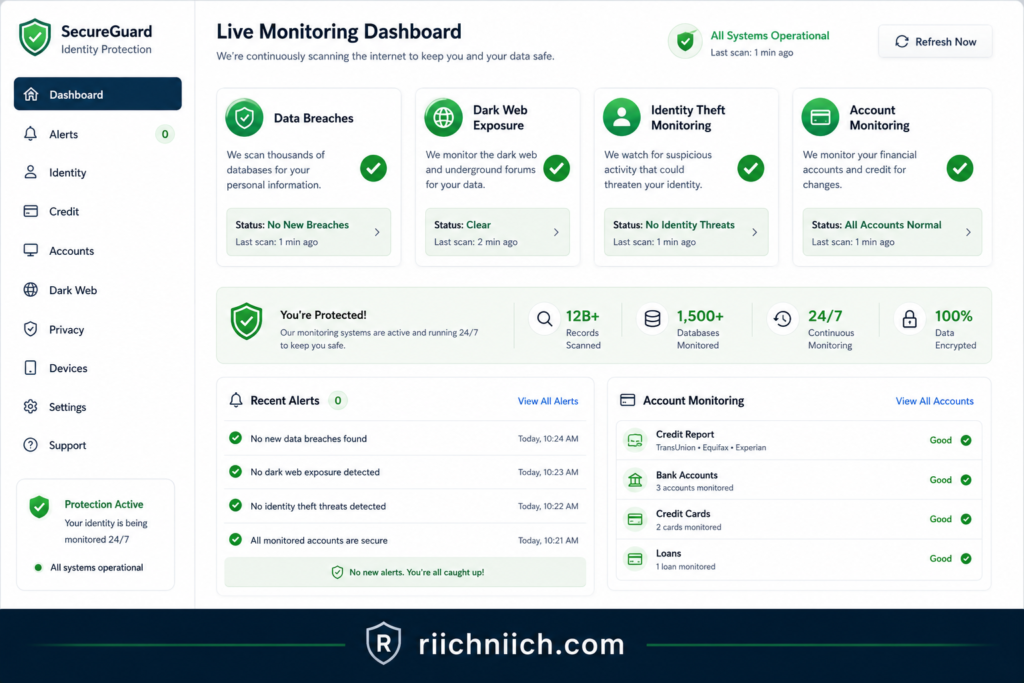
Enable Continuous Identity Monitoring
Checking your email address once is helpful, but ongoing monitoring provides much greater protection.
Identity monitoring services can continuously watch for:
- New data breaches.
- Dark web exposure.
- Fraud alerts.
- Suspicious identity activity.
- New accounts opened using your personal information.
Instead of discovering problems months later, you’ll receive alerts much sooner, allowing you to respond before significant damage occurs.
This is particularly valuable if your email address has already appeared in previous breaches.
What Should You Do If Your Email Address Was Leaked?
If you discover your email address has been exposed, don’t assume nothing will happen.
Take these steps immediately:
- Change passwords for your email and other important accounts.
- Enable multi-factor authentication.
- Replace reused passwords with unique ones.
- Review recent account activity.
- Monitor financial accounts and credit reports.
- Watch for phishing emails pretending to be legitimate companies.
- Consider using identity monitoring to receive future alerts automatically.
These proactive measures can significantly reduce the likelihood that a leaked email address leads to account takeover or identity theft.
Is It Worth Monitoring Your Email Long-Term?
If you’re still wondering why am I getting so many spam emails, long-term monitoring is one of the most effective ways to protect yourself.
Data breaches continue to occur every year, and even companies with strong security can become targets.
Rather than checking manually every few months, continuous monitoring provides ongoing visibility into potential threats involving your email address and other personal information.
Combined with strong passwords, multi-factor authentication, and good email habits, monitoring helps create a comprehensive defense against phishing, fraud, and identity theft.
Best Tools to Protect Your Email from Spam, Phishing, and Identity Theft
If you’ve been wondering why am I getting so many spam emails, improving your email security is one of the best investments you can make. While no tool can stop every unwanted email, combining several layers of protection can significantly reduce spam, block phishing attempts, and help protect your identity if your personal information is exposed.
The most effective strategy isn’t relying on a single product—it’s using complementary tools that work together to secure your email account and the sensitive information connected to it.
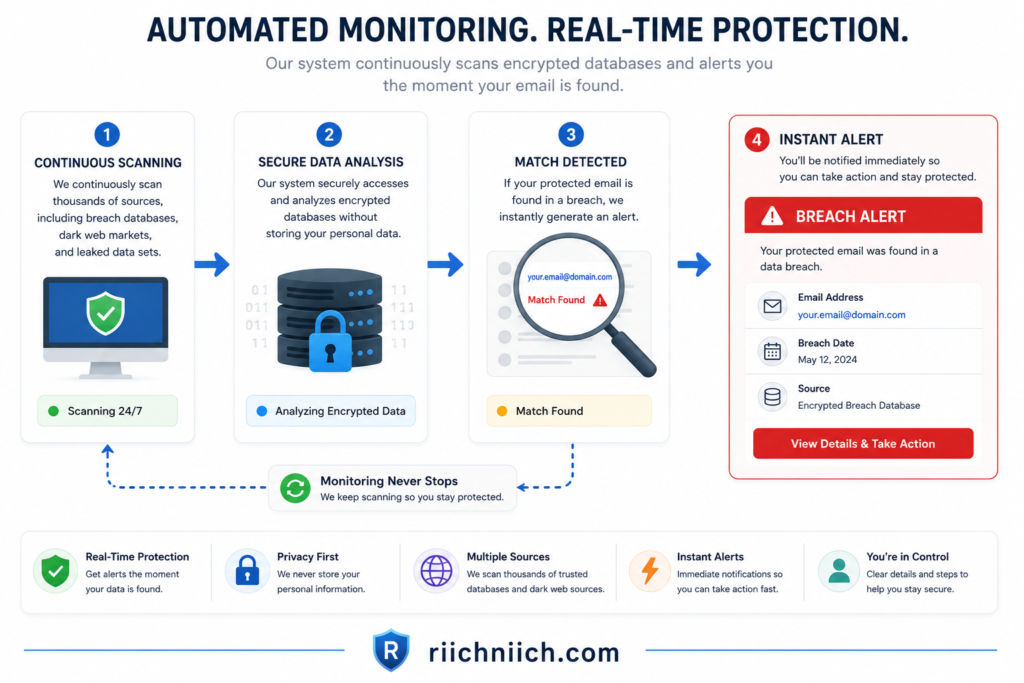
Identity Monitoring Services
Identity monitoring services help detect suspicious activity involving your personal information before it turns into full-scale identity theft.
👉 If you’re looking for continuous identity monitoring, fraud alerts, and recovery support, Coveron is worth considering as an additional layer of protection for your personal information.
Many providers monitor for:
- Data breach notifications.
- Dark web exposure.
- New credit activity.
- Identity theft alerts.
- Fraud involving your personal information.
If your email address is exposed during a breach, these services can notify you quickly, allowing you to change passwords and secure your accounts before criminals take advantage of the leaked information.
If you’re searching why am I getting so many spam emails, identity monitoring is often one of the earliest ways to discover that your information has been compromised.
Password Managers
Weak or reused passwords remain one of the biggest reasons online accounts become compromised.
A password manager helps you:
- Generate strong passwords.
- Store passwords securely.
- Avoid password reuse.
- Fill login credentials safely.
- Identify weak or compromised passwords.
Because your email account controls password resets for many other services, protecting it with a unique password is one of the most important security steps you can take.
If one website experiences a breach, unique passwords prevent attackers from accessing your other accounts.
Dark Web Monitoring
Many people don’t realize their email address has been stolen until months after a data breach.
Dark web monitoring continuously scans known criminal marketplaces for exposed personal information, including:
- Email addresses.
- Passwords.
- Phone numbers.
- Financial information.
- Other sensitive identifiers.
Instead of discovering a breach long after it occurs, you’ll receive alerts much sooner, allowing you to take immediate action.
Data Removal Services
Reducing your online exposure makes it harder for scammers to find your email address in the first place.
Data removal services work to remove your personal information from many data broker and people-search websites.
These services can help reduce the public availability of:
- Email addresses.
- Phone numbers.
- Home addresses.
- Family connections.
- Other personal details.
Although they won’t eliminate spam completely, reducing your digital footprint can decrease future exposure and make personalized phishing attacks less effective.
Built-In Email Spam Filters
Most major email providers include powerful spam filtering technology.
These filters automatically identify suspicious messages and move them into your spam folder before they reach your inbox.
To improve their effectiveness:
- Report spam messages.
- Report phishing attempts.
- Avoid marking legitimate emails as spam.
- Regularly review your spam folder for false positives.
Using your provider’s built-in tools is one of the simplest ways to improve email security without installing additional software.
Multi-Factor Authentication
Multi-factor authentication (MFA) is one of the most effective defenses against account takeover.
Even if criminals obtain your password during a phishing attack or data breach, MFA requires an additional verification step before access is granted.
Authentication methods may include:
- Authentication apps.
- Security keys.
- Biometric verification.
- One-time verification codes.
Enabling MFA on your primary email account significantly reduces the risk of unauthorized access.
Antivirus and Malware Protection
Some phishing emails are designed to install malicious software rather than steal passwords directly.
Reliable antivirus software helps detect and block:
- Malicious attachments.
- Ransomware.
- Spyware.
- Trojans.
- Downloaded malware.
Keeping your antivirus software updated adds another important layer of protection for both your devices and your email account.
Secure Email Habits
Even the best security tools can’t replace good habits.
To reduce the chances of becoming a victim:
- Verify sender email addresses.
- Avoid clicking unexpected links.
- Never download suspicious attachments.
- Ignore urgent requests for personal information.
- Visit company websites directly instead of using email links.
- Review account security settings regularly.
Developing these habits helps protect you against both automated spam campaigns and highly targeted phishing attacks.
Is It Worth Investing in Email Protection Tools?
If you’ve been searching why am I getting so many spam emails, the answer is yes—especially if your email account contains sensitive personal or financial information.
Your email serves as the recovery point for many of your online accounts. If criminals gain access to it, they may also gain access to:
- Online banking.
- Investment accounts.
- Healthcare portals.
- Shopping accounts.
- Cloud storage.
- Social media profiles.
Using multiple security tools together provides much stronger protection than relying on a single solution.
For many people, the ideal combination includes:
- An identity monitoring service.
- A password manager.
- Dark web monitoring.
- A data removal service.
- Multi-factor authentication.
- Reliable antivirus protection.
This layered approach not only helps reduce spam but also protects your identity, accounts, and personal information against today’s most common cyber threats.
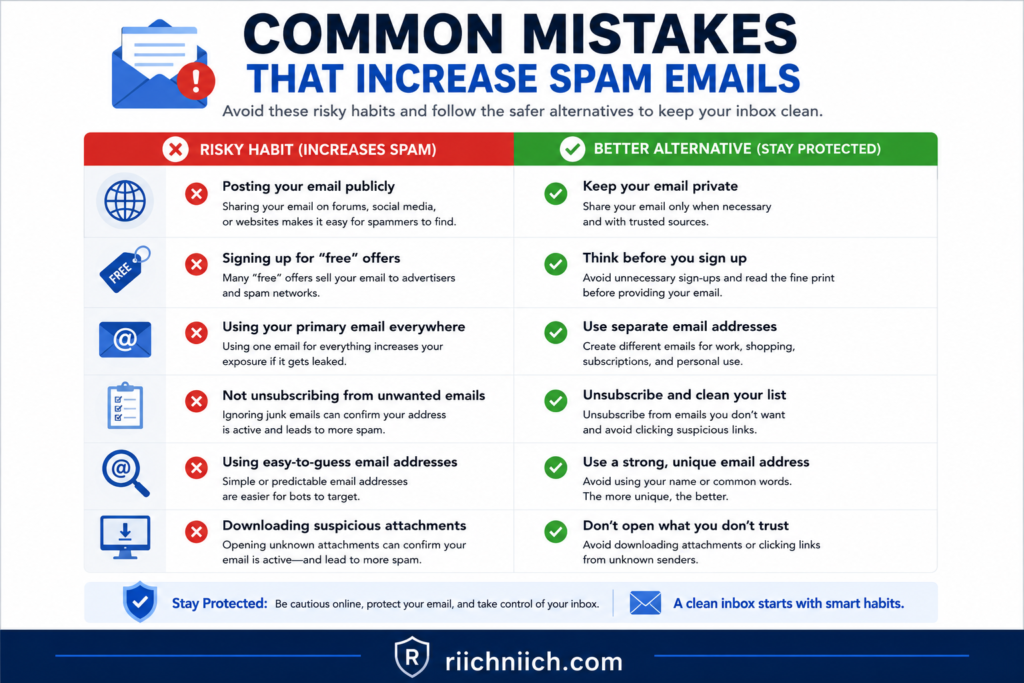
Common Mistakes That Lead to More Spam Emails
If you’ve been asking why am I getting so many spam emails, the answer isn’t always outside your control. While data breaches and cybercriminals play a major role, some everyday online habits can unintentionally increase the amount of spam you receive.
The good news is that many of these mistakes are easy to avoid. By changing a few habits, you can reduce unwanted emails, make your inbox more secure, and lower your chances of becoming a victim of phishing or identity theft.
Using the Same Email Address for Everything
One of the most common mistakes is using a single email address for every online activity.
If you use one inbox for:
- Online shopping
- Banking
- Social media
- Newsletters
- Sweepstakes
- Mobile apps
- Work accounts
your exposure grows every time you sign up for a new service.
If just one of those companies experiences a data breach, your primary email address becomes available to scammers.
Instead, consider creating separate email addresses for different purposes. Keeping your financial accounts separate from promotional signups makes it easier to manage spam and protects your most important accounts.
Clicking Links in Suspicious Emails
Curiosity often works in a scammer’s favor.
Clicking links inside suspicious emails can:
- Confirm your email address is active.
- Redirect you to fake login pages.
- Download malware.
- Expose personal information.
Even if the email looks convincing, avoid interacting with unexpected messages.
If you’re unsure whether an email is legitimate, open your browser and visit the company’s official website directly instead of using the provided link.
Reusing Weak Passwords
Many people continue using the same password across dozens of websites.
If one website suffers a data breach, criminals frequently test those same credentials on:
- Email accounts
- Banking websites
- Shopping accounts
- Social media
- Cloud storage services
This attack method, known as credential stuffing, remains one of the most successful ways criminals gain access to online accounts.
Using strong, unique passwords dramatically reduces this risk.
Posting Your Email Address Publicly
Making your email address publicly visible increases the likelihood that automated bots will collect it.
Common places where people unknowingly expose their email include:
- Social media profiles
- Personal websites
- Discussion forums
- Blog comments
- Business directories
- Marketplace listings
Once collected, your email address may be added to spam databases used by advertisers and cybercriminals.
Using contact forms instead of displaying your email publicly can help reduce automated harvesting.
Signing Up for Every Promotion or Giveaway
Free offers often come with hidden costs.
Many online promotions collect email addresses that are later shared with marketing partners or included in future advertising campaigns.
Before entering contests, downloading free resources, or subscribing to newsletters, ask yourself whether providing your email address is truly necessary.
Reducing unnecessary registrations helps limit your digital footprint over time.
Ignoring Privacy Settings
Many websites allow you to control how your information is shared.
Unfortunately, users often skip these settings during registration.
Whenever possible:
- Opt out of marketing emails.
- Decline optional data sharing.
- Limit personalized advertising.
- Disable unnecessary third-party sharing.
These small adjustments can significantly reduce future marketing emails and decrease the number of organizations handling your personal information.
Failing to Update Account Security
If you’ve been wondering why am i getting so many spam emails, outdated security settings may be contributing to the problem.
Regularly review:
- Recovery email addresses.
- Connected devices.
- Third-party applications.
- Account forwarding rules.
- Login history.
- Multi-factor authentication settings.
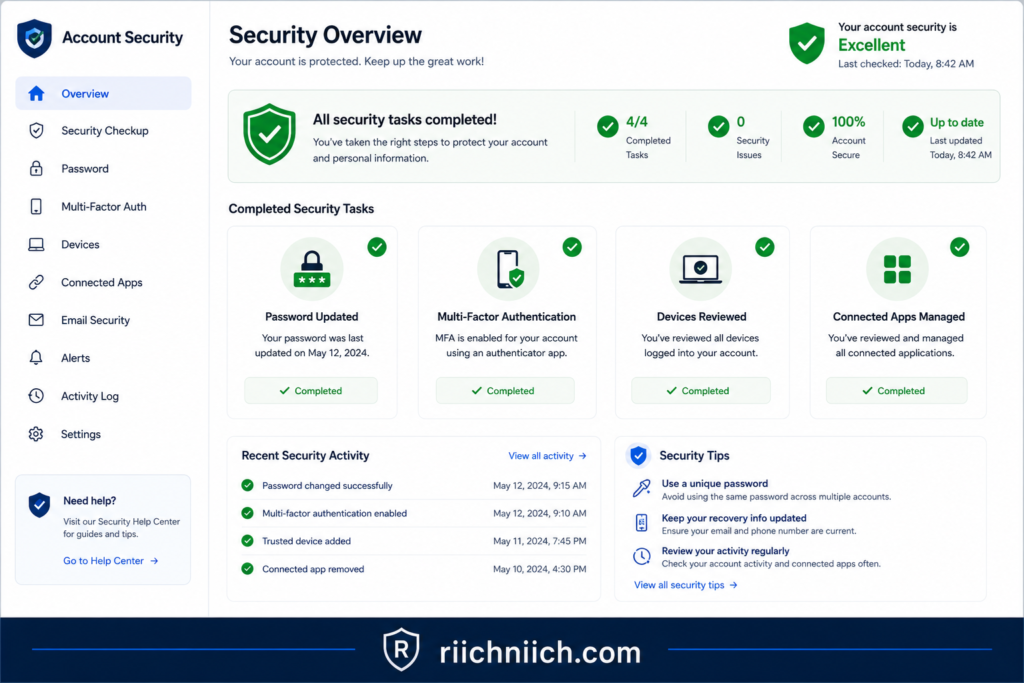
Routine security checks help detect unauthorized access before criminals can exploit your accounts.
Ignoring Data Breach Notifications
Many companies notify customers when their information has been exposed during a cyberattack.
Unfortunately, these emails are often ignored or mistaken for spam.
If you receive a legitimate breach notification:
- Change affected passwords immediately.
- Enable multi-factor authentication.
- Monitor financial accounts.
- Watch for phishing emails.
- Consider identity monitoring.
Responding quickly can significantly reduce the chances of identity theft following a breach.
Waiting Too Long to Protect Your Identity
One of the biggest mistakes is assuming spam emails are only an annoyance.
In reality, spam often serves as the first step in larger cybercrimes, including:
- Phishing attacks.
- Account takeovers.
- Financial fraud.
- Identity theft.
Waiting until your accounts are compromised makes recovery far more difficult than preventing the attack in the first place.
Identity monitoring, dark web monitoring, password managers, and data removal services can help detect problems early and reduce your long-term risk.
Is It Worth Changing These Habits?
Absolutely.
If you’ve repeatedly searched why am I getting so many spam emails, making a few simple changes today can significantly improve your online security tomorrow.
You don’t need advanced technical knowledge to reduce your risk.
Small improvements—such as using unique passwords, enabling multi-factor authentication, limiting where you share your email address, and monitoring your identity—can greatly reduce spam while making it much harder for cybercriminals to target you.
The goal isn’t just to receive fewer unwanted emails. It’s to build safer online habits that protect your personal information, financial accounts, and digital identity for years to come.
Frequently Asked Questions About Why Am I Getting So Many Spam Emails
If you’re still wondering why am I getting so many spam emails, you’re not alone. Below are answers to some of the most common questions people have about spam emails, phishing attempts, data breaches, and protecting their inboxes.
Why am I suddenly getting so many spam emails?
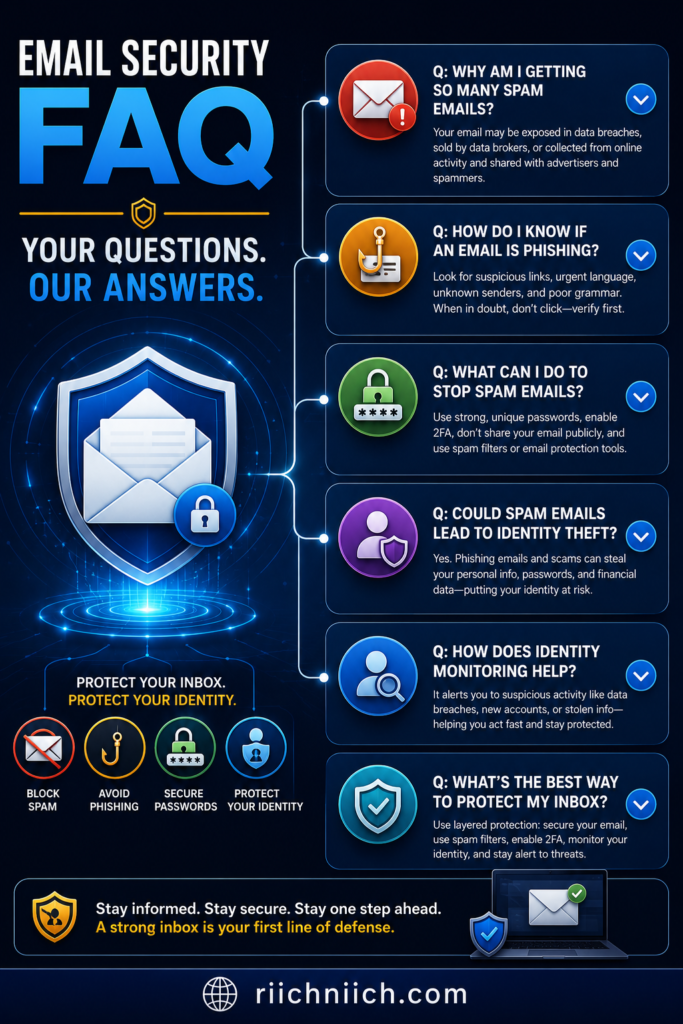
A sudden increase in spam emails often happens because your email address was exposed in a data breach, added to a marketing database, collected by data brokers, or harvested from public websites.
It can also happen after signing up for new online accounts, newsletters, contests, or mobile apps. In some cases, scammers simply obtain your email address from previously leaked databases and begin sending phishing campaigns months or even years later.
If the increase is dramatic, it’s a good idea to review your account security and monitor your email for signs of suspicious activity.
👉 If you’re concerned your email was exposed in a data breach, Aura can continuously monitor for breach notifications, dark web exposure, and identity theft alerts before they become much larger problems.
Does getting lots of spam emails mean I’ve been hacked?
Not necessarily.
Receiving more spam emails doesn’t automatically mean your email account has been hacked. However, it may indicate that your email address has been exposed online.
Watch for additional warning signs such as:
- Password reset emails you didn’t request.
- Login alerts from unfamiliar devices.
- Verification codes you didn’t initiate.
- Emails appearing in your Sent folder that you didn’t send.
- Changes to your account settings.
If any of these occur, secure your account immediately by changing your password and enabling multi-factor authentication.
Can spam emails lead to identity theft?
Yes.
Many spam emails are actually phishing attacks designed to trick you into revealing:
- Passwords.
- Credit card numbers.
- Banking information.
- Social Security numbers.
- Multi-factor authentication codes.
If criminals successfully collect this information, they may attempt identity theft, financial fraud, or account takeover.
This is why it’s important to avoid clicking suspicious links or downloading unexpected attachments.
Why do scammers keep targeting my email address?
Scammers rarely target individuals personally.
Instead, they use automated systems that send millions of emails to addresses collected through:
- Data breaches.
- Public websites.
- Data brokers.
- Online registrations.
- Previous phishing campaigns.
Once your email address appears in one database, it may be sold or shared repeatedly, increasing the amount of spam you receive over time.
Can I completely stop spam emails?
Unfortunately, no.
Because spam campaigns constantly evolve, it’s nearly impossible to eliminate every unwanted email.
However, you can greatly reduce spam by:
- Reporting spam instead of simply deleting it.
- Avoiding suspicious links.
- Limiting where you share your email address.
- Using separate email addresses for different purposes.
- Strengthening your account security.
Over time, these practices help improve your inbox and reduce your overall exposure.
Should I unsubscribe from spam emails?
Only if the sender is legitimate.
If the email comes from a trusted company that you knowingly subscribed to, using the unsubscribe option is generally safe.
However, avoid clicking unsubscribe links in suspicious emails because some scammers use them to verify that your email address is active, leading to even more spam.
When you’re unsure, report the email as spam instead.
How can I tell if my email address was leaked?
You can look for several warning signs, including:
- A sudden increase in spam emails.
- Personalized phishing emails.
- Password reset requests you didn’t initiate.
- Data breach notifications from companies.
- Suspicious login alerts.
- Identity monitoring notifications.
You can also use trusted breach notification services and identity monitoring tools to determine whether your email address has appeared in known data breaches.
Should I change my email password if I’m getting more spam?
Yes, especially if you suspect your email address has been exposed during a data breach.
Changing your password is a smart precaution if:
- You reuse passwords across multiple websites.
- You receive unexpected login alerts.
- Your email provider reports suspicious activity.
- Your password appeared in a known breach.
Use a strong, unique password and enable multi-factor authentication for added protection.
What are the best tools to help protect my email?
If you’re asking why am I getting so many spam emails, several tools can strengthen your security and help detect problems early.
Useful protection includes:
- Identity monitoring services.
- Password managers.
- Dark web monitoring.
- Data removal services.
- Reliable antivirus software.
- Multi-factor authentication.
Using these tools together creates multiple layers of protection against phishing, account takeover, and identity theft.
When should I be concerned about spam emails?
Occasional spam is normal.
However, you should pay close attention if you notice:
- A sudden flood of spam emails.
- Messages containing your personal information.
- Login alerts from unknown devices.
- Password reset requests you didn’t initiate.
- Financial account notifications you don’t recognize.
- Friends reporting strange emails sent from your account.
These warning signs may indicate your email address—or additional personal information—has been exposed.
Taking action early can help prevent more serious problems later.
Is protecting my email worth the effort?
Absolutely.
Your email account is connected to many of your most important online services, including banking, shopping, healthcare, cloud storage, and social media.
Protecting your email helps protect everything connected to it.
Simple steps like creating strong passwords, enabling multi-factor authentication, monitoring for data breaches, and reducing where you share your email address can significantly lower your risk of phishing attacks and identity theft while keeping your inbox much cleaner over time.
Conclusion: Why Am I Getting So Many Spam Emails?
If you’ve made it this far, you should have a much clearer understanding of why am I getting so many spam emails. In most cases, the increase isn’t random. Your email address may have been exposed in a data breach, shared by data brokers, harvested from public websites, or added to spam lists after signing up for online accounts, newsletters, or promotions.
While receiving spam emails doesn’t automatically mean your identity has been stolen, it should be treated as an opportunity to strengthen your online security before a more serious problem develops. Spam campaigns often serve as the starting point for phishing attacks, account takeovers, financial fraud, and identity theft.
The good news is that you can dramatically reduce your risk by taking a proactive approach.
Start by:
- Checking whether your email address has been exposed in a data breach.
- Changing passwords for important accounts.
- Enabling multi-factor authentication.
- Reporting spam instead of interacting with suspicious emails.
- Limiting where you share your email address online.
- Monitoring your accounts for unusual activity.
If you consistently wonder why am I getting so many spam emails, it’s also worth considering additional protection beyond your inbox. Identity monitoring services can alert you to new data breaches, dark web exposure, suspicious activity involving your personal information, and other warning signs before they become larger problems. Pairing identity monitoring with a trusted password manager, dark web monitoring, and data removal services creates multiple layers of protection that help secure both your email account and your digital identity.
Remember that email is often the gateway to your online life. It controls password resets for banking, shopping, healthcare, social media, cloud storage, and many other important accounts. Protecting your email today can prevent far more expensive and stressful problems tomorrow.
Whether you’re receiving only a few unwanted messages or your inbox is suddenly overflowing, taking action now puts you in a much stronger position to defend yourself against phishing scams and identity theft.