

Choosing between surfshark vs expressvpn can be difficult because both offer strong privacy, security, fast connections, and apps for popular devices. But they take different approaches to value. Surfshark stands out for unlimited simultaneous connections, competitive long-term pricing, and advanced privacy features, while ExpressVPN focuses on simplicity, Lightway, TrustedServer technology, and broad international coverage.
So, which VPN should you actually pay for in 2026? In this comparison, we’ll break down Surfshark and ExpressVPN by price, speed, privacy, security, streaming, gaming, features, device limits, and overall value to help you decide which one deserves your money.
Table of Contents
Surfshark vs ExpressVPN: 🔥 Quick Answer
If you are trying to decide between these two premium VPNs, the quick answer is that Surfshark is the stronger choice for value and protecting lots of devices, while ExpressVPN is a compelling choice for shoppers who prioritize a polished VPN experience, its Lightway protocol, and an extensive global server presence.
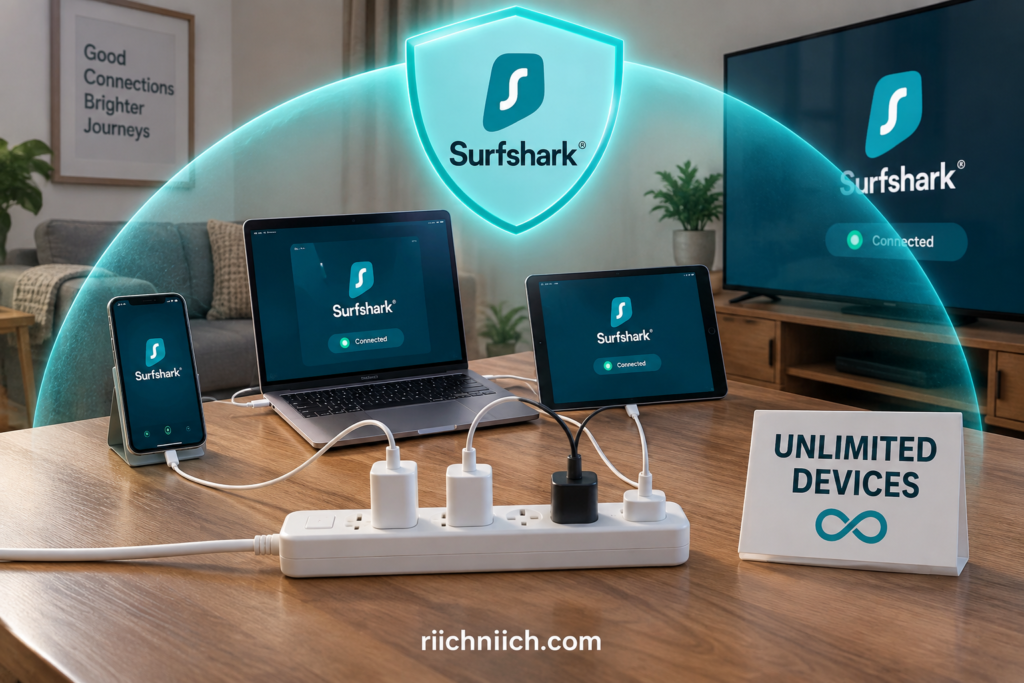
In our surfshark vs expressvpn comparison, Surfshark immediately stands out because one subscription supports unlimited simultaneous device connections. That can make it particularly attractive for families or anyone who wants VPN protection across multiple phones, computers, tablets, and TVs without constantly thinking about a device limit. Surfshark also offers features such as CleanWeb, Dynamic MultiHop, Bypasser, Rotating IP, and a kill switch.
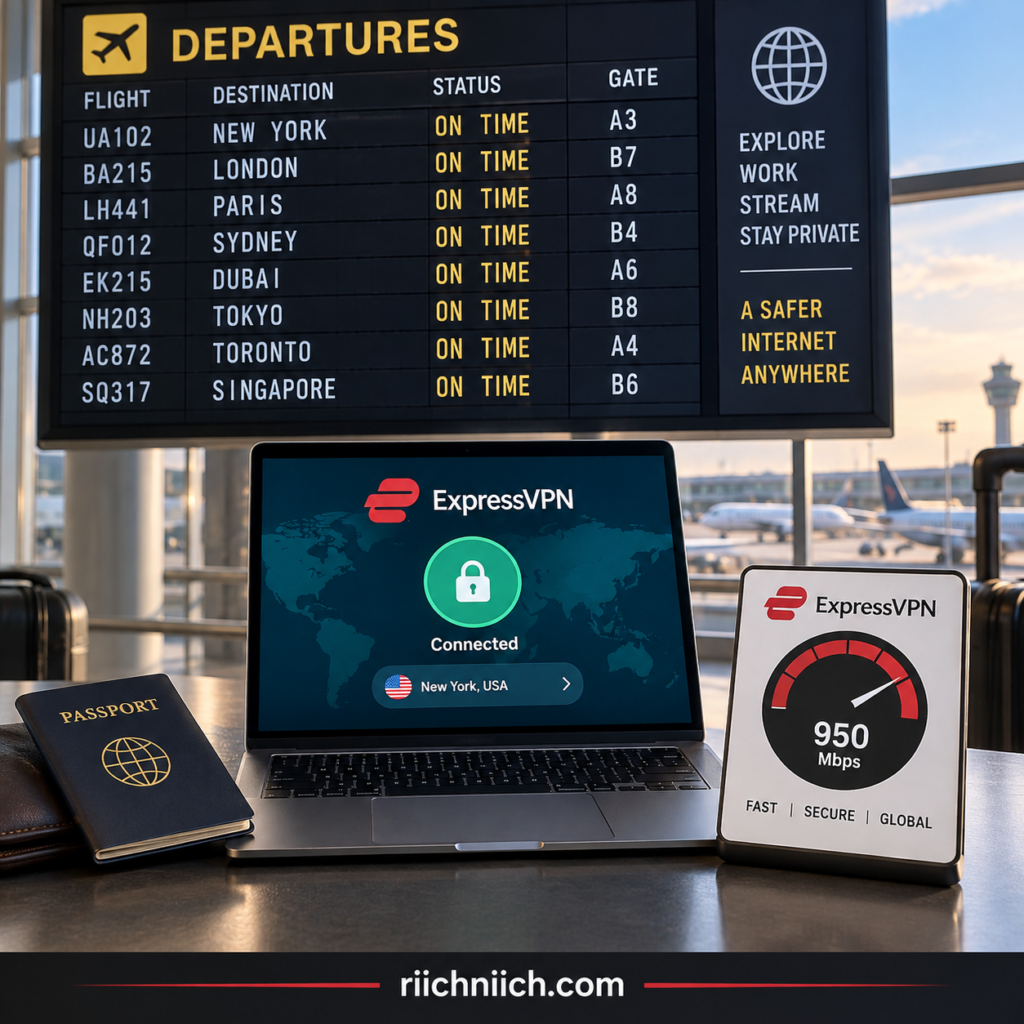
ExpressVPN takes a different approach. It supports up to 14 simultaneous connections and offers its proprietary Lightway protocol, TrustedServer RAM-only infrastructure, a kill switch, split tunneling on supported platforms, and other privacy and security tools. Its network currently spans 113 countries, giving travelers and users who regularly connect through different regions plenty of location choices.
So, which one should you buy?
For shoppers focused on value, families, and unlimited devices, Surfshark has the more obvious advantage. One subscription can protect an unlimited number of supported devices simultaneously, which becomes increasingly valuable as the number of devices in your household grows.
ExpressVPN may be the better fit if you place greater importance on Lightway, straightforward everyday use, and broad international server coverage. Lightway was designed for speed, security, reliability, and quick transitions between networks, which can be especially useful when moving between Wi-Fi and mobile connections.
Both services also give buyers a way to evaluate the service before fully committing. Surfshark currently advertises a 7-day free trial for qualifying 12- and 24-month purchases and a 30-day money-back guarantee, while ExpressVPN advertises a 30-day money-back guarantee for first-time subscribers, subject to its terms and purchase method.
Quick verdict: For most value-conscious buyers comparing surfshark vs expressvpn, Surfshark is our early pick, especially if you need to protect many devices. ExpressVPN remains a strong alternative for buyers willing to pay for its particular combination of Lightway, server coverage, and streamlined VPN experience.
This is only the quick answer, though. The better VPN for you will depend on pricing, speed, privacy, security, streaming performance, device support, and the features you will actually use—all of which we’ll compare below.
👉 If you want the better overall value with unlimited simultaneous VPN connections, check Surfshark’s current deal and compare its plans before you buy.
Surfshark vs ExpressVPN at a Glance 👀
For this section, we’d make the comparison highly scannable so readers can understand the biggest differences before we get into the deeper tests later in the article.
When comparing surfshark vs expressvpn, both are premium VPN services built to encrypt your internet connection, hide your IP address, and improve privacy when browsing at home, traveling, or using public Wi-Fi. The biggest differences are in device limits, specialized features, protocols, server coverage, and overall value.
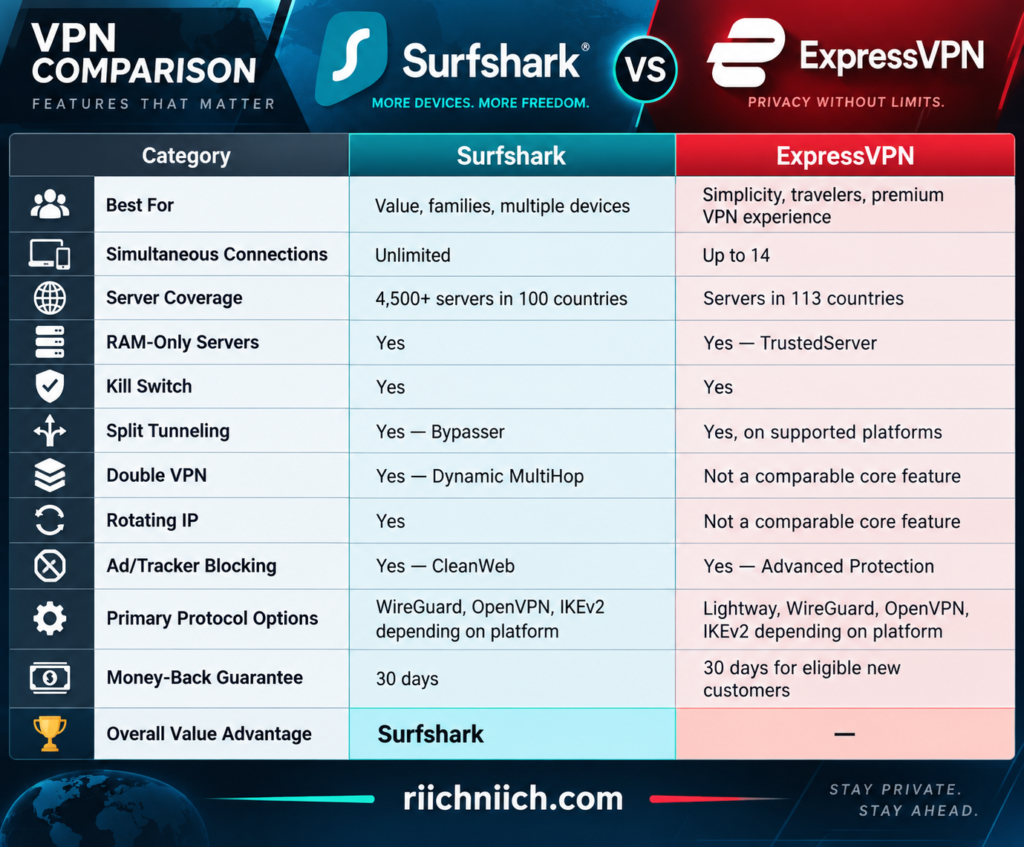
Surfshark currently advertises 4,500+ servers across 100 countries and unlimited simultaneous connections. Its feature set includes CleanWeb, Dynamic MultiHop, Bypasser, Rotating IP, a kill switch, and other privacy tools. Surfshark also says its network uses RAM-only servers.
ExpressVPN takes a slightly different approach. Its network covers 113 countries, and a subscription currently supports up to 14 simultaneous connections. One of its standout technologies is Lightway, its proprietary VPN protocol. ExpressVPN also uses TrustedServer technology, which runs its VPN servers on RAM and is designed so data is wiped with each reboot.
What Stands Out Immediately?
For buyers researching surfshark vs expressvpn, Surfshark’s biggest advantage is easy to spot: unlimited simultaneous connections. You can install Surfshark across supported phones, computers, smart TVs, tablets, and other devices without having to choose which ones receive one of a limited number of connection slots.
That makes Surfshark particularly attractive if you’re looking for the best VPN for multiple devices or want one VPN subscription that can cover a household.
Surfshark also packs several privacy features into its VPN. Dynamic MultiHop can route traffic through two VPN servers, Rotating IP periodically changes your VPN IP address without disconnecting you, and CleanWeb can block ads, trackers, and malicious websites.
ExpressVPN’s advantages become more apparent for buyers who prioritize international server coverage and its proprietary technology. Lightway is designed around speed, reliability, and security, while TrustedServer provides a RAM-only server architecture that avoids storing VPN server data on traditional hard drives.
The Early Winner
At a glance, Surfshark has the stronger value proposition for many buyers, particularly households with lots of devices and shoppers who want features such as Dynamic MultiHop, Rotating IP, CleanWeb, and unlimited simultaneous connections in one VPN service.
ExpressVPN should not be counted out. Its Lightway protocol, TrustedServer infrastructure, broad country coverage, and straightforward approach could make it worth choosing depending on what you value most from a VPN.
That is why the winner of surfshark vs expressvpn cannot be determined by the feature list alone. Price, speed, security, privacy, streaming performance, ease of use, and long-term value can change which service is the better purchase—and we’ll compare each of those areas before making the final recommendation.
What Is Surfshark?
Surfshark is a consumer VPN service designed to make your internet connection more private by encrypting your traffic and routing it through a VPN server. This helps conceal your regular IP address from the websites and online services you visit and makes it more difficult for third parties on the network to observe your internet activity.
For buyers researching surfshark vs expressvpn, one of Surfshark’s biggest selling points is that a standard subscription supports unlimited simultaneous connections after any applicable trial period. That makes Surfshark especially appealing if you want one VPN subscription for a household with several phones, laptops, tablets, smart TVs, and other compatible devices.

What Does Surfshark Do?
At its core, Surfshark creates an encrypted connection between your device and its VPN network. Instead of websites seeing your normal internet connection and IP address, your traffic is routed through the VPN server you select.
That can be useful when you want to:
- Improve your privacy while browsing.
- Protect your internet traffic on public Wi-Fi.
- Hide your regular IP address.
- Connect through VPN servers in other locations.
- Reduce tracking with additional privacy features.
- Protect multiple devices under one VPN subscription.
Surfshark also offers Auto-connect, which can automatically establish the VPN connection when your device connects to Wi-Fi or Ethernet. This is particularly useful for travelers who frequently connect to hotel, airport, café, or other unfamiliar networks.
Surfshark Offers More Than a Basic VPN
Where Surfshark becomes more interesting in a surfshark vs expressvpn buying decision is its collection of additional privacy and security features.
CleanWeb can block ads, trackers, malware, and phishing attempts. Bypasser provides split tunneling, allowing selected apps or websites to bypass the VPN. Kill Switch can cut your internet connection if the VPN unexpectedly disconnects.
Then there is Dynamic MultiHop, which routes your traffic through two VPN servers instead of one. Surfshark allows you to choose the entry and exit locations when creating a custom MultiHop connection.
Surfshark also offers Rotating IP, which periodically changes the VPN IP address without requiring you to disconnect from the VPN.
These features help position Surfshark as more than simply a tool for changing your IP address. It is designed for shoppers who want a broader collection of online privacy controls inside the same service.
What Is Surfshark One?
Buyers should also understand the difference between Surfshark VPN and Surfshark One.
Surfshark One expands the package beyond the VPN. It currently combines Surfshark VPN, Surfshark Antivirus, Surfshark Alert, and Surfshark Search. Surfshark Alert can warn users when monitored information appears in breached databases, while Surfshark Search provides private, ad-free searching.
That distinction matters because you shouldn’t automatically assume every Surfshark security feature is included with the basic VPN subscription. Some tools require Surfshark One or another eligible plan, while Dedicated IP is sold separately.
Who Is Surfshark Best For?
Surfshark makes the most sense for buyers who want strong value without sacrificing advanced VPN features.
Its unlimited-device policy is particularly attractive for large households and people with many connected devices. Features such as CleanWeb, Bypasser, Dynamic MultiHop, Rotating IP, Auto-connect, and Kill Switch also give more privacy-conscious users plenty of controls to work with.
Surfshark currently offers eligible new users a 7-day trial on qualifying 12- and 24-month purchases, followed by unlimited device connections after the trial, and it also advertises a 30-day money-back guarantee. Eligibility and payment requirements apply, so check the current terms before purchasing.
For shoppers comparing surfshark vs expressvpn, Surfshark therefore enters the comparison with a clear buyer proposition: protect a large number of devices while getting a substantial collection of privacy and security features from one VPN provider.
Whether that makes Surfshark the better purchase will depend on how its pricing, speeds, security, streaming capabilities, apps, and overall experience compare with ExpressVPN—which we’ll examine throughout this comparison.
What Is ExpressVPN?
ExpressVPN is a premium VPN and broader privacy/security service designed to encrypt your internet traffic, mask your real IP address, and provide a more private connection when you browse, stream, travel, work remotely, or use public Wi-Fi. ExpressVPN offers apps across major desktop, mobile, and TV platforms and currently supports up to 14 simultaneous VPN connections, depending on the subscription tier.
For buyers researching surfshark vs expressvpn, ExpressVPN’s appeal comes from more than simply changing your IP address. Its core VPN combines Lightway, TrustedServer RAM-only infrastructure, AES-256 encryption, an Internet Kill Switch, private DNS, leak protection, split tunneling on supported platforms, and automatic obfuscation.

What Does ExpressVPN Do?
When you connect to ExpressVPN, your internet traffic travels through an encrypted VPN connection before reaching the internet. Websites see the VPN server’s IP address rather than your regular public IP address.
This can be useful if you want to:
- Improve your privacy while browsing.
- Protect internet traffic when using public Wi-Fi.
- Hide your regular IP address.
- Connect through VPN servers in other locations.
- Stream or download with greater privacy.
- Protect multiple compatible devices.
- Add extra protection against certain trackers, ads, phishing domains, and malicious websites.
ExpressVPN also runs its own private encrypted DNS on its VPN servers, helping keep DNS requests within its infrastructure instead of relying on a third-party DNS provider.
For someone shopping for the best VPN for privacy, these underlying technologies are important because a VPN’s value depends on more than how many server locations appear in the app.
What Is Lightway?
One of the biggest differentiators in a surfshark vs expressvpn buying decision is Lightway, ExpressVPN’s proprietary VPN protocol.
Lightway was designed to establish VPN connections quickly while maintaining speed, security, and reliability. It is also designed to handle changes between networks smoothly—for example, when your phone switches from home Wi-Fi to cellular data. ExpressVPN has open-sourced Lightway’s core code, and the protocol has undergone independent security assessments.
That can make Lightway particularly attractive to people who frequently use their VPN on phones or laptops while traveling.
What Is ExpressVPN TrustedServer?
Another important ExpressVPN feature is TrustedServer.
Traditional servers can use hard drives that retain information until it is overwritten or erased. ExpressVPN says its TrustedServer infrastructure instead operates using volatile RAM, with server data wiped when a server reboots. The software stack is also reinstalled at startup.
This architecture is designed to reduce the risk of information persisting on a VPN server’s hard drive.
ExpressVPN Offers More Than a Basic VPN
ExpressVPN has expanded beyond its traditional VPN service.
Its Advanced Protection features can block malicious websites and intrusive display ads, while additional capabilities such as tracker blocking depend on the subscription plan. These protections are integrated into ExpressVPN apps on supported platforms.
Depending on the subscription tier and location, ExpressVPN’s broader security suite can also include tools such as ExpressKeys for password management, ExpressMailGuard for email aliases, and Identity Defender for U.S. customers. Feature availability varies by plan, so buyers should compare what is actually included before choosing a subscription.
This is particularly important for our surfshark vs expressvpn comparison because both companies now offer services beyond a traditional VPN. We need to compare what you’re actually getting for your money rather than assuming every advertised feature comes with every plan.
Who Is ExpressVPN Best For?
ExpressVPN makes the most sense for buyers who prioritize a straightforward premium VPN experience, strong underlying privacy technology, broad device compatibility, and a VPN designed to work smoothly across changing networks.
Lightway is particularly interesting for frequent travelers and mobile users, while TrustedServer gives privacy-conscious shoppers a RAM-only server architecture. ExpressVPN also supports up to 14 simultaneous connections, which should be enough for many individuals and households, although this will become an important difference when we compare it with Surfshark’s unlimited-device approach.
ExpressVPN currently advertises a 30-day money-back guarantee for first-time users, giving eligible buyers an opportunity to evaluate the service before making a longer-term commitment.
For shoppers deciding between surfshark vs expressvpn, ExpressVPN therefore enters the comparison with a clear proposition: a polished premium VPN built around Lightway, TrustedServer, strong privacy features, and an expanding collection of security tools.
The question is whether those advantages justify choosing ExpressVPN over Surfshark—especially once we compare pricing and long-term value.
Surfshark vs ExpressVPN: Plans and Pricing
🚨 ALL PRICES IN THIS BLOG ARTICLE ARE PROMOTIONAL INTRODUCTORY PRICES AND SUBJECT TO CHANGE.
When comparing surfshark vs expressvpn, pricing is one of the biggest differences buyers should consider. Both services now use tiered subscription structures, meaning the price depends not only on the subscription length but also on how many additional privacy and security tools you want.
For buyers primarily looking for a VPN, Surfshark currently has the lower introductory price on comparable long-term entry-level plans. Surfshark Starter starts at $2.49 per month for the first 27 months ($67.23 upfront), while ExpressVPN Basic currently starts at $2.99 per month for the first 28 months ($83.72 upfront). These are promotional introductory prices and can change.
Surfshark Plans and Pricing
Surfshark offers three main subscription tiers: Starter, One, and One+. Each can be purchased as a 1-month, 12-month, or 24-month subscription.
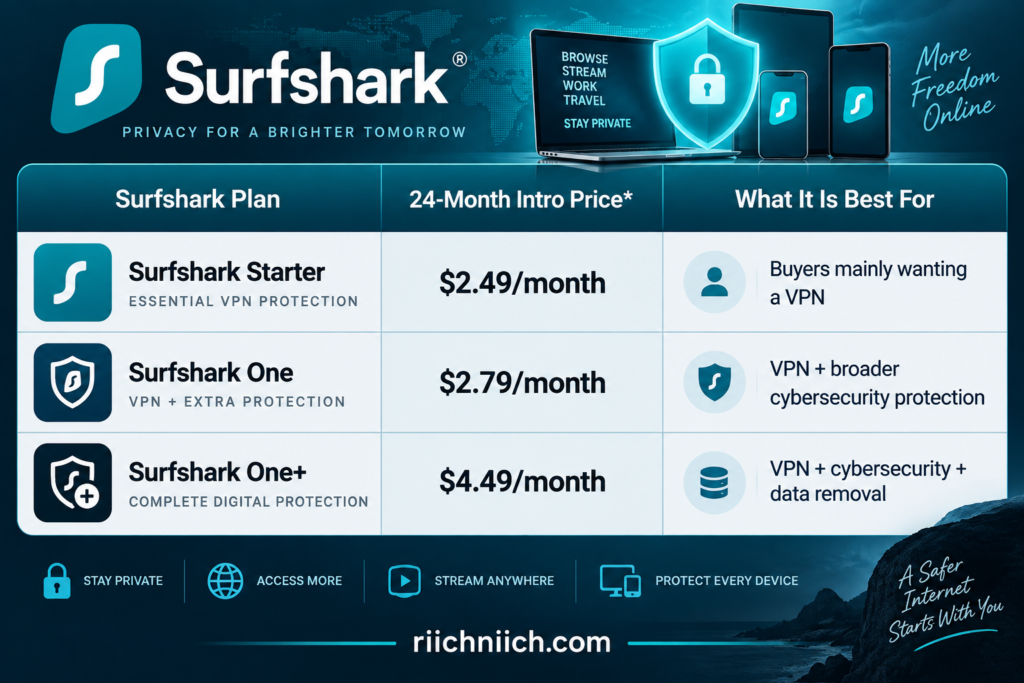
🚨 Current promotional pricing at the time of writing. Surfshark’s advertised offer includes three additional months, producing a 27-month introductory term. Taxes may apply. These are promotional introductory prices and can change.
Surfshark Starter is likely the most relevant plan if you’re shopping specifically for a VPN. It includes Surfshark VPN and Alternative ID, along with the core VPN capabilities we’ve discussed, including unlimited simultaneous connections.
Surfshark One expands the package with tools including Antivirus and Alert, while Surfshark One+ adds Incogni data removal. That makes the higher tiers more interesting if you want a broader cybersecurity package instead of paying solely for VPN protection.
ExpressVPN Plans and Pricing
ExpressVPN also offers three subscription tiers: Basic, Advanced, and Express Pro. The company offers monthly, 12-month, and two-year introductory options.
At the time of writing, its two-year introductory offers look like this:
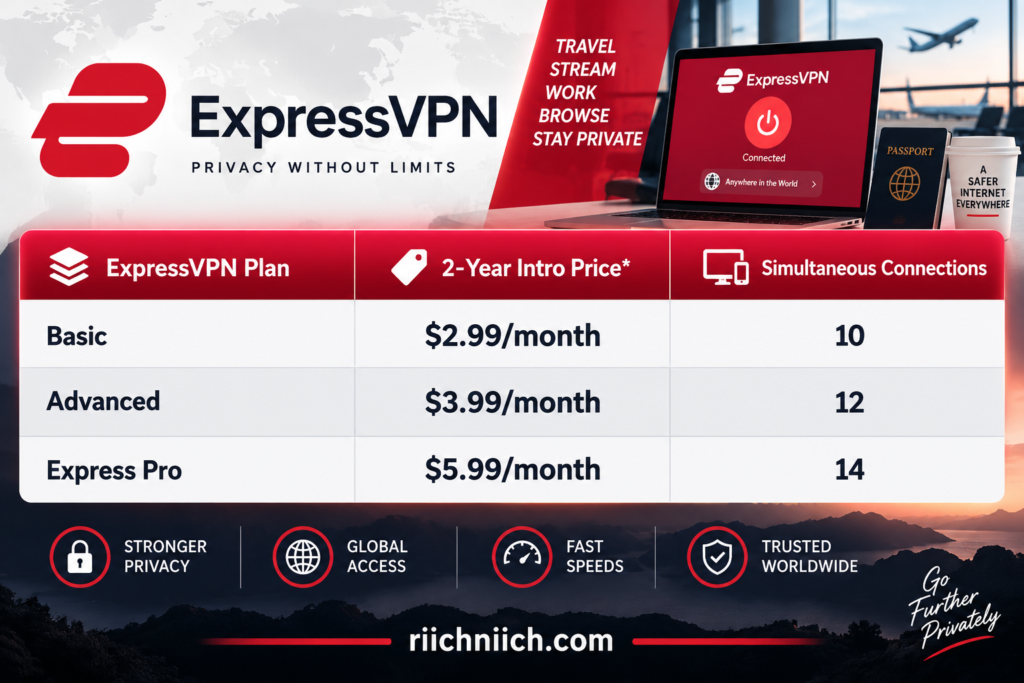
🚨 Current promotional pricing at the time of writing. ExpressVPN’s advertised two-year offers currently include four extra months, creating a 28-month introductory term. Sales tax may apply. Prices are promotional introductory prices and can change.
ExpressVPN Basic provides the core VPN, 10 simultaneous connections, Lite Protection, and limited ExpressMailGuard access. Advanced increases the device allowance to 12 and adds features such as ExpressKeys and Advanced Protection, with additional benefits available on eligible longer subscriptions. Express Pro increases the VPN limit to 14 simultaneous connections and provides the company’s largest collection of additional security and privacy tools.
Surfshark vs ExpressVPN Price Comparison
Looking strictly at the entry-level long-term offers, the surfshark vs expressvpn price comparison currently favors Surfshark.
Surfshark Starter’s advertised introductory offer works out to $2.49 per month for 27 months, compared with $2.99 per month for 28 months for ExpressVPN Basic. More importantly for households, Surfshark provides unlimited simultaneous connections after its trial, whereas ExpressVPN Basic supports 10.
That means Surfshark isn’t merely competing on a lower introductory price. You’re also getting the ability to connect more devices simultaneously.
However, there is an important catch with both services: don’t choose based only on the large monthly price displayed on the checkout page.
The heavily discounted long-term prices are introductory rates. ExpressVPN currently states that its $83.72 Basic introductory offer renews at $99.95 annually, Advanced at $119.95 annually, and Express Pro at $199.95 annually. Surfshark likewise states that introductory prices and renewal prices differ.
Always check the total amount due today and the renewal price before purchasing.
What About Shorter Subscriptions?
Long-term plans provide the lowest advertised monthly equivalent, but committing for two years isn’t right for everyone.
Surfshark’s published pricing currently lists Starter at $16.45 for one month, $3.39 per month on its 12-month plan, and $2.49 per month on its 24-month offer. The higher Surfshark One and One+ tiers cost more depending on the subscription length.
This creates an important buying lesson: the cheapest VPN depends on how long you intend to keep it.
If you only need a VPN temporarily—for example, during a trip—a monthly subscription may make more sense despite its higher monthly cost. If you expect to use a VPN every day, the discounted longer-term plans can dramatically reduce the effective monthly price.
Which Has the Better Pricing?
Based on current introductory offers, Surfshark wins the pricing round for long-term value.
The entry-level Surfshark Starter offer costs less than ExpressVPN Basic while also providing unlimited simultaneous connections after the trial. Surfshark One is also only slightly more expensive than Starter under the current long-term promotion, making it worth considering if you want the additional cybersecurity tools.
ExpressVPN’s pricing may still make sense if its particular features—such as Lightway, TrustedServer, or tools included in its higher subscription tiers—are more important to you than obtaining the lowest possible price.
For buyers comparing surfshark vs expressvpn, our pricing winner is therefore Surfshark. But a cheaper VPN isn’t automatically the better purchase. The more important question is how much useful protection and functionality you’re getting for every dollar you spend, which is exactly what we’ll examine in the value comparison next.
Surfshark vs ExpressVPN: Which Offers Better Value?
Value is about more than finding the cheapest VPN. A service offers good value when the price, device coverage, privacy features, security tools, and everyday usefulness justify what you pay.
For buyers comparing surfshark vs expressvpn, Surfshark currently offers the stronger overall value for most people, particularly if you want to protect several devices or an entire household. ExpressVPN remains competitive for shoppers who specifically value its Lightway protocol, TrustedServer technology, and premium VPN experience.
Why Surfshark Offers Stronger Value
Surfshark’s biggest value advantage is straightforward: one subscription supports unlimited simultaneous VPN connections. Surfshark says this applies across its Starter, One, and One+ plans, meaning you don’t need to purchase a higher VPN tier simply because your household has more devices.
That can make a substantial difference for a household with multiple:
- Smartphones
- Laptops
- Tablets
- Smart TVs
- Streaming devices
- Desktop computers
Instead of calculating which devices can stay connected, you can protect all compatible devices under the same subscription.
For buyers searching for the best VPN for multiple devices or a VPN for families, this is one of Surfshark’s strongest selling points.

You Get More Than Unlimited Connections
The value argument becomes stronger when you consider what comes with Surfshark’s core VPN.
Surfshark Starter includes features such as Dynamic MultiHop, Bypasser split tunneling, CleanWeb, Rotating IP, Alternative ID, a kill switch, and unlimited simultaneous connections. Surfshark’s current network also includes more than 4,500 servers across 100 countries.
That means you aren’t necessarily sacrificing advanced VPN functionality to obtain the lower-priced option.
Surfshark’s higher tiers also create an interesting upgrade path. Surfshark One adds tools including Antivirus and Alert, while One+ adds Incogni data removal.
For a buyer who already pays separately for some of those types of security services, a bundled plan could potentially provide better value—but only if you’ll actually use the additional tools.
Where ExpressVPN Can Still Be Worth Paying For
ExpressVPN shouldn’t be dismissed simply because Surfshark has the stronger price-to-features argument.
ExpressVPN’s value is more about its particular technology and user experience than maximizing the number of devices you can connect for the lowest price.
Its core VPN includes Lightway, ExpressVPN’s own VPN protocol, along with TrustedServer, its RAM-only server technology. ExpressVPN’s current tier structure supports 10 simultaneous connections with Basic, 12 with Advanced, and 14 with Pro.
For someone who only needs to protect a handful of devices, Surfshark’s unlimited connections may therefore provide little practical advantage. If you prefer ExpressVPN’s apps, Lightway, or other features, paying more could still be worthwhile.
That’s an important distinction in a Surfshark vs ExpressVPN value comparison: the service with more features isn’t automatically the better purchase if you won’t use those features.
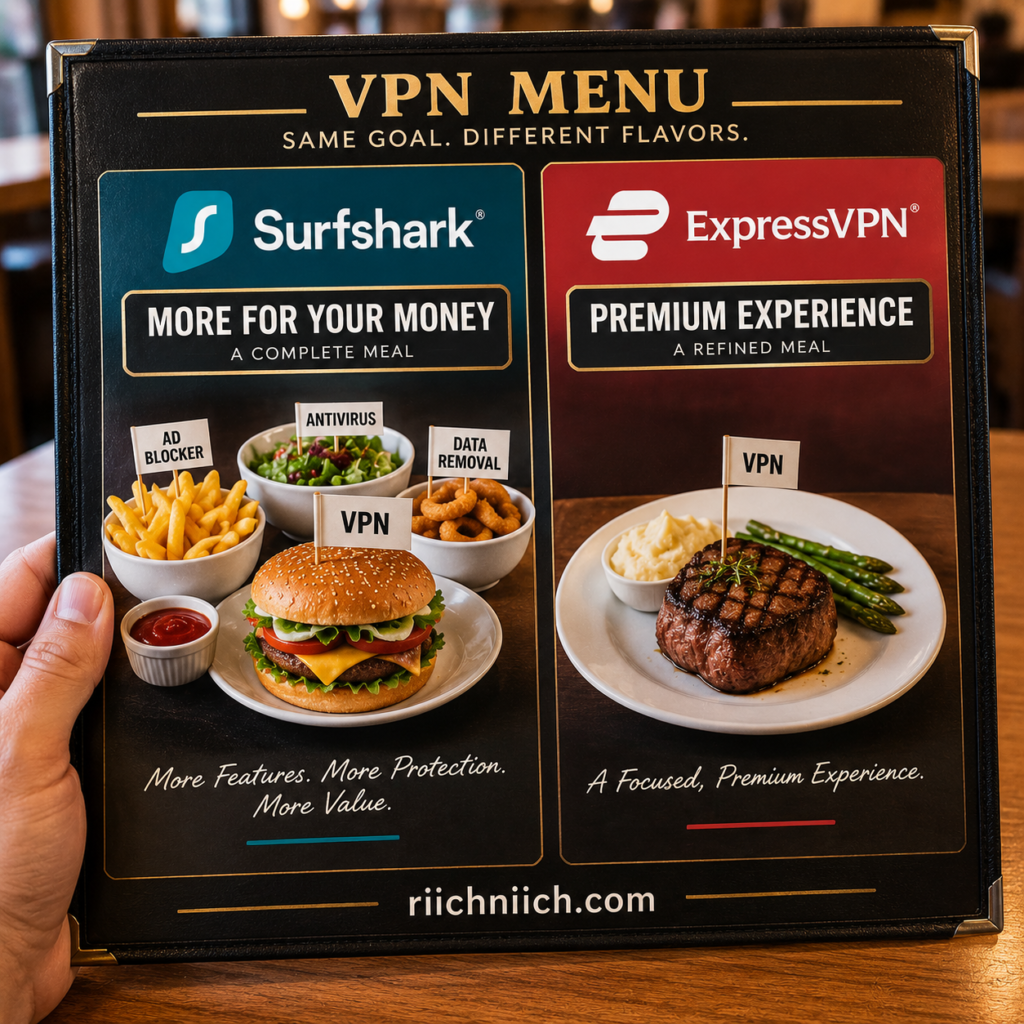
Surfshark One Makes the Value Comparison More Interesting
Surfshark One deserves special attention if you’re looking beyond a basic VPN.
It combines Surfshark VPN with additional tools including Antivirus, Alert, Search, and Alternative ID. Surfshark currently lists its 24-month introductory One offer at only a small premium over Starter, although promotional and renewal pricing can change.
That creates an interesting buying decision.
If you only want to encrypt your connection and hide your regular IP address, Surfshark Starter may be enough.
If you also want malware protection and monitoring for exposed personal information, Surfshark One may provide more value.
And if you specifically want automated personal-data removal, Surfshark One+ adds Incogni.
Don’t automatically buy the most expensive package. The best value comes from choosing the lowest-priced tier that contains the features you will realistically use.
Think About Cost Per Device
There’s another useful way to evaluate surfshark vs expressvpn: don’t look only at the subscription price—consider how many devices you need to protect.
Imagine a household with two adults and several phones, laptops, tablets, TVs, and other compatible devices. A 10-device allowance might be perfectly adequate today but could eventually become restrictive as more devices are added.
Surfshark eliminates that calculation because its VPN allows unlimited simultaneous connections. ExpressVPN instead increases its allowance as you move from Basic to Advanced and Pro.
For a single user with three devices, this difference may barely matter.
For a large household with 15 or 20 compatible devices, it can become one of the most important differences between the two VPNs.
Value Winner: Surfshark
For most buyers comparing surfshark vs expressvpn, Surfshark wins on overall value.
Its combination of competitive long-term introductory pricing, unlimited simultaneous VPN connections, and a large collection of included privacy features makes it particularly compelling for families, multi-device households, and value-conscious shoppers. Its higher tiers also give buyers the option to add antivirus, data-leak monitoring, and data-removal capabilities if those tools are useful to them.
ExpressVPN may still be worth the additional cost if Lightway, TrustedServer, its apps, or its particular feature set better matches what you want from a VPN.
But if your buying decision comes down to how much VPN functionality and device coverage you receive for your money, Surfshark has the advantage.
Winner for Value: Surfshark
Price and value aren’t everything, though. A VPN still needs to provide the tools you’ll actually depend on. Next, we’ll compare the features included with Surfshark and ExpressVPN to see where each service has the advantage.
Surfshark vs ExpressVPN: Features
Features can make the difference between a VPN that simply changes your IP address and one that becomes a useful everyday privacy tool. In our surfshark vs expressvpn comparison, both services provide the essential VPN protections you would expect, but Surfshark currently offers more privacy customization, while ExpressVPN distinguishes itself with technologies such as Lightway and TrustedServer.
For buyers, the better feature set depends on whether you prefer more controls and customization or a more streamlined collection of proprietary VPN technologies.
Surfshark vs ExpressVPN Feature Comparison
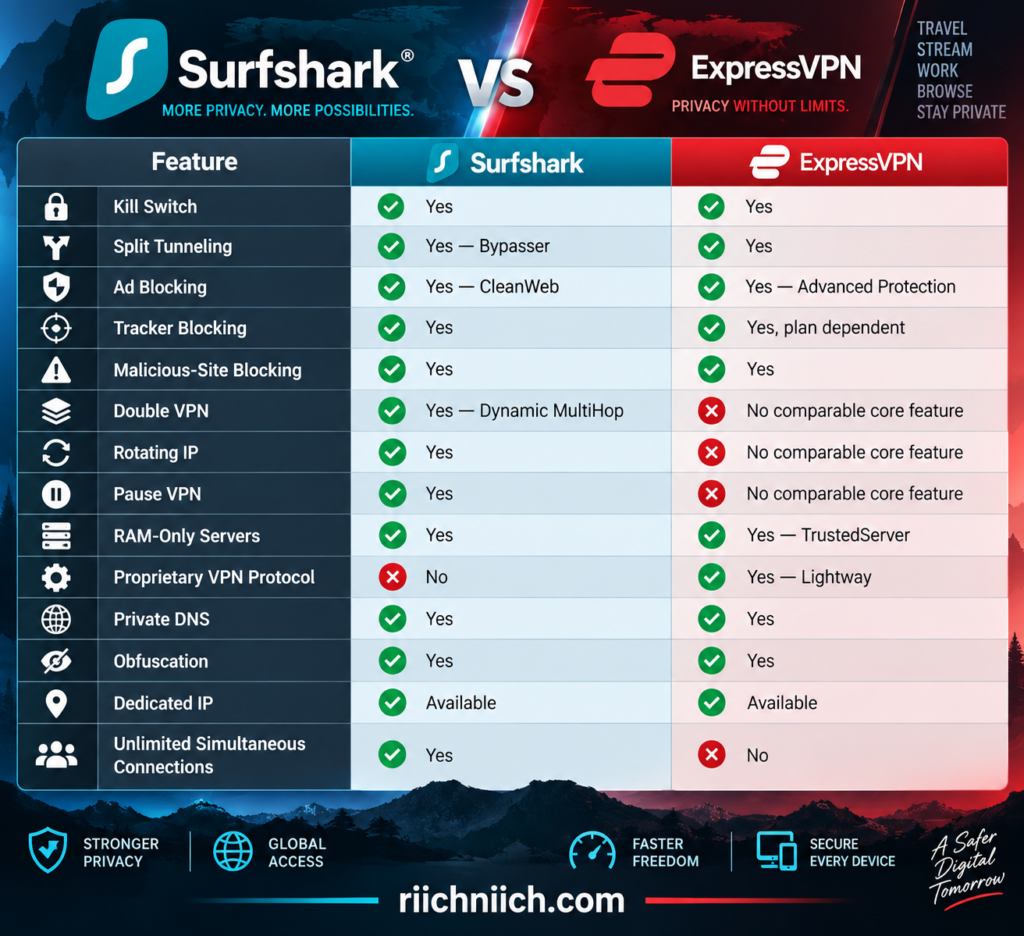
Surfshark’s current feature set includes CleanWeb, Bypasser, Kill Switch, Dynamic MultiHop, IP Rotator, Pause VPN and several other controls. ExpressVPN offers features including Lightway, TrustedServer, split tunneling, an Internet Kill Switch, Advanced Protection, private DNS and Dedicated IP. Feature availability can vary by device, operating system and subscription tier.
Surfshark Bypasser vs ExpressVPN Split Tunneling
Both VPNs offer split tunneling, although Surfshark calls its feature Bypasser.
Split tunneling lets you decide which internet traffic uses the VPN and which traffic connects normally. For example, you could keep your browser protected by the VPN while allowing another application to use your regular connection.
Surfshark’s Bypasser can exclude selected apps or websites from VPN protection on supported platforms. Surfshark also offers Reverse Bypasser, which lets you do the opposite—choose specific apps or websites that should use the VPN while leaving other traffic outside the VPN tunnel.
ExpressVPN similarly allows selected apps or traffic to use or bypass the VPN on supported platforms, and its current implementation includes regular and inverse split-tunneling options.
This is a useful feature for buyers who want greater control instead of routing absolutely everything through their VPN.
Surfshark Dynamic MultiHop
One of Surfshark’s more distinctive privacy features is Dynamic MultiHop.
Instead of sending your internet traffic through one VPN server, MultiHop routes the connection through two VPN locations. Surfshark’s Dynamic MultiHop lets you select the entry and exit locations from its available servers.
This gives privacy-focused users another layer of routing between their device and the internet.
The tradeoff is that routing traffic through multiple servers can potentially reduce performance compared with using a nearby single VPN server. For everyday browsing, most people won’t need MultiHop running constantly.
But if you’re comparing surfshark vs expressvpn specifically for advanced privacy controls, Dynamic MultiHop gives Surfshark an advantage because ExpressVPN doesn’t offer a directly comparable double-VPN feature in its standard feature set.
Surfshark Rotating IP
Surfshark also offers Rotating IP, another feature that separates it from a basic VPN.
When enabled, Surfshark periodically changes the IP address assigned to your connection without disconnecting you from the selected VPN location. Surfshark currently says its IP Rotator changes the user’s IP every five to ten minutes.
Your VPN location stays the same, but the IP address changes periodically.
That can make your browsing activity more difficult to associate with one VPN IP over a longer session.
ExpressVPN Lightway
ExpressVPN’s most important proprietary feature is Lightway.
Lightway is ExpressVPN’s own VPN protocol and is designed to provide fast connections, reliability and efficient switching between networks. ExpressVPN has also reimplemented Lightway in Rust and incorporated post-quantum protection into the protocol.
This becomes particularly useful on mobile devices.
For example, your phone might move from your home Wi-Fi network to cellular data as you leave the house. Lightway was designed to handle network changes quickly rather than requiring the VPN connection to start over every time the underlying network changes.
For buyers looking for a VPN that they can simply turn on and leave running, this is one of ExpressVPN’s strongest features.
ExpressVPN TrustedServer
ExpressVPN’s other major proprietary technology is TrustedServer.
TrustedServer runs ExpressVPN’s VPN servers using volatile RAM rather than writing the operating system and applications to traditional hard drives. ExpressVPN says information on the server is wiped whenever it is powered off and back on, and its software stack is reloaded at startup.
The goal is to reduce the possibility of data or unauthorized modifications persisting on a VPN server.
ExpressVPN also says TrustedServer has undergone independent audits, which gives buyers something beyond the company’s own marketing claims to evaluate.
CleanWeb vs Advanced Protection
Both VPNs have moved beyond basic encryption by adding tools designed to reduce unwanted online content and tracking.
Surfshark’s CleanWeb can block ads, trackers, malware and phishing attempts. Its browser-extension version also offers additional capabilities such as data-breach and malware alerts for websites.
ExpressVPN offers Advanced Protection, which includes malicious-site blocking, ad blocking and adult-site blocking, while tracker blocking is currently restricted to its Advanced and Express Pro plans. Availability also varies by platform.
Neither feature should replace good cybersecurity habits or dedicated security software where needed, but both can add another layer of protection to everyday browsing.
Kill Switch Protection
Both services include a kill switch, which is one of the most important features to look for when buying a VPN.
If your VPN connection unexpectedly drops, a kill switch can stop internet traffic from continuing over your normal unprotected connection.
Surfshark’s Kill Switch is available across Android, iOS, macOS, Windows and Linux. ExpressVPN similarly provides an Internet Kill Switch on supported platforms.
Which VPN Has Better Features?
For the overall surfshark vs expressvpn feature comparison, Surfshark has the advantage if you want the largest selection of privacy controls and customization options.
Dynamic MultiHop, Rotating IP, Bypasser, Reverse Bypasser, Pause VPN, CleanWeb and unlimited simultaneous connections create a particularly feature-rich package.
ExpressVPN takes a somewhat different approach. Instead of competing feature-for-feature, some of its biggest strengths are technologies built into the underlying VPN experience—particularly Lightway and TrustedServer—along with split tunneling, Advanced Protection and its Internet Kill Switch.
For buyers who enjoy adjusting privacy settings and want more advanced VPN tools for their money, Surfshark is more compelling.
For buyers who value proprietary VPN technology and a streamlined experience, ExpressVPN remains a strong choice.
Winner for Features: Surfshark
The feature list gives Surfshark an early advantage, but features mean much less if turning them on makes your connection noticeably slow. Next, we’ll compare Surfshark vs ExpressVPN speed and performance to see which VPN handles everyday internet use better.
Surfshark vs ExpressVPN: Speed and Performance
Speed matters when choosing a VPN because every VPN adds some processing and routing between your device and the internet. The best services minimize that slowdown enough that everyday browsing, streaming, gaming, video calls, and downloads still feel responsive.
For buyers comparing surfshark vs expressvpn, both services are built for high-speed connections. Surfshark combines modern protocols such as WireGuard with a network of 4,500+ servers, while ExpressVPN emphasizes its proprietary Lightway protocol for fast and stable connections.
However, there is an important point before declaring a speed winner: VPN speeds are not fixed. Your results can change based on your internet connection, physical distance from the VPN server, server congestion, protocol, device, and even the time of day.
Surfshark Speed and Performance
Surfshark is designed around high-capacity server infrastructure and lightweight VPN protocols.
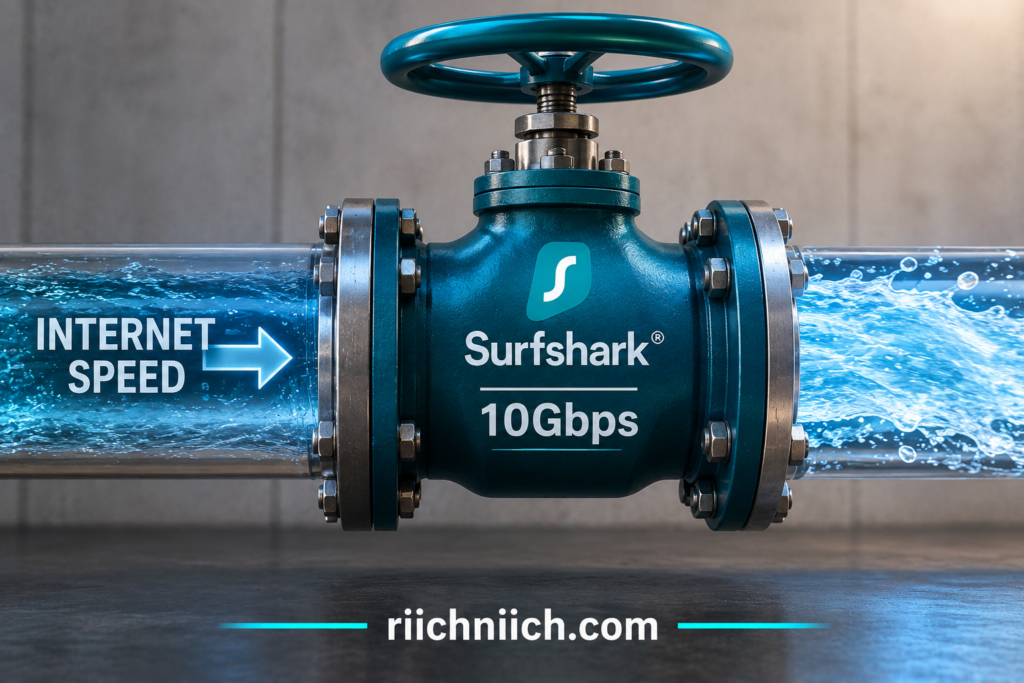
Surfshark currently operates 4,500+ servers across 100 countries, and the company says its servers have at least 10Gbps ports, with higher-capacity infrastructure being introduced in high-traffic locations.
That matters because server capacity can help reduce bottlenecks when many customers are connected at once.
Surfshark supports WireGuard, OpenVPN, and IKEv2, depending on the platform. WireGuard is particularly important for buyers concerned about performance because it is designed for high performance with relatively low overhead. Surfshark has also introduced its proprietary Dausos protocol on supported platforms.
ExpressVPN Speed and Performance
ExpressVPN approaches performance differently, with Lightway playing a major role.
Lightway is ExpressVPN’s proprietary VPN protocol. It was designed to provide fast connection establishment, stable performance, and efficient transitions when a device changes networks. ExpressVPN describes Lightway as a relatively compact protocol and has made its core open source.
That last point can matter particularly on mobile devices.
Imagine leaving your house while streaming audio on your phone. Your connection changes from Wi-Fi to cellular data. A VPN that handles those transitions efficiently can provide a smoother experience than one that repeatedly struggles to reconnect.
ExpressVPN also continues to emphasize high-capacity server infrastructure alongside Lightway. Its current plans provide VPN locations across a large international network.

Which Is Faster for Everyday Browsing?
For normal web browsing, both Surfshark and ExpressVPN should be capable of providing more than enough performance for most users, assuming you connect to a nearby, uncongested server.
Surfshark’s own published testing demonstrates why server distance matters. In one set of tests, its average download speed declined as the VPN server moved farther from the test location—from 186.40 Mbps on a local server to 160.08 Mbps on an Australian server, compared with a 201.89 Mbps connection without the VPN. Those are Surfshark’s own tests rather than our independent measurements, so they should be treated as illustrative rather than a guarantee of the speeds you will receive.
This is why shoppers shouldn’t obsess over a single VPN speed-test result.
The better question is whether the VPN can maintain enough of your existing connection for what you actually do online.
Which Is Faster for Streaming?
Streaming video requires consistent performance more than a spectacular speed-test number.
For reference, Netflix recommends approximately 15 Mbps for 4K video, meaning you don’t need a 500 Mbps VPN connection simply to watch one 4K stream.
Both Surfshark and ExpressVPN have infrastructure capable of handling high-bandwidth activities, but your actual streaming performance will depend heavily on the server you select and the distance between you and that server.
If you’re buying a VPN primarily for streaming, test several nearby locations during the refund period rather than assuming the server with the most impressive advertised capacity will automatically perform best on your home internet connection.
Which Is Better for Gaming?
Gaming introduces another performance metric that is arguably more important than download speed: latency.
A VPN connection can increase latency because your traffic has to travel through an additional server before reaching its destination. Generally, connecting to a nearby VPN server should produce better latency than routing your connection halfway around the world.
For gamers comparing surfshark vs expressvpn, choosing the right server may therefore make a bigger difference than simply choosing one VPN brand over the other.
Surfshark gives buyers access to WireGuard, which prioritizes performance and low overhead, while ExpressVPN’s Lightway is similarly designed around speed and efficient connections.
Neither VPN can magically reduce the physical distance between you and a game server. If low ping is your priority, start with the closest appropriate VPN location and compare your latency with and without the VPN enabled.
Does Using Extra Privacy Features Affect Speed?
Potentially, yes.
Surfshark’s Dynamic MultiHop, for example, routes traffic through two VPN servers instead of one. That provides an additional routing layer but also creates a longer path for your internet traffic. Surfshark itself notes that VPN performance depends on factors including server distance and the route your connection takes.
This creates a simple tradeoff:
Single nearby server: generally better for maximum performance.
MultiHop or distant server: potentially more useful for certain privacy or location needs, but may introduce additional latency or speed loss.
Most everyday users don’t need MultiHop enabled constantly. If your priority is 4K streaming, gaming, large downloads, or video conferencing, a nearby single server using a fast protocol will usually make more sense.
How to Get Better VPN Speeds
Whichever service you choose, there are several practical ways to improve VPN performance.
Start with the nearest suitable VPN server. Surfshark specifically recommends choosing a server close to your actual location when speed is the priority. You can also experiment with protocols—Surfshark recommends trying WireGuard when troubleshooting slow connections on Windows.
If performance suddenly becomes poor, try another server in the same region. Congestion can affect one server while another nearby server performs normally.
You should also compare your internet speed with the VPN disconnected and connected. That gives you a meaningful baseline rather than judging the VPN from the connected number alone.
Which VPN Wins for Speed and Performance?
This is one category where we would not declare an absolute winner based solely on advertised specifications.
Both services have strong performance technology. Surfshark combines WireGuard with a large network and high-capacity server infrastructure, while ExpressVPN has invested heavily in Lightway and its own server infrastructure.
For buyers researching surfshark vs expressvpn, Surfshark gets a slight edge for raw performance potential, particularly because of its high-capacity infrastructure and strong WireGuard performance. ExpressVPN remains extremely competitive, especially if you value Lightway’s quick connections and ability to handle changing networks smoothly.
Winner for Speed and Performance: Surfshark — by a narrow margin
Don’t choose either service expecting identical results on every connection. Your ISP, location, device, protocol, server selection, and network conditions can completely change the outcome.
The good news is that both services offer money-back guarantees for eligible new purchases, giving you an opportunity to test performance on your own internet connection and devices rather than relying entirely on somebody else’s benchmark.
And speed is only part of the buying decision. A VPN can be extremely fast and still be a poor choice if its security isn’t strong enough. Next, we’ll compare Surfshark vs ExpressVPN security and examine how each service protects your connection.
Surfshark vs ExpressVPN: Security
Security is one of the most important factors when choosing a VPN. A low price or fast connection means little if the service cannot properly protect your internet traffic.
For buyers comparing surfshark vs expressvpn, the good news is that both services have strong security foundations. Surfshark uses modern encryption, secure VPN protocols, RAM-only servers, a kill switch, leak protection, and independently audited infrastructure. ExpressVPN counters with AES-256 encryption, its open-source Lightway protocol, TrustedServer RAM-only technology, an Internet Kill Switch, and an extensive history of independent security audits.
The difference is less about whether either VPN is secure enough for normal use and more about how each company builds and verifies that security.
Surfshark vs ExpressVPN Security Comparison
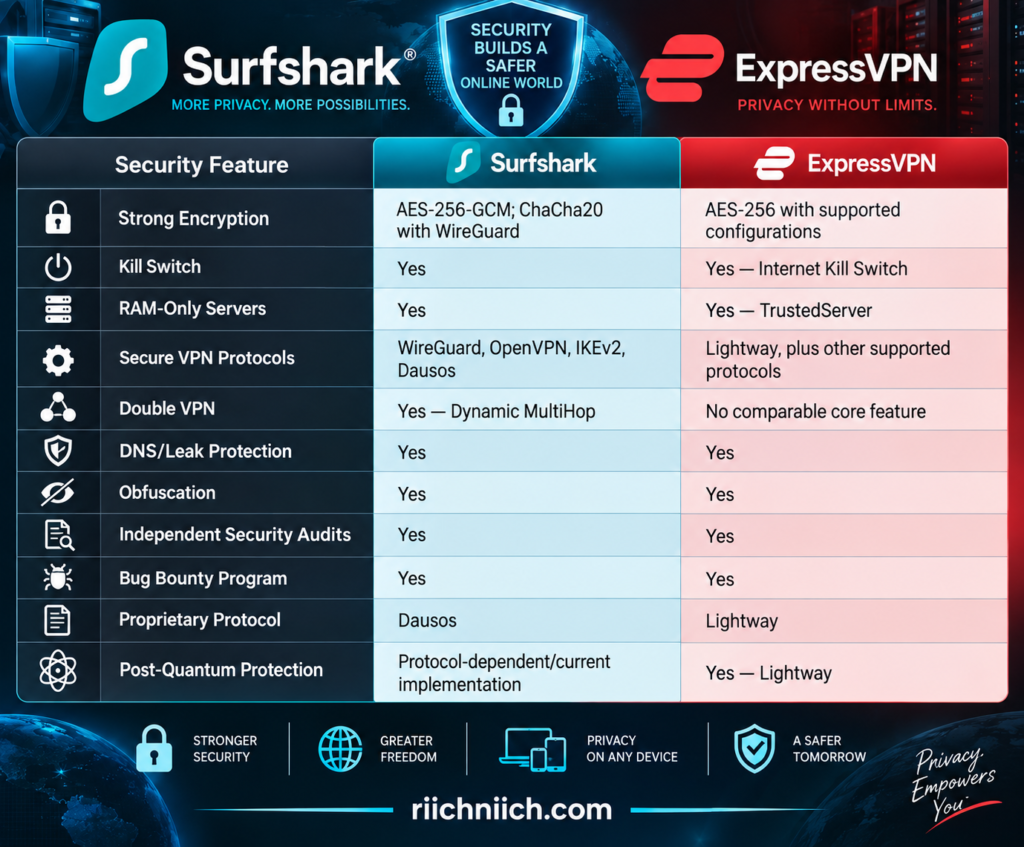
Surfshark says it uses AES-256-GCM, ChaCha20 for WireGuard, and AEGIS-256X2 for its Dausos protocol. ExpressVPN uses AES-256 encryption and has incorporated post-quantum protection into Lightway.
Surfshark Encryption
Surfshark uses modern encryption standards to protect data traveling between your device and its VPN servers.
Its current security architecture includes AES-256-GCM encryption, while WireGuard connections use ChaCha20. Surfshark’s newer Dausos protocol uses AEGIS-256X2.
In practical terms, encryption transforms the information traveling through your VPN connection into data that cannot simply be read by someone intercepting the traffic.
That becomes particularly important when you’re using an unfamiliar network, such as Wi-Fi at an airport, hotel, coffee shop, or convention center.
A VPN does not make you anonymous or protect you from every cybersecurity threat, but strong encryption helps protect the connection between your device and the VPN server.
ExpressVPN Encryption
ExpressVPN also uses AES-256 encryption as part of its VPN security architecture. Its Lightway protocol uses modern cryptography and has been designed with a comparatively streamlined codebase intended to make security review and maintenance easier.
ExpressVPN has also moved Lightway to Rust and incorporated post-quantum protection.
Post-quantum protection is designed to address a longer-term security concern: attackers could theoretically collect encrypted traffic today and attempt to decrypt it later if sufficiently capable quantum computers become available.
For buyers evaluating surfshark vs expressvpn primarily from a security perspective, ExpressVPN’s continued development of Lightway is one of its strongest arguments.
RAM-Only Servers
This is one area where both VPNs take a similar security approach.
Surfshark says its server network is 100% RAM-only. Because RAM requires power to retain information, information held in memory disappears when a server is powered down or rebooted. Surfshark also loads fresh configurations after reboot.
ExpressVPN uses its own RAM-only architecture called TrustedServer.
TrustedServer is designed so VPN servers do not write their operating data to traditional hard drives. ExpressVPN says the entire software stack is reinstalled when a server starts, helping maintain consistent server configurations while wiping information stored in RAM during a reboot.
This is a meaningful security feature on both services.
Kill Switch Protection
A kill switch protects you when the VPN connection unexpectedly fails.
Without one, your device could fall back to its normal internet connection, potentially exposing your regular IP address or sending traffic outside the encrypted VPN tunnel.
Both Surfshark and ExpressVPN provide kill-switch functionality.
ExpressVPN’s Internet Kill Switch covers IPv4, IPv6, and DNS requests on supported configurations and blocks traffic until a secure tunnel is restored.
For privacy-conscious buyers, a kill switch should be considered an essential VPN feature rather than a bonus.
Surfshark Dynamic MultiHop Adds Another Security Option
Surfshark has another advantage for users who want greater control over how their traffic is routed: Dynamic MultiHop.
Instead of routing your traffic through one VPN server, MultiHop sends it through two VPN servers before it reaches its destination. Surfshark allows users to customize the entry and exit locations.
That doesn’t mean everyone should use MultiHop all the time. Routing traffic through two servers can add latency and may reduce performance.
But for buyers specifically looking for additional routing options, it gives Surfshark a security feature that ExpressVPN does not directly replicate in its standard VPN feature set.
Independent Security Audits Matter
VPN security involves something you cannot easily see.
You can see whether the application connects. You can run a speed test. But you cannot personally inspect everything happening inside a VPN provider’s server infrastructure.
That makes independent security audits particularly valuable.
Surfshark reports that Deloitte audits in 2023 and 2025 verified adherence to its no-logs policy, and its infrastructure has also undergone security assessment by Cure53.
ExpressVPN has an especially extensive published audit history covering areas such as Lightway, TrustedServer, its applications, browser extensions, and privacy commitments. Its audit history includes work by organizations such as Cure53, KPMG, PwC, Praetorian, and F-Secure.
ExpressVPN’s Rust implementation of Lightway, for example, underwent separate assessments by Cure53 and Praetorian in 2024. The identified issues were subsequently addressed and retested.
This doesn’t mean an audit guarantees that a VPN will never experience a vulnerability. Audits represent an assessment of particular systems at a particular point in time. However, repeated independent testing gives buyers more evidence with which to evaluate a VPN provider’s security claims.
Which VPN Is More Secure?
For everyday users, both Surfshark and ExpressVPN provide a strong security package.
Surfshark combines modern encryption, RAM-only servers, secure protocols, a kill switch, Dynamic MultiHop, independent audits, penetration testing, and a bug-bounty program.
ExpressVPN combines AES-256 encryption, TrustedServer, an Internet Kill Switch, Lightway, post-quantum protection, independent audits, internal penetration testing, and a bug-bounty program.
But if security is the single most important factor in your buying decision, we would give ExpressVPN a narrow advantage here. Its combination of TrustedServer, the open-source Lightway protocol, post-quantum protection, and particularly extensive history of published third-party security assessments gives buyers a strong body of external verification to examine.
That does not mean Surfshark is insecure. Far from it. Surfshark has a strong modern security architecture of its own, and its Dynamic MultiHop feature may actually appeal more to buyers who want additional routing control.
For our overall surfshark vs expressvpn comparison:
Winner for Security: ExpressVPN — by a narrow margin
Security protects the connection itself, but there’s another question that matters just as much: what information does the VPN provider collect about you? That’s why our next comparison—Surfshark vs ExpressVPN: Privacy—deserves its own section.
Surfshark vs ExpressVPN: Privacy
Privacy is one of the main reasons to buy a VPN in the first place. A VPN can encrypt your connection and hide your regular IP address from the websites you visit, but you’re also placing some trust in the VPN provider itself. That makes logging policies, server design, jurisdiction, independent audits, and transparency important parts of the buying decision.
For shoppers comparing surfshark vs expressvpn, both services have strong privacy credentials. Both maintain no-logs policies for online activity, use RAM-only server infrastructure, and have subjected important privacy claims to independent assessments. The differences become clearer when you look closely at what information each provider handles and how those claims have been tested in practice.
Surfshark vs ExpressVPN Privacy Comparison
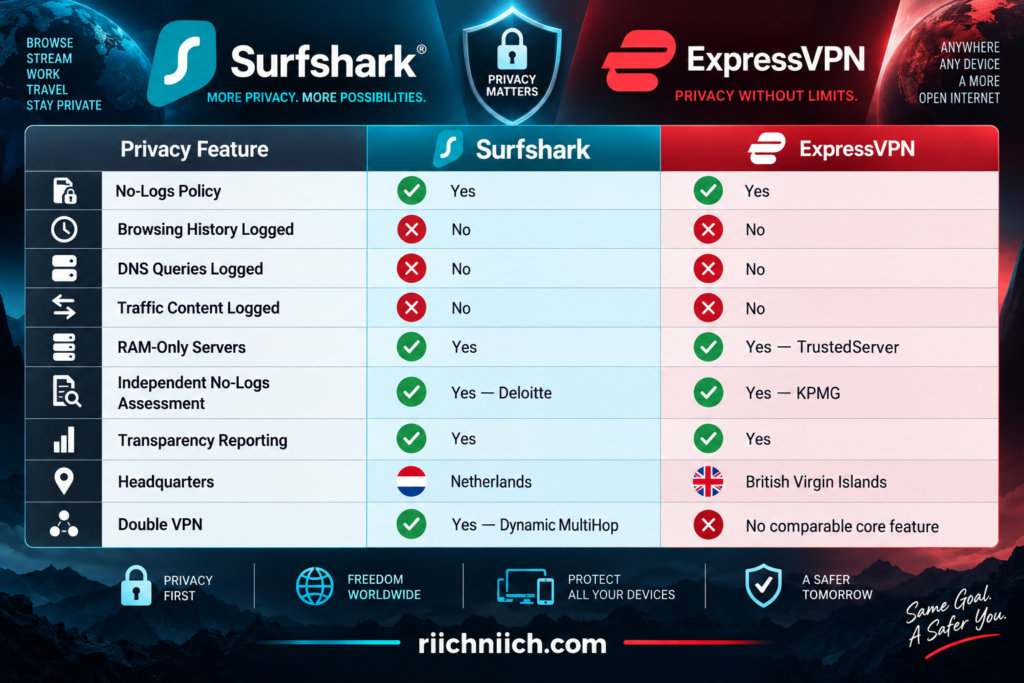
Both providers therefore satisfy many of the requirements buyers should look for when searching for the best VPN for privacy.
Surfshark’s No-Logs Policy
Surfshark says it does not collect information about what you do online, including visited IP addresses, browsing history, session information, bandwidth usage, connection timestamps, or network traffic.
There is an important detail worth explaining rather than simply calling Surfshark “no logs.”
Surfshark’s current privacy policy says its servers temporarily maintain certain connection information—including a user ID and/or IP address and VPN-server connection timestamps—to make the VPN function. Surfshark says this information is automatically deleted within 15 minutes after the VPN session ends and that it does not store information about the websites you visit.
That distinction is important for buyers. “No logs” does not necessarily mean that absolutely no technical information ever exists anywhere while you’re connected. What matters is what information is collected, why it is needed, how long it remains, and whether your browsing activity is retained.
Surfshark’s no-logs practices were independently assessed by Deloitte in 2023 and 2025, providing external verification rather than requiring customers to rely solely on Surfshark’s own claims.
ExpressVPN’s No-Logs Policy
ExpressVPN similarly states that it does not collect logs of users’ online activity, including browsing history, traffic destinations, data content, or DNS queries. It also says it doesn’t store connection logs containing your source IP address, assigned VPN IP address, connection timestamp, or session duration.
ExpressVPN does collect limited operational information.
For example, its current privacy policy says it can collect whether a VPN connection was successfully established on a particular day, the VPN location used, and the country/ISP from which the connection originated—but not the specific connection time or source IP address. ExpressVPN says this information is used for technical support and network troubleshooting.
Again, this is why reading beyond the words “no logs” matters.
For privacy-conscious buyers evaluating surfshark vs expressvpn, the important question isn’t whether a VPN processes any information. It is whether the provider retains information capable of reconstructing what you did online and tying that activity back to you.
ExpressVPN’s privacy claims and TrustedServer controls have undergone repeated independent assessment by KPMG. Its 2025 assessment found no exceptions in controls tested regarding the prevention of user-activity logging.
RAM-Only Servers Strengthen Privacy
Both companies have another important privacy advantage: RAM-only server infrastructure.
Surfshark says its VPN network operates entirely on RAM-only servers. Because RAM requires power to retain information, data in memory disappears when the server is powered down or rebooted.
ExpressVPN’s equivalent is TrustedServer. Its servers run on RAM instead of traditional hard drives, and ExpressVPN says the server’s information is wiped on reboot while the software stack is reinstalled at startup.
RAM-only infrastructure doesn’t magically guarantee privacy. However, it reduces the risk associated with persistent data remaining on traditional server hard drives.
For buyers, surfshark vs expressvpn is effectively a tie in this particular category because both companies have adopted RAM-only architectures.
Does VPN Jurisdiction Matter?
Surfshark is based in the Netherlands, while ExpressVPN operates from the British Virgin Islands (BVI).
Some VPN buyers place considerable importance on jurisdiction because it determines the legal framework under which a VPN company operates.
ExpressVPN’s BVI jurisdiction may therefore appeal to highly privacy-conscious buyers. Surfshark, meanwhile, states that its Netherlands jurisdiction does not require it to retain or report users’ browsing logs.
But jurisdiction should not be evaluated in isolation.
A VPN headquartered in a privacy-friendly location could still collect excessive information. Conversely, a company facing a valid legal request cannot provide browsing logs it genuinely never retained.
That makes technical architecture and demonstrated behavior at least as important as the address printed on the company’s registration documents.
Surfshark’s 2026 Warrant Provides a Real-World Privacy Test
There is actually a useful real-world example for Surfshark.
In April 2026, Surfshark reported receiving a legally binding warrant from the Amsterdam District Court concerning a criminal investigation. Surfshark says it was required to disclose the information it possessed about the specific account.
According to Surfshark’s transparency report, the available information consisted of confirmation that the account existed and payment-related information. Surfshark reported that it could not provide information about the user’s online activity because it did not collect or store that information.
This is valuable information for prospective buyers because it moves the privacy discussion beyond marketing claims.
A no-logs policy becomes much more meaningful when a real legal request demonstrates what information the provider actually has available to disclose.
ExpressVPN Also Publishes Real-World Transparency Data
ExpressVPN publishes transparency reports covering legal and user-data requests.
Its report covering January through June 2026 says the company received 137 government, law-enforcement, and civil requests and three warrants. ExpressVPN reported that none resulted in the disclosure of VPN activity or connection logs.
This provides another useful form of evidence.
Privacy policies tell you what a company says it does. Independent audits test specific claims and systems. Transparency reports can show what happens when those policies encounter real legal requests.
ExpressVPN performs strongly across all three.
A VPN Does Not Make You Anonymous
This is important to understand before buying either service.
Surfshark and ExpressVPN can hide your normal public IP address from websites and encrypt traffic between your device and the VPN server, but a VPN does not automatically make you anonymous online.
If you sign into Google, Facebook, Amazon, your bank, or another personal account, that service can still know you’re logged in. Cookies, browser fingerprinting, account information, and other tracking techniques can also identify or recognize users independently of their IP address.
Think of a VPN as an important privacy layer, not an invisibility cloak.
Which VPN Is Better for Privacy?
For buyers comparing surfshark vs expressvpn, this is extremely close.
Surfshark has an independently assessed no-logs policy, RAM-only servers, Dynamic MultiHop, transparency reporting, and a particularly useful 2026 real-world example showing that a legal warrant did not produce users’ online-activity records.
ExpressVPN has an independently assessed no-logs policy, TrustedServer RAM-only infrastructure, repeated KPMG assessments, a substantial history of independent scrutiny, and transparency reports showing that recent legal requests did not result in VPN activity or connection logs being disclosed.
For most people, either service provides a strong privacy foundation.
However, if privacy is your highest priority, we would give ExpressVPN a very narrow advantage because of the combination of its BVI jurisdiction, TrustedServer architecture, clearly defined no-logs policy, repeated independent assessments, and long-running transparency efforts.
Surfshark remains extremely competitive—and buyers who specifically want Dynamic MultiHop or its broader collection of privacy tools may actually prefer it.
Winner for Privacy: ExpressVPN — by a narrow margin
The privacy comparison is therefore much closer than the pricing or feature comparisons. Next, we’ll examine another important technical difference in Surfshark vs ExpressVPN: VPN Protocols, including WireGuard, OpenVPN, Lightway, and the protocols each service uses to create the encrypted VPN tunnel.
Surfshark vs ExpressVPN: VPN Protocols
A VPN protocol determines how your device creates and maintains the encrypted connection to a VPN server. It can affect speed, security, connection stability, battery use, and how well the VPN works on restrictive or unstable networks.
For buyers comparing surfshark vs expressvpn, both services now provide an impressive selection of modern protocols. Surfshark offers Dausos, WireGuard, OpenVPN, and IKEv2, with availability varying by platform. ExpressVPN offers its proprietary Lightway, plus its own privacy-enhanced implementation of WireGuard, OpenVPN, and IKEv2 on supported devices.
That makes this comparison much more interesting than simply asking whether you should choose WireGuard or Lightway.
Surfshark vs ExpressVPN Protocol Comparison
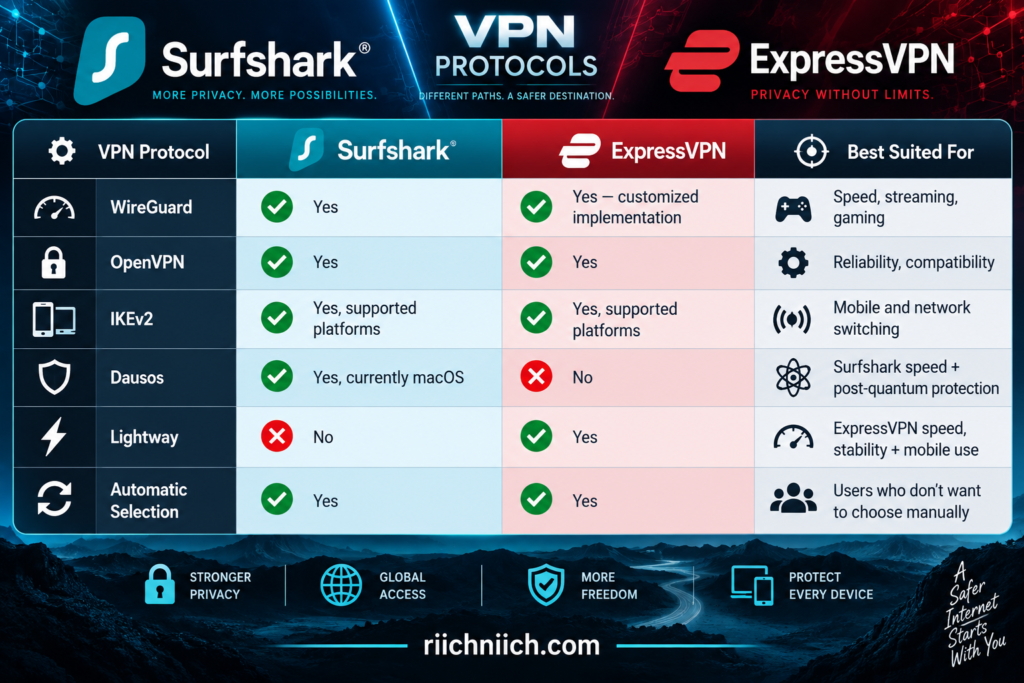
The important takeaway is that you don’t necessarily need to understand every protocol to use either VPN. Both applications can automatically choose a suitable protocol, while more advanced users can manually change protocols when needed.
Surfshark WireGuard
For many Surfshark users, WireGuard is likely to be the protocol you’ll use most often.
WireGuard is a modern, lightweight VPN protocol designed to provide strong security without the heavier overhead associated with some older protocols. Surfshark recommends WireGuard as a strong general-purpose option and says it is typically its fastest choice outside supported Dausos configurations.
That makes WireGuard particularly well suited for:
- Streaming
- Gaming
- Video calls
- Large downloads
- Everyday browsing
- Mobile VPN use
Surfshark has also added post-quantum protection to WireGuard connections through its apps, although Surfshark notes that this protection does not currently apply to manual WireGuard configurations.
For most buyers who don’t want to think about protocols constantly, WireGuard provides a strong combination of speed, security, and efficiency.
Surfshark Dausos
Surfshark has also entered the proprietary-protocol competition with Dausos.
Introduced in 2026, Dausos was designed specifically for consumer VPN use rather than adapting technology originally developed for other networking environments. Surfshark says Dausos gives each user connection a dedicated data tunnel, separating that connection from other users’ traffic while aiming to improve speed and efficiency.
Dausos also incorporates post-quantum cryptography and AEGIS-256X2 encryption.
There is currently one significant limitation for buyers: Dausos is only available through Surfshark’s macOS App Store application, although Surfshark says availability on additional platforms is planned.
That means Dausos is promising, but it shouldn’t be the sole reason most Windows, Android, or iPhone users choose Surfshark today.
ExpressVPN Lightway
Lightway is one of ExpressVPN’s most important differentiators in the surfshark vs expressvpn comparison.
Unlike an off-the-shelf protocol simply incorporated into the service, ExpressVPN developed Lightway specifically for its VPN.
Lightway is designed to connect quickly, maintain stable connections, reduce battery consumption, and transition efficiently when the underlying network changes. ExpressVPN has also rewritten Lightway in Rust and incorporated post-quantum protection.
That network-switching capability is especially useful on mobile devices.
Imagine you’re using ExpressVPN on your phone while leaving home. Your phone disconnects from Wi-Fi and switches to cellular service. A protocol designed to handle that transition efficiently can help maintain a smoother VPN experience.
Lightway supports both UDP and TCP, giving it additional flexibility when UDP connections are unreliable or blocked.
ExpressVPN Now Supports WireGuard Too
This is an important development for anyone comparing these services in 2026.
ExpressVPN now offers WireGuard, so the choice is no longer simply Surfshark WireGuard versus ExpressVPN Lightway.
ExpressVPN says it rebuilt its WireGuard implementation with additional privacy and security features, including post-quantum protection using ML-KEM, ephemeral key exchange, dynamic IP addresses, and integration with its TrustedServer infrastructure.
ExpressVPN’s WireGuard implementation is currently available on supported versions of iOS, Android, Windows, macOS, Linux, and Apple TV.
This gives ExpressVPN buyers two modern high-performance choices:
Lightway for ExpressVPN’s proprietary VPN experience.
WireGuard for buyers who prefer a widely adopted modern protocol.
That flexibility significantly strengthens ExpressVPN’s protocol lineup.
What About OpenVPN?
Both VPNs also support OpenVPN.
OpenVPN has been around much longer than WireGuard, Dausos, or Lightway and remains widely used because of its security, configurability, and compatibility.
Surfshark provides OpenVPN UDP and TCP. UDP generally prioritizes performance, while TCP can provide greater reliability and may work better under certain network conditions.
OpenVPN can be useful when a newer protocol isn’t working correctly on a particular network.
However, for ordinary everyday use, most buyers will probably prefer WireGuard, Lightway, or another automatically selected modern protocol because of their efficiency and performance advantages.
What About IKEv2?
Both services also support IKEv2 on certain platforms and configurations.
IKEv2 is particularly well known for its ability to quickly re-establish connections when networks change or connectivity is temporarily interrupted. That has historically made it attractive for mobile devices.
However, protocol availability varies by operating system.
For example, Surfshark no longer provides IKEv2 directly through its Windows app, although manual configuration remains possible.
Most everyday users therefore won’t need to specifically choose IKEv2 unless it solves a particular connectivity problem.
Which Protocol Should You Use?
For most people, the simplest answer is: start with the VPN’s automatic setting.
Both Surfshark and ExpressVPN can choose a protocol based on the application and network conditions. You can then manually experiment if you’re experiencing slow speeds, connection problems, or unusual network restrictions.
For Surfshark users, WireGuard is an excellent starting point for most devices, while eligible macOS users can also experiment with Dausos.
For ExpressVPN users, Lightway is the natural starting point, with WireGuard now providing another strong high-performance option.
OpenVPN remains useful when compatibility or network restrictions become more important than maximizing performance.
Which VPN Has Better Protocols?
This category is extremely close.
Surfshark gives buyers WireGuard, OpenVPN, IKEv2, and its new Dausos protocol. Its in-app WireGuard implementation now includes post-quantum protection, while Dausos introduces Surfshark’s own approach to dedicated consumer VPN tunnels.
ExpressVPN offers Lightway, WireGuard, OpenVPN, and IKEv2, with Lightway remaining one of its signature technologies. Its customized WireGuard implementation also includes post-quantum security and integration with TrustedServer.
For buyers comparing surfshark vs expressvpn, we would give ExpressVPN a narrow win for VPN protocols right now. Lightway is mature, available across major platforms, and specifically designed around ExpressVPN’s infrastructure, while the addition of WireGuard means buyers no longer have to choose between ExpressVPN and WireGuard.
Surfshark’s Dausos could make this comparison even closer as it expands beyond macOS.
Winner for VPN Protocols: ExpressVPN — by a narrow margin
Protocols determine how your encrypted tunnel works, but they don’t determine where that tunnel can take you. Next, we’ll compare Surfshark vs ExpressVPN: Server Network and Locations to see which provider gives buyers more options around the world.
Surfshark vs ExpressVPN: Server Network and Locations
A large VPN server network gives you more choices when you want a nearby server for speed, a particular country for travel, or another location when one server becomes crowded. But server count alone does not determine which VPN has the better network. Country coverage, city-level choices, server capacity, physical versus virtual locations, and the technology behind the network all matter.
For buyers comparing surfshark vs expressvpn, both providers have extensive global networks. Surfshark currently advertises 4,500+ servers across 100 countries, while ExpressVPN offers 214 selectable server locations across 113 countries.
That gives Surfshark the advantage in disclosed total server count, while ExpressVPN currently covers more countries and provides more selectable locations.
Surfshark vs ExpressVPN Server Network Comparison
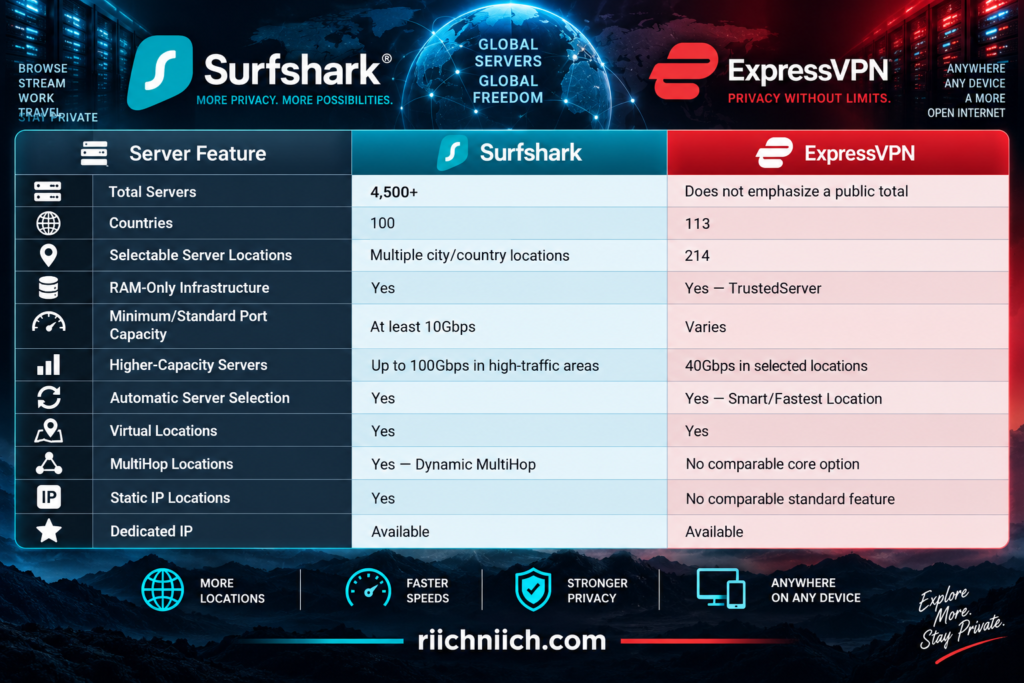
One important caution: 4,500 servers and 214 server locations are not directly comparable numbers. A “server” is an individual machine or server instance, while a “location” represents a place users can select in the VPN application.
Surfshark Server Network
Surfshark currently operates more than 4,500 servers in 100 countries across Europe, the Americas, Asia-Pacific, the Middle East, and Africa. Many countries also provide multiple city-level choices.
That is a substantial network for a consumer VPN.
Surfshark also says all of its servers have at least 10Gbps ports, with capacity reaching up to 100Gbps in high-traffic areas. The company has been upgrading its infrastructure to accommodate heavier loads and reduce congestion.
For buyers, that means Surfshark isn’t simply competing by placing thousands of servers on a marketing page. Server capacity matters because several thousand underpowered or overloaded servers wouldn’t necessarily produce a better experience than a smaller collection of high-capacity servers.
ExpressVPN Server Network
ExpressVPN takes a somewhat different approach to describing its network.
Instead of emphasizing the total number of individual servers, ExpressVPN currently advertises 214 selectable VPN server locations across 113 countries. This is its broadest geographic network to date.
Those locations span the Americas, Europe, Asia-Pacific, the Middle East, and Africa.
ExpressVPN also provides multiple locations within certain countries. That can be valuable in large countries where connecting to a server thousands of miles away could increase latency even though the server is technically in your own country.
ExpressVPN has also been upgrading parts of its infrastructure to 40Gbps servers. Its published list includes upgraded locations in the United States, Canada, Australia, Japan, Singapore, the United Kingdom, France, Germany, and numerous other countries.
More Servers vs More Countries: Which Matters More?
This is where the surfshark vs expressvpn server comparison can become misleading if you only look at the biggest number.
Surfshark’s 4,500+ servers sounds much larger than ExpressVPN’s 214 locations—but those figures measure different things.
For most buyers, three things matter more:
Can you connect to the country you need?
Is there a server reasonably close to you?
Does the network have enough capacity to maintain good performance?
Surfshark currently has the larger publicly disclosed individual server count, while ExpressVPN has the broader country coverage, with 113 countries compared with Surfshark’s 100.
If you only use servers in the United States and nearby countries, however, having access to another dozen countries halfway around the world may make little practical difference.
For travelers and people who frequently need international VPN locations, ExpressVPN’s wider geographic reach becomes more valuable.
Physical vs Virtual Server Locations
Both Surfshark and ExpressVPN use virtual server locations in portions of their networks.
A virtual location means the IP address corresponds to the country you selected, but the physical server handling the connection may actually be located in another country.
For example, ExpressVPN explains that an Indonesian virtual location can provide an Indonesian IP address while the physical server is located in Singapore. ExpressVPN says the vast majority of its locations have the physical server and registered IP address in the same country, while virtual locations are used where suitable local infrastructure may not meet its requirements.
Virtual servers are not automatically inferior or insecure.
They can allow VPN providers to offer IP addresses for countries where operating reliable physical infrastructure would otherwise be difficult. However, privacy-conscious users may still want to know where the physical server is actually located, particularly when jurisdiction matters to them.
Finding the Fastest Server
Having hundreds or thousands of servers isn’t very useful if you don’t know which one to choose.
Fortunately, both VPNs can help.
Surfshark allows users to connect to nearby or fast locations, and its Windows application currently includes a beta Performance Indicator that uses connection-quality information to display green, yellow, or red indicators beside locations.
ExpressVPN offers Smart Location, which considers factors such as download speed, latency, and distance when selecting a server. Its Android and iOS applications use its newer Fastest Location functionality.
For most buyers, automatic selection is the easiest approach when you don’t specifically need an IP address from another country.
If your priority is speed, start with a nearby recommended server.
If your priority is location, select the country you need and then compare available cities where possible.
Surfshark Offers More Specialized Server Choices
Surfshark has an advantage for buyers who want more control over how they connect to the network.
Inside supported Surfshark apps, users can access different categories including regular locations, Static IP, Dedicated IP, and MultiHop.
Dynamic MultiHop is particularly different because it allows you to route traffic through two VPN locations rather than one.
Static IP servers can also be useful when you want to reconnect to the same shared VPN IP instead of receiving a different one each time.
Dedicated IP goes further by providing an IP address assigned specifically to you as an optional service.
These aren’t necessarily features every buyer needs, but they make Surfshark’s network more customizable than simply selecting a country and pressing Connect.
Which Server Network Is Better for Travelers?
If international travel is one of your main reasons for purchasing a VPN, ExpressVPN has a notable advantage in geographic coverage.
Its network currently reaches 113 countries, compared with 100 for Surfshark.
More countries means a better chance of finding a VPN location near your physical location when traveling internationally. A nearby server can potentially reduce latency compared with connecting to a server much farther away.
It also provides more options when you specifically need an IP address associated with another country.
Surfshark is hardly limited, though. Coverage across 100 countries is still extensive, and its 4,500+ servers give buyers a large pool of infrastructure.
For frequent international travelers, ExpressVPN’s broader geographic footprint gets the edge.
Which VPN Has the Better Server Network?
The winner depends on what you mean by “better.”
Surfshark currently provides 4,500+ servers across 100 countries, with at least 10Gbps ports throughout its network and capacity up to 100Gbps in high-traffic areas. It also offers specialized connection options such as Dynamic MultiHop, Static IP, and Dedicated IP.
ExpressVPN currently provides 214 selectable locations across 113 countries, giving it the wider geographic footprint. It also has high-capacity 40Gbps infrastructure deployed across numerous locations and tools that automatically help users select an appropriate server.
For buyers comparing surfshark vs expressvpn, we would separate the decision this way:
Choose Surfshark if you value a large disclosed server pool, high-capacity infrastructure, MultiHop, Static IP options, and more control over how you connect.
Choose ExpressVPN if your priority is maximum country coverage, international travel, and having more geographic locations available around the world.
Because server network and locations is fundamentally a geographic comparison, ExpressVPN’s coverage of 113 countries gives it the narrow overall advantage.
Winner for Server Network and Locations: ExpressVPN — by a narrow margin
A large global network becomes especially valuable when you want to use your VPN for entertainment. Next, we’ll look at Surfshark vs ExpressVPN: Streaming to compare how the two services perform for viewers who want fast, reliable VPN connections across their favorite streaming devices.
Surfshark vs ExpressVPN: Streaming
Streaming is one of the biggest reasons people shop for a VPN. A good streaming VPN needs more than a large server network—it should provide enough speed for high-quality video, work across popular streaming devices, and make it easy to troubleshoot a connection when a streaming platform detects or blocks a VPN server.
For buyers comparing surfshark vs expressvpn, both are strong streaming choices. Surfshark provides support guides for Netflix, Amazon Prime Video, Disney+, Hulu, BBC services, YouTube, DAZN, and others. ExpressVPN lists compatibility with services including Netflix, Amazon Prime Video, Disney+, Hulu, Apple TV+, HBO, Showtime, Sling TV, and others.
The biggest difference comes down to value and devices. Surfshark’s unlimited simultaneous connections are especially attractive for households with multiple streamers, while ExpressVPN has a polished streaming-device ecosystem and continues to support MediaStreamer for certain devices that cannot run a VPN app directly.
Surfshark vs ExpressVPN Streaming Comparison
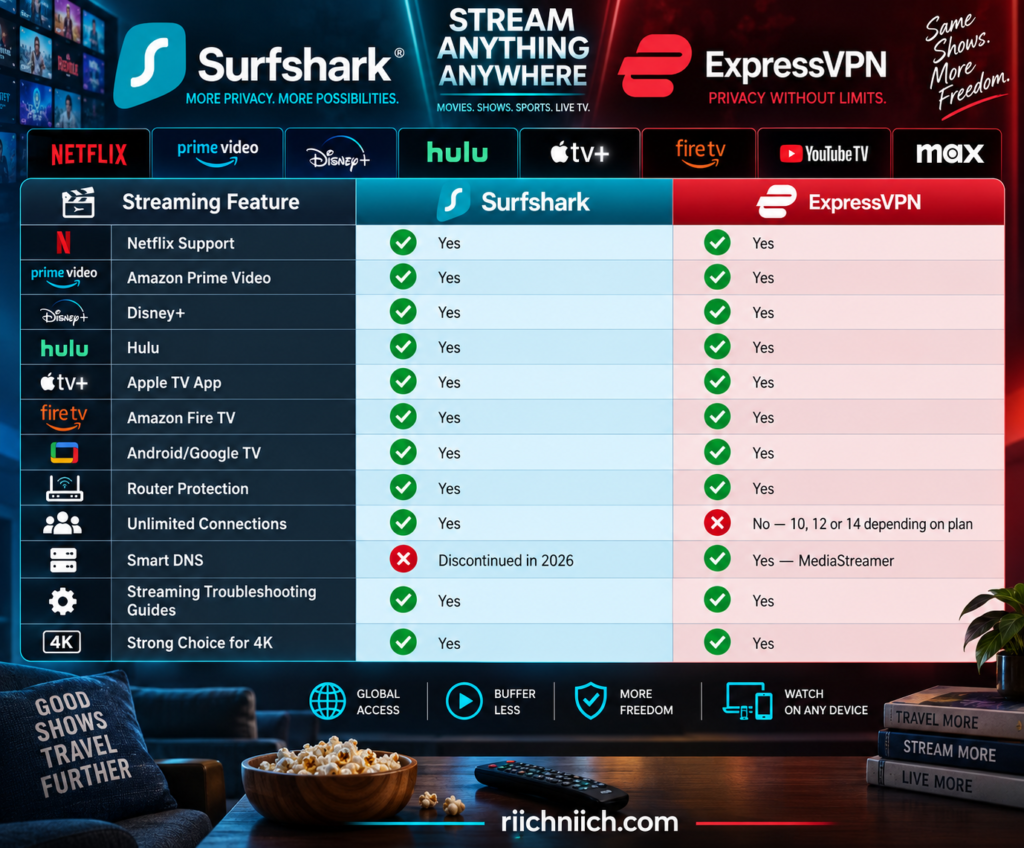
Streaming-service availability can change, and neither provider can guarantee that every platform will work perfectly with every VPN server at all times. Streaming companies regularly change how they identify VPN connections, which is why both Surfshark and ExpressVPN maintain troubleshooting instructions for streaming problems.
Surfshark for Streaming
Surfshark is particularly appealing for streaming households because one subscription supports unlimited simultaneous connections.
That could mean protecting a living-room TV, bedroom TV, tablet, phone, laptop, and other supported devices without constantly thinking about whether you’ve reached a VPN connection limit.
Surfshark also maintains dedicated instructions for securely using major services such as Netflix, Hulu, Disney+, Amazon Prime Video, YouTube, BBC services, and DAZN.
For Netflix specifically, Surfshark recommends connecting to a VPN server in your home country and provides troubleshooting instructions if Netflix detects the connection.
That makes Surfshark especially attractive if you’re looking for the best VPN for streaming across multiple devices without paying for additional simultaneous connections.
ExpressVPN for Streaming
ExpressVPN is also heavily optimized around streaming-device support.
Its current documentation lists compatibility with major services including Netflix, Amazon Prime Video, Disney+, Hulu, Apple TV+, HBO, Showtime, and Sling TV.
ExpressVPN also provides native applications for many popular streaming platforms. Its Apple TV application works on compatible devices running tvOS 17 or later, while older Apple TV setups can use alternatives such as MediaStreamer or an ExpressVPN-enabled router.
ExpressVPN also supports Amazon Fire TV devices, including current Fire OS and Vega OS configurations.
That broad device support makes ExpressVPN particularly compelling for buyers who want a VPN that works directly on the devices connected to their television.
Surfshark No Longer Offers Smart DNS
There is one significant change buyers should know about in 2026.
Surfshark discontinued Smart DNS on February 2, 2026. The company said demand for the feature was limited and that it was redirecting resources toward VPN speed, security, and other features.
This matters primarily for televisions and other streaming devices that cannot install a VPN application directly.
Surfshark still provides alternatives. For unsupported smart TVs and consoles, its current instructions recommend options such as installing the VPN on a router, sharing a VPN connection from Windows, or using a compatible Fire TV Stick or Android TV box.
ExpressVPN, meanwhile, continues to offer MediaStreamer, its DNS-based option for certain devices that cannot run a VPN app.
Keep in mind that a DNS streaming feature does not provide the same encryption and privacy protection as a full VPN connection.
For buyers with older smart TVs or other devices that cannot install VPN software, ExpressVPN therefore has a meaningful convenience advantage.
Which Is Better for 4K Streaming?
Both Surfshark and ExpressVPN should provide enough performance for 4K streaming on a sufficiently fast internet connection, particularly when connected to a nearby VPN server.
The key is consistency.
Streaming doesn’t necessarily require the highest possible speed-test result. What matters is maintaining enough bandwidth without repeated buffering, quality drops, or connection interruptions.
Surfshark’s WireGuard support and high-capacity server network make it a strong option for high-bandwidth streaming. ExpressVPN’s Lightway protocol is similarly designed around fast, stable connections.
If you’re shopping specifically for a VPN for 4K streaming, test the VPN on your actual home internet connection. A service that performs exceptionally well for somebody in another state or country may produce different results on your ISP, router, and streaming devices.
What Happens If a Streaming Service Detects Your VPN?
Even a good streaming VPN can occasionally encounter a blocked server.
Streaming services continually update their systems, and an IP address that works today may eventually be identified as belonging to a VPN.
This does not automatically mean the entire VPN has stopped working.
Surfshark’s current troubleshooting instructions recommend completely closing the streaming app or browser, connecting to a different server or city in the same country, reopening the service, checking for DNS leaks, and clearing cached information when necessary.
ExpressVPN provides similar service-specific troubleshooting. For Netflix, for example, its current guidance includes restarting the app, signing out and back in, trying a browser, and changing servers when necessary.
Both providers also offer customer support if streaming problems continue.
Can a VPN Give You Free Streaming Subscriptions?
No.
Buying Surfshark or ExpressVPN does not include Netflix, Hulu, Disney+, Amazon Prime Video, or another paid streaming subscription.
You still need an active subscription to the streaming service you want to use. Surfshark explicitly notes this in its Hulu and Disney+ support documentation.
You should also use either VPN in accordance with applicable laws and the terms of the streaming service. ExpressVPN’s current streaming guidance specifically tells users to connect to a server location matching the country where they are currently located.
This is worth clarifying because a VPN is primarily a privacy and security tool, not a subscription to the entertainment services themselves.
Which VPN Is Better for Streaming?
For most buyers comparing surfshark vs expressvpn, Surfshark gets the overall streaming advantage—but it’s close.
Both support major streaming platforms, both provide applications for popular streaming devices, and both have modern protocols capable of handling high-quality video.
Surfshark’s biggest advantage is value for a streaming household. Unlimited simultaneous connections mean you can protect numerous TVs, phones, tablets, laptops, and other compatible devices without worrying about reaching a connection ceiling.
ExpressVPN’s biggest advantage is streaming-device flexibility. Its native Apple TV and Fire TV support, router options, and continued MediaStreamer availability make it especially appealing when your home includes devices that don’t handle traditional VPN apps easily.
So the buying decision comes down to this:
Choose Surfshark if you have a large household, lots of streaming devices, and want strong streaming capabilities at a lower long-term cost.
Choose ExpressVPN if you prioritize polished streaming-device support and want MediaStreamer available for compatible devices that cannot run a full VPN application.
Winner for Streaming: Surfshark — by a narrow margin
There is one streaming platform important enough to deserve a closer comparison. Next, we’ll look specifically at Surfshark vs ExpressVPN for Netflix and compare what buyers should know before choosing either VPN for Netflix viewing.
Surfshark vs ExpressVPN for Netflix
Netflix is one of the most important streaming services to consider when choosing a VPN, but it is also one of the more complicated. Netflix actively detects VPN and proxy connections, and its own help documentation says VPN users may sometimes see only titles with worldwide licensing. Netflix also does not support VPN use for live events or its ad-supported experience.
For buyers comparing surfshark vs expressvpn, both services officially provide Netflix support and troubleshooting guidance. Surfshark stands out for unlimited simultaneous connections and lower long-term pricing, while ExpressVPN offers particularly broad streaming-device support and its MediaStreamer option for certain devices that cannot run a regular VPN app.
Surfshark vs ExpressVPN for Netflix at a Glance
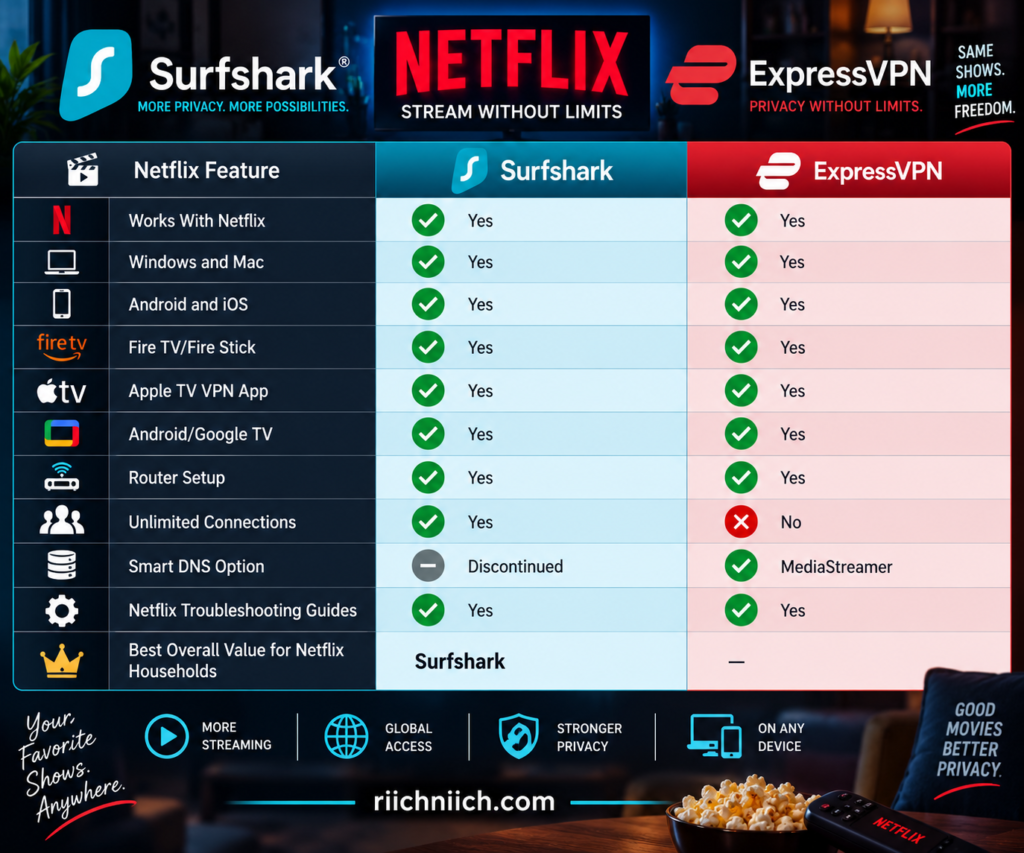
Neither VPN can guarantee uninterrupted Netflix compatibility forever. Netflix can identify VPN IP addresses, and server compatibility can change over time. That’s why the ability to switch servers and get useful troubleshooting support matters almost as much as whether Netflix works on the first attempt.
Watching Netflix With Surfshark
Surfshark officially states that customers with active Surfshark and Netflix subscriptions can securely watch Netflix while connected to its VPN. Its current instructions recommend connecting to a Surfshark server in your home country, clearing the browser cache, logging into Netflix, and refreshing the browser.
For buyers, Surfshark’s biggest Netflix advantage isn’t necessarily a special Netflix feature.
It’s unlimited simultaneous VPN connections.
Consider a household with:
- Two smart TVs
- Three smartphones
- Two tablets
- Several laptops
- A Fire TV Stick
Surfshark allows all of those compatible devices to use the VPN without forcing you to count how many VPN connections are currently active.
That’s a major advantage if you’re looking for a VPN for Netflix and multiple devices, especially in a family household.
Watching Netflix With ExpressVPN
ExpressVPN also maintains dedicated instructions for Netflix and supports a particularly broad range of streaming hardware.
Its current Netflix documentation lists support for Windows, Mac, Linux, iOS, Android, Apple TV, Amazon Fire TV, Fire Stick, smart TVs, Chromecast with Google TV, and compatible wireless routers.
ExpressVPN recommends choosing a server location in the country you want to securely stream from and, when multiple locations are available within that country, selecting one close to your physical location. Its broader streaming guidance says users should select a server matching the country where they are currently located to comply with applicable terms.
This broad device compatibility is one of ExpressVPN’s biggest strengths for Netflix users.
ExpressVPN MediaStreamer Gives It an Extra Netflix Option
ExpressVPN has another advantage for certain older streaming devices: MediaStreamer.
MediaStreamer is a DNS service designed for devices that may not support a regular VPN application. ExpressVPN currently says it can be used with certain smart TVs, older Apple TV models, gaming consoles, and other streaming hardware.
There are important limitations.
MediaStreamer is not a VPN.
It doesn’t encrypt your traffic or provide the same privacy and security protections as connecting through the ExpressVPN application. ExpressVPN also states that only U.S. Netflix is streamable through MediaStreamer.
Surfshark discontinued its Smart DNS feature in February 2026, so ExpressVPN currently has an advantage for buyers who specifically need a DNS-based streaming solution on hardware that cannot install a VPN application.
For most modern devices, however, using the full VPN app is preferable because you retain the VPN’s encryption and privacy protections.
What If Netflix Detects the VPN?
This is where expectations matter.
Netflix’s own help center confirms that VPN use can trigger restrictions. If Netflix detects a VPN or proxy, users may receive an error asking them to disable it. Netflix also says that VPN users may sometimes see only titles for which it has worldwide rights.
That means no reputable VPN review should promise that every Netflix server will work permanently.
If Surfshark stops working with Netflix, Surfshark recommends troubleshooting steps such as reconnecting, changing VPN locations, clearing cache and cookies, checking for DNS leaks, changing protocols, or contacting support.
ExpressVPN maintains particularly detailed Netflix troubleshooting instructions. For U.S. customers having trouble, its current guide recommends trying several U.S. server locations, force-closing and reopening the Netflix app after changing locations, signing out and back in, trying a browser, and contacting support if the problem continues.
This is an important buying consideration because Netflix compatibility is a moving target.
Netflix’s Ad-Supported Plan Changes the Comparison
There is one major limitation that has nothing to do with whether you choose Surfshark or ExpressVPN.
Netflix currently states that VPNs aren’t supported on its ad-supported experience. Netflix also doesn’t support VPN connections for watching live events.
That means switching from Surfshark to ExpressVPN—or ExpressVPN to Surfshark—is unlikely to solve the underlying issue if your Netflix plan itself doesn’t support VPN use.
This is particularly important before purchasing a VPN primarily for Netflix.
If Netflix is your main reason for buying either service, check your Netflix plan first.
Which Is Better for Netflix on Multiple Devices?
Surfshark wins this part of the surfshark vs expressvpn comparison.
Surfshark allows unlimited simultaneous VPN connections, making it especially attractive for families and households with multiple Netflix viewers.
ExpressVPN’s current plans allow different numbers of simultaneous connections depending on the subscription tier, rather than unlimited connections.
For an individual with one television, phone, and laptop, that difference may not matter much.
For a household with multiple TVs, phones, tablets, computers, and streaming devices, Surfshark’s unlimited connection policy becomes much more valuable.
And because Surfshark’s long-term plans are generally less expensive, its cost per protected streaming device can be particularly compelling.
Which Is Better for Netflix While Traveling?
Both VPNs have large international server networks, but ExpressVPN has the broader country footprint.
ExpressVPN’s broad server-location coverage, Lightway protocol, and strong support for phones, tablets, laptops, Apple TV, Fire TV, and routers make it a particularly appealing option for frequent travelers.
Surfshark remains highly competitive because it also offers a large international network and unlimited connections.
However, travelers should understand that Netflix libraries vary by country, and Netflix says using a VPN can result in only globally licensed titles being displayed. Netflix also says the country associated with an account can’t simply be changed unless the customer moves to another country.
A VPN should therefore be viewed primarily as a way to secure your Netflix connection while traveling, not as a guarantee that you can access every country’s Netflix catalog.
Surfshark or ExpressVPN for Netflix?
For Netflix specifically, this is another close comparison.
Surfshark is the better choice for value-conscious Netflix households. You get unlimited simultaneous VPN connections, support across major streaming devices, strong performance, and dedicated Netflix troubleshooting guidance.
ExpressVPN is the better choice for device flexibility. Its extensive streaming-device support and MediaStreamer give buyers additional options, particularly when dealing with older hardware that cannot run a traditional VPN app.
For the majority of buyers researching surfshark vs expressvpn, however, Surfshark’s combination of Netflix support, unlimited devices, and lower long-term pricing gives it the overall advantage.
Winner for Netflix: Surfshark — by a narrow margin
ExpressVPN remains the stronger alternative if your entertainment setup includes devices where MediaStreamer or ExpressVPN’s broader hardware support would be particularly useful.
Netflix is only one use case, though. A VPN also has to perform when milliseconds matter. Next, we’ll compare Surfshark vs ExpressVPN for Gaming to see which service is better suited for low-latency connections, online multiplayer, and protecting your IP address while you play.
Surfshark vs ExpressVPN for Gaming
Gaming puts different demands on a VPN than ordinary web browsing or streaming. Download speed still matters, but latency, connection stability, server distance, routing, and protection against IP-based attacks become much more important when every fraction of a second can affect gameplay.
For buyers comparing surfshark vs expressvpn, both are capable gaming VPNs. Surfshark combines WireGuard, 4,500+ servers across 100 countries, at least 10Gbps server ports, and unlimited simultaneous connections. ExpressVPN counters with its lightweight Lightway protocol, 214 server locations across 113 countries, 10Gbps and selected 40Gbps servers, and automatic server selection based partly on latency and distance.
The biggest question isn’t simply which VPN has the highest advertised speed. For gaming, you want the service that can give you a stable, low-latency route to the game server you actually use.
Surfshark vs ExpressVPN Gaming Comparison
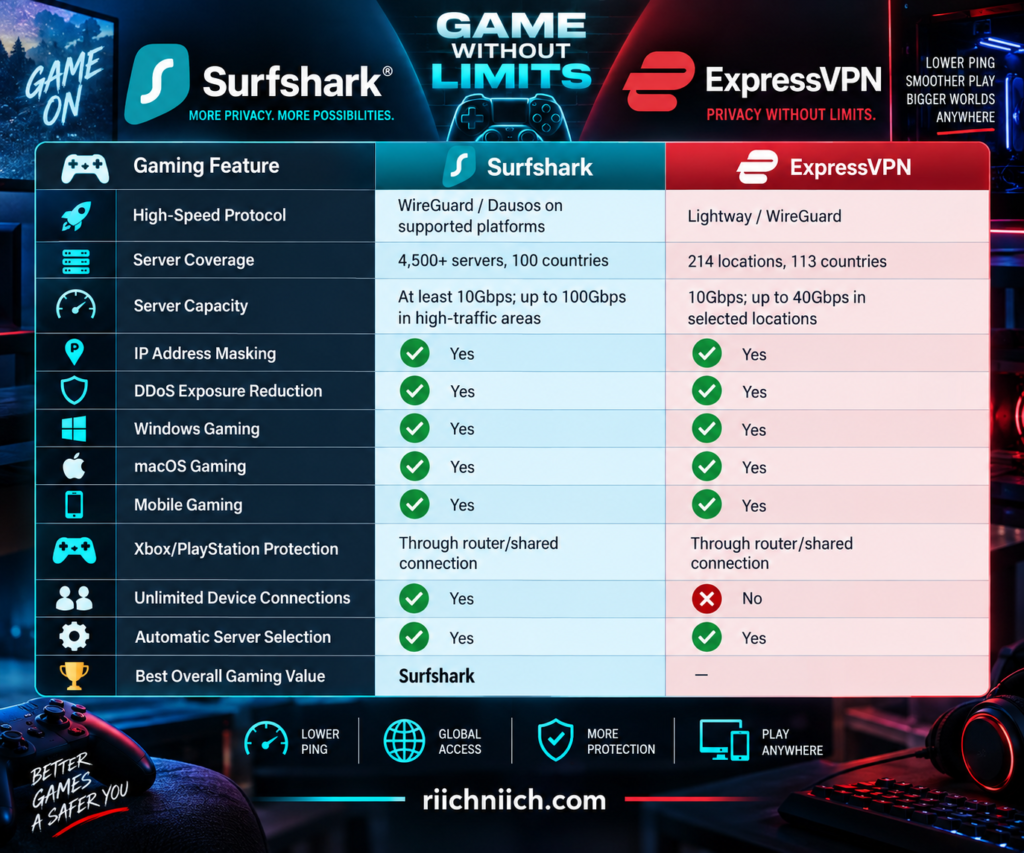
Neither VPN can guarantee lower ping than your normal internet connection. In many situations, adding a VPN will actually increase latency because your traffic has another stop to make before reaching the game server. A VPN can occasionally improve routing if your ISP is using an inefficient path, but buyers shouldn’t purchase one expecting it to magically eliminate lag.
Surfshark for Gaming
Surfshark has several advantages for gamers, starting with its server infrastructure.
The network currently includes 4,500+ servers across 100 countries, and Surfshark says every server has at least a 10Gbps port, with capacity reaching up to 100Gbps in high-traffic areas.
A large server network gives gamers more opportunities to find a nearby connection rather than routing their traffic through a distant VPN server.
Surfshark also supports WireGuard, which is particularly well suited to gaming because of its relatively lightweight design and low overhead.
Then there is one of Surfshark’s biggest advantages for gaming households: unlimited simultaneous connections.
You could have Surfshark running on a gaming PC, gaming laptop, smartphone, tablet, streaming device, and several other devices without reaching a simultaneous-device limit.
That makes Surfshark particularly attractive for families with multiple gamers.
ExpressVPN for Gaming
ExpressVPN has put considerable emphasis on gaming performance as well.
Its network now covers 214 selectable locations across 113 countries, giving gamers a large geographic selection for finding a server near themselves or potentially along a better route toward their game’s servers.
ExpressVPN also operates 10Gbps infrastructure with 40Gbps capacity available in selected locations.
The standout feature, however, is Lightway.
Lightway was built to minimize VPN overhead and establish connections quickly. ExpressVPN also emphasizes its ability to reconnect efficiently when a network connection is interrupted—something particularly useful for mobile gamers switching between Wi-Fi and cellular connections.
For competitive gaming, where connection consistency can matter as much as raw download speed, Lightway gives ExpressVPN a compelling argument.
Which VPN Has Better Ping?
This is where VPN marketing needs to be treated carefully.
No VPN can promise lower ping for every gamer.
Ping measures how long it takes information to travel from your device to its destination and back. The farther your traffic has to travel, the greater the potential latency.
Adding a VPN server normally adds another point to that journey.
Imagine your normal route looks like this:
Your PC → Game Server
Turning on a VPN changes the route to:
Your PC → VPN Server → Game Server
If that VPN server creates a longer path, your ping may increase.
But sometimes an ISP routes traffic inefficiently. In that situation, a VPN server could potentially provide a better path to the destination and improve connection consistency. ExpressVPN itself acknowledges that routing can affect gaming latency and says its global network gives users alternative routes to try.
The safest buying advice is therefore simple: test it on your own games and connection.
Choosing the Right VPN Server for Gaming
Server selection can make a significant difference in gaming performance.
If privacy is your main reason for using the VPN, start with a server close to your physical location. That generally minimizes the extra distance your traffic has to travel.
ExpressVPN’s Smart Location can automatically choose a server using measurements that include download speed, latency, and distance. Its mobile applications use Fastest Location to identify a suitable connection for the current network.
Surfshark similarly provides Quick Connect functionality to help users select a fast available server.
If you’re having problems, don’t automatically assume the VPN itself is slow. Try another nearby server before disconnecting completely.
A congested route could perform poorly while another server in the same region works much better.
Can a VPN Protect Gamers From DDoS Attacks?
A VPN can help reduce your exposure to certain IP-targeted DDoS attacks.
When you’re connected to a VPN, other internet services generally see the VPN server’s public IP address rather than your regular home IP address. ExpressVPN specifically identifies IP masking as a way to help protect gamers from targeted DDoS attacks.
This can be particularly relevant in competitive gaming environments where another player could otherwise obtain and target your public IP address.
But a VPN is not a universal anti-DDoS guarantee.
It primarily helps by keeping your regular IP address from being directly exposed through the VPN connection. If your actual IP address has already been obtained through another method, additional steps may still be necessary.
Surfshark vs ExpressVPN for Xbox and PlayStation
There’s an important limitation when using either VPN with a gaming console:
Xbox and PlayStation consoles don’t normally support standard VPN apps directly.
Instead, you generally need to run the VPN through a compatible router or share a VPN connection from another device.
ExpressVPN specifically provides console setup options involving routers and shared connections, including ways to protect consoles through a VPN-enabled PC or Ethernet hotspot.
Surfshark similarly supports router-based setups, allowing devices connected through the router to use the VPN connection.
This is one area where ExpressVPN can be particularly attractive because of its router ecosystem and extensive console-specific guidance.
For a gaming PC, however, setup is considerably easier: install the VPN application, choose a nearby server, connect, and launch your game.
Which Is Better for Mobile Gaming?
ExpressVPN gets a slight advantage for mobile gaming because of Lightway.
Mobile gamers frequently switch between different types of connections—home Wi-Fi, cellular data, public Wi-Fi, and other networks.
Lightway was specifically designed to reconnect efficiently when connectivity changes or temporarily drops. ExpressVPN also emphasizes reduced protocol overhead and lower battery consumption compared with older VPN protocols.
Surfshark remains highly competitive thanks to WireGuard, which is also lightweight and well suited to mobile devices.
For casual mobile gaming, the difference is unlikely to be dramatic.
For someone who regularly plays latency-sensitive games while moving between Wi-Fi and cellular connections, ExpressVPN’s Lightway technology is particularly appealing.
Should You Use MultiHop While Gaming?
Usually, no.
Surfshark’s Dynamic MultiHop is an excellent privacy feature, but it routes your internet connection through two VPN servers instead of one.
That’s useful when additional routing privacy is the priority.
It isn’t usually what you want when low latency is the priority.
For gaming, a nearby single VPN server using a high-performance protocol such as WireGuard will generally make more sense than sending the connection through multiple VPN locations.
Save MultiHop for situations where the additional privacy layer matters more than minimizing latency.
Which VPN Is Better for Gaming?
For buyers researching surfshark vs expressvpn, the gaming comparison is extremely close.
Surfshark offers the stronger gaming value. You get 4,500+ servers across 100 countries, high-capacity infrastructure, WireGuard, unlimited simultaneous connections, and competitive long-term pricing.
That makes it especially attractive for a household containing multiple gaming PCs, phones, laptops, and other connected devices.
ExpressVPN has the stronger gaming-focused technology package. Lightway is designed to minimize connection overhead and handle interruptions efficiently, its Smart Location system considers latency and distance, and its network covers 214 locations across 113 countries.
If we were choosing specifically for competitive online gaming, we would give ExpressVPN the narrow advantage because latency, routing options, and connection recovery matter more than unlimited device connections during an actual match.
If we were choosing the best gaming VPN based on overall value for a multi-device household, Surfshark would win.
Winner for Gaming: ExpressVPN — by a narrow margin
Neither VPN can guarantee lower ping, so use the money-back period to test the games you actually play, the servers closest to you, and your normal gaming hours before committing long term.
Gaming puts the emphasis on latency; downloading and file sharing create a different set of priorities. Next, we’ll compare Surfshark vs ExpressVPN for Torrenting to see how the two services handle P2P traffic, privacy, speeds, and large downloads.
Surfshark vs ExpressVPN for Torrenting
Torrenting places unique demands on a VPN. Unlike ordinary web browsing, peer-to-peer file sharing can expose your public IP address to other participants in the torrent swarm. A good VPN for torrenting should therefore provide strong encryption, IP address protection, a reliable kill switch, fast protocols, and enough server capacity for large downloads.
For buyers comparing surfshark vs expressvpn, both services provide the core security features needed for P2P file sharing. Surfshark’s combination of WireGuard, unlimited simultaneous connections, a system-level Kill Switch, and competitive pricing makes it particularly attractive for frequent torrent users. ExpressVPN counters with Lightway, its Internet Kill Switch, TrustedServer infrastructure, and a strong privacy architecture.
This comparison assumes you’re downloading and sharing content you have the legal right to use. A VPN doesn’t make copyright infringement legal.
Surfshark vs ExpressVPN for Torrenting at a Glance
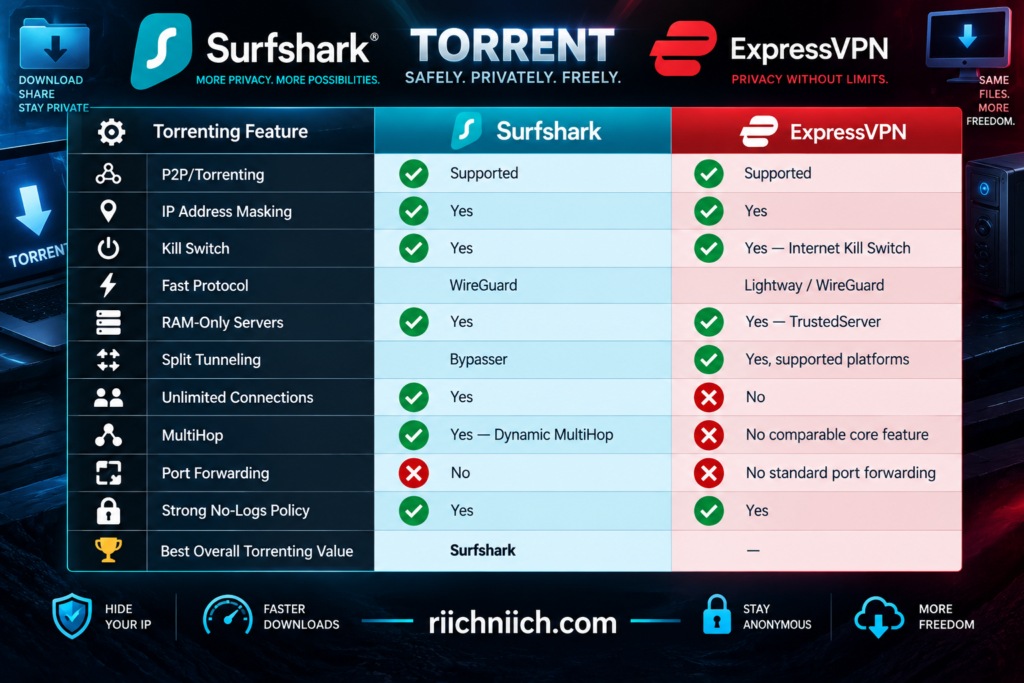
Neither service should be chosen based on a promise of a particular torrent download speed. P2P performance can vary dramatically depending on the torrent’s seeders, peers, your ISP connection, VPN server distance, protocol, and network congestion.
Surfshark for Torrenting
Surfshark is a particularly strong option for torrent users who want good performance without paying premium VPN pricing.
WireGuard is one of its biggest advantages. The protocol is designed to be lightweight and efficient, making it a logical choice when downloading large files where VPN overhead could otherwise affect performance. Surfshark also supports OpenVPN and other protocols on compatible platforms.
Surfshark’s network of thousands of servers also gives users plenty of opportunities to choose a nearby location rather than unnecessarily routing P2P traffic through a distant server.
Then there’s Surfshark’s unlimited simultaneous connection policy. Someone could use the VPN on a desktop torrenting computer while simultaneously protecting a laptop, smartphone, tablet, television, and other supported devices.
That combination makes Surfshark particularly attractive for buyers who want a VPN for torrenting plus everyday household protection, rather than paying primarily for one computer.
ExpressVPN for Torrenting
ExpressVPN is another strong P2P option, especially for buyers who prioritize privacy architecture and connection reliability.
Its Lightway protocol was built around fast, stable VPN connections and uses a streamlined codebase designed to be easier to audit and maintain. ExpressVPN also supports WireGuard in its current applications, giving torrent users another modern high-performance option.
ExpressVPN’s TrustedServer infrastructure adds another privacy layer by running its VPN servers using RAM rather than relying on traditional persistent hard-drive storage.
Its Internet Kill Switch is particularly important for P2P activity because it can block internet traffic when the VPN tunnel unexpectedly disconnects.
For buyers who don’t mind paying more for ExpressVPN’s broader privacy and security architecture, it’s a compelling torrenting choice.
The Kill Switch Is Especially Important for Torrenting
If you’re going to torrent through a VPN, the kill switch is one feature you should take seriously.
Imagine you’re downloading a large legal torrent that takes an hour to complete. Halfway through the download, your VPN connection drops for several seconds.
Without appropriate protection, your torrent application could continue communicating over your regular internet connection. That could expose your normal public IP address.
Surfshark’s Kill Switch is designed to cut off internet access if the VPN unexpectedly disconnects and restore access once the VPN connection is safely re-established. Surfshark currently supports the feature on Windows, macOS, Android, iOS, and Linux.
ExpressVPN’s Internet Kill Switch similarly blocks traffic if its VPN connection unexpectedly drops. Its current implementation covers IPv4, IPv6, and DNS requests, and ExpressVPN also offers an Advanced Internet Kill Switch on Windows, Mac, and Linux that can block internet access whenever the VPN isn’t active.
For P2P users, that’s valuable protection.
Can Your IP Address Be Exposed While Torrenting?
Yes, which is one reason VPNs are popular for P2P activity.
When you participate in a torrent swarm without a VPN, other peers can generally see the public IP addresses participating in that swarm.
When properly connected to Surfshark or ExpressVPN, peers should instead see the VPN server’s public IP address rather than your regular home IP address.
However, that protection depends on the VPN tunnel functioning correctly.
That’s why buyers should look beyond the words “hides your IP.” Features such as a kill switch and leak protection matter because they help prevent your normal connection from suddenly taking over when the VPN fails.
Surfshark specifically notes that its system-level Kill Switch can help prevent an IP address from being exposed while sharing files if the VPN connection drops.
Which Is Faster for Torrenting?
There is no universal winner for every P2P download.
Surfshark’s WireGuard implementation is an excellent choice when download performance matters because WireGuard is designed to provide strong security with relatively low overhead.
ExpressVPN’s Lightway similarly prioritizes performance, stability, and quick reconnection.
For either service, a nearby VPN server will generally be the best starting point when maximum download performance is your priority.
Your torrent itself also matters enormously.
A poorly seeded torrent could download slowly even through an extremely fast VPN connection, while a well-seeded legal torrent could perform much better.
This is why a single “Surfshark downloaded at X Mbps while ExpressVPN downloaded at Y Mbps” test shouldn’t determine your entire buying decision.
Should You Use MultiHop for Torrenting?
Surfshark’s Dynamic MultiHop can route traffic through two VPN locations rather than one.
That can provide another layer of routing privacy, but it also creates a longer path for your traffic.
For someone downloading large files, that tradeoff may not make sense unless additional routing privacy is specifically the priority.
For ordinary P2P use, a nearby single VPN server with WireGuard and the Kill Switch enabled will generally be the more performance-oriented Surfshark configuration.
MultiHop is better treated as an optional privacy tool rather than something you need to activate every time you open a torrent client.
What About Binding a Torrent Client to the VPN?
More advanced torrent users sometimes bind their torrent client to a VPN network interface.
This means the torrent application is configured to send traffic only through a specific VPN interface. If that interface disappears, the torrent client cannot simply continue over another available network connection.
This can provide an additional layer of protection alongside a kill switch when the operating system, VPN configuration, and torrent client support it.
There is an important ExpressVPN-specific detail on Windows: ExpressVPN says applications that need to bind to a VPN adapter should have Lightway Turbo disabled. With Lightway Turbo off, ExpressVPN uses its WinTUN driver, allowing compatible applications to bind to the VPN interface.
That’s a fairly advanced feature, so most everyday users won’t need to adjust it. But it is worth knowing if torrent-client binding is part of your setup.
Does Either VPN Offer Port Forwarding?
If port forwarding is an essential requirement, neither Surfshark nor ExpressVPN is the obvious choice.
Surfshark does not currently provide traditional VPN port forwarding, and ExpressVPN does not provide standard port forwarding through its regular VPN service.
This can matter to advanced P2P users because port forwarding may improve inbound peer connectivity in certain torrenting configurations.
It does not mean you cannot torrent without port forwarding.
Most users can still download and share through supported P2P applications, but someone specifically shopping for a VPN because they require manual inbound port forwarding should consider this limitation before purchasing either service.
Torrenting Doesn’t Make Illegal Downloads Legal
A VPN is a privacy and security tool.
It does not give you permission to download copyrighted movies, games, software, music, books, or other content that you don’t have the legal right to obtain.
The same applies to the VPN provider’s terms of service and local laws.
There are plenty of legitimate uses for BitTorrent technology, including distributing open-source software, public-domain media, and other legally shareable large files.
For this surfshark vs expressvpn comparison, we’re evaluating how the VPNs protect and handle legitimate P2P traffic—not whether they can conceal unlawful activity.
Which VPN Is Better for Torrenting?
For most buyers comparing surfshark vs expressvpn, Surfshark gets the overall advantage for torrenting.
Surfshark combines WireGuard, a system-level Kill Switch, RAM-only infrastructure, a large high-capacity server network, unlimited simultaneous connections, and lower long-term pricing. Its Kill Switch specifically protects against traffic escaping onto the normal internet connection if the VPN unexpectedly drops.
ExpressVPN is still an excellent choice. Lightway provides a strong combination of performance and stability, TrustedServer strengthens its privacy architecture, and the Internet Kill Switch provides robust protection against accidental traffic leaks.
For buyers primarily interested in maximum value and P2P performance, Surfshark makes more sense.
For buyers willing to pay more for ExpressVPN’s privacy architecture, Lightway, and advanced kill-switch controls, ExpressVPN remains highly competitive.
Winner for Torrenting: Surfshark — by a narrow margin
Torrenting is usually done from a trusted home connection, but VPN protection can become even more important when you leave home. Next, we’ll compare Surfshark vs ExpressVPN for Public Wi-Fi to see which service is better suited for airports, hotels, coffee shops, and other shared networks.
Surfshark vs ExpressVPN for Public Wi-Fi
Public Wi-Fi is convenient, but it also gives you less control over the network carrying your internet traffic. Whether you’re connecting at an airport, hotel, coffee shop, restaurant, library, or convention center, you usually don’t know who manages the network, whether it’s configured properly, or whether the hotspot you’re joining is even the legitimate one.
For buyers comparing surfshark vs expressvpn, both VPNs provide strong protection for public Wi-Fi. They encrypt traffic between your device and the VPN server, hide your normal public IP address from internet destinations, and include kill-switch protection if the VPN connection unexpectedly drops. Surfshark adds highly configurable Auto-connect options, while ExpressVPN combines Auto-connect, its Internet Kill Switch, and Lightway for handling unstable and changing networks.
For frequent travelers and anyone who regularly uses shared Wi-Fi, these aren’t minor features—they can be some of the strongest reasons to buy a VPN.
Surfshark vs ExpressVPN for Public Wi-Fi at a Glance
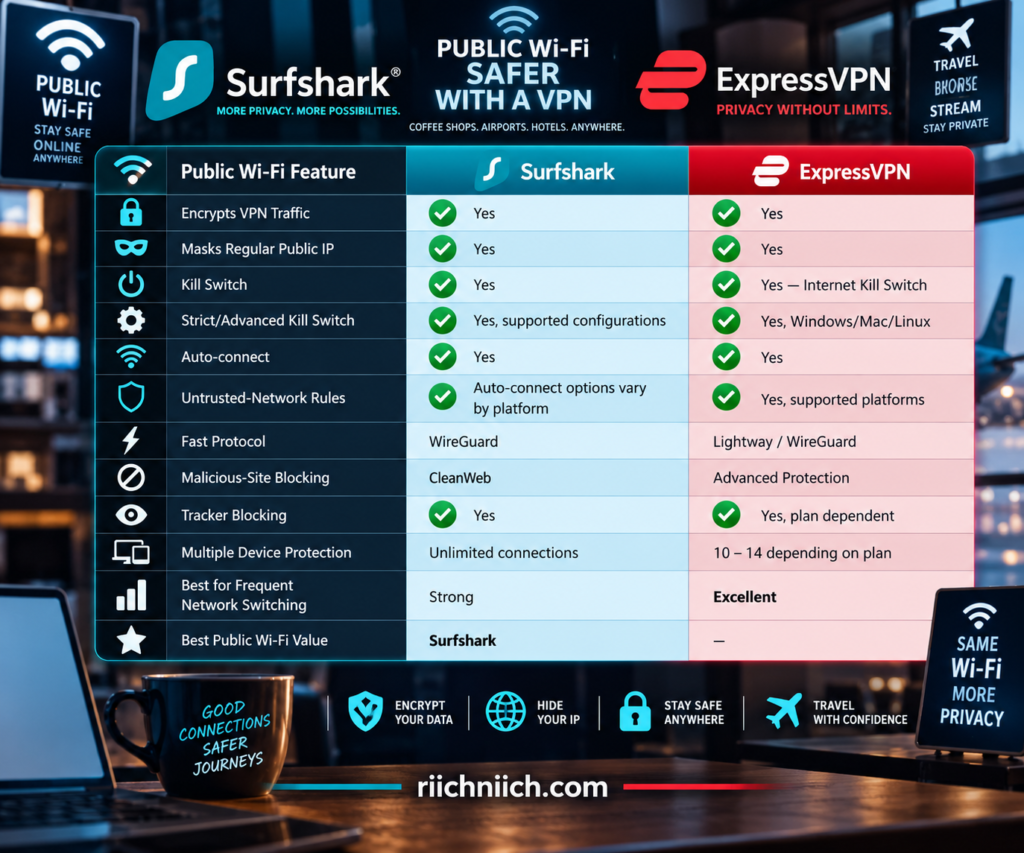
The biggest advantage of either VPN is that you don’t have to trust the Wi-Fi network with your unencrypted VPN traffic. Once the secure tunnel is established, the network carries encrypted traffic between your device and the VPN server.
Surfshark for Public Wi-Fi
Surfshark is particularly convenient for people who frequently move between different Wi-Fi networks because of its Auto-connect feature.
When enabled, Auto-connect can connect your device to Surfshark when it detects a Wi-Fi or Ethernet connection. Surfshark also lets you select the location you want Auto-connect to use, such as the fastest server, nearest server, a specific country or city, Static IP, or even MultiHop. On iOS, Surfshark currently connects to the most recently used location instead.
This means you don’t have to remember to open the VPN application every time you sit down at a coffee shop or connect your laptop to hotel Wi-Fi.
For someone who regularly works away from home, that’s a significant convenience.
ExpressVPN for Public Wi-Fi
ExpressVPN is also particularly well suited to public networks.
Its Auto-connect functionality can automatically establish a VPN connection based on network conditions. On supported platforms, you can create rules for secure Wi-Fi, unsecured Wi-Fi, Ethernet, or specific Wi-Fi networks. ExpressVPN’s Android app can also automatically connect when joining a network that hasn’t been marked as trusted.
This gives you a practical way to create a simple rule:
Trusted home Wi-Fi → your normal preference
Unknown public Wi-Fi → automatically connect the VPN
That’s exactly the type of automation that makes a VPN useful in everyday life rather than something you have to remember to activate manually.
ExpressVPN’s Lightway protocol is another advantage here because it is designed to connect quickly and transition efficiently between Wi-Fi and mobile networks.
Why a Kill Switch Matters on Public Wi-Fi
Public Wi-Fi can be unstable.
Imagine sitting in an airport terminal with your VPN connected. The Wi-Fi signal briefly disappears, your VPN tunnel drops, and the hotspot reconnects a few seconds later.
Without appropriate protection, your device could potentially resume sending traffic over its normal connection before the VPN tunnel has been restored.
That’s where a kill switch becomes important.
Surfshark’s Kill Switch can block internet access if its VPN connection unexpectedly drops, preventing traffic from simply continuing outside the VPN tunnel. Surfshark supports Kill Switch on Windows, macOS, Android, iOS, and Linux.
Surfshark also documents Soft and Strict system-level kill-switch modes. Soft mode responds to an unexpected VPN failure, while Strict mode can block internet access whenever the VPN isn’t active.
ExpressVPN’s Internet Kill Switch performs a similar job and covers IPv4, IPv6, and DNS requests. On Windows, Mac, and Linux, ExpressVPN also offers an Advanced Internet Kill Switch that can prevent internet access whenever the VPN isn’t active.
For someone who frequently uses unfamiliar Wi-Fi, that always-on approach can be particularly valuable.
Can a VPN Protect You From Fake Wi-Fi Hotspots?
A VPN helps considerably, but it doesn’t solve the entire problem.
Suppose you’re at an airport and see these two networks:
Airport_Free_WiFi
Airport_Free_WiFi_5G
Without checking, you may not know whether both are legitimate.
An attacker can create a convincing hotspot name hoping people connect to it. If you connect through a properly functioning VPN, the VPN encrypts traffic traveling through the secure tunnel, which limits what someone operating the hotspot can inspect.
However, a VPN does not make a fake network trustworthy.
You should still verify the official Wi-Fi network name with the airport, hotel, coffee shop, or other establishment before connecting.
And if a suspicious captive portal asks for information it shouldn’t need—such as banking credentials or unrelated account passwords—the presence of a VPN doesn’t make that request legitimate.
Change block type or style
Move Paragraph block from position 829 up to position 828
Move Paragraph block from position 829 down to position 830
Change alignment
Change text alignment
Displays more block tools
What Does a VPN Actually Protect on Public Wi-Fi?
When properly connected, Surfshark or ExpressVPN creates an encrypted tunnel between your device and the VPN server.
This can prevent someone controlling or monitoring the local network from simply observing the contents of traffic inside that VPN tunnel.
The VPN also substitutes the VPN server’s public IP address for your normal public IP when communicating with internet destinations through the tunnel.
That makes a VPN useful for activities such as:
- Browsing on airport Wi-Fi
- Checking email from a hotel
- Working remotely from a coffee shop
- Using messaging applications on shared networks
- Connecting while traveling
- Protecting everyday traffic on unfamiliar hotspots
But don’t interpret that as permission to ignore every other security precaution.
HTTPS, strong unique passwords, multi-factor authentication, current software updates, and phishing awareness still matter.
What a VPN Does Not Protect You From
Neither Surfshark nor ExpressVPN can protect you from every online threat.
A VPN cannot stop you from voluntarily entering your password into a convincing phishing website. It cannot make a malicious download safe. It cannot prevent someone from stealing an unlocked laptop from your table.
It also doesn’t automatically secure traffic before the VPN tunnel has been established.
That’s why Auto-connect and kill-switch features are particularly relevant when comparing surfshark vs expressvpn for public Wi-Fi.
The goal isn’t merely having a VPN application installed.
The goal is making sure your connection is actually inside the encrypted VPN tunnel when you’re using the network.
Surfshark or ExpressVPN for Airports?
Both are excellent options for airport Wi-Fi.
Surfshark is particularly attractive if you’re traveling with many devices. Unlimited simultaneous connections mean you can protect your laptop, phone, tablet, and other compatible devices without worrying about a VPN connection limit.
ExpressVPN has another type of advantage: Lightway plus Auto-connect and Internet Kill Switch.
Lightway is designed to handle connection changes efficiently, while ExpressVPN’s Internet Kill Switch is specifically intended to prevent traffic from escaping the VPN tunnel during connection interruptions and unstable Wi-Fi.
That’s a very practical combination in an airport, where your device may move between Wi-Fi, cellular data, weak signals, and different hotspots.
Surfshark or ExpressVPN for Hotels?
Hotels create a slightly different situation because you may connect multiple devices for several days.
That’s where Surfshark’s unlimited simultaneous connections become particularly attractive.
One subscription can protect compatible phones, laptops, tablets, and other devices without forcing a family to decide which devices get one of a limited number of VPN connections.
ExpressVPN remains a strong hotel option, especially for frequent travelers who prioritize Lightway’s network-switching capabilities and its broader international server footprint.
For a family vacation, Surfshark’s unlimited connections provide better value.
For a frequent business traveler who constantly moves between hotels, airports, cellular data, and other networks, ExpressVPN’s connectivity tools are particularly compelling.
Should You Use a VPN for Online Banking on Public Wi-Fi?
A VPN adds an important privacy and security layer, but the safest option for sensitive financial activity is still a trusted network or your cellular connection when available.
Modern banking websites and apps already use HTTPS/TLS encryption, and a VPN adds another encrypted layer between your device and the VPN server.
However, you still need to verify that you’re using the legitimate banking website or official application. A VPN won’t save you if you enter your credentials into a phishing page.
If you absolutely need to access a sensitive account while traveling, using your cellular connection may be preferable to an unfamiliar public hotspot.
Which VPN Is Better for Public Wi-Fi?
For buyers researching surfshark vs expressvpn, this is one of the closest comparisons yet.
Surfshark provides Auto-connect, system-level Kill Switch protection, modern protocols such as WireGuard, unlimited simultaneous connections, and strong value. Its Auto-connect feature can automatically establish VPN protection when your device detects Wi-Fi or Ethernet, reducing the chance that you’ll simply forget to turn the VPN on.
ExpressVPN combines configurable Auto-connect rules with Lightway and a robust Internet Kill Switch. On supported desktop platforms, its Advanced Internet Kill Switch can even block internet traffic whenever the VPN isn’t active.
For families, multiple devices, and overall value, Surfshark has the advantage.
For frequent travelers constantly moving between unfamiliar networks, we would give ExpressVPN a slight edge because Auto-connect, Lightway, and its Internet Kill Switch work together particularly well for unstable and changing network conditions.
Winner for Public Wi-Fi: ExpressVPN — by a narrow margin
Public Wi-Fi protection becomes even more important when you’re away from home for days or weeks at a time. Next, we’ll compare Surfshark vs ExpressVPN for Traveling to determine which VPN offers the better combination of international server coverage, mobile performance, device support, and travel-friendly security.
Surfshark vs ExpressVPN for Traveling
Travel is one of the situations where a VPN can become especially useful. Your phone or laptop may connect to airport Wi-Fi in the morning, hotel Wi-Fi that evening, and cellular data while you’re moving around during the day. A travel-friendly VPN needs to handle those network changes while giving you nearby server options and protecting your connection on networks you don’t control.
For buyers comparing surfshark vs expressvpn, both are strong travel VPNs, but they have different advantages. Surfshark stands out for unlimited simultaneous connections and strong value, while ExpressVPN currently provides the broader geographic network with 214 selectable locations across 113 countries and a Lightway protocol designed with mobile connectivity in mind.
For frequent international travelers, those differences can matter more than they would at home.
Surfshark vs ExpressVPN for Traveling at a Glance
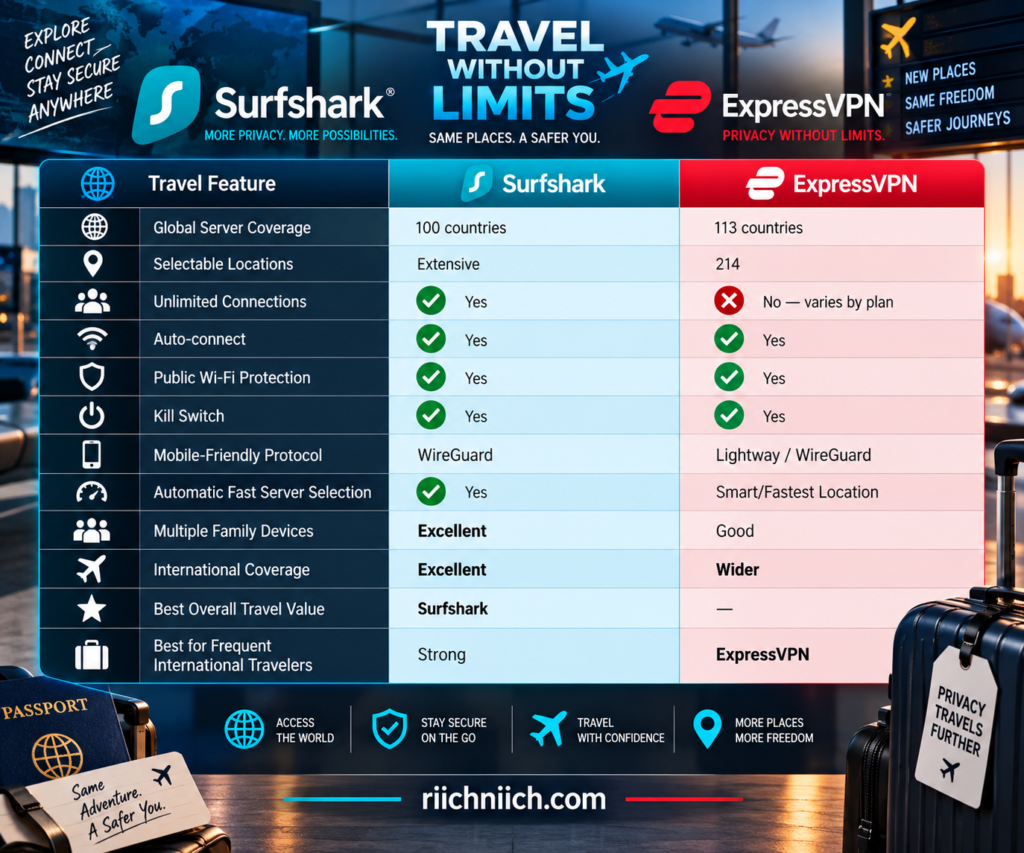
A larger network doesn’t automatically make one VPN better for every trip. If you’re traveling only within the United States, for example, having servers in another dozen countries may make little practical difference. International travelers visiting multiple regions are more likely to benefit from broader geographic coverage.
Surfshark for Traveling
Surfshark has a major advantage for travelers carrying several connected devices: unlimited simultaneous VPN connections.
Think about what you might bring on a vacation:
- Smartphone
- Laptop
- Tablet
- Second phone
- Family members’ devices
With Surfshark, you don’t have to decide which compatible devices get VPN protection because one subscription supports unlimited simultaneous connections.
That’s particularly valuable for families.
Instead of purchasing a VPN primarily for one travel laptop, you’re buying something that can cover numerous compatible devices at home and while you’re away.
Surfshark’s Auto-connect feature is also useful while traveling. It can automatically establish a VPN connection when your device finds Wi-Fi or Ethernet, and you can choose options such as the fastest server, nearest server, a particular country or city, Static IP, or MultiHop. On iOS, the current implementation instead connects to the most recently used location.
ExpressVPN for Traveling
ExpressVPN has a particularly strong argument for frequent international travelers.
Its network currently spans 214 selectable server locations across 113 countries, covering the Americas, Europe, Asia-Pacific, the Middle East, and Africa.
That broad geographic coverage gives travelers more opportunities to find a nearby VPN server when moving between countries.
And server distance matters.
If you’re traveling in another part of the world but route all of your traffic through a VPN server thousands of miles away, you can introduce unnecessary latency. A nearby server can often provide a more responsive connection.
ExpressVPN’s Smart Location feature considers download speed, latency, and distance when recommending a server. On Android and iOS, its Fastest Location feature uses real-time information including speed, latency, and distance to identify suitable servers for the current network.
Lightway Is a Strong Feature for Travelers
ExpressVPN’s Lightway protocol becomes especially relevant when you’re constantly moving between networks.
Imagine this:
You’re connected to hotel Wi-Fi while checking something on your phone.
You walk outside.
Your phone leaves the hotel network and switches to cellular data.
Later, you enter an airport and connect to another Wi-Fi network.
ExpressVPN designed Lightway with mobile use and network transitions in mind. The company says Lightway can maintain fast connections with relatively low battery use while moving between Wi-Fi and mobile networks.
That’s a practical advantage for someone who wants to turn on the VPN and leave it running throughout the day.
Surfshark’s WireGuard implementation is also fast and lightweight, so this isn’t a weakness for Surfshark. But ExpressVPN’s Lightway technology is particularly well suited to the constant network switching that happens while traveling.
Automatic Connections Matter More When Traveling
At home, forgetting to turn on your VPN may not seem like a major issue.
Traveling is different because you may connect to unfamiliar networks repeatedly.
Surfshark’s Auto-connect can activate the VPN after detecting a Wi-Fi or Ethernet connection, reducing the need to manually open the application every time you change networks.
ExpressVPN also provides Auto-connect controls. On Android, for example, you can configure ExpressVPN to connect automatically when joining networks that haven’t been marked as trusted. On Windows, rules can be created for secure Wi-Fi, unsecured Wi-Fi, Ethernet, or particular Wi-Fi networks.
That means your travel routine can become:
Connect to unfamiliar Wi-Fi → VPN automatically connects → continue using your device.
This is much better than relying on yourself to remember to activate the VPN every time you arrive at a new airport, hotel, café, or conference center.
Traveling With Multiple Devices
Surfshark wins this part of the surfshark vs expressvpn comparison.
A solo traveler may only carry a phone and laptop, making connection limits relatively unimportant.
A family can be very different.
Two adults and two children could easily travel with several phones, tablets, laptops, and other connected devices.
Surfshark’s unlimited simultaneous connections eliminate the need to keep track of which devices are currently connected.
ExpressVPN’s plans support a limited number of simultaneous VPN connections depending on the tier. That may still be plenty for many travelers, but Surfshark’s unlimited policy is clearly more flexible.
Using a VPN on Hotel Wi-Fi
Hotels are one of the most obvious places to use a travel VPN.
You’re connecting through infrastructure you don’t control, sometimes using a room number, last name, or captive portal simply to access the network.
Once the VPN connection is established, Surfshark or ExpressVPN encrypts traffic between your device and the VPN server.
That gives you another privacy layer while browsing, checking email, working remotely, or using other online services from your hotel.
However, you may occasionally need to complete the hotel’s Wi-Fi sign-in page before the VPN can establish its connection.
If the hotel’s captive portal doesn’t appear, temporarily opening the Wi-Fi login page and completing the required network authentication may be necessary before reconnecting your VPN.
What If the VPN Doesn’t Connect While Traveling?
Different hotels, airports, workplaces, and countries can use different network configurations.
If your VPN suddenly refuses to connect, don’t immediately assume the service doesn’t work in that destination.
Try:
- Confirming that the internet works without the VPN.
- Connecting to another nearby VPN server.
- Switching VPN protocols.
- Restarting the VPN application.
- Checking whether the network requires a captive-portal login.
- Contacting the VPN provider’s support team if the problem continues.
ExpressVPN currently recommends its Automatic protocol setting for most users. If that doesn’t work, its troubleshooting guidance suggests trying available protocols such as Lightway UDP, Lightway TCP, WireGuard, OpenVPN, or IKEv2 depending on the device.
This flexibility can be valuable when you’re thousands of miles from home and encounter an unusual network.
Can You Use a VPN in Every Country?
Not necessarily.
VPN laws and restrictions vary by country and can change, so you shouldn’t assume that because Surfshark or ExpressVPN has a server location associated with a country, VPN use is automatically unrestricted there.
Some countries restrict VPN services or regulate how they can be used.
Before traveling internationally, check the current laws and regulations for your destination. This is particularly important if you’re visiting a country known for internet censorship or VPN restrictions.
Also consider installing and updating your VPN applications before you leave home. In locations where VPN websites or app stores are restricted, downloading the software after arrival could be more difficult.
A VPN Doesn’t Replace Basic Travel Security
A VPN protects an important part of your digital travel setup, but it can’t protect the physical device itself.
If somebody steals an unlocked phone or laptop, VPN encryption won’t prevent that person from accessing information already available on the device.
Travelers should still use:
- Strong device passcodes
- Biometric locks where appropriate
- Multi-factor authentication
- Automatic screen locking
- Device encryption
- Current software updates
- Secure backups
A VPN should be one layer of your travel-security strategy.
Which VPN Is Better for Traveling?
For buyers comparing surfshark vs expressvpn, the winner depends heavily on how you travel.
Surfshark is the better choice for families and value-conscious travelers. Unlimited simultaneous connections make it easy to protect a large collection of phones, tablets, laptops, and other compatible devices without managing connection limits. Its Auto-connect functionality also makes protection easier as you move between networks.
ExpressVPN is the stronger choice for frequent international travelers. Its network currently reaches 113 countries and 214 selectable locations, while Smart Location and Fastest Location help identify appropriate servers based on factors including speed, latency, and distance. Lightway is also specifically designed to perform efficiently as mobile devices transition between Wi-Fi and cellular networks.
So the buying decision is fairly straightforward:
Choose Surfshark if you travel with lots of devices, travel with your family, and want the better long-term value.
Choose ExpressVPN if you travel internationally frequently and prioritize broad geographic coverage, mobile connectivity, and easy server selection.
For this category, ExpressVPN’s larger geographic footprint and travel-friendly Lightway technology give it the narrow overall advantage.
Winner for Traveling: ExpressVPN — by a narrow margin
Travelers may use a phone, tablet, laptop, smart TV, and several other devices during the same trip, which leads directly to another important buying consideration. Next, we’ll compare Surfshark vs ExpressVPN: Device Compatibility to see exactly which operating systems, browsers, televisions, routers, and other devices each VPN supports.
Surfshark vs ExpressVPN: Device Compatibility
A VPN can have excellent security and fast servers, but those advantages mean much less if it doesn’t work well on the devices you actually use. Before choosing between Surfshark and ExpressVPN, consider everything you want to protect—not just your primary computer.
For buyers comparing surfshark vs expressvpn, device compatibility is excellent with both services. Surfshark provides apps for major desktop and mobile platforms, browsers, and streaming devices, while manual router setup can extend protection to devices that don’t support VPN apps directly. ExpressVPN covers the same major categories and adds an especially extensive ecosystem for routers, televisions, streaming hardware, and other connected devices.
The biggest difference isn’t simply which devices are supported. It’s how many of those devices you can have connected at the same time.
Surfshark vs ExpressVPN Device Compatibility at a Glance
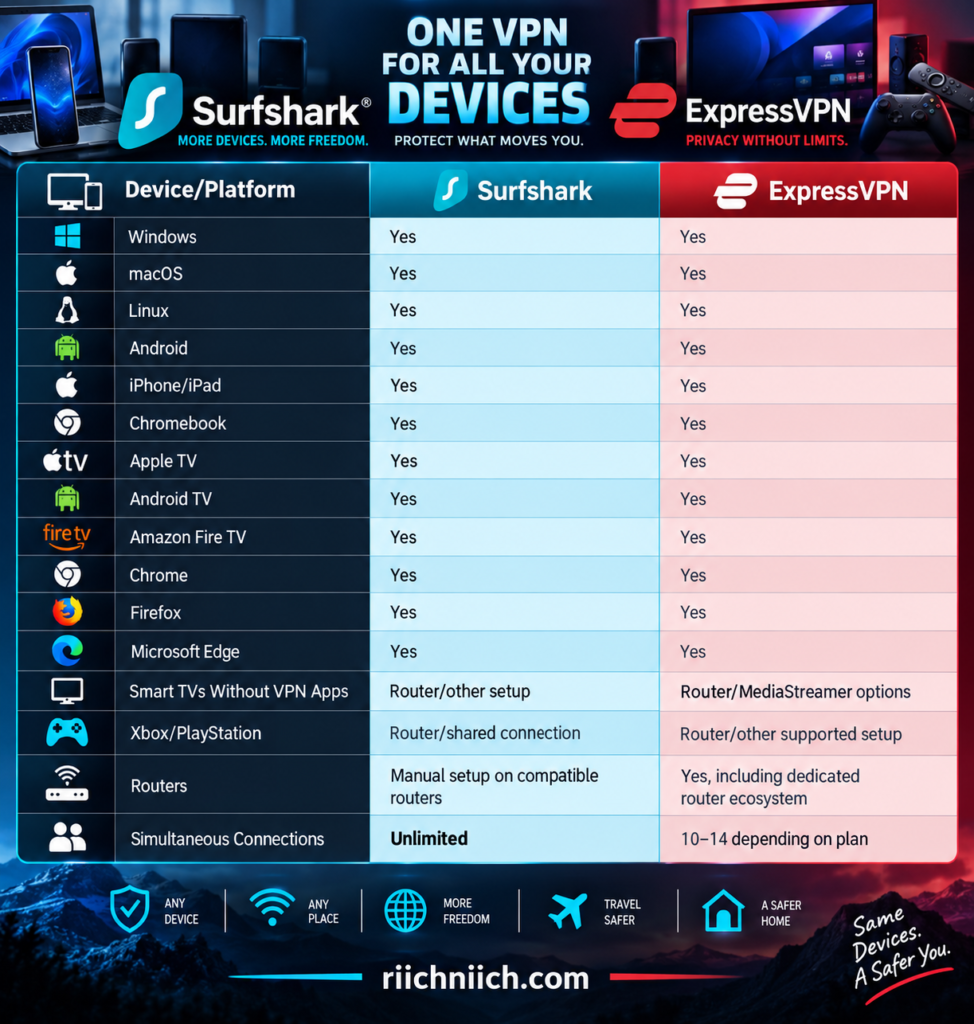
For the average buyer, either service will cover the most commonly used operating systems. Surfshark’s biggest advantage appears when you start adding more and more devices to the household.
Surfshark Device Compatibility
Surfshark covers virtually every major device category an ordinary household is likely to use.
Its current download options include dedicated support for Windows, macOS, Linux, Android, iOS, Chrome, Firefox, and Edge, while Surfshark also supports devices such as Fire TV and Apple TV. Compatible routers can be configured to extend VPN protection to other devices on the network.
That makes Surfshark suitable for someone who might use Windows at work, an Android phone throughout the day, an iPad on the couch, and an Apple TV or Fire TV in the living room.
The interface changes somewhat between platforms, and not every feature is available on every operating system. That’s normal with VPN software because Windows, macOS, Android, iOS, and television operating systems impose different technical restrictions.
But Surfshark’s major selling point remains consistent:
One subscription supports unlimited simultaneous connections.
For a household filled with connected devices, that can be a major buying advantage.
ExpressVPN Device Compatibility
ExpressVPN also offers extremely broad device support.
Its current applications and configurations cover Windows, Mac, Linux, Chromebook, Android, iOS, and Amazon Fire tablets, along with browser support and numerous entertainment devices. Its current download center also includes Apple TV, Android TV, Fire TV, routers, Xbox, PlayStation, smart-home devices, and MediaStreamer configurations.
ExpressVPN’s television support is particularly extensive. Its current download information lists smart-TV and streaming support including Apple TV, Fire Stick, Chromecast, Roku, Nvidia Shield, Android TV, Samsung TVs, and more, although the installation method varies by device.
That distinction matters.
“Compatible” doesn’t always mean there’s a native ExpressVPN app you can install directly on every television. Some devices use the native application, while others may require MediaStreamer, router-based protection, or another configuration.
Windows Compatibility
Both Surfshark and ExpressVPN provide dedicated Windows applications.
This is important because Windows generally gives VPN providers more freedom to offer their full collection of features than some more restrictive mobile or television operating systems.
Surfshark’s Windows app supports standard VPN functionality along with features such as different VPN protocols and manual WireGuard and OpenVPN configurations. Surfshark also provides an installer for Windows computers using ARM-based processors.
ExpressVPN’s current Windows application supports Windows 10 and 11, including a separate ARM64 version.
For ordinary Windows users, there isn’t enough of a compatibility difference here to choose one VPN solely on this category.
Windows compatibility: Tie
Mac Compatibility
Both VPNs provide native macOS applications.
ExpressVPN currently supports Macs running macOS 11 Big Sur and later, and its app runs natively on Apple Silicon Macs.
Surfshark likewise provides a dedicated macOS application.
However, specific VPN features and protocols can differ depending on which version of an application you install. That’s particularly relevant with Surfshark because its newer Dausos protocol is currently limited to its macOS App Store application.
If you’re buying primarily for a Mac, check the current feature list for the specific version you’re planning to install rather than assuming every Surfshark or ExpressVPN feature works identically across operating systems.
Android and iPhone Compatibility
Both services are excellent choices for smartphones and tablets.
Surfshark provides applications for Android and iOS, while ExpressVPN supports Android phones and tablets as well as iPhones and iPads. ExpressVPN’s current Android app supports Android 7 and above, while its iOS application supports iOS 15 and above.
Both services are designed to make connecting straightforward: open the app, select a server, and establish the VPN connection.
This makes either service suitable for buyers looking for a VPN for:
- Android phones
- Samsung Galaxy devices
- Google Pixel devices
- iPhones
- iPads
- Android tablets
Surfshark gets the practical advantage for a household with many mobile devices because you don’t have to count simultaneous connections.
Linux Compatibility
Linux support used to be an afterthought for many consumer VPNs, but both companies now provide dedicated Linux experiences.
Surfshark offers a Linux application with a graphical user interface rather than forcing ordinary users to rely entirely on command-line configuration.
ExpressVPN also provides a modern Linux application with a graphical interface, server-location controls, Quick Connect, protocol information, and support for headless installations. Its current compatibility includes Ubuntu 24.04 LTS+, Debian 12+, Fedora 39+, Linux Mint 22+, Raspberry Pi OS 64-bit Bookworm+, and current Arch Linux releases.
For Linux users, both services are considerably more approachable than VPNs that provide only manual configuration files.
Browser Compatibility
Surfshark provides browser extensions for Chrome, Firefox, and Microsoft Edge.
ExpressVPN currently supports Chrome, Firefox, Edge, Brave, Chromium, and Vivaldi in various desktop configurations. Its support documentation also lists Chrome OS browser support in Proxy Mode for Chrome and Firefox.
There is an important distinction between a browser extension and a full VPN application.
Depending on the provider and mode being used, a browser extension may protect or control browser traffic rather than functioning exactly like the full system-wide VPN application.
If you want your entire computer’s internet connection protected, installing the full VPN application is generally the better choice.
Smart TV and Streaming Device Compatibility
This category has become increasingly important because many buyers aren’t purchasing a VPN just for their laptop.
They also want it on the television.
Surfshark supports streaming platforms including Apple TV, Android TV, and Fire TV, while a VPN-compatible router can extend protection to televisions and streaming devices that cannot run Surfshark directly.
ExpressVPN similarly supports Apple TV, Android TV, Fire TV, Nvidia Shield, Chromecast with Google TV, and other entertainment hardware. Its Android TV app, for example, supports Android TV 5.0 and newer.
ExpressVPN also continues to offer MediaStreamer for certain devices that don’t support conventional VPN applications.
Remember, however, that MediaStreamer is a DNS service rather than a full VPN, so it doesn’t provide the same encrypted VPN tunnel.
What About Gaming Consoles?
Xbox and PlayStation consoles generally don’t work like a Windows PC where you simply download a standard VPN desktop application.
Instead, VPN protection may need to come through a VPN-configured router or shared network connection.
Surfshark specifically notes that gaming consoles and other operating systems without native VPN support can still be protected through a VPN router.
ExpressVPN’s device center includes Xbox and PlayStation setup options along with router configurations.
If protecting a console is one of your main reasons for purchasing a VPN, check the setup instructions for your specific router before subscribing.
Router Compatibility Can Protect Devices Without VPN Apps
A VPN router solves an important device-compatibility problem.
Instead of installing the VPN individually on every device, you configure the VPN at the router level. Compatible devices connecting through that router can then send their internet traffic through the VPN connection.
This can be useful for:
Smart TV → Router → VPN → Internet
Game Console → Router → VPN → Internet
Streaming Device → Router → VPN → Internet
Surfshark supports manual configuration on compatible VPN routers, but not every router works. Surfshark specifically notes that many ISP-provided routers and several consumer router models don’t support the required OpenVPN or WireGuard client functionality with their default firmware.
ExpressVPN has a more developed router ecosystem, including its router software and Aircove hardware, which can make it particularly attractive for someone planning to protect a large collection of home devices through the network itself.
Device Compatibility Is Not the Same as Feature Compatibility
This is an easy detail to overlook when shopping for a VPN.
Just because Surfshark or ExpressVPN works on a particular device doesn’t mean every feature works identically on that device.
For example, split tunneling, protocol availability, kill-switch behavior, browser-extension functionality, and advanced privacy tools can vary between Windows, macOS, Android, iOS, Linux, and television applications.
Older operating systems can also lose support as VPN providers update their security requirements.
ExpressVPN, for example, currently requires Windows 10 or newer for its latest Windows application, while its latest Mac app requires macOS 11 or later.
Before buying either service for an older computer, television, phone, or router, verify the specific device model and operating-system version rather than checking only whether the general platform is supported.
Which VPN Has Better Device Compatibility?
For most buyers comparing surfshark vs expressvpn, both services cover the devices that matter most: Windows, Mac, Linux, Android, iPhone and iPad, browsers, televisions, streaming hardware, and compatible routers.
ExpressVPN gets a slight advantage for the breadth of its device ecosystem. Its current setup center extends beyond conventional computers and phones into Apple TV, Android TV, Fire TV, routers, Xbox, PlayStation, smart-home devices, MediaStreamer, and manual configurations.
Surfshark, however, has the more important advantage for many households:
Unlimited simultaneous connections.
ExpressVPN’s current Basic, Advanced, and Express Pro tiers support 10, 12, and 14 simultaneous VPN connections respectively. Surfshark doesn’t impose that type of simultaneous-device limit.
That makes the buying decision fairly simple.
Choose Surfshark if you have lots of phones, computers, tablets, televisions, and other devices and want maximum flexibility from one subscription.
Choose ExpressVPN if you prioritize an extensive device ecosystem, particularly routers and entertainment hardware, and its connection limits are already enough for your household.
For overall device compatibility, the sheer breadth of ExpressVPN’s ecosystem earns it a narrow technical win—but Surfshark remains the better value for protecting a large number of devices.
Winner for Device Compatibility: ExpressVPN — by a narrow margin
Device compatibility tells you where each VPN works. The next question is how many of those devices you can actually protect at once, which makes Surfshark vs ExpressVPN: How Many Devices Can You Protect? an especially important comparison for families and multi-device households.
Surfshark vs ExpressVPN: How Many Devices Can You Protect?
The number of devices a VPN can protect simultaneously becomes increasingly important as households add smartphones, laptops, tablets, smart TVs, streaming devices, and other connected hardware.
For buyers comparing surfshark vs expressvpn, this is one category where there is a clear difference: Surfshark allows unlimited simultaneous VPN connections, while ExpressVPN currently allows 10, 12, or 14 simultaneous connections depending on the subscription tier.
If you’re looking for the best VPN for multiple devices, Surfshark has one of the strongest advantages in this entire comparison.
Surfshark vs ExpressVPN Device Limits
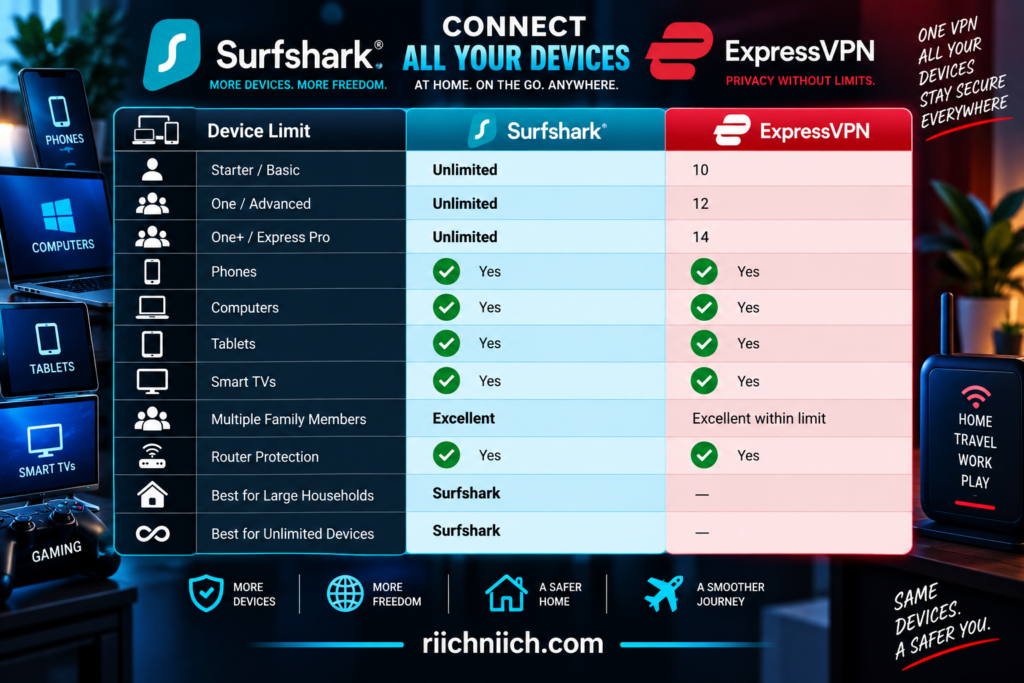
Surfshark confirms that its Starter, One, and One+ plans all allow an unlimited number of devices to use the VPN simultaneously. ExpressVPN’s current limits are 10 connections with Basic, 12 with Advanced, and 14 with Express Pro.
How Many Devices Can You Use With Surfshark?
Surfshark allows unlimited simultaneous VPN connections with one subscription.
That applies to its regular Surfshark VPN service across the Starter, One, and One+ plans. Surfshark says you can install and use the VPN on devices including Windows and Mac computers, Linux machines, Android and iOS devices, smart TVs, and supported browsers.
So a household could theoretically have Surfshark running on:
- 4 smartphones
- 3 laptops
- 2 tablets
- 2 smart TVs
- 1 Fire TV
- 1 Apple TV
That’s 13 simultaneous VPN connections without requiring another VPN subscription.
Add another laptop or phone?
You’re still covered.
This is a major buyer-intent advantage because households don’t remain static. You may have six connected devices today and 15 a few years from now.
With Surfshark, you don’t have to upgrade your VPN plan simply because you’ve added more compatible devices.
How Many Devices Can You Use With ExpressVPN?
ExpressVPN takes a different approach.
The simultaneous connection limit depends on which ExpressVPN subscription you purchase:
Basic: 10 devices
Advanced: 12 devices
Express Pro: 14 devices
These are simultaneous connections, meaning an Express Pro subscriber could have 14 devices actively connected to ExpressVPN at the same time.
ExpressVPN even gives an example of an Express Pro account simultaneously covering six iPhones, four iPads, and four MacBooks.
For many people, 10 connections with the Basic plan will already be enough.
But buyers with large families, lots of smart devices, or multiple computers may eventually reach that limit.
Does Unlimited Really Mean Unlimited With Surfshark?
For ordinary household use, yes: Surfshark’s core VPN plans support unlimited simultaneous VPN connections.
There are two qualifications worth understanding.
First, Surfshark’s Terms of Service include a Fair Usage Policy allowing it to restrict an immoderate number of simultaneous connections if usage could negatively affect service quality. That’s aimed at misuse rather than an ordinary household with many devices.
Second, “unlimited devices” applies specifically to the VPN service. Other products included with higher Surfshark tiers can have their own limits. Surfshark Antivirus, for example, currently allows a maximum of five simultaneous connections per account.
So if you’re purchasing Surfshark One or One+, don’t interpret “unlimited VPN connections” to mean every additional cybersecurity product included in the package also has unlimited device coverage.
For the VPN itself, however, the unlimited-device advantage remains.
How Many Devices Does the Average Household Actually Need?
This number can grow faster than you might expect.
Consider a household with two adults and two children.
Each adult has a smartphone and laptop. The children each have a tablet. There are two televisions with streaming devices. Then add a home computer and perhaps another tablet.
You could easily reach 10 or more devices without considering yourself a particularly technology-heavy household.
That’s where the difference between surfshark vs expressvpn becomes more noticeable.
With Surfshark, you don’t have to think about the number.
With ExpressVPN Basic, you’d need to make sure no more than 10 devices are actively connected at once. Advanced raises that limit to 12, while Express Pro raises it to 14.
For a single person or couple, this difference may be almost irrelevant.
For a large household, it can become one of the most important reasons to choose Surfshark.
What Happens If You Reach ExpressVPN’s Device Limit?
ExpressVPN doesn’t prevent you from installing its app on additional devices simply because you’ve reached your simultaneous connection allowance.
The restriction applies to how many devices are actively connected to the VPN at the same time.
If you reach your plan’s limit and try connecting another device, ExpressVPN can display a Connection Limit Reached warning. You can then disconnect one of the currently connected devices and connect the new one.
If you consistently need more than 14 simultaneous connections, ExpressVPN currently suggests three main alternatives: purchase another subscription, share the VPN connection from a Windows computer, or configure ExpressVPN on a router.
For most households, that’s manageable.
But Surfshark eliminates the need to manage that limit in the first place.
Can a VPN Router Protect Even More Devices?
Yes, and this changes the equation somewhat for ExpressVPN.
Instead of installing the VPN individually on every device, you can configure a compatible router so devices connected through that router use the VPN connection.
ExpressVPN specifically says that if you need to connect more than 14 devices simultaneously, setting up a VPN router allows you to connect as many devices to that router as you wish.
Surfshark also supports router configurations and specifically highlights routers as a way to protect devices such as smart TVs, Nintendo Switch, Xbox, PlayStation, Oculus Quest, Apple Vision Pro, and Raspberry Pi.
Router-level protection can therefore be useful for smart-home environments where some devices don’t support native VPN applications.
But Surfshark still has the simpler advantage for individual apps:
Unlimited simultaneous VPN connections without requiring the router workaround.
Which Is Better for Families?
Surfshark is the clear winner for families.
A family VPN needs to accommodate more than today’s devices.
Phones get replaced. Children receive tablets. Another television gets added. Someone buys a laptop. A streaming device appears in another bedroom.
Surfshark’s unlimited connection policy means the VPN can grow alongside the household without forcing you to count active VPN connections. Surfshark also explicitly allows customers to share their subscription with family members within a household.
ExpressVPN isn’t bad for families—far from it.
Ten simultaneous connections with Basic may be plenty for many households, while Advanced provides 12 and Express Pro provides 14.
But if you’re specifically searching for the best VPN for families and multiple devices, Surfshark’s unlimited connections provide greater flexibility.
Does Connecting More Devices Make Surfshark Slower?
Not automatically.
Surfshark states that it doesn’t impose bandwidth limitations and that the number of devices being used with one subscription does not itself affect connection speed.
There is an important practical distinction, though.
Your home internet connection still has a finite amount of bandwidth.
If one laptop is downloading a huge file, two TVs are streaming 4K video, several phones are watching videos, and someone is playing an online game, those devices are still sharing the bandwidth available from your ISP.
That’s true whether you’re using Surfshark, ExpressVPN, or no VPN at all.
So “unlimited VPN connections” should not be interpreted as “unlimited internet bandwidth.”
Surfshark Has One Trial Limitation to Know About
There’s one newer detail buyers should know before testing Surfshark.
Surfshark’s current 7-day free trial allows up to three devices during the trial period. Once the trial ends and the regular subscription begins, the VPN can be used on an unlimited number of devices. Surfshark also currently offers a 30-day money-back guarantee.
That’s an important distinction if you’re planning to test Surfshark on your entire household immediately.
The regular paid VPN subscription is unlimited; the current free trial is not.
Surfshark vs ExpressVPN: Which Is Better for Multiple Devices?
For buyers comparing surfshark vs expressvpn, Surfshark wins this category decisively.
ExpressVPN has significantly improved its device allowance. Its current Basic plan supports 10 simultaneous connections, Advanced supports 12, and Express Pro supports 14. That’s enough for many individuals, couples, and even families.
But Surfshark removes the device-counting problem entirely for normal VPN use.
You can protect numerous compatible phones, laptops, tablets, televisions, and other devices under one VPN subscription without upgrading to a more expensive tier simply to increase your simultaneous VPN connection allowance.
That gives Surfshark a major buyer-intent advantage for:
- Large families
- Multi-device households
- Couples with many devices
- People with separate work and personal computers
- Travelers carrying multiple devices
- Households that expect to add more devices over time
Winner for Multiple Devices: Surfshark — by a clear margin
ExpressVPN’s 10–14 connection allowance is generous, but unlimited simultaneous VPN connections are simply more flexible. If device count is one of your top buying priorities, Surfshark is the stronger choice.
The number of devices is only part of the experience, though. A VPN also needs to be easy enough that everyone in the household can actually use it. Next, we’ll compare Surfshark vs ExpressVPN: Apps and Ease of Use.
Have more devices than you want to count? Check Surfshark’s current deal and protect your household with unlimited simultaneous VPN connections under one subscription.
Surfshark vs ExpressVPN: Apps and Ease of Use
A VPN should make privacy easier, not turn it into another technical chore. Most people don’t want to adjust complicated network settings every time they go online—they want to open the app, connect, and know the VPN is working.
For buyers comparing surfshark vs expressvpn, both services do a good job of simplifying everyday VPN use. Surfshark combines an easy Quick-connect system with considerably more customization, while ExpressVPN emphasizes a streamlined interface built around connecting with one click or tap.
That creates a noticeable difference in philosophy: Surfshark gives you more controls to explore, while ExpressVPN generally keeps the everyday experience simpler.
Surfshark vs ExpressVPN Ease of Use at a Glance
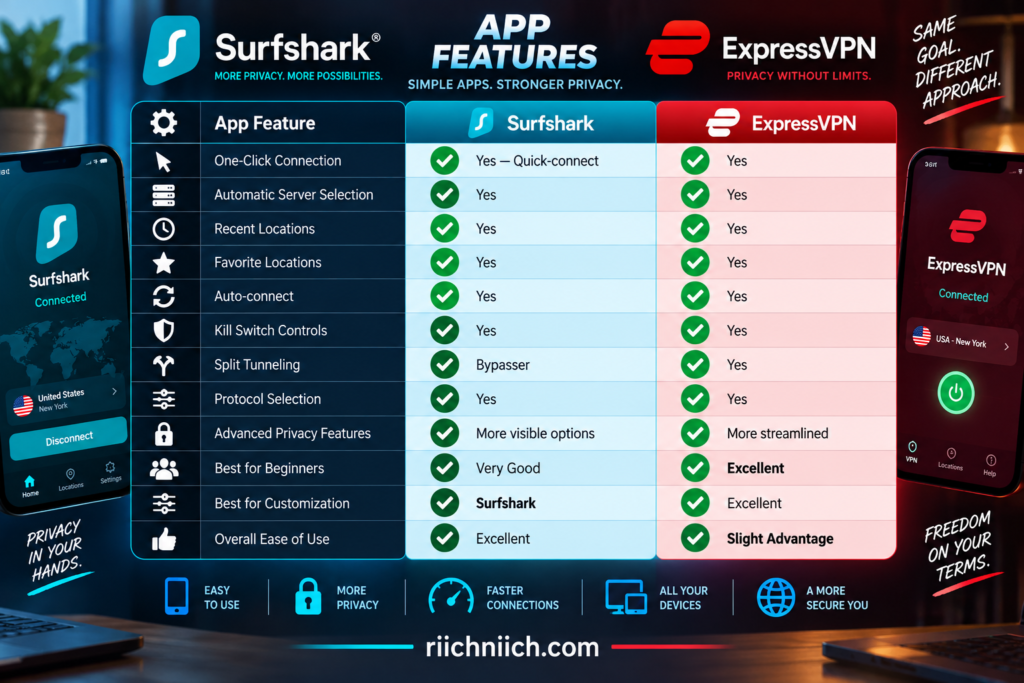
Both are beginner-friendly enough that you can install the app, sign in, and establish a VPN connection without understanding protocols, encryption standards, DNS, or server infrastructure.
Surfshark’s App Is Simple on the Surface
Surfshark does a good job of keeping its main VPN controls straightforward even though there are numerous features underneath.
On Windows, after signing in, the main dashboard provides a Quick-connect button. By default, it connects you to an appropriate nearby location, and Surfshark lets you change the preference to options such as the fastest or nearest location.
Once connected, the dashboard clearly displays your connection status and provides quick access to recently used servers and the complete location list.
Surfshark’s current Windows app also includes a beta Performance Indicator that uses green, yellow, and red indicators to represent server connection quality based on ping. That can make choosing between server locations easier without requiring the user to interpret raw technical information.
For someone who just wants VPN protection, the basic routine can be extremely simple:
Open Surfshark → Quick-connect → Connected
You don’t need to touch the more advanced features unless you want them.
Surfshark Gives Advanced Users More to Explore
The simplicity changes once you start opening Surfshark’s settings.
That’s not necessarily bad.
Surfshark packs numerous controls into its applications, including features such as:
- Auto-connect
- Kill Switch
- CleanWeb
- Bypasser
- Rotating IP
- Static IP locations
- Dynamic MultiHop
- Protocol selection
- NoBorders on supported platforms
Surfshark’s current Windows interface, for example, lets users enable Auto-connect, launch the app at startup, change VPN protocols, activate CleanWeb and Kill Switch, access Bypasser, and manage NoBorders from its settings.
This gives Surfshark a stronger argument for buyers who like to customize how their VPN behaves.
The downside is that someone completely new to VPNs may initially wonder what features such as Bypasser, Static IP, MultiHop, or Rotating IP actually do.
Fortunately, you don’t need to use any of them to establish a basic VPN connection.
ExpressVPN Takes an Even Simpler Approach
ExpressVPN’s application philosophy is heavily centered around one-click or one-tap protection.
ExpressVPN itself recommends using its regular applications instead of manual configurations for most people. Its app interface allows users to connect or disconnect with one click or tap, browse server locations, use Lightway, configure split tunneling on supported devices, activate protection features, and automatically connect when appropriate.
This makes ExpressVPN particularly appealing to someone purchasing their first VPN.
You don’t need to understand what Lightway is.
You don’t need to know how VPN routing works.
You don’t need to manually configure network adapters.
Install the application, sign in, and connect.
That simplicity is one reason ExpressVPN earns the edge in this category.
Choosing a Server Is Easy With Both
Most VPN users don’t need to manually select a server every time they connect.
Surfshark’s Quick-connect can automatically choose an appropriate server, while users who want more control can select a specific country or location. On its current Windows app, Surfshark also lets users favorite locations and see connection-quality indicators.
ExpressVPN similarly lets you connect automatically or browse its server network manually. Its app currently provides access to locations across 113 countries.
For everyday use, automatic selection is usually the easiest choice.
Need a particular location?
Open the location list and choose it manually.
Want the VPN to make the decision?
Use the automatic option.
Neither service forces ordinary users to understand the technical details behind the server selection.
Surfshark’s Auto-connect Can Reduce Daily Effort
One of the best ease-of-use features is one you may eventually stop noticing.
Auto-connect.
Surfshark can automatically establish a VPN connection after detecting Wi-Fi or Ethernet, meaning you don’t necessarily have to open the app and press Quick-connect every time you go online.
Surfshark also lets you customize the location used for Auto-connect. Depending on the platform, that can include the fastest server, nearest server, a particular country or city, Static IP, or MultiHop. On iOS, Surfshark currently uses the most recently selected location instead of offering the same preferred-location selection.
For everyday users, this can turn Surfshark from something you actively manage into something that simply runs in the background.
That’s particularly useful on laptops that regularly move between home, work, hotels, airports, and coffee shops.
ExpressVPN Also Makes Automatic Protection Easy
ExpressVPN offers a similarly hands-off experience.
Its standard applications can automatically connect when the app launches or when joining untrusted networks on supported platforms.
This matters because the easiest VPN to use is ultimately the VPN you don’t have to remember to turn on.
ExpressVPN also combines automatic connections with its Internet Kill Switch, meaning users can configure a more persistent approach to VPN protection without repeatedly navigating through settings.
For buyers who want a set-it-and-forget-it VPN experience, ExpressVPN is particularly strong.
Surfshark’s Mobile Apps Remain Beginner-Friendly
Surfshark has continued refining its mobile experience.
Its updated Android home screen puts the VPN connection front and center. Users can change locations, see recently used servers, disconnect or pause the VPN, favorite locations, and view details such as the VPN IP address, protocol, connection time, and Kill Switch status.
On iPhone and iPad, Quick-connect remains the fastest route to protection. Surfshark currently allows users to customize Quick-connect toward the fastest server or nearest country, while additional settings provide access to Auto-connect, CleanWeb, Kill Switch, protocols, Bypasser, and Rotating IP.
That’s a good balance.
Beginners see the basic connection controls first.
More experienced users can dig deeper when they want more control.
ExpressVPN’s Mobile Experience Is Especially Clean
ExpressVPN also emphasizes one-tap operation on iPhone and Android.
Its current mobile experience combines straightforward server selection with Lightway, automatic reconnection, and an in-app server speed test designed to help users find suitable server options.
That makes ExpressVPN particularly attractive for people who don’t want to spend time customizing their VPN.
Open it.
Connect.
Continue using your phone.
The more technical options are still available when needed, but they don’t dominate the basic experience.
For someone buying a VPN for a parent, spouse, or another person who isn’t particularly interested in cybersecurity technology, ExpressVPN’s simplicity can be a genuine selling point.
What About Manual VPN Setup?
Both companies support manual configurations for situations where their normal applications aren’t appropriate.
But manual setup should generally be viewed as an alternative rather than the default.
ExpressVPN explicitly recommends its regular app setup for most users because it provides one-click connections and access to features including leak protection, Internet Kill Switch, Lightway, split tunneling, blocking features, and automatic connections. Manual configuration is intended more for unsupported devices or users who need additional technical flexibility.
Surfshark similarly supports manual configurations such as OpenVPN and WireGuard. Its current Windows instructions, for example, provide an OpenVPN Connect setup for situations such as restrictive networks or Windows versions that don’t support the regular Surfshark application.
For most buyers:
Use the official app unless you have a specific reason not to.
Which VPN Is Easier for Beginners?
ExpressVPN wins.
Not because Surfshark is difficult—it isn’t.
Surfshark has done an excellent job of keeping Quick-connect accessible while placing its more advanced capabilities deeper within the application.
But Surfshark simply gives users more things to configure.
That can be an advantage for someone who wants Dynamic MultiHop, Rotating IP, Bypasser, Static IP locations, CleanWeb, customizable Auto-connect behavior, and other privacy controls.
ExpressVPN feels more focused on the core workflow:
Install → Sign in → Connect
That’s difficult to beat for a first-time VPN buyer.
Which VPN Is Better for Advanced Users?
Surfshark gets the advantage here.
If you’re the type of user who likes opening settings and controlling exactly how your VPN behaves, Surfshark provides a broader collection of easily accessible options.
For example, you can configure Auto-connect, select protocols, use Bypasser, activate CleanWeb, choose Static IP locations, use Dynamic MultiHop, activate Rotating IP, and manage other supported features.
ExpressVPN still provides meaningful customization, including protocol selection, split tunneling on supported devices, Internet Kill Switch controls, automatic connections, and blocking features.
But its overall design philosophy remains more streamlined.
Think of the difference this way:
Surfshark: simple when you want it, customizable when you need it.
ExpressVPN: simple by design, with advanced controls available underneath.
Surfshark vs ExpressVPN: Which Has the Better Apps?
For buyers comparing surfshark vs expressvpn, there isn’t a bad choice here.
Surfshark’s apps strike an impressive balance between accessibility and advanced control. Quick-connect makes basic VPN protection easy, while users who want more can access Auto-connect, CleanWeb, Bypasser, Kill Switch, server preferences, protocols, and additional privacy features.
ExpressVPN goes even further toward simplicity. Its apps are designed around fast one-click or one-tap connections, while features such as automatic connection, Lightway, split tunneling, Internet Kill Switch, and protection controls remain available without requiring manual VPN configuration.
That makes the buying decision straightforward:
Choose Surfshark if you want an easy VPN that also gives you plenty of settings and privacy features to customize.
Choose ExpressVPN if you want the most straightforward experience possible and would rather have the VPN handle most of the complexity for you.
Winner for Apps and Ease of Use: ExpressVPN — by a narrow margin
Surfshark is arguably the better choice for users who enjoy customization, but ExpressVPN’s streamlined approach gives it the advantage for beginners and anyone who simply wants to connect and get on with what they were doing.
Ease of use covers what you interact with every day. Next, we’ll look beneath the main interface at the additional protections each service provides in Surfshark vs ExpressVPN: Extra Privacy and Security Features.
Surfshark vs ExpressVPN: Extra Privacy and Security Features
A VPN’s encrypted tunnel is only one part of modern online protection. Features that block malicious websites, reduce tracking, protect passwords, monitor exposed personal information, create email aliases, or remove data from broker sites can make a subscription considerably more valuable.
For buyers comparing surfshark vs expressvpn, both companies have expanded well beyond basic VPN protection. Surfshark offers tools such as CleanWeb, Dynamic MultiHop, Rotating IP, Alternative ID, Surfshark Alert, Antivirus, and Incogni depending on the plan. ExpressVPN now offers Advanced Protection, ExpressKeys, ExpressMailGuard, Identity Defender, and additional tools depending on its Basic, Advanced, or Express Pro tier.
The important buying question is therefore no longer just, “Which VPN is better?” It’s also which privacy ecosystem gives you features you’ll actually use.
Surfshark vs ExpressVPN Extra Features at a Glance
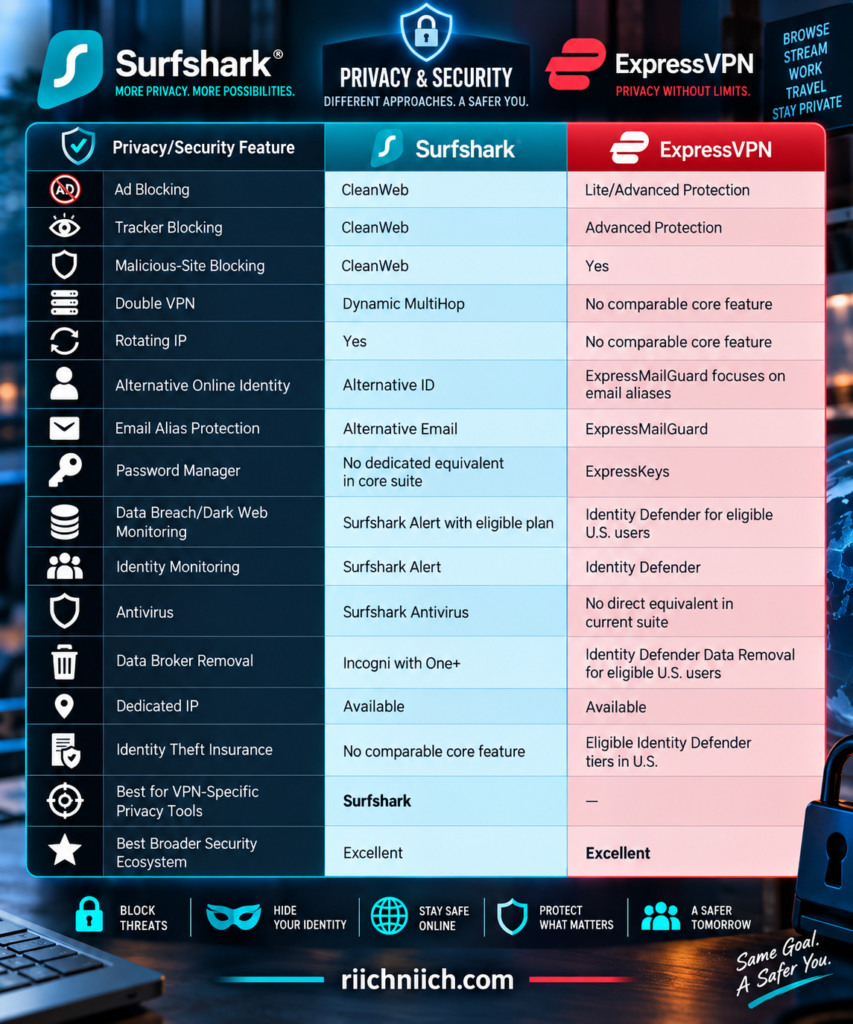
Some of these features depend on your subscription tier, operating system, and country. That makes it important to compare the specific plan you’re purchasing, not simply the Surfshark or ExpressVPN brand name.
Surfshark’s Dynamic MultiHop Adds Another Routing Layer
One of Surfshark’s standout privacy features is Dynamic MultiHop.
A normal VPN connection generally works like this:
Your Device → VPN Server → Internet
Dynamic MultiHop adds another VPN location:
Your Device → Entry VPN Server → Exit VPN Server → Internet
Surfshark also lets you customize the entry and exit locations rather than restricting you to only predefined server combinations.
This can be useful when additional routing privacy is more important than achieving the lowest possible latency.
However, sending traffic through two VPN servers can reduce performance. For ordinary browsing, streaming, gaming, or downloading, you don’t necessarily need MultiHop turned on all the time.
Think of it as an additional privacy option, not a requirement for using Surfshark securely.
Surfshark Rotating IP Makes Tracking an IP Address More Difficult
Surfshark also offers Rotating IP.
When enabled, Surfshark periodically changes your VPN IP address while keeping you connected to the same general VPN location.
That’s different from manually disconnecting and selecting another server.
Your VPN connection remains active while the outward-facing IP changes.
This can make it harder for websites and online services to correlate activity based solely on one persistent VPN IP address.
It doesn’t make you anonymous, and websites can still use cookies, browser fingerprinting, account logins, and other techniques to recognize you.
But it’s a useful additional privacy feature that ExpressVPN doesn’t currently match with a directly comparable core feature.
Alternative ID Can Keep Your Real Information More Private
Surfshark’s Alternative ID takes protection outside the VPN tunnel.
Instead of giving every website your real information, Alternative ID can generate an alternative online persona and email address that you can use for certain online activities.
The goal is to reduce how frequently your real personal information is distributed across websites and databases.
Surfshark also offers Alternative Number as a paid add-on. The feature provides a virtual phone number that can help keep your real number private when dealing with signups, listings, and websites you may not fully trust. Alternative Number is currently available only in the U.S.
This is an interesting privacy strategy because it focuses on data minimization.
Instead of only protecting information after you’ve shared it, you’re reducing how often you hand out the real information in the first place.
Surfshark One Expands Beyond the VPN
Buyers who want more than Surfshark’s core VPN can move into the Surfshark One ecosystem.
Surfshark One bundles additional cybersecurity tools with the VPN, while One+ goes further by including Incogni, a data-removal service designed to request removal of personal information from data brokers. Surfshark also offers Dedicated IP and Alternative Number as optional paid additions.
That changes the value proposition.
You’re no longer simply buying a VPN.
You’re potentially combining:
VPN protection + malware protection + breach monitoring + private search/privacy tools + identity masking + data removal
For someone trying to reduce the number of separate cybersecurity subscriptions they pay for, that can make Surfshark One or One+ significantly more attractive than purchasing Surfshark Starter alone.
ExpressVPN’s Advanced Protection Goes Beyond Encryption
ExpressVPN has also expanded considerably beyond its traditional VPN.
Its Advanced Protection system can block ads, trackers, known malicious sites, and adult content depending on the subscription tier.
The malicious-site blocker can prevent connections to known phishing, malware, and fraudulent domains. ExpressVPN’s current Advanced Protection system uses DNS-based blocking on the device rather than routing those blocking decisions through a traditional server-side filter.
There is an important plan difference.
ExpressVPN’s current Basic tier includes Lite Protection with blocking for ads, malicious sites, and adult sites. Advanced and Express Pro add the broader Advanced Protection package, including tracker blocking.
That’s worth checking before buying because not every ExpressVPN subscriber receives exactly the same protection features.
ExpressKeys Adds a Password Manager
ExpressVPN has another advantage Surfshark doesn’t currently match directly within its core cybersecurity suite: ExpressKeys.
ExpressKeys is ExpressVPN’s password manager.
It can store unlimited logins, credit and debit cards, and secure notes, synchronize across unlimited devices, generate passwords, and use zero-knowledge encryption. Its mobile apps also support passkeys and biometric unlocking.
ExpressKeys is currently included with ExpressVPN’s Advanced and Express Pro subscriptions.
This makes those plans more attractive if you’re currently paying separately for both a VPN and password manager.
A password manager solves a completely different problem from a VPN.
A VPN protects your internet connection.
A password manager helps you create and securely store unique credentials.
Using both addresses two different parts of online security.
ExpressMailGuard Helps Hide Your Real Email Address
ExpressVPN introduced ExpressMailGuard in 2026 as another privacy layer.
Instead of giving websites your primary email address, ExpressMailGuard can create aliases that forward messages to your actual inbox.
Those aliases sit between the sender and your real email address.
Depending on the plan, ExpressMailGuard can provide dedicated subdomains, anonymous aliases, routing rules, multiple recipient inboxes, and the ability to disable an alias when you no longer want messages from a particular source. ExpressVPN says successfully delivered forwarded emails use zero-retention forwarding.
This serves a similar privacy goal to Surfshark’s alternative-email tools: reduce how widely your primary email address gets distributed.
That’s particularly useful for shopping accounts, newsletters, online registrations, and services you don’t necessarily want permanently tied to your primary inbox.
ExpressVPN Identity Defender Changes the Comparison
ExpressVPN has expanded much further into identity protection through Identity Defender.
As of 2026, Identity Defender is available to eligible Advanced and Express Pro customers in the United States. Depending on the tier, it can provide dark-web monitoring, Social Security number monitoring, credit alerts and reports, data removal, change-of-address monitoring, and additional identity-related alerts. Express Pro expands monitoring into areas such as home title, auto title, court records, and 401(k) activity.
This is significantly different from ordinary VPN protection.
A VPN can help protect information while it’s traveling across the internet.
Identity monitoring watches for signs that personal information may already be exposed or misused.
ExpressVPN’s Advanced and Express Pro tiers also currently include identity-theft insurance for eligible U.S. subscribers, with coverage limits of up to $3 million for Advanced and $5 million for Express Pro, subject to policy terms, conditions, exclusions, and availability.
That gives ExpressVPN a much stronger identity-protection component than it had in earlier years.
Data Removal Is Now Available From Both Ecosystems
This is another area where the comparison has become much more interesting.
Surfshark One+ includes Incogni, which focuses specifically on removing personal information from data brokers.
ExpressVPN’s Identity Defender now includes a Data Removal feature for eligible U.S. customers on Advanced and Express Pro subscriptions. Its identity-protection suite combines data removal with monitoring and alerts rather than positioning data removal solely as a standalone privacy product.
That means buyers concerned about their personal information appearing across people-search sites and data-broker databases now have options within either ecosystem.
Surfshark’s advantage is its integration with the established Incogni data-removal service through One+.
ExpressVPN’s advantage is combining data removal with a broader identity-monitoring package for eligible U.S. customers.
Dedicated IP Is Available From Both
Both companies also offer Dedicated IP options.
Normally, VPN users share server IP addresses with other customers. A dedicated IP gives you an IP address assigned specifically for your use.
That can be useful when websites repeatedly challenge shared VPN IPs with CAPTCHAs or when you need a more consistent IP address for certain online services.
Surfshark currently offers Dedicated IP as an optional addition to its plans.
ExpressVPN offers Dedicated IP as an add-on to Basic and Advanced, while its current Express Pro tier includes Dedicated IP.
However, a dedicated IP has a different privacy profile from a heavily shared VPN address. If your primary goal is blending your VPN traffic among many other users, a shared IP may still be preferable.
Don’t Pay for Features You Won’t Use
This is especially important in the surfshark vs expressvpn buying decision.
A longer feature list doesn’t automatically mean a better purchase.
If all you want is:
Fast VPN + encrypted connection + IP masking + kill switch
then Surfshark Starter or ExpressVPN Basic may already cover your primary needs.
If you also want breach monitoring, antivirus protection, data removal, alternative identities, or other privacy tools, Surfshark’s higher tiers become much more compelling.
If you want a password manager, sophisticated email aliases, identity monitoring, data removal, and identity-theft protection under one ecosystem, ExpressVPN’s Advanced or Express Pro plans become much more interesting. ExpressVPN’s current Advanced and Pro tiers package significantly more than the VPN itself.
The right comparison is therefore not:
Which company has more features?
It’s:
Which company includes the features I would otherwise pay for separately?
Which VPN Has Better Extra Privacy and Security Features?
For buyers researching surfshark vs expressvpn, this category no longer has an obvious winner.
Surfshark provides an impressive collection of VPN-specific privacy tools. Dynamic MultiHop, Rotating IP, Bypasser, CleanWeb, Alternative ID, Surfshark Alert, Antivirus, and the option to add Incogni through One+ create a broad privacy and cybersecurity package.
ExpressVPN has evolved into a much broader security ecosystem. Depending on your tier and location, it can combine the VPN with Advanced Protection, ExpressKeys, ExpressMailGuard, Identity Defender, data removal, identity monitoring, and other services. Identity Defender is currently limited to eligible U.S. customers on Advanced and Express Pro plans.
So the buying decision comes down to what kind of additional protection you want.
Choose Surfshark if you prioritize advanced VPN privacy features, unlimited connections, Alternative ID, antivirus protection, and the option to bundle Incogni data removal.
Choose ExpressVPN if you want a broader all-in-one ecosystem that can include a password manager, email aliases, identity monitoring, data removal, and additional identity-protection tools.
For pure VPN privacy customization, Surfshark wins.
For the breadth of the overall cybersecurity ecosystem in 2026, ExpressVPN has become considerably more competitive.
A VPN is only one part of protecting your digital life, so you can also explore our ‘Best Cybersecurity Tools’ guide to see which additional protections may be worth adding to your setup.
Winner for Extra Privacy and Security Features: Surfshark — by a narrow margin
Surfshark’s Dynamic MultiHop, Rotating IP, Alternative ID, and other VPN-focused privacy controls give it the edge, while ExpressVPN’s rapidly expanding security suite makes this one of the closest categories in the comparison.
One feature deserves a closer comparison of its own because it affects everyday browsing on almost every device. Next, we’ll compare Surfshark vs ExpressVPN: Ad and Tracker Blocking.
Surfshark vs ExpressVPN: Ad and Tracker Blocking
A VPN can hide your IP address and encrypt your internet connection, but that does not automatically stop websites, advertising networks, and analytics companies from tracking you. That’s why built-in ad and tracker blocking has become an important feature when choosing a privacy-focused VPN.
For buyers comparing surfshark vs expressvpn, both services now include tools designed to reduce ads, trackers, malicious domains, and other unwanted connections. Surfshark uses CleanWeb, while ExpressVPN includes ad blocking and other filtering tools under Advanced Protection.
The biggest difference is how these tools are implemented and which features are included with each subscription tier.
Surfshark vs ExpressVPN Ad and Tracker Blocking at a Glance
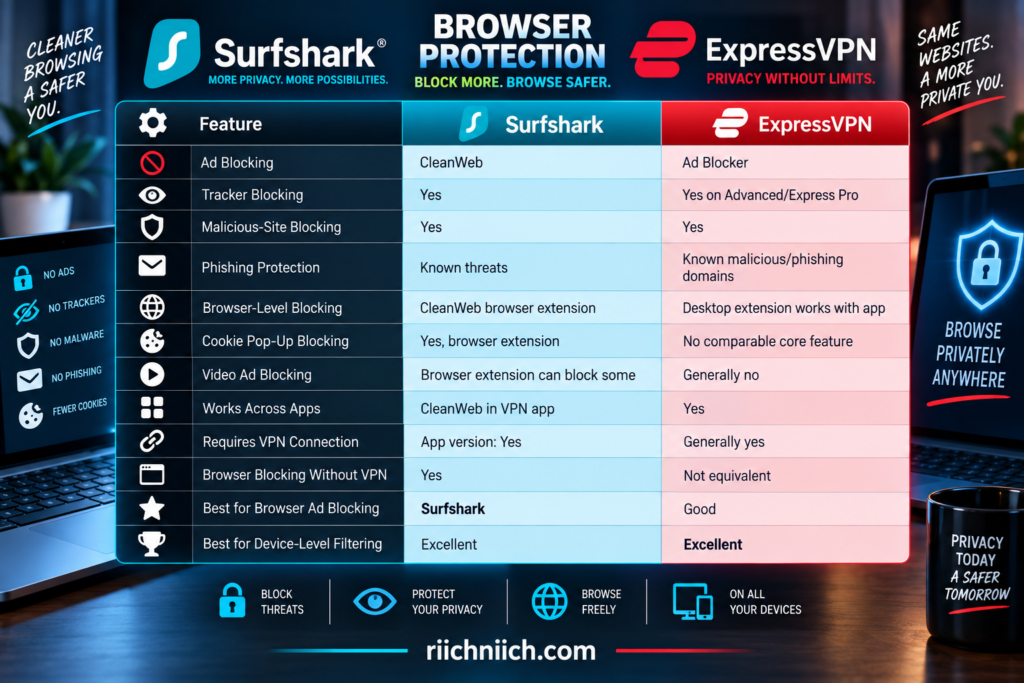
Neither service should be treated as a guarantee that every advertisement or tracking method will disappear. Modern tracking can involve cookies, browser fingerprinting, first-party scripts, account logins, and techniques that aren’t necessarily stopped by a blocklist. ExpressVPN explicitly notes that its tracker blocker cannot catch every tracking method.
How Surfshark CleanWeb Works
Surfshark’s CleanWeb is designed to block ads, trackers, and known malicious content before those unwanted connections interfere with your browsing.
There are actually two important versions to understand.
The CleanWeb feature inside Surfshark’s VPN apps works while you’re connected to the VPN and can block ads, trackers, and malware-related threats. Surfshark currently lists app-level CleanWeb support on iOS, macOS, Android, Windows, Linux, Fire TV, and Apple TV.
Then there’s the more advanced browser-extension version.
Surfshark’s CleanWeb browser protection works with Chrome, Firefox, and Edge and does not require an active VPN connection. It can block web ads, trackers, cookie-consent pop-ups, malware, and certain video ads while providing additional security alerts.
That gives Surfshark two different layers:
Surfshark VPN app → broader device-level filtering while connected
Surfshark browser extension → more advanced browser-specific controls
For buyers who spend a lot of time browsing the web, that distinction makes CleanWeb particularly useful.
Surfshark Can Block More Than Traditional Display Ads
The browser-extension version of CleanWeb is where Surfshark becomes more interesting.
Instead of focusing only on traditional banner advertisements, its browser protection can address several common browsing annoyances.
Surfshark says its extension can block web ads, video ads, trackers, cookie-consent pop-ups, and malware-related threats. It also includes alerts related to malicious websites and previous data breaches.
The cookie pop-up feature is particularly convenient.
Rather than repeatedly clicking through cookie-consent windows, Surfshark’s browser extension can automatically reject non-essential cookies on supported sites. It’s currently available through the CleanWeb browser-extension suite on Chrome, Edge, and Firefox.
That’s partly a privacy feature and partly a quality-of-life feature.
You get a cleaner browsing experience while potentially reducing unnecessary tracking.
How ExpressVPN Ad Blocking Works
ExpressVPN approaches the problem through its Advanced Protection system.
Its current protection tools can block intrusive display ads, known trackers, malicious websites, and adult content, depending on the subscription tier. The system uses DNS-based filtering performed locally on the user’s device, preventing apps and websites from communicating with domains appearing on ExpressVPN’s blocklists.
That local filtering approach is important because ExpressVPN says blocked domains don’t leave the device.
ExpressVPN also updates its blocklists weekly using multiple open-source lists covering advertising, tracking, malicious hosts, and other blocked categories.
The advantage is that ExpressVPN’s protection isn’t restricted to whatever happens inside your web browser.
It can stop connections from apps as well as websites on supported devices.
ExpressVPN’s Tracker Blocker Has a Plan Restriction
This is an important buyer-intent difference.
ExpressVPN’s ad blocker and malicious-site blocker are included across its current plans, but the dedicated tracker blocker is reserved for Advanced and Express Pro subscribers.
That means someone purchasing ExpressVPN Basic should not assume they’re getting every Advanced Protection feature simply because the VPN advertises ad and tracker blocking as part of its broader ecosystem.
ExpressVPN Basic provides substantial blocking functionality, but you need Advanced or Express Pro for the complete tracker-blocking package.
Surfshark’s CleanWeb, meanwhile, is included with its regular VPN subscription packages.
For value-conscious buyers specifically interested in ad and tracker blocking, that gives Surfshark an advantage.
ExpressVPN Blocks Trackers Across Apps and Browsers
ExpressVPN’s tracker blocker isn’t simply a browser extension.
When enabled on a supported device, it prevents apps and websites from connecting to known advertising and analytics domains contained in ExpressVPN’s blocklists.
Imagine you have several applications on your phone.
Some may communicate with analytics services in the background.
A conventional browser-only blocker isn’t designed to control what happens inside those separate applications.
ExpressVPN’s device-level filtering gives it broader reach because the blocking isn’t confined to a single browser window.
Its full Advanced Protection suite is currently available through ExpressVPN apps for Android, iOS, Mac, Windows, and Linux, as well as Aircove. Ad and tracker blocking are also available through its Apple TV application.
Does ExpressVPN Need to Be Connected for Ad Blocking?
Generally, yes.
ExpressVPN’s Advanced Protection features in its standard apps require the VPN to be active. On desktop, ExpressVPN currently specifies that the features work when the VPN is connected using Lightway or Automatic protocol settings.
That’s different from Surfshark’s browser-extension implementation.
Surfshark’s CleanWeb browser extension can continue providing its browser-level protection without an active VPN connection.
For example:
VPN disconnected + Surfshark browser extension active → CleanWeb browser protection can continue
With ExpressVPN’s regular Advanced Protection implementation, the VPN generally needs to be active for those features to function. Aircove is an exception because its Advanced Protection can operate with or without the VPN enabled.
This is another small but meaningful advantage for Surfshark if browser-level ad blocking is one of your priorities.
Can Either VPN Block Every Ad?
No.
This is where VPN marketing can sometimes create unrealistic expectations.
Ad blockers generally rely on identifying and blocking domains or scripts associated with advertising. Some advertisements are much easier to identify than others.
ExpressVPN specifically states that its blocker does not block every ad. First-party advertising and video/audio ads delivered through services such as YouTube can use delivery methods that aren’t stopped by its blocklists.
Surfshark’s browser extension goes further by advertising support for blocking certain video ads, but you still shouldn’t purchase either VPN expecting a permanently ad-free internet.
Websites constantly change how ads are delivered.
Blocklists change.
Advertising platforms change.
Some advertisements may still appear.
So the realistic expectation should be:
Fewer unwanted ads—not zero ads forever.
Ad Blocking Can Also Reduce Unnecessary Data Usage
Advertisements aren’t just visual distractions.
They can require additional images, scripts, video, analytics requests, and other resources to load.
Blocking some of those connections means your device may download less unnecessary content.
ExpressVPN specifically notes that blocking ads can reduce the scripts, images, and trackers a device needs to load, potentially improving page-loading performance on ad-heavy websites.
This can be especially useful when you’re using:
- Cellular data
- A mobile hotspot
- Slow hotel Wi-Fi
- Congested public Wi-Fi
- Limited-bandwidth connections
You shouldn’t buy a VPN ad blocker purely as an internet-speed booster, but reducing unnecessary advertising requests can make cluttered websites feel cleaner and more responsive.
Tracker Blocking Does Not Make You Invisible
This distinction is extremely important when evaluating surfshark vs expressvpn for privacy.
A VPN can mask your normal public IP address.
A tracker blocker can stop connections to many known tracking domains.
But websites may still recognize or profile you using other information.
That can include:
Cookies
Browser fingerprinting
Account logins
Device characteristics
First-party analytics
Information you voluntarily provide
ExpressVPN explicitly acknowledges that no single tool can stop every tracking method and specifically mentions cookies and browser fingerprinting as examples its tracker blocker may not prevent.
So don’t think of ad and tracker blocking as an invisibility switch.
Think of it as another layer:
VPN → reduces IP-based exposure
Tracker blocker → reduces connections to known trackers
Browser privacy controls → reduce additional tracking
Good account/privacy habits → reduce information you voluntarily expose
That layered approach provides much more realistic online privacy.
Ad Blocking Is Not Antivirus Protection
Blocking malicious domains can reduce your chances of accidentally reaching known phishing, malware, or fraudulent websites.
That’s useful.
But it doesn’t replace antivirus software.
ExpressVPN explicitly states that its malicious-site blocker is not a full antivirus solution. It can stop connections to known harmful domains, but it cannot replace endpoint malware protection and safe browsing practices.
The same principle applies when evaluating Surfshark CleanWeb.
Domain blocking can stop certain threats before they load, but malware can still arrive through other routes.
This distinction is especially relevant when comparing Surfshark plans because Surfshark One includes a separate Antivirus product. CleanWeb and Surfshark Antivirus solve different security problems.
Which Is Better for Ad Blocking?
Surfshark gets the advantage.
Both services can block many common advertisements, but Surfshark’s browser-extension version of CleanWeb adds features such as cookie pop-up blocking and certain video-ad blocking while continuing to work without requiring the VPN connection itself to remain active.
ExpressVPN’s ad blocker is still useful, especially because its protection extends beyond a single browser and can work across applications on supported devices.
But for someone specifically shopping for a VPN with strong built-in ad blocking, Surfshark’s combination of VPN-level CleanWeb and its enhanced browser implementation provides more flexibility.
Winner for Ad Blocking: Surfshark
Which Is Better for Tracker Blocking?
This comparison is closer.
ExpressVPN’s tracker blocker can prevent apps and websites from communicating with known advertising and analytics domains across supported devices. Its local DNS-based implementation and weekly updated blocklists make it a strong privacy feature.
However, the dedicated tracker blocker is currently limited to Advanced and Express Pro subscribers.
Surfshark includes tracker blocking through CleanWeb with its VPN subscriptions, and its browser extension provides additional browser-level controls.
For buyers focused on getting the most privacy functionality without moving to a higher subscription tier, Surfshark again has the stronger value proposition.
Winner for Tracker Blocking: Surfshark — by a narrow margin
Surfshark vs ExpressVPN: Which Has Better Ad and Tracker Blocking?
For buyers comparing surfshark vs expressvpn, both services now provide substantially more browsing protection than a basic VPN tunnel alone.
ExpressVPN’s Advanced Protection is particularly strong at device-level filtering. It can block known ads, malicious sites, trackers, and other unwanted domains across supported applications and browsers. Its locally processed DNS-based blocking is also a thoughtful privacy design.
Surfshark provides the more flexible overall package.
CleanWeb works through Surfshark’s VPN applications, while the browser-extension implementation adds stronger browser-specific capabilities such as cookie pop-up blocking, certain video-ad blocking, and additional security alerts. The browser version can also operate without requiring the VPN itself to remain connected.
The buying decision comes down to what you prioritize:
Choose Surfshark if you want strong ad and tracker blocking included with the VPN, enhanced browser-level controls, cookie pop-up blocking, and the ability to use CleanWeb’s browser protection without keeping the VPN connected.
Choose ExpressVPN if you prioritize straightforward device-level filtering across apps and browsers and you’re comfortable choosing Advanced or Express Pro to get its dedicated tracker blocker.
Winner for Ad and Tracker Blocking: Surfshark
Surfshark’s combination of CleanWeb in the VPN app and its more capable browser-extension implementation gives it the overall advantage, particularly for buyers who want more privacy features without paying for a higher VPN tier.
Privacy tools are valuable, but they aren’t much help when something goes wrong and you can’t get an answer. That makes the next comparison Surfshark vs ExpressVPN: Customer Support.
Surfshark vs ExpressVPN: Customer Support
Customer support may not seem like the most important feature when choosing a VPN—until something stops working. A VPN can fail to connect, a streaming service may suddenly stop loading, a router setup can become confusing, or you may need help with billing, refunds, or account access.
For buyers comparing surfshark vs expressvpn, both services offer strong customer support with 24/7 live chat, online help centers, setup instructions, troubleshooting guides, and direct support options. Surfshark also provides email support, while ExpressVPN lets customers submit issues through supported apps and receive responses through their registered email address.
Neither provider’s support system gives the other an immediate knockout advantage, but there are differences in how they handle troubleshooting.
Surfshark vs ExpressVPN Customer Support at a Glance
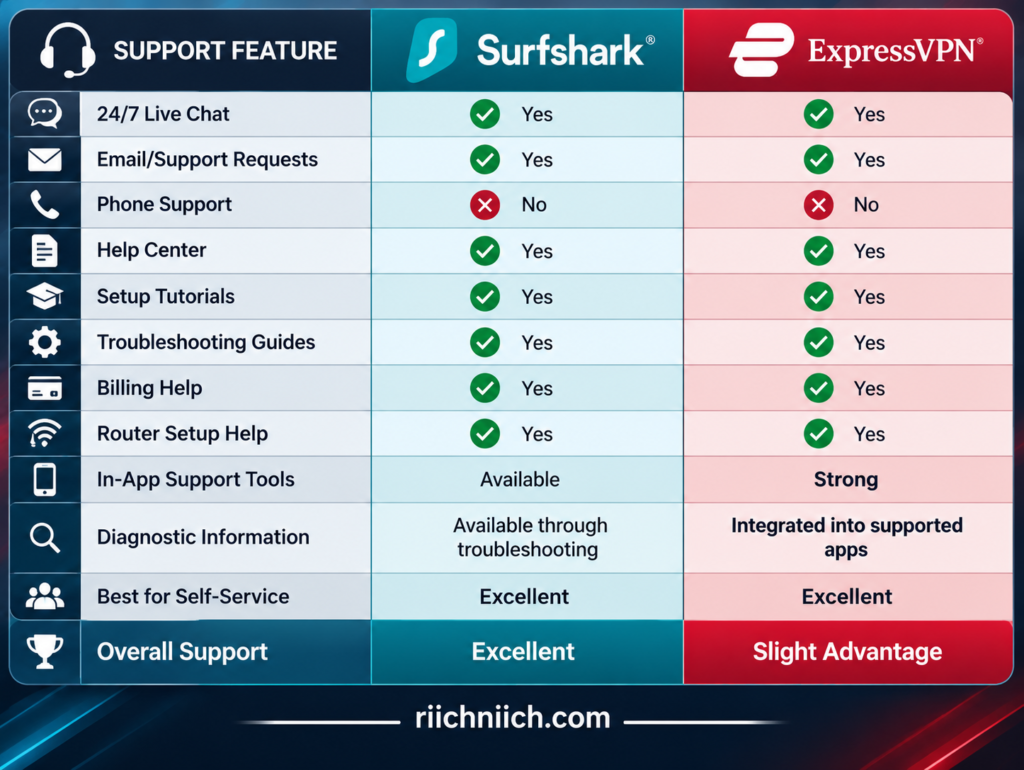
Both companies provide enough support that most customers should be able to resolve ordinary VPN problems without searching through unrelated forums or third-party websites.
Surfshark Offers 24/7 Live Chat
Surfshark provides 24/7 customer support through live chat and email.
Surfshark describes live chat as the fastest option when you need real-time, step-by-step assistance. Email is available when the problem doesn’t require an immediate conversation or when a longer explanation is easier.
That combination should cover most situations.
You could contact support about:
- Connection problems
- Slow VPN speeds
- Streaming issues
- App installation
- Router configuration
- Account access
- Subscription questions
- Refunds and cancellations
Surfshark does not currently offer telephone support.
For most VPN problems, that’s not necessarily a major disadvantage. Live chat lets the support agent send specific settings, instructions, and troubleshooting steps that you can follow directly on your device.
Surfshark’s Help Center Is Extensive
You may not need to contact a person at all.
Surfshark’s current Help Center contains more than 250 support articles covering setup, installation, troubleshooting, billing, account management, VPN protocols, Surfshark features, and Surfshark One.
The information is organized into practical categories such as:
Getting Started
Fix an Issue
Billing
My Account
Surfschool
Surfshark One
This is useful because many VPN problems have fairly straightforward solutions.
If your VPN suddenly becomes slow, for example, you may be able to troubleshoot the server, protocol, or application without waiting for a support agent.
Surfshark also provides specific guides for routers, restricted networks, login problems, refunds, 2FA, and manual VPN configurations.
What Should You Tell Surfshark Support?
Surfshark recommends providing several pieces of information when contacting its support team:
What problem you’re experiencing
Your device and operating system
Your Surfshark app version, if available
Troubleshooting steps you’ve already attempted
Providing those details can help prevent the conversation from turning into a long series of basic questions before troubleshooting begins.
For example, instead of saying:
“Surfshark doesn’t work.”
A more useful description would be:
“Surfshark won’t connect on Windows 11. I updated the app, tried two server locations, and restarted the computer.”
That immediately gives the support agent more information to work with.
ExpressVPN Also Provides 24/7 Live Chat
ExpressVPN provides 24/7 live-chat support, meaning you can reach its support team regardless of whether you’re troubleshooting during the afternoon or in the middle of the night.
That’s especially valuable for international travelers.
A connection problem that happens at 2:00 a.m. at home could be happening in the middle of someone’s workday halfway around the world.
ExpressVPN’s support center covers:
Setup
Troubleshooting
Account management
Product information
Its troubleshooting library also includes dedicated sections for connection problems, streaming problems, supported platforms, Aircove routers, ExpressKeys, Dedicated IP, and other issues.
ExpressVPN Has Particularly Detailed Troubleshooting Guides
ExpressVPN’s troubleshooting library is one of its strengths.
Instead of only publishing generic articles such as “VPN not working,” its current support center breaks problems into specific situations.
Examples include:
VPN won’t connect
VPN keeps disconnecting
VPN connected but there’s no internet
Slow VPN connection
Unable to access certain content
CAPTCHA problems
Email problems while connected
MediaStreamer problems
Streaming issues
Router problems
That makes self-service easier because you can go directly to the problem you’re experiencing rather than working through a huge general troubleshooting checklist.
For buyers who prefer solving problems themselves before opening live chat, this is a meaningful advantage.
ExpressVPN Can Collect Diagnostic Information Through the App
This is one of ExpressVPN’s more useful support features.
On supported platforms, customers can contact support directly through the ExpressVPN application. When support is contacted through the app, ExpressVPN says diagnostic information is automatically shared with the support team to help diagnose the problem more quickly.
Users can also access diagnostic information themselves.
For example, on Windows and Mac, ExpressVPN provides diagnostic tools that can generate information that can be saved and shared with live-chat support. Android and iOS users can similarly access and copy diagnostic information. Aircove users can download diagnostic logs through the router dashboard.
That can make technical troubleshooting more efficient.
Instead of trying to describe a complicated connection problem from memory, diagnostic information can give the support team additional technical context.
What Happens If ExpressVPN Won’t Connect?
ExpressVPN’s current connection troubleshooting process gives a good example of how structured its support documentation can be.
If the VPN won’t connect, ExpressVPN recommends checking that the regular internet connection works first. It then walks users through potential solutions such as:
- Updating to the latest ExpressVPN app.
- Connecting to another VPN server location.
- Changing the VPN protocol.
- Checking whether antivirus or other security software is interfering.
- Contacting ExpressVPN Support if the problem continues.
That’s the kind of troubleshooting sequence that’s useful for beginners because it doesn’t immediately throw technical terminology at them.
The instructions move from simpler fixes toward more involved troubleshooting.
Support Matters More When You’re Traveling
Customer support becomes considerably more important when you’re away from home.
Imagine arriving at a hotel in another country and discovering that your VPN refuses to connect.
You don’t have your normal router.
You’re unfamiliar with the local network.
You may be using a different type of Wi-Fi connection.
And you may need the VPN immediately.
Both Surfshark and ExpressVPN offering 24/7 live chat is therefore a meaningful advantage for travelers.
ExpressVPN’s current troubleshooting documentation also specifically tells users in countries with high levels of internet censorship to contact its support team if the normal troubleshooting steps don’t produce a working connection.
This doesn’t guarantee that a VPN will work on every network or in every country, but having immediate support available gives you somewhere to turn when ordinary fixes fail.
What About Streaming Support?
Streaming problems are one of the most common reasons a VPN customer may need help.
A streaming service that worked yesterday may suddenly detect a VPN server IP, or a particular server location may temporarily stop working as expected.
ExpressVPN maintains dedicated streaming troubleshooting resources for services including Netflix, YouTube TV, and BBC iPlayer.
Surfshark’s Help Center likewise includes a dedicated category for streaming issues alongside speed and connection troubleshooting.
This matters because the solution may be something simple:
Change servers
Reconnect
Update the app
Clear cached information
Change a VPN setting
Rather than spending an hour experimenting, live support may be able to point you toward the appropriate troubleshooting steps.
Neither VPN Offers Traditional Phone Support
Some buyers may consider this a disadvantage.
Surfshark explicitly states that it doesn’t provide telephone support, instead relying on live chat and email so troubleshooting instructions can remain in writing.
ExpressVPN similarly centers customer assistance around its online Support Center and 24/7 live chat rather than traditional telephone support.
For technically complicated VPN problems, written support can actually be useful.
An agent can provide:
Exact server names
Protocol settings
Menu locations
Links to setup instructions
Troubleshooting sequences
You can then follow those instructions without trying to remember what someone said over the phone.
However, buyers who strongly prefer speaking with customer-service representatives by telephone should be aware of this limitation before subscribing.
Good Documentation Can Be More Valuable Than Fast Chat
Live chat gets most of the attention when VPN companies advertise customer support.
But good documentation can be equally important.
Suppose you want to install a VPN on a router at midnight.
You could contact live chat and wait for someone to walk you through the setup.
Or you could open a detailed router guide, find your model, and follow the instructions immediately.
Both Surfshark and ExpressVPN provide extensive self-service documentation.
Surfshark currently has more than 250 Help Center articles, while ExpressVPN organizes its support resources across setup tutorials, troubleshooting, account management, device instructions, and individual product categories.
For most everyday VPN users, either support system should be more than adequate.
Which VPN Has Better Customer Support?
For buyers comparing surfshark vs expressvpn, customer support is extremely close.
Surfshark provides the essentials buyers should expect from a premium VPN: 24/7 live chat, email support, extensive setup documentation, troubleshooting guides, account assistance, and a large Help Center.
ExpressVPN provides the same core advantages through 24/7 live chat, extensive setup tutorials, detailed troubleshooting resources, account support, and platform-specific assistance.
ExpressVPN gets a slight advantage because of the depth of its troubleshooting library and its integrated diagnostic-support tools. Being able to contact support through supported apps and provide diagnostic information can make more complicated technical problems easier to investigate.
But this isn’t a category where Surfshark should lose a buying decision on its own. Its 24/7 live chat, email support, and extensive Help Center provide everything most customers are likely to need.
The buying decision is straightforward:
Choose Surfshark if you want reliable 24/7 assistance and extensive self-service resources while prioritizing Surfshark’s lower-cost value proposition.
Choose ExpressVPN if customer support is especially important to you and you value highly structured troubleshooting resources and integrated diagnostic tools.
Winner for Customer Support: ExpressVPN — by a narrow margin
Both providers deliver strong customer support, so the difference is small. ExpressVPN’s more structured diagnostic and troubleshooting experience gives it the edge rather than any major weakness in Surfshark’s support.
Customer support tells you what happens after you become a customer. Before committing, however, it’s worth knowing how much time each company gives you to test the service and change your mind. Next, we’ll compare Surfshark vs ExpressVPN: Free Trials and Money-Back Guarantees.
Surfshark vs ExpressVPN: Free Trials and Money-Back Guarantees
A VPN can look perfect on paper and still not be right for your particular internet connection, devices, streaming services, or daily routine. That’s why a free trial and money-back guarantee can be just as important as the feature list when deciding which VPN to buy.
For buyers comparing surfshark vs expressvpn, both services give new customers a way to test the VPN before fully committing—but their trial structures are different. Surfshark currently offers a 7-day free trial on eligible 12- and 24-month plans, followed by a 30-day money-back guarantee. ExpressVPN offers a 3-day mobile free trial on iOS and Android, while eligible first-time customers who purchase directly through ExpressVPN receive a 30-day money-back guarantee.
That difference gives Surfshark a noticeable advantage for buyers who specifically want a true no-charge trial period before their first subscription payment is processed.
Surfshark vs ExpressVPN Trial and Refund Comparison
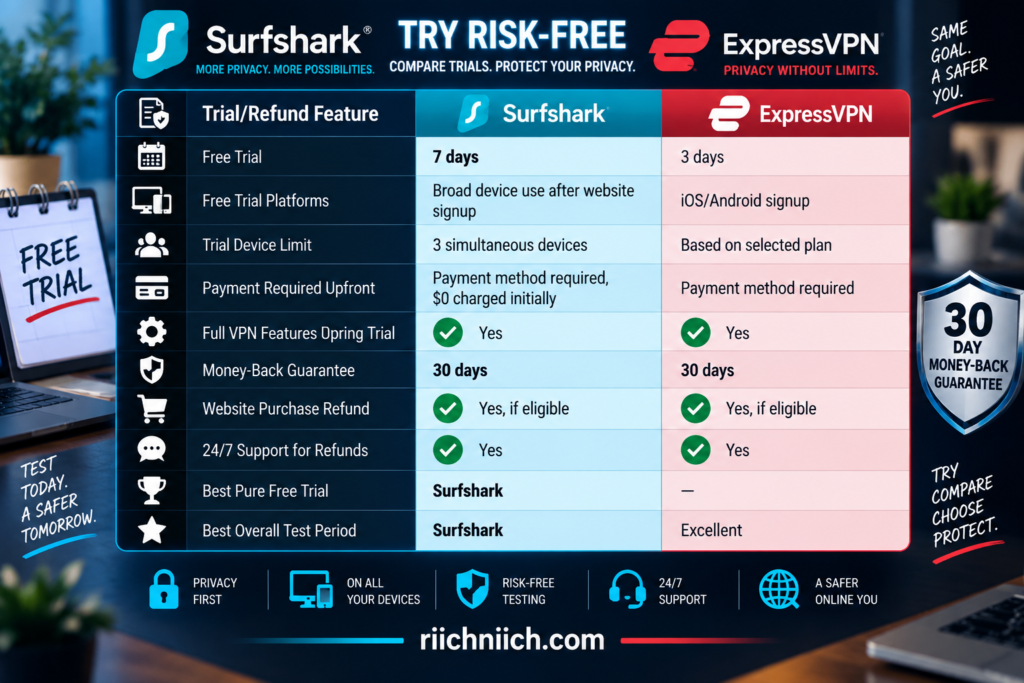
🚨 The exact terms can depend on how and where you purchase the subscription, so buyers should always check the current checkout and refund conditions before paying.
How Surfshark’s 7-Day Free Trial Works
Surfshark currently offers new customers a 7-day VPN free trial through its website.
The trial is available with eligible 12-month and 24-month plans when using supported payment methods such as a credit card, PayPal, or Apple Pay. You provide payment information when signing up, but Surfshark charges $0 initially. If you don’t cancel during the seven-day trial, the selected paid subscription begins automatically.
This gives you an opportunity to test things that actually matter before paying:
- Connection speed
- Server availability
- Streaming performance
- Mobile apps
- Desktop apps
- Public Wi-Fi connections
- CleanWeb
- Kill Switch
- VPN protocols
Surfshark says the trial provides access to its VPN features rather than giving you a stripped-down demonstration version.
Surfshark Limits the Trial to Three Devices
There is one important limitation.
Although regular Surfshark VPN subscriptions allow unlimited simultaneous connections, the current 7-day trial allows you to use the VPN on up to three devices simultaneously. Once the paid subscription begins, the normal unlimited-device allowance becomes available.
For most buyers, three devices should still be enough to conduct a meaningful test.
For example, you could try:
Laptop + smartphone + smart TV
That would let you evaluate Surfshark across three very different use cases before deciding whether it’s worth keeping.
If you’re testing Surfshark specifically because you want a VPN for a large family, however, remember that you won’t be able to test its unlimited simultaneous connection advantage fully during the free-trial period.
Surfshark Gives You More Time After the Trial
Surfshark’s trial structure becomes especially attractive because the testing period doesn’t necessarily end after seven days.
If you allow the 7-day trial to convert into a paid subscription, Surfshark says its 30-day money-back guarantee then applies, effectively creating as much as 37 days of risk-free testing under the current offer structure.
There’s an important distinction:
The first seven days are a free trial.
The following eligible period is a money-back guarantee, meaning payment has been processed and you would need to request a refund if you decide not to keep the service.
That’s much different from getting 37 completely free days without being charged.
Still, it gives buyers considerably more time to determine whether Surfshark works for them.
How Surfshark’s 30-Day Money-Back Guarantee Works
If you purchase an eligible Surfshark subscription through its website, Surfshark currently provides a full refund within 30 days of the initial purchase under its money-back guarantee. Refund eligibility also extends to certain eligible resellers, subject to the applicable conditions.
To request the refund, Surfshark directs customers to contact customer support through live chat.
There are exceptions.
Surfshark’s refund policy states that eligibility depends on factors including the purchase source, whether the subscription has already received a refund, and whether the purchase contains services or options excluded from refunds.
That’s why you should never assume every add-on or payment method automatically receives identical refund treatment.
For the regular eligible VPN subscription, however, the 30-day guarantee gives you enough time to test Surfshark under real-world conditions.
ExpressVPN Has a 3-Day Mobile Free Trial
ExpressVPN also offers a genuine free trial, but it’s shorter and tied to mobile signup.
Its current 3-day free trial is available through the ExpressVPN apps on iOS and Android. You download the app from the appropriate app store, select a plan, provide the required payment method, and activate the trial.
Although you start the trial on a mobile device, ExpressVPN says you’re not restricted to testing only that phone or tablet. Once the trial is active, you can sign in on other supported platforms and use the device allowance included with the selected plan.
That currently means:
Basic → up to 10 simultaneous connections
Advanced → up to 12 simultaneous connections
Express Pro → up to 14 simultaneous connections
This gives ExpressVPN an advantage over Surfshark’s three-device trial limit if you want to test the VPN on many devices simultaneously.
ExpressVPN’s 30-Day Guarantee Is Different From Its Free Trial
This distinction is important when researching surfshark vs expressvpn.
ExpressVPN frequently describes its 30-day money-back guarantee as a way to try the VPN risk-free, but it is not a 30-day free trial.
With an eligible website purchase, you pay for the subscription when you sign up.
You then have 30 days from the initial purchase to request a full refund if ExpressVPN isn’t right for you. The guarantee is intended for eligible first-time subscribers.
That means:
3-day mobile trial → no initial subscription charge during the trial
30-day website guarantee → subscription charged, refund available if eligible
Those should not be described as the same thing.
Be Careful Where You Buy ExpressVPN
The purchase method matters.
ExpressVPN’s current refund policy states that subscriptions billed as in-app purchases through the Apple App Store or Google Play Store do not receive ExpressVPN’s standard 30-day money-back guarantee. Instead, refund requests are handled according to Apple or Google’s policies and are granted at their discretion.
There’s another important catch:
ExpressVPN says users who activate its 3-day iOS or Android free trial are not eligible for the standard 30-day first-time-subscriber money-back guarantee associated with direct purchases.
So don’t assume you can automatically combine:
3 free days + 30-day ExpressVPN guarantee
The purchase route changes the refund rules.
If the 30-day ExpressVPN money-back guarantee is important to your buying decision, review the current terms and consider purchasing directly through ExpressVPN rather than assuming an app-store subscription receives identical protection.
ExpressVPN’s Guarantee Is for First-Time Customers
ExpressVPN’s standard 30-day money-back guarantee applies to eligible new subscribers.
Its current terms state that customers can cancel within 30 calendar days of the initial purchase and request a full refund, but the guarantee can be denied to subscribers who previously received a refund under the policy. The guarantee also doesn’t generally apply to renewal purchases or subscriptions purchased using redemption codes.
ExpressVPN’s support documentation similarly notes that refund eligibility can depend on the terms in effect when you purchased, including the plan, purchase method, and promotion.
That makes the checkout page important.
Don’t purchase based solely on an old review claiming every ExpressVPN subscription has identical refund terms.
ExpressVPN Has a Separate Renewal Refund Protection
ExpressVPN currently provides another consumer-friendly policy worth mentioning.
If an eligible subscription renews when you didn’t intend it to, ExpressVPN says you have a guaranteed 14 days from the renewal to request a full refund.
That’s separate from the initial 30-day money-back guarantee.
This can be helpful for customers who forget to disable automatic renewal and notice the charge shortly afterward.
However, buyers still shouldn’t rely on refund policies as a substitute for managing subscriptions. If you know you don’t want a VPN to renew, turn off automatic renewal ahead of time.
What Should You Test Before the Refund Window Ends?
Don’t spend the entire trial simply browsing the internet and then decide that “the VPN works.”
Test the things that caused you to consider buying the VPN in the first place.
If streaming matters, test your normal streaming devices.
If gaming matters, check latency.
If you’re buying the VPN for travel, try it on several unfamiliar networks.
If privacy matters most, test the Kill Switch, Auto-connect, CleanWeb or Advanced Protection, and other features you expect to use.
If you have many devices, install it on your phone, laptop, tablet, television, and other supported hardware.
A good testing checklist should include:
Speed → Is the performance acceptable?
Stability → Does the connection stay active?
Devices → Does it work on everything you own?
Streaming → Does it work with the services you normally use?
Apps → Is the interface easy enough to use every day?
Servers → Are there locations near where you need them?
Features → Do the privacy tools you’re paying for actually matter to you?
The goal isn’t to prove that Surfshark or ExpressVPN is objectively perfect.
It’s to determine which VPN works better for you before the refund deadline arrives.
Don’t Confuse Canceling With Requesting a Refund
This is another detail buyers should understand.
Stopping automatic renewal and requesting your money back aren’t necessarily the same action.
For Surfshark, you can disable auto-renewal during the 7-day trial to prevent the subscription from converting into a paid plan. If you’ve already been charged and are still eligible under the 30-day money-back guarantee, Surfshark instructs customers to contact support through live chat to request the refund.
ExpressVPN similarly tells eligible customers to request their refund through support or the appropriate account process within the guarantee window.
So if you want your money returned:
Don’t just cancel renewal. Confirm that you’ve actually requested the refund.
Which VPN Has the Better Free Trial?
Surfshark wins.
Its current 7-day free trial gives buyers more than twice as much time as ExpressVPN’s 3-day mobile trial. Surfshark also allows the trial to be initiated through its website on eligible 12- and 24-month plans and used across supported platforms, although simultaneous trial usage is limited to three devices.
ExpressVPN’s trial does have one interesting advantage: after activating the 3-day trial through iOS or Android, you can use your subscription’s normal simultaneous connection allowance across supported platforms—currently 10, 12, or 14 connections depending on the tier.
But three days simply doesn’t provide as much testing time.
Winner for Free Trial: Surfshark
Which VPN Has the Better Money-Back Guarantee?
This category is much closer because both providers offer a 30-day money-back guarantee for eligible purchases.
ExpressVPN’s guarantee is straightforward for eligible first-time customers purchasing directly, and its 14-day renewal-refund provision adds another useful consumer protection.
Surfshark’s advantage is how its current trial structure can work together: an eligible customer can receive seven free days before being charged and then enter the 30-day money-back period after the trial converts, potentially providing up to 37 days to evaluate the service under the current offer.
That gives Surfshark the overall advantage.
Surfshark vs ExpressVPN: Which Is Better for Trying Before You Commit?
For buyers comparing surfshark vs expressvpn, Surfshark offers the more attractive overall testing structure.
You get a 7-day free trial on eligible plans, followed by a 30-day money-back guarantee after the trial converts to a paid subscription. That potentially gives you up to 37 days to decide whether Surfshark is right for you, although only the first seven days are actually free before payment.
ExpressVPN gives mobile users a shorter 3-day free trial, while eligible first-time customers purchasing directly can instead rely on its 30-day money-back guarantee. App-store purchases and mobile-trial subscriptions have different refund rules, so the purchase method matters.
The buying decision is straightforward:
Choose Surfshark if you want the longer genuine free trial and more time to evaluate the VPN before making a final decision.
Choose ExpressVPN if three days is enough for a no-charge mobile trial or you’re comfortable paying upfront and testing the full service under its eligible 30-day refund policy.
Winner for Free Trials and Money-Back Guarantees: Surfshark
Surfshark’s 7-day free trial combined with its subsequent 30-day money-back guarantee provides the stronger overall test-before-you-commit proposition.
That trial advantage becomes even more important for households with several people and many connected devices. Next, we’ll compare Surfshark vs ExpressVPN: Which Is Better for Families?.
Surfshark vs ExpressVPN: Which Is Better for Families?
Choosing a VPN for one person is relatively simple. Choosing one for an entire household is different. Parents may have laptops and work devices, children may have phones and tablets, and the home may also include smart TVs, streaming devices, gaming systems, and other connected hardware.
For families comparing surfshark vs expressvpn, Surfshark has one major advantage from the start: unlimited simultaneous VPN connections. Surfshark explicitly allows a subscription to be shared with family members within a household, and its Starter, One, and One+ plans all support unlimited simultaneous VPN connections.
ExpressVPN remains a strong family VPN, but its current plans have connection limits: 10 devices with Basic, 12 with Advanced, and 14 with Express Pro.
For a household with many connected devices, that difference can have a significant effect on value.
Surfshark vs ExpressVPN for Families at a Glance
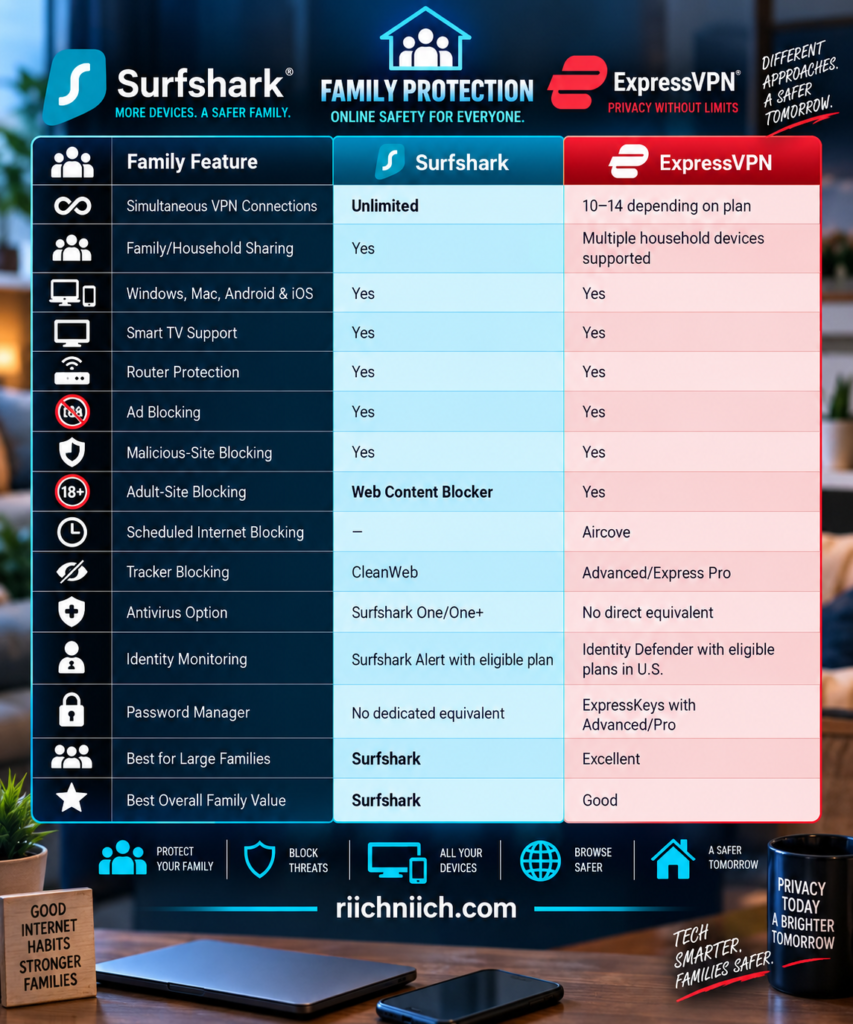
The right choice still depends on what your household needs. A family wanting to protect 20 devices has different priorities from a family with four devices that primarily wants parental filtering and simple applications.
Surfshark’s Unlimited Connections Are a Huge Family Advantage
This is where Surfshark separates itself.
Surfshark allows unlimited simultaneous VPN connections on Starter, One, and One+, and the company specifically says a subscription can be shared with family members within a household.
Think about a household with four people.
Each person could easily have:
1 smartphone + 1 computer + 1 tablet = 3 devices
That’s already 12 devices.
Now add:
2 smart TVs + 1 Fire TV + 1 family laptop = 16 devices
With Surfshark, you don’t have to count those VPN connections.
You can install the VPN on supported devices and continue adding household devices without running into a normal numerical VPN connection cap.
That makes Surfshark particularly attractive for large families, technology-heavy households, and homes where everyone has several personal devices.
ExpressVPN Can Still Cover a Typical Family
ExpressVPN doesn’t provide unlimited connections, but its limits are much higher than they once were.
Its current subscription structure allows:
Basic — 10 simultaneous VPN connections
Advanced — 12 simultaneous VPN connections
Express Pro — 14 simultaneous VPN connections
Ten devices may be perfectly adequate for a smaller household.
For example:
Two parents with a smartphone and laptop each = 4
Two children with a tablet each = 2
Two televisions = 2
One family tablet = 1
One additional computer = 1
Total: 10 devices
That fits within ExpressVPN Basic.
But as the household grows, you may have to start thinking about which devices are actively connected.
For families comparing surfshark vs expressvpn specifically because they have a large number of devices, Surfshark’s unlimited connections remove that concern entirely.
A VPN Router Can Change the Equation
ExpressVPN has an important workaround for larger households.
If you need to protect more than the maximum 14 simultaneous devices, ExpressVPN says you can use a VPN router. Devices connected through that router can be protected while the router counts as the VPN connection rather than every individual household device consuming its own slot.
That can be extremely useful for:
Smart TVs
Gaming consoles
Streaming devices
Smart-home equipment
Other devices without native VPN applications
ExpressVPN also offers Device Groups on compatible ExpressVPN router setups. You can create up to five groups and connect different groups to different VPN locations.
Imagine one family member wants a particular VPN location for streaming while another wants a different location for gaming.
Device Groups can separate those connections without forcing the entire household onto one VPN location.
That’s a genuinely useful family feature.
Surfshark Is Easier When Everyone Has Multiple Devices
A major advantage of unlimited connections isn’t simply the maximum number.
It’s not having to think about the number at all.
Suppose someone buys a new tablet.
Install Surfshark.
Your child gets a new phone.
Install Surfshark.
You add another television.
Install Surfshark on it if supported.
You replace a laptop but still occasionally use the old one.
Both can remain protected.
Surfshark says you can download its VPN app on an unlimited number of devices and use unlimited simultaneous VPN connections.
That removes the device-management problem entirely for ordinary household use.
For families, simplicity has value.
You don’t want someone disconnecting another family member’s device simply because the household has reached its VPN limit.
What About Parental Controls?
This comparison has become more interesting because both providers now offer family-oriented content filtering.
Surfshark offers a Web Content Blocker designed to let families block selected categories of websites. Parents can customize which categories are restricted and protect those settings with two-factor authentication. Surfshark says the feature is designed to filter content without monitoring the family member’s browsing activity and works across unlimited supported Windows, macOS, iOS, and Android devices.
ExpressVPN’s Advanced Protection includes an adult-site blocker on Basic, Advanced, and Express Pro. ExpressVPN says the feature uses blocklists of known adult sites and is available through its apps on Android, iOS, Mac, Windows, and Linux, as well as Aircove.
ExpressVPN’s Aircove parental controls go a step further by allowing parents to block internet access at specified times.
That’s useful for households that want rules such as:
Internet available after homework
or
Internet disabled on selected devices at bedtime
However, neither VPN should automatically be treated as a replacement for a comprehensive dedicated parental-control platform if you need detailed screen-time management, app supervision, activity reporting, or granular child profiles.
Surfshark’s Web Content Blocker Is Especially Interesting for Families
Surfshark’s current Web Content Blocker strengthens its family proposition.
Rather than simply providing an adult-site filter, Surfshark says users can select website categories they want to block and protect the settings using 2FA.
The privacy philosophy behind the feature is also noteworthy.
Surfshark says the blocker is designed to restrict unwanted categories without snooping on the user’s browsing activity.
That can be appealing to parents who want to create safer boundaries without turning household cybersecurity into constant surveillance.
And because the Web Content Blocker works across unlimited supported devices, it pairs naturally with Surfshark’s unlimited VPN connection model.
A family with several phones and tablets doesn’t need to choose which devices receive the protection.
ExpressVPN Has Strong Family Filtering Too
ExpressVPN shouldn’t be overlooked here.
Its current Basic plan already includes blocking for:
Ads
Known malicious sites
Adult sites
Advanced and Express Pro add dedicated tracker blocking.
That means a family doesn’t necessarily have to purchase ExpressVPN’s most expensive plan simply to access its adult-content blocker.
The feature is part of Advanced Protection and uses DNS-based filtering on supported devices. ExpressVPN says its adult-site blocklist is assembled from publicly available and open-source lists and is regularly reviewed and updated.
For parents who want straightforward content filtering combined with VPN protection, that’s useful.
Aircove makes the family controls even more interesting by adding scheduled internet blocking alongside router-level VPN protection.
Protecting Children From Malicious Websites Matters Too
Parental controls aren’t only about adult content.
Children can encounter:
Fake download buttons
Malicious advertisements
Phishing pages
Scam websites
Fraudulent game offers
Suspicious links
Both VPN ecosystems provide tools that can help reduce exposure to known malicious domains.
Surfshark includes CleanWeb, while its broader current plans also include additional scam-protection capabilities. Surfshark’s current pricing page lists features including ad blocking, cookie pop-up blocking, Alternative ID, scam text protection, and an email scam checker among its available security tools.
ExpressVPN’s malicious-site blocker is available across Basic, Advanced, and Express Pro and is designed to block known malicious domains before they load.
These protections don’t replace teaching children how to recognize scams, suspicious links, or requests for personal information.
But they can provide another defensive layer.
Surfshark One Can Make Sense for a Family
Surfshark becomes more compelling for families when you move beyond the Starter plan.
Surfshark One combines the VPN with additional cybersecurity tools, including Surfshark Antivirus and Surfshark Alert, while One+ adds Incogni data removal.
That changes the buying calculation.
Instead of purchasing only a VPN for the household, you’re potentially combining several types of protection within one ecosystem.
For example:
VPN → protects internet connections
Antivirus → helps protect supported devices against malware
Alert → monitors selected personal information for exposure
Alternative ID → helps reduce how frequently real personal information is shared online
Incogni with One+ → helps remove personal information from data brokers
Not every family needs all of those features.
But if you were already considering separate services for several of these jobs, Surfshark One or One+ deserves closer attention.
ExpressVPN’s Higher Tiers Offer Different Family Benefits
ExpressVPN takes a different approach.
Its Advanced and Express Pro plans expand beyond the VPN with services such as ExpressKeys, ExpressMailGuard, Advanced Protection, and Identity Defender for eligible U.S. customers.
That can be valuable for a family concerned about more than network privacy.
ExpressKeys provides password-management functionality.
ExpressMailGuard provides email-alias capabilities.
Advanced Protection adds tracker blocking to the ad, malicious-site, and adult-site filtering available across the current tiers.
And eligible U.S. customers on qualifying longer-term Advanced and Express Pro subscriptions can access Identity Defender monitoring features.
So while Surfshark has the stronger device-count proposition, ExpressVPN can still make sense for households that place more value on its broader collection of account, password, email, and identity-security tools.
Which Is Better for a Small Family?
This is much closer.
If your household only needs VPN protection on five or six devices, ExpressVPN’s connection limit may not matter at all.
Even ExpressVPN Basic currently supports 10 simultaneous connections.
At that point, the decision can come down to other priorities:
Do you prefer Surfshark’s pricing and privacy features?
Do you prefer ExpressVPN’s simpler apps?
Do you want Surfshark’s Web Content Blocker?
Do you want ExpressVPN’s Aircove family controls?
Do you need antivirus?
Do you need a password manager?
When device limits aren’t a concern, the family comparison becomes much more balanced.
Which Is Better for a Large Family?
Surfshark.
This is one of the clearest category wins in the entire surfshark vs expressvpn comparison.
Surfshark’s unlimited simultaneous connections mean you can protect the family’s supported phones, tablets, computers, televisions, and other devices without constantly counting connections.
ExpressVPN’s 10, 12, or 14 connections are generous and may be plenty for many households, but they’re still limits.
A router can help ExpressVPN overcome that limitation, but Surfshark doesn’t require that workaround for ordinary supported devices.
If you’re purchasing specifically because you have a large household with many devices, Surfshark is the easier recommendation.
Don’t Forget About Shared Account Security
There is one downside to sharing a VPN subscription across a household.
More people may need access to the account.
Surfshark says family members can use the same account credentials to log in and use the VPN.
That makes protecting the main account especially important.
Use a strong, unique password.
Enable two-factor authentication where available.
Don’t reuse the VPN password on unrelated websites.
And only share account access with people you trust.
The VPN may protect dozens of devices, but the subscription itself still depends on one central account.
Surfshark vs ExpressVPN: Which Is Better for Families?
For families comparing surfshark vs expressvpn, Surfshark is the stronger overall choice.
The biggest reason is simple: unlimited simultaneous VPN connections.
A family doesn’t have to calculate whether 10, 12, or 14 connections will be enough. Surfshark’s regular VPN subscriptions allow unlimited simultaneous connections and are specifically designed to be shared within a household.
Surfshark’s Web Content Blocker strengthens that advantage by letting families restrict selected website categories across unlimited supported devices while protecting the settings with 2FA.
ExpressVPN remains an excellent alternative. Its 10–14 simultaneous connections will cover many households, while its adult-site blocking, Advanced Protection, Aircove scheduled internet controls, ExpressKeys, ExpressMailGuard, and other higher-tier features can make it particularly attractive to families that want those specific tools.
The buying decision comes down to this:
Choose Surfshark if you have a large household, lots of devices, want family-oriented content filtering, or simply never want to think about a VPN connection limit.
Choose ExpressVPN if your household fits comfortably within 10–14 connections and you place more value on its straightforward apps, Aircove controls, password manager, or broader higher-tier security ecosystem.
Winner for Families: Surfshark
Unlimited simultaneous VPN connections are simply difficult to beat in a family setting. Combined with Surfshark’s increasingly family-focused filtering and security features, it provides the stronger overall value for households with multiple people and multiple devices.
The family winner isn’t necessarily the easiest choice for someone purchasing their very first VPN, however. Next, we’ll compare Surfshark vs ExpressVPN: Which Is Better for Beginners?.
Surfshark vs ExpressVPN: Which Is Better for Beginners?
If you’ve never used a VPN before, the best service isn’t necessarily the one with the longest feature list. A beginner-friendly VPN should make the basics obvious: install the app, sign in, connect, and know you’re protected without having to understand protocols, server infrastructure, encryption, or network configuration.
For first-time buyers comparing surfshark vs expressvpn, both are beginner-friendly, but ExpressVPN has a slight advantage. Its apps emphasize one-click or one-tap connections and automatic server recommendations, while Surfshark remains easy to use but exposes more privacy features and customization options. ExpressVPN specifically recommends its regular app setup for most users because it provides simple connections without manual configuration.
That doesn’t make Surfshark difficult. In fact, beginners who want better long-term value may ultimately prefer Surfshark because its basic VPN operation is simple while more advanced features are available when they’re ready to use them.
Surfshark vs ExpressVPN for Beginners at a Glance
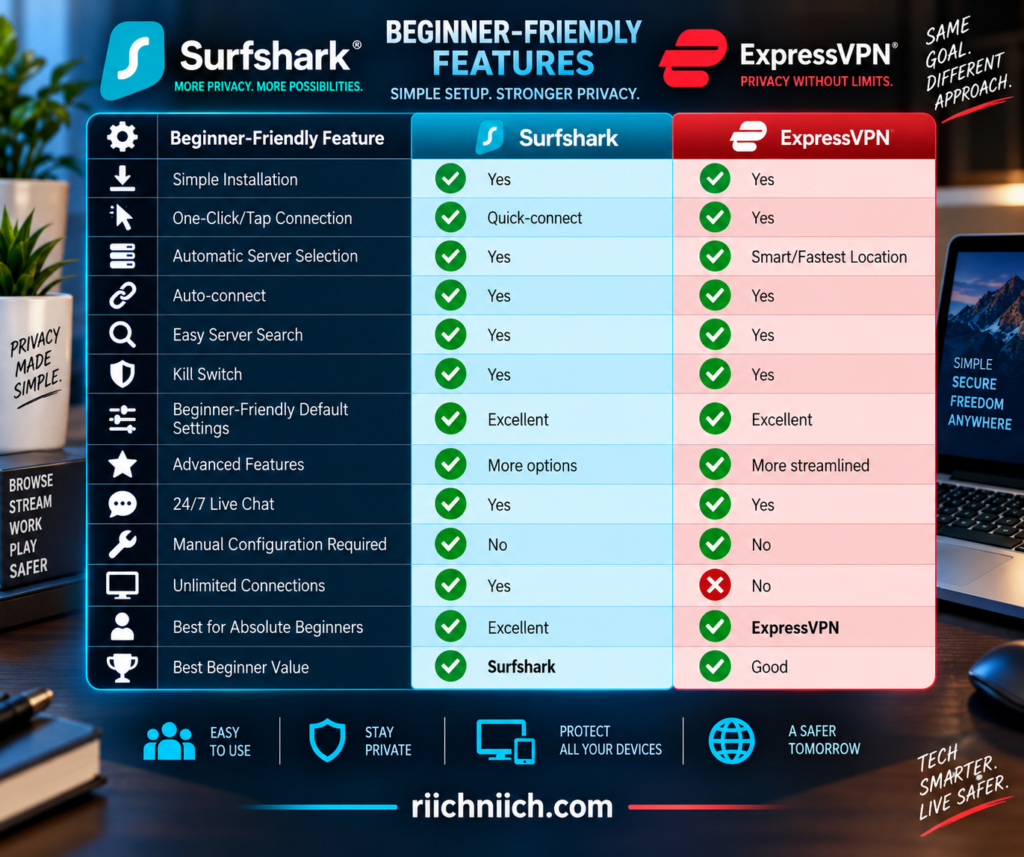
The biggest distinction is simplicity versus flexibility.
Surfshark gives beginners an easy starting point but leaves plenty of additional controls available.
ExpressVPN does more to keep the basic VPN experience focused on a few decisions.
You Don’t Need to Understand How a VPN Works to Use Either One
VPN terminology can sound intimidating when you’re new to it.
You may encounter terms such as:
WireGuard
Lightway
OpenVPN
Kill Switch
Split tunneling
DNS
MultiHop
Obfuscation
Fortunately, you don’t need to understand most of these terms before using either VPN.
For basic protection, your routine can be as simple as:
Download app → Sign in → Connect
ExpressVPN’s current setup instructions specifically center the experience around selecting a server and pressing the Connect button. Its Smart Location system on desktop can automatically recommend a server using factors such as download speed, latency, and distance.
Surfshark similarly provides Quick-connect so beginners don’t have to manually choose among thousands of servers every time they want protection.
That’s exactly how a beginner-friendly VPN should work.
ExpressVPN Makes the First Connection Extremely Simple
ExpressVPN gets its biggest beginner advantage from how little the user needs to decide.
Install the app.
Sign in.
Press the connection button.
ExpressVPN can handle the server decision automatically.
On desktop, Smart Location recommends a server based on factors including speed, latency, and distance. On Android and iOS, the newer Fastest Location system uses real-time network conditions to recommend suitable servers.
Beginners don’t need to ask:
Which country should I choose?
Which server has the lowest latency?
Which protocol should I use?
For ordinary browsing, you can let ExpressVPN make the server decision and start using the internet.
Surfshark Is Also Easy to Start Using
Surfshark’s additional features shouldn’t create the impression that it’s complicated to operate.
Its core experience remains straightforward.
The Surfshark app provides Quick-connect, and users can configure it to automatically connect to an appropriate location. Surfshark’s current Auto-connect system can also automatically establish the VPN when the device finds Wi-Fi or Ethernet.
That means a beginner can largely ignore Surfshark’s advanced settings.
You don’t need Dynamic MultiHop.
You don’t need Rotating IP.
You don’t need to manually change protocols.
You don’t need to configure Bypasser.
You can simply use Quick-connect.
As you become more comfortable with VPNs, those additional features are already there when you want them.
That’s one of Surfshark’s biggest strengths for beginners: it can grow with you.
Surfshark’s Extra Settings Can Be an Advantage Later
A first-time VPN user may initially want simplicity.
Six months later, that same person may want more control.
That’s where Surfshark becomes particularly appealing.
Its current mobile applications expose settings for features such as:
Quick-connect
Auto-connect
CleanWeb
Kill Switch
VPN protocol
Bypasser
Rotating IP
depending on the platform.
You don’t have to configure those features on day one.
But as you learn what they do, you can gradually customize your protection.
For example, you might eventually decide that you want Surfshark to connect automatically whenever you join Wi-Fi.
Later, you might enable CleanWeb.
Then perhaps you’ll configure Bypasser for a website that doesn’t work properly through the VPN.
Surfshark gives you room to move from beginner to more advanced user without changing VPN providers.
ExpressVPN Reduces the Number of Decisions
ExpressVPN takes almost the opposite approach.
Rather than emphasizing how many controls you can adjust, its standard app experience tries to make the important choices easy.
One of the best examples is server selection.
On desktop, Smart Location recommends an appropriate server automatically. On Android and iOS, Fastest Location can recommend up to five fast server locations based on real-time network conditions, with the primary recommendation displayed under the main connection button.
If you don’t care which VPN server you’re using, you don’t have to think about it.
Press Connect.
If you do need a specific location, open the location list and choose one.
This is why ExpressVPN has the advantage for someone who says:
“I don’t want to learn about VPNs. I just want one that is easy to use.”
Auto-connect Makes Both VPNs Easier for Beginners
One of the most useful features for a new VPN user is Auto-connect.
Why?
Because beginners frequently forget to turn their VPN on.
Surfshark’s Auto-connect can establish a VPN connection when your device finds Wi-Fi or Ethernet. You can also choose an automatic destination such as the fastest server, nearest server, a specific country or city, Static IP, or MultiHop server. On iOS, Surfshark currently uses your most recently selected location instead.
ExpressVPN also offers automatic connection options.
On Android, for example, ExpressVPN can automatically connect when the device starts or when it joins networks that haven’t been marked as trusted. Its current Windows application provides rules for secure Wi-Fi, unsecured Wi-Fi, Ethernet, and specific Wi-Fi networks.
For beginners, this can turn the VPN into something that requires very little daily attention.
Configure it once.
Let it connect automatically.
Continue using your device normally.
What If You Choose the Wrong Server?
Nothing catastrophic happens.
This is something new VPN users sometimes overthink.
If you choose a VPN server and the connection feels slow, you can simply disconnect and choose another server.
Both services provide automatic server-selection tools specifically to reduce this guesswork.
ExpressVPN’s Smart Location uses download speed, latency, and distance when recommending a location, while its mobile Fastest Location feature uses real-time information to recommend servers for the current network.
Surfshark lets users configure Quick-connect and Auto-connect around options such as the fastest or nearest location.
For beginners, the simplest rule is:
Need ordinary privacy protection? Use the recommended/fastest option.
Need a particular country? Select that country manually.
You don’t need to make server selection more complicated than that.
Beginners Should Leave the Protocol on Automatic at First
Both VPNs offer different VPN protocols, but beginners don’t need to start changing them immediately.
Protocols affect how the VPN creates and manages its encrypted connection.
Unless you’re troubleshooting a specific problem, the application’s recommended or automatic setting is generally the easiest place to start.
ExpressVPN’s regular application is specifically designed to handle the technical side of the connection without requiring manual configuration.
Surfshark similarly allows users to change protocols through its settings but doesn’t require them to do so for normal VPN use.
If everything works properly:
Leave it alone.
If you later encounter a connection or performance problem, protocol selection becomes one of several troubleshooting options.
That’s much easier than trying to become a VPN expert before you’ve even connected for the first time.
Both Make It Obvious When You’re Protected
Another important beginner feature is knowing whether the VPN is actually connected.
A VPN application shouldn’t force you to guess.
ExpressVPN’s current Android app, for example, displays Protected once the VPN connection is established and Not Protected when disconnected.
Surfshark similarly presents connection status directly through its application interface.
That sounds minor, but it’s important.
Someone who understands VPN networking can troubleshoot connection states.
A beginner needs a much simpler answer:
Am I protected right now—yes or no?
Both applications make that distinction easy to understand.
ExpressVPN’s 24/7 Support Is Helpful for First-Time Users
Beginners are more likely to have questions.
Why won’t this website load?
Which server should I use?
Why did my internet stop when the Kill Switch activated?
How do I install the VPN on my television?
Why is streaming slower?
What does split tunneling mean?
Both companies provide 24/7 customer support, but ExpressVPN’s combination of straightforward applications, detailed setup documentation, and extensive troubleshooting guides gives it another small advantage for inexperienced users.
ExpressVPN also lets users access 24/7 live chat through its app or website.
Surfshark’s support remains strong as well, so this isn’t a major difference.
The important point for a first-time buyer is that you don’t have to troubleshoot everything yourself.
Surfshark May Be Easier for a Beginner With Lots of Devices
There is one area where Surfshark becomes dramatically simpler.
Device limits.
Surfshark’s paid VPN plans allow unlimited simultaneous VPN connections.
That means a beginner doesn’t need to learn how simultaneous connection limits work or decide which device should be disconnected before adding another one.
Install Surfshark on your supported devices.
Sign in.
Use them.
ExpressVPN currently allows 10 simultaneous connections with Basic, 12 with Advanced, and 14 with Express Pro.
Those limits are generous, but Surfshark removes the issue altogether.
For someone new to VPNs who wants to protect a phone, laptop, tablet, television, and several family devices, Surfshark’s approach is easier to understand:
Unlimited means you don’t have to count.
Surfshark Is Better for Beginners Who Want Value
Ease of use isn’t the only consideration.
Price matters.
A beginner may not know whether they’ll continue using a VPN long term, which makes paying a premium harder to justify.
Surfshark’s long-term plans have generally been positioned more aggressively on price, while also including unlimited simultaneous VPN connections.
That gives Surfshark an important buyer-intent advantage.
You can get an easy-to-use VPN without paying primarily for the absolute simplest interface.
For someone asking:
“What is a good first VPN that gives me a lot for my money?”
Surfshark is arguably the stronger choice.
For someone asking:
“What is the easiest VPN possible for me to start using?”
ExpressVPN gets the advantage.
ExpressVPN Is Better for Beginners Who Want Maximum Simplicity
ExpressVPN’s greatest strength for beginners isn’t a particular technical feature.
It’s that the service tries to remove unnecessary decisions from ordinary VPN use.
Its recommended app setup provides one-click or one-tap connection, server selection, leak protection, Internet Kill Switch protection, and access to other VPN features without requiring manual configuration.
Smart Location and Fastest Location further reduce the need to understand server selection.
For a person who has never used a VPN, that simplicity matters.
You can learn the advanced features later.
First, the VPN needs to feel comfortable enough that you’ll actually use it.
What Should a Beginner Turn On First?
Don’t activate every feature on your first day just because it’s available.
Start simple.
A new user really needs to understand only a few things:
Connect — turns the VPN protection on.
Location — determines which VPN location you’re using.
Auto-connect — can turn the VPN on automatically.
Kill Switch — helps prevent traffic from continuing outside the VPN if the protected connection unexpectedly drops.
Once you’re comfortable with those basics, explore additional features such as split tunneling, CleanWeb, Advanced Protection, Rotating IP, MultiHop, and alternative protocols.
This approach also makes troubleshooting easier.
If you change ten advanced settings immediately and something stops working, figuring out which setting caused the problem becomes much harder.
Surfshark vs ExpressVPN: Which Is Better for Beginners?
For first-time VPN buyers comparing surfshark vs expressvpn, ExpressVPN is slightly easier overall.
Its apps focus heavily on the core connection experience. Smart Location on desktop and Fastest Location on mobile reduce the need to understand server selection, while the regular ExpressVPN app is specifically designed to avoid the complexity of manual VPN configuration.
Surfshark comes extremely close.
Quick-connect makes basic protection simple, Auto-connect can automate everyday VPN use, and beginners can ignore advanced features such as Dynamic MultiHop, Rotating IP, Bypasser, and protocol selection until they actually need them.
The buying decision comes down to what kind of beginner you are:
Choose Surfshark if this is your first VPN and you want an easy service with strong long-term value, unlimited connections, and advanced privacy features you can learn over time.
Choose ExpressVPN if this is your first VPN and your top priority is making the entire experience as straightforward as possible.
Winner for Beginners: ExpressVPN — by a narrow margin
ExpressVPN wins because it removes more decisions from the initial experience. Surfshark, however, may be the better first VPN purchase for value-conscious buyers, especially if you want unlimited device connections and room to explore more advanced privacy features later.
Ease of use is important, but some buyers care more about minimizing how much of their online activity can be observed or connected back to them. Next, we’ll compare Surfshark vs ExpressVPN: Which Is Better for Privacy?.
Surfshark vs ExpressVPN: Which Is Better for Privacy?
Privacy is one of the most important reasons to buy a VPN in the first place. A strong privacy-focused VPN should do more than change your IP address. It should minimize the information it collects, protect DNS requests, prevent accidental leaks, use secure server infrastructure, and provide evidence that its no-logs claims actually hold up.
For privacy-conscious buyers comparing surfshark vs expressvpn, both are excellent choices. Both use RAM-only server infrastructure, maintain no-activity-logs policies, have undergone independent assessments, and publish transparency information about government and legal requests.
The difference is in the details. Surfshark provides more privacy customization, including Dynamic MultiHop and Rotating IP. ExpressVPN has a particularly strong combination of a detailed no-logs policy, TrustedServer infrastructure, independent verification, BVI jurisdiction, and a long public record of privacy-focused audits.
For privacy overall, ExpressVPN gets the edge—but it is extremely close.
Surfshark vs ExpressVPN Privacy at a Glance
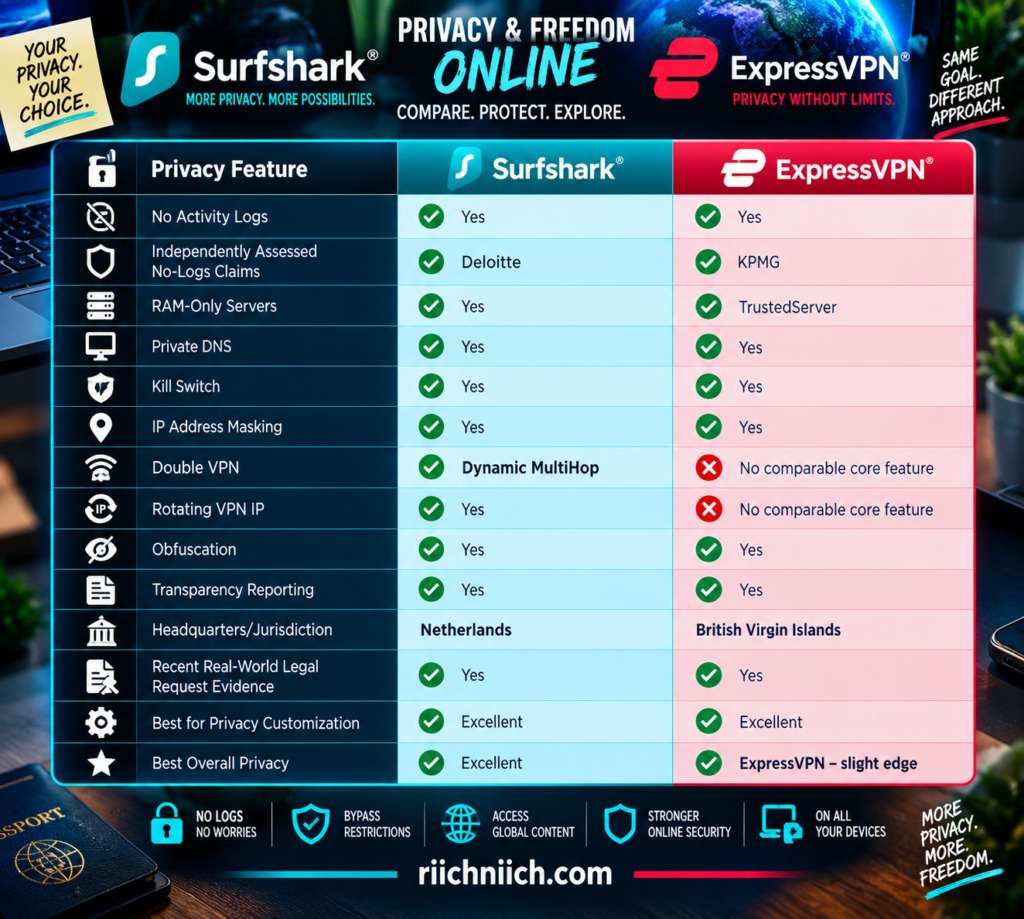
Neither service makes you completely anonymous online. A VPN is a privacy tool, not an invisibility cloak. Your browser, cookies, online accounts, device fingerprint, and information you voluntarily share can still identify you.
Both VPNs Have Independently Checked No-Logs Claims
Anyone can put “no logs” on a VPN website.
Independent verification makes that claim more meaningful.
Surfshark says Deloitte independently verified its adherence to its no-logs policy in 2023 and again in 2025. Surfshark’s Trust Center says it doesn’t keep activity logs such as browsing history, IP addresses, used bandwidth, connection timestamps, network traffic, or session information.
ExpressVPN has also repeatedly subjected its privacy systems to outside examination. KPMG’s 2025 assessment examined ExpressVPN’s TrustedServer system and privacy-policy claims, including controls intended to prevent retention of activity and connection logs.
This is important for buyers researching surfshark vs expressvpn because you don’t have to rely entirely on marketing promises.
Both companies have allowed independent organizations to examine important parts of their privacy claims.
Surfshark Uses RAM-Only Servers
Surfshark’s entire VPN network operates on RAM-only servers rather than relying on traditional hard drives for VPN server operation.
RAM is volatile memory.
When the server is rebooted or powered down, information stored in RAM disappears. Surfshark says its RAM-only infrastructure automatically wipes server data on every reboot.
This reduces the privacy risks associated with persistent server storage.
Imagine a traditional filing cabinet.
Information placed inside can remain there until somebody deliberately removes it.
RAM-only infrastructure is more like writing on a board that is automatically cleared whenever the system restarts.
That doesn’t replace a strong no-logs policy, but it provides another technical layer supporting it.
ExpressVPN’s TrustedServer Uses the Same RAM-Only Principle
ExpressVPN calls its RAM-only infrastructure TrustedServer.
Its VPN servers run on volatile memory rather than conventional hard drives. ExpressVPN says its private DNS requests are also processed through this RAM-only infrastructure, and historical browsing activity and DNS queries aren’t stored.
TrustedServer is particularly important because ExpressVPN has also subjected the architecture to independent examination.
KPMG’s 2025 assessment looked at TrustedServer and ExpressVPN’s privacy claims, adding external verification to the technical design.
For privacy-focused buyers, that’s a strong combination:
No-logs policy + RAM-only infrastructure + independent verification
Surfshark follows a similarly strong philosophy, so RAM-only servers don’t create a decisive winner by themselves.
ExpressVPN’s Privacy Policy Is Particularly Strict About Connection Logs
ExpressVPN’s current privacy policy, updated January 1, 2026, says it does not collect logs of browsing history, traffic destinations, data content, or DNS queries.
It also says it doesn’t store connection logs containing your source IP address, outgoing VPN IP address, connection timestamp, or session duration.
ExpressVPN does collect limited operational information.
For example, it records whether a VPN connection was successfully established on a particular day, the VPN location used, and the originating country/ISP—but not the specific connection time or source IP address. ExpressVPN says this information is used for technical support and network reliability.
That distinction matters.
“No logs” shouldn’t be interpreted as meaning a VPN company possesses literally zero information about your account or service operation.
The important question is whether the provider stores information that could connect you to specific online activity.
ExpressVPN’s policy is explicit about the categories it says it does not retain.
Surfshark’s No-Logs Policy Has Been Tested by a Real Warrant
Privacy policies become much more interesting when authorities actually request information.
In April 2026, Surfshark disclosed that it complied with a legally binding warrant from the Amsterdam District Court concerning a criminal investigation.
According to Surfshark’s transparency report, the information available consisted of confirmation that the account existed and payment-related information.
Surfshark reported that it could not provide the user’s online activity because it didn’t collect or store that information.
That’s meaningful real-world evidence of what the company’s data-minimization practices can mean when a legal request arrives.
The lesson isn’t that a VPN company can ignore a valid legal order.
It can’t necessarily do that.
The privacy advantage comes from minimizing the sensitive information available to disclose in the first place.
ExpressVPN’s No-Logs Design Has Also Faced Real Requests
ExpressVPN provides similar evidence through its transparency reporting.
During the first half of 2026, ExpressVPN reported receiving:
137 government, law-enforcement, and civil requests
3 warrants
It also received a much larger volume of DMCA notices.
Most importantly for privacy buyers, ExpressVPN reported that zero requests resulted in disclosure of VPN activity or connection logs.
That’s a powerful distinction.
A privacy policy tells you what a company says it does.
An audit examines whether certain systems and controls operate as represented.
A transparency report shows what happens when outside parties actually request information.
ExpressVPN provides evidence across all three areas.
Jurisdiction Gives ExpressVPN Another Privacy Advantage
Surfshark is headquartered in the Netherlands, while ExpressVPN operates under the jurisdiction of the British Virgin Islands (BVI).
Jurisdiction matters because VPN providers operate under the laws applicable to their businesses.
But jurisdiction shouldn’t be exaggerated.
A VPN being located in a privacy-friendly jurisdiction doesn’t magically make poor logging practices safe.
Likewise, a strong no-logs architecture can significantly limit what a provider possesses even when it receives a legally enforceable request.
That’s why the better privacy question is:
What does the company collect, how is the infrastructure designed, and what information actually exists when authorities ask for it?
ExpressVPN’s BVI jurisdiction is a privacy advantage, but its no-logs architecture and independent verification matter even more.
Surfshark Has the Advantage for MultiHop Privacy
This is where Surfshark fights back.
Surfshark’s Dynamic MultiHop can route your VPN traffic through two VPN servers rather than one. Surfshark also allows users to customize the entry and exit locations.
That provides another layer between your original connection and the final destination.
ExpressVPN doesn’t currently offer a directly comparable double-VPN feature as part of its core VPN.
For most people, MultiHop isn’t necessary for everyday browsing.
It can also reduce speed because traffic has farther to travel.
But privacy-conscious users who specifically want double VPN routing have a clear reason to choose Surfshark.
Rotating IP Gives Surfshark Another Unique Privacy Tool
Surfshark also offers Rotating IP.
Rather than keeping the same VPN IP address throughout the entire connection, Surfshark can periodically change the outward-facing VPN IP while maintaining the same VPN location.
This can make it more difficult for online services to correlate activity based solely on one persistent VPN IP.
ExpressVPN doesn’t currently offer a directly equivalent core feature.
Again, this doesn’t make Surfshark users anonymous.
If you’re signed into the same Google, Facebook, Amazon, or other online account, changing your VPN IP doesn’t suddenly hide your identity from that account.
Cookies and browser fingerprinting can also provide other tracking signals.
But Rotating IP is still a useful additional privacy layer, particularly for people who want more control over how their VPN identity appears online.
Both Protect DNS Requests
DNS requests can reveal which domains your device is trying to reach.
That’s why DNS protection is an important part of a privacy-focused VPN.
ExpressVPN runs its own encrypted private DNS on its VPN servers. Its current documentation says DNS queries are handled through TrustedServer and aren’t logged.
Surfshark likewise routes DNS requests through its VPN infrastructure as part of its privacy protections.
The practical goal is simple:
Your ordinary internet provider shouldn’t receive the same normal DNS visibility it would have if you were browsing without the VPN.
For buyers comparing the best VPN for privacy, DNS protection should be considered a basic requirement rather than an optional bonus.
A Kill Switch Protects Privacy When the VPN Fails
Imagine you’re connected to a VPN and the connection unexpectedly drops.
Without additional protection, your device could potentially continue communicating through the normal internet connection.
That could expose your normal public IP address.
Both Surfshark and ExpressVPN include kill-switch protection designed to prevent this scenario.
Surfshark’s Kill Switch can stop internet traffic if the VPN protection is unexpectedly interrupted.
ExpressVPN provides its equivalent through Internet Kill Switch, with more restrictive behavior available on supported desktop platforms.
For privacy-sensitive users, this is one of the first VPN settings worth understanding.
You don’t want your privacy protection to disappear silently when the VPN connection does.
Obfuscation Adds Privacy in Restrictive Environments
VPN encryption protects the contents of your traffic, but network operators may sometimes be able to recognize characteristics associated with VPN use.
Obfuscation is designed to make VPN traffic harder to identify as VPN traffic.
Surfshark provides obfuscation capabilities as part of its security architecture, particularly for environments where VPN traffic may be restricted.
ExpressVPN’s modern protocols likewise include mechanisms designed to operate effectively on networks where ordinary VPN connections face interference.
This feature won’t matter equally to everyone.
Someone using a VPN primarily at home in the United States may rarely think about obfuscation.
Someone traveling through a region with restrictive networks may consider it much more important.
Users should still check local laws and regulations before using a VPN while traveling.
A VPN Does Not Make You Anonymous
This is one of the most important points in the entire surfshark vs expressvpn privacy comparison.
Neither VPN makes you invisible online.
Suppose you:
- Connect to Surfshark or ExpressVPN.
- Open a browser.
- Sign into your personal Google account.
- Visit websites while remaining signed in.
The VPN can mask your ordinary public IP address from those websites, but it doesn’t erase the fact that you’ve deliberately authenticated into your account.
The same applies to:
Cookies
Browser fingerprints
Email addresses
Phone numbers
Payment information
Social-media accounts
Information you voluntarily submit
A VPN protects an important part of your digital privacy, but it’s only one layer.
For stronger privacy, combine your VPN with good browser privacy settings, strong account security, tracker blocking, careful information sharing, and other privacy tools appropriate to your needs.
Shared IP Addresses Can Provide More Privacy Than Dedicated IPs
Both services offer Dedicated IP options, but privacy-focused buyers should understand the tradeoff.
With a standard shared VPN server, many customers can appear online through the same VPN IP address.
That creates a crowd.
With a Dedicated IP, the address is reserved specifically for you.
A dedicated address can reduce CAPTCHAs and make certain services easier to use, but it also removes some of the privacy benefit of blending your traffic among many users sharing the same outward-facing IP.
Think of it like entering a crowded stadium.
A shared VPN IP means many people are using the same entrance.
A Dedicated IP gives you your own entrance.
The private entrance may be more convenient, but it also distinguishes you from the crowd.
If maximum privacy is your priority, a normal shared VPN IP may be preferable for everyday use.
Which VPN Has Better Privacy Features?
Surfshark wins this particular subcategory.
Dynamic MultiHop and Rotating IP give privacy-conscious users controls that ExpressVPN doesn’t directly replicate in its core VPN.
Surfshark also combines those features with:
RAM-only servers
No-logs policy
Kill Switch
Obfuscation
Private DNS protections
CleanWeb
Alternative ID
and other privacy tools.
Its independently assessed no-logs claims and transparency reporting strengthen the argument further.
Winner for Privacy Features: Surfshark
But having more privacy features isn’t automatically the same as having the strongest overall privacy posture.
Which VPN Has the Stronger Overall Privacy Record?
ExpressVPN gets the narrow advantage.
Its current privacy policy explicitly states that it doesn’t log browsing history, traffic destinations, data content, DNS queries, source IP addresses, outgoing VPN IP addresses, connection timestamps, or session duration.
TrustedServer reinforces that policy through RAM-only infrastructure.
KPMG has independently examined ExpressVPN’s privacy claims and TrustedServer architecture.
And ExpressVPN’s H1 2026 transparency report provides another meaningful piece of evidence: despite receiving 137 government, law-enforcement, and civil requests and three warrants, it reported zero disclosures of VPN activity or connection logs.
Combined with its BVI jurisdiction, that gives ExpressVPN an exceptionally strong overall privacy case.
Winner for Overall Privacy Record: ExpressVPN — by a narrow margin
Surfshark vs ExpressVPN: Which Is Better for Privacy?
For privacy-conscious buyers comparing surfshark vs expressvpn, this is one of the closest categories in the entire comparison.
Surfshark has the advantage in privacy customization. Dynamic MultiHop can route traffic through two VPN servers, Rotating IP can periodically change your VPN IP, and Surfshark supplements those capabilities with RAM-only servers, independently assessed no-logs practices, Kill Switch protection, obfuscation, and additional privacy tools.
ExpressVPN has the stronger argument for overall privacy assurance. Its detailed no-logs policy, TrustedServer RAM-only architecture, independent KPMG assessments, BVI jurisdiction, and transparency reports provide multiple layers of evidence supporting its privacy claims.
The buying decision comes down to what you value most:
Choose Surfshark if you want advanced privacy controls such as Dynamic MultiHop and Rotating IP while still getting a strong independently assessed no-logs VPN.
Choose ExpressVPN if your priority is a highly established privacy architecture backed by detailed logging disclosures, TrustedServer, independent assessments, transparency reporting, and BVI jurisdiction.
Winner for Privacy: ExpressVPN — by a very narrow margin
Surfshark offers more tools for actively customizing your privacy, but ExpressVPN’s combination of infrastructure, policy, jurisdiction, independent verification, and real-world transparency gives it the slight overall advantage for buyers who place privacy above everything else.
Privacy is one consideration; protecting a large collection of devices is another. Next, we’ll compare Surfshark vs ExpressVPN: Which Is Better for Multiple Devices?.
Surfshark vs ExpressVPN: Which Is Better for Multiple Devices?
Most people no longer need a VPN for just one computer. A typical user may have a smartphone, laptop, tablet, smart TV, streaming device, work computer, and other connected hardware—and a household can multiply that number quickly.
For buyers comparing surfshark vs expressvpn, this is one of the easiest categories to call. Surfshark allows unlimited simultaneous VPN connections on its Starter, One, and One+ subscriptions. ExpressVPN currently allows 10 connections with Basic, 12 with Advanced, and 14 with Express Pro.
That makes Surfshark the stronger choice if your priority is getting a VPN for multiple devices without having to count connections.
Surfshark vs ExpressVPN for Multiple Devices at a Glance
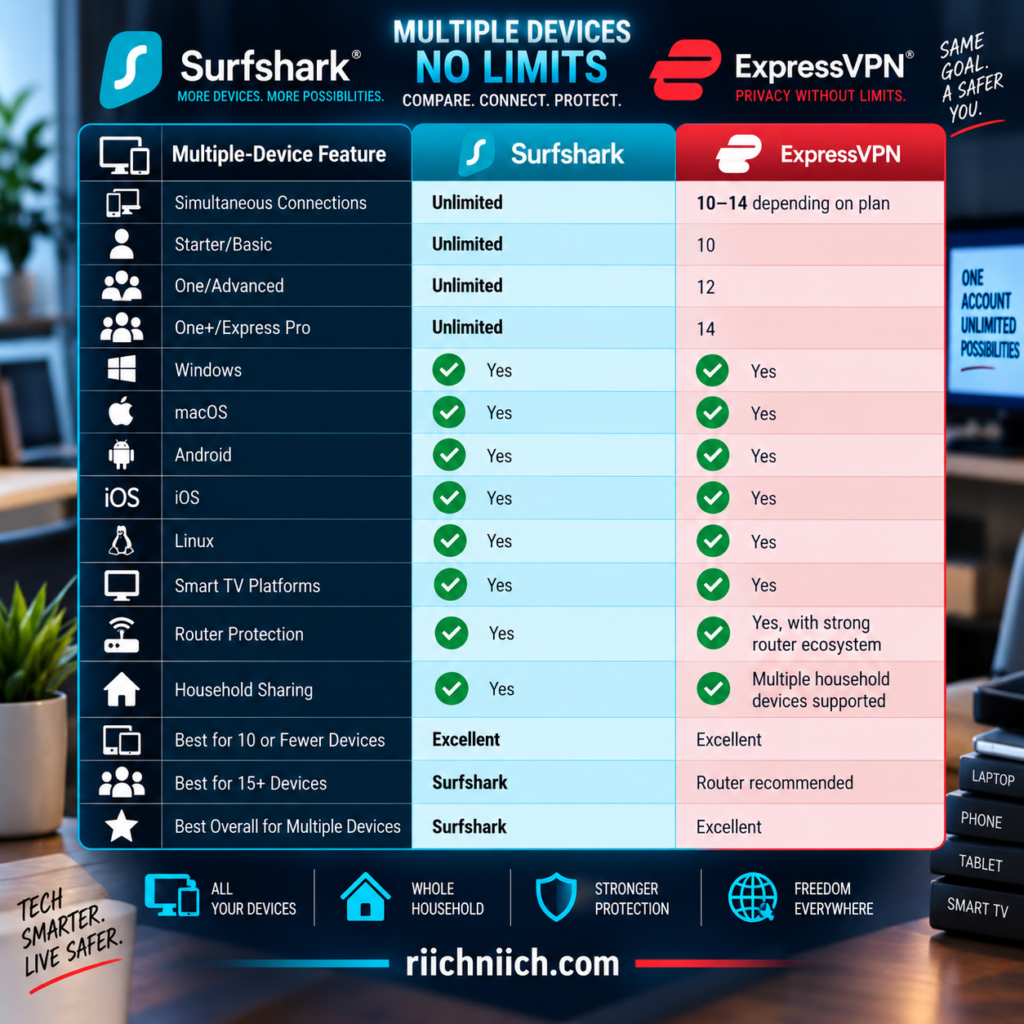
ExpressVPN’s limits are generous enough for many individuals and smaller households. But Surfshark removes the limit entirely for its paid VPN service.
Surfshark Allows Unlimited Simultaneous VPN Connections
This is Surfshark’s biggest advantage in the multiple-device comparison.
Surfshark says you can install its VPN app on an unlimited number of devices and connect an unlimited number simultaneously with Starter, One, or One+. It specifically lists devices such as phones, laptops, and smart TVs and allows household sharing.
That means you could potentially protect:
2 smartphones
2 laptops
2 tablets
3 smart TVs
2 streaming devices
1 additional computer
and continue adding supported devices without reaching a normal numerical VPN connection limit.
You don’t need to disconnect the tablet before connecting the television.
You don’t need to check whether another family member is already using too many connections.
And you don’t need to buy a more expensive Surfshark tier simply to increase the VPN device allowance.
For someone searching for the best VPN for multiple devices, that’s a major selling point.
Unlimited Connections Are Different From Unlimited Features
There is one distinction worth understanding.
Surfshark’s unlimited connections specifically refer to the VPN. Not every additional service included with Surfshark One or One+ necessarily has the same unlimited-device allowance.
For example, Surfshark’s support documentation distinguishes the unlimited VPN allowance from other products such as Surfshark Antivirus.
That’s important when evaluating a bundle.
If you’re purchasing Surfshark primarily because you have 20 devices and want VPN protection across all of them, the unlimited VPN allowance is the feature that matters.
Don’t automatically assume every additional cybersecurity tool bundled into the subscription carries identical device rules.
ExpressVPN Gives You 10, 12, or 14 Connections
ExpressVPN has moved well beyond the smaller connection limits associated with some of its older plans.
Its current three-tier structure provides:
Basic — 10 simultaneous VPN connections
Advanced — 12 simultaneous VPN connections
Express Pro — 14 simultaneous VPN connections
These limits apply regardless of the mix of supported device types.
ExpressVPN gives an example of an Express Pro subscription simultaneously covering six iPhones, four iPads, and four MacBooks—or another combination totaling 14 connections.
For an individual user, that’s probably more than enough.
Even many households will fit comfortably inside the Basic plan’s 10-device allowance.
The problem appears when you’re trying to protect everything.
Device Limits Add Up Faster Than You Might Think
Consider one person.
You might own:
Phone = 1
Laptop = 1
Tablet = 1
Smart TV = 1
Streaming device = 1
Work or secondary computer = 1
That’s already six devices.
Now add another person with a phone, laptop, and tablet.
You’re at nine.
Add another smart TV and you’ve reached 10.
That’s still within ExpressVPN Basic’s current allowance.
But add another family member, a second streaming device, another computer, or several other supported devices and you can eventually reach the limit.
With Surfshark, that calculation disappears.
That’s why unlimited simultaneous connections aren’t merely a marketing number—they can make everyday VPN management considerably easier.
Surfshark Is Especially Strong for People With Many Personal Devices
You don’t need a large family to benefit from unlimited connections.
Some individuals simply own a lot of technology.
You might have a personal laptop and work laptop.
An Android phone and iPad.
A desktop computer.
An Apple TV.
A Fire TV Stick.
A smart television.
A secondary phone.
A Chromebook.
With Surfshark, all of those supported devices can remain connected without forcing you to think about a simultaneous-device cap. Surfshark currently supports applications across computers, mobile devices, streaming platforms, browsers, and other compatible hardware.
For technology-heavy users, that’s a significant convenience advantage.
ExpressVPN’s Connection Limits May Not Matter to Everyone
It’s easy to look at “unlimited” versus “14” and assume ExpressVPN is automatically inadequate.
That’s not true.
If you have five devices, ExpressVPN Basic’s 10 simultaneous connections give you plenty of room.
If you have eight devices, you’re still comfortably under the limit.
Even a household with 12 devices could use ExpressVPN Advanced without needing to disconnect anything. Express Pro increases that allowance to 14.
So don’t pay for unlimited connections simply because the word unlimited sounds better.
Count the devices you realistically expect to have connected at the same time.
If that number is well below 10, ExpressVPN’s connection limit shouldn’t be a major factor in your decision.
If you’re approaching or exceeding 14, Surfshark becomes much more attractive.
What Happens If You Reach ExpressVPN’s Limit?
ExpressVPN makes this straightforward.
If you’ve reached your subscription’s simultaneous-connection limit and attempt to connect another device, you can receive a Connection Limit Reached warning.
To connect the additional device, you need to disconnect another active device.
ExpressVPN currently recommends three alternatives if you need more than 14 simultaneous connections:
Purchase another subscription
Share the VPN connection from a Windows computer
Use ExpressVPN on a router
The router option is particularly important because it changes the multiple-device comparison considerably.
ExpressVPN on a Router Can Protect Far More Devices
ExpressVPN says you can connect as many devices as you want to a router running ExpressVPN. Devices connected through the router are protected while the router functions as the VPN connection.
This means a home containing 25 connected devices doesn’t necessarily require 25 individual ExpressVPN connection slots.
Instead, compatible devices can connect through the protected router.
This is especially useful for hardware such as:
Gaming consoles
Smart TVs
Streaming boxes
Smart-home devices
Devices without native ExpressVPN apps
ExpressVPN’s router ecosystem also includes Device Groups, allowing you to create up to five groups and assign different VPN locations—or no VPN/internet—to different groups.
For example:
Streaming devices → one VPN location
Gaming devices → another location
Work devices → Smart Location
Certain devices → no VPN
That’s much more sophisticated than simply putting every device behind the same router connection.
Surfshark Also Supports Router-Level Protection
Surfshark can also be configured on compatible VPN routers.
This allows devices connected through the router to receive VPN protection, including hardware that may not support Surfshark’s normal application. Surfshark specifically describes router installation as an option for securing household devices such as smart TVs and gaming consoles.
However, Surfshark itself points out some tradeoffs.
Router connections can be less convenient to manage, performance can depend on the router’s hardware, and features available through Surfshark’s native applications—such as Kill Switch, Bypasser, or CleanWeb—may not be available through the router setup. Surfshark therefore recommends using its applications directly where possible.
Because Surfshark already allows unlimited simultaneous VPN connections, you generally don’t need a router simply to overcome a device cap.
That’s a significant distinction.
With Surfshark, a router is primarily useful for protecting otherwise unsupported devices or covering an entire network.
With ExpressVPN, a router can do that and help you move beyond the subscription’s normal 10–14 simultaneous-connection limit.
Native Apps Are Usually Better When Available
A VPN router is powerful, but it shouldn’t automatically be your first choice.
If your phone, computer, tablet, or television has a native Surfshark or ExpressVPN application, installing the app directly often gives you easier control over:
VPN location
Kill Switch
Split tunneling
Automatic connections
Protocols
Ad/tracker blocking
and other platform-specific features.
Surfshark explicitly notes that some of its app features aren’t available through a router configuration.
The direct application also lets different people independently control their VPN connections.
One person can disconnect.
Another can stay connected.
Someone else can change countries.
That’s harder when every device is forced through one basic router configuration.
Surfshark Makes Adding New Devices Almost Effortless
This is an underrated advantage.
Imagine buying another tablet six months after subscribing.
With Surfshark:
Install app → Sign in → Connect
You don’t have to ask:
How many devices are connected right now?
Which device should I disconnect?
Do I need to upgrade my subscription?
Surfshark’s paid VPN allowance remains unlimited across Starter, One, and One+.
That makes it particularly useful for households where the device count changes frequently.
New phone?
Install it.
Another laptop?
Install it.
New smart TV?
Install Surfshark if the platform is supported.
The subscription scales with your device collection without requiring a higher VPN tier merely for additional connections.
Don’t Forget Surfshark’s Trial Device Limit
There is one exception buyers should know about.
Surfshark’s current 7-day free trial is limited to three devices simultaneously.
After the trial converts to the paid VPN subscription, the normal unlimited-device allowance becomes available.
That means you can’t use Surfshark’s free trial to connect 15 devices simultaneously and test its unlimited-device advantage at full scale.
You could instead test three representative devices—for example:
Phone + laptop + television
Then, if you keep the subscription, expand protection across the rest of your supported devices.
This trial restriction shouldn’t be confused with the regular paid Surfshark VPN limit.
Free trial: up to 3 devices
Paid VPN: unlimited simultaneous connections
Which Is Better for 5 Devices?
Either.
Five simultaneous devices fit comfortably within Surfshark and every current ExpressVPN tier.
At this point, device limits shouldn’t determine your purchase.
Compare other priorities such as:
Price
Privacy
Speed
Streaming
Ease of use
Extra security features
ExpressVPN Basic already gives you twice the capacity needed for five simultaneous devices, while Surfshark gives you unlimited connections.
Which Is Better for 10 Devices?
This becomes more interesting.
ExpressVPN Basic currently allows exactly 10 simultaneous connections, so a 10-device household can fit within the entry tier.
But there’s no remaining room.
If you add another device later, you’ll either need to disconnect something, move to a higher tier, or use a router-based solution.
Surfshark gives you unlimited connections from the beginning.
For exactly 10 devices, both work.
For a household likely to grow beyond 10, Surfshark is the safer long-term choice.
Which Is Better for 15 or More Devices?
Surfshark wins easily for direct app connections.
ExpressVPN Pro currently tops out at 14 simultaneous VPN connections, while Surfshark’s paid VPN service has no normal numerical connection cap.
ExpressVPN can still protect a larger household through a compatible VPN router, and its router implementation is genuinely useful.
But that’s an additional configuration.
Surfshark doesn’t require a router workaround simply because you’ve reached 15 devices.
For someone specifically searching for the best VPN for multiple devices, this is where Surfshark’s unlimited-device policy becomes extremely compelling.
More Devices Shouldn’t Mean Less Security
One danger of connection limits is that people may begin choosing which devices deserve protection.
Protect the laptop—but leave the tablet disconnected.
Protect the phone—but don’t bother with the television.
Disconnect one person’s device so another can connect.
That’s not ideal.
If you’ve decided a particular device needs VPN protection, it shouldn’t have to compete with another device for a connection slot.
Surfshark’s unlimited connections remove that decision entirely.
ExpressVPN’s 10–14 connections are generous enough that many customers will never face the problem, but larger households potentially can.
Unlimited Devices Doesn’t Mean Unlimited Speed
There is another misconception worth clearing up.
Connecting more devices doesn’t magically increase your internet bandwidth.
Suppose five people simultaneously:
stream 4K video,
download large files,
play online games,
join video calls,
and browse the web.
Your home internet connection still has finite bandwidth.
Surfshark says it doesn’t impose bandwidth limitations based on the number of devices under the subscription, but your actual performance can still depend on your ISP connection, Wi-Fi quality, device hardware, server selection, and what everyone is doing simultaneously.
So unlimited VPN connections should be interpreted as:
No normal numerical VPN connection limit
—not—
Unlimited internet capacity.
Surfshark vs ExpressVPN: Which Is Better for Multiple Devices?
For buyers comparing surfshark vs expressvpn, Surfshark is the clear winner for multiple devices.
Surfshark Starter, One, and One+ all allow unlimited simultaneous VPN connections. You can install the VPN across supported computers, phones, tablets, smart TVs, streaming hardware, and other devices without keeping a running count of active VPN connections.
ExpressVPN is still generous. Basic supports 10 simultaneous connections, Advanced supports 12, and Express Pro supports 14. A compatible ExpressVPN router can also protect as many connected devices as you want, and Device Groups provide impressive control over how different household devices use the VPN.
But for straightforward multi-device protection, the buying decision is simple:
Choose Surfshark if you have lots of devices, expect your device collection to grow, share your subscription within your household, or simply never want to count VPN connections.
Choose ExpressVPN if 10–14 direct connections are enough for you or you specifically want its more advanced router ecosystem and Device Groups.
Winner for Multiple Devices: Surfshark — by a clear margin
ExpressVPN’s higher connection limits and router options make it much more competitive than a simple device-count comparison suggests. But unlimited simultaneous VPN connections are still the more convenient solution, especially for large households and users with a growing collection of connected devices.
With the major use cases now covered, the next comparison should put the strengths and weaknesses side by side: Surfshark vs ExpressVPN: Pros and Cons.
Surfshark vs ExpressVPN: Pros and Cons
After comparing pricing, speed, security, privacy, streaming, gaming, torrenting, device support, and ease of use, the differences between Surfshark and ExpressVPN become much clearer. Neither VPN is the best choice for every buyer.
For shoppers comparing surfshark vs expressvpn, Surfshark’s biggest strengths are value, unlimited simultaneous connections, and a larger collection of customizable privacy features. ExpressVPN’s strongest advantages are ease of use, its Lightway protocol, TrustedServer architecture, broad geographic server coverage, and a polished overall experience.
The better purchase depends on which strengths matter most to you.
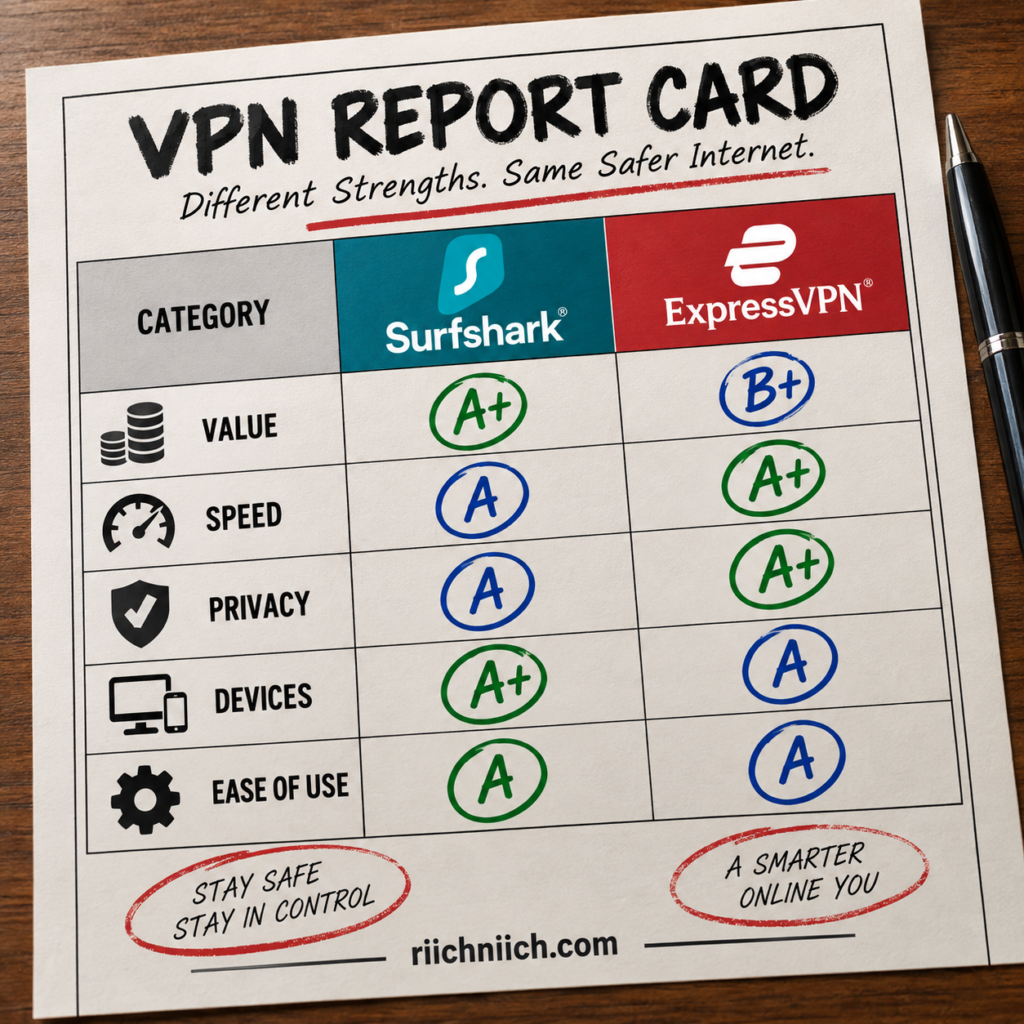
Surfshark Pros
Unlimited Simultaneous Connections
This is one of Surfshark’s biggest advantages.
Surfshark allows unlimited simultaneous VPN connections on its paid plans. You can protect supported phones, computers, tablets, smart TVs, streaming devices, and other compatible hardware without counting active VPN connections.
That’s particularly valuable for families and people with many devices.
ExpressVPN’s current limits are 10 connections with Basic, 12 with Advanced, and 14 with Express Pro.
If you’re specifically looking for the best VPN for multiple devices, Surfshark has the clear advantage.
Excellent Long-Term Value
Surfshark is especially competitive when you’re willing to purchase a longer subscription.
Its current 24-month Starter offer is advertised at $2.49 per month for the initial promotional term, while One and One+ are also heavily discounted on long-term subscriptions. Prices and promotions can change, so always check the checkout total and renewal terms before purchasing.
Combine that pricing with unlimited VPN connections, and Surfshark becomes particularly attractive for households that would otherwise need to protect many devices.
Strong Privacy Customization
Surfshark gives users several privacy features beyond a basic VPN connection.
Dynamic MultiHop can route traffic through two VPN servers.
Rotating IP can periodically change your VPN IP address without requiring you to disconnect from the VPN. Surfshark currently supports Rotating IP on Windows, Android, iOS, and macOS.
Surfshark also offers Alternative ID, Bypasser, CleanWeb, Kill Switch, and obfuscation capabilities.
These features make Surfshark especially attractive to buyers who enjoy customizing how their VPN behaves.
Strong Security Tools Beyond the VPN
Surfshark isn’t limited to VPN protection.
The current Surfshark One bundle adds tools such as Antivirus, Alert, and scam-protection features, while One+ adds Incogni data removal.
That gives buyers the option to turn a basic VPN subscription into a broader cybersecurity package without purchasing every tool separately.
Excellent for Families
Unlimited VPN connections are already a major family advantage, but Surfshark has also expanded its broader family-oriented security capabilities.
Surfshark One includes content filtering through its Web Content Blocker, while the company’s plans can add antivirus, breach monitoring, scam protection, and other tools depending on the tier.
For a household with multiple people and a growing collection of devices, Surfshark offers excellent scalability.
Strong Ad and Tracker Blocking
CleanWeb can block ads, trackers, and malicious domains, adding another layer of protection while browsing.
This doesn’t eliminate every advertisement or tracking technique, and it shouldn’t replace antivirus software where antivirus protection is needed.
But it’s a useful feature to have integrated into the VPN.
Advanced Users Have Plenty to Explore
Surfshark can be simple when you want it to be and much more configurable when you don’t.
You can start with Quick-connect and gradually explore features such as:
Dynamic MultiHop
Rotating IP
Bypasser
CleanWeb
Alternative ID
protocol selection
and other privacy controls.
Surfshark has even introduced its own Dausos protocol in 2026, although Dausos is currently limited to the macOS App Store version of Surfshark rather than being universally available across platforms.
That combination of simplicity and customization makes Surfshark appealing to people who expect their VPN needs to grow over time.
Surfshark Cons
The Interface Can Feel Busier
Surfshark’s large feature collection creates a tradeoff.
There are more settings, privacy tools, security features, bundles, and options to understand.
A beginner can absolutely use Surfshark without touching most of them, but someone who wants the cleanest possible connect-and-forget VPN experience may find ExpressVPN more straightforward.
This is one reason ExpressVPN narrowly won the beginner category in our surfshark vs expressvpn comparison.
Some Features Vary by Platform
Not every Surfshark feature works identically across every operating system.
Dausos is a good example. Surfshark’s new proprietary protocol is currently available only through the macOS App Store app.
Other capabilities can also vary by device or operating system.
That means you should check the exact feature support for the devices you own rather than assuming every advertised Surfshark feature is available everywhere.
Monthly Pricing Is Much Less Attractive Than Long-Term Pricing
Surfshark’s best value appears on longer subscriptions.
Its September 2026 plan guide lists Starter at $16.45 per month when purchased month-to-month versus $2.49 per month on the 24-month promotional plan. One and One+ show the same general pattern.
That’s a substantial difference.
Surfshark can therefore be an excellent long-term VPN value without necessarily being the most attractive option for someone who only wants a single month.
Router Setup Isn’t Its Biggest Strength
Surfshark supports compatible VPN routers, but ExpressVPN has a particularly developed router ecosystem.
This matters most if you want centralized VPN control over an entire home network, need to protect devices that can’t run VPN applications directly, or want more sophisticated router-level device management.
Surfshark’s unlimited direct connections reduce the need to use a router merely to overcome a connection limit, but ExpressVPN gets the advantage for users who specifically prioritize the router experience.
More Features Can Mean Paying for Things You Don’t Need
Surfshark One and One+ can offer excellent value if you actually want their additional cybersecurity services.
But not everybody needs antivirus, breach monitoring, data removal, or every other bundled capability.
If all you want is a VPN, don’t automatically purchase the largest package.
Surfshark Starter may be enough.
ExpressVPN Pros
Extremely Beginner-Friendly
ExpressVPN’s simplicity is one of its strongest advantages.
Its apps are designed around getting connected without requiring users to understand the technical details behind the VPN.
That makes ExpressVPN especially attractive to someone purchasing their first VPN or anyone who simply doesn’t want to spend time adjusting settings.
You can install the app, let ExpressVPN recommend a location, connect, and continue using your device.
Lightway Is a Major Strength
ExpressVPN’s proprietary Lightway protocol is designed around speed, reliability, security, and quickly adapting as network conditions change.
That’s particularly useful on mobile devices where you may frequently move between Wi-Fi and cellular networks.
ExpressVPN also now supports its own implementation of WireGuard alongside Lightway, giving users more protocol flexibility than older ExpressVPN comparisons may suggest.
This is one area where old VPN reviews can be misleading: ExpressVPN’s current protocol lineup is considerably more competitive than it used to be.
TrustedServer Strengthens Its Security and Privacy Case
ExpressVPN’s TrustedServer technology runs its VPN servers using RAM rather than conventional persistent hard-drive storage.
This helps ensure that server software and data are cleared when the server is rebooted.
Combined with ExpressVPN’s no-logs policy and history of independent assessments, TrustedServer is one of the strongest arguments for buyers who prioritize privacy and security.
Excellent Privacy Record
ExpressVPN has built a strong privacy case through multiple layers:
No-logs policies
RAM-only TrustedServer infrastructure
Independent assessments
Transparency reporting
BVI jurisdiction
and a history of publishing information about legal requests.
That’s why ExpressVPN narrowly won the privacy category earlier in our surfshark vs expressvpn comparison.
Surfshark gives you more privacy customization, but ExpressVPN makes a particularly strong case for buyers who prioritize a mature and extensively scrutinized privacy architecture.
Excellent Geographic Server Coverage
ExpressVPN currently advertises VPN server locations across 113 countries.
That broad geographic footprint is useful for travelers and users who need access to VPN locations across many regions.
Surfshark’s network is also extensive, but ExpressVPN has the advantage in country coverage.
Strong Router Ecosystem
ExpressVPN has put considerable effort into whole-home VPN protection.
Its router approach is useful for devices that don’t natively support VPN apps, and it can also help households move beyond the normal simultaneous-connection limits of the subscription.
This is particularly attractive if your home contains:
gaming consoles,
smart TVs,
streaming devices,
smart-home hardware,
and other connected equipment.
For a buyer who specifically wants a VPN at the router level, ExpressVPN deserves serious consideration.
ExpressVPN Has Become More Than Just a VPN
The current ExpressVPN lineup includes Basic, Advanced, and Express Pro. Higher tiers expand beyond the VPN with products and services such as ExpressKeys, Identity Defender for eligible U.S. customers, ExpressAI, and travel eSIM benefits.
ExpressVPN Basic currently includes 10 simultaneous VPN connections, Advanced increases that to 12, and Express Pro raises it to 14.
This makes ExpressVPN much more of a cybersecurity suite than it was historically.
ExpressVPN Cons
No Unlimited Simultaneous Connections
This is probably ExpressVPN’s clearest disadvantage against Surfshark.
Current limits are:
Basic — 10 devices
Advanced — 12 devices
Express Pro — 14 devices
Those limits are generous.
Many people will never reach them.
But Surfshark gives you unlimited simultaneous VPN connections regardless of whether you choose Starter, One, or One+.
For large families or users with lots of technology, Surfshark is simply more convenient.
It Usually Provides Less Value for Device-Heavy Households
ExpressVPN’s current long-term promotional pricing is competitive, but device count changes the value calculation.
As of this comparison, ExpressVPN’s checkout advertises 2-year introductory pricing of $2.99 per month for Basic, $3.99 for Advanced, and $5.99 for Express Pro, with different renewal prices after the introductory term.
Surfshark’s current 24-month promotional pricing starts at $2.49 per month for Starter, $2.79 for One, and $4.49 for One+, with unlimited VPN connections.
Promotional prices can change, so buyers should compare the total initial charge and renewal price, not just the large monthly figure advertised on the page.
For a household with many devices, Surfshark currently delivers stronger value.
No Direct Equivalent to Dynamic MultiHop
ExpressVPN doesn’t provide a directly comparable built-in double-VPN feature to Surfshark’s Dynamic MultiHop.
Most users don’t need to route traffic through two VPN servers.
But people who specifically want that additional privacy-routing option will find Surfshark more flexible.
No Direct Equivalent to Surfshark’s Rotating IP
Surfshark can automatically rotate the VPN IP address while keeping the user connected in the same general location.
ExpressVPN doesn’t currently provide a directly comparable core Rotating IP feature.
Again, this isn’t necessary for most people.
But it gives privacy enthusiasts another reason to prefer Surfshark.
Some of ExpressVPN’s Best Extras Require Higher Tiers
ExpressVPN’s Basic plan provides the core VPN experience, 10 simultaneous connections, and Lite Protection.
Moving to Advanced adds additional capabilities, while Express Pro unlocks the broadest feature set.
That means you need to look carefully at which ExpressVPN plan contains the specific feature you want.
Don’t assume everything advertised across the ExpressVPN ecosystem comes with Basic.
Where Surfshark Has the Advantage
Surfshark is the stronger choice when your priorities are:
Value
Unlimited simultaneous connections
Large households
Multiple devices
Dynamic MultiHop
Rotating IP
Privacy customization
Cybersecurity bundles
Long-term affordability
The combination of unlimited VPN connections and aggressive long-term pricing is particularly difficult for ExpressVPN to match.
Surfshark also provides more tools for people who like experimenting with privacy settings rather than leaving everything on automatic.
Where ExpressVPN Has the Advantage
ExpressVPN is the stronger choice when your priorities are:
Beginner-friendly operation
Lightway
TrustedServer
Broad geographic coverage
Travel
Router-level protection
Straightforward apps
Established privacy architecture
ExpressVPN generally asks the user to make fewer decisions.
That’s valuable if you don’t care about experimenting with MultiHop routes or rotating IP addresses and simply want a VPN that feels polished and predictable.
Which VPN Has Fewer Compromises?
That depends on the buyer.
For a single person with five devices, ExpressVPN’s connection limit isn’t much of a disadvantage.
For a family with 20 devices, it’s much more important.
For someone who never uses MultiHop, Surfshark’s Dynamic MultiHop advantage means very little.
For someone who travels frequently and values a broad selection of countries and a lightweight protocol, ExpressVPN’s advantages become more meaningful.
This is why a good Surfshark vs ExpressVPN comparison shouldn’t simply count how many features each service has.
The better question is:
Which disadvantages will actually affect you?

Surfshark Pros and Cons Summary
Surfshark Pros
- Unlimited simultaneous VPN connections
- Excellent long-term value
- Strong speeds and performance
- Dynamic MultiHop
- Rotating IP
- CleanWeb
- Alternative ID
- Strong privacy customization
- Large server network
- Good streaming and torrenting performance
- Excellent choice for families
- Strong option for many devices
- Surfshark One and One+ expand into broader cybersecurity protection
Surfshark Cons
- Interface can feel busier than ExpressVPN
- Some advanced features vary by platform
- Dausos is still limited in platform availability
- Monthly pricing is much higher than promotional long-term pricing
- Router experience isn’t as much of a differentiator as ExpressVPN’s
- Large feature selection may be unnecessary for users wanting only a basic VPN
ExpressVPN Pros and Cons Summary
ExpressVPN Pros
- Extremely beginner-friendly
- Lightway protocol
- Current WireGuard support
- TrustedServer RAM-only infrastructure
- Strong privacy record
- Extensive independent verification
- Broad geographic server coverage
- Excellent for travelers
- Strong streaming support
- Strong gaming performance
- Excellent router ecosystem
- Polished applications
- Higher tiers add password, identity, email, travel, and other security features
ExpressVPN Cons
- No unlimited simultaneous connections
- Basic limited to 10 simultaneous connections
- Advanced limited to 12
- Express Pro limited to 14
- No direct Dynamic MultiHop equivalent
- No direct Rotating IP equivalent
- Higher tiers required for some extra security features
- Can offer less value than Surfshark for device-heavy households
Surfshark vs ExpressVPN: Which Has the Better Pros and Cons Balance?
For most value-focused buyers comparing surfshark vs expressvpn, Surfshark has the stronger overall pros-to-cons balance.
Its weaknesses mostly involve polish, platform-specific feature availability, and the fact that some buyers simply won’t need all of its advanced options.
Its strengths, however, directly affect what many people care about when buying a VPN: price, unlimited devices, privacy features, streaming, security, and overall value. Surfshark’s current Starter plan includes unlimited simultaneous connections, while One and One+ expand the service into broader cybersecurity packages.
ExpressVPN’s advantages shouldn’t be underestimated. Its streamlined applications, Lightway protocol, TrustedServer infrastructure, broad server-location coverage, strong privacy reputation, and router ecosystem make it an excellent premium VPN. Its current tiers also provide a much larger feature ecosystem than ExpressVPN offered historically.
The buying decision comes down to this:
Choose Surfshark if you want the stronger combination of value, unlimited devices, advanced privacy features, and flexibility.
Choose ExpressVPN if you’re willing to prioritize simplicity, Lightway, TrustedServer, broad geographic coverage, and a polished premium experience over unlimited connections.
Winner for Overall Pros and Cons: Surfshark — by a narrow margin
Surfshark simply gives the average buyer fewer practical limitations, especially when price and device count are considered together. ExpressVPN remains extremely competitive, however, and its advantages may be more important than Surfshark’s for travelers, beginners, router users, and buyers who prioritize its particular privacy architecture.
The next question gets even more direct: Is Surfshark Better Than ExpressVPN?
Is Surfshark Better Than ExpressVPN?
For most buyers, yes—Surfshark is better than ExpressVPN if your priorities are value, unlimited device connections, advanced privacy features, and getting more flexibility for the money. ExpressVPN still wins in several important areas, particularly ease of use, geographic server coverage, Lightway, TrustedServer, and its polished router experience.
After comparing the major categories throughout this surfshark vs expressvpn review, Surfshark comes out ahead for the average buyer because its advantages affect everyday use in ways that are difficult to ignore. Surfshark currently supports unlimited simultaneous VPN connections, operates 4,500+ servers across 100 countries, and includes features such as Rotating IP, Bypasser, CleanWeb, and Alternative ID.
ExpressVPN remains a premium alternative. Its current plans support 10, 12, or 14 simultaneous connections depending on the tier, and its network covers 214 selectable locations across 113 countries.
So the real answer isn’t simply that Surfshark is better. It’s that Surfshark is better for more types of buyers, while ExpressVPN can still be the better purchase for specific priorities.
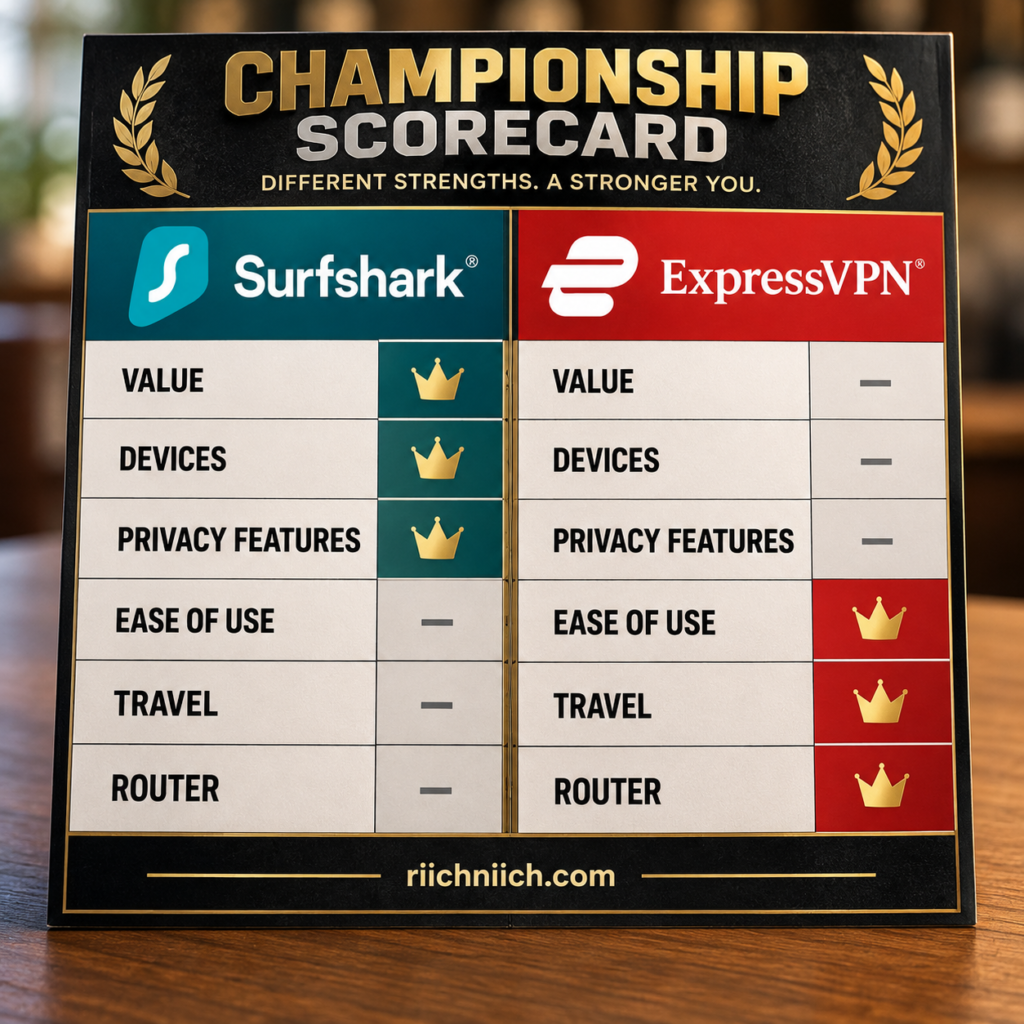
Surfshark Is Better for Overall Value
This is one of the strongest arguments for choosing Surfshark.
Surfshark’s current 24-month Starter promotion is advertised at $2.49 per month plus three extra months, or $67.23 for the first 27 months before applicable taxes. Surfshark One is currently $2.79 per month under the same promotional structure, while One+ is $4.49. Promotional pricing can change, so the checkout total and renewal terms should always be checked before purchasing.
What makes the pricing particularly attractive isn’t simply the monthly equivalent.
It’s what you’re getting for that price.
Even Surfshark Starter includes the VPN with unlimited simultaneous connections, Alternative ID, ad blocking, Bypasser, Rotating IP, and other privacy features. Higher tiers expand into additional cybersecurity protection.
For buyers looking for an affordable VPN service without sacrificing premium features, Surfshark makes a compelling argument.
Surfshark Is Better for Multiple Devices
This isn’t particularly close.
Surfshark Starter, One, and One+ all allow unlimited simultaneous VPN connections. Surfshark also specifically permits household sharing and supports devices including Windows, macOS, Linux, Android, iOS, Apple TV, Fire TV, Android TV, browsers, and compatible routers.
ExpressVPN currently provides:
Basic — 10 simultaneous connections
Advanced — 12 simultaneous connections
Express Pro — 14 simultaneous connections
Those limits are generous.
But they’re still limits.
If you have a phone, tablet, computer, smart TV, streaming devices, and several family members with their own technology, Surfshark’s unlimited-device policy is considerably easier to manage.
Winner for Multiple Devices: Surfshark
Surfshark Is Better for Families
The unlimited-device advantage naturally carries over to families.
A household can quickly accumulate more connected devices than expected.
Two parents and two children might collectively have:
four phones,
four computers,
three tablets,
three televisions,
two streaming devices,
and several other pieces of technology.
Surfshark lets the household protect supported devices without constantly calculating how many VPN connections are active. Surfshark explicitly says one subscription can be shared within a household.
Surfshark’s current plans also include family-oriented tools such as Web Content Blocker capabilities, while higher tiers can add Antivirus, Alert, identity-theft-related protection, and Incogni data removal depending on the plan and eligibility.
ExpressVPN remains competitive for families, especially with its current adult-site blocking and higher-tier security tools, but its 10–14 direct connection limits give Surfshark the overall advantage.
Winner for Families: Surfshark
Surfshark Is Better for Privacy Customization
If you like having more control over how your VPN protects your privacy, Surfshark has another advantage.
Surfshark offers tools such as:
Dynamic MultiHop — routes traffic through two VPN servers.
Rotating IP — periodically changes your outward-facing VPN IP while keeping you connected.
Bypasser — lets selected apps or websites bypass VPN protection.
CleanWeb — blocks ads, trackers, malware, and phishing attempts on supported platforms.
Alternative ID — provides alternative identity and email information for situations where you don’t want to provide your primary details.
ExpressVPN has excellent privacy and security features of its own, including TrustedServer, private DNS, automatic obfuscation, Internet Kill Switch, split tunneling, and Advanced Protection features.
But Surfshark provides more options for someone who wants to actively customize how their VPN behaves.
Winner for Privacy Features: Surfshark
ExpressVPN Is Better for Overall Privacy Assurance
More privacy features don’t automatically mean better privacy overall.
This is one area where ExpressVPN still earns the advantage.
ExpressVPN’s TrustedServer architecture runs its VPN servers using volatile RAM and removes server data when systems reboot. Its current feature documentation also emphasizes private DNS, leak protection, automatic obfuscation, Internet Kill Switch protection, and a no-logs policy backed by published independent assessments.
Surfshark also has a strong no-logs policy, RAM-only infrastructure, independent verification, and transparency reporting, so the difference is small.
But when privacy is the buyer’s single highest priority, ExpressVPN’s combination of TrustedServer, its established auditing record, and privacy-focused architecture gives it the narrow edge.
Winner for Overall Privacy: ExpressVPN — narrowly
Surfshark Is Better If You Want More Features for Your Money
Surfshark’s value becomes even clearer when you look beyond the basic VPN connection.
Its current feature set includes unlimited devices, ad blocking, cookie pop-up blocking, Bypasser, Rotating IP, Alternative ID, and scam-protection capabilities. Higher plans add tools such as Antivirus, Alert, identity-related protections, and Incogni data removal.
Not everyone needs all of these tools.
That’s important.
A long feature list doesn’t automatically make a product better.
But if you’re already considering paying separately for antivirus, data-breach monitoring, or data removal, Surfshark’s broader bundles become much more compelling.
This is particularly true for value-conscious buyers who want to consolidate several privacy and cybersecurity services.
ExpressVPN Is Better for Beginners
Surfshark isn’t difficult to use.
But ExpressVPN is slightly easier.
ExpressVPN’s design emphasizes getting the user connected with minimal configuration. Features such as automatic obfuscation and Lightway are designed to operate without requiring the user to constantly manage technical settings.
That makes ExpressVPN particularly attractive for someone who thinks:
“I don’t care how the VPN works. I just want to press Connect and know I’m protected.”
Surfshark’s Quick-connect experience is also beginner-friendly, but its larger collection of settings and features can make the interface feel busier.
Winner for Beginners: ExpressVPN
ExpressVPN Is Better for Travelers Who Need More Countries
Surfshark has a large global network with 4,500+ servers across 100 countries.
ExpressVPN currently covers 113 countries across 214 selectable server locations.
That’s a meaningful difference for people who travel internationally or frequently need VPN locations across less commonly supported regions.
ExpressVPN also combines that geographic coverage with Lightway, which is designed to connect quickly and transition smoothly between Wi-Fi and mobile networks.
For someone moving between airports, hotels, cellular networks, coffee shops, and other connections, that combination is attractive.
Winner for Traveling: ExpressVPN
ExpressVPN Is Better for People Who Want Lightway
ExpressVPN’s proprietary Lightway protocol remains one of its biggest technical differentiators.
ExpressVPN describes Lightway as a streamlined protocol designed for fast connections, stability, modern cryptography, and efficient switching between networks.
ExpressVPN also now supports WireGuard, so buyers aren’t limited to Lightway.
Surfshark has its own strong protocol selection, including WireGuard, OpenVPN, IKEv2 on supported platforms, and the newer Dausos protocol where available.
But if Lightway itself is something you specifically want, there’s only one choice.
Winner for Lightway: ExpressVPN
Surfshark Is Better for Users Who Don’t Want to Count Connections
This may sound like the same multiple-device argument, but there’s a convenience factor that deserves separate attention.
Connection limits create another thing to manage.
With ExpressVPN, you have to know whether your plan allows 10, 12, or 14 simultaneous connections. If you exceed that allowance, ExpressVPN says you can disconnect another device, purchase another subscription, share a Windows connection, or use a VPN router.
Surfshark eliminates that calculation.
Your phone can stay connected.
Your laptop can stay connected.
Your tablet can stay connected.
Your television can stay connected.
Other household members can use their supported devices.
For buyers who want a VPN with unlimited devices, Surfshark’s advantage is straightforward.
ExpressVPN Is Better for Router-Focused Households
Surfshark supports compatible VPN routers, but ExpressVPN has invested heavily in its router ecosystem.
This becomes important if you want to protect an entire home network, including hardware that can’t run VPN applications directly.
ExpressVPN also allows customers who need more than 14 simultaneous connections to connect devices through a VPN router.
That can cover televisions, game consoles, smart-home hardware, streaming equipment, and other connected devices from a central point.
Surfshark’s unlimited direct connections mean you don’t need a router simply to bypass a device cap.
But if the router itself is central to your VPN strategy, ExpressVPN has the stronger proposition.
Winner for Router Users: ExpressVPN
Surfshark Is Better for Long-Term Value
This is ultimately why Surfshark wins the overall comparison.
You’re not sacrificing the major VPN essentials to get a lower long-term price.
Surfshark still provides:
Strong encryption
Kill Switch
Split tunneling
Fast protocols
RAM-only infrastructure
No-logs practices
Streaming support
P2P support
Ad and tracker blocking
4,500+ servers across 100 countries
Unlimited simultaneous connections
The lower promotional long-term pricing therefore isn’t compensating for an obviously stripped-down VPN.
Instead, you’re getting a premium VPN with several features ExpressVPN either limits differently or doesn’t directly replicate.
That’s what makes Surfshark’s value proposition so strong.
Is Surfshark Better Than ExpressVPN for Streaming?
For most households, Surfshark gets the slight advantage because it combines strong streaming capabilities with unlimited simultaneous connections.
That matters when different people want to stream on different supported devices at the same time.
ExpressVPN remains an excellent streaming VPN and has advantages for certain device setups, particularly through its broader router ecosystem and other device-support options.
Neither VPN can guarantee permanent access to every streaming service because streaming platforms can change their VPN-detection systems.
For the average streaming household, though:
Winner for Streaming: Surfshark — narrowly
Is Surfshark Better Than ExpressVPN for Gaming?
Not necessarily.
This is one category where ExpressVPN has the slight advantage.
Lightway is designed around fast connection establishment, stability, and efficient network switching, which can be particularly useful for mobile gaming.
Surfshark remains a strong gaming VPN and can be the better value, especially if several gamers or gaming devices share the same household.
But if your priority is competitive gaming and minimizing VPN-related connection friction, ExpressVPN gets the narrow edge.
Winner for Gaming: ExpressVPN — narrowly
Is Surfshark Better Than ExpressVPN for Torrenting?
For most P2P users, Surfshark gets the advantage.
Both VPNs provide the core tools that matter for torrenting, including IP masking, encrypted connections, kill-switch protection, and fast modern protocols.
Surfshark adds unlimited simultaneous connections and typically stronger long-term value.
That means you can protect multiple computers and other devices without managing connection slots.
Winner for Torrenting: Surfshark — narrowly
Is Surfshark Better Than ExpressVPN for Public Wi-Fi?
ExpressVPN gets a slight advantage here.
Both VPNs can encrypt internet traffic over public networks and provide kill-switch protection.
ExpressVPN’s Lightway protocol, automatic obfuscation, private DNS, and Internet Kill Switch make it particularly well suited to users frequently moving between unfamiliar networks.
Surfshark remains excellent for public Wi-Fi and may actually be the better value if you’re protecting many devices.
But for frequent travelers jumping between airports, hotels, cafés, and cellular networks:
Winner for Public Wi-Fi: ExpressVPN — narrowly
Where Surfshark Clearly Wins
Surfshark is the stronger choice for buyers prioritizing:
Overall value
Unlimited devices
Families
Large households
Privacy customization
Dynamic MultiHop
Rotating IP
Long-term affordability
Broader value-oriented cybersecurity bundles
Those aren’t minor advantages.
For many buyers, they directly determine how much they’ll pay and how many devices they’ll actually be able to protect.
Where ExpressVPN Clearly Wins
ExpressVPN is the stronger choice for buyers prioritizing:
Beginner-friendly operation
Lightway
TrustedServer
Broader country coverage
Travel
Router-focused protection
A highly streamlined VPN experience
ExpressVPN’s current network spans 113 countries and 214 selectable locations, while its core security architecture includes TrustedServer, Lightway, private DNS, leak protection, automatic obfuscation, and Internet Kill Switch.
Surfshark vs ExpressVPN: Who Wins More Categories?
Looking at the major categories covered throughout this comparison, the results lean toward Surfshark:
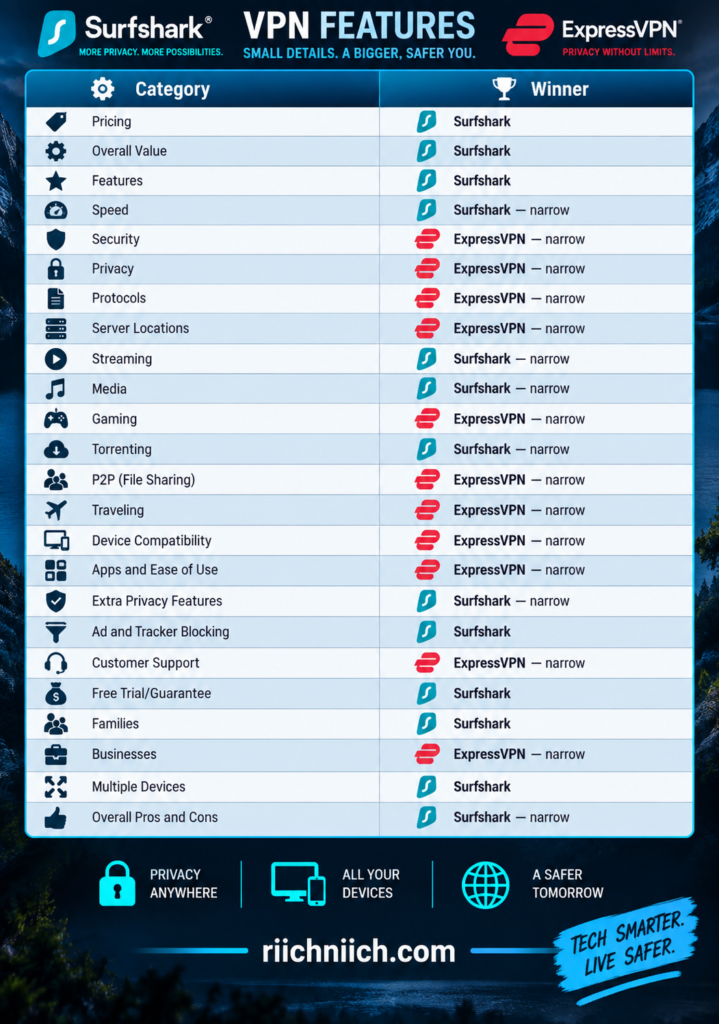
The number of category wins doesn’t tell the entire story because some categories will matter far more to you than others.
A frequent international traveler might reasonably choose ExpressVPN despite Surfshark winning more categories overall.
A family with 20 connected devices might find Surfshark’s unlimited connections far more important than ExpressVPN’s advantages in protocols or server geography.
So, Is Surfshark Better Than ExpressVPN?
Yes, Surfshark is better than ExpressVPN for most value-focused buyers—but ExpressVPN is better for certain users.
Surfshark’s biggest advantage is that it combines competitive VPN performance and security with unlimited simultaneous connections, strong privacy customization, family-friendly scalability, and excellent long-term value. Surfshark’s current paid plans all include unlimited VPN connections, removing one of the biggest practical restrictions found with many competing VPN subscriptions.
ExpressVPN’s advantages are different. It provides a highly streamlined experience, Lightway, TrustedServer, strong router support, and an unusually broad geographic footprint of 214 selectable locations across 113 countries. Its current Basic, Advanced, and Express Pro tiers also support up to 10, 12, and 14 simultaneous VPN connections respectively.
For the average person comparing surfshark vs expressvpn and asking which VPN provides the better combination of price, features, privacy, streaming, and multiple-device protection, Surfshark is the better overall buy.
Choose Surfshark if you want maximum value, unlimited devices, strong privacy features, and a VPN that can easily cover an entire household.
Choose ExpressVPN if you’re willing to prioritize simplicity, Lightway, TrustedServer, travel-friendly geographic coverage, and its router ecosystem over unlimited connections.
Overall Winner: Surfshark
But the comparison isn’t finished yet. There’s an equally important question from the other direction: Is ExpressVPN Better Than Surfshark?
Is ExpressVPN Better Than Surfshark?
Yes, ExpressVPN can be better than Surfshark—but only for certain buyers.
For shoppers comparing surfshark vs expressvpn, ExpressVPN has meaningful advantages in ease of use, geographic server coverage, Lightway, TrustedServer, router-based protection, travel, and overall privacy assurance. Surfshark still offers the stronger overall value for many buyers because of unlimited simultaneous connections, lower long-term pricing, and more privacy customization.
The important question isn’t whether ExpressVPN has more features. It doesn’t necessarily. The question is whether ExpressVPN’s particular strengths match the way you plan to use a VPN.
If they do, paying more or accepting a connection limit may be worthwhile.

ExpressVPN Is Better for Beginners
One of ExpressVPN’s clearest advantages is simplicity.
Its regular apps are designed around a straightforward experience: install the application, sign in, choose a location—or let ExpressVPN recommend one—and connect.
ExpressVPN’s own documentation recommends its app rather than manual configuration for most users. The app provides one-click or one-tap connections while automatically handling features such as DNS leak protection and Internet Kill Switch protection.
That makes ExpressVPN particularly attractive if this is your first VPN.
You don’t need to understand VPN protocols.
You don’t need to manually configure DNS.
You don’t need to understand server infrastructure.
You don’t need to customize advanced privacy settings before getting started.
Surfshark is also beginner-friendly, but its larger collection of options—including Dynamic MultiHop, Rotating IP, Bypasser, CleanWeb, NoBorders, and other settings—gives users more to explore.
That’s excellent for customization, but ExpressVPN has the slight advantage if your priority is simply:
Install it. Connect it. Use it.
Winner for Beginners: ExpressVPN
ExpressVPN Is Better If You Want Lightway
Lightway is one of the strongest reasons to specifically choose ExpressVPN.
Lightway is ExpressVPN’s proprietary VPN protocol. The company designed it around fast connection establishment, stability, modern cryptography, and efficient switching between different networks.
That last point is especially useful on mobile devices.
Imagine leaving your house while your phone is connected to Wi-Fi.
You walk outside.
Your phone switches to cellular data.
Later, you enter a coffee shop and connect to another Wi-Fi network.
ExpressVPN says Lightway is designed to transition smoothly between Wi-Fi and mobile networks while using relatively few system resources.
ExpressVPN also now supports WireGuard, so Lightway isn’t your only modern protocol option.
Surfshark has an excellent protocol selection of its own, but it can’t offer Lightway because Lightway belongs to ExpressVPN.
If you’ve specifically researched VPN protocols and decided you want Lightway:
Winner: ExpressVPN
ExpressVPN Is Better for Geographic Server Coverage
Surfshark actually advertises a larger total number of servers: 4,500+ servers across 100 countries.
ExpressVPN takes a different approach to describing its network.
As of August 2026, ExpressVPN says its network covers 214 selectable server locations across 113 countries.
That gives ExpressVPN the advantage in country coverage.
Why does that matter?
Suppose you travel frequently or need an IP address associated with a particular country.
The total number of servers worldwide isn’t necessarily the most important number.
You may care more about whether your VPN actually has a location in the country you need.
For international travelers and people who frequently switch between geographic regions, ExpressVPN’s broader country coverage is a genuine advantage.
Winner for Geographic Coverage: ExpressVPN
ExpressVPN Is Better for Frequent Travelers
The server-network advantage becomes even more useful when combined with Lightway.
A frequent traveler may move between:
airport Wi-Fi,
hotel Wi-Fi,
cellular networks,
conference-center Wi-Fi,
rental properties,
coffee shops,
and other unfamiliar networks.
ExpressVPN combines its 113-country network with Lightway, automatic connection features, Internet Kill Switch protection, and automatic obfuscation.
Surfshark remains an excellent travel VPN and may be preferable for families traveling with many devices because of its unlimited simultaneous connections.
But for an individual frequent traveler who values broad geographic coverage and easy network transitions, ExpressVPN has the stronger overall package.
Winner for Traveling: ExpressVPN
ExpressVPN Is Better for Users Who Prioritize TrustedServer
ExpressVPN’s TrustedServer technology is another major differentiator.
TrustedServer runs ExpressVPN’s VPN servers using volatile RAM rather than relying on conventional hard drives for persistent operation. ExpressVPN says data on the servers is removed with every reboot, and a fresh software image is loaded when the server restarts.
Surfshark also operates RAM-only VPN servers, so the underlying concept isn’t exclusive to ExpressVPN.
What makes TrustedServer particularly compelling is how central ExpressVPN has made the architecture to its security model, combined with its history of independent assessments.
For buyers researching the best VPN for privacy, that combination can be more important than having the largest possible feature list.
Surfshark may give you more privacy controls.
ExpressVPN makes a strong case around the underlying privacy infrastructure itself.
ExpressVPN Is Better for Overall Privacy Assurance
This distinction is important.
Surfshark wins privacy customization.
ExpressVPN narrowly wins overall privacy assurance.
Surfshark gives you Dynamic MultiHop, Rotating IP, CleanWeb, Alternative ID, and other useful privacy tools. Its current feature set provides significantly more control than a basic VPN connection.
ExpressVPN’s argument is different.
Its privacy case centers on TrustedServer, no-logs practices, private DNS, strong encryption, independent assessments, and a long-established security architecture. ExpressVPN says TrustedServer doesn’t store browsing activity or connection logs on hard drives and clears server data when rebooted.
So if you’re asking:
“Which VPN gives me more privacy features to customize?”
Choose Surfshark.
If you’re asking:
“Which VPN would I choose primarily because I trust its privacy architecture and verification record?”
ExpressVPN gets the narrow advantage.
Winner for Overall Privacy: ExpressVPN — narrowly
ExpressVPN Is Better for Router-Based Protection
This is another area where ExpressVPN stands out.
Most people will probably install VPN apps directly on their phones, computers, tablets, and streaming devices.
But a VPN router can protect devices across an entire home network—including hardware that may not support a VPN application directly.
ExpressVPN also recommends a VPN router as one solution for customers who need to protect more devices than their subscription’s normal simultaneous-connection allowance. ExpressVPN says you can connect as many devices as you want through a VPN router.
This makes router protection particularly useful for:
gaming consoles,
smart TVs,
streaming devices,
smart-home equipment,
and households containing many connected devices.
Surfshark also supports router configurations.
But because Surfshark already provides unlimited direct VPN connections, routers serve a somewhat different purpose there.
If your entire VPN strategy revolves around centralized home-network protection, ExpressVPN has the stronger proposition.
Winner for Router-Focused Users: ExpressVPN
ExpressVPN Is Better for Users Who Want Fewer Decisions
Some people enjoy adjusting VPN settings.
Other people absolutely don’t.
If you fall into the second group, ExpressVPN’s simplicity becomes an advantage rather than a limitation.
The recommended ExpressVPN app can handle server selection, protocols, DNS protection, kill-switch protection, automatic connections, and other functionality without requiring extensive manual configuration.
You still have access to additional settings when you need them.
But you don’t have to use them.
Surfshark’s greater flexibility is valuable for users who want more control.
ExpressVPN’s advantage is making that control feel less necessary.
This is why someone willing to pay for a premium VPN service may reasonably choose ExpressVPN even when Surfshark costs less.
You’re not necessarily paying for more features.
You may be paying for fewer decisions.
ExpressVPN Is Better for Certain Mobile Users
Lightway makes ExpressVPN particularly compelling on phones and tablets.
Mobile devices frequently change networks.
Your phone may switch from home Wi-Fi to 5G, then connect to workplace Wi-Fi, return to cellular data, and later join public Wi-Fi.
ExpressVPN says Lightway is designed to connect quickly and switch smoothly between Wi-Fi and mobile networks.
That doesn’t automatically make ExpressVPN faster than Surfshark on every phone.
Actual VPN performance depends on your device, ISP, server distance, network conditions, and protocol.
But if reliable network switching is one of your biggest concerns, ExpressVPN deserves extra consideration.
ExpressVPN Is Better for Some Gamers
Surfshark and ExpressVPN are both capable gaming VPNs.
But ExpressVPN received the narrow advantage in our gaming comparison because of its combination of Lightway, broad server geography, and straightforward server selection.
Its current network includes 214 selectable locations in 113 countries, giving users plenty of geographic choices when trying to find an appropriate route to a game server.
A VPN doesn’t guarantee lower ping.
In fact, encryption and additional routing can increase latency.
But if your ISP’s normal route to a particular server is inefficient, a VPN route can occasionally perform differently.
For competitive gaming, test nearby servers rather than assuming a distant VPN location will improve performance.
Winner for Gaming: ExpressVPN — narrowly
ExpressVPN Is Better for Public Wi-Fi Travelers
Both VPNs are excellent tools for protecting internet traffic on public Wi-Fi.
Both provide encryption.
Both provide kill-switch protection.
Both can mask your normal public IP address from websites and services you access through the VPN.
ExpressVPN’s Lightway protocol and Internet Kill Switch make it especially appealing for people constantly moving between unfamiliar networks. ExpressVPN says the kill switch blocks internet traffic if the VPN connection unexpectedly drops, helping prevent your real IP address or unencrypted traffic from leaking during interruptions.
Surfshark remains highly competitive here, particularly because its Auto-connect and Kill Switch features can also automate protection.
But for frequent travelers:
Winner for Public Wi-Fi: ExpressVPN — narrowly
ExpressVPN Is Better If You Need a VPN Location in More Countries
This deserves emphasis because “more servers” and “more locations” aren’t the same thing.
Surfshark:
4,500+ servers
100 countries
ExpressVPN:
214 selectable locations
113 countries
If your priority is raw advertised server count, Surfshark has the larger published number.
If your priority is the number of countries available, ExpressVPN wins.
This can matter more than expected if you travel internationally, access country-specific services while traveling, or need an IP address associated with a particular region.
ExpressVPN Is Not Better for Multiple Devices
Here’s where the answer changes decisively.
ExpressVPN currently allows:
10 simultaneous connections with Basic
12 with Advanced
14 with Express Pro.
Surfshark’s paid VPN service allows unlimited simultaneous connections.
For most individuals, ExpressVPN’s limits are more than sufficient.
But for a large household, Surfshark is much easier.
You don’t have to count devices.
You don’t have to upgrade just because you added more VPN connections.
You don’t have to disconnect one device to make room for another.
ExpressVPN can overcome its connection limit with router-based protection, but Surfshark doesn’t create the direct-device restriction in the first place.
Winner for Multiple Devices: Surfshark
ExpressVPN Is Not Better for Overall Value
This is the biggest reason ExpressVPN doesn’t win the entire surfshark vs expressvpn comparison.
ExpressVPN’s current Basic plan starts with an introductory 2-year offer of $2.99 per month plus four extra months, billed as $83.72 for the first 28 months. It then renews at $99.95 annually under the current offer.
ExpressVPN Basic includes 10 simultaneous connections, Lite Protection, and the core ExpressVPN service. Higher tiers increase the connection allowance and add more cybersecurity features.
That’s competitive premium pricing.
But Surfshark’s combination of lower promotional long-term pricing, unlimited VPN connections, and advanced privacy features gives it the stronger overall value proposition for many households.
This is especially important when you’re paying for multiple people.
A premium experience can justify a premium price—but only if you’ll actually benefit from ExpressVPN’s specific advantages.
ExpressVPN Is Not Better for Advanced Privacy Customization
Surfshark wins here.
Dynamic MultiHop allows traffic to pass through two VPN servers.
Rotating IP changes your VPN IP every 5–10 minutes while keeping you connected to the chosen location.
Surfshark also provides Bypasser, CleanWeb, NoBorders, Pause VPN, Static IP options, and other controls depending on platform.
ExpressVPN provides excellent privacy protection, but it doesn’t directly match every one of those customization tools.
For buyers who enjoy configuring exactly how their VPN behaves:
Winner for Privacy Customization: Surfshark
ExpressVPN Is Not Better for Large Families
ExpressVPN has become much more family-friendly.
Its Basic plan supports 10 simultaneous connections, Advanced supports 12, and Express Pro supports 14. Its Advanced Protection suite can also block ads, malicious sites, adult content, and—with Advanced or Express Pro—trackers on supported platforms.
That’s plenty for many families.
But Surfshark still has the fundamental advantage:
Unlimited simultaneous VPN connections.
For a couple with four devices, that may mean nothing.
For a family with 15, 20, or more connected devices, it can mean a lot.
Winner for Large Families: Surfshark
When Is ExpressVPN Worth Paying For?
ExpressVPN makes the most sense when its specific strengths solve problems you actually have.
It becomes especially attractive if you:
travel internationally frequently,
want VPN locations across more countries,
prefer extremely straightforward applications,
want Lightway,
place heavy emphasis on TrustedServer,
want a strong router-based VPN setup,
frequently move between Wi-Fi and cellular networks,
or simply prefer a more streamlined VPN experience.
ExpressVPN’s current product has also expanded beyond the traditional VPN. Its Basic, Advanced, and Express Pro tiers now include ExpressMailGuard, while higher tiers add access to tools such as ExpressKeys and other cybersecurity services depending on the plan and region.
That makes the value equation much closer than it was when ExpressVPN was primarily just a premium-priced VPN.
When Should You Choose Surfshark Instead?
Surfshark remains the better purchase if your priorities are:
Lower long-term cost
Unlimited simultaneous connections
Lots of household devices
Family use
Dynamic MultiHop
Rotating IP
More privacy customization
Strong streaming value
A broader feature-to-price ratio
Surfshark currently operates more than 4,500 servers across 100 countries and provides features including CleanWeb, Bypasser, Dynamic MultiHop, Rotating IP, Kill Switch, NoBorders, Auto-connect, and other controls depending on the platform.
It also gives new eligible users a current seven-day trial on qualifying 12- and 24-month website purchases, followed by its 30-day money-back guarantee after the trial converts to a paid subscription. The trial itself is limited to three simultaneous devices, while the paid VPN supports unlimited devices.
For a buyer who wants maximum functionality per dollar, Surfshark is extremely difficult to beat.
Is ExpressVPN Better Than Surfshark?
For some people, yes.
ExpressVPN is better if you prioritize simplicity, Lightway, TrustedServer, international server coverage, traveling, public Wi-Fi use, router protection, or a highly streamlined premium experience.
Its current network spans 214 selectable locations across 113 countries, while its apps provide one-click connections, automatic connection options, DNS leak protection, Internet Kill Switch, Lightway, WireGuard, split tunneling, and additional security features.
But for the average value-focused buyer comparing surfshark vs expressvpn, Surfshark still has the stronger overall proposition.
Surfshark gives you unlimited simultaneous connections, 4,500+ servers across 100 countries, Dynamic MultiHop, Rotating IP, CleanWeb, Bypasser, Kill Switch, and additional privacy features depending on the platform and subscription.
So the buying decision is fairly clear:
Choose ExpressVPN if you’re willing to pay for its strengths in simplicity, Lightway, TrustedServer, travel, geographic coverage, and router protection.
Choose Surfshark if you want the better combination of price, unlimited devices, advanced privacy features, family use, and overall value.
Is ExpressVPN better than Surfshark? Yes—for the right buyer.
Is ExpressVPN the better overall value for most people? No. Surfshark still wins that comparison.
The next step is to make the buying decision even more specific by identifying exactly who benefits most from each service, starting with Surfshark vs ExpressVPN: Who Should Choose Surfshark?.
Surfshark vs ExpressVPN: Who Should Choose Surfshark?
Surfshark is the better choice for buyers who want strong VPN protection without paying a premium for every additional device or feature. It stands out most for households with many devices, value-conscious shoppers, families, streaming users, and people who want more control over their privacy settings.
For buyers comparing surfshark vs expressvpn, Surfshark currently combines unlimited simultaneous VPN connections with 4,500+ servers across 100 countries and features such as Dynamic MultiHop, Rotating IP, Bypasser, CleanWeb, Kill Switch, and Alternative ID.
ExpressVPN remains the better fit for some users, particularly those who prioritize Lightway, simplicity, broader country coverage, and its router ecosystem. But if the following situations describe how you plan to use your VPN, Surfshark is probably the better purchase.
Choose Surfshark If You Want the Best Overall Value
Surfshark makes the strongest case for buyers who want to maximize what they receive for their subscription.
Its current 24-month Starter promotion is $2.49 per month plus three extra months, totaling $67.23 for the first 27 months before applicable taxes. Surfshark One is currently $2.79 per month and One+ is $4.49 under comparable introductory terms. Prices and promotions can change, so buyers should always check the current checkout total and renewal terms before purchasing.
More importantly, Surfshark isn’t offering a heavily stripped-down VPN just to reach that price.
The core VPN includes features such as Auto-connect, Kill Switch, split tunneling, unlimited simultaneous connections, and other privacy tools.
That makes Surfshark particularly attractive if your goal is:
Get a premium VPN without paying premium prices for every device.
For value-focused buyers, this is probably Surfshark’s strongest selling point.
Choose Surfshark If You Have a Lot of Devices
If you own a lot of technology, Surfshark is an easy recommendation.
Surfshark Starter, One, and One+ allow unlimited simultaneous VPN connections. Surfshark says you can install its VPN across an unlimited number of devices and share the subscription with family members within your household.
That can include supported:
phones,
laptops,
desktop computers,
tablets,
smart TVs,
streaming devices,
and other compatible hardware.
You don’t have to decide which devices deserve VPN protection and which ones should remain disconnected.
For someone specifically searching for a VPN with unlimited devices, Surfshark is one of the clearest reasons to choose it over ExpressVPN.
Choose Surfshark If You Have a Large Family
Unlimited connections become even more valuable when one subscription is being used across a household.
Consider a family of four.
Four smartphones alone use four connections.
Add laptops, tablets, televisions, streaming hardware, and other supported devices, and the total can rise quickly.
Surfshark specifically allows family sharing within a household and doesn’t impose a normal numerical simultaneous-connection limit on its paid VPN plans.
That means you don’t need to keep a mental inventory of who’s connected.
Surfshark has also expanded its family-oriented protections with tools such as Web Content Blocker, which allows selected website categories to be blocked across supported devices.
If you’re shopping for the best VPN for families, Surfshark’s combination of unlimited VPN connections, security features, and competitive long-term pricing makes it particularly compelling.
Choose Surfshark If You Want More Privacy Controls
Surfshark is also the better choice for users who want to go beyond simply pressing Connect.
Its current feature set includes Dynamic MultiHop, which routes traffic through two VPN servers, and Rotating IP, which changes the outward-facing VPN IP every 5–10 minutes without disconnecting the VPN.
You also get tools such as Bypasser, Kill Switch, CleanWeb, NoBorders, and other controls depending on your device.
This doesn’t mean everyone should turn on every feature.
Most people don’t need MultiHop for ordinary web browsing, for example.
But Surfshark gives you the option.
That’s important for privacy-conscious buyers who want a VPN they can customize as they learn more about online privacy.
Choose Surfshark If You Want Dynamic MultiHop
Dynamic MultiHop deserves special attention because ExpressVPN doesn’t currently provide a directly equivalent core double-VPN feature.
Normally, VPN traffic follows a path similar to:
You → VPN server → Internet
With Dynamic MultiHop:
You → VPN server #1 → VPN server #2 → Internet
Surfshark lets users select both locations from its server network on supported platforms.
That creates an additional privacy-routing layer.
There is a tradeoff.
Sending traffic through two VPN servers can reduce performance compared with a normal single-server connection.
So MultiHop isn’t something you necessarily need while streaming a movie or playing a latency-sensitive online game.
But if double-VPN routing is an important part of your privacy strategy, Surfshark is the stronger choice.
Choose Surfshark If You Want Rotating IP
Rotating IP is another reason privacy-focused buyers may prefer Surfshark.
Rather than keeping the same outward-facing VPN IP throughout your connection, Surfshark can change the IP address periodically while keeping you connected to the selected VPN location. Surfshark says the IP changes every 5–10 minutes.
This adds another obstacle to tracking based solely on a persistent VPN IP.
It doesn’t make you anonymous.
If you’re signed into a personal account, cookies and other identifiers can still connect activity to you.
But Rotating IP provides another layer that ordinary VPN connections don’t necessarily offer.
If you’ve been specifically comparing Surfshark vs ExpressVPN privacy features, this is one of Surfshark’s most distinctive advantages.
Choose Surfshark If You Want Ad and Tracker Blocking
Surfshark’s CleanWeb adds another privacy and convenience layer.
The in-app version can block ads, trackers, malware, and phishing attempts on supported platforms. Surfshark’s browser-extension version can also block ads and pop-ups while offering malware and data-breach alerts.
That can reduce some of the unwanted advertising and tracking encountered during everyday browsing.
It isn’t a complete substitute for antivirus software.
It also can’t stop every possible form of online tracking.
But having these capabilities integrated into the VPN means you don’t necessarily need another browser extension just to gain basic ad and tracker blocking.
For buyers who want their VPN subscription to handle more than IP masking, CleanWeb adds meaningful value.
Choose Surfshark If You Want Split Tunneling
Surfshark calls its split-tunneling feature Bypasser.
It allows selected apps or websites to bypass VPN protection while the rest of your traffic continues through the VPN. Surfshark currently supports Bypasser across several major platforms, although exact functionality varies by operating system.
This can be useful when a particular website or application doesn’t work correctly through a VPN.
Instead of turning Surfshark off completely, you can potentially exclude that specific service.
For example:
Most browsing → VPN
Specific incompatible app → Normal connection
That lets you maintain VPN protection for everything else.
Choose Surfshark If You Stream on Several Devices
Surfshark becomes especially attractive for streaming households because of its unlimited connections.
One person can stream on a television.
Another can use a tablet.
Someone else can watch from a laptop.
Another person can use a streaming device.
You’re not consuming a limited pool of VPN connection slots.
Surfshark currently supports major platforms including Windows, macOS, Linux, Android, iOS, Apple TV, Fire TV, and Android TV. For televisions that don’t support a native VPN application, a compatible VPN router can provide another option.
That makes Surfshark particularly compelling if your idea of the best VPN for streaming includes protecting several screens at once.
Streaming services can change how they detect VPN connections, so no VPN should be treated as a permanent guarantee of access to every streaming catalog.
But from a household-device perspective, Surfshark has a major advantage.
Choose Surfshark If You’re a Value-Focused Gamer
ExpressVPN narrowly wins our gaming comparison because Lightway and its broader geographic footprint make it particularly attractive for certain gaming situations.
But Surfshark can still be the better purchase for a gaming household.
Why?
Unlimited connections.
A household might contain:
a gaming PC,
a gaming laptop,
a smartphone,
a handheld gaming device,
multiple consoles,
and other connected equipment.
Surfshark’s unlimited-device policy means those supported devices don’t have to compete for individual VPN connection slots.
Surfshark also operates 4,500+ servers across 100 countries, with its current network built around at least 10Gbps server ports and higher-capacity infrastructure in certain high-traffic locations.
So while ExpressVPN may appeal more to the competitive gamer prioritizing its specific protocol and routing strengths, Surfshark can be the better gaming value for a household with many devices.
Choose Surfshark If You Torrent Regularly
Both Surfshark and ExpressVPN can work well for P2P traffic.
Surfshark becomes particularly attractive because it combines P2P support with unlimited simultaneous connections, Kill Switch protection, modern protocols, and its large server network. Surfshark’s current server directory identifies P2P availability throughout its network.
That means someone with multiple computers doesn’t have to worry about consuming additional VPN slots.
For most torrent users, Dynamic MultiHop isn’t necessary because the extra routing can reduce speed.
A nearby normal VPN server using an appropriate protocol will usually make more sense.
And a VPN doesn’t make copyright infringement legal. You remain responsible for what you download and share.
For legitimate P2P users prioritizing price, privacy, and multiple devices, Surfshark is the stronger overall value.
Choose Surfshark If You Want a VPN That Can Grow With You
This may be one of Surfshark’s most underrated advantages.
You don’t need to understand every feature on day one.
A beginner can start with:
Quick-connect
Then learn Auto-connect.
Then CleanWeb.
Then Bypasser.
Then perhaps Rotating IP.
Then Dynamic MultiHop.
Surfshark’s feature set gives users room to become more advanced without necessarily switching VPN providers later. Its current platform includes tools ranging from basic Auto-connect and Kill Switch protection to MultiHop, Rotating IP, NoBorders, scam protection, and content blocking.
That’s a different value proposition from simply being easy.
It’s easy enough for a beginner but configurable enough for an experienced user.
Choose Surfshark If You’re Building a Broader Cybersecurity Setup
Surfshark becomes even more interesting if you’re not shopping for a VPN alone.
Surfshark Starter focuses on the VPN and core privacy tools, while Surfshark One adds additional cybersecurity features such as Antivirus, Alert, and scam protection. One+ adds Incogni data removal.
That gives you a progression:
Starter → VPN and privacy
One → VPN plus broader security
One+ → VPN, broader security, and data removal
Not everybody needs the larger packages.
If all you want is a VPN, buying One+ simply because it contains more features may waste money.
But if you’re already planning to pay separately for additional privacy or security tools, Surfshark’s bundles become much more attractive.
Choose Surfshark If You Want to Try It Before Fully Committing
Surfshark currently offers eligible new users a 7-day VPN free trial through its website on qualifying 12- and 24-month purchases made with PayPal, Apple Pay, or a credit card.
The trial is limited to three simultaneous devices.
Once the trial ends and the paid subscription begins, the normal unlimited-device allowance applies. Surfshark says the subsequent paid purchase also enters its 30-day money-back-guarantee period, effectively giving eligible buyers a longer period to decide whether the service is right for them.
This is useful if you’re unsure how Surfshark will perform on your particular internet connection.
Test the things you actually care about:
your normal browsing,
your favorite streaming services,
your phone,
your laptop,
the VPN servers nearest you,
and any applications you use regularly.
A VPN can perform differently depending on your ISP, location, device, server, and network conditions.
Testing it on your own setup is more useful than relying entirely on someone else’s speed test.
Who Should NOT Choose Surfshark?
Surfshark isn’t automatically the right VPN just because it wins the overall value comparison.
You may prefer ExpressVPN if you:
want the simplest possible VPN experience,
specifically want Lightway,
travel frequently and value ExpressVPN’s broader country coverage,
want ExpressVPN’s TrustedServer architecture,
place greater weight on ExpressVPN’s privacy-verification history,
or want its router-focused ecosystem.
You also shouldn’t buy Surfshark solely because it offers unlimited connections if you only own three devices.
In that situation, the device advantage may have almost no practical value.
The goal isn’t to buy the VPN with the longest feature list.
It’s to buy the VPN whose advantages match your actual needs.
Surfshark vs ExpressVPN: Who Should Choose Surfshark?
For buyers comparing surfshark vs expressvpn, Surfshark is the better choice if you want maximum value, unlimited simultaneous connections, strong privacy customization, family-friendly scalability, and a VPN that provides plenty of advanced features without requiring you to use them.
Surfshark currently combines 4,500+ servers across 100 countries with unlimited simultaneous VPN connections. Its feature set includes CleanWeb, Bypasser, Kill Switch, Dynamic MultiHop, Rotating IP, NoBorders, and additional security and privacy tools depending on your subscription and device.
Choose Surfshark if you are:
- A value-conscious buyer who wants a lower-cost long-term VPN.
- A family with many connected devices.
- Someone who wants unlimited simultaneous VPN connections.
- A privacy-focused user who wants Dynamic MultiHop or Rotating IP.
- A streaming household with several screens.
- A P2P user who wants strong value across multiple computers.
- Someone interested in combining a VPN with broader cybersecurity or data-removal tools.
- A beginner who wants something easy now but more customizable later.
For these buyers, Surfshark isn’t simply the cheaper alternative. It can be the better overall purchase because its biggest advantages—unlimited devices, strong privacy tools, and long-term value—are features you’ll potentially benefit from every day.
Best for: Value, families, multiple devices, privacy customization, and feature-rich protection
Overall recommendation: Choose Surfshark if you want to get the most protection and flexibility from a single VPN subscription.
Still deciding whether Surfshark deserves your money? Read our full breakdown, ‘Is Surfshark Worth It?’ to take a closer look at its pricing, privacy features, performance, and overall value.
The other side of the buying decision is just as important. Next comes Surfshark vs ExpressVPN: Who Should Choose ExpressVPN?.
Surfshark vs ExpressVPN: Who Should Choose ExpressVPN?
ExpressVPN is the better choice for buyers who prioritize simplicity, privacy architecture, international server coverage, mobile performance, and router-based protection over getting the lowest possible price or unlimited simultaneous connections.
In the overall surfshark vs expressvpn comparison, Surfshark offers stronger value for many buyers. But ExpressVPN has several advantages that can easily justify choosing it instead—especially if you’re a frequent traveler, a VPN beginner, a router-focused user, or someone who places a high priority on independently assessed security and privacy infrastructure.
ExpressVPN currently offers three tiers—Basic, Advanced, and Express Pro—with 10, 12, and 14 simultaneous VPN connections respectively. All three include Lightway, post-quantum protection, multiplatform apps, and access to servers across 113 countries.
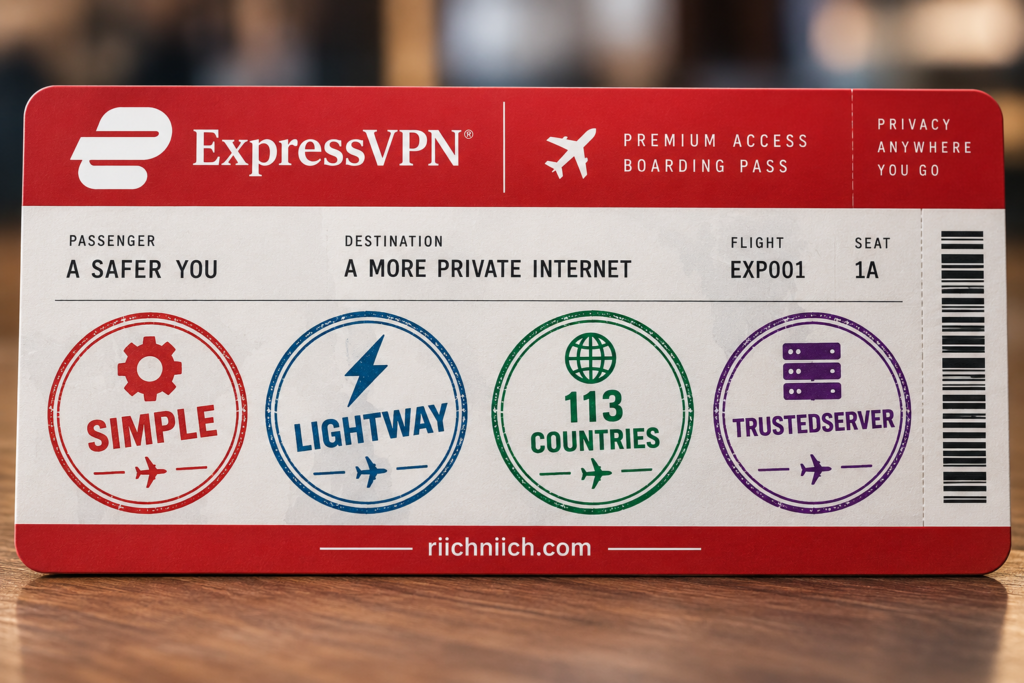
Choose ExpressVPN If You Want the Simplest Experience
ExpressVPN is particularly well suited to someone who doesn’t want to spend much time configuring a VPN.
You can install the app, sign in, connect, and let ExpressVPN handle most of the technical work in the background.
That’s valuable for beginners.
VPN services can quickly become overwhelming when users are presented with protocols, encryption terminology, DNS settings, split tunneling, obfuscation, server types, and other technical controls.
ExpressVPN gives advanced users options, but you don’t need to understand all of them to use the service effectively.
For someone searching for the best VPN for beginners, this simplicity is one of ExpressVPN’s strongest selling points.
Choose ExpressVPN if your ideal VPN is something you barely have to think about after setting it up.
Choose ExpressVPN If You Want Lightway
Lightway is one of the biggest reasons to choose ExpressVPN specifically.
Unlike standard protocols that many VPN providers share, Lightway was developed by ExpressVPN. Its core code is open source, and it has undergone multiple independent security assessments. ExpressVPN says Lightway is designed for faster connections, reliability, lower battery consumption, and smooth transitions between networks.
That last benefit is particularly important for mobile users.
Imagine leaving home while connected to Wi-Fi.
Your phone switches to cellular.
You arrive at work and connect to Wi-Fi again.
Later, you leave and return to cellular data.
Lightway is designed so that when your network changes or temporarily disappears, the VPN connection can become idle rather than being completely terminated, helping it resume quickly.
Surfshark offers strong protocols of its own, including WireGuard and its newer Dausos protocol on supported platforms. But if Lightway itself appeals to you, ExpressVPN is the obvious choice.
Best for Lightway: ExpressVPN
Choose ExpressVPN If You Travel Frequently
ExpressVPN becomes especially attractive for frequent international travelers.
Its network currently covers 214 selectable server locations across 113 countries. ExpressVPN says the vast majority of those locations have both the physical server and registered IP address in the selected country, while a smaller number use virtual server locations.
Surfshark’s network is also extensive, but ExpressVPN currently covers more countries.
That can matter if you’re regularly traveling internationally and want a larger selection of geographic VPN locations.
Combine that with Lightway and ExpressVPN becomes particularly appealing for people constantly moving between:
airports,
hotels,
cellular connections,
public Wi-Fi,
work networks,
and temporary accommodations.
If you’re looking for a VPN for traveling, ExpressVPN is one of the situations where paying more can make sense.
Best for Frequent Travelers: ExpressVPN
Choose ExpressVPN If Country Coverage Matters More Than Server Count
This is an important distinction in the surfshark vs expressvpn comparison.
A VPN can advertise thousands of servers, but that doesn’t necessarily mean it operates in more countries.
For some users, server quantity matters.
For others, geographic diversity matters more.
ExpressVPN currently provides locations in 113 countries, spread across 214 selectable locations.
If you frequently need VPN locations in different regions, that broad geographic footprint can be more useful than simply choosing the VPN advertising the larger total server count.
For international travelers in particular, this is a meaningful reason to choose ExpressVPN.
Choose ExpressVPN If You Prioritize TrustedServer
Privacy-focused buyers should pay particular attention to TrustedServer.
ExpressVPN’s TrustedServer infrastructure operates its VPN servers using RAM rather than depending on conventional persistent hard-drive storage. ExpressVPN says server data is wiped with every reboot, helping reduce the risk of information remaining on the server over time.
Surfshark also uses RAM-only servers, so RAM-only infrastructure itself isn’t unique to ExpressVPN.
The difference is that TrustedServer has become a central part of ExpressVPN’s security architecture and has been independently assessed.
ExpressVPN’s published audit history includes assessments covering TrustedServer, Lightway, its no-logs and privacy commitments, desktop and mobile applications, browser extensions, routers, and other products.
If you’re choosing a VPN for online privacy and care heavily about the underlying server architecture and its verification history, ExpressVPN deserves serious consideration.
Choose ExpressVPN If Independent Security Verification Matters to You
VPN companies make a lot of claims.
Independent verification helps determine whether some of those claims hold up under outside scrutiny.
ExpressVPN says it has commissioned independent audits since 2018. Its published audit program has covered areas including Lightway, TrustedServer, Windows, macOS, Linux, Android and iOS applications, browser extensions, Aircove routers, privacy commitments, and its no-logs policy.
The company has worked with firms including Cure53, KPMG, Praetorian, F-Secure, and PwC Switzerland across different assessments.
Surfshark also has independent verification behind important parts of its service, so this isn’t an argument that Surfshark is unverified.
But if your buying decision places unusually heavy weight on the depth and history of published third-party assessments, ExpressVPN has a compelling record.
Choose ExpressVPN If Privacy Assurance Matters More Than Privacy Customization
This is probably the easiest way to understand the privacy difference.
Surfshark gives you more privacy customization.
ExpressVPN gives you an especially strong privacy architecture and verification story.
Surfshark provides tools such as Dynamic MultiHop and Rotating IP that ExpressVPN doesn’t directly replicate.
ExpressVPN instead emphasizes technologies and practices such as:
TrustedServer,
Lightway,
private DNS,
kill-switch protection,
no-logs commitments,
independent audits,
and transparency.
Neither approach is automatically superior for everyone.
If you enjoy controlling exactly how your VPN routes and changes your connection, Surfshark may be more appealing.
If you’d rather rely on a streamlined privacy architecture with an extensive independent-assessment history, ExpressVPN may be the better fit.
Best for Privacy Customization: Surfshark
Best for Overall Privacy Assurance: ExpressVPN — narrowly
Choose ExpressVPN If You Want Strong Router-Based Protection
ExpressVPN is particularly attractive for people who want to protect an entire home network through a router.
Its router software includes Device Groups, which allow devices to be separated into as many as five groups. Each group can use a different VPN location, no VPN, or no internet connection. An unlimited number of devices can be assigned to a group.
This creates some useful possibilities.
Your streaming devices could use one VPN location.
Your gaming equipment could use another.
Your work computer could use Smart Location.
Certain smart-home devices could use no VPN.
Children’s devices could be placed into a separate group.
That’s much more flexible than simply forcing the entire house through one VPN server.
Surfshark supports VPN routers too, but ExpressVPN’s Device Groups make its router implementation especially attractive for people who want centralized network control.
Best for Router-Focused Households: ExpressVPN
Choose ExpressVPN If 10–14 Connections Are Already Enough
Surfshark’s unlimited simultaneous connections are a major advantage—but only if you need them.
ExpressVPN Basic currently supports 10 simultaneous VPN connections.
Advanced supports 12.
Express Pro supports 14.
Suppose you have:
one phone,
one laptop,
one tablet,
two televisions,
and one streaming device.
That’s six devices.
ExpressVPN Basic already gives you room for four more simultaneous connections.
In that situation, Surfshark’s unlimited-device advantage may sound impressive without actually changing your experience.
If 10 connections comfortably cover everything you own, you can reasonably ignore the unlimited-versus-limited comparison and concentrate on other factors such as privacy, protocols, server locations, apps, and ease of use.
Choose ExpressVPN If You Want a Premium Router Setup for Lots of Devices
ExpressVPN’s normal device limits don’t necessarily prevent it from protecting a large household.
Its router implementation changes the equation.
A router running ExpressVPN can place an unlimited number of connected devices into Device Groups, while up to five groups can use different connection rules.
This means a household with numerous smart devices doesn’t necessarily need to install the ExpressVPN app individually on every piece of hardware.
It’s particularly useful for equipment that may not support a traditional VPN app.
Surfshark remains easier if your primary goal is unlimited direct app connections.
But if your goal is protecting and organizing an entire home network from one central location, ExpressVPN becomes much more competitive.
Choose ExpressVPN If You Want More Than the Basic VPN
ExpressVPN’s current product lineup has expanded considerably.
All three tiers include the VPN and ExpressMailGuard, although capabilities differ by tier. Basic includes 10 VPN connections and Lite Protection. Advanced increases the allowance to 12 and adds ExpressKeys, tracker blocking, and additional features. Express Pro provides 14 VPN connections, Dedicated IP, ExpressKeys, broader ExpressMailGuard capabilities, ExpressAI, and the most extensive Identity Defender package for eligible U.S. customers. Exact inclusions can also depend on subscription duration and eligibility.
Identity Defender is currently U.S.-only, and the eSIM benefits included with certain longer subscriptions require compatible, carrier-unlocked phones.
This matters because ExpressVPN is no longer simply selling:
VPN → done.
Depending on the tier, it can become a broader privacy and cybersecurity package involving VPN protection, password management, email privacy, identity protection, and other services.
That can make the higher price easier to justify if you’ll actually use those tools.
Choose ExpressVPN If You Want ExpressKeys
If password management is important to you, ExpressVPN’s higher tiers become more interesting.
ExpressVPN Advanced and Express Pro currently include ExpressKeys, the company’s password manager.
That can help consolidate another part of your cybersecurity setup under the same subscription.
This shouldn’t automatically determine which VPN you buy.
If you already use a password manager you like, ExpressKeys may provide little additional value.
But if you’re shopping for both a VPN and password manager, including both under one subscription can simplify the buying decision.
Choose ExpressVPN If Identity Protection Interests You
Eligible U.S. buyers should also consider ExpressVPN’s newer Identity Defender offering.
Under the current long-term Advanced package, ExpressVPN lists five Identity Defender tools, automated data removal, and identity-theft insurance of up to $3 million subject to policy terms, conditions, and exclusions. Express Pro expands the Identity Defender package and lists insurance of up to $5 million, again subject to the applicable insurance terms.
This doesn’t mean ExpressVPN should replace every dedicated identity-protection service for every consumer.
A VPN can improve online privacy, but it cannot prevent every form of identity fraud, so use these additional steps to protect yourself from identity theft beyond simply hiding your IP address.
The right choice depends on which monitoring and recovery features you actually need.
But for someone already considering ExpressVPN Advanced or Pro, these additional benefits should be included when comparing the total subscription value.
Choose ExpressVPN If You Want a Dedicated IP Included With the Highest Tier
ExpressVPN’s current subscription structure also changes how Dedicated IP is sold.
Basic and Advanced allow Dedicated IP as an optional add-on.
Express Pro includes Dedicated IP.
A dedicated VPN IP can be useful if you regularly encounter websites that dislike frequently changing or heavily shared VPN IP addresses.
However, there’s a privacy tradeoff.
Shared VPN IP addresses place many users behind the same outward-facing address, which can make individual activity harder to distinguish based solely on that IP.
A dedicated IP is assigned specifically for your use.
So don’t choose a dedicated IP merely because it sounds more premium.
Choose it because you have a specific reason to need a consistent VPN IP.
Choose ExpressVPN If You’re Willing to Pay More for the Right Experience
The surfshark vs expressvpn price comparison shouldn’t be reduced to finding the smallest monthly number.
ExpressVPN’s current two-year introductory offers advertise:
Basic — $2.99/month, $83.72 for the first 28 months
Advanced — $3.99/month, $111.72 for the first 28 months
Express Pro — $5.99/month, $167.72 for the first 28 months
The current listed annual renewal prices are $99.95 for Basic, $119.95 for Advanced, and $199.95 for Express Pro. These prices can change, and taxes may apply.
All three currently include a 30-day money-back guarantee for eligible new users.
The key is to ask whether you’re benefiting from what you’re paying for.
If Lightway, TrustedServer, 113-country coverage, the router ecosystem, or higher-tier security tools matter to you, ExpressVPN’s premium positioning may be justified.
If none of those things matter much, Surfshark probably provides better value.
Choose ExpressVPN If You Want Fewer Features to Manage Yourself
There’s a subtle difference between having fewer capabilities and needing to manage fewer capabilities.
ExpressVPN still provides plenty of advanced technology.
But much of the experience is designed to work without requiring constant attention.
Lightway handles the VPN protocol.
TrustedServer operates behind the scenes.
Server recommendations can simplify location selection.
Kill-switch protection can prevent unprotected traffic if the VPN drops.
Advanced Protection can block unwanted domains depending on your plan.
You don’t have to constantly adjust these systems to benefit from them.
That makes ExpressVPN particularly appealing to someone who wants cybersecurity technology working quietly in the background.
Who Should NOT Choose ExpressVPN?
ExpressVPN isn’t the best purchase simply because it provides a polished premium experience.
You may be better off with Surfshark if you have a large number of devices and don’t want connection limits.
You may also prefer Surfshark if your priorities are lower long-term pricing, Dynamic MultiHop, Rotating IP, greater privacy customization, or maximum value for a large household.
ExpressVPN’s current 10-, 12-, and 14-device limits are generous, but Surfshark’s paid VPN service removes the numerical connection limit entirely.
That distinction can become significant for families.
And if you don’t particularly care about Lightway, TrustedServer, ExpressVPN’s additional country coverage, or its router capabilities, paying more for those advantages may not make sense.
The better VPN isn’t the one with the more prestigious feature list.
It’s the one whose advantages you’ll actually use.
Surfshark vs ExpressVPN: Who Should Choose ExpressVPN?
For buyers comparing surfshark vs expressvpn, ExpressVPN is the better choice if you value simplicity, Lightway, TrustedServer, extensive independent security verification, broad international server coverage, mobile-friendly performance, and advanced router management.
Its current network covers 214 selectable locations across 113 countries, while its three subscription tiers provide 10, 12, or 14 simultaneous VPN connections.
Its audit program has examined technologies and products including TrustedServer, Lightway, VPN applications, privacy commitments, no-logs practices, browser extensions, and Aircove routers.
Choose ExpressVPN if you are:
- A beginner who wants a straightforward VPN.
- A frequent international traveler.
- A mobile user who values Lightway.
- A privacy-focused buyer who values TrustedServer and independent assessments.
- Someone who needs VPN locations across a particularly broad range of countries.
- A household that wants sophisticated router-level Device Groups.
- A user who only needs 10–14 direct VPN connections.
- A buyer interested in ExpressVPN’s higher-tier password, email privacy, identity-protection, or Dedicated IP features.
For these buyers, ExpressVPN’s higher cost can be justified because you’re paying for specific advantages rather than simply paying more for another VPN.
Best for: Beginners, travelers, Lightway, privacy assurance, international coverage, and router-based protection
Overall recommendation: Choose ExpressVPN if you prioritize a polished, straightforward premium VPN experience over unlimited device connections and the lowest possible long-term price.
For everyone else—particularly families, value-focused buyers, and users with lots of devices—Surfshark will usually make more financial sense.
The next section should answer whether that value proposition holds up on its own: Is Surfshark Worth It?
Is Surfshark Worth It?
Yes. Surfshark is worth it for most people who want a feature-rich VPN at a competitive long-term price, especially families, households with many devices, streaming users, and buyers who want more privacy tools than a basic VPN normally provides.
In the larger surfshark vs expressvpn comparison, Surfshark’s strongest argument is value. Its current Starter plan combines unlimited simultaneous connections with 4,500+ servers across 100 countries, RAM-only infrastructure, Dynamic MultiHop, Bypasser, CleanWeb, Rotating IP, Kill Switch, and other privacy features.
Surfshark isn’t automatically worth buying for everyone, though. Its monthly plans are considerably more expensive than its long-term offers, and buyers who specifically prioritize ExpressVPN’s Lightway, broader country coverage, or router ecosystem may still prefer ExpressVPN.
But if you’re looking for a VPN you can use across an entire household without paying for each additional connection, Surfshark provides a lot for the money.

Is Surfshark Worth the Price?
Surfshark makes the most financial sense when purchased on a longer subscription.
As of September 2026, Surfshark advertises its 24-month Starter offer at $2.49 per month plus three extra months, totaling $67.23 for the first 27 months before applicable taxes. Surfshark One is currently $2.79 per month, while One+ is $4.49 per month under the corresponding promotional offer.
The current plan structure is:
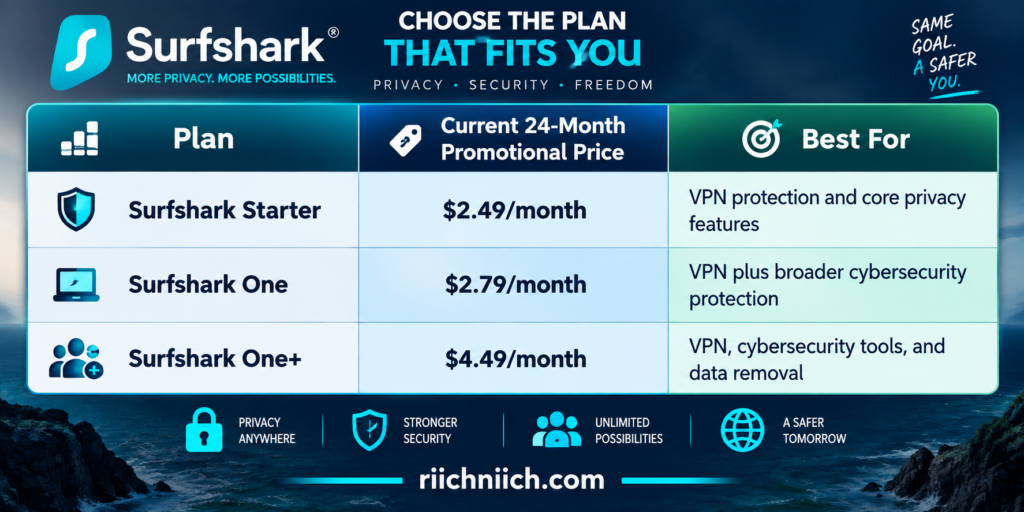
🚨 These are introductory long-term prices, not permanent monthly rates and subject to change. Surfshark’s July 2026 plan guide lists its actual month-to-month prices at $16.45 for Starter, $18.95 for One, and $21.85 for One+.
That’s an important distinction.
Surfshark is an excellent long-term value.
Surfshark is much harder to recommend as a month-to-month value.
If you’re planning to use a VPN for a year or longer, its pricing becomes much more attractive.
Surfshark Is Worth It If You Have Multiple Devices
This may be the single strongest reason to buy Surfshark.
Surfshark Starter, One, and One+ all support unlimited simultaneous VPN connections. The company says one subscription can protect an unlimited number of supported devices and can be shared with family members within the same household.
Think about how quickly devices accumulate:
Phone.
Laptop.
Tablet.
Desktop.
Smart TV.
Streaming device.
Then add another person’s devices.
And another.
Instead of purchasing a more expensive tier because you’ve reached a device limit, Surfshark lets you continue adding supported devices under the same VPN subscription.
That gives Surfshark tremendous value for large households.
For buyers comparing surfshark vs expressvpn primarily because they need a VPN for multiple devices, Surfshark is the stronger purchase.
Surfshark Is Worth It for Families
Unlimited connections become even more valuable when multiple people share a subscription.
A family doesn’t have to decide which devices remain protected.
Parents can use Surfshark on their computers and phones.
Children can use it on supported tablets or computers.
The household can protect compatible televisions and streaming hardware.
And adding another supported device doesn’t require removing an existing connection.
Surfshark specifically allows household sharing under one subscription, which makes its unlimited connection policy especially useful for families.
If you’re looking for the best VPN for families, this can make Surfshark worth paying for even before considering its additional privacy features.
Surfshark Is Worth It If You Want More Than a Basic VPN
Surfshark isn’t simply an encrypted internet connection.
Its current core feature set includes tools such as Dynamic MultiHop, Bypasser, Kill Switch, NoBorders, CleanWeb, Rotating IP, Auto-connect, Quick-connect, and RAM-only server infrastructure.
These features solve different problems.
Dynamic MultiHop can route your connection through two VPN servers.
Bypasser lets selected traffic avoid the VPN tunnel.
Kill Switch can stop internet traffic if VPN protection unexpectedly drops.
CleanWeb can block ads, trackers, and malicious sites.
Rotating IP periodically changes your VPN IP without dropping the connection.
You may never use every one of these features.
But that’s part of what makes Surfshark valuable: you can start with basic VPN protection and explore the advanced tools later without immediately needing another VPN service.
Surfshark Is Worth It for Privacy-Conscious Users
Surfshark has become particularly competitive for buyers looking for the best VPN for privacy.
Its infrastructure is currently 100% RAM-only, meaning server data is wiped when a server reboots. Surfshark also says its servers use at least 10Gbps ports, with up to 100Gbps capacity in some high-traffic areas.
Then there are the privacy controls.
Dynamic MultiHop provides double-VPN routing.
Rotating IP changes the VPN IP every few minutes without dropping the connection.
Bypasser gives you split-tunneling control.
NoBorders helps Surfshark operate on restrictive networks.
And Surfshark’s no-logs policy has undergone independent verification.
ExpressVPN still gets the narrow advantage for overall privacy assurance in this comparison because of its particular TrustedServer architecture, auditing history, and privacy record.
But Surfshark wins if you’re looking for more privacy customization for your money.
Surfshark Is Worth It for Streaming Households
Surfshark also makes sense for households that stream frequently.
The biggest advantage isn’t simply whether Surfshark works with popular streaming services.
It’s the unlimited connections.
Several people can use Surfshark on supported devices without competing for a limited number of VPN slots.
One person could use a television.
Another could use a tablet.
Another could use a laptop.
Another could use a phone.
For a single person with one television, unlimited connections may not matter much.
For a household with several people and multiple screens, it can substantially increase the value of the subscription.
Streaming platforms can change their VPN-detection systems, so no VPN can guarantee permanent access to every service or regional catalog. But Surfshark’s combination of device support, server coverage, and unlimited connections makes it a strong VPN for streaming households.
Surfshark Is Worth It for Public Wi-Fi Protection
A VPN is particularly useful when you’re regularly connecting through networks you don’t control.
Hotels.
Airports.
Coffee shops.
Libraries.
Conference centers.
Surfshark encrypts traffic between your device and the VPN server, while features such as Auto-connect and Kill Switch can help reduce the chance of accidentally using an internet connection without VPN protection.
That doesn’t make public Wi-Fi completely risk-free.
A VPN won’t stop you from entering a password into a phishing website or downloading malware.
But if you’re frequently traveling or working away from home, encrypting network traffic is one more useful layer of protection.
Surfshark Is Worth It If You Want Strong Ad and Tracker Blocking
CleanWeb increases Surfshark’s value beyond the VPN itself.
Surfshark says CleanWeb can block ads, trackers, malware, and phishing attempts on supported devices. Its browser-extension version can additionally block pop-ups and provide malware and data-breach alerts.
This doesn’t mean you’ll never see another advertisement.
And CleanWeb isn’t a replacement for dedicated antivirus protection.
But it can reduce unwanted content and tracking during everyday browsing without requiring a completely separate VPN-related purchase.
For someone who already wants ad and tracker blocking, that’s additional value built into the subscription.
Surfshark One May Be Worth the Small Upgrade
This is where Surfshark’s current pricing becomes particularly interesting.
The 24-month promotional price currently moves from:
Starter — $2.49/month
to
One — $2.79/month.
That’s only a $0.30-per-month difference under the current introductory pricing.
Surfshark One builds on the VPN with additional cybersecurity tools, including Surfshark Antivirus, Alert, and Antiscam capabilities.
For someone who actually wants those additional protections, paying the small promotional difference between Starter and One can make sense.
But don’t upgrade simply because the monthly difference looks small.
Ask yourself whether you’ll use the additional tools.
If you already have antivirus software and don’t need the other security features, Starter may still be the smarter purchase.
Is Surfshark One+ Worth It?
One+ becomes more specialized.
Surfshark One+ includes the core VPN and broader cybersecurity features while adding Incogni data removal.
That makes One+ particularly relevant if you’re concerned about personal information circulating through data brokers.
Instead of paying for a VPN and then separately purchasing a data-removal service, One+ packages those protections together.
But the price jump is larger.
The current 24-month promotional pricing increases from $2.79 per month for One to $4.49 for One+.
So One+ isn’t automatically the best Surfshark plan.
Choose One+ if you specifically want data removal.
If you don’t, One or Starter may provide better value.
Surfshark Is Worth It for Long-Term Users
Surfshark’s pricing model clearly rewards commitment.
Its July 2026 plan guide lists Starter at:
$16.45/month month-to-month
$3.39/month on the 12-month plan
$2.49/month on the 24-month promotional plan.
That makes the intended value proposition obvious.
Surfshark wants long-term subscribers.
If you only need a VPN for one month while traveling, the month-to-month price is much less compelling.
If you expect to use a VPN throughout the year for privacy, public Wi-Fi, streaming, travel, or general security, the longer plans make substantially more financial sense.
Surfshark May Not Be Worth It If You Only Need a VPN for One Month
This is one of Surfshark’s biggest weaknesses.
$16.45 for one month of Starter is very different from an advertised long-term equivalent of $2.49 per month.
Don’t confuse the promotional monthly equivalent with a month-to-month subscription.
If you only need a VPN temporarily, compare the actual total amount you’ll pay rather than focusing on the large promotional number.
This is also why buyers should look at renewal terms.
A VPN can be an excellent introductory deal without remaining equally inexpensive forever.
Surfshark May Not Be Worth It If You Only Own a Few Devices
Unlimited simultaneous connections are valuable—but not equally valuable to everyone.
Suppose you only use:
one phone,
one laptop,
and one television.
You’re protecting three devices.
In that situation, unlimited connections shouldn’t be the deciding factor in your surfshark vs expressvpn decision.
ExpressVPN’s current connection allowances would already cover those devices comfortably.
You should instead compare the features you’ll actually notice, such as:
speed,
server locations,
privacy,
ease of use,
protocols,
streaming,
and price.
Don’t pay for a theoretical advantage you won’t use.
Surfshark May Not Be Worth It If You Specifically Want Lightway
Lightway is an ExpressVPN technology.
If you’ve researched VPN protocols and specifically decided that Lightway is important to you, Surfshark can’t provide it.
Surfshark has its own protocol lineup and newer technologies, including WireGuard and Dausos where supported, but those aren’t Lightway.
This is one of the cases where ExpressVPN can legitimately be worth paying more for.
The same applies if ExpressVPN’s TrustedServer architecture, broader country coverage, or router ecosystem is particularly important to you.
Is Surfshark Worth It Compared With a Free VPN?
For people who regularly use a VPN, paying for a reputable service can provide meaningful advantages over relying on an unknown free provider.
Surfshark gives paying customers access to its full server infrastructure, unlimited paid VPN connections, privacy features, customer support, and other capabilities depending on the plan.
Surfshark itself does not offer a permanently free plan. Eligible new customers can instead use its current seven-day trial or its money-back guarantee.
Free VPNs vary enormously in quality, so “free VPN” shouldn’t automatically be treated as one category. Some reputable companies offer limited free tiers, while unknown free services may have significant restrictions or questionable privacy practices.
If a VPN will regularly handle your internet traffic, it’s worth evaluating the provider’s privacy policy, business model, security architecture, and independent verification—not merely the price.
Can You Try Surfshark Before Deciding?
Yes.
Surfshark currently provides eligible new users with a 7-day free VPN trial through qualifying 12- and 24-month purchases on its website using PayPal, Apple Pay, or a credit card.
The trial allows up to three devices simultaneously.
After the trial ends, the paid VPN subscription supports unlimited simultaneous connections. Surfshark says that once the trial ends and payment is charged, the 30-day money-back period begins.
That’s a useful opportunity to test Surfshark under your actual conditions.
Try your normal internet connection.
Try your phone.
Try your computer.
Try the streaming services you use.
Try nearby servers.
Try public Wi-Fi if that’s important to you.
Real-world VPN performance depends heavily on your particular device, location, ISP, network, protocol, and server.
What About the 30-Day Money-Back Guarantee?
Surfshark currently offers a 30-day money-back guarantee on eligible first purchases.
For direct website purchases, Surfshark says you can request a full refund within 30 days of the first purchase. There are exceptions, including previous refunds, renewals, certain payment channels, and non-refundable add-ons, so buyers should review the current refund terms before purchasing.
This makes the buying decision less risky.
Instead of relying entirely on benchmarks and reviews, you can evaluate how Surfshark performs with the devices and services you actually use.
That’s particularly important with VPNs because one person’s performance doesn’t guarantee another person’s results.
Is Surfshark Worth It for the Average User?
For most people planning to use a VPN regularly, yes.
Surfshark offers the features that matter most to ordinary users without requiring an expensive premium tier:
strong encryption,
a large server network,
unlimited simultaneous connections,
Kill Switch,
split tunneling through Bypasser,
CleanWeb,
Auto-connect,
Rotating IP,
Dynamic MultiHop,
and RAM-only server infrastructure.
Its network currently includes more than 4,500 servers across 100 countries.
That’s enough functionality for someone who simply wants better privacy on public Wi-Fi while also leaving plenty of advanced features for users who want more control.
Is Surfshark Worth It for Families?
Yes—this is one of Surfshark’s strongest use cases.
Unlimited simultaneous connections mean a family doesn’t need to buy a more expensive VPN plan simply because the household owns many devices. Surfshark explicitly supports sharing a subscription within a household.
Add the option to move into Surfshark One for broader cybersecurity protection, and the value proposition becomes even stronger.
If you’re comparing the best VPN for families or the best VPN for multiple devices, Surfshark should be near the top of your shortlist.
Is Surfshark Worth It for Privacy?
Yes, especially if you want privacy customization.
Surfshark’s RAM-only infrastructure, Dynamic MultiHop, Rotating IP, Bypasser, Kill Switch, NoBorders, CleanWeb, and other features provide considerably more control than a basic connect-and-forget VPN.
ExpressVPN still has advantages for buyers who place greater emphasis on its TrustedServer architecture and long-established independent verification record.
But if your goal is to get a strong VPN for privacy while keeping the price relatively low, Surfshark provides excellent value.
Is Surfshark Worth It in 2026?
Yes. Surfshark is one of the strongest value choices in this comparison for 2026.
Its current combination of 4,500+ servers across 100 countries, unlimited simultaneous connections, RAM-only infrastructure, modern privacy features, and aggressive long-term pricing makes it particularly compelling for households that intend to use a VPN regularly.
The value becomes strongest if you:
- plan to keep the VPN long term;
- own many devices;
- share the VPN with your household;
- want privacy features such as Dynamic MultiHop or Rotating IP;
- stream on multiple devices;
- regularly use public Wi-Fi;
- or want the option to add broader cybersecurity and data-removal tools.
Surfshark becomes less compelling if you only need a VPN for a month, don’t need its advanced features, or specifically prefer ExpressVPN’s Lightway, TrustedServer, international coverage, or router ecosystem.
For most value-focused buyers comparing surfshark vs expressvpn, however, Surfshark is worth the money and remains the better overall value.
Best value: Surfshark Starter if you primarily want VPN and privacy protection.
Best balance: Surfshark One if you’ll actually use the additional cybersecurity features.
Best for broader privacy cleanup: Surfshark One+ if Incogni data removal is something you already want.
Overall verdict: Yes, Surfshark is worth it—especially on a long-term plan and especially if you’re protecting multiple devices.
The next section should evaluate the premium alternative on its own terms: Is ExpressVPN Worth It?
Is ExpressVPN Worth It?
Yes. ExpressVPN is worth it if you value a polished VPN experience, strong privacy architecture, Lightway, broad international server coverage, and easy-to-use apps enough to pay more for those advantages. It isn’t the best value for every buyer, but it remains a strong premium choice in 2026.
For buyers comparing surfshark vs expressvpn, Surfshark still has the advantage in overall value, unlimited simultaneous connections, and privacy customization. ExpressVPN makes its case differently: it focuses on simplicity, security, travel-friendly coverage, independently assessed technology, and a mature VPN experience.
ExpressVPN currently offers Basic, Advanced, and Express Pro, with 10, 12, and 14 simultaneous VPN connections respectively. Its network spans 214 selectable locations across 113 countries.
The question, then, isn’t simply whether ExpressVPN is good. It is.
The question is whether its particular advantages are worth paying for in your situation.

Is ExpressVPN Worth the Price?
ExpressVPN has become considerably more competitive on introductory pricing.
As of September 2026, its current two-year introductory offers are:

🚨 These are promotional prices ONLY, which means they are subject to change and sales tax may apply.
The renewal price is particularly important.
Don’t evaluate ExpressVPN solely by the large “$2.99/month” or “$3.99/month” figure. Look at what you’ll pay today, what you’ll receive, and what the subscription will cost when it renews.
For someone who plans to use ExpressVPN long term, that’s the better way to judge its actual value.
ExpressVPN Is Worth It If You Want a Premium, Simple VPN
ExpressVPN’s strongest selling point may not be a feature you can put on a specification sheet.
It’s simplicity.
You don’t need to understand encryption standards, DNS settings, server architecture, VPN protocols, or routing to start using it.
Install the app.
Sign in.
Connect.
That makes ExpressVPN especially appealing to someone who wants a premium VPN service that requires very little management.
Surfshark isn’t difficult to use, but it gives you more privacy tools and customization options to explore. ExpressVPN generally feels more focused on making the underlying technology disappear into the background.
For beginners and people who simply don’t want another complicated piece of software, that can be worth paying for.
ExpressVPN Is Worth It If You Want Lightway
Lightway remains one of the strongest arguments for choosing ExpressVPN.
It’s ExpressVPN’s own VPN protocol, designed around fast connections, reliability, security, and efficient transitions between networks. ExpressVPN’s current plans also include post-quantum protection alongside Lightway.
That can be particularly useful on mobile devices.
Your phone might move from:
home Wi-Fi,
to cellular,
to workplace Wi-Fi,
back to cellular,
and later to hotel or public Wi-Fi.
A VPN protocol designed to handle changing networks efficiently has obvious value in that environment.
ExpressVPN now also supports WireGuard, giving users another modern protocol option.
If Lightway itself is one of the reasons you’re shopping for ExpressVPN, then ExpressVPN can absolutely be worth paying for.
ExpressVPN Is Worth It for Frequent Travelers
This is one of ExpressVPN’s strongest use cases.
Its network currently covers 214 selectable server locations across 113 countries. ExpressVPN says most locations use a physical server and registered IP address in the selected country, while a smaller number are virtual locations.
That broad geographic coverage can be particularly useful when traveling internationally.
A traveler may need VPN protection at:
airports,
hotels,
coffee shops,
conference centers,
temporary accommodations,
and other networks they don’t control.
ExpressVPN combines its broad location network with Lightway and apps designed to make connecting straightforward.
For someone who travels internationally several times per year, these benefits may be more important than Surfshark’s unlimited-device advantage.
ExpressVPN is especially worth considering if travel is one of the main reasons you’re buying a VPN.
ExpressVPN Is Worth It If Privacy Is Your Top Priority
ExpressVPN’s privacy proposition goes deeper than simply masking your IP address.
Its TrustedServer infrastructure uses RAM-only technology, while its broader security approach includes its no-logs policy, private DNS, encryption, kill-switch protection, and independent assessments.
ExpressVPN also states that its expanded 214-location network runs on TrustedServer technology.
Surfshark also uses RAM-only infrastructure and has undergone independent verification, so this isn’t a case of one VPN being private and the other not.
The distinction is subtler.
Surfshark provides more privacy customization.
ExpressVPN provides an especially compelling privacy architecture and verification story.
For someone looking for the best VPN for privacy and placing a high value on the underlying infrastructure, ExpressVPN can justify its premium positioning.
ExpressVPN Is Worth It If You Want Broad Geographic Coverage
Some VPN shoppers focus heavily on total server count.
Travelers may want to focus more on where those servers are located.
ExpressVPN currently offers locations in 113 countries and 214 selectable locations.
That’s useful if you frequently need connections across different regions.
More location choices can also provide alternatives if a particular route is congested or performs poorly. ExpressVPN itself notes that closer locations can help reduce latency and that additional regional options provide alternatives when one route isn’t working well.
For someone who rarely leaves home and always connects to the nearest U.S. server, this advantage may not matter much.
For an international traveler, it can matter considerably.
ExpressVPN Is Worth It for Public Wi-Fi
If you frequently connect to public Wi-Fi, ExpressVPN can also make sense.
A VPN encrypts traffic between your device and the VPN server, which is particularly useful when you’re using networks you don’t control.
ExpressVPN’s current service combines that encrypted connection with Lightway, kill-switch protection, private DNS, and other security features.
That doesn’t mean a VPN makes every public network safe.
A VPN won’t stop you from entering your password into a phishing site.
It won’t make a malicious download harmless.
And it doesn’t eliminate the need for strong passwords and multifactor authentication.
But for someone regularly working from hotels, airports, cafés, and other public networks, ExpressVPN adds a useful privacy layer without requiring much manual configuration.
ExpressVPN Is Worth It for Router-Based Protection
This is an area where ExpressVPN can justify itself even for a household with many devices.
Basic supports 10 simultaneous connections.
Advanced supports 12.
Express Pro supports 14.
That’s less flexible than Surfshark’s unlimited connections.
However, ExpressVPN says customers who need more than 14 simultaneous devices can install the VPN on a router and connect as many devices to that router as they want.
That can be useful for protecting:
smart TVs,
gaming consoles,
streaming hardware,
smart-home devices,
computers,
phones,
and other connected equipment.
If you want a VPN installed directly on every device, Surfshark is easier.
If you want a whole-home VPN centered around your router, ExpressVPN becomes much more compelling.
ExpressVPN Basic May Be All You Need
Don’t automatically buy Express Pro.
For many buyers, Basic provides the features they actually need.
Basic currently includes the core ExpressVPN service, 10 simultaneous connections, Lightway, post-quantum protection, apps across supported platforms, Lite Protection for blocking ads, malicious sites, and adult sites, and a limited version of ExpressMailGuard. Dedicated IP is available separately as an add-on.
Ten connections are already enough for many individuals and smaller households.
If your main goal is:
Get ExpressVPN’s core VPN experience at the lowest available tier
Basic is probably the first plan to consider.
Don’t pay for Advanced or Pro simply because they have longer feature lists.
Is ExpressVPN Advanced Worth It?
Advanced becomes more attractive if you want security tools beyond the basic VPN.
It currently includes 12 simultaneous VPN connections, ExpressKeys password management, Advanced Protection, expanded ExpressMailGuard capabilities, and—on eligible longer subscriptions—Identity Defender features for U.S. customers and an eSIM benefit.
Advanced Protection includes blocking for ads, trackers, malicious sites, and adult content on supported platforms. ExpressVPN notes that the Basic tier includes these protections except for the dedicated tracker blocker.
The current two-year Advanced introductory offer is $3.99 per month, or $111.72 for the first 28 months, before applicable taxes.
That can be worthwhile if you were already considering paying separately for a password manager or additional privacy tools.
But if you only want the VPN, Basic may provide better value.
Is Express Pro Worth It?
Express Pro is designed for buyers who want the broadest ExpressVPN package.
It currently includes 14 simultaneous VPN connections, Dedicated IP, ExpressKeys, full ExpressMailGuard capabilities, Advanced Protection, ExpressAI, and full Identity Defender capabilities for eligible U.S. customers. Longer qualifying subscriptions also include an eSIM benefit.
The current two-year introductory price is $5.99 per month, totaling $167.72 for the first 28 months. It currently renews at $199.95 annually.
That’s substantially more expensive than Basic.
So Express Pro only makes sense if you’ll actually use the extras.
If you specifically want Dedicated IP, password management, identity monitoring, email privacy tools, and the broader security package, Pro can consolidate several services.
If you’re buying it only for the VPN, you’re probably paying for features you don’t need.
ExpressVPN Is Worth It If You Want Broader Cybersecurity Tools
ExpressVPN is no longer simply a VPN company selling one VPN subscription.
Depending on the tier, its current ecosystem can include ExpressKeys password management, ExpressMailGuard email aliases, Identity Defender for eligible U.S. users, an eSIM benefit, and ExpressAI, alongside the VPN itself.
This changes the value equation.
If you already pay separately for several similar tools, consolidating them into one package may make ExpressVPN Advanced or Pro more attractive.
If password security is part of your buying decision, compare your options in our guide, ‘Best Password Managers’ before deciding whether ExpressKeys gives you enough additional value.
If you already have a password manager, identity protection service, and other cybersecurity tools that you like, those extras have much less value.
Evaluate the package based on what you’ll actually use, not the number of features printed on the pricing page.
ExpressVPN May Not Be Worth It If You Have Lots of Devices
This is one of the clearest situations where Surfshark makes more sense.
ExpressVPN currently allows 10, 12, or 14 simultaneous connections depending on your subscription.
Those are generous limits.
A single person with a phone, laptop, tablet, desktop, and television probably won’t care.
But a household containing 20 devices might.
Surfshark eliminates the numerical direct-connection limit on its paid VPN subscriptions.
ExpressVPN can work around its limits through router protection, but that requires a different setup.
For someone specifically searching for the best VPN for multiple devices, Surfshark remains the easier value proposition.
ExpressVPN May Not Be Worth It If Price Is Your Main Priority
ExpressVPN can be competitively priced during its introductory period, but price-sensitive shoppers need to look beyond the introductory monthly equivalent.
The current Basic two-year offer starts at $83.72 for the first 28 months and renews annually at $99.95. Advanced renews at $119.95 annually, while Express Pro currently renews at $199.95 annually.
Those renewal prices matter.
If your only goal is finding a capable VPN at the lowest long-term cost, Surfshark is likely the better purchase in this surfshark vs expressvpn comparison.
ExpressVPN becomes worth the extra expense when you specifically value what differentiates it.
ExpressVPN May Not Be Worth It If You Want Maximum Privacy Customization
ExpressVPN has excellent privacy technology.
But Surfshark provides more unusual privacy controls.
Dynamic MultiHop.
Rotating IP.
More customizable multi-server routing.
Those features may appeal to privacy enthusiasts who want more control over how their VPN connection behaves.
ExpressVPN’s approach is more streamlined.
That can be an advantage for beginners—but a disadvantage for someone who enjoys configuring advanced privacy options.
If you want maximum privacy customization per dollar, Surfshark is likely the better choice.
Is ExpressVPN Worth It for Streaming?
Yes, particularly if you value device flexibility and straightforward apps.
ExpressVPN supports streaming across major computers, phones, tablets, streaming devices, and televisions, while router protection can extend VPN coverage to additional home devices.
Its broad server-location network also gives users many connection options.
However, no VPN can guarantee permanent access to every streaming service. Streaming platforms can change their VPN detection systems at any time.
For a household with a large number of simultaneous streaming devices, Surfshark’s unlimited connections can provide better value.
For someone prioritizing ease of use and device flexibility, ExpressVPN remains an excellent streaming VPN.
Is ExpressVPN Worth It for Gaming?
Yes, especially if Lightway is important to you.
Lightway’s focus on quick connections and efficient network switching makes it particularly relevant for mobile gaming, while ExpressVPN’s 214 selectable locations provide many routing choices.
A VPN doesn’t guarantee lower ping.
In many cases, adding VPN routing can increase latency.
But having more nearby connection options can help you experiment with different routes when necessary.
That’s why ExpressVPN narrowly won the gaming category earlier in our surfshark vs expressvpn comparison.
Can You Try ExpressVPN Before Committing?
There are two different ways to test ExpressVPN, and the distinction matters.
ExpressVPN currently offers a 3-day free trial on iOS and Android. The trial requires a valid payment method linked to the relevant app store and provides the features included with the subscription tier you select.
However, users who start subscriptions through the Apple App Store or Google Play Store do not receive ExpressVPN’s standard 30-day money-back guarantee. Refunds for those purchases are handled according to the respective app store’s policies.
For first-time customers who purchase directly through ExpressVPN’s website, the service instead provides a 30-day money-back guarantee. You pay upfront and can request a refund within the eligible 30-day period.
So don’t confuse the two:
Mobile app-store signup → 3-day free trial
Eligible direct website purchase → 30-day money-back guarantee
ExpressVPN explicitly states that it does not offer a 30-day free trial.
Is ExpressVPN Worth It for the Average User?
It depends on what the average user values.
If you simply want:
a reliable VPN,
good security,
streaming support,
public Wi-Fi protection,
and several device connections,
Surfshark may provide better overall value.
But if you also value:
Lightway
TrustedServer
extensive international server coverage
very straightforward apps
strong router integration
an extensive independent-assessment history
then ExpressVPN becomes easier to justify.
That’s the difference between asking:
“Is ExpressVPN good?”
and:
“Is ExpressVPN worth paying for?”
The answer to the first question is clearly yes.
The second depends on whether you’ll actually benefit from the features that distinguish it.
Is ExpressVPN Worth It in 2026?
Yes—ExpressVPN is worth it in 2026 for buyers who want a premium, easy-to-use VPN and place real value on Lightway, TrustedServer, international coverage, and its broader security ecosystem.
Its current network spans 214 selectable locations across 113 countries, while its plans provide 10, 12, or 14 simultaneous VPN connections.
The current two-year introductory pricing also makes ExpressVPN more competitive than its premium reputation might suggest, starting at $2.99 per month for Basic. But buyers should pay close attention to the annual renewal price rather than judging value from the introductory monthly equivalent alone.
ExpressVPN is especially worth considering if you:
- travel internationally;
- want Lightway;
- value TrustedServer and privacy verification;
- want a very simple VPN experience;
- need server locations across many countries;
- want strong router-based protection;
- or will actually use the extra security tools included with Advanced or Express Pro.
It is harder to justify if your top priorities are unlimited devices, the lowest long-term price, Dynamic MultiHop, Rotating IP, or maximum privacy customization.
For the average value-focused buyer comparing surfshark vs expressvpn, Surfshark remains the better overall value.
For the buyer who specifically wants ExpressVPN’s strengths, however, ExpressVPN is absolutely worth considering—and Basic may provide everything you need without paying for the higher tiers.
Best value within ExpressVPN: Basic for buyers primarily interested in the VPN itself.
Best balance: Advanced if you’ll use ExpressKeys, tracker blocking, and the additional privacy/security benefits.
Best premium package: Express Pro if you specifically want Dedicated IP and the broader collection of identity, email, password, and security tools.
Overall verdict: Yes, ExpressVPN is worth it—but its value comes from its premium experience and specific advantages, not from being the cheapest VPN.
Frequently Asked Questions About Surfshark vs ExpressVPN
Choosing between Surfshark and ExpressVPN usually comes down to what you value most. Surfshark stands out for unlimited devices, competitive long-term pricing, and privacy customization, while ExpressVPN is particularly strong for simplicity, Lightway, international coverage, and its independently assessed privacy architecture.
These frequently asked questions cover the biggest buying decisions people are likely to have when comparing surfshark vs expressvpn in 2026.

Which Is Better, Surfshark or ExpressVPN?
For most value-focused buyers, Surfshark is the better overall choice.
Surfshark currently offers unlimited simultaneous VPN connections, 4,500+ servers across 100 countries, and features such as Dynamic MultiHop, Rotating IP, CleanWeb, Bypasser, and Kill Switch.
ExpressVPN is better for certain buyers, particularly people who prioritize beginner-friendly apps, Lightway, broad international coverage, and a strong independent-audit history. Its network currently spans 214 selectable locations across 113 countries.
So the winner depends on your priorities:
Best overall value: Surfshark
Best premium experience: ExpressVPN
Is Surfshark Better Than ExpressVPN?
Surfshark is better if you prioritize price, unlimited devices, families, privacy customization, and getting more features for your money.
Its unlimited simultaneous connections are especially important for households with many phones, computers, tablets, televisions, and other supported devices.
ExpressVPN is better if you place greater value on Lightway, simplicity, international coverage, and its privacy and security verification history.
For the average buyer in this surfshark vs expressvpn comparison, Surfshark has the stronger overall value proposition.
If Surfshark is currently your favorite but you want to compare it with another privacy-focused option before buying, our Surfshark vs ProtonVPN comparison can help you narrow down your final choice.
Is ExpressVPN Better Than Surfshark?
Yes, for certain users.
If ExpressVPN is leading your shortlist, you may also want to see our NordVPN vs ExpressVPN comparison before deciding which premium VPN is the better fit for you.
ExpressVPN is particularly compelling for frequent travelers, beginners, and users who want Lightway or prioritize ExpressVPN’s privacy architecture. Its current network covers 113 countries and 214 locations, while Lightway is optimized for mobile use and transitions between Wi-Fi and cellular networks.
However, ExpressVPN does not beat Surfshark in every category.
If unlimited devices, lower long-term pricing, Dynamic MultiHop, or Rotating IP matter more to you, Surfshark is likely the better purchase.
Which Is Cheaper, Surfshark or ExpressVPN?
Surfshark currently has the lower introductory price on the companies’ long-term entry-level offers.
Surfshark Starter is currently advertised at $2.49 per month, totaling $67.23 for the first 27 months under its 24-month promotion with three extra months.
ExpressVPN’s current long-term Basic offer starts at $2.99 per month under its promotional pricing.
Prices, promotions, taxes, and renewal rates can change, so always compare the total first-term cost and renewal price rather than relying only on the advertised monthly equivalent.
For buyers focused heavily on Surfshark vs ExpressVPN price, Surfshark currently has the advantage.
Which VPN Offers Better Value?
Surfshark offers better overall value for most buyers.
The combination of competitive long-term pricing, unlimited connections, 4,500+ servers across 100 countries, CleanWeb, Dynamic MultiHop, Rotating IP, and other privacy features makes its entry-level VPN particularly competitive.
ExpressVPN may provide better personal value if its specific advantages—such as Lightway, its 113-country footprint, or privacy architecture—are more important to you.
The cheapest VPN isn’t necessarily the best value.
Value is what you receive for what you actually pay.
Which Is Faster, Surfshark or ExpressVPN?
Both can deliver fast VPN performance, and there is no universal speed winner for every user.
Surfshark says its 4,500+ servers use at least 10Gbps ports, with capacity reaching 100Gbps in certain high-traffic locations.
ExpressVPN’s Lightway protocol is designed for fast, efficient connections and quick reconnection when changing networks.
Actual Surfshark vs ExpressVPN speed will depend on factors such as your ISP, device, VPN protocol, server distance, network congestion, and time of day.
For that reason, real-world testing on your own internet connection is more useful than treating any single speed benchmark as universal.
Which Is Better for Privacy?
This one is extremely close.
ExpressVPN gets the narrow advantage for overall privacy assurance, while Surfshark wins for privacy customization.
If privacy is your main reason for buying a VPN, see our guide to the best VPN for privacy to compare the features that matter most for protecting your data and reducing online tracking.
Surfshark provides tools such as Dynamic MultiHop and Rotating IP alongside RAM-only servers and an independently verified no-activity-logs policy.
ExpressVPN emphasizes its no-logs policy, TrustedServer infrastructure, Lightway, and extensive independent-assessment history. ExpressVPN says its no-logs policy has been independently validated through third-party audits.
If you want more privacy controls, choose Surfshark.
If you place greater weight on ExpressVPN’s privacy architecture and verification history, choose ExpressVPN.
Which Is Better for Security?
Both Surfshark and ExpressVPN provide strong security features suitable for everyday VPN use.
Surfshark provides encrypted VPN connections, RAM-only infrastructure, Kill Switch, modern protocols, and additional tools such as Dynamic MultiHop. Its current protocol lineup includes Dausos, WireGuard with post-quantum protection, IKEv2, and OpenVPN.
ExpressVPN provides TrustedServer, Lightway, WireGuard, private DNS, kill-switch protection, and post-quantum capabilities.
Neither service should be dismissed as weak on security.
In our overall comparison, ExpressVPN receives a narrow security advantage, but the difference isn’t large enough by itself to make Surfshark a poor choice.
Which Has More Servers?
Surfshark publishes the larger total server count.
It currently operates 4,500+ servers across 100 countries.
ExpressVPN emphasizes locations rather than publishing a comparable overall individual-server count. Its network currently provides 214 selectable locations across 113 countries.
So there are two different answers:
More published individual servers: Surfshark
More countries: ExpressVPN
Don’t automatically assume one measurement is more important. If you need a particular country, geographic coverage may matter more than total server count.
Which Has More Server Locations?
ExpressVPN currently provides the broader country footprint, with 214 selectable locations across 113 countries.
Surfshark operates more than 4,500 servers across 100 countries.
For frequent international travelers who need access to many different geographic VPN locations, ExpressVPN has the advantage.
Does Surfshark Allow Unlimited Devices?
Yes.
Surfshark’s regular paid VPN plans support unlimited simultaneous device connections. Surfshark specifically markets this as a way to protect an entire household with one subscription.
There is one important exception: Surfshark’s current seven-day trial is limited to three devices simultaneously. Once the trial converts to a regular paid VPN subscription, the unlimited connection allowance applies.
This is one of Surfshark’s biggest advantages in the surfshark vs expressvpn comparison.
How Many Devices Does ExpressVPN Allow?
ExpressVPN currently supports different numbers of simultaneous connections depending on your plan:
Basic — 10 devices
Advanced — 12 devices
Express Pro — 14 devices.
That’s enough for many individuals and smaller households.
Surfshark is still the stronger choice if you specifically want a VPN with unlimited devices.
Which Is Better for Families?
Surfshark is better for most families.
The main reason is simple: unlimited simultaneous VPN connections.
As families accumulate phones, laptops, tablets, streaming hardware, and other supported devices, a fixed connection limit can become increasingly important. Surfshark removes that numerical limit on its regular paid VPN service.
ExpressVPN remains a good option for smaller families that stay comfortably within its 10–14 connection allowances.
For large households, however:
Winner for Families: Surfshark
Which Is Better for Streaming?
Surfshark gets the narrow advantage for streaming value, particularly for households using several devices.
Unlimited simultaneous connections mean different members of a household can use the VPN on supported streaming devices without consuming a fixed number of connection slots.
ExpressVPN remains an excellent streaming choice, especially for buyers who prioritize straightforward apps, broad device compatibility, and router-based protection.
Streaming platforms can change their VPN-detection systems, so neither provider can guarantee permanent access to every service or regional library.
Which Is Better for Netflix?
Both can be good choices for Netflix, but Surfshark gets the narrow advantage for multi-device households.
Its unlimited simultaneous connections are particularly useful when several people stream on different devices.
ExpressVPN remains attractive if you prioritize its broader device and router ecosystem.
Remember that Netflix can detect VPN usage, and its own VPN rules can affect which content is available. No VPN should be purchased on the assumption that every Netflix region will always work.
Which Is Better for Gaming?
ExpressVPN gets a narrow advantage for gaming, particularly for users interested in Lightway and broad geographic server coverage.
ExpressVPN’s Lightway protocol is designed for fast connections and efficient network switching, while its network currently covers 214 locations across 113 countries.
Surfshark may still provide better gaming value for households with several gaming devices because of its unlimited simultaneous connections.
Also remember that using a VPN doesn’t automatically lower ping. The extra routing can sometimes increase latency.
Which Is Better for Torrenting?
Surfshark gets the narrow advantage for P2P users, largely because it combines P2P support with unlimited simultaneous connections and strong long-term value.
Surfshark’s current server directory identifies P2P support across its network and also shows specialized options such as Dynamic MultiHop, Static IP, and Dedicated IP locations.
ExpressVPN remains a strong P2P option as well.
Neither VPN makes copyright infringement legal. A VPN protects the connection; it doesn’t change the legality of the material being transferred.
Which Is Better for Public Wi-Fi?
Both are strong options, but ExpressVPN gets a narrow advantage for frequent public Wi-Fi users and travelers.
Lightway is optimized for mobile use and network transitions, making it particularly relevant when moving between cellular data and Wi-Fi.
A VPN should still be combined with HTTPS, strong passwords, multifactor authentication, and basic phishing awareness.
Surfshark also provides strong public Wi-Fi protection and may be preferable if you’re protecting many devices.
Before connecting at an airport, hotel, or coffee shop, learn more about the dangers of public Wi-Fi and the additional steps you can take to protect your personal information.
Which Is Better for Traveling?
ExpressVPN is better for frequent international travelers.
Its network spans 113 countries and 214 selectable locations, while Lightway is designed with mobile connectivity and network switching in mind.
Surfshark is particularly attractive for family travel because unlimited simultaneous connections can cover everyone’s supported devices.
So:
Solo/frequent international traveler: ExpressVPN
Family or device-heavy traveler: Surfshark
Which Is Easier to Use?
ExpressVPN gets the narrow advantage for beginners.
Both services provide straightforward apps, but ExpressVPN places particular emphasis on simplifying the experience for people who simply want to connect and continue using the internet.
Surfshark remains easy to use but exposes more privacy and customization tools for users who want them.
If you’re buying your first VPN and don’t want to spend much time changing settings, ExpressVPN may feel more straightforward.
Does Surfshark Have a Free Trial?
Yes.
Surfshark currently provides eligible new customers with a seven-day VPN free trial through its website on qualifying 12- and 24-month plans purchased using PayPal, Apple Pay, or a credit card. The trial supports up to three simultaneous devices.
After the trial ends, payment is charged and the normal paid subscription begins. Surfshark says its 30-day money-back-guarantee period then applies.
Does ExpressVPN Have a Free Trial?
Yes, but the structure is different.
ExpressVPN currently provides a three-day free trial through its iOS and Android apps. It also offers eligible first-time direct customers a 30-day money-back guarantee.
An important distinction is that customers who sign up through the iOS or Android app-store trial are not covered by ExpressVPN’s standard 30-day money-back guarantee; app-store refunds follow Apple or Google’s policies.
The 30-day money-back guarantee is therefore not the same thing as a 30-day free trial.
Do Surfshark and ExpressVPN Have Money-Back Guarantees?
Yes.
Surfshark currently provides a 30-day money-back guarantee on eligible first purchases made directly through Surfshark or qualifying sellers, subject to its refund terms.
ExpressVPN also provides eligible first-time direct customers with a 30-day money-back guarantee.
Always check the refund terms before purchasing, particularly if you’re buying through an app store or third-party payment channel.
Which Is Better for Multiple Devices?
Surfshark wins decisively.
Surfshark allows unlimited simultaneous connections on its regular paid VPN plans.
ExpressVPN allows 10, 12, or 14 simultaneous connections depending on the subscription tier.
If you only own a few devices, this difference may not matter.
If your household has 15, 20, or more devices you want to connect directly, it can become one of the biggest reasons to choose Surfshark.
Which Is Better for Beginners?
ExpressVPN wins narrowly.
Surfshark is still beginner-friendly, but it offers more settings and privacy tools to explore.
ExpressVPN is particularly well suited to someone who wants to install a VPN, connect, and let the service handle most technical decisions automatically.
For a first-time VPN buyer who prioritizes simplicity over customization, ExpressVPN is the better fit.
Which Has Better Privacy Features?
Surfshark wins for privacy features and customization.
Its current feature set includes Dynamic MultiHop, Rotating IP, Bypasser, CleanWeb, Kill Switch, RAM-only servers, and other privacy technologies.
ExpressVPN’s strength lies more in its underlying privacy architecture, TrustedServer technology, no-logs policy, Lightway, and independent verification.
That distinction is worth remembering:
More privacy customization: Surfshark
Stronger overall privacy assurance in our comparison: ExpressVPN — narrowly
Which VPN Is Better for Someone Who Just Wants the Best Deal?
Surfshark.
If your buying priorities are price + features + unlimited devices, Surfshark is the easier recommendation.
Its current entry-level long-term promotion starts at $2.49 per month, and the paid VPN allows unlimited simultaneous connections.
That’s especially difficult to ignore for families and people with large numbers of devices.
Which VPN Is Better If Price Doesn’t Matter?
ExpressVPN becomes much more compelling once price and device limits stop being major concerns.
If you don’t care about paying somewhat more and 10–14 direct connections are already enough, you can focus entirely on ExpressVPN’s strengths: Lightway, international coverage, simplicity, privacy architecture, and its independent-assessment record.
That doesn’t automatically make ExpressVPN better.
It simply removes two of Surfshark’s largest advantages from the equation.
Can I Use Surfshark or ExpressVPN on a Router?
Yes, both can be used with compatible routers.
Router-based VPN protection can be useful for devices that don’t support a native VPN app, such as certain televisions, consoles, and smart-home devices.
ExpressVPN has a particularly developed router ecosystem, while Surfshark’s unlimited direct-device connections reduce the need to use a router simply to overcome a simultaneous-connection limit.
For users building their VPN setup primarily around a router, ExpressVPN gets the advantage.
Do Surfshark and ExpressVPN Keep Logs?
Both advertise no-logs policies, but “no logs” should always be understood by reading exactly what each company’s privacy policy says rather than assuming it means absolutely no operational information of any kind.
Surfshark has undergone independent assurance of its no-activity-logs policy, including Deloitte assessments in 2023 and 2025.
ExpressVPN states that it does not keep activity or connection logs and says its no-logs policy has been independently validated through third-party audits.
For privacy-sensitive buyers, the provider’s full privacy policy and independent assessments are more useful than relying solely on a “no logs” marketing label.
Are Surfshark and ExpressVPN Safe?
Both provide strong security technologies suitable for consumers looking for a reputable VPN.
Surfshark combines encryption, RAM-only infrastructure, Kill Switch, modern VPN protocols, and independent security assessments.
ExpressVPN combines technologies such as Lightway, TrustedServer, post-quantum protection, and a long-running independent-audit program.
However, no VPN provides complete online security.
A VPN cannot stop every phishing attack, prevent every malware infection, protect weak passwords, or make unsafe behavior harmless.
It should be one layer in a broader cybersecurity setup.
Should I Choose Surfshark or ExpressVPN in 2026?
For most value-focused buyers, Surfshark is the better overall purchase in 2026.
Choose Surfshark if your priorities are:
lower long-term pricing, unlimited devices, families, privacy customization, Dynamic MultiHop, Rotating IP, streaming value, and protecting many devices with one subscription.
Choose ExpressVPN if your priorities are:
Lightway, beginner-friendly operation, international travel, broader country coverage, privacy assurance, or router-focused protection.
Surfshark currently combines 4,500+ servers across 100 countries with unlimited simultaneous connections and a $2.49-per-month introductory long-term Starter offer.
ExpressVPN counters with 214 selectable locations across 113 countries, Lightway, an extensive independent-audit history, and up to 14 simultaneous connections depending on the plan.
For the average person researching surfshark vs expressvpn and asking which service provides the strongest combination of price, privacy, security, streaming, features, and multiple-device protection, Surfshark gets the overall recommendation.
But the margin isn’t enormous. ExpressVPN remains the better buy when its specific strengths match what you actually need from a VPN.
Conclusion: Surfshark vs ExpressVPN — Which Should You Choose?
After comparing pricing, speed, security, privacy, server networks, streaming, gaming, torrenting, public Wi-Fi, device compatibility, apps, extra features, customer support, and overall value, Surfshark is the better choice for most buyers in 2026.
That does not mean ExpressVPN is the worse VPN.
In fact, ExpressVPN wins several important categories. It remains an excellent choice for buyers who prioritize simplicity, Lightway, TrustedServer, international server coverage, travel, and router-based protection.
But when the entire surfshark vs expressvpn comparison is considered, Surfshark delivers the stronger combination of price, unlimited simultaneous connections, privacy features, family usability, and long-term value.
Overall Winner: Surfshark

Choose Surfshark If You Want the Best Overall Value
For the average buyer, Surfshark’s biggest advantage is straightforward: you get a lot for the money.
Surfshark’s current 24-month Starter promotion is advertised at $2.49 per month plus three extra months, totaling $67.23 for the first 27 months before applicable taxes. It also includes a 30-day money-back guarantee. Pricing and renewal rates can change, so check the current terms before purchasing.
More importantly, the entry-level plan doesn’t restrict you to just a few devices.
Surfshark currently allows unlimited simultaneous VPN connections on Starter, One, and One+. You can use one subscription across supported phones, computers, tablets, smart TVs, and other devices, and Surfshark permits household sharing.
That gives Surfshark a major advantage for families and device-heavy households.
If your primary question is Surfshark or ExpressVPN for the best overall value, Surfshark is the answer.
Choose ExpressVPN If You Want the More Premium, Streamlined Experience
ExpressVPN’s value proposition is different.
Rather than competing primarily on unlimited devices or the lowest long-term price, ExpressVPN is particularly attractive for users who value a streamlined experience and its specific underlying technologies.
Its current plans include Lightway and post-quantum protection, while the server network spans 113 countries. Basic supports 10 simultaneous connections, Advanced supports 12, and Express Pro supports 14.
ExpressVPN’s network currently includes 214 selectable locations across those 113 countries, giving it broader country coverage than Surfshark’s 100-country network.
For travelers, beginners, and people who specifically want ExpressVPN’s technology and ecosystem, those advantages can justify choosing it over Surfshark.
Surfshark Wins for Multiple Devices
This is the easiest category to call.
Surfshark allows unlimited simultaneous connections on its regular paid VPN subscriptions.
ExpressVPN allows:
- Basic: 10 simultaneous connections
- Advanced: 12 simultaneous connections
- Express Pro: 14 simultaneous connections
ExpressVPN’s limits are generous and will be more than enough for many people.
But unlimited is still unlimited.
If you have a large family or simply own a lot of connected devices, Surfshark removes the need to count connections altogether.
Winner for Multiple Devices: Surfshark
Surfshark Wins for Families
The same advantage makes Surfshark our preferred VPN for families.
A household can easily accumulate more connected devices than expected.
Phones.
Laptops.
Tablets.
Smart TVs.
Streaming hardware.
Gaming devices.
Surfshark lets household members use one subscription across an unlimited number of simultaneous VPN connections.
ExpressVPN remains an excellent family option if 10–14 direct connections are enough. It can also protect additional devices through a VPN router; ExpressVPN says users can connect as many devices as they want through a configured VPN router.
But for simplicity at household scale:
Winner for Families: Surfshark
Surfshark Wins for Privacy Customization
Surfshark also gets the advantage if you want more control over how your VPN behaves.
Its current plans include tools such as Bypasser and Rotating IP, while Surfshark also offers advanced capabilities such as Dynamic MultiHop. Its network is RAM-only, and the company says its no-logs policy has been independently audited.
This makes Surfshark particularly appealing to privacy-focused users who enjoy adjusting how their VPN connection works rather than simply connecting to a server and leaving everything on default.
ExpressVPN takes a different approach.
Its privacy strength lies more heavily in technologies such as TrustedServer, its audited no-logs policy, and Lightway. ExpressVPN says TrustedServer uses RAM-only servers that wipe session data with every reboot.
So our verdict remains:
Privacy customization: Surfshark
Overall privacy assurance: ExpressVPN — narrowly
Both are strong privacy choices. The better one depends on whether you value additional controls or ExpressVPN’s particular privacy architecture and verification record.
ExpressVPN Wins for Beginners
If you’re buying your first VPN and want the simplest possible experience, ExpressVPN gets the narrow advantage.
You don’t need to understand every protocol.
You don’t need to configure advanced privacy routing.
You don’t need to use every security feature.
ExpressVPN is particularly good at allowing someone to install the service, connect, and get on with whatever they were doing.
Surfshark is also beginner-friendly, but it offers more visible features and customization for users who want to explore them.
That flexibility is an advantage for power users, but ExpressVPN’s more streamlined approach can be preferable for someone who doesn’t want to think much about their VPN.
Winner for Beginners: ExpressVPN
ExpressVPN Wins for Frequent International Travelers
ExpressVPN gets another narrow victory for travel.
Its network currently spans 214 selectable locations across 113 countries, compared with Surfshark’s 4,500+ servers across 100 countries.
Surfshark publishes the larger individual server count.
ExpressVPN provides the broader country footprint.
For someone who regularly travels internationally, that geographic diversity can be more valuable than the total number of individual servers.
Lightway also strengthens ExpressVPN’s travel appeal because it is designed for efficient VPN connectivity and network transitions.
Winner for Traveling: ExpressVPN
For family travel, however, Surfshark’s unlimited connections may matter more.
Surfshark Wins for Long-Term Value
Surfshark’s pricing becomes particularly difficult to ignore when you’re buying a VPN for long-term use.
Its current 24-month Starter promotion is $2.49 per month for the introductory period, while ExpressVPN Basic currently starts at $2.99 per month on its two-year introductory offer.
The difference isn’t enormous by itself.
But Surfshark combines that lower introductory price with unlimited simultaneous connections and a substantial collection of privacy features.
That combination is what creates the stronger value proposition.
If you’re only protecting three devices, the unlimited connection benefit may not matter.
If you’re protecting 15 devices, it can matter a lot.
Winner for Long-Term Value: Surfshark
ExpressVPN Wins for Router-Focused Households
If your VPN strategy revolves around protecting the entire home network from the router, ExpressVPN deserves serious consideration.
ExpressVPN specifically recommends router protection as one solution for customers who need more than their plan’s 10–14 direct connections. Devices connected through the VPN router can exceed those direct app limits.
This can be particularly useful for devices that don’t easily support traditional VPN apps.
Surfshark supports compatible routers too.
But Surfshark’s unlimited direct connections mean you don’t necessarily need a router simply to overcome a device cap.
Winner for Router-Focused Protection: ExpressVPN
Surfshark Wins for Streaming Value
Both services are strong streaming choices.
But Surfshark gets the narrow overall advantage because unlimited simultaneous connections can be extremely useful in a streaming household.
You might have one person streaming from a television.
Another on a tablet.
Another on a laptop.
Another on a phone.
With Surfshark, those VPN connections don’t consume a fixed pool of available slots.
ExpressVPN remains an excellent streaming choice, particularly for users who value its broader device and router ecosystem.
And no VPN can guarantee permanent access to every streaming service because streaming providers can change their VPN-detection systems.
For overall streaming value:
Winner: Surfshark — narrowly
ExpressVPN Wins for Gaming — But Only Narrowly
Gaming is another close category.
ExpressVPN gets the slight advantage because of Lightway, its broad geographic server network, and its focus on efficient connectivity.
Surfshark remains highly competitive and may actually be the better gaming purchase for a household with several gamers or many devices.
Remember that a VPN doesn’t automatically reduce ping.
Performance depends on your normal internet connection, physical distance from the VPN and game servers, server congestion, routing, protocol, and device.
So this isn’t a landslide.
Winner for Gaming: ExpressVPN — narrowly
Surfshark Wins for Torrenting Value
For P2P users, Surfshark gets the narrow advantage.
Both services provide the essential VPN protections that matter here, including encrypted connections, IP masking, kill-switch protection, and modern protocols.
Surfshark adds unlimited simultaneous connections and strong long-term pricing, which improves its overall value for someone using multiple computers or devices.
A VPN does not make copyright infringement legal, so it should only be used for lawful P2P activity.
Winner for Torrenting: Surfshark — narrowly
ExpressVPN Wins for Public Wi-Fi Travelers
Both services can protect traffic when you’re using Wi-Fi networks you don’t control.
ExpressVPN gets the slight advantage for frequent travelers because its Lightway technology, broad geographic coverage, and straightforward applications are particularly well suited to people moving between different networks.
Surfshark remains an excellent public Wi-Fi VPN, especially if you’re protecting several devices at once.
Neither service eliminates other security risks. A VPN cannot stop you from entering credentials into a phishing site or downloading malicious software.
Winner for Public Wi-Fi: ExpressVPN — narrowly
Surfshark Wins the Free-Trial Comparison
Surfshark currently provides eligible new users with a 7-day free trial on qualifying 12- and 24-month website plans. The trial allows up to three devices simultaneously. After the trial converts to a paid subscription, the normal unlimited-device allowance applies, and Surfshark says the 30-day money-back period then begins.
ExpressVPN currently provides a 3-day free trial on Android and iOS, while eligible first-time direct website purchasers receive a 30-day money-back guarantee. Users who begin through the iOS App Store or Google Play Store aren’t eligible for ExpressVPN’s standard 30-day guarantee.
Surfshark therefore gives eligible buyers the more attractive trial-and-refund structure.
Winner for Free Trial and Money-Back Structure: Surfshark
Which VPN Gives You More for Your Money?
For most people: Surfshark.
That’s the deciding factor in this comparison.
ExpressVPN wins several technically important categories.
Surfshark wins several financially and practically important categories.
There’s a difference.
An ExpressVPN advantage in international server coverage may be extremely valuable to a frequent traveler.
But someone who rarely travels may barely notice it.
Surfshark’s unlimited connections, on the other hand, can affect every day of ownership if your household has many devices.
Likewise, Dynamic MultiHop and Rotating IP matter to someone who wants additional privacy controls, while Surfshark’s long-term pricing directly affects what comes out of your wallet.
That combination makes Surfshark easier to recommend to the broadest group of buyers.
The Final Decision Is Actually Simple
If you’re still stuck between the two, focus on what you will actually use.
Choose Surfshark if you want:
Better overall value
Unlimited simultaneous connections
A VPN for families
A VPN for multiple devices
Dynamic MultiHop
Rotating IP
Strong ad and tracker blocking
Competitive long-term pricing
More privacy customization
Strong streaming and P2P value
Choose ExpressVPN instead if you want Lightway, TrustedServer, broader country coverage, a particularly streamlined experience, strong router integration, or a VPN geared toward frequent international travel.
ExpressVPN currently starts at $2.99 per month under its two-year introductory Basic offer, with 10 simultaneous connections. Advanced provides 12 connections and Pro provides 14.
Surfshark currently starts at $2.49 per month under its 24-month Starter promotion and provides unlimited simultaneous VPN connections across all three regular paid tiers.
That makes the buyer-intent conclusion clear.
Final Verdict: Surfshark vs ExpressVPN — Which Should You Choose?
After evaluating the complete surfshark vs expressvpn comparison, Surfshark is our overall winner for 2026.
It’s the VPN we would recommend to the largest group of buyers because it combines the things most consumers are likely to care about: competitive pricing, unlimited devices, strong security, advanced privacy features, streaming support, P2P support, and enough flexibility to work for individuals as well as large households.
Surfshark currently offers 4,500+ servers across 100 countries, unlimited simultaneous connections, Bypasser, Rotating IP, ad blocking, and additional privacy and security features depending on the plan. Its current Starter promotion begins at $2.49 per month for the introductory long-term period.
ExpressVPN remains the stronger choice for a different type of buyer. Its network reaches 113 countries and 214 selectable locations, its plans support 10–14 simultaneous connections, and its biggest differentiators include Lightway and its privacy-focused infrastructure.
So if you’re ready to make the decision:
Choose Surfshark if you want the best balance of price, privacy, features, unlimited devices, and overall value.
Choose ExpressVPN if you’re willing to prioritize simplicity, Lightway, TrustedServer, international coverage, travel, and router-based protection over unlimited connections.
For most readers, Surfshark is the better buy.
For frequent travelers and buyers specifically attracted to ExpressVPN’s technology and streamlined experience, ExpressVPN is still an excellent premium alternative.
Overall Winner: Surfshark
Best for Value: Surfshark
Best for Families and Multiple Devices: Surfshark
Best for Privacy Customization: Surfshark
Best for Beginners: ExpressVPN
Best for Frequent International Travelers: ExpressVPN
Best for Router-Focused Users: ExpressVPN
Best Overall Choice for Most Buyers in 2026: Surfshark