
Choosing between two strong VPNs can be difficult, especially when they excel in different areas. In this Surfshark vs ProtonVPN comparison, we’ll break down how they compare for privacy, security, speed, streaming, torrenting, gaming, server coverage, device limits, pricing, and overall value. Surfshark stands out for unlimited connections and everyday versatility, while Proton VPN makes a strong case for privacy-focused users and anyone looking for a capable free plan. By the end, you’ll know which VPN is the better choice for your needs—and which one is actually worth paying for.
Table of Contents
Surfshark vs ProtonVPN: 🔥 Quick Answer
If you are trying to decide between Surfshark and Proton VPN, the quick answer is that Surfshark vs ProtonVPN comes down to what you value most from your VPN subscription.
Surfshark is our pick for most buyers, especially if you want a VPN that can cover a large number of devices and provide a broad set of everyday privacy and security features. Proton VPN is the stronger choice for privacy-focused users who place extra value on transparency, open-source apps, Switzerland-based operations, and a genuinely usable free VPN option.
Both services take privacy seriously. Surfshark operates a no-logs policy that Deloitte independently verified again in 2025, and its infrastructure uses RAM-only servers. Proton VPN also maintains a strict no-logs policy and passed its fifth consecutive annual third-party no-logs audit in 2026. Its apps are open source and independently audited.
For the average person comparing Surfshark vs ProtonVPN before buying, however, we would lean toward Surfshark. It makes particular sense for households and buyers who want to protect multiple devices without having to think as much about connection limits. Proton VPN becomes especially attractive when privacy transparency is your highest priority or when you want to start with a free VPN before deciding whether a paid subscription is worthwhile.

Which One Should You Choose?
Choose Surfshark if your priorities are protecting many devices, getting plenty of features for your money, streaming, and finding a VPN that is straightforward for everyday use.
Choose Proton VPN if your priorities are open-source software, strong privacy transparency, Swiss jurisdiction, or having access to a free VPN option without advertising or activity tracking. Proton states that its free service is funded by paying subscribers rather than ads or the sale of user data.
For buyers who simply want to know which service wins Surfshark vs ProtonVPN, Surfshark gets the overall recommendation for most users, while Proton VPN gets the privacy-focused recommendation.
That distinction is important because there isn’t one VPN that is automatically best for every person. Someone protecting a household full of devices may value Surfshark differently from someone whose number-one concern is open-source software and privacy transparency.
Quick verdict: Surfshark wins for overall value and everyday versatility. Proton VPN wins for privacy-focused users and people who want a strong free option.
This gives us a clear buying recommendation up front. The rest of the Surfshark vs ProtonVPN comparison can determine whether that verdict still holds when we put pricing, features, privacy, security, speed, streaming, device support, and overall value head-to-head.
Surfshark vs ProtonVPN: Key Differences at a Glance
When comparing Surfshark vs ProtonVPN, both services cover the VPN essentials, but they are built around somewhat different strengths. Surfshark leans heavily toward everyday versatility, unlimited device connections, and additional cybersecurity tools, while Proton VPN puts greater emphasis on privacy transparency, open-source software, advanced privacy routing, and its free VPN option.
For buyers, that difference matters more than simply counting features. The better VPN is the one whose strengths match how you actually plan to use it.
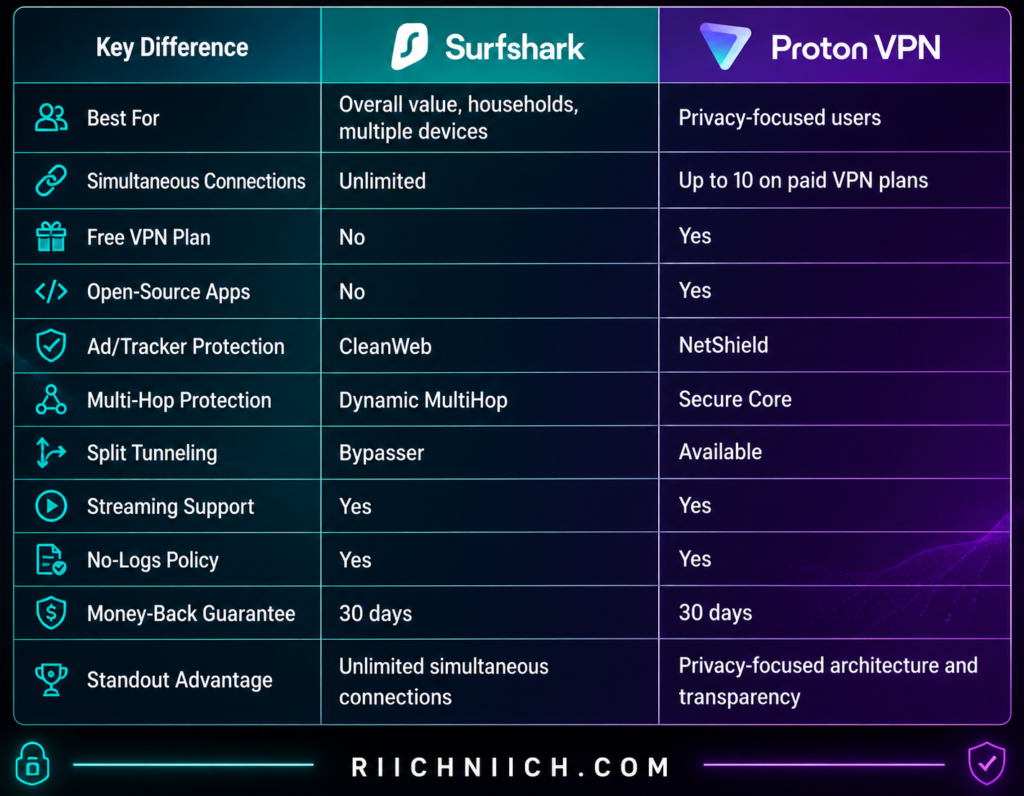
Surfshark currently allows unlimited simultaneous connections, meaning one subscription can cover a large collection of compatible devices without forcing you to choose which ones stay connected. Proton VPN’s paid service supports up to 10 devices simultaneously.
That gives Surfshark an immediate advantage for families, couples, or buyers with numerous phones, computers, tablets, and other connected devices. If device coverage is one of your biggest concerns when evaluating Surfshark vs ProtonVPN, Surfshark is particularly compelling.
The privacy comparison is more nuanced.
Proton VPN’s apps are open source and independently audited. It also offers Secure Core, which routes traffic through hardened infrastructure in privacy-friendly countries before sending it through an exit VPN server. Proton VPN is headquartered in Switzerland and operates under Swiss privacy law.
Surfshark approaches advanced protection differently. Its Dynamic MultiHop feature can route your connection through two VPN servers, while CleanWeb helps block ads, trackers, malware, and phishing attempts.
Another major difference is the free tier. Proton VPN offers a free plan with no data limits or speed limits, although advanced capabilities such as Secure Core, streaming support, NetShield, the broader server network, and support for up to 10 devices are premium features.
That makes Proton VPN especially appealing if you are looking at Surfshark vs ProtonVPN free plan options and aren’t ready to pay immediately. Surfshark, on the other hand, is fundamentally a paid VPN service.
The Biggest Buying Difference
Think about Surfshark vs ProtonVPN this way:
Surfshark is the more practical all-around choice for most buyers. Unlimited simultaneous connections can be particularly valuable if you’re protecting an entire household, and features such as CleanWeb, Bypasser, and Dynamic MultiHop make it a versatile package.
Proton VPN is the more privacy-centered choice. Open-source apps, independent audits, Swiss jurisdiction, Secure Core, NetShield, and a free plan make it especially attractive to buyers who put privacy transparency ahead of maximum device coverage.
Neither approach automatically makes one service better for everyone. It simply creates two different buying propositions.
If you want maximum flexibility across your devices, Surfshark has the early advantage. If you want privacy-focused architecture and transparency, Proton VPN has the early advantage.
For most people comparing Surfshark vs ProtonVPN based on overall usefulness and device coverage, Surfshark remains our overall pick at this stage of the comparison. But there are several categories where Proton VPN could easily be the better purchase depending on your priorities.
Next, we need to compare one of the biggest factors that can change that buying decision: plans and pricing.
Surfshark vs ProtonVPN: Plans and Pricing
🚨 ALL prices in this blog article are promotional/current prices rather than permanent prices. Taxes, billing terms, renewals and available offers can affect what you actually pay. Check the providers’ checkout pages before purchasing.
Price is one of the biggest factors in the Surfshark vs ProtonVPN comparison because these two services take different approaches to getting you into their ecosystems. Surfshark generally becomes much more attractive when you commit to a longer subscription, while Proton VPN gives you something Surfshark does not: a permanent free tier.
For buyers looking strictly at Surfshark vs ProtonVPN price, we would give Surfshark the advantage for long-term paid value, particularly if you have several devices or an entire household to protect. Proton VPN becomes more appealing if you want to start without paying or prefer its privacy-focused ecosystem.
Surfshark Pricing
Surfshark offers three main packages: Surfshark Starter, Surfshark One, and Surfshark One+, with 1-month, 12-month, and 24-month subscription options.
For someone primarily shopping for a VPN, Surfshark Starter is the most relevant starting point. It includes the VPN, Alternative ID, CleanWeb, unlimited simultaneous device connections, and other core features.
Surfshark’s longer subscriptions are where the pricing becomes much more competitive. At the time of writing, Surfshark advertises its 24-month Starter offer at $2.49 per month with 3 extra months, or $67.23 for the first 27 months. Promotional pricing changes, however, so readers should verify the current offer before purchasing.
One particularly important value advantage is that Surfshark’s paid plans support unlimited simultaneous connections. Instead of purchasing additional VPN subscriptions as you add phones, laptops, tablets, or TVs, you can protect compatible devices under the same subscription.
That can significantly change the value equation when comparing Surfshark vs ProtonVPN for families and multi-device households.
👉 If Surfshark already fits your budget and you want unlimited device connections, check Surfshark’s latest pricing and discount here before choosing your plan.
Proton VPN Pricing
Proton VPN takes a different approach.
Its lineup includes Proton Free, VPN Plus, and Proton Unlimited. For this Surfshark vs ProtonVPN comparison, VPN Plus is the fairest direct comparison to Surfshark’s VPN-focused offering.
Proton Free costs $0 and does not require a credit card. However, it comes with limitations compared with VPN Plus, including one simultaneous device connection, fewer location choices, and fewer premium capabilities.
VPN Plus unlocks the premium VPN experience, including up to 10 simultaneous devices, Proton’s full premium server selection, streaming support, P2P/BitTorrent support, NetShield, and priority support with live chat. Proton currently advertises more than 20,000 servers across more than 140 countries for VPN Plus.
Proton’s standard monthly VPN Plus price is listed at $9.99, while longer subscriptions can substantially reduce the effective monthly cost. Its pricing page currently advertises savings of up to 65% on VPN Plus with a two-year commitment, although promotions and displayed checkout prices can change.
Proton Unlimited is a broader package rather than simply a VPN upgrade. It combines premium access to Proton VPN with paid Proton services including Proton Mail, Proton Pass, Proton Drive, and Proton Calendar.
That means Proton Unlimited makes more sense for someone who wants to buy into the larger Proton privacy ecosystem—not necessarily someone who only needs a VPN.
Surfshark vs ProtonVPN Pricing Comparison
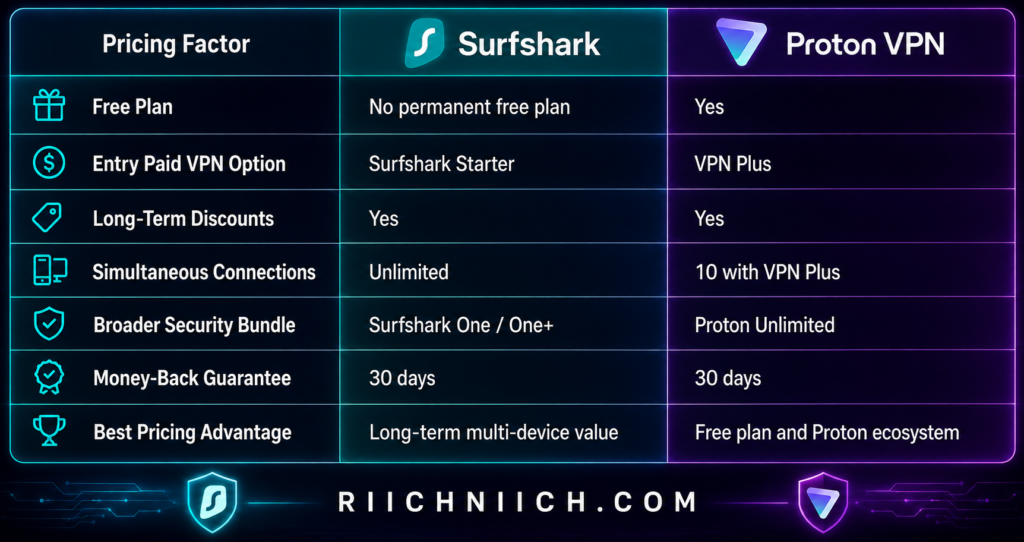
Both services offer a 30-day money-back guarantee on qualifying paid subscriptions. Surfshark also currently offers eligible new customers a seven-day VPN free trial on certain 12- and 24-month purchases.
Which One Gives You More for Your Money?
This is where the buyer-intent side of Surfshark vs ProtonVPN becomes especially important.
If you’re paying for a VPN and have a lot of devices, Surfshark’s unlimited simultaneous connections make its long-term pricing difficult to ignore. A household can protect multiple compatible phones, computers, tablets, and TVs without paying more simply because it owns more devices.
Proton VPN’s 10-device allowance will still be more than enough for many individuals and smaller households. And if you aren’t ready to spend anything, Proton Free has an obvious advantage: you can use it without purchasing a subscription.
The decision changes again if you’re shopping for more than a VPN. Surfshark One adds tools such as Antivirus, Alert, and Search, while One+ goes further by adding Incogni data removal. Proton Unlimited instead combines its VPN with Proton’s encrypted email, password manager, cloud storage, calendar, and other privacy products.
So our pricing verdict for Surfshark vs ProtonVPN is straightforward:
Surfshark wins for paid long-term value, particularly for buyers who want to protect many devices.
Proton VPN wins if you want a permanent free option or specifically want access to Proton’s larger privacy ecosystem.
For the average buyer who already knows they want a paid VPN, we would give Surfshark the pricing advantage. The combination of aggressive long-term pricing and unlimited simultaneous connections gives you considerable value from a single subscription.
Surfshark vs ProtonVPN: Features
Features can make the difference between a VPN you simply turn on occasionally and one that becomes part of your everyday online security. In the Surfshark vs ProtonVPN comparison, both services go well beyond basic IP masking and encrypted browsing, but they emphasize different types of protection.
Surfshark offers a particularly broad collection of practical features for everyday users, while Proton VPN provides several advanced privacy and network-security tools that will appeal to more privacy-focused buyers.
Here is how their major features compare:
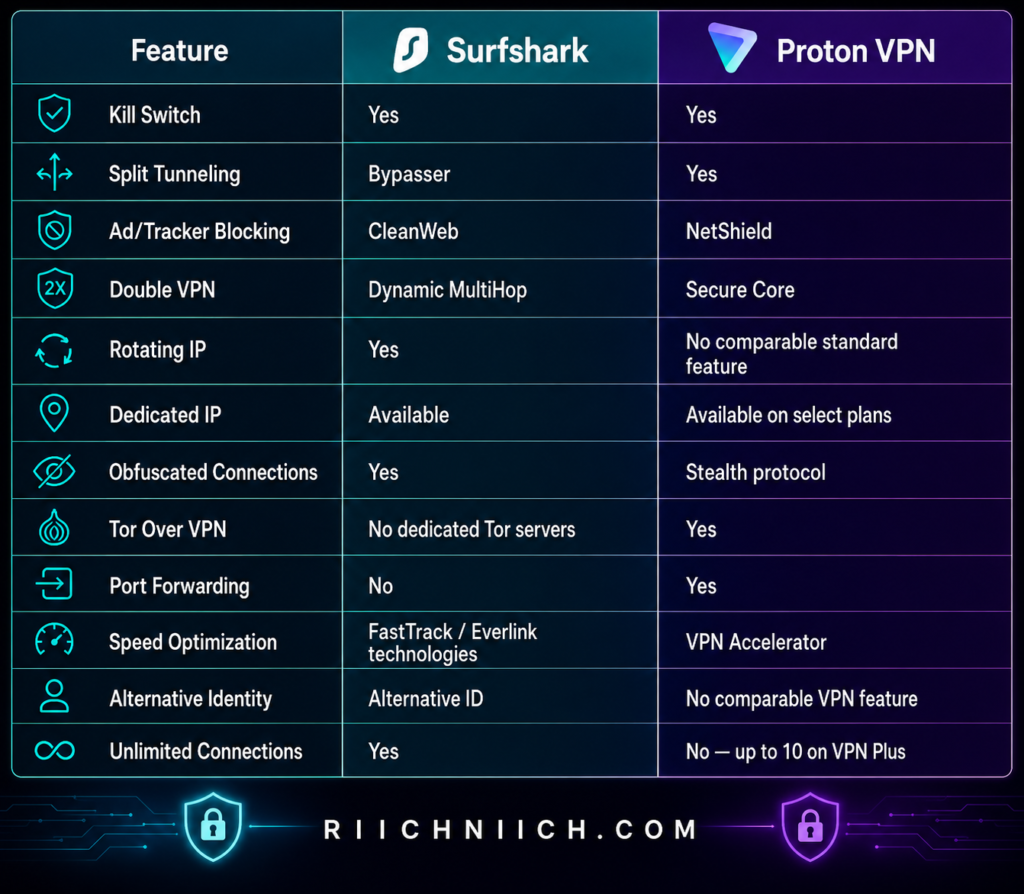
Both VPNs cover the essentials well. You get features such as a kill switch and split tunneling, allowing you to control what happens when the VPN disconnects and which traffic travels through the encrypted VPN tunnel. Surfshark calls its split-tunneling feature Bypasser, while Proton VPN offers its own split-tunneling controls on supported platforms.
Where the Surfshark vs ProtonVPN feature comparison becomes more interesting is in the additional tools built around those basics.
Surfshark Features
Surfshark’s feature set is designed to give everyday users considerable control without requiring them to understand complicated networking concepts.
One of its most useful features is CleanWeb, which can block ads, trackers, and malware while you’re browsing. Surfshark’s browser-extension version adds capabilities such as blocking cookie pop-ups and providing malware and data-breach alerts.
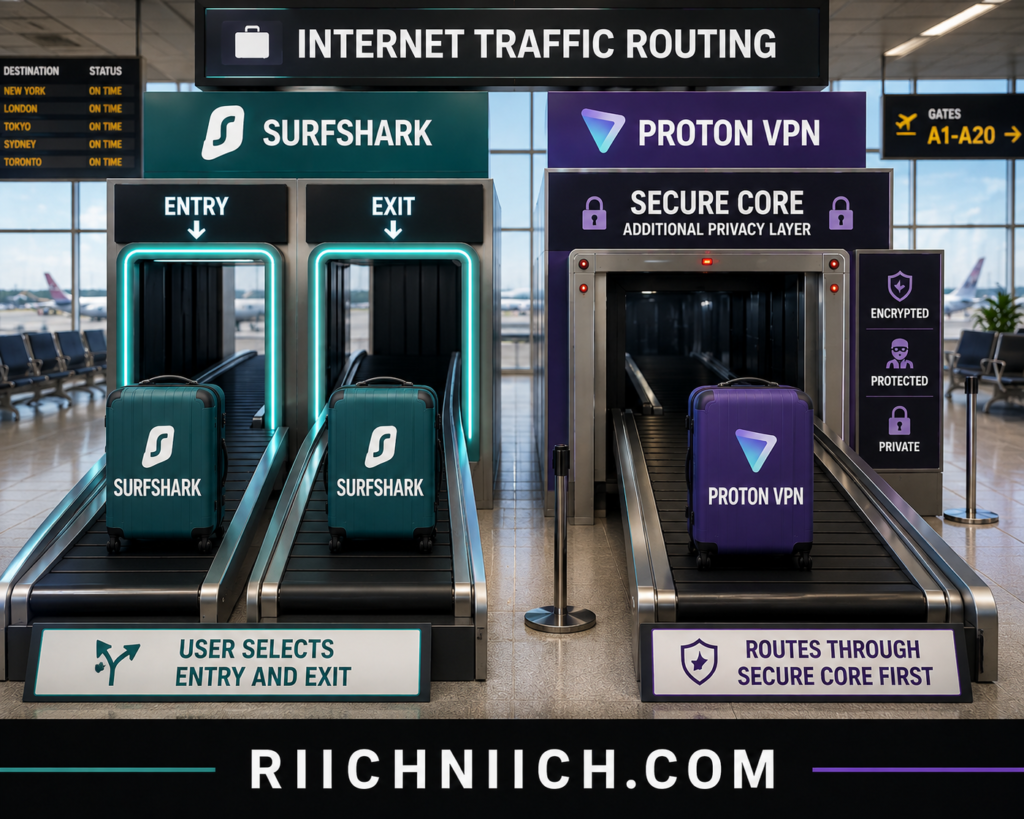
Dynamic MultiHop lets you route your internet traffic through two VPN servers instead of one. Unlike a fixed double-VPN route, Surfshark allows you to select entry and exit locations, giving users more flexibility over how the connection is routed.
Surfshark also includes several features that differentiate it from a conventional VPN:
Rotating IP periodically changes your IP address while keeping your VPN location and connection active. NoBorders is designed to help Surfshark operate on restricted networks. Static IP lets you repeatedly connect to the same shared IP address, while an optional Dedicated IP provides an IP address assigned specifically to you.
Another interesting addition is Alternative ID. Instead of giving your real information to every website you use, Alternative ID can generate an alternative online identity and email address. That can be useful for shopping sites, newsletters, promotions, and websites where you would rather not expose your primary contact information.
For buyers comparing Surfshark vs ProtonVPN features, Surfshark therefore feels less like a standalone VPN and more like an expanding collection of everyday privacy tools.
Proton VPN Features
Proton VPN takes a somewhat different approach. Its standout features tend to focus more heavily on privacy, network security, censorship resistance, and control over how your traffic travels through the internet.
The biggest example is Secure Core.
When Secure Core is enabled, Proton VPN routes your traffic through hardened servers in privacy-friendly countries such as Switzerland, Iceland, or Sweden before sending it through the final VPN server. Proton says it owns and operates these Secure Core servers itself.
That extra routing is designed to provide additional protection against sophisticated network attacks.
Proton VPN also includes NetShield, a DNS-filtering feature that blocks ads, trackers, and malware. It serves a similar everyday purpose to Surfshark’s CleanWeb, although the underlying implementations and available controls differ.
Another standout feature is VPN Accelerator. Proton says this collection of technologies can improve VPN performance substantially over long-distance connections by addressing latency, congestion, protocol inefficiencies, and other networking bottlenecks.
Proton VPN also offers features that advanced users may appreciate, including port forwarding, Tor over VPN, DNS leak protection, alternative routing, and its Stealth protocol for networks that attempt to block VPN traffic.
These features make Proton VPN particularly compelling if you’re evaluating Surfshark vs ProtonVPN for privacy rather than simply looking for the longest feature list.
CleanWeb vs NetShield
This is one of the closest feature battles in Surfshark vs ProtonVPN.
Both are designed to reduce exposure to unwanted online content such as trackers, ads, and malicious domains.
Surfshark CleanWeb is especially appealing for everyday browsing, and its browser-extension implementation can also handle annoyances such as cookie consent pop-ups.
Proton VPN NetShield uses DNS filtering to prevent your device from connecting to domains associated with ads, trackers, and malware. Proton states that NetShield is included with VPN Plus and its other paid VPN plans.
Neither feature should replace dedicated antivirus or comprehensive endpoint security, but both add another useful layer to a VPN subscription.
Dynamic MultiHop vs Secure Core
This comparison highlights the different philosophies behind the two services.
Surfshark Dynamic MultiHop emphasizes flexibility. You can route your traffic through two VPN locations and customize the entry and exit points.
Proton VPN Secure Core emphasizes hardened infrastructure. Traffic first passes through Proton-controlled Secure Core servers in Switzerland, Iceland, or Sweden before reaching the exit VPN server.
For ordinary browsing, many users won’t need either feature running constantly. But if advanced privacy is important to you, both provide an additional option beyond a standard single-server VPN connection.
Which VPN Has Better Features?
There isn’t a complete sweep for either service in Surfshark vs ProtonVPN because the better feature set depends heavily on the type of buyer.
For most everyday users, we give Surfshark the slight advantage. Features such as CleanWeb, Dynamic MultiHop, Bypasser, Rotating IP, Alternative ID, and unlimited simultaneous connections create an unusually versatile package. Surfshark currently advertises more than 4,500 servers and unlimited simultaneous device connections as part of its VPN offering.
For advanced privacy users, Proton VPN may actually have the stronger collection. Secure Core, NetShield, Tor over VPN, Stealth, port forwarding, VPN Accelerator, open-source apps, and advanced routing capabilities give buyers considerably more control over privacy-focused use cases.
So the feature verdict for Surfshark vs ProtonVPN is:
Surfshark wins for overall everyday versatility.
Proton VPN wins for advanced privacy and networking features.
For the average buyer looking for a feature-rich VPN that can protect a large collection of devices, Surfshark remains our overall choice. But if Secure Core, Tor over VPN, port forwarding, open-source software, or censorship-resistant connections are important to you, Proton VPN has several meaningful advantages that could justify choosing it instead.
Surfshark vs ProtonVPN: Privacy
Privacy is one of the most important parts of the Surfshark vs ProtonVPN comparison. A VPN can hide your browsing activity from your internet service provider and mask your real IP address from websites, but you are also placing significant trust in the VPN company itself.
That means buyers should look beyond marketing claims and consider logging policies, independent audits, jurisdiction, server infrastructure, and transparency before paying for either service.
Both perform very well here. However, if privacy is your number-one reason for buying a VPN, Proton VPN has the edge.
Surfshark Takes a Strong No-Logs Approach
Surfshark maintains a no-logs policy and says it does not collect your visited IP addresses, browsing history, session information, connection timestamps, bandwidth usage, or network traffic. Some connection information needed to operate the service is temporarily retained but automatically deleted within 15 minutes after a VPN session ends.
More importantly for buyers, Surfshark has subjected its no-logs claims to independent verification. Deloitte verified Surfshark’s no-logs policy in both 2023 and 2025. Surfshark’s Trust Center also reports a December 2025 infrastructure security audit by SecuRing that found no critical vulnerabilities.
That outside verification matters. You don’t have to rely entirely on Surfshark telling you that it protects your privacy.
Surfshark also operates 100% RAM-only VPN servers. Unlike traditional servers that can retain information on hard drives, RAM loses its stored information when the server is powered down or rebooted.
For buyers comparing Surfshark vs ProtonVPN for privacy, Surfshark therefore checks several major boxes: no activity logs, independent verification, RAM-only infrastructure, and a privacy-friendly approach to server operation.

Proton VPN Goes Further on Transparency
Proton VPN also operates a strict no-logs policy. It says it does not log websites you visit, internet traffic, your IP address, session lengths, or location-based information associated with your VPN activity.
The policy applies to both paid and free Proton VPN users, which is particularly important if you’re considering the Proton VPN free plan as an alternative to purchasing Surfshark immediately.
Proton VPN’s no-logs claims have also undergone independent auditing. Its current documentation states that external security experts have verified the policy.
But one of Proton VPN’s biggest privacy advantages is transparency at the application level.
All Proton VPN apps are open source. That allows security researchers and other technically knowledgeable users to inspect the source code rather than relying exclusively on the company’s description of how its apps operate. Proton also commissions independent security audits of its software and publishes audit results.
Open source doesn’t automatically make a VPN private, but when you’re deciding which company to trust with your internet connection, additional transparency is valuable.
Switzerland Gives Proton VPN Another Advantage
Jurisdiction also separates the two services.
Surfshark is based in the Netherlands, and the company states that Dutch jurisdiction does not require it to store or report users’ VPN activity.
Proton VPN is headquartered in Switzerland, outside U.S. and EU jurisdiction and outside the 5 Eyes, 9 Eyes, and 14 Eyes intelligence-sharing alliances. Proton states that Swiss law does not require its VPN service to retain connection logs.
Proton’s July 2026 transparency report also states that foreign government requests must go through the Swiss legal system before Proton can be compelled to respond, and reiterates that Proton VPN is not obligated under Swiss law to save connection logs.
For the average VPN user, jurisdiction shouldn’t be the only reason to choose a service. A company’s actual logging practices, technical architecture, and independent verification matter too.
But when everything is considered together, Switzerland strengthens Proton VPN’s case in the Surfshark vs ProtonVPN privacy comparison.
Secure Core Is Proton VPN’s Privacy Standout
Proton VPN also gives privacy-focused buyers access to Secure Core.
Instead of connecting directly through a single VPN server, Secure Core can route your traffic through a hardened Proton-controlled server in Switzerland, Iceland, or Sweden before sending it through a second VPN server to its final destination.
Proton says it owns and operates the Secure Core servers itself. The system is intended to provide additional protection against sophisticated network attacks, including situations where an exit VPN server could potentially be compromised.
Most everyday users won’t need Secure Core turned on every time they browse the internet. But for journalists, travelers, people using hostile networks, or anyone with a higher privacy threat model, it can be a meaningful feature.
Surfshark vs ProtonVPN: Which Is Better for Privacy?
This is one category where we would not give Surfshark the overall win.
Surfshark provides an impressive privacy package. Its no-logs policy has been independently verified, its network uses RAM-only servers, and its Netherlands jurisdiction does not require the company to retain users’ VPN activity.
But Proton VPN wins the privacy category.
Its combination of Swiss jurisdiction, a no-logs policy, independent verification, fully open-source apps, published security audits, Secure Core, and extensive transparency creates one of the strongest privacy propositions in this comparison.
Privacy Winner: Proton VPN
If you’re buying primarily for everyday browsing, streaming, multiple devices, and general online privacy, Surfshark still provides more than enough privacy protection for most people.
But if your purchasing decision in Surfshark vs ProtonVPN is driven primarily by privacy and transparency, we would spend our money on Proton VPN.
That gives Proton VPN an important category win—even though Surfshark can still come out ahead when we consider the complete package rather than privacy alone.
Surfshark vs ProtonVPN: Security
Security is another category where Surfshark vs ProtonVPN is extremely competitive. Both services use modern encryption, secure VPN protocols, kill switches, DNS leak protection, and additional tools designed to reduce the risk of exposing your real IP address or browsing activity.
For most buyers, either VPN provides a strong security foundation. The differences become more important when you look beyond basic encryption and consider server security, malware protection, VPN protocols, multi-hop connections, and protection against advanced network attacks.
For this category, Proton VPN gets a slight overall advantage for advanced security, although Surfshark remains an excellent choice for everyday protection.
Surfshark Uses Strong Encryption and Modern VPN Protocols
Surfshark uses AES-256-GCM encryption as well as ChaCha20 for WireGuard connections. Its current protocol lineup includes WireGuard, OpenVPN, IKEv2, and its newer in-house Dausos protocol. Surfshark also says it conducts penetration testing and maintains a third-party bug bounty program to identify potential vulnerabilities.
For the average buyer, you don’t need to understand the mathematics behind these encryption standards. The important point is that Surfshark uses modern cryptography designed to prevent outsiders from reading traffic traveling through your VPN connection.
Surfshark also provides a kill switch. If your VPN connection unexpectedly drops, the kill switch is designed to prevent your internet traffic from continuing outside the protected VPN tunnel.
That’s especially valuable when you’re using hotel, airport, coffee-shop, or other unfamiliar Wi-Fi networks. You don’t want a brief VPN interruption to quietly expose your real IP address while you continue browsing.

CleanWeb Adds Everyday Threat Protection
Surfshark also includes CleanWeb, which is designed to block ads, trackers, malware, and phishing attempts. Its browser-extension version can additionally block pop-ups and provide malware and data-breach alerts.
This is an important distinction when evaluating Surfshark vs ProtonVPN security because encryption isn’t the only security concern when browsing online.
A VPN can encrypt your connection, but it doesn’t automatically make every website safe. Features that help prevent connections to known malicious destinations can provide another useful layer of protection.
However, CleanWeb should not be treated as a replacement for antivirus software. A VPN and antivirus solve different security problems.
Proton VPN Also Uses Strong Encryption
Proton VPN uses AES-256 or ChaCha20 encryption, depending on the VPN protocol being used. Proton supports modern protocols including WireGuard and OpenVPN and uses perfect forward secrecy, meaning new encryption keys are generated for individual VPN sessions.
Perfect forward secrecy provides an additional safeguard: compromising the encryption key for one session shouldn’t expose traffic encrypted under previous session keys.
Proton VPN’s apps also include kill switch and Always-on VPN capabilities. If the VPN connection fails, the kill switch can block network traffic to prevent your real IP address and DNS requests from leaking outside the encrypted connection.
Both VPNs therefore handle the fundamental security requirements well.
Proton VPN’s Server Security Stands Out
This is where Proton VPN starts pulling ahead in the Surfshark vs ProtonVPN security comparison.
Proton says its VPN servers are bare-metal servers protected with full-disk encryption. Full-disk encryption protects server certificates, configurations, and software so that physical access to a server does not automatically give an attacker access to those assets.
Proton’s Secure Core architecture adds another layer.
Instead of sending your connection through only the final VPN server, Secure Core first routes traffic through hardened servers located in Switzerland, Iceland, or Sweden. Proton says it owns and operates these Secure Core servers and houses them in high-security data centers.
The purpose is to make certain sophisticated network attacks more difficult. Even if an exit VPN server were compromised or its surrounding network monitored, Secure Core is designed to make connecting that activity back to your real IP address harder.
That’s more protection than the average VPN buyer will need, but it’s a meaningful advantage for people with higher security requirements.
NetShield Helps Block Malicious Domains
Proton VPN’s answer to Surfshark CleanWeb is NetShield.
NetShield uses DNS filtering to help block ads, trackers, and malware. When you’re connected to Proton VPN, DNS requests are handled through Proton’s VPN infrastructure, and NetShield can prevent connections to domains identified as unwanted or malicious.
That makes the everyday security contest between the two fairly close:
Surfshark CleanWeb is excellent for buyers who want straightforward protection against ads, trackers, phishing attempts, and malicious websites.
Proton VPN NetShield provides similar DNS-level protection against ads, tracking, and malware.
Neither one makes you invulnerable to phishing, malicious downloads, account takeover, or other cyber threats. You still need strong passwords, multifactor authentication, software updates, and good browsing habits.
Both VPNs Protect Against DNS Leaks
DNS leaks can undermine some of the privacy benefits of a VPN because DNS requests can reveal which websites you’re attempting to visit.
Proton VPN says DNS queries are resolved through its own DNS servers rather than third-party providers. It also provides DNS and IPv6 leak protection.
Surfshark similarly includes private DNS and leak protection as part of its VPN infrastructure.
For ordinary buyers deciding Surfshark vs ProtonVPN which is better, this means both services cover another essential security requirement: keeping DNS requests from accidentally escaping the VPN tunnel.
What About Public Wi-Fi?
Both services are particularly useful when you’re connected to networks you don’t control.
Imagine sitting in an airport and seeing several networks:
Airport_Free_WiFi
Airport_Guest
Airport_WiFi_5G
Which one is legitimate?
A VPN cannot prevent every threat associated with a malicious or compromised Wi-Fi network, but encrypting your internet traffic adds an important security layer between your device and the VPN server.
This is one reason a paid VPN can make sense for people who regularly work, travel, or bank while away from their home network.

Surfshark vs ProtonVPN: Which Is More Secure?
For basic VPN security, this is almost a tie.
Both services give buyers strong encryption, modern VPN protocols, kill-switch protection, DNS leak protection, malicious-domain blocking, and multi-layer connection options. Surfshark also backs its security program with penetration testing and a third-party bug bounty.
But when evaluating the more advanced side of Surfshark vs ProtonVPN, we give Proton VPN the security win.
Its combination of open-source and independently audited apps, full-disk encryption on servers, perfect forward secrecy, Secure Core, NetShield, DNS and IPv6 leak protection, and hardened infrastructure gives security-conscious buyers an unusually comprehensive package.
Security Winner: Proton VPN
That doesn’t make Surfshark a weak purchase. In fact, buyers primarily interested in protecting everyday browsing across many devices may prefer Surfshark because it combines strong VPN security with unlimited simultaneous connections and a broader collection of consumer-friendly tools.
But if your decision in Surfshark vs ProtonVPN is based specifically on which service provides the stronger advanced security architecture, we would choose Proton VPN.
Surfshark vs ProtonVPN: Speed and Performance
Speed matters when choosing a VPN because encryption and server routing add extra work to your internet connection. A good VPN should minimize that slowdown enough that everyday browsing, streaming, video calls, gaming, and large downloads still feel fast.
In the Surfshark vs ProtonVPN speed comparison, both services have the technology to deliver excellent performance. Surfshark uses WireGuard alongside newer routing and connection technologies, while Proton VPN combines WireGuard with its proprietary VPN Accelerator technology.
For most buyers, the difference is unlikely to be dramatic on a good nearby server. However, Surfshark gets our slight overall win for speed and everyday performance, while Proton VPN is particularly impressive when dealing with long-distance connections.
Surfshark Is Built for Fast Everyday Connections
Surfshark supports WireGuard, a lightweight VPN protocol designed for high-speed, low-overhead connections. Surfshark itself recommends switching to WireGuard when users experience slower VPN performance.
That makes WireGuard a sensible choice for bandwidth-heavy activities such as:
- 4K streaming
- Large downloads
- Video conferencing
- Cloud backups
- Online gaming
- Everyday browsing across multiple devices
Surfshark has also been investing in technology beyond the basic VPN protocol.
Its FastTrack system continuously evaluates network conditions and attempts to route traffic along a more efficient path rather than relying on one fixed route. Surfshark says FastTrack can provide speed improvements of up to 70% compared with its standard routing under suitable conditions. As of July 2026, Surfshark said the technology had expanded across all continents and covered the majority of its server network for macOS users.
That doesn’t mean every connection will suddenly become 70% faster. Performance gains depend on your device, location, destination, server, ISP, network congestion, and the route your traffic would otherwise take.
But it shows that Surfshark is actively optimizing more than raw server capacity.

Proton VPN Has a Powerful Speed Advantage of Its Own
Proton VPN uses WireGuard too, but its biggest performance feature is VPN Accelerator.
VPN Accelerator is designed to improve VPN performance by reducing latency, addressing congestion, improving packet forwarding, and overcoming some processing limitations of VPN protocols. Proton says the technology can improve performance by more than 400% in certain conditions, with the largest improvements generally occurring over long-distance connections or networks experiencing packet loss.
That number needs context.
It does not mean Proton VPN makes your underlying internet connection four times faster. Proton specifically notes that VPN Accelerator cannot make the VPN exceed the speed of your raw internet connection. Instead, the technology is intended to recover performance that might otherwise be lost because of VPN routing, distance, congestion, or protocol overhead.
VPN Accelerator works with Proton VPN’s supported protocols and is built into its apps. Proton also operates many Plus servers on 10 Gbps connections, providing substantial network capacity for bandwidth-intensive activities.
For buyers researching Surfshark vs ProtonVPN speed, this makes Proton VPN particularly attractive if you frequently connect to VPN servers far from your physical location.
Nearby Servers vs Long-Distance Servers
Distance is one of the biggest factors affecting VPN performance.
If you’re in Texas and connect to a nearby U.S. server, your traffic has a relatively short distance to travel. Connect instead to a server thousands of miles away, and latency will normally increase because your data has to travel farther before reaching its destination.
That’s why comparing VPN speed using only one server can be misleading.
Proton itself recommends choosing a nearby server and avoiding heavily loaded servers when maximum speed is the goal. It also notes that WireGuard is usually its fastest protocol.
The same general principle applies to Surfshark: the fastest server is often a nearby server with a good network route and available capacity.
So when deciding between Surfshark vs ProtonVPN, don’t assume that a speed test performed by someone hundreds or thousands of miles away will predict exactly what you’ll experience at home.
What About Streaming Performance?
Both VPNs should have more than enough potential bandwidth for high-quality streaming when you’re connected to an appropriate server and have a sufficiently fast underlying internet connection.
The more important issue is consistency.
A VPN that reaches an impressive peak speed but frequently experiences latency spikes, overloaded servers, or unstable connections can feel slower than one delivering slightly lower but more consistent performance.
Proton’s high-speed infrastructure and VPN Accelerator are specifically designed to improve connection stability and performance, including over longer distances.
Surfshark’s WireGuard implementation and increasingly broad FastTrack deployment similarly focus on keeping routes efficient.
For most households, either service should comfortably handle normal HD and 4K streaming under good network conditions.
Advanced Privacy Features Can Reduce Speed
There is an important tradeoff buyers should understand when evaluating Surfshark vs ProtonVPN speed.
Additional privacy routing usually requires your traffic to travel farther.
For example, Proton VPN’s Secure Core sends your traffic through an additional hardened server before reaching the final VPN server. Proton explicitly notes that Secure Core adds latency and recommends disabling it when maximum performance is more important than the extra security layer.
Surfshark’s MultiHop connections follow the same basic principle: routing traffic through two VPN servers adds additional distance and processing compared with a standard single-server connection.
That doesn’t make these features bad. It simply means you shouldn’t use the most privacy-intensive connection mode and then expect the same performance as a nearby single-server WireGuard connection.
For streaming, gaming, and large downloads, a standard nearby server will usually make more sense.
For situations where maximum privacy matters more than speed, accepting some additional latency may be worthwhile.
How Much Will a VPN Slow Down Your Internet?
There isn’t one percentage that accurately answers this question.
VPN performance depends on your:
Original internet speed → Wi-Fi or Ethernet connection → device → VPN protocol → server distance → server load → network congestion → destination website or service
Some speed reduction is normal because the VPN has to encrypt and route your traffic. Surfshark’s own Windows troubleshooting documentation, for example, tells users that some decrease can be expected and recommends WireGuard and testing different server locations when performance is poor.
This is why we wouldn’t recommend buying either service solely because of a single online speed-test result.
Surfshark vs ProtonVPN: Which Is Faster?
For the overall Surfshark vs ProtonVPN speed comparison, I’m giving Surfshark a narrow win.
Surfshark combines WireGuard with its evolving FastTrack routing technology and is designed to deliver strong everyday performance across browsing, streaming, downloads, and other bandwidth-intensive activities. Its recent FastTrack expansion is particularly promising for reducing inefficient network routing.
Proton VPN is extremely competitive, however. VPN Accelerator is one of its standout technologies, particularly for users connecting across long distances, and its Plus network includes high-capacity 10 Gbps servers.
Speed and Performance Winner: Surfshark — by a narrow margin
If you’re buying primarily for fast everyday browsing, streaming, downloads, and general use, Surfshark gets our recommendation in this category.
If you regularly make long-distance VPN connections, Proton VPN deserves serious consideration because VPN Accelerator is specifically designed to reduce the performance penalties that distance and poor network conditions can create.
The important takeaway for buyers comparing Surfshark vs ProtonVPN is that speed should not be a deal-breaker for either service. Both are capable of fast performance, and your server choice, protocol, physical location, and underlying internet connection may ultimately have a bigger impact than the difference between the two VPN providers.
Surfshark vs ProtonVPN: Server Network and Locations
A VPN’s server network affects more than how many countries appear inside the app. It can influence connection speed, latency, congestion, streaming options, and whether you can get an IP address in the location you actually need.
This is one area where Surfshark vs ProtonVPN has changed considerably. Proton VPN has expanded aggressively and now operates a substantially larger network by raw server count, while Surfshark maintains a smaller but still extensive network with strong geographic coverage.
As of August 2026, Surfshark lists 4,500+ servers across 100 countries. Proton VPN’s current server directory lists 20,533 servers across 148 countries and 195 locations.
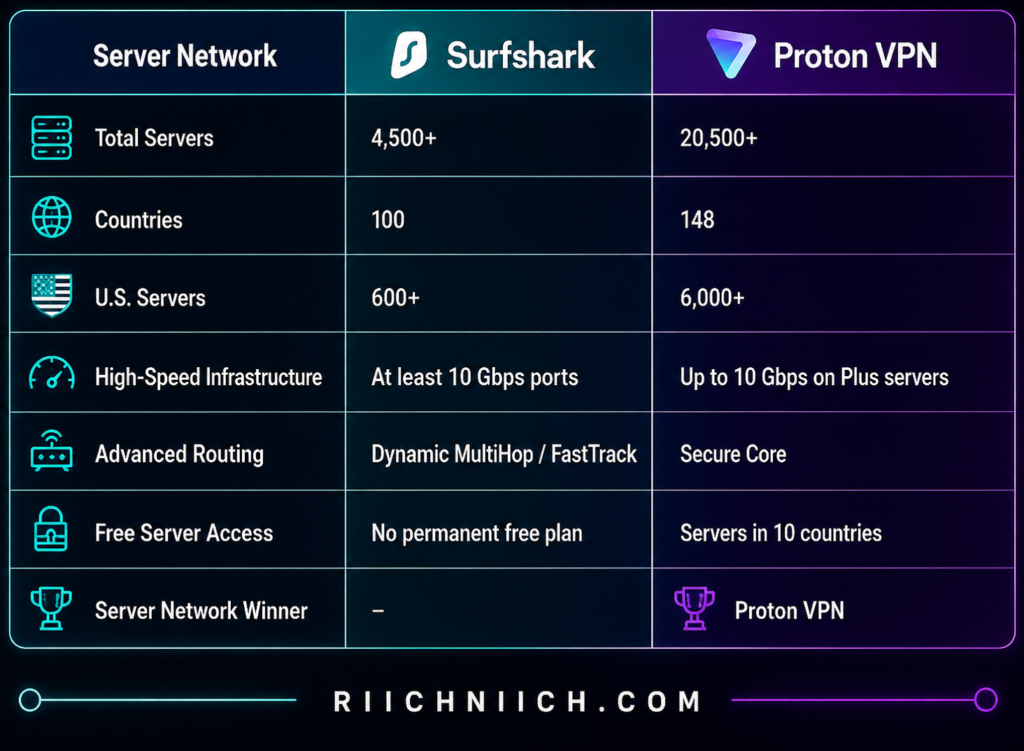
Numbers can change as both providers add or retire infrastructure, so buyers should treat these figures as a snapshot rather than permanent specifications.
Surfshark Has a Large Global Network
Surfshark’s network includes more than 4,500 servers in 100 countries, covering North America, South America, Europe, Asia-Pacific, the Middle East, and Africa.
More important than the raw number is the capacity behind those servers. Surfshark says all of its servers have at least 10 Gbps ports, with capacity reaching as high as 100 Gbps in some high-traffic areas.
That can help reduce congestion when large numbers of customers are connected.
For U.S. buyers, Surfshark provides 600+ U.S. servers across 24 locations. Its current U.S. network includes cities such as Dallas, Houston, Los Angeles, Denver, Chicago, Miami, Atlanta, New York, Seattle, Boston, and San Francisco.
That geographical spread matters.
If you live near Dallas, for example, being able to connect to Dallas instead of sending your traffic across the country to New York can potentially reduce latency.
Proton VPN Has Become a Much Larger Network
Proton VPN has expanded dramatically.
Its current server directory lists 20,533 servers across 148 countries, including 17,930 Plus servers for paid subscribers. Proton also lists servers on every continent.
The expansion has been particularly rapid. Proton reported crossing 5,000 servers in 2024 and 11,000 in January 2025; by April 2026, it had surpassed 20,000.
For someone comparing Surfshark vs ProtonVPN server locations, that gives Proton VPN a clear advantage in both raw server count and country coverage.
The U.S. difference is especially striking. Proton’s current directory lists more than 6,000 U.S. servers across 22 cities, while Surfshark lists more than 600 U.S. servers across 24 locations.
That doesn’t automatically mean Proton VPN will be ten times faster. Server quantity and VPN performance aren’t the same thing.
A nearby Surfshark server with plenty of capacity can outperform a poorly routed connection to another provider with thousands more servers. Your physical location, server load, ISP, VPN protocol, and network route all matter.
But Proton’s scale gives buyers considerably more infrastructure to work with.
Proton VPN Also Offers More Country Choices
Country coverage may be even more useful than the total number of servers.
Surfshark’s 100-country network is already large enough for most buyers, but Proton VPN currently extends that to 148 countries.
Why does that matter?
Suppose you’re traveling internationally and want a VPN endpoint closer to your current location. Greater geographical coverage increases the chance that you’ll have an appropriate nearby option.
It can also matter when you specifically need an IP address associated with a particular country.
Proton has continued adding less commonly supported locations during 2026, including countries such as Guinea, Zimbabwe, Kosovo, Gabon, Kyrgyzstan, Lebanon, Nicaragua, Papua New Guinea, Bolivia, Greenland, Haiti, Jamaica, Paraguay, and Uruguay.
For buyers who travel frequently or need access to a particularly broad selection of countries, this is a meaningful advantage.
Physical and Virtual Locations Matter Too
Server counts don’t tell the entire story.
Surfshark uses both physical and virtual locations. With a virtual location, the server providing the IP address for a particular country may physically reside somewhere else. Surfshark says it uses virtual locations when reliable physical infrastructure is difficult to obtain in a particular country, and identifies virtual locations within its apps.
Proton VPN uses physical bare-metal servers extensively, but it also uses Smart Routing to provide IP addresses for some countries where hosting physical VPN infrastructure would be difficult.
Virtual or smart-routed locations aren’t automatically bad. They can actually expand geographical coverage into places where operating physical servers would otherwise be impractical.
However, privacy-focused buyers should understand the difference between where an IP address appears to be located and where the physical server handling the connection actually resides.

Proton VPN’s Secure Core Network Is Different
Raw server quantity isn’t Proton VPN’s only advantage.
Its paid service also includes Secure Core servers, which route your traffic through hardened infrastructure before sending it through the final VPN location. Proton currently lists 126 Secure Core servers supporting routes to 68 countries.
This is not necessarily something you would use when your priority is maximum streaming or gaming speed because the additional routing can increase latency.
But it gives privacy-focused buyers another option that a basic server-count comparison doesn’t capture.
Surfshark approaches advanced routing differently through technologies such as Dynamic MultiHop and FastTrack. FastTrack continuously evaluates routes through Surfshark’s network and attempts to choose a more efficient path based on current network conditions.
This creates an interesting distinction in Surfshark vs ProtonVPN:
Surfshark emphasizes making efficient use of its network.
Proton VPN combines optimization with enormous network scale and broader geographic coverage.
Does Proton VPN’s Bigger Network Make It Better?
Not automatically.
A VPN could theoretically operate thousands of poorly maintained servers and still deliver a worse experience than a smaller, better-optimized network.
That’s why buyers shouldn’t choose a VPN based solely on the biggest number printed on a website.
Look instead at whether the service provides:
Servers near you → locations you actually need → sufficient capacity → reliable connections → good routing → specialized servers for your use case.
For many buyers, Surfshark’s 100-country network already provides far more locations than they’ll ever use.
But Proton VPN’s much larger network becomes valuable if you travel frequently, want access to unusual locations, or simply prefer having the broadest possible selection.
What About Proton VPN Free Servers?
There’s another important server-network difference for buyers considering Surfshark vs ProtonVPN free plan options.
Proton Free provides access to servers in 10 countries, selected from the Netherlands, Japan, Romania, Poland, Norway, Switzerland, Singapore, Mexico, Canada, and the United States. Proton Free also has no data limit.
Paid Proton VPN customers receive access to the much larger Plus network and its additional capabilities.
Surfshark does not offer an equivalent permanent free VPN tier.
So if your budget is $0, Proton VPN wins this part of the server comparison by default.
Surfshark vs ProtonVPN: Which Has the Better Server Network?
For this category of Surfshark vs ProtonVPN, the winner is Proton VPN.
Surfshark’s 4,500+ servers across 100 countries remain more than enough for most people, and its high-capacity infrastructure, broad U.S. coverage, Dynamic MultiHop, and FastTrack technology make it a highly capable global network.
But Proton VPN currently offers more than 20,500 servers across 148 countries, giving buyers substantially greater server quantity and geographic reach.
Server Network and Locations Winner: Proton VPN
For most buyers, we wouldn’t choose Proton VPN only because it has more servers. Surfshark still provides enough global coverage for typical browsing, streaming, travel, and privacy needs.
But if server selection and worldwide location coverage are major factors in your purchasing decision, Proton VPN earns a decisive win in this part of Surfshark vs ProtonVPN.
Surfshark vs ProtonVPN: Streaming
If streaming is one of the main reasons you’re buying a VPN, Surfshark vs ProtonVPN is a close comparison. Both services support major streaming platforms, offer fast VPN protocols, have apps for popular streaming devices, and provide large server networks that give travelers plenty of connection options.
For most buyers, however, Surfshark gets our overall streaming win. Its combination of strong streaming support, unlimited simultaneous connections, and straightforward device coverage makes it particularly attractive for households where several people may be watching different services at the same time.
Proton VPN is still a strong streaming VPN, especially on its paid plans, but there is one important detail to understand immediately: Proton’s reliable streaming support is primarily a paid-plan feature. Proton says streaming coverage is available with VPN Plus and its other paid VPN plans.
Surfshark Works Well for Everyday Streaming
Surfshark officially supports secure streaming with Netflix and provides dedicated troubleshooting guidance when streaming platforms detect or block a VPN connection. Its support documentation recommends connecting to a server in your home country when using Netflix.
The biggest streaming advantage, though, is not necessarily Netflix itself.
It’s unlimited simultaneous connections.
Imagine a household where one person is streaming a movie on the living-room TV, someone else is watching on a tablet, another person has Netflix running on a laptop, and several phones remain connected to the VPN.
Surfshark doesn’t make you count those connections against a fixed device limit.
That’s a significant purchasing advantage when comparing Surfshark vs ProtonVPN for streaming, particularly for families and households with multiple televisions, phones, tablets, computers, and streaming devices.
Proton VPN Is Also a Serious Streaming Option
Proton VPN has invested heavily in streaming support.
Its paid plans support streaming services including Netflix, Amazon Prime Video, Disney+, Apple TV, BBC iPlayer, Peacock, Paramount+, and many regional platforms. Proton maintains individual streaming guides showing which locations and servers are supported for different services.
For Netflix specifically, Proton VPN supports streaming through its paid Plus servers and provides apps for Windows, macOS, Android, iPhone and iPad, Android TV, Fire TV, and Apple TV, among other platforms.
Proton’s performance technology is another advantage.
Its paid network uses high-capacity infrastructure, and VPN Accelerator is designed to reduce some of the performance loss associated with VPN connections, particularly over longer distances. Proton markets its Plus infrastructure for high-resolution streaming, including 4K.
So if you’re comparing Surfshark vs ProtonVPN streaming based purely on whether Proton VPN can handle serious streaming use, the answer is yes.
What About Netflix?
Netflix deserves separate attention because Surfshark vs ProtonVPN Netflix is likely to be one of the biggest questions for buyers.
Both services officially provide guidance for streaming Netflix while connected to their VPNs. Surfshark states that an active Surfshark and Netflix subscription can be used to view Netflix securely, while Proton provides dedicated Netflix support through its paid VPN plans.
However, buyers should understand that VPN streaming access is never something we would treat as permanently guaranteed.
Streaming companies routinely identify and block IP addresses associated with VPNs. Surfshark’s own troubleshooting documentation notes that streaming services can block individual IP addresses and recommends reconnecting to another server when this happens.
Proton gives similar advice. If Netflix isn’t working, it recommends reconnecting, changing servers, clearing browser or DNS caches, or trying another browser or device.
This is important because you may see reviews claiming that one VPN “always works” with a particular streaming platform.
That can change.
A VPN server that works today may be detected tomorrow, while another server may continue working normally.
Streaming Service Comparison
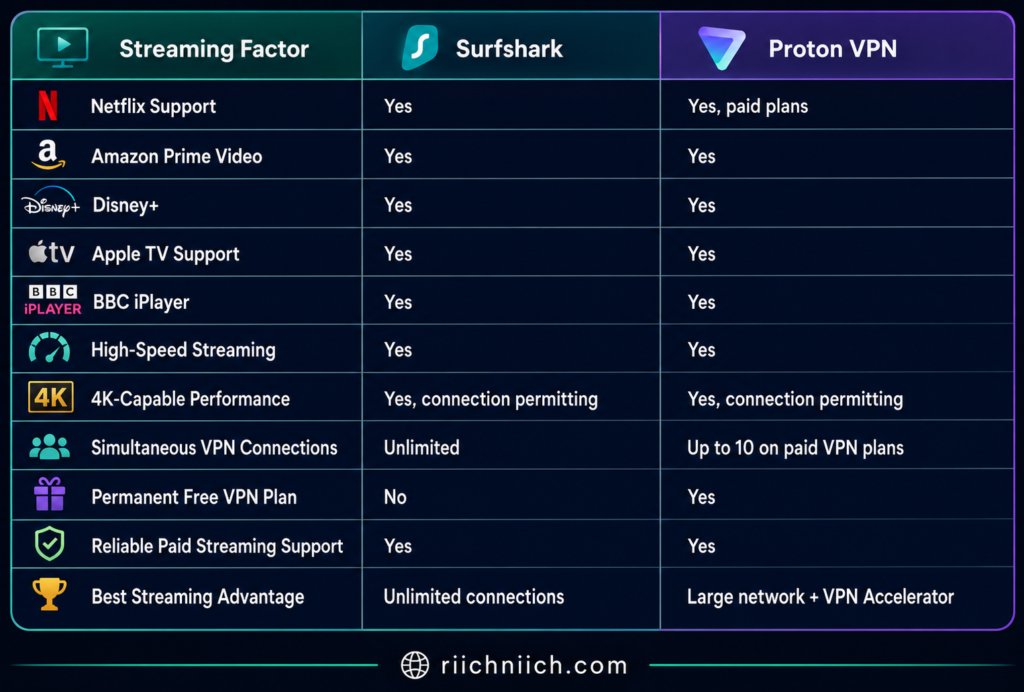
For a single person with a few devices, the difference between unlimited connections and Proton VPN’s up to 10 simultaneous paid-plan connections may not matter.
For a large household, Surfshark’s unlimited connection policy becomes much more valuable.
Can You Stream With Proton VPN Free?
Technically, you may sometimes be able to stream while using Proton Free, but we would not buy—or choose—a VPN based on that expectation.
Proton explicitly says its free service does not block users from trying Netflix, but Netflix frequently blocks IP addresses belonging to free servers. Proton therefore recommends a paid plan for reliable streaming support.
That distinction matters in Surfshark vs ProtonVPN free plan comparisons.
Proton Free is excellent for people who primarily need basic VPN privacy without paying. But if your main goal is streaming, VPN Plus is the appropriate Proton option to compare against Surfshark.
Which Is Better for 4K Streaming?
Both VPNs have enough potential performance for 4K streaming when your underlying internet connection is fast enough.
The VPN isn’t the only factor.
Your streaming quality depends on your:
Internet speed → Wi-Fi quality → device → VPN protocol → server distance → server congestion → streaming platform
For example, connecting to a nearby VPN server will generally produce lower latency than sending your traffic across the world.
Proton specifically recommends choosing a nearby Plus server for the best streaming performance. It also warns that Secure Core is not optimized for streaming because the additional routing can increase latency and reduce video quality.
The same general principle applies when using multi-hop routing with other VPNs: additional privacy routing can come at the expense of maximum performance.
For movie night, use a normal nearby server.
Save the advanced multi-hop features for situations where the extra privacy protection matters more than maximum streaming speed.
Don’t Ignore Streaming-Service Rules
There’s one more point buyers should know before purchasing either VPN.
A VPN changes the public IP address websites see, but streaming platforms have their own licensing agreements and terms governing where content may be accessed.
Proton, for example, specifically advises users to comply with the terms and conditions of the streaming services they use.
So we would buy a VPN primarily for privacy, security, safer travel, and protecting your internet connection, with streaming compatibility as an additional benefit—not as permission to disregard a streaming provider’s terms.
Surfshark vs ProtonVPN: Which Is Better for Streaming?
For this category of Surfshark vs ProtonVPN, we give Surfshark the win.
Both are capable streaming VPNs. Proton VPN has excellent paid streaming support, a huge server network, VPN Accelerator, high-capacity infrastructure, and support for numerous international streaming platforms.
But Surfshark has one advantage that becomes increasingly valuable in a streaming-heavy household:
Unlimited simultaneous connections.
You don’t have to count how many family members, televisions, laptops, tablets, or phones are connected to your VPN subscription.
Streaming Winner: Surfshark
If you’re a privacy-focused individual who streams on only a few devices, Proton VPN remains an excellent choice.
But if you’re buying specifically for streaming across a household full of devices, Surfshark offers the more practical package. That’s why Surfshark takes the streaming category in Surfshark vs ProtonVPN.
Surfshark vs ProtonVPN: Torrenting
If peer-to-peer file sharing is important to you, Surfshark vs ProtonVPN becomes a more specialized comparison. Both VPNs can protect your IP address while using P2P applications, but Proton VPN offers one feature that gives it a meaningful advantage for serious torrent users: port forwarding.
For occasional P2P use, Surfshark is straightforward and capable. For buyers who torrent frequently and want more control over P2P connectivity, Proton VPN is our pick for this category.
Surfshark Is a Good Choice for Straightforward P2P Use
Surfshark allows P2P traffic and combines that support with several features that matter when sharing files: strong encryption, a kill switch, WireGuard support, DNS leak protection, and a no-logs policy.
The biggest advantage for everyday users is simplicity. You don’t need to purchase another subscription based on how many computers you want to protect because Surfshark allows unlimited simultaneous connections.
That could be useful if you have a desktop computer handling large downloads while your laptop, phone, tablet, and other household devices remain protected under the same VPN subscription.
Surfshark also supports WireGuard, which is generally a good protocol choice when speed matters. Because P2P transfers can involve large files, minimizing VPN overhead can make a noticeable difference.
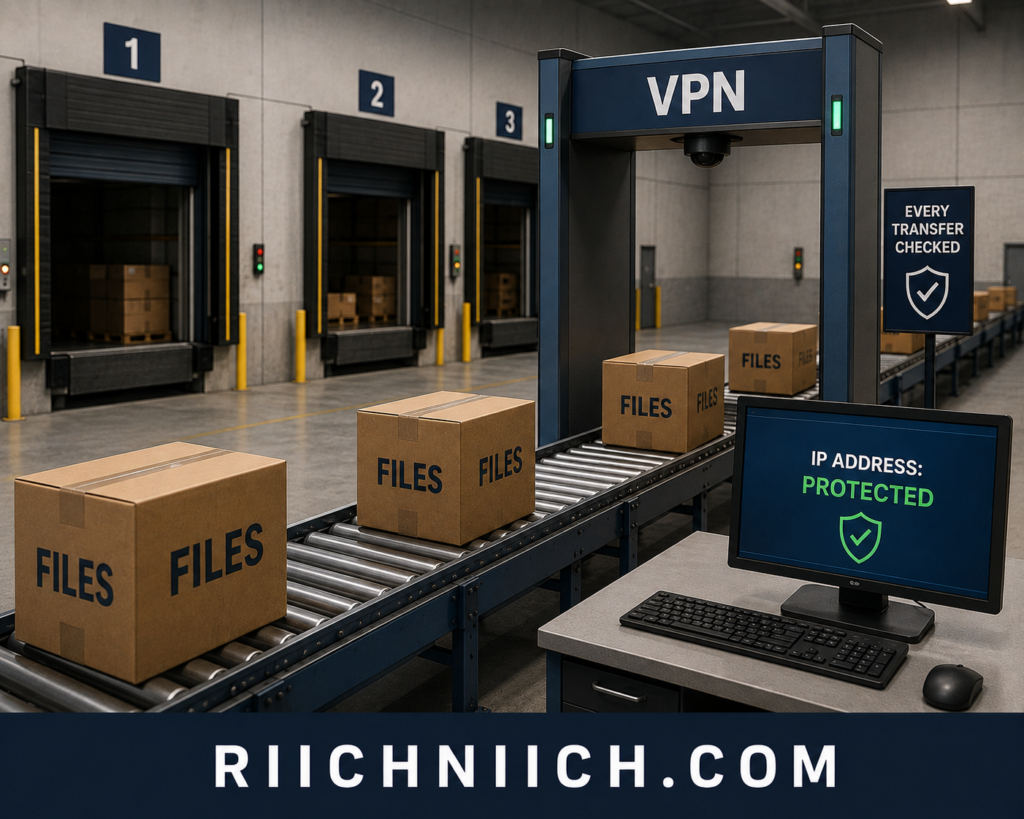
Proton VPN Has Dedicated P2P Servers
Proton VPN takes a more specialized approach.
Its paid plans provide dedicated P2P servers specifically configured for peer-to-peer traffic, including BitTorrent. These servers are clearly identified with a P2P icon inside Proton VPN’s apps.
When connected, other peers participating in the same transfer see the VPN server’s IP address instead of your real IP address.
Proton also recommends binding compatible BitTorrent clients directly to the Proton VPN network interface. This can provide another safeguard because the torrent client will only transfer data through the selected VPN interface.
That’s particularly attractive for buyers specifically researching Surfshark vs ProtonVPN for torrenting rather than simply wanting occasional P2P support.
Port Forwarding Gives Proton VPN a Major Advantage
Here is the feature that separates the two.
Proton VPN supports port forwarding on its paid plans. Its current apps support the feature on Windows, macOS, and Linux, and Proton also provides configuration options for compatible OpenVPN and WireGuard setups.
Port forwarding allows incoming P2P connections to reach your torrent client through the VPN’s firewall.
Why does that matter?
BitTorrent depends on connections between peers. Allowing incoming connections can potentially increase the number of peers you can connect to, which may improve transfer performance in some situations. Proton specifically identifies P2P applications such as BitTorrent as a primary use case for the feature.
Surfshark does not offer comparable user-configurable port forwarding.
For ordinary VPN users, that probably won’t matter.
For someone who regularly uses P2P applications, it could be the feature that decides Surfshark vs ProtonVPN.
The Kill Switch Matters More When Torrenting
A kill switch is valuable for ordinary browsing, but it becomes particularly important during P2P transfers.
Suppose your torrent client is actively transferring a file and the VPN connection unexpectedly drops.
Without protection, the torrent application could potentially continue communicating through your normal internet connection, exposing your real public IP address to other peers.
Proton VPN’s kill switch blocks internet traffic if the VPN connection drops, preventing the device from simply continuing over the unprotected connection. Its Advanced Kill Switch on supported platforms can go further by preventing internet access unless Proton VPN is connected.
Proton also recommends binding the torrent client to the VPN interface where supported. That’s worth doing because Proton warns that choosing the wrong network interface can expose your real IP address even when a kill switch is enabled.
Surfshark also provides kill-switch protection, making this an essential feature to enable regardless of which VPN you purchase.
What About Torrenting Speed?
Both services have the technology necessary for fast P2P transfers, but your results will depend heavily on factors outside the VPN.
Torrent performance can depend on:
Your internet speed → VPN server distance → protocol → server load → number of available peers → peer speeds → torrent health
This is another reason Proton VPN’s port forwarding is significant. Allowing incoming connections can potentially improve connectivity to peers rather than limiting the client primarily to connections it initiates itself.
Proton’s P2P infrastructure also uses high-speed servers, and its VPN Accelerator technology is designed to improve performance, particularly over long-distance or unstable connections.
Surfshark remains highly competitive for simpler P2P use, especially with WireGuard and nearby servers.
Can You Torrent With Proton VPN Free?
This is an important limitation.
Although Proton VPN offers one of the more generous free VPN plans, P2P file sharing requires a paid Proton VPN plan. Proton’s dedicated P2P servers are reserved for paid subscribers.
So don’t choose Proton Free expecting it to function as your permanent free torrenting VPN.
For this particular use case, the appropriate buying comparison is Surfshark vs Proton VPN Plus, not Surfshark versus Proton Free.
Torrenting Comparison
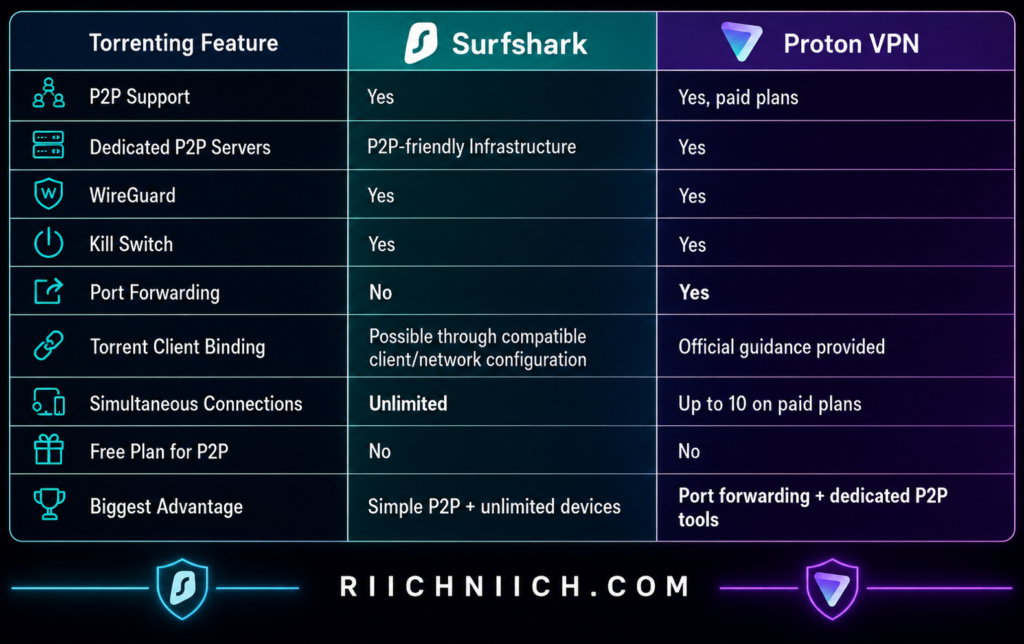
Only Torrent Content You Have the Right to Download
Torrenting itself is a file-transfer technology and has legitimate uses. The legal issue depends on what you’re downloading and whether you have permission to obtain or distribute it.
A VPN does not make copyright infringement legal, nor should it be treated as a tool for avoiding accountability.
You can use P2P networks for legitimate purposes such as distributing open-source software, public-domain material, authorized media, and other files you have permission to download or share.
Surfshark vs ProtonVPN: Which Is Better for Torrenting?
For this category of Surfshark vs ProtonVPN, Proton VPN wins.
Surfshark is still a strong option if you want straightforward P2P support combined with fast protocols and unlimited simultaneous connections. For an occasional torrent user, that may be everything you need.
But Proton VPN is better equipped for someone who takes P2P seriously.
Its combination of dedicated P2P servers, port forwarding, kill-switch protection, official torrent-client binding guidance, VPN Accelerator, and high-capacity infrastructure gives experienced users more control over both privacy and connectivity.
Torrenting Winner: Proton VPN
If torrenting is only an occasional activity and you’re buying a VPN for an entire household, Surfshark’s unlimited connections may still make it the better overall purchase.
But if P2P performance and torrent-specific features are major buying priorities, Proton VPN has the stronger toolset in Surfshark vs ProtonVPN.
Surfshark vs ProtonVPN: Gaming
Gaming changes the Surfshark vs ProtonVPN comparison because raw download speed is not the only thing that matters. For online gaming, latency, connection stability, server distance, and protection against IP-based attacks can be more important than how quickly a VPN downloads a large file.
Both services offer fast protocols and large server networks, but for most gamers, Surfshark gets our slight overall win. Its unlimited simultaneous connections, gaming-focused server coverage, WireGuard support, and router compatibility make it particularly practical for households with PCs, consoles, and other gaming devices.
Proton VPN is still a strong alternative, especially if you value its VPN Accelerator technology and much larger global server network.
Surfshark Is Well Suited for Gaming
Surfshark supports WireGuard, which is particularly useful for gaming because it is designed to provide high performance with relatively low overhead. Surfshark also notes that OpenVPN UDP can be a good choice for games when speed is more important than the reliability characteristics of TCP.
Surfshark’s current network includes more than 4,500 servers across 100 countries, giving gamers plenty of opportunities to find a server reasonably close to their physical location. Surfshark also says its servers use high-capacity ports intended to reduce congestion.
That last part matters because when you’re gaming, you generally want the VPN server to add as little extra distance as possible between you and the game’s server.
If you’re buying specifically based on Surfshark vs ProtonVPN for gaming, we would normally start with the closest Surfshark server and WireGuard rather than using advanced features such as MultiHop.

Proton VPN Has Powerful Performance Technology
Proton VPN has an advantage of its own: VPN Accelerator.
VPN Accelerator is designed to reduce network latency, improve VPN connection stability, and overcome performance bottlenecks. Proton says the technology can improve VPN performance by more than 400% under certain conditions, particularly when connecting over long distances or networks experiencing packet loss.
That doesn’t mean Proton VPN will reduce your gaming ping by 400%.
A VPN cannot eliminate the physical distance between you and a game server, and Proton itself recommends connecting to a VPN server as close to you as possible for maximum performance.
Proton also supports WireGuard, which it describes as a lightweight protocol designed for fast and reliable connections. VPN Accelerator works alongside WireGuard as well.
For gamers who frequently connect over longer distances, that’s an attractive combination.
Will a VPN Lower Your Ping?
This is one area where VPN marketing can become misleading.
A VPN will not automatically lower your ping.
In many situations, using a VPN actually increases latency because your gaming traffic has to make an additional stop:
Your device → VPN server → game server
Without the VPN, the route may simply be:
Your device → game server
However, there are situations where a VPN can potentially help. If your ISP is routing your traffic inefficiently, a VPN server may provide a different path to the game’s servers. Whether that lowers your ping depends entirely on the routes involved.
For competitive gaming, we would therefore not buy either VPN because someone promises lower ping.
Instead, choose the closest suitable server and test your actual latency.
DDoS Protection Can Matter for Gamers
One of the more legitimate reasons to game through a VPN is IP-address protection.
A distributed denial-of-service (DDoS) attack attempts to overwhelm a connection or system with traffic. If another player or malicious actor obtains your public IP address, that information could potentially be used as part of an attack against your connection.
When you’re connected through Surfshark, other parties see the VPN server’s public IP rather than your home IP address. Surfshark specifically promotes this as a way to reduce exposure of your real IP during gaming.
Proton VPN provides the same fundamental VPN benefit: your traffic exits through the VPN server rather than exposing your normal public IP to the destination.
That doesn’t make either service a magical anti-DDoS solution. But hiding your residential IP address can remove an important piece of information an attacker would otherwise need to target your home connection directly.
Surfshark Has an Advantage for Gaming Households
This is where Surfshark’s unlimited simultaneous connections becomes particularly useful.
Consider a household with:
Two gaming PCs + PlayStation + Xbox + phones + tablets + streaming devices.
You don’t have to decide which devices get one of your VPN connection slots.
Surfshark allows unlimited simultaneous connections under one subscription. It also provides router setup options, which can be useful because gaming consoles such as PlayStation, Xbox, and Nintendo Switch generally don’t run conventional VPN apps directly. Surfshark specifically recommends installing the VPN on a compatible router when a gaming platform lacks a dedicated app.
With a router-level VPN connection, compatible devices using that router can have their internet traffic routed through the VPN.
That makes Surfshark particularly attractive when comparing Surfshark vs ProtonVPN for families with several gamers.
Proton VPN Is Also Router-Friendly
Proton VPN can also be configured on compatible routers.
It provides downloadable WireGuard configuration files for advanced users, including support for WireGuard clients built into compatible routers.
This is useful for consoles because you can protect the network connection at the router rather than needing a Proton VPN app installed directly on the gaming system.
Proton VPN’s paid plans support up to 10 simultaneous VPN connections, which will still be plenty for many households.
Surfshark simply removes the connection-count concern altogether.
Which VPN Is Better for Competitive Gaming?
For competitive gaming, we would prioritize these factors over almost everything else:
Low ping → nearby server → stable connection → WireGuard → minimal additional routing
Both services satisfy those requirements well.
Surfshark offers WireGuard and a large international server network. Proton VPN combines WireGuard with VPN Accelerator and a massive global server network, giving you plenty of options for finding a nearby connection. Proton’s WireGuard implementation is also designed around high-speed, reliable connections.
But there is something you should avoid with either VPN when low latency is the priority: unnecessary multi-hop routing.
Surfshark’s Dynamic MultiHop and Proton VPN’s Secure Core can provide additional privacy, but sending your gaming traffic through multiple VPN servers adds extra distance.
For a competitive match, stick with a single nearby server.
Gaming Comparison
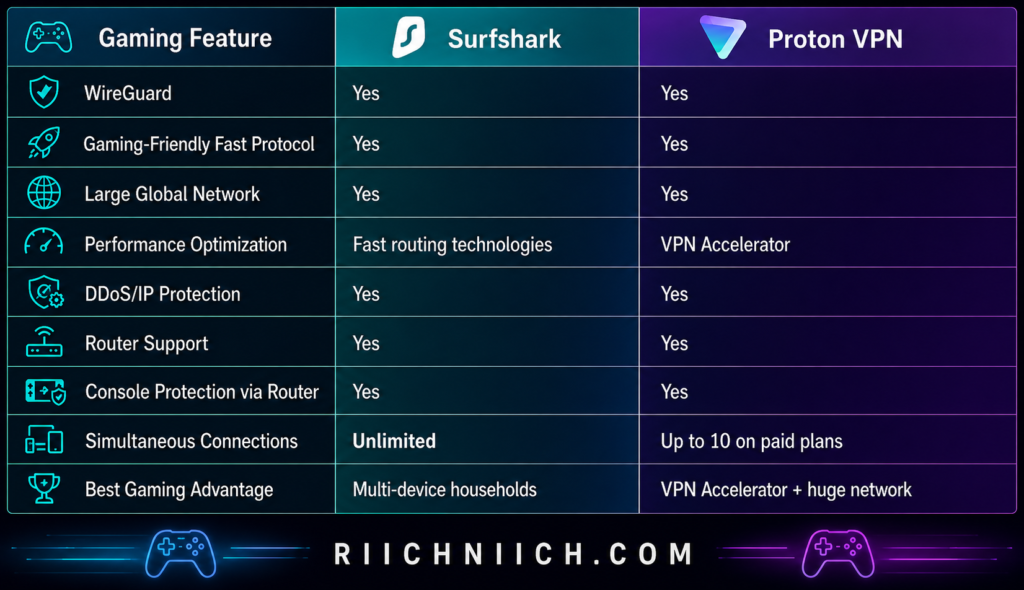
Surfshark vs ProtonVPN: Which Is Better for Gaming?
For gaming, Surfshark wins by a narrow margin.
Proton VPN is an excellent performer. Its combination of WireGuard, VPN Accelerator, high-capacity servers, and enormous server coverage gives gamers a strong platform—particularly when finding an efficient route over longer distances.
But Surfshark’s combination of WireGuard, extensive server coverage, unlimited simultaneous connections, router support, and IP-address protection makes it the more practical purchase for a gaming household.
Gaming Winner: Surfshark
If you’re a single competitive gamer, the real-world winner may simply be whichever provider gives you the lowest ping to the games you play. Your location and the location of the game’s servers can matter more than the VPN brand.
But for a buyer comparing the complete gaming package in Surfshark vs ProtonVPN, we would choose Surfshark, especially if you have multiple gamers or gaming devices sharing the same household.
Surfshark vs ProtonVPN: Apps and Ease of Use
A VPN can have excellent privacy and security technology, but that doesn’t mean much if the app is frustrating to use. For most buyers, you should be able to install the VPN, choose a location, connect, and get on with your day without digging through complicated settings.
Fortunately, both services perform well here. In Surfshark vs ProtonVPN, Surfshark provides a clean, beginner-friendly experience with broad device support, while Proton VPN combines an approachable interface with more visible control for users who want to customize their connection.
For the average buyer—especially someone purchasing their first VPN—Surfshark gets our slight edge for ease of use.
Surfshark Keeps the Basics Simple
Surfshark is designed around a straightforward process:
Install the app → sign in → choose a location → connect.
You don’t have to configure encryption protocols or understand VPN terminology before getting protected. Surfshark says users can install its app and connect to a VPN within a single click.
Its apps are available across the major platforms most buyers are likely to use, including Windows, macOS, Linux, Android, iOS, Chromebook, Fire TV, Android TV, and Apple TV/tvOS. Surfshark also provides browser extensions for Chrome, Firefox, and Edge.
That makes it relatively easy to move from your laptop to your phone or television without learning an entirely different service.
Surfshark also organizes more advanced tools such as CleanWeb, Bypasser, Rotating IP, and MultiHop within its ecosystem rather than requiring ordinary users to manually configure them. Feature availability does vary somewhat by operating system, so you should check your specific device if one particular feature is important to your purchase.
Proton VPN Is Also Very Beginner-Friendly
Proton VPN may have a reputation for attracting privacy enthusiasts, but its basic app experience isn’t limited to technical users.
Its Quick Connect function allows you to open the app and connect automatically without manually selecting a server. Proton describes the process simply: open the app and tap Quick Connect to connect to the best server for your location.
If that’s all you want from your VPN, that’s essentially all you have to do.
But Proton VPN also makes it relatively easy to go deeper.
You can manually select locations and access more advanced capabilities such as Secure Core, split tunneling, NetShield, different VPN protocols, and port forwarding where those features are supported. The availability of some features varies by operating system.
That gives Proton VPN an appealing balance:
Beginners can keep things simple. Advanced users can dig deeper.
Both Services Cover the Major Devices
Device compatibility shouldn’t be a major obstacle with either VPN.
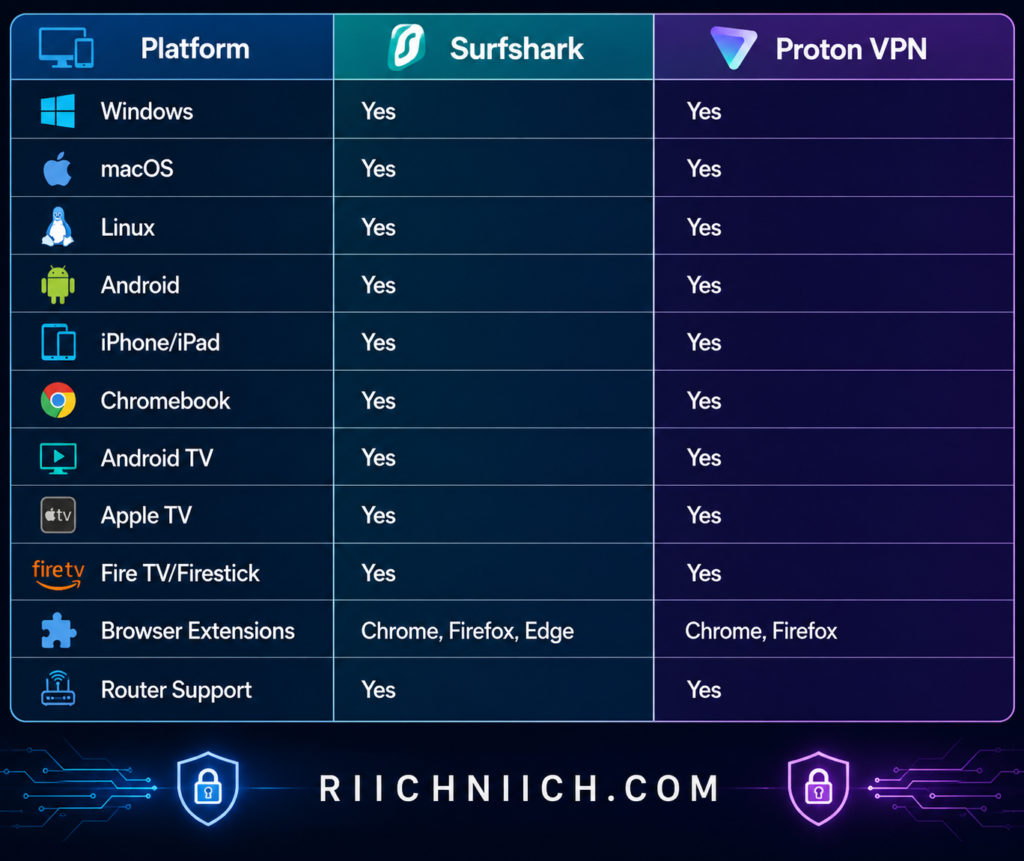
Proton VPN officially supports Windows, macOS, Linux, Android, Android TV, iOS and iPadOS, Chromebook, Apple TV, Chrome, and Firefox, among other configurations.
Surfshark similarly covers the major desktop, mobile, browser, and television platforms.
For most buyers researching Surfshark vs ProtonVPN for beginners, either provider should cover the devices you already own.
Surfshark Has the Easier Device-Limit Experience
There’s one usability advantage that has nothing to do with interface design:
Surfshark allows unlimited simultaneous connections.
You can install Surfshark on an unlimited number of devices and connect multiple devices simultaneously under one subscription. Surfshark specifically positions this as suitable for households sharing one account.
Proton VPN’s paid plans allow up to 10 simultaneous devices or browser connections.
Ten connections will be plenty for many people. But unlimited connections remove one more thing you have to think about.
You can install Surfshark on your laptop, desktop, phone, tablet, TV, and other compatible devices without keeping track of whether you’ve reached a connection limit.
For families, that simplicity is a genuine advantage.
Browser Extensions Are Convenient, but Know the Difference
Both companies also offer browser-based options, although the coverage differs.
Surfshark provides extensions for Chrome, Firefox, and Edge, while Proton VPN provides extensions for Chrome and Firefox.
A browser extension can be useful if you only want to protect browsing traffic rather than your entire device.
But buyers should understand the distinction.
Surfshark explains that its browser extension protects browser traffic only, whereas installing the full VPN application protects the entire device.
For everyday privacy, we would generally install the full VPN app unless you specifically need browser-only protection.
Proton VPN Has an Important Transparency Advantage
Ease of use isn’t only about how an application looks.
It’s also about whether you trust the software you’re installing.
Proton VPN has made its apps open source, allowing researchers and technically knowledgeable users to inspect the code. Proton also publishes information about independent security audits of its software.
The average buyer will probably never inspect a line of source code.
But you don’t have to.
The value comes from allowing independent researchers to scrutinize the applications that millions of people trust with their internet traffic.
This doesn’t necessarily make Proton VPN easier to operate, but it does give privacy-conscious buyers another reason to feel comfortable installing its apps.
Router Setup Requires More Work
Both VPNs can also be installed on compatible routers, but we wouldn’t describe router configuration as beginner-friendly in the same way as installing a phone or desktop app.
Router compatibility varies depending on the model and firmware.
Surfshark explicitly notes that many ISP-provided routers and certain consumer routers do not support the VPN protocols required for direct configuration.
Proton VPN similarly supports a range of compatible router platforms, including OpenWRT, AsusWRT, DD-WRT, pfSense, Tomato, and others.
Router installation becomes useful when you want VPN protection for devices that cannot run a VPN app directly. Once configured, devices connecting through that router can have their traffic protected without installing separate VPN software on each one.
For most buyers, however, we recommend starting with the regular apps and only moving to router configuration if you actually need it.
Which VPN Is Easier for Beginners?
This is another close category in Surfshark vs ProtonVPN.
Proton VPN deserves credit for making an advanced privacy service approachable. Quick Connect lets beginners avoid complicated settings, while advanced controls remain available when they want them.
But Surfshark gets the slight overall win for apps and ease of use.
Its combination of a straightforward interface, wide platform support, browser extensions for three major browsers, and unlimited simultaneous connections makes it particularly easy to deploy throughout an entire household.
Apps and Ease of Use Winner: Surfshark
If you’re a privacy enthusiast who enjoys having more advanced controls available, Proton VPN’s apps are excellent and its open-source approach is a meaningful advantage.
But if you’re buying your first VPN and simply want something you can install across your devices without much thought, Surfshark is our recommendation.
That makes Surfshark the better choice for beginners in this part of Surfshark vs ProtonVPN, while Proton VPN remains one of the strongest alternatives for buyers who want simplicity without sacrificing access to more advanced privacy controls.
Surfshark vs ProtonVPN: Device Limits and Simultaneous Connections
Device limits can easily become a deciding factor in Surfshark vs ProtonVPN, especially if you’re buying a VPN for more than one person. Phones, laptops, tablets, smart TVs, work computers, and streaming devices can add up surprisingly quickly.
This is one category where the difference is clear: Surfshark allows unlimited simultaneous VPN connections on its regular paid plans, while Proton VPN Plus supports up to 10 devices at the same time. Proton Free is limited to one simultaneous device.
For an individual, Proton VPN’s 10-device allowance may be more than enough. For a large household or anyone with lots of connected devices, Surfshark has the stronger value proposition.
Surfshark Gives You Unlimited Simultaneous Connections
One of Surfshark’s biggest selling points is simple:
There is no standard simultaneous-device limit on Surfshark Starter, One, or One+.
Surfshark says you can install its VPN app on an unlimited number of devices and use unlimited simultaneous VPN connections under one subscription. This includes compatible computers, phones, tablets, smart TVs, and other supported devices.
That creates a meaningful advantage when comparing Surfshark vs ProtonVPN unlimited devices for a household.
Imagine your home has:
2 smartphones + 2 laptops + desktop computer + tablet + Apple TV + Fire TV + work laptop + another family member’s phone
That’s already 10 devices.
Add another tablet, computer, or streaming device and you would exceed the simultaneous connection allowance of a single Proton VPN Plus account.
With Surfshark, you don’t have to count them.
Proton VPN Allows Up to 10 Devices on VPN Plus
Proton VPN takes a more traditional approach.
Proton VPN Plus supports up to 10 simultaneous VPN connections. Its supported platforms include Windows, macOS, Linux, Android, iOS and iPadOS, Chromebook, Android TV, Apple TV, Fire TV, and browsers, among others.
Ten connections is actually quite generous.
For one person with a laptop, desktop, phone, tablet, and television, you could have every device protected simultaneously and still have several connection slots remaining.
Even many couples and smaller households may never reach the limit.
The limitation becomes more relevant when several people share the same VPN subscription or when your home has a particularly large collection of connected devices.
Proton Free Has a Much Smaller Device Limit
The distinction becomes even larger if you’re considering Proton’s free VPN.
Proton Free supports only one VPN connection at a time. Proton VPN Plus increases that limit to 10.
That doesn’t necessarily make the free plan a poor choice. If you only want to protect your laptop while traveling or your phone while using public Wi-Fi, one connection may be sufficient.
But it’s an important limitation for buyers researching Surfshark vs ProtonVPN free plan options.
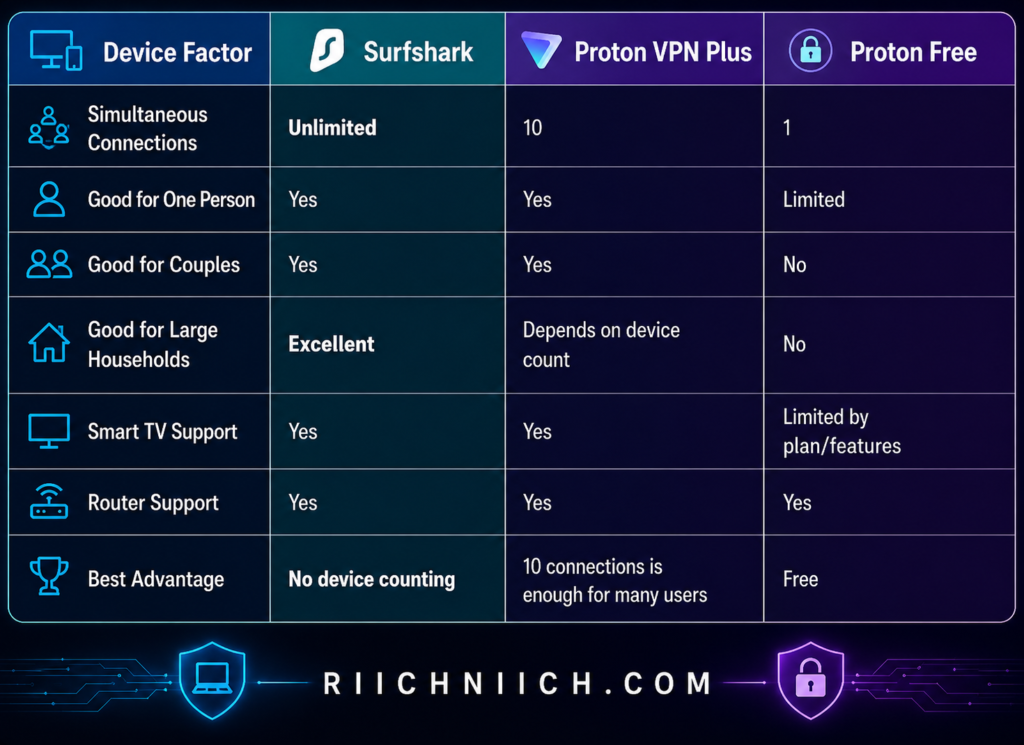
For buyers specifically comparing Surfshark vs ProtonVPN simultaneous connections, Surfshark clearly wins on the numbers.
Browser Extensions Can Count Too
There’s a detail about Proton VPN’s connection limit that buyers can easily overlook.
Proton states that each browser using its VPN browser extension counts as one of your 10 VPN connections on VPN Plus. Opening multiple tabs in the same browser doesn’t create additional connections, but using the extension simultaneously in different browsers can.
For example, you could have:
Windows PC app = 1 connection
Chrome extension = 1 connection
Firefox extension = 1 connection
iPhone = 1 connection
Android tablet = 1 connection
Those would consume five simultaneous connections.
Again, 10 will still be plenty for many users. But heavy multi-device users should understand exactly what they’re buying.
A VPN Router Can Change the Equation
There’s another option if you have many devices: install the VPN on a compatible router.
This allows the router to establish the VPN connection while compatible devices connected through that network benefit from VPN protection.
Surfshark promotes router setup as a way to protect an entire home network, including devices such as smart TVs, Xbox, PlayStation, Nintendo Switch, and other hardware that may not have conventional VPN apps.
Proton VPN has an interesting advantage here as well. Its Free plan documentation states that you can connect unlimited devices through a compatible router, even though the Free plan normally permits only one direct VPN connection at a time.
Router installation is more complicated than simply downloading an app, however, so we wouldn’t recommend choosing a VPN based solely on this workaround unless you are comfortable configuring your network.
Unlimited Connections Are Especially Valuable for Families
The device-limit difference becomes much more important when comparing Surfshark vs ProtonVPN for families.
Consider a four-person household where each person has:
Smartphone + laptop + tablet
That’s already 12 devices before counting televisions, streaming hardware, desktop computers, or other compatible equipment.
Surfshark lets the household continue adding VPN connections without worrying about hitting a conventional simultaneous-device ceiling. The company specifically states that one subscription can be shared within a household for unlimited simultaneous VPN connections.
Proton does offer a separate Proton Family plan for households. It supports up to six members, with each member receiving up to 10 VPN connections, along with Proton’s broader premium privacy services.
That’s potentially an excellent solution if you want the larger Proton ecosystem.
But if you’re comparing the standard paid VPN offerings and primarily want simple VPN protection for lots of devices, Surfshark’s approach is easier.
Does Connecting More Devices Slow Down Surfshark?
Surfshark states that it doesn’t impose bandwidth limitations based on the number of devices connected under your subscription.
However, there’s an important practical distinction.
Surfshark allowing unlimited connections doesn’t mean your home internet connection has unlimited capacity.
If five family members simultaneously stream 4K video, download large files, join video conferences, and play online games, those activities are still sharing whatever bandwidth your internet service provides.
In other words:
Surfshark doesn’t impose the device bottleneck—but your home internet connection still can.
Surfshark also maintains a fair-use policy intended to prevent abuse of its unlimited-device model, such as unauthorized reselling or unusually large-scale exploitation of the service. Normal household use is exactly the type of use the unlimited-connection feature is designed to accommodate.
Which Is Better for Multiple Devices?
For this category of Surfshark vs ProtonVPN, the winner is decisive.
Surfshark wins.
Proton VPN Plus supporting up to 10 simultaneous devices is generous and should be enough for many individuals, couples, and smaller households.
But Surfshark removes the issue almost entirely by offering unlimited simultaneous connections across its regular paid VPN plans.
Device Limits and Simultaneous Connections Winner: Surfshark
If you’re protecting only three or four devices, we wouldn’t choose Surfshark solely because its limit is higher. Proton VPN’s 10 connections are already more than you need.
But if you’re buying a VPN for a family, large household, or growing collection of devices, Surfshark provides considerably more breathing room.
That’s one of Surfshark’s strongest buyer-intent advantages in Surfshark vs ProtonVPN: you can buy one subscription without having to keep a running count of which devices are currently using it.
Surfshark vs ProtonVPN: Free Plan
The free-plan comparison is one of the easiest categories to call in Surfshark vs ProtonVPN.
Proton VPN wins because it offers a permanent free VPN plan. Surfshark does not.
That said, Surfshark does offer a 7-day free trial for eligible new customers, followed by a 30-day money-back guarantee on qualifying purchases. So the real buying decision is whether you want a VPN you can continue using without paying or whether you want to temporarily test the full capabilities of a premium service before committing.
For buyers who simply want free VPN protection with no monthly data allowance, Proton VPN is the clear choice.
Before choosing a free service solely to save money, read our Free vs Paid VPN comparison to understand what you may gain—or give up—by skipping a premium VPN.
What Do You Get With Proton VPN Free?
Proton VPN’s free plan is unusually generous because it doesn’t impose a monthly data allowance.
According to Proton, its Free plan includes:
- Unlimited data
- No artificial speed limits
- No advertisements
- One simultaneous VPN connection
- Servers in 10 countries
- A strict audited no-logs policy
- Strong encryption
- Kill switch/Always-on VPN protection
- DNS leak protection
- IPv6 leak prevention or full IPv6 support, depending on platform
Proton says the free service is supported by revenue from its paying customers rather than advertising.
That last point is particularly important.
“Free” VPNs can involve major tradeoffs. With Proton VPN Free, you aren’t getting a short trial that suddenly stops working after seven days or a plan that gives you only a few gigabytes each month.
Proton says the service is free indefinitely with no data or time limit.

Proton VPN Free Still Has Important Limitations
There is a catch—but it’s not a hidden fee.
Proton reserves many of its premium capabilities for paying customers.
Free users currently have access to servers in 10 countries: the Netherlands, Japan, Romania, Poland, Norway, Switzerland, Singapore, Mexico, Canada, and the United States. Proton automatically connects free users to an available free server, and manual server changes are subject to restrictions and cooldown periods.
Compare that with Proton VPN Plus, which unlocks its much larger premium server network along with features such as streaming support, P2P file sharing, Secure Core, NetShield, and higher-end server options.
The Free plan also allows only one simultaneous VPN connection.
That makes Proton Free excellent for someone who wants to protect a laptop or phone without paying, but considerably less practical for a household that wants several devices connected simultaneously.
Proton VPN Free Isn’t the Best Choice for Streaming
Streaming is another limitation buyers should understand.
Proton does not prevent Free users from attempting to use streaming services, but its premium plans are where it provides dedicated streaming support. Proton specifically says you’ll need a paid plan for guaranteed support for services such as Netflix, Disney+, and Amazon Prime Video.
That means we would not choose Proton Free primarily because you want a free Netflix VPN.
The better use case is straightforward:
Private everyday browsing without paying for a VPN.
If streaming, P2P, advanced security features, a much larger server selection, or multiple simultaneous connections are important, Proton VPN Plus becomes the more appropriate comparison with Surfshark.
Surfshark Doesn’t Have a Permanent Free Plan
Surfshark takes a completely different approach.
There is no permanent Surfshark Free tier comparable to Proton Free. Instead, Surfshark lets eligible new customers try the premium service for seven days at no cost.
As of August 2026, Surfshark says its website trial is available on eligible 12- and 24-month plans when using supported payment methods. During the trial, you can use Surfshark VPN on up to three devices; after becoming a paid subscriber, the normal unlimited simultaneous-connection benefit applies.
This actually gives Surfshark one advantage over Proton Free:
You’re testing the premium VPN rather than a limited free tier.
You can evaluate the service you would actually be paying for before deciding whether it’s worth keeping.
Surfshark Also Has a 30-Day Money-Back Guarantee
After the trial, eligible Surfshark purchases are also covered by a 30-day money-back guarantee.
Surfshark says qualifying customers who purchased through its website can request a full refund within 30 days of their initial purchase, subject to its refund conditions and exclusions.
Don’t confuse that with a free plan.
You’re paying for the subscription and then relying on the refund policy if you decide not to keep it. That’s fundamentally different from Proton Free, where you can continue using the VPN without ever purchasing Proton VPN Plus.
Surfshark vs ProtonVPN Free Plan Comparison

The important distinction in Surfshark vs ProtonVPN free plan is therefore trial versus permanent service.
Surfshark gives you a temporary opportunity to experience its premium VPN.
Proton VPN gives you a restricted version that you can continue using for free.
Is Proton VPN Free Good Enough?
For some people, yes.
If your main goal is to encrypt your internet connection while traveling, protect everyday browsing on public Wi-Fi, or hide your normal public IP address without paying a monthly subscription, Proton Free provides an unusually strong starting point.
It becomes less attractive when your requirements expand.
If you want 10 simultaneous connections, the full server network, dedicated streaming support, P2P functionality, NetShield, Secure Core, or other premium capabilities, you’ll need to move to a paid Proton VPN plan.
This creates an interesting buying path.
You can start with Proton Free and decide later whether the premium features justify paying for Proton VPN Plus.
Surfshark instead gives you a limited period to test its premium product and then requires payment if you want to continue.
Which Free Option Should You Choose?
For this part of Surfshark vs ProtonVPN, the winner is decisive:
Free Plan Winner: Proton VPN
Proton VPN provides a genuine $0 VPN with unlimited data, no ads, no artificial speed limits, and no activity logging, although you sacrifice premium features, broad server selection, and multiple simultaneous connections.
Surfshark is the better option if your goal is specifically to test a premium VPN before buying. Its seven-day trial lets eligible customers experience the paid service rather than evaluating a stripped-down free tier.
But if your budget is literally $0 and you want to keep it that way, there isn’t much debate in Surfshark vs ProtonVPN.
Choose Proton VPN Free.
If you already know you want premium features, streaming support, broader server choice, and protection across multiple devices, then skip the free-plan question entirely and compare Surfshark against Proton VPN Plus. That’s the comparison that matters when deciding which service is ultimately worth paying for.
Surfshark vs ProtonVPN: Customer Support
Customer support may not be the first thing you think about when buying a VPN, but it becomes important the moment something stops working. Connection problems, streaming errors, router setup, billing questions, and account issues can quickly turn a simple VPN into a frustrating experience.
In Surfshark vs ProtonVPN, both companies provide extensive online help centers and direct customer support. The biggest difference is accessibility: Surfshark offers 24/7 live chat and email support, while Proton VPN’s 24/7 human live chat is available to customers with a paid Proton VPN plan.
For buyers who want the easiest path to immediate help, Surfshark gets our customer-support win.
Surfshark Offers 24/7 Live Chat
Surfshark provides 24/7 customer support through live chat and email. The company describes live chat as its fastest option when you need real-time, step-by-step assistance.
That’s valuable because VPN problems often require troubleshooting rather than a simple answer.
For example, you might need help because:
- A VPN server won’t connect
- Your internet becomes slow after connecting
- A streaming service isn’t working
- You need help configuring a router
- You can’t sign in to your account
- You have a billing or refund question
Instead of submitting a ticket and waiting for an email response, you can open Surfshark’s live chat and work through the issue in real time.
Surfshark does not offer telephone support, but for VPN troubleshooting we don’t consider that a major disadvantage. Live chat allows you to copy error messages, follow technical instructions, and keep a written record of the troubleshooting process.
Image Suggestion: A photorealistic roadside assistance scene transformed into “VPN Roadside Support.” A laptop sits beside a stalled Wi-Fi router while a support technician arrives in a small service van marked “24/7 LIVE CHAT.” The technician holds a simple troubleshooting checklist while the relieved customer watches. Keep the scene focused on the laptop, router, technician, and 24/7 sign, with riichniich.com clearly visible at the bottom.
Surfshark Also Has a Large Self-Service Help Center
Sometimes you don’t need to contact anyone.
Surfshark’s Help Center currently contains more than 250 support articles covering installation, setup, connection problems, streaming issues, billing, refunds, account management, VPN protocols, features, routers, and other common questions.
That’s particularly useful if you’re setting up Surfshark on a new device and simply need instructions.
The Help Center separates information into practical categories such as Getting Started, Fix an Issue, Billing, My Account, Surfschool, and Surfshark One.
For beginners comparing Surfshark vs ProtonVPN, good documentation matters because it can solve many problems without requiring a support conversation at all.
Proton VPN Now Offers 24/7 Live Chat Too
Proton VPN’s customer support has become considerably stronger.
Proton now provides 24/7 Live Chat with its in-house Support team for everyone with a paid Proton VPN plan. You can access it after signing into your Proton account or through Proton VPN’s website while logged in.
That’s an important distinction because older comparisons may describe Proton VPN’s live-chat support as having more limited hours.
For a current Surfshark vs ProtonVPN comparison, both companies now provide round-the-clock live-chat assistance to paying VPN customers.
Proton also says its paid subscriptions include priority support, giving VPN Plus customers another reason to upgrade if they expect to need technical assistance.
Proton Free Users Have Different Support Options
This is where the difference becomes more important.
Proton’s human Live Chat is reserved for paid Proton VPN customers. Free users can still access Proton’s extensive support documentation and submit support requests, but they don’t receive the same paid-plan live-chat benefit.
Proton also introduced an AI-powered support assistant in 2026. It uses Proton’s support documentation to answer common questions and can escalate conversations to human advisors when necessary. Proton states that users are told when they are interacting with AI and can request a human advisor.
This creates an important buyer-intent distinction.
If you’re using Proton Free, you’re getting an impressive VPN without paying, but premium support is one of the benefits you give up.
If you upgrade to Proton VPN Plus, the customer-support gap between Proton VPN and Surfshark becomes much smaller.
Both Have Strong Troubleshooting Resources
The self-service side of Surfshark vs ProtonVPN is strong for both companies.

Proton’s support library covers everything from installation and streaming to advanced VPN features and troubleshooting. Its apps also include a Report an issue function on supported platforms that can send technical information to Proton’s team to help diagnose problems. Proton states that these diagnostic logs do not include your browsing history.
That can be especially useful when you’re dealing with a problem that can’t be solved by changing a simple setting.
Which Customer Support Is Better for Beginners?
If this is your first VPN, Surfshark has a small advantage.
You don’t have to think about whether your plan qualifies for human live chat. Surfshark explicitly offers 24/7 live chat and email support, along with a large library of setup and troubleshooting articles.
That creates a straightforward safety net for beginners.
Proton VPN Plus customers aren’t far behind. They receive priority support and 24/7 live chat, while Proton’s detailed documentation and in-app issue reporting can be particularly useful when troubleshooting technical problems.
So if you’re comparing Surfshark vs ProtonVPN for beginners, customer support alone shouldn’t stop you from buying either paid service.
The bigger difference appears if you’re considering Proton Free.
Surfshark vs ProtonVPN: Which Has Better Customer Support?
For customer support, Surfshark wins by a narrow margin.
Both providers now offer strong support systems, and paid Proton VPN customers have access to 24/7 live chat, priority support, extensive documentation, and technical issue reporting.
But Surfshark makes its support proposition particularly straightforward: 24/7 live chat, email support, and more than 250 self-help articles covering everything from installation to connection and streaming problems.
Customer Support Winner: Surfshark
If you’re an experienced VPN user, the difference probably won’t affect your purchasing decision.
But if you’re a beginner—or simply want to know that someone is available when your VPN suddenly stops connecting before an important trip—Surfshark’s easy access to round-the-clock assistance gives it the edge.
That makes Surfshark the better choice for customer-support accessibility in Surfshark vs ProtonVPN, although Proton VPN Plus is now close enough that support should not be a major reason to avoid either service.
Surfshark vs ProtonVPN: Which Is Better for Beginners?
If this is your first time buying a VPN, you probably don’t want to spend your first hour learning about protocols, server loads, routing configurations, and advanced privacy settings. You want to install the app, sign in, connect, and know that your internet connection is protected.
That’s why Surfshark vs ProtonVPN looks slightly different from a beginner’s perspective. Both VPNs are easy enough for first-time users, but Surfshark is our overall recommendation for beginners because it combines simple setup, one-click connections, unlimited simultaneous devices, and 24/7 customer support.
Proton VPN is also beginner-friendly—and its permanent free plan makes it particularly attractive if you want to learn how a VPN works before spending any money.
Surfshark Makes the First Setup Simple
Getting started with Surfshark doesn’t require much technical knowledge.
The basic process is:
Download the app → sign in → choose a location → connect.
Surfshark describes its app as allowing you to connect and protect your connection with a single click. It provides apps and setup instructions for Windows, macOS, Linux, Android, iOS, browsers, smart TVs, and other supported platforms.
That simplicity matters when evaluating Surfshark vs ProtonVPN for beginners.
You don’t need to understand the difference between WireGuard and OpenVPN before using Surfshark. You don’t need to manually configure DNS settings. And you don’t need to know which encryption algorithm the VPN is using.
You can let the app handle those decisions and explore the advanced settings later.

Proton VPN Is Easier Than Its Advanced Features Suggest
Proton VPN has plenty of advanced privacy features, but beginners don’t have to use them.
Its apps include Quick Connect, which automatically connects you to an appropriate nearby server. Proton describes the basic process as downloading the app, logging in, and tapping Quick Connect.
That makes the everyday experience straightforward:
Open Proton VPN → Quick Connect → protected.
Once you’re comfortable with the basics, you can start exploring features such as NetShield, Secure Core, VPN Accelerator, split tunneling, alternative routing, and different protocols.
We actually like this approach for beginners who eventually want to learn more about VPN technology.
Proton VPN can be simple when you want it to be and advanced when you’re ready for it.
Proton VPN Has the Best Way to Learn Without Paying
Proton VPN has one major beginner advantage Surfshark cannot match: Proton Free.
Instead of purchasing a subscription before you’ve even figured out whether you like using a VPN, you can start with Proton’s permanent free service.
That’s valuable if you’ve never used a VPN before.
You can learn how connecting and disconnecting works, see how websites behave while you’re connected, test performance on your internet connection, and decide whether having a VPN running regularly makes sense for you.
If protecting yourself on coffee-shop, airport, or hotel networks is one of the reasons you’re considering a VPN, read our guide, ‘Public Wi-Fi Dangers’ to see what can put your information at risk.
Surfshark doesn’t offer a permanent free plan, although eligible new customers can currently use a 7-day free trial on qualifying 12- and 24-month subscriptions. After the trial, Surfshark’s standard unlimited-device benefit applies to paid subscribers.
So there’s an important distinction:
Best beginner VPN to try without paying: Proton VPN
Best beginner VPN if you’re ready to purchase: Surfshark
Surfshark Removes Device Counting
Another reason we prefer Surfshark for first-time buyers is that you don’t have to learn or manage a device limit.
Surfshark Starter, One, and One+ support unlimited simultaneous VPN connections. You can install the VPN across compatible phones, computers, tablets, televisions, and other devices without constantly checking how many connections you’re using.
Proton VPN Plus allows up to 10 simultaneous devices or browser connections.
Ten is generous and will be plenty for many beginners.
But Surfshark’s approach is simpler.
Buy one subscription. Install it on your devices. Stop counting.
That becomes especially useful if you’re introducing a VPN to an entire household rather than buying it only for yourself.
Both Apps Let You Grow Into More Advanced Features
Beginner-friendly shouldn’t mean overly basic.
You may initially buy a VPN because you want additional privacy on public Wi-Fi. Six months later, you might start caring about tracker blocking, split tunneling, multi-hop connections, dedicated IP addresses, streaming, or more advanced privacy controls.
Both services give you room to grow.
Surfshark gives buyers access to features such as CleanWeb, Bypasser, Dynamic MultiHop, Rotating IP, and Alternative ID, depending on the app and subscription.
Proton VPN offers features such as NetShield, Secure Core, VPN Accelerator, split tunneling, port forwarding on supported platforms, and specialized servers.
The important point for a beginner is that you don’t have to use all of these features immediately.
Start with the connect button.
Learn the rest when you actually need it.
Surfshark Has the Better Safety Net for New Users
Beginners are also more likely to need help.
Maybe the VPN won’t connect. Perhaps your streaming service suddenly gives you an error. Or maybe you want to install the VPN on your television and aren’t sure where to start.
Surfshark provides 24/7 live chat and email support, along with a Help Center containing more than 250 articles covering installation, troubleshooting, billing, account management, and VPN features.
Proton VPN also has extensive setup documentation and support resources. Paid Proton VPN customers currently receive 24/7 human Live Chat, while Proton also provides a support-request system.
So both are well-supported choices.
But combined with Surfshark’s straightforward setup and unlimited connections, the overall experience feels particularly forgiving for someone buying a VPN for the first time.
Beginner-Friendly Comparison

Which Should a First-Time VPN Buyer Choose?
For a first-time buyer comparing Surfshark vs ProtonVPN, we recommend Surfshark.
The reason isn’t that Proton VPN is difficult to use—it isn’t. Proton’s Quick Connect feature makes basic operation remarkably straightforward, and its free plan arguably provides the easiest risk-free introduction to VPNs.
But Surfshark removes several small complications that beginners don’t need.
You get simple apps, one-click connections, unlimited simultaneous devices, broad platform support, and 24/7 assistance if something goes wrong.
Best for Beginners: Surfshark
There is one important exception.
If you’ve never used a VPN and aren’t sure you’re ready to pay for one, start with Proton VPN Free. It gives you an opportunity to learn how VPN protection fits into your everyday browsing before committing to a premium subscription.
But if you’ve already decided you want to buy a VPN and simply want the easier all-around choice, Surfshark is our pick for beginners in Surfshark vs ProtonVPN.
Surfshark vs ProtonVPN: Which Is Better for Families?
Families often need more from a VPN than a single user does. One household can easily have several smartphones, laptops, tablets, smart TVs, gaming consoles, and other connected devices competing for protection.
That makes Surfshark vs ProtonVPN especially interesting for families. Both services can protect multiple devices and support the major platforms, but their approaches are different.
For most families looking primarily for a VPN, Surfshark is our pick. Its biggest advantage is simple: one standard paid subscription supports unlimited simultaneous VPN connections, so you don’t have to count devices as your household grows. Surfshark explicitly allows a subscription to be shared with family members in the same household.
Proton VPN is still an excellent family option, particularly if your household wants more than a VPN. Proton offers a dedicated Proton Family plan that brings its broader privacy ecosystem to as many as six people.
Surfshark Makes Multi-Device Protection Simple
Surfshark’s strongest family advantage is its unlimited simultaneous connections.
Surfshark Starter, One, and One+ allow an unlimited number of devices to connect to the VPN simultaneously under one subscription. Supported devices include Windows and Mac computers, Android and iOS phones and tablets, Apple TV, Fire TV, Android TV, browsers, and compatible routers.
Think about a four-person household:
4 smartphones + 3 laptops + 2 tablets + 2 smart TVs + gaming devices
You’ve already passed 10 devices.
With Surfshark, there is no standard simultaneous-connection ceiling to manage. You can keep adding compatible devices without purchasing extra VPN subscriptions simply because your household owns more technology.
For buyers researching Surfshark vs ProtonVPN for families, that’s a substantial convenience and value advantage.
Surfshark Has Added a Family-Focused Content Blocker
Surfshark now offers another feature that makes this comparison more interesting for households: a web content blocker.
The feature allows you to block selected categories of websites on family devices and lock those settings using two-factor authentication. Surfshark says it works across an unlimited number of supported Windows, macOS, iOS, and Android devices.
Importantly, Surfshark distinguishes this from traditional parental-control software. The feature is designed to restrict selected website categories without monitoring the person’s browsing activity.
That could be useful for parents who want basic content restrictions without turning the VPN into a surveillance tool.
However, we would not treat Surfshark as a full parental-control platform. Parents looking for detailed screen-time schedules, app-by-app controls, location tracking, or extensive child activity reports may still need dedicated parental-control tools.
Because a VPN does not replace device-level malware protection, families building a more complete security setup should also compare the Best Antivirus for Families.
For a privacy-focused household, though, Surfshark’s approach is an interesting extra.
Surfshark One Adds More Household Security
Families who want more than a VPN should also look at Surfshark One.
Surfshark One combines its VPN with additional security tools including Antivirus, Alert, Search, Alternative ID, and CleanWeb. Surfshark One+ adds Incogni data-removal capabilities on top of the package.
This is where Surfshark becomes more than a way to change your IP address.
For example, Surfshark Antivirus provides malware protection on supported Windows, macOS, and Android devices, although the Antivirus component itself is limited to five devices rather than inheriting the VPN’s unlimited-device allowance.
Surfshark has also added webcam protection for supported Windows and macOS devices, allowing users to control which applications can access the camera.
Those additions could make Surfshark One worth considering if your family wants to consolidate several everyday cybersecurity tools into one subscription.
Proton VPN Plus Can Still Cover Many Families
Proton VPN Plus supports up to 10 simultaneous connections.
For many families, that’s plenty.
A household with two parents and one or two children may be able to keep its most important phones, laptops, tablets, and televisions connected without ever reaching the limit.
Proton supports major platforms including Windows, macOS, Linux, Android, iOS and iPadOS, Chromebook, Fire TV, Android TV, and Apple TV.
So device compatibility isn’t the issue.
The main difference in Surfshark vs ProtonVPN is simply that Surfshark removes the device-counting problem, while a standard Proton VPN Plus subscription caps simultaneous connections at 10.
Proton Family Changes the Comparison
There is an important exception: Proton Family.
Proton Family isn’t merely a VPN subscription with a higher device limit. It is a broader privacy plan designed for up to six people.
Each family member receives the premium features included with Proton Unlimited, including Proton VPN, Proton Mail, Proton Pass, Proton Drive, and Proton Calendar. Proton currently provides the Family plan with 3 TB of shared storage.
And here’s the important VPN detail:
Each Proton Family member gets up to 10 simultaneous VPN connections.
With six members, that’s potentially up to 60 simultaneous VPN connections across the family, rather than 10 connections shared by everyone.
That completely changes the buying decision for certain households.
If you only want a VPN, Surfshark’s unlimited connections are simpler.
But if your family also wants encrypted email, cloud storage, password management, calendar tools, and separate accounts for family members, Proton Family becomes much more compelling.
Separate Accounts Can Matter for Families
This is one advantage of Proton Family that shouldn’t be overlooked.
With Surfshark’s standard household-sharing model, family members can use the same Surfshark subscription across their devices.
Proton Family is structured around individual family-member accounts.
That distinction becomes more valuable as children get older or when adults in the household want separate private email, password-manager vaults, cloud storage, and other personal services rather than sharing one set of credentials.
So when comparing Surfshark vs ProtonVPN for families, ask yourself what you’re actually buying:
Do I want one VPN that covers practically everything in the house?
Or:
Do I want a larger privacy ecosystem with individual accounts for family members?
Those are different purchases.
What About Streaming for the Family?
Surfshark gets another advantage if your household streams heavily.
Because Surfshark allows unlimited simultaneous VPN connections, several people can keep compatible televisions, phones, tablets, and computers connected without consuming a fixed number of VPN slots.
Proton VPN Plus allows up to 10 simultaneous connections and supports major streaming devices such as Apple TV, Android TV, Fire TV, computers, phones, and tablets.
Again, 10 connections will be enough for many households.
But Surfshark’s unlimited policy means you don’t have to think about it.
Family Comparison
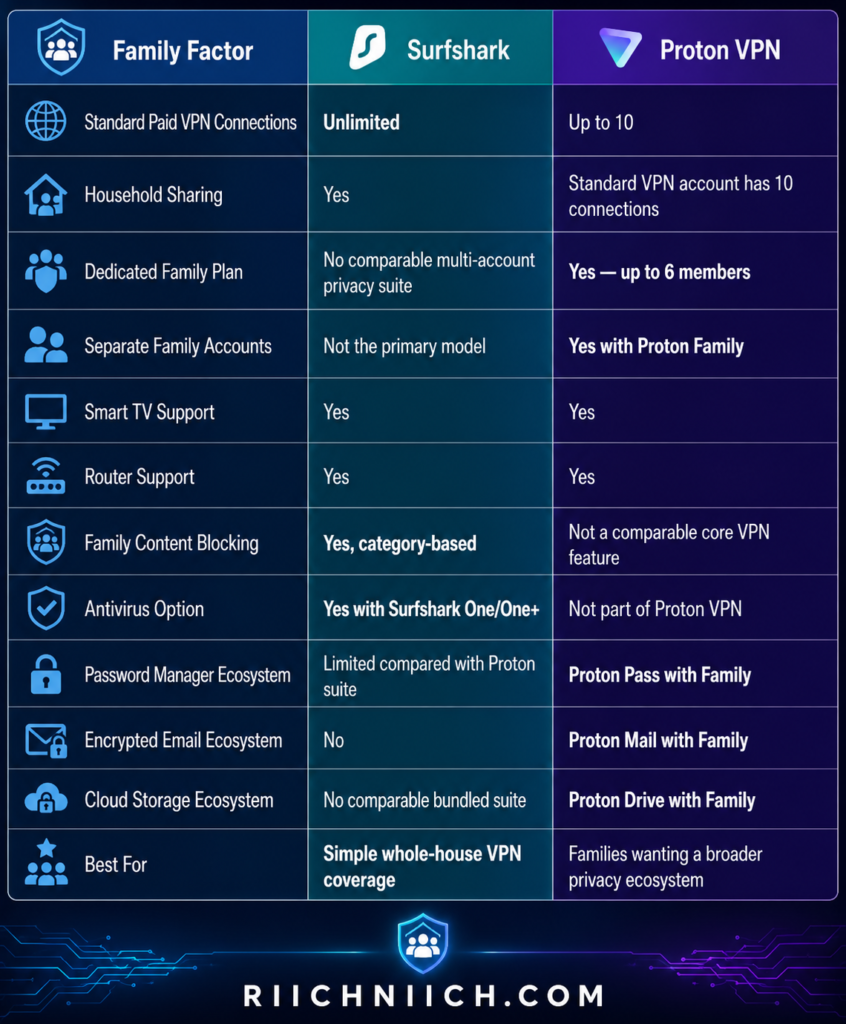
Which One Should Families Buy?
For most households comparing Surfshark vs ProtonVPN, we recommend Surfshark.
The reason is practicality.
You can buy one Surfshark subscription, install the VPN across the household’s compatible devices, and stop worrying about simultaneous-connection limits. Add its web content blocker and the optional Surfshark One security tools, and it becomes an especially attractive package for an everyday family.
Best for Families: Surfshark
However, Proton VPN deserves an important exception.
If you’re looking for more than a family VPN and want separate accounts, encrypted email, password management, cloud storage, and VPN protection for up to six people, we would seriously consider Proton Family instead. Each member receiving up to 10 VPN connections makes it a much more powerful family proposition than simply comparing Surfshark’s unlimited connections with Proton VPN Plus’s standard 10-device limit.
So the buying decision in Surfshark vs ProtonVPN is fairly straightforward:
Choose Surfshark if you want the simplest and most flexible VPN for a household full of devices.
Choose Proton Family if you want to build a broader privacy ecosystem around every member of your family.
Surfshark vs ProtonVPN: Which Is Better for Privacy?
If privacy is the main reason you’re buying a VPN, this is one of the most important decisions in Surfshark vs ProtonVPN.
Both providers have strong privacy credentials. Surfshark combines a verified no-logs policy with RAM-only servers and an increasingly transparent approach to government requests. Proton VPN combines a no-logs policy with Swiss jurisdiction, open-source apps, independent audits, Secure Core, and extensive transparency.
For buyers who put privacy above price, streaming, device limits, and convenience, our recommendation is Proton VPN.
For a broader look at what separates privacy-focused VPNs from the rest, see our guide to the Best VPN for Privacy.
Both VPNs Have Strong No-Logs Policies
A VPN provider can potentially occupy a privileged position between your device and the internet, so a no-logs policy is one of the first things we look for.
Surfshark says it does not collect online-activity information such as visited IP addresses, browsing history, bandwidth usage, network traffic, or connection timestamps. Some connection information needed to operate the service is temporarily retained and automatically deleted within 15 minutes after the session ends.
Surfshark’s no-logs claims have also been independently verified by Deloitte in 2023 and 2025.
Proton VPN similarly says it does not log websites visited, traffic content, IP addresses, session lengths, or location-based information associated with VPN activity. Its no-logs policy has undergone independent verification as well.
So if you’re comparing Surfshark vs ProtonVPN for privacy, both start from a strong position.
Proton VPN Has the Jurisdiction Advantage
One of Proton VPN’s biggest privacy selling points is its location.
Proton VPN is headquartered in Switzerland, which is outside U.S. and EU jurisdiction and is not part of the 5 Eyes, 9 Eyes, or 14 Eyes intelligence-sharing arrangements. Proton says Swiss law does not require its VPN service to retain connection logs.
Its July 2026 transparency report adds an important layer of context: foreign authorities cannot simply compel Proton VPN directly. Requests must receive approval through the Swiss legal system before Proton can be required to respond.
Surfshark is headquartered in the Netherlands. Surfshark states that Dutch jurisdiction does not require it to store or report users’ VPN activity.
We wouldn’t reject Surfshark merely because it is based in the Netherlands. Actual logging practices, technical safeguards, audits, and legal obligations matter more than simply looking at a country on a map.
But when comparing the complete privacy packages, Proton VPN’s Swiss jurisdiction is still a meaningful advantage.
Proton VPN’s Open-Source Apps Increase Transparency
This is another area where Proton VPN separates itself.
All Proton VPN apps are open source. That means their source code is publicly available for inspection. Proton also commissions professional independent security audits of its applications and publishes audit information.
Most VPN customers will never inspect source code themselves.
That’s not the point.
Open-source software allows independent security researchers and other experts to examine what an application is actually doing rather than requiring everyone to trust the provider’s marketing claims.
For a service you’re trusting with your internet traffic, that level of transparency carries weight.
This is one of the strongest reasons we favor Proton VPN when buyers ask whether Surfshark vs ProtonVPN is better specifically for privacy.
Surfshark’s RAM-Only Network Is a Major Strength
Surfshark has an important technical privacy advantage of its own: its server network operates on 100% RAM-only infrastructure.
Unlike traditional disk-based servers, RAM requires power to retain information. Surfshark says information stored on its servers is wiped when they reboot or power down.
Combine that with Surfshark’s independently verified no-logs policy and you have a strong privacy architecture.
Surfshark has also provided useful real-world evidence through its transparency reporting. In April 2026, Surfshark disclosed that it complied with a legally binding warrant from the Amsterdam District Court. According to Surfshark, it could provide confirmation that the account existed and payment-related information, but could not provide the user’s online activity because it did not have that information stored.
That’s an important distinction for buyers.
A privacy policy tells you what a company says it does.
An audit gives you independent verification.
A real legal request can provide another test of what information the company actually has available.

Secure Core Gives High-Privacy Users Another Option
Proton VPN’s Secure Core is another reason privacy-focused buyers may prefer it.
A normal VPN connection generally looks like:
Your device → VPN server → Internet
Secure Core adds another protected stage:
Your device → Secure Core server → Exit VPN server → Internet
Proton operates Secure Core infrastructure in Switzerland, Iceland, and Sweden and says it owns and provisions these hardened servers itself.
The goal is to make sophisticated correlation and network-monitoring attacks more difficult. Even if someone monitors or compromises the final VPN server, the connection traces back toward Proton’s Secure Core infrastructure rather than directly toward your original IP address.
For everyday Netflix viewing or casual web browsing, you probably don’t need Secure Core running constantly. The additional routing can also reduce performance.
But for users with a higher privacy requirement, it’s an impressive option to have.
Surfshark Is Still More Than Private Enough for Most Buyers
It’s important not to turn this category win into an exaggerated conclusion.
Choosing Proton VPN for privacy does not mean Surfshark is an untrustworthy VPN.
Surfshark gives buyers:
An independently verified no-logs policy
RAM-only servers
A published transparency report
MultiHop connections
IP rotation
Private DNS and leak protection
A jurisdiction that Surfshark says does not require storage of VPN activity
Its transparency report and recent independent audits provide additional evidence supporting those privacy claims.
For an ordinary household that wants to keep browsing more private, secure public Wi-Fi connections, mask its public IP address, and protect many devices, Surfshark remains an excellent choice.
The difference becomes more significant when privacy itself is the primary purchasing criterion.
Privacy-Focused Comparison
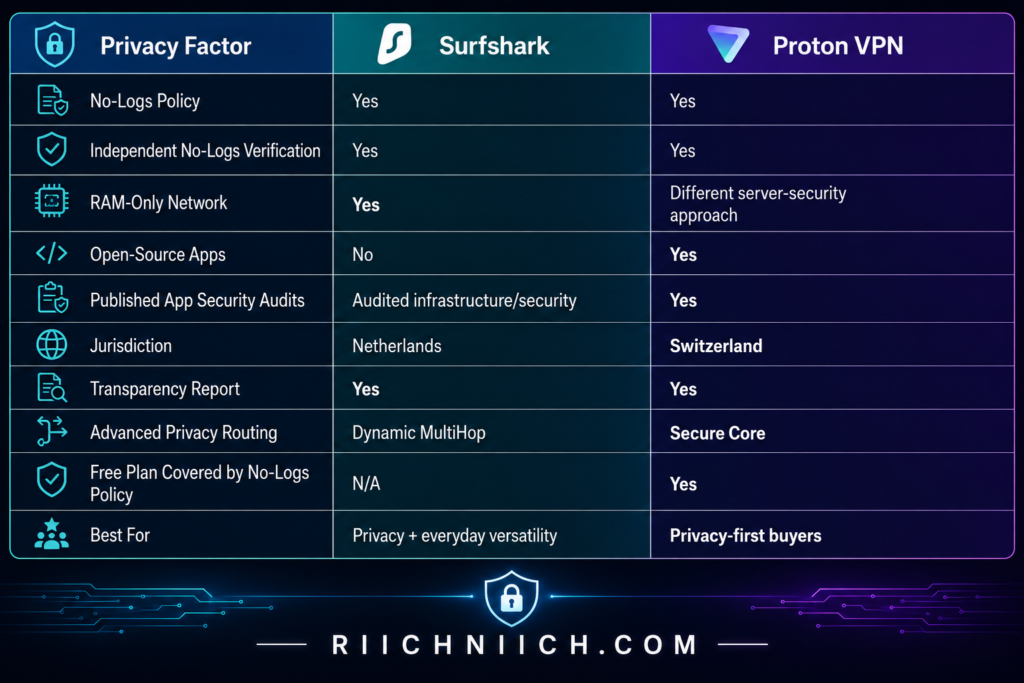
Which Should Privacy-Focused Buyers Choose?
For privacy specifically, Proton VPN wins.
Surfshark has done many of the things we want to see from a trustworthy VPN provider: independent no-logs verification, RAM-only servers, transparency reporting, and strong technical safeguards.
But Proton VPN stacks several privacy advantages together: Swiss jurisdiction, a strict no-logs policy, independent verification, open-source apps, published audits, Secure Core infrastructure, full-disk encryption across its servers, and detailed transparency reporting.
Best for Privacy: Proton VPN
If you’re buying a VPN primarily for streaming, unlimited devices, family use, and overall everyday value, Surfshark may still be the better purchase.
But if your number-one question is simply, “Which one would I buy if privacy mattered more than everything else?”, we would choose Proton VPN.
That’s one of the clearest category wins in Surfshark vs ProtonVPN: 👉 If privacy is the reason you’re buying a VPN, check Proton VPN’s current plans here and see whether VPN Plus is worth the upgrade for you.
Surfshark vs ProtonVPN: 💵 Which Gives You Better Value for Money?
Value for money isn’t simply about choosing the VPN with the lowest advertised monthly price. The better question is: What are you actually getting for the money you spend?
That’s where Surfshark vs ProtonVPN becomes interesting. Proton VPN offers an exceptional privacy-focused product and one of the strongest permanent free VPN plans available. Surfshark, however, packs a lot into its paid subscriptions, particularly when you consider unlimited simultaneous connections, strong streaming support, a large server network, Alternative ID, and the option to add antivirus, breach monitoring, private search, and data removal through higher-tier plans.
For most buyers looking for the strongest combination of price, features, and multi-device coverage, Surfshark gives you better overall value for money.
Surfshark’s Long-Term Plans Are Hard to Ignore
Surfshark becomes particularly competitive when you’re willing to purchase a longer subscription.
Its current lineup consists of three main tiers:
Surfshark Starter — VPN plus Alternative ID and core VPN/privacy features.
Surfshark One — adds tools including Antivirus, Alert, and Search.
Surfshark One+ — adds Incogni data removal to the broader cybersecurity package.
Surfshark sells these plans with 1-month, 12-month, and 24-month subscription options, with the biggest introductory discounts typically attached to longer commitments.
Current promotional prices can change, so we wouldn’t choose Surfshark based on one temporary sale price. Instead, look at the total amount charged upfront, introductory term, renewal price, and exactly which features are included before purchasing.
That is especially important because the eye-catching monthly figure on a long-term VPN plan is usually the effective monthly cost of an upfront subscription, not necessarily a month-to-month billing arrangement.

Unlimited Devices Increase Surfshark’s Value
This is one of the biggest reasons Surfshark wins the value category.
A regular Surfshark subscription supports unlimited simultaneous VPN connections. Surfshark Starter, One, and One+ all include this benefit.
That means the value of your subscription can increase considerably as you add devices.
Suppose you have:
2 phones + 2 laptops + tablet + desktop + smart TV + Fire TV + work laptop + gaming devices
You’re not purchasing another VPN subscription because you crossed a device threshold.
Proton VPN Plus allows up to 10 simultaneous connections, which is generous and more than enough for many individuals.
But for families and larger households, Surfshark’s unlimited-device policy makes the cost per protected device potentially much lower.
That’s a major consideration when comparing Surfshark vs ProtonVPN price and value rather than simply looking at the advertised monthly rate.
Surfshark One Can Be a Better Deal Than Buying Separate Security Tools
Surfshark’s value proposition gets even stronger if you need more than a VPN.
Surfshark One combines the VPN with Antivirus, Alert, Search, Alternative ID, and CleanWeb, while One+ adds Incogni for automated personal-data removal.
This matters because someone building a broader cybersecurity setup might otherwise purchase several services separately.
For example, you might pay independently for a:
VPN + antivirus + breach-monitoring tool + private search service + data-removal service
Bundling doesn’t automatically make something a good deal. If you don’t need the additional features, there’s little reason to pay for them.
But if you were already planning to purchase several of those tools, Surfshark One or One+ can potentially provide substantially more value than evaluating the VPN price by itself.
This is where buyer intent matters.
Don’t ask, “Which plan gives me the most features?”
Ask:
“Which plan includes features I will actually use?”
Proton VPN Plus Gives Privacy-Focused Buyers Excellent Value
Proton VPN shouldn’t be dismissed simply because Surfshark wins this category.
Proton VPN Plus provides a substantial premium package including 20,000+ servers across 140+ countries, up to 10 simultaneous connections, NetShield, streaming support, P2P support, Secure Core, split tunneling, a kill switch, browser extensions, and advanced privacy protections.
That is a lot of VPN for the money.
More importantly, several Proton VPN features are particularly valuable to privacy-focused buyers.
Secure Core, open-source applications, Swiss jurisdiction, specialized P2P capabilities, port forwarding on supported platforms, and Proton’s broader privacy philosophy may matter more to you than getting unlimited connections.
That’s why the value winner in Surfshark vs ProtonVPN depends partly on what you consider valuable.
Surfshark emphasizes getting more practical utility from one subscription.
Proton VPN emphasizes premium privacy infrastructure and advanced VPN capabilities.
Proton Free Has Unbeatable Value at $0
There’s one situation where Proton VPN destroys the conventional price comparison:
Your budget is zero.
Proton VPN Free provides unlimited data, one VPN connection, strong encryption, kill-switch protection, DNS leak protection, and Proton’s audited no-logs policy without requiring a paid subscription.
Surfshark doesn’t offer an equivalent permanent free tier. It currently provides eligible new customers with a 7-day trial, after which a paid subscription is required if you want to continue using the service.
So there are really two value winners:
Best free value: Proton VPN
Best paid overall value: Surfshark
If you only need basic VPN protection on one device and don’t require premium streaming, P2P features, advanced servers, or multiple simultaneous connections, Proton Free could be all you need.
And you can’t beat $0 on price.

Don’t Judge Value by the Introductory Price Alone
This is particularly important when buying a VPN.
Long-term introductory deals can look extremely inexpensive when converted into a monthly figure, but the subscription may require a substantial upfront payment and renew under different pricing.
Surfshark’s own pricing page distinguishes its promotional long-term pricing from recurring pricing.
Before purchasing either service, check:
Initial payment → subscription length → extra promotional months → renewal price → cancellation terms → features included
We would rather pay slightly more for a VPN we plan to use for several years than choose something solely because its first-term promotional price is lower.
The same rule applies to Surfshark vs ProtonVPN.
Buy based on long-term usefulness, not just the biggest discount percentage on the checkout page.
Both Give You Time to Change Your Mind
Surfshark provides a 30-day money-back guarantee on qualifying initial purchases made through eligible channels. Its current policy states that recurring payments generally aren’t covered by that initial guarantee.
Surfshark also currently offers eligible new customers a seven-day trial on qualifying 12- and 24-month subscriptions.
This gives buyers an opportunity to test important things that specifications can’t predict:
Does the VPN perform well on your internet connection?
Does it work properly on your devices?
Are the servers you need fast enough?
Do you actually like the apps?
Those real-world answers can matter more than a small difference in monthly cost.
Value for Money Comparison
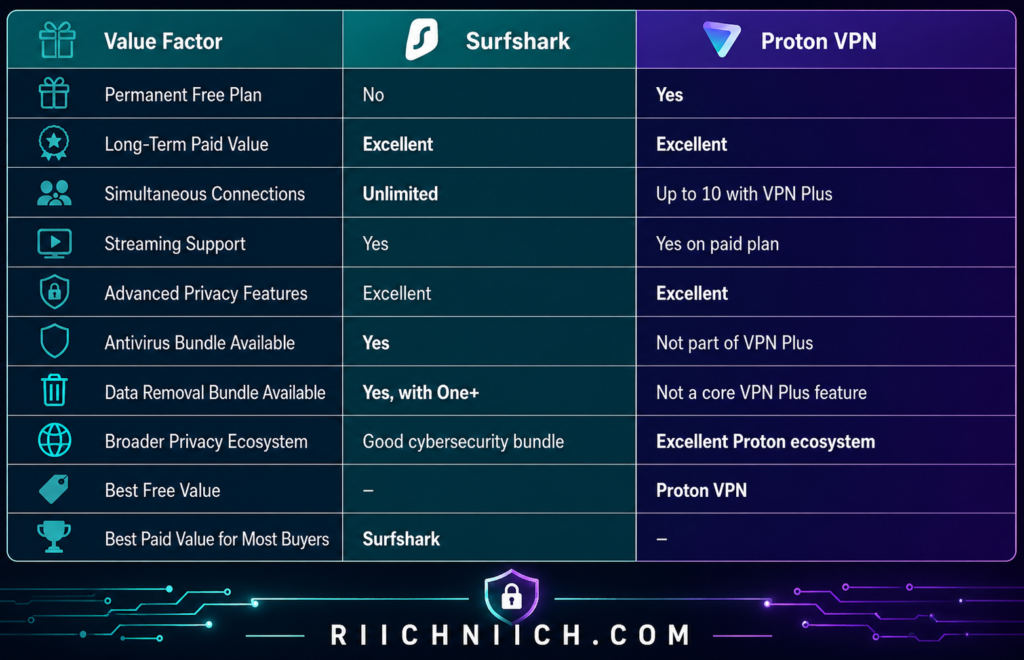
Which One Gives You More for Your Money?
For the overall value category in Surfshark vs ProtonVPN, Surfshark wins.
The biggest reason is that Surfshark stretches one subscription across unlimited devices while also providing strong VPN features and optional cybersecurity bundles.
Value for Money Winner: Surfshark
For a single privacy-focused user, Proton VPN may absolutely be worth paying for. Its premium plan includes a huge server network, Secure Core, P2P support, NetShield, up to 10 simultaneous connections, and other advanced features.
And if you don’t want to pay anything, Proton VPN Free is unquestionably the better value.
But for a buyer willing to pay for a VPN and looking for the strongest balance of price, features, streaming, unlimited device protection, family usability, and optional cybersecurity tools, we would choose Surfshark.
That’s why, when the question changes from “Which VPN is more privacy-focused?” to “Which one gives me more for the money I’m spending?”, Surfshark takes this category in Surfshark vs ProtonVPN.
Surfshark vs ProtonVPN: Pros and Cons
After comparing the major categories, the strengths and weaknesses in Surfshark vs ProtonVPN become much easier to see.
Neither VPN is the best choice for every buyer. Surfshark’s biggest strengths are unlimited simultaneous connections, ease of use, streaming, family-friendly value, and a broad collection of extra cybersecurity features. Proton VPN stands out for privacy, advanced security, its enormous server network, P2P features, open-source apps, and its permanent free plan.
So rather than asking which VPN has the longest feature list, think about which advantages actually match the way you plan to use your VPN.
Surfshark Pros
Unlimited simultaneous connections
This is one of Surfshark’s biggest advantages. You can protect compatible phones, computers, tablets, TVs, and other devices without having to manage a conventional simultaneous-device limit.
That’s especially valuable for families and households with a growing collection of connected devices.
Beginner-friendly experience
Surfshark keeps everyday VPN use straightforward. You don’t need to understand encryption protocols or advanced networking before getting started.
For someone purchasing a VPN for the first time, that’s important. You can start with the basics and explore more advanced features later.
Strong feature selection
Surfshark includes more than basic VPN protection. Its current feature set includes tools such as CleanWeb, Bypasser, Dynamic MultiHop, obfuscated connections, and Alternative ID, with additional cybersecurity capabilities available through its higher-tier subscriptions. CleanWeb, for example, can block ads, trackers, malware, and phishing attempts.
Strong option for streaming households
Surfshark combines fast protocols and global server coverage with unlimited connections, making it particularly practical when multiple people in the same household regularly stream on different devices.
Good paid value
Surfshark becomes particularly attractive when you plan to protect a lot of devices. Instead of looking only at the subscription price, consider the cost per protected device.
For a household with 15 or 20 compatible devices, unlimited connections can significantly strengthen Surfshark’s value proposition.
Large global server network
Surfshark currently advertises 4,500+ VPN servers worldwide, giving users substantial geographic coverage for everyday browsing, travel, streaming, and other uses.
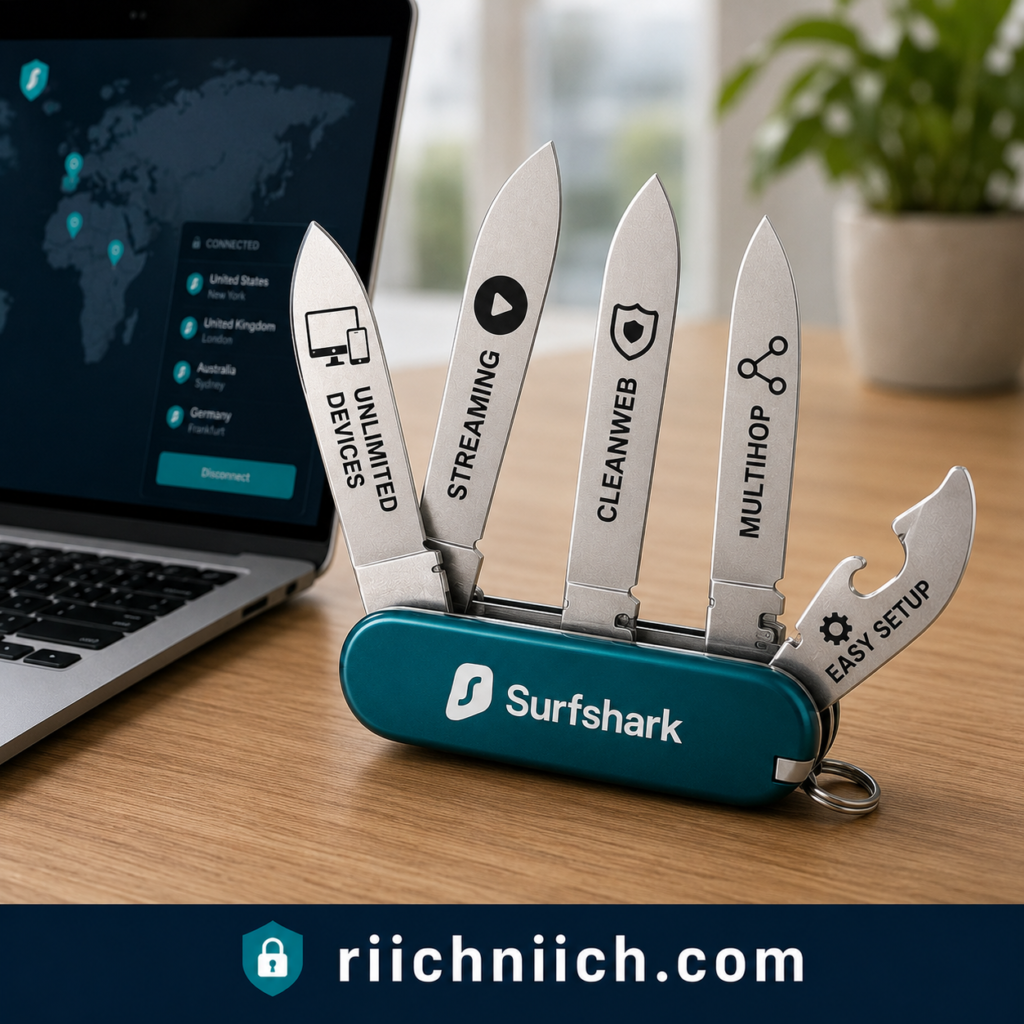
Surfshark Cons
No permanent free VPN plan
Surfshark doesn’t have an equivalent to Proton VPN Free.
That matters if you’re researching Surfshark vs ProtonVPN free plan options and don’t want to pay anything. Proton provides an unlimited-data free service, while Surfshark is ultimately a paid product.
Not our first choice for the most privacy-focused buyer
Surfshark has strong privacy protections, but Proton VPN’s combination of Swiss jurisdiction, open-source apps, published independent audits, Secure Core, and its privacy-focused infrastructure gives Proton an advantage for buyers who put privacy above practically everything else.
No port forwarding
This is unlikely to matter to the average buyer, but it’s significant for some P2P users. Proton VPN supports port forwarding on paid plans and supported platforms, which can improve connectivity for certain P2P applications.
Long-term deals require looking beyond the headline price
Like many subscription services, Surfshark’s promotional pricing can make the effective monthly cost look particularly attractive. Buyers should always check the total upfront charge and renewal terms, rather than choosing solely because of the large promotional discount displayed at checkout.
Proton VPN Pros
Excellent privacy credentials
Privacy is arguably Proton VPN’s biggest strength.
Proton VPN is based in Switzerland, operates under a strict no-logs policy, makes its applications open source, and commissions independent security audits.
For privacy-first buyers comparing Surfshark vs ProtonVPN, those are significant advantages.
Secure Core provides advanced protection
Secure Core routes traffic through hardened Proton-controlled infrastructure in Switzerland, Iceland, or Sweden before it reaches the exit VPN server. It’s designed to provide additional protection against sophisticated network-based attacks.
Most everyday users won’t need Secure Core constantly, but privacy-conscious buyers may appreciate having the option.
Excellent permanent free plan
Proton VPN Free is one of Proton’s strongest competitive advantages.
The Free plan includes unlimited data, no time limit, no ads, a strict no-logs policy, kill-switch protection, and strong encryption. It currently allows one simultaneous connection and provides free servers in 10 countries.
If your budget is $0, Proton VPN is the obvious choice between these two.
Huge paid server network
Proton VPN Plus currently advertises 20,000+ servers in 140+ countries, giving paid users an enormous selection of locations.
That’s especially useful for travelers and people who want a wider selection of countries.
Strong P2P capabilities
Proton VPN Plus supports P2P and BitTorrent, while port forwarding is available to paid users on supported Windows, macOS, and Linux apps.
That makes Proton VPN particularly attractive to buyers who regularly use legitimate P2P file-sharing applications.
VPN Accelerator
Proton’s VPN Accelerator is designed to improve performance, particularly across longer-distance VPN connections. Proton says it can produce substantial performance improvements under the right conditions.
Proton VPN Cons
10 simultaneous connections on VPN Plus
Ten simultaneous connections are more than enough for many people, but Surfshark removes the limit entirely.
Proton VPN Plus currently supports up to 10 simultaneous devices or browser connections.
If you’re protecting a large household, Surfshark’s unlimited connections are simply easier.
The Free plan has substantial feature limitations
Proton VPN Free is excellent for basic privacy, but buyers shouldn’t confuse it with Proton VPN Plus.
The free tier is limited to one simultaneous device and servers in 10 countries, while features such as Secure Core, NetShield, premium streaming support, P2P/BitTorrent support, and the full premium network require a paid plan.
Advanced features may be unnecessary for casual users
Secure Core, port forwarding, alternative routing, Stealth, and other specialized capabilities are valuable—but many ordinary users may never need them.
If your primary goals are simply protecting your connection, streaming, and covering every device in your house, Surfshark’s strengths may better match what you’re actually paying for.
Secure Core can add extra routing
Secure Core deliberately sends traffic through an additional hardened server before the final VPN server.
That’s useful when additional privacy is the goal, but the extra routing means it isn’t necessarily the mode you’d choose when your priority is the lowest possible latency.
Surfshark vs ProtonVPN Pros and Cons at a Glance
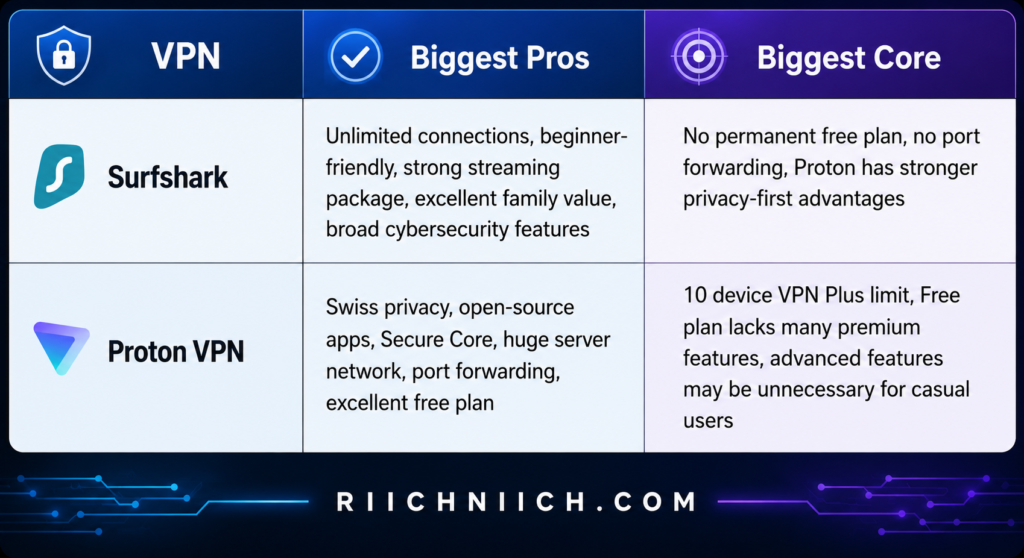
Which VPN’s Advantages Matter More?
This is where the buying decision in Surfshark vs ProtonVPN starts becoming clear.
Choose Surfshark if you care most about:
Unlimited devices, streaming, family use, beginner-friendly operation, and getting a lot of everyday utility from one paid subscription.
Choose Proton VPN if you care most about:
Privacy, advanced security, open-source transparency, Secure Core, P2P capabilities, a huge server network, or having a permanent free option.
Proton VPN’s paid plan combines more than 20,000 servers in 140+ countries with Secure Core, P2P support, NetShield, split tunneling, strong encryption, and up to 10 simultaneous connections.
Surfshark counters with unlimited connections, 4,500+ servers, Dynamic MultiHop, obfuscated connections, CleanWeb, and a package that is particularly easy to spread across an entire household.
Pros and Cons Overall Edge: Surfshark for most everyday buyers
But this is not a universal win.
If we were buying primarily for maximum privacy and advanced security controls, we would choose Proton VPN.
If we were buying for a household and wanted strong VPN protection, streaming, easy apps, unlimited simultaneous connections, and good overall paid value, we would choose Surfshark.
That’s the central takeaway from the pros and cons of Surfshark vs ProtonVPN: Surfshark is the stronger all-around choice for many mainstream buyers, while Proton VPN is the more compelling specialist choice for privacy-focused users.
Surfshark vs ProtonVPN: Who Should Choose Surfshark?
After looking at every major category in Surfshark vs ProtonVPN, Surfshark makes the most sense for buyers who want a VPN that is easy to use, flexible across lots of devices, strong for streaming, and packed with practical everyday features.
Proton VPN remains our preference for buyers who put maximum privacy and advanced security controls first. But Surfshark is the easier recommendation for many households because it combines unlimited simultaneous connections, 4,500+ servers, streaming-friendly performance, CleanWeb, split tunneling, Dynamic MultiHop, Alternative ID, and optional cybersecurity tools under one ecosystem.
So, who should actually buy Surfshark?
Choose Surfshark If You Have a Lot of Devices
This is probably the easiest reason to choose Surfshark.
Surfshark allows unlimited simultaneous VPN connections on its Starter, One, and One+ plans. One subscription can cover compatible laptops, phones, tablets, smart TVs, and other devices throughout your household.
That removes a problem you might not think about when initially buying a VPN.
Your household’s device count usually grows.
You might start with a laptop and smartphone. Then you add a tablet, work computer, smart TV, another television, children’s devices, and additional computers.
With Surfshark, you don’t have to keep asking:
“How many VPN connection slots do I have left?”
If you’re comparing Surfshark vs ProtonVPN simultaneous connections, Surfshark is the better purchase for buyers who simply don’t want a conventional device limit.

Choose Surfshark If You’re Buying a VPN for Your Family
Surfshark is particularly compelling for households.
Surfshark explicitly allows customers to share a subscription with family members in the same household while maintaining unlimited simultaneous VPN connections.
That makes the value proposition straightforward.
Instead of deciding which family member gets a connection, everyone can protect their compatible devices.
This is why Surfshark was our winner when looking at Surfshark vs ProtonVPN for families.
Proton VPN’s paid plans can still accommodate many households comfortably, and Proton Family becomes particularly interesting if you want Proton’s wider ecosystem. But if your goal is simply:
“I want one VPN subscription that can cover all of our devices.”
Surfshark is easier to recommend.
Choose Surfshark If Streaming Is a Major Priority
Surfshark is also a strong choice for households that stream frequently.
The unlimited-device policy becomes especially useful here because several televisions, laptops, tablets, and phones can remain connected without consuming a fixed number of VPN connection slots.
That means one family member can be using a television while another uses a tablet and someone else uses a laptop without having to think about your VPN subscription’s simultaneous-device allowance.
Surfshark also supports major platforms including Windows, macOS, Linux, Android, iOS, Apple TV, Fire TV, Chrome, Firefox, and Edge. Router installation can extend protection to other devices on your home network.
If you’re deciding Surfshark vs ProtonVPN for streaming and you have a device-heavy household, this is one of Surfshark’s strongest arguments.
Choose Surfshark If You’re New to VPNs
Surfshark is also an excellent first paid VPN.
You don’t have to understand every advanced feature before using it. For ordinary browsing, you can open the application, connect to a server, and let Surfshark handle the VPN connection.
As you become more comfortable, there are plenty of additional features to explore.
For example, Bypasser provides split tunneling so selected apps or websites can operate outside the VPN connection. Dynamic MultiHop lets you route traffic through two VPN servers. Rotating IP can periodically change your VPN IP address without disconnecting you.
You don’t have to configure any of those on your first day.
That’s important.
A good beginner VPN should be easy immediately but still useful after you’ve learned more about online privacy.
Choose Surfshark If You Want More Than a Basic VPN
Another reason to choose Surfshark is its broader collection of cybersecurity tools.
Even Surfshark’s VPN feature set goes beyond simply encrypting your internet connection.
CleanWeb can block ads, trackers, and malicious websites. Surfshark’s browser-extension version adds features such as cookie pop-up blocking and alerts involving malicious sites or past data breaches.
Surfshark also offers Alternative ID, which can generate alternative personal details and an email address that forwards messages to your normal inbox. The idea is to reduce how often you give your primary information to websites.
Move into Surfshark One and the package expands further.
Surfshark One currently combines its VPN with Antivirus, Alert, Search, Alternative ID, and other security features, while One+ adds Incogni data-removal functionality.
That’s attractive if you’re already considering paying separately for several online-security tools.
Choose Surfshark If You Want Strong Paid Value
Surfshark is our paid-value winner in Surfshark vs ProtonVPN because its benefits become increasingly valuable as you add devices and actually use the included features.
If Surfshark is currently your frontrunner, read our full ‘Is Surfshark Worth It?’ review before you buy to see whether its features justify the cost for your needs.
This is particularly true for a household.
Instead of asking only:
“Which VPN has the lowest monthly price?”
Ask:
“How much protection am I getting from the subscription I’m paying for?”
One Surfshark subscription can cover an unlimited number of compatible devices simultaneously. Higher plans can then layer additional security tools onto the same ecosystem.
Surfshark also offers 1-month, 12-month, and 24-month subscription options. Because promotional pricing can change, check the total upfront payment and renewal terms rather than relying only on the advertised effective monthly price.
Choose Surfshark If You Want to Test the Premium Product First
Surfshark does not have Proton VPN’s permanent free plan, so if your budget is $0, Proton VPN remains the obvious choice.
But Surfshark does provide another option for buyers who are interested but haven’t committed.
Eligible new customers can currently get a 7-day free trial with qualifying 12- or 24-month plans and supported payment methods. Surfshark also offers a 30-day money-back guarantee. The trial currently permits up to three devices; the normal unlimited-device allowance becomes available after the paid subscription begins.
That gives you an opportunity to test the things that actually matter before deciding whether Surfshark is worth paying for.
Try it on your home Wi-Fi.
Test your normal websites.
Connect your phone.
Try your television.
Check your connection speeds.
Make sure the apps feel comfortable to use.
A specifications table can’t tell you exactly how a VPN will perform on your internet connection and your devices.

Who Should Not Choose Surfshark?
Surfshark isn’t automatically the better purchase just because it wins several mainstream categories in Surfshark vs ProtonVPN.
We would lean toward Proton VPN instead if your priorities are heavily focused on advanced privacy, Swiss jurisdiction, open-source applications, Secure Core, port forwarding for P2P, or having a permanent free VPN plan.
That’s the key difference between these two services.
Surfshark is particularly strong as an all-around consumer VPN.
Proton VPN is particularly strong as a privacy-first VPN.
Knowing which description sounds more like you makes the decision much easier.
Should You Buy Surfshark?
Choose Surfshark if you want:
- Unlimited simultaneous VPN connections
- A VPN that’s easy for beginners
- Strong streaming and everyday performance
- One subscription for a device-heavy household
- CleanWeb and additional browsing protections
- Alternative ID
- Optional antivirus and breach-monitoring tools
- Optional data removal through Surfshark One+
- Strong overall value from a paid VPN subscription
Surfshark currently combines unlimited connections with a network of 4,500+ servers, Dynamic MultiHop, split tunneling, a kill switch, obfuscated connections, CleanWeb, and other privacy and security features.
Choose Surfshark if you want the better all-around VPN for everyday use.
That’s ultimately who we think should buy Surfshark in Surfshark vs ProtonVPN.
If you have a family, lots of devices, regularly stream, want an easy first VPN, or simply want to stretch one paid subscription across as much of your digital life as possible, Surfshark is the stronger buy.
Surfshark vs ProtonVPN: Who Should Choose ProtonVPN?
After comparing the major categories in Surfshark vs ProtonVPN, Proton VPN is the better choice for a particular type of buyer: someone who puts privacy, transparency, advanced security, P2P features, and control over their VPN connection ahead of unlimited devices or the lowest long-term price.
Surfshark remains our better all-around choice for many households, but Proton VPN has several advantages that are difficult to ignore. Its combination of Swiss jurisdiction, a strict independently audited no-logs policy, open-source apps, Secure Core, full-disk-encrypted servers, port forwarding, NetShield, VPN Accelerator, and a permanent free plan makes it particularly compelling for privacy-focused buyers.
So, who should actually choose Proton VPN?
Choose ProtonVPN If Privacy Is Your Number-One Priority
This is the strongest reason to choose Proton VPN in Surfshark vs ProtonVPN.
Proton VPN is headquartered in Switzerland and operates under a strict no-logs policy. According to Proton, it does not log the websites you visit, your traffic, your IP address, session lengths, or location-based information. Its no-logs policy has also been independently audited.
Proton also makes all of its VPN apps open source, allowing security researchers and technically knowledgeable users to inspect the source code. The apps undergo regular independent security audits as well.
Most people will never inspect that code themselves, but that’s not really the point.
The value is transparency.
If you’re trusting a company to handle your VPN traffic, being able to independently examine and audit the software is a meaningful advantage.
Choose ProtonVPN If You Want Advanced Privacy Protection
Proton VPN also goes further than basic VPN encryption with Secure Core.
A normal VPN connection routes your traffic through a VPN server before sending it to the internet. Secure Core routes the connection through one of Proton’s hardened servers first and then through the final VPN server.
Proton operates Secure Core infrastructure in Switzerland, Iceland, and Sweden. The company says these servers are owned and operated by Proton and located in high-security data centers.
This creates an additional privacy layer for people concerned about sophisticated network attacks.
Secure Core isn’t necessary for every buyer. It also adds additional routing, so we wouldn’t automatically use it when your main priority is gaming or maximum streaming performance.
But if you’re comparing Surfshark vs ProtonVPN for privacy, having this option is one of Proton VPN’s biggest strengths.
Choose ProtonVPN If You Want More Transparency From Your VPN
Privacy claims are easy to put on a marketing page.
Proton backs several of its claims with mechanisms that allow outside scrutiny.
Its VPN apps are open source, its software is regularly independently audited, and its no-logs policy has undergone independent verification. Proton also states that its VPN servers are bare-metal and protected with full-disk encryption.
This doesn’t mean you should automatically distrust every VPN that takes a different technical approach.
But for a privacy-first buyer, Proton’s philosophy is attractive because it reduces how much you’re being asked to accept solely on trust.
Choose ProtonVPN If You Torrent Regularly
Torrenting was another category where Proton VPN won our comparison.
Proton VPN Plus supports P2P traffic and provides specialized servers optimized for BitTorrent. More importantly for advanced users, Proton VPN supports port forwarding. Proton describes the feature as useful for improving P2P performance and accessing resources through the VPN connection.
That’s a meaningful difference from Surfshark, which does not provide comparable user-configurable port forwarding.
Most casual VPN buyers won’t care.
Frequent P2P users might care a lot.
If legitimate P2P file sharing is an important part of your buying decision in Surfshark vs ProtonVPN, Proton VPN gives you the more specialized toolset.
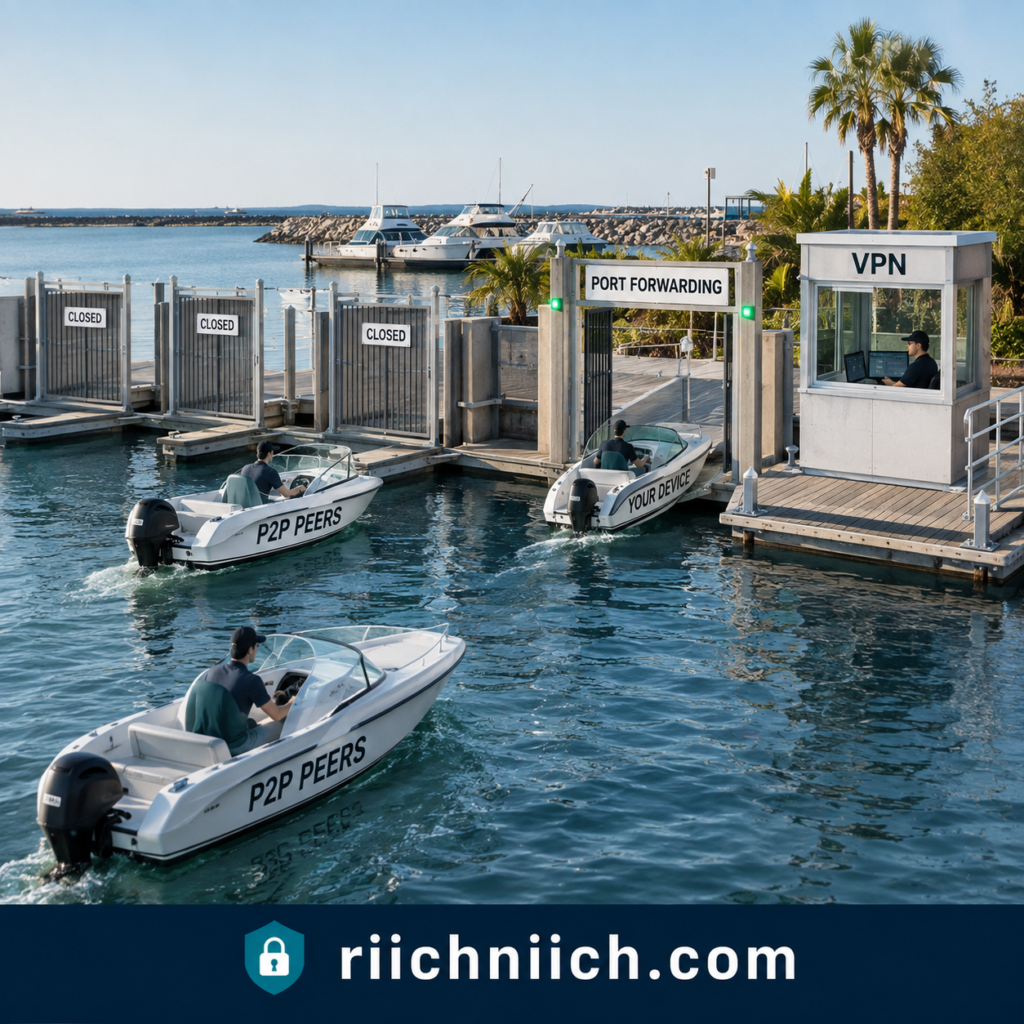
Choose ProtonVPN If You Want a Permanent Free VPN
This is the easiest reason to choose Proton VPN if you aren’t ready to spend money.
Proton VPN has a permanent free plan.
Proton says its Free plan has no data limits, no artificial speed limits, no advertisements, and the same strict no-logs policy protecting paid users.
There are restrictions. Proton Free supports one direct VPN connection and has a much smaller server selection than Proton VPN Plus. Premium capabilities such as Secure Core, full streaming support, P2P functionality, and the complete paid server network require an upgrade.
But if your buying decision is:
“Surfshark vs ProtonVPN—which can I use without paying?”
The answer is straightforward.
Choose Proton VPN.
Surfshark may let eligible customers temporarily trial its premium product, but Proton provides an actual long-term free tier.
Choose ProtonVPN If You Want a Huge Server Network
Proton VPN has also grown into an enormous VPN network.
Its current paid offering advertises 20,000+ servers across 140+ countries, compared with the smaller—but still extensive—Surfshark network discussed earlier in this comparison.
Raw server count doesn’t automatically determine quality or speed.
But broader country coverage can be valuable if you travel internationally, need a VPN endpoint in a less commonly supported location, or simply want more choices when selecting a server.
For buyers researching Surfshark vs ProtonVPN server locations, Proton VPN has the stronger overall network footprint.
Choose ProtonVPN If You Regularly Make Long-Distance Connections
Proton VPN’s VPN Accelerator is another feature worth considering.
Proton says VPN Accelerator uses several optimization technologies to reduce latency and improve performance, particularly over long-distance connections. Under suitable conditions, Proton says performance can improve by up to 400%.
That does not mean Proton VPN makes your actual internet service four times faster.
Think of it as recovering performance that could otherwise be lost because of inefficient VPN routing, processing limitations, distance, or network conditions.
If you frequently travel or regularly connect to VPN servers far from your physical location, Proton VPN’s performance technology becomes a more meaningful buying advantage.
Choose ProtonVPN If 10 Devices Are Enough
Surfshark’s unlimited simultaneous connections are unquestionably better on paper.
But ask yourself whether you actually need unlimited connections.
Proton VPN Plus supports up to 10 simultaneous devices or browser connections.
For one person, that could easily cover:
Phone + laptop + desktop + tablet + work computer + television + streaming device
…and still leave connection slots available.
If you only have four or five devices, Surfshark supporting unlimited connections doesn’t necessarily provide any practical advantage to you.
In that situation, I’d focus more heavily on the features you’ll actually use.
And if privacy, Secure Core, port forwarding, open-source applications, and advanced controls matter more, Proton VPN may provide better value for you despite Surfshark winning our overall value category.
Choose ProtonVPN If You Want More Than a Standalone VPN
Proton also has an advantage for buyers interested in building a larger privacy ecosystem.
The broader Proton ecosystem includes products such as Proton Mail, Proton Pass, Proton Drive, Proton Calendar, Proton Docs, and Proton Sheets through applicable Proton subscriptions. Proton Unlimited, for example, combines Proton VPN with Proton’s other premium privacy products.
This creates a different proposition from Surfshark’s cybersecurity-oriented bundles.
Surfshark’s ecosystem leans toward tools such as VPN protection, antivirus, breach alerts, private search, Alternative ID, and data removal.
Proton’s ecosystem leans more toward replacing everyday online services with privacy-focused email, password management, cloud storage, documents, calendars, and VPN protection.
If you’re trying to move more of your digital life into one privacy-focused ecosystem, Proton becomes especially attractive.

Who Should Not Choose ProtonVPN?
Proton VPN won’t be the better purchase for everyone in Surfshark vs ProtonVPN.
We would lean toward Surfshark instead if your priorities are unlimited simultaneous connections, a large device-heavy household, straightforward family sharing, streaming across lots of devices, beginner-friendly everyday use, or maximizing the practical value of one paid VPN subscription.
That’s especially true if you don’t expect to use Proton’s more specialized features.
There isn’t much value in paying for advanced capabilities just because they sound impressive.
If you never need Secure Core, port forwarding, or the wider Proton ecosystem—and your main goal is simply protecting every device in your household—Surfshark probably fits you better.
Should You Buy ProtonVPN?
Choose Proton VPN if you want:
- Stronger privacy-first positioning
- Swiss jurisdiction
- A strict independently audited no-logs policy
- Open-source VPN apps
- Secure Core
- Full-disk-encrypted servers
- Port forwarding and strong P2P capabilities
- A huge international server network
- VPN Accelerator
- A permanent free VPN option
- Up to 10 simultaneous connections with VPN Plus
- Access to Proton’s larger privacy ecosystem
Proton VPN combines those features with modern protocols, NetShield, a kill switch, DNS leak protection, split tunneling, Tor over VPN, Stealth, and other advanced privacy tools.
Choose Proton VPN if privacy and advanced control matter more to you than unlimited devices.
That’s ultimately who should buy Proton VPN in Surfshark vs ProtonVPN.
If you’re a privacy-first buyer, frequent P2P user, advanced VPN user, international traveler, or someone who wants to start with a genuinely free VPN before upgrading, Proton VPN is the stronger choice.
If Proton VPN is your frontrunner but you want to compare it against another premium alternative before buying, see our NordVPN vs ProtonVPN comparison next.
Surfshark may be the better all-around purchase for many households, but for the buyer who looks at a VPN primarily as a privacy and security tool, Proton VPN is the one we would choose.
Frequently Asked Questions About Surfshark vs ProtonVPN
If you’re still deciding between these two VPNs, the answers below cover some of the most important questions buyers have about Surfshark vs ProtonVPN, including privacy, speed, streaming, free plans, device limits, torrenting, and overall value.

Is Surfshark Better Than ProtonVPN?
For most everyday buyers, we would choose Surfshark.
Surfshark is particularly strong if you want unlimited simultaneous connections, easy-to-use apps, streaming support, strong everyday performance, and good value for a household with lots of devices. One paid Surfshark subscription can be used on an unlimited number of compatible devices simultaneously.
However, Proton VPN is the better choice if privacy and advanced security are your highest priorities. Its paid plans include features such as Secure Core, NetShield, P2P support, split tunneling, and access to more than 20,000 servers across 140+ countries.
So our overall recommendation in Surfshark vs ProtonVPN is:
Surfshark for most everyday buyers. Proton VPN for privacy-first buyers.
Which Is Better for Privacy: Surfshark or ProtonVPN?
We give Proton VPN the privacy win.
Both providers have no-logs policies. Surfshark states that it does not log browsing history, network traffic, bandwidth usage, IP addresses, or connection timestamps associated with online activity, although certain temporary connection information is automatically deleted shortly after a session ends.
Proton VPN adds several privacy-focused advantages, including Swiss jurisdiction, open-source and independently audited apps, Secure Core, and a strict no-logs policy.
If your main reason for purchasing a VPN is maximizing online privacy rather than streaming or protecting a large number of devices, Proton VPN is our choice.
Which Is Faster: Surfshark or ProtonVPN?
Both VPNs can deliver fast everyday performance, and the result you experience will depend heavily on your location, ISP, VPN protocol, server distance, server load, and destination.
In our overall Surfshark vs ProtonVPN comparison, we give Surfshark a narrow speed and performance win for mainstream everyday use.
Proton VPN shouldn’t be underestimated, however. Its paid service uses high-speed infrastructure and includes VPN Accelerator, which is designed to improve VPN performance, particularly when longer-distance connections create additional performance loss.
For either service, connecting to a nearby server using WireGuard will generally be a sensible starting point when maximum performance is your goal.
Is Surfshark or ProtonVPN Better for Streaming?
We recommend Surfshark for streaming, particularly for families and multi-device households.
The biggest reason is unlimited simultaneous connections. You can have several compatible TVs, phones, laptops, and tablets using Surfshark without worrying about a conventional connection limit.
Proton VPN Plus is also a strong streaming option. It supports up to 10 simultaneous devices, offers streaming support on its paid service, and provides apps for platforms including Apple TV, Android TV, Fire TV, Windows, macOS, Android, and iOS.
Streaming winner: Surfshark
For a single person, though, either VPN can be an excellent choice.
Does ProtonVPN Have a Free Plan?
Yes. This is one of Proton VPN’s biggest advantages in Surfshark vs ProtonVPN.
Proton VPN offers a permanent free plan with no data limits, no artificial speed limits, no advertisements, and a no-logs policy.
The Free plan is more limited than Proton VPN Plus. Premium features such as Secure Core, NetShield, the full global server network, dedicated P2P support, premium streaming support, and up to 10 simultaneous connections require a paid plan.
But if your VPN budget is $0, Proton VPN is the clear choice.
Does Surfshark Have a Free Plan?
No. Surfshark does not offer a permanent free VPN plan comparable to Proton VPN Free.
Instead, eligible new customers can currently get a 7-day free trial when selecting qualifying 12- or 24-month plans and using an eligible payment method. The trial currently supports up to three simultaneous devices; paid service afterward unlocks unlimited simultaneous connections. Surfshark also offers a 30-day money-back guarantee on qualifying purchases.
So there is an important difference:
Proton VPN = permanent free tier
Surfshark = temporary premium trial
How Many Devices Can You Use With Surfshark?
Surfshark allows unlimited simultaneous VPN connections on its Starter, One, and One+ subscriptions.
You can install Surfshark across compatible phones, computers, smart TVs, tablets, routers, and other supported devices. Surfshark also permits household sharing.
This is one of the strongest reasons to choose Surfshark if you’re buying a VPN for a family.
How Many Devices Can You Use With ProtonVPN?
Proton VPN Plus supports up to 10 simultaneous connections, while Proton VPN Free supports one direct connection at a time.
Ten devices will be plenty for many individuals and smaller households.
However, if you’re comparing Surfshark vs ProtonVPN simultaneous connections specifically, Surfshark wins because its paid VPN plans don’t impose the same conventional device ceiling.
Which Is Better for Families?
Surfshark is our recommendation for most families.
Its unlimited simultaneous connections mean you don’t have to count every phone, laptop, tablet, smart TV, and other compatible device in your home.
Proton does have an interesting alternative for households that want a larger privacy ecosystem. Proton Family supports up to six accounts, includes 3 TB of shared storage, and gives members access to the premium Proton ecosystem, including Proton VPN. Each account can use up to 10 simultaneous VPN connections.
So the decision comes down to what your household needs:
VPN protection across lots of devices → Surfshark
Separate accounts plus a broader privacy ecosystem → Proton Family
Is Surfshark or ProtonVPN Better for Torrenting?
We recommend Proton VPN for frequent P2P users.
Proton VPN’s paid service supports BitTorrent and offers dedicated P2P capabilities. More importantly, Proton supports port forwarding, which can increase peer connectivity and potentially improve P2P performance.
Surfshark still supports P2P use and provides the essential VPN protections you’d expect, including encryption and a kill switch.
But if torrenting is a major purchasing priority, Proton VPN’s more specialized P2P toolset gives it the advantage.
Remember that a VPN doesn’t make copyright infringement legal. Only download or share files you have the right to access.
Is Surfshark or ProtonVPN Better for Gaming?
For most gamers, we give Surfshark a slight edge.
Both services support fast VPN protocols and provide large server networks, but Surfshark’s unlimited simultaneous connections are useful for gaming households with multiple PCs, consoles, phones, and other devices.
Proton VPN’s VPN Accelerator can also make it particularly competitive when connecting over longer distances. Proton’s paid service supports up to 10 devices simultaneously.
For competitive gaming, however, your actual ping matters more than the brand name. Test nearby servers and avoid unnecessary multi-hop routing when low latency is your priority.
Is ProtonVPN Safe?
Yes, Proton VPN has a strong security and privacy architecture.
Its paid plans include strong encryption, kill-switch protection, DNS leak protection, Secure Core, NetShield, split tunneling, and a strict no-logs policy. Proton’s apps are also open source and independently audited.
That combination is one of the main reasons Proton VPN wins our privacy category in Surfshark vs ProtonVPN.
Is Surfshark Safe?
Yes. Surfshark provides modern VPN encryption and additional security and privacy features, and it maintains a no-logs policy.
Surfshark says it doesn’t collect users’ browsing history, network traffic, bandwidth usage, IP addresses, or other online-activity logs.
Its network also currently includes more than 4,500 RAM-only servers, and paid subscriptions support unlimited simultaneous devices.
For ordinary buyers looking to secure everyday browsing, public Wi-Fi use, streaming, and multiple household devices, Surfshark provides a strong security package.
Can I Use Either VPN on a Smart TV?
Yes, depending on your television or streaming platform.
Surfshark supports devices including Apple TV, Fire TV, and Android TV, along with compatible routers.
Proton VPN also provides apps for Apple TV, Android TV, and Fire TV, along with router configurations and other supported platforms.
If you have several televisions and streaming devices, Surfshark’s unlimited simultaneous connections may make it more convenient.
Can a VPN Make My Internet Faster?
Usually, you should expect some VPN overhead rather than assuming a VPN will increase your normal internet speed.
Your data has to be encrypted and routed through a VPN server before reaching its destination. That can increase latency or reduce throughput.
There are exceptions. A more efficient VPN route could sometimes outperform poor ISP routing, and technologies such as Proton’s VPN Accelerator are specifically designed to reduce VPN-related performance losses.
But we would not buy Surfshark or Proton VPN because someone promises that a VPN will automatically make your internet faster.
Is ProtonVPN Free Actually Safe?
Proton says its Free plan uses the same strong encryption and strict no-logs policy as its paid service.
The major differences are features and access—not Proton giving free users weaker basic privacy protections.
Free customers receive a smaller server selection and one simultaneous connection, while capabilities such as Secure Core, NetShield, dedicated P2P support, premium streaming support, and the complete global network are paid features.
That’s why Proton Free is our recommendation if someone needs a legitimate VPN but genuinely cannot justify paying for one yet.
Is Surfshark Worth Paying For Instead of Using ProtonVPN Free?
For many buyers, yes—but only if you’ll actually use the premium benefits.
Surfshark becomes worth paying for if you want things such as unlimited simultaneous connections, broader location choice, stronger streaming functionality, household coverage, and its additional privacy and security features.
Proton Free is excellent if you primarily want basic VPN privacy on one device without paying. Proton itself reserves features such as premium streaming, P2P support, Secure Core, NetShield, the complete server network, and 10-device support for paid plans.
Don’t pay for a premium VPN simply because it has more features.
Pay because those features solve problems you actually have.
Which VPN Should I Buy: Surfshark or ProtonVPN?
For the majority of buyers comparing Surfshark vs ProtonVPN, we would choose Surfshark.
It provides an excellent combination of unlimited simultaneous connections, easy apps, streaming capability, strong performance, family-friendly flexibility, and paid value. Surfshark currently operates more than 4,500 servers and allows unlimited simultaneous connections after its trial period.
We would choose Proton VPN instead if your priorities are privacy, open-source transparency, Secure Core, advanced P2P capabilities, a huge global server network, or getting a legitimate permanent free VPN. Proton VPN Plus currently includes 20,000+ servers in 140+ countries and up to 10 simultaneous connections.
So the simplest answer is:
Choose Surfshark if you want the better all-around VPN for most everyday uses.
Choose Proton VPN if privacy and advanced VPN features matter more than unlimited devices.
That distinction should make the final buying decision in Surfshark vs ProtonVPN considerably easier.
Conclusion: Surfshark vs ProtonVPN
After comparing pricing, features, privacy, security, speed, server networks, streaming, torrenting, gaming, apps, device limits, free plans, customer support, family use, and overall value, our final recommendation in Surfshark vs ProtonVPN is Surfshark for most buyers.
But this is a close comparison because Proton VPN wins in areas that matter enormously to privacy-focused users.
Surfshark is the better all-around purchase if you want a VPN that is easy to use, works across unlimited devices, performs well for streaming, fits a household, and delivers strong value from one subscription.
Proton VPN is the better choice if privacy, transparency, Secure Core, advanced P2P capabilities, or a permanent free VPN are more important to you.
There isn’t a bad choice here. The better VPN depends on what you’re buying it for.
Why Surfshark Wins Overall
The biggest reason Surfshark takes our overall Surfshark vs ProtonVPN verdict is that it does more of the things the average VPN buyer is likely to need without creating many compromises.
Surfshark currently offers 4,500+ servers, unlimited simultaneous connections, Dynamic MultiHop, CleanWeb, split tunneling, obfuscation, a kill switch, and other privacy and security features. Its entire server network is RAM-only, and Deloitte independently verified its no-logs commitments in 2023 and again in 2025.
Unlimited connections are particularly important.
Proton VPN Plus allows up to 10 simultaneous connections, which is generous. Surfshark removes the conventional limit entirely.
That means you can protect your laptop today, add your phone tomorrow, install Surfshark on your television later, and continue adding compatible household devices without worrying about running out of connection slots.
For a family or device-heavy household, that’s a major advantage.

Where Proton VPN Is Better
Choosing Surfshark overall does not mean Proton VPN loses across the board.
In fact, Proton VPN would be our personal recommendation for someone whose number-one priority is privacy.
Proton VPN is based in Switzerland and provides open-source apps, a strict no-logs policy, Secure Core, full-disk encryption, kill-switch protection, DNS leak protection, and other advanced privacy features.
Its server network is also considerably larger on paper. Proton currently lists 20,000+ servers in more than 140 countries, while Surfshark advertises more than 4,500 servers.
Proton VPN Plus also supports P2P, Secure Core, NetShield, streaming, split tunneling, and up to 10 simultaneous connections.
So if your priorities look like this:
Privacy first → advanced security second → everything else third
We would buy Proton VPN.
Where Surfshark Is Better
Surfshark’s advantage is breadth.
It is particularly compelling if your priorities look more like:
Streaming + multiple devices + family use + easy setup + everyday privacy + overall value.
One subscription can cover unlimited compatible devices simultaneously. Surfshark also combines that flexibility with a substantial server network and features such as Dynamic MultiHop and obfuscated servers.
That makes Surfshark easier to recommend to someone who simply says:
“I need a good VPN. Which one should I buy?”
We would answer Surfshark.
If that person instead said:
“Privacy is my number-one concern. Which one should I buy?”
We would answer Proton VPN.
That distinction is the key to this entire comparison.
Surfshark vs ProtonVPN: Final Scorecard
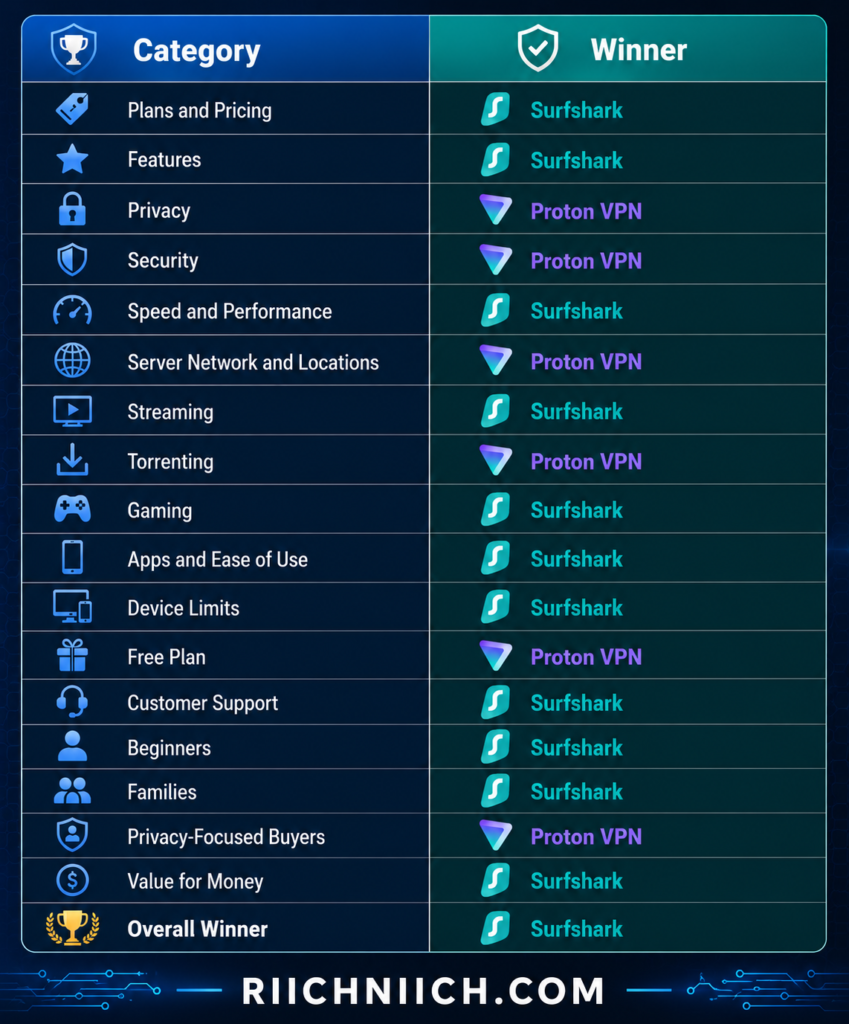
The scorecard shouldn’t be treated as though every category has equal importance.
If privacy is twice as important to you as streaming or unlimited devices, Proton VPN could easily be the better purchase even though Surfshark wins more categories overall.
Likewise, Proton having a much larger server count doesn’t automatically make it a better VPN for a family with 15 devices.
Buy based on the categories that matter to you—not simply the number of categories each VPN wins.
What About Proton VPN Free?
This is the biggest exception to our Surfshark recommendation.
If you want a VPN but don’t want to spend any money, choose Proton VPN Free.
Proton’s free service has unlimited bandwidth and uses the same apps, strong encryption, and no-logs policy as its paid service, although premium capabilities and broader server access require a paid plan.
Surfshark doesn’t have an equivalent permanent free tier.
So if your budget is literally $0, Proton VPN wins automatically.
If you’re ready to purchase a premium VPN, however, we think Surfshark becomes the stronger all-around value proposition for the typical buyer.
What About Privacy?
This deserves one final clarification because we don’t want the overall Surfshark recommendation to suggest that Surfshark is weak on privacy.
It isn’t.
Surfshark’s no-logs commitments have been independently verified by Deloitte, its network uses RAM-only servers, and its 2026 transparency report provides a useful real-world example of its logging practices. When Surfshark received a legally binding warrant in April 2026, it reported that it could provide account-existence and payment-related information but could not provide the user’s online activity because it did not store it.
That’s strong evidence in Surfshark’s favor.
Proton VPN wins our privacy category because of the complete package—Swiss jurisdiction, open-source apps, Secure Core, no-logs protections, independent scrutiny, and its privacy-first architecture.
So this isn’t:
Private VPN vs. non-private VPN.
It’s:
Two strong privacy services, with Proton VPN getting our edge for the privacy-first buyer.

Which VPN Should You Buy?
Here’s the easiest way to make your final decision in Surfshark vs ProtonVPN.
Choose Surfshark if you want the better VPN for most everyday buyers.
It makes the most sense if you have lots of devices, a family, multiple streaming devices, want beginner-friendly apps, or simply want strong overall value from one paid VPN subscription.
Choose Proton VPN if privacy is your highest priority.
It makes more sense if you value Swiss jurisdiction, Secure Core, open-source apps, advanced P2P capabilities, a huge international server network, or the option to start with a permanent free VPN. Proton VPN Plus currently offers 20,000+ servers in 140+ countries and up to 10 simultaneous connections.
Our Final Recommendation
Overall Winner: Surfshark
For the majority of people reading this Surfshark vs ProtonVPN comparison because they’re ready to buy a VPN, Surfshark is the service we would recommend first.
Its combination of unlimited simultaneous connections, strong performance, streaming support, beginner-friendly operation, useful security features, family flexibility, and paid value makes it the more complete package for everyday use. Surfshark’s audited no-logs commitments and RAM-only infrastructure also mean you aren’t giving up serious privacy protections just to get that convenience.
But Proton VPN deserves a very clear second recommendation:
If privacy is the reason you’re buying a VPN in the first place, choose Proton VPN.
That is ultimately the buying decision we would make from Surfshark vs ProtonVPN:
Best overall for most buyers: Surfshark
Best for privacy-focused buyers: Proton VPN
Best free option: Proton VPN Free
For everyone else—especially families, beginners, streamers, and people with lots of devices—Surfshark is our overall winner and the VPN we would buy.