


NordVPN vs ProtonVPN is a close comparison between two highly capable VPN services, but they appeal to slightly different buyers. NordVPN focuses on fast performance, streaming, ease of use, and broader online security, while ProtonVPN stands out for privacy, transparency, open-source apps, and its free plan.
In this guide, we’ll compare NordVPN vs ProtonVPN across pricing, speed, security, privacy, streaming, gaming, torrenting, server networks, device support, and overall value to help you decide which VPN is actually worth your money.
Table of Contents
NordVPN vs ProtonVPN: 🔥 Quick Answer
If you are trying to decide between these two popular VPN services, the quick answer is that NordVPN vs ProtonVPN is a close matchup, but each service makes more sense for a different type of buyer.
NordVPN is the stronger choice for most people who want an all-around premium VPN, particularly if you care about combining everyday privacy with additional security features. NordVPN includes features such as its NordLynx protocol, Kill Switch, Double VPN, Dark Web Monitor, Meshnet, and protection against malicious websites, trackers, phishing, and malware, depending on your plan and device.
ProtonVPN is especially compelling for privacy-focused users and anyone who wants a genuinely usable free VPN option before paying. ProtonVPN offers open-source apps, a no-logs policy, WireGuard support, a kill switch, and privacy-focused technologies such as Secure Core and Stealth. Its paid plans add features including NetShield, streaming support, P2P support, and access to its larger premium server network.
The biggest difference for budget-conscious shoppers is the free option. ProtonVPN offers a free plan with no data or time limits and no ads, although features such as Secure Core, P2P support, NetShield, premium streaming support, and the broader server network require a paid plan.
So, which is better, NordVPN or ProtonVPN?
For the average buyer who wants a feature-rich VPN for everyday browsing, security, streaming, and multiple online activities, NordVPN is our initial overall pick. ProtonVPN becomes particularly attractive if your priorities lean heavily toward privacy transparency, open-source applications, Secure Core, or getting started without paying for a subscription.
👉 If you want the stronger all-around option for everyday use, check NordVPN’s current deal and available plans here before deciding which subscription is right for you.
Here is the simplest way to think about NordVPN vs ProtonVPN:

ProtonVPN’s Secure Core, for example, routes traffic through hardened servers in privacy-friendly countries before sending it through another VPN server. NordVPN, meanwhile, has increasingly positioned its desktop offering beyond basic VPN protection, with phishing, scam, tracker, and malware protections integrated into supported versions of its app.
The rest of this NordVPN vs ProtonVPN comparison will break down the areas that should actually influence your purchase—including NordVPN vs ProtonVPN pricing, speed, security, privacy, features, streaming performance, torrenting, apps, device support, and overall value—so you can decide which VPN better fits the way you use the internet.
Why Compare NordVPN vs ProtonVPN?
Choosing a VPN is no longer just about finding a service that changes your IP address. If you are paying for a subscription, you should know what you are getting for your money and whether the service actually matches the way you plan to use it.
That is why NordVPN vs ProtonVPN is an important comparison for buyers. Both services provide encrypted VPN connections, kill switches, no-logs policies, and advanced privacy features, but they approach online protection differently. NordVPN emphasizes a broad collection of privacy and cybersecurity tools, while ProtonVPN puts particularly strong emphasis on transparency, open-source applications, Swiss privacy protections, and its Secure Core architecture.
For example, NordVPN includes features such as Double VPN, split tunneling, private DNS, Meshnet, and additional threat-protection capabilities. NordVPN also says its no-logs practices have undergone six independent reviews, with its sixth completed in 2025.
ProtonVPN takes a somewhat different approach. Its apps are open source and independently audited, while Secure Core can route your connection through hardened servers controlled by Proton in Switzerland, Iceland, or Sweden before your traffic reaches another VPN server. ProtonVPN also maintains a free plan with unlimited data, no advertisements, and no activity logging.
These differences matter because the best VPN for privacy may not necessarily be the best VPN for streaming, gaming, everyday browsing, or overall value. Someone looking for a feature-rich premium security package could reach a different conclusion than someone whose top priorities are open-source software and access to a capable free VPN.
The Right VPN Depends on What You Actually Need
A good NordVPN vs ProtonVPN comparison therefore needs to look beyond brand recognition.
Before buying either service, consider how much importance you place on:
- Speed and performance
- Privacy and no-logs practices
- Security features
- Streaming
- Torrenting
- Gaming
- Server availability
- Ease of use
- Number of devices you need to protect
- Free versus paid VPN access
- Subscription price and long-term value
Privacy deserves particular attention. A VPN provider handles traffic traveling through its VPN infrastructure, so its policies, technical safeguards, and transparency should be part of your purchasing decision. Both companies advertise independently examined no-logs practices, while ProtonVPN additionally makes its applications open source.
It is also important to understand what you’re buying a VPN to accomplish. The Federal Trade Commission’s public Wi-Fi guidance notes that widespread HTTPS encryption has made public Wi-Fi considerably safer than it once was, while still recommending strong passwords, two-factor authentication, and updated software. A VPN should therefore be considered one part of a broader privacy and security strategy—not a replacement for good security habits.
Why This Comparison Matters Before You Buy
The real question isn’t simply whether NordVPN or ProtonVPN is a good VPN. Both offer substantial privacy and security capabilities. The more useful question is which one gives you the better combination of features, performance, privacy, and value for the price.
If you are comparing NordVPN or ProtonVPN because you are ready to subscribe, don’t make the decision based on one feature alone. The sections ahead will examine NordVPN vs ProtonVPN across pricing, speed, security, privacy, features, streaming, torrenting, gaming, apps, customer support, and overall value.
By the end, you should have a much clearer answer to which is better, NordVPN or ProtonVPN, and—more importantly—which service deserves your money. 💵
NordVPN vs ProtonVPN Features Compared
Features are one of the biggest factors to consider when deciding which VPN deserves your money. In the NordVPN vs ProtonVPN comparison, both services go well beyond basic IP masking and encrypted browsing, but their feature sets emphasize different types of users.
NordVPN provides a broad collection of VPN and cybersecurity tools, including NordLynx, Kill Switch, split tunneling, Double VPN, Onion Over VPN, obfuscated servers, Meshnet, Dark Web Monitor, private DNS, and Threat Protection. Depending on the device and subscription, Threat Protection Pro can also block malicious URLs, ads and trackers, scan downloaded files for malware, and check apps for security vulnerabilities.
ProtonVPN focuses heavily on VPN privacy and advanced connection controls. Its features include Secure Core, NetShield, VPN Accelerator, Stealth, split tunneling, port forwarding, Tor over VPN, kill switch protection, WireGuard, DNS leak protection, and open-source applications that undergo independent security audits.
Here is a quick NordVPN vs ProtonVPN features comparison:
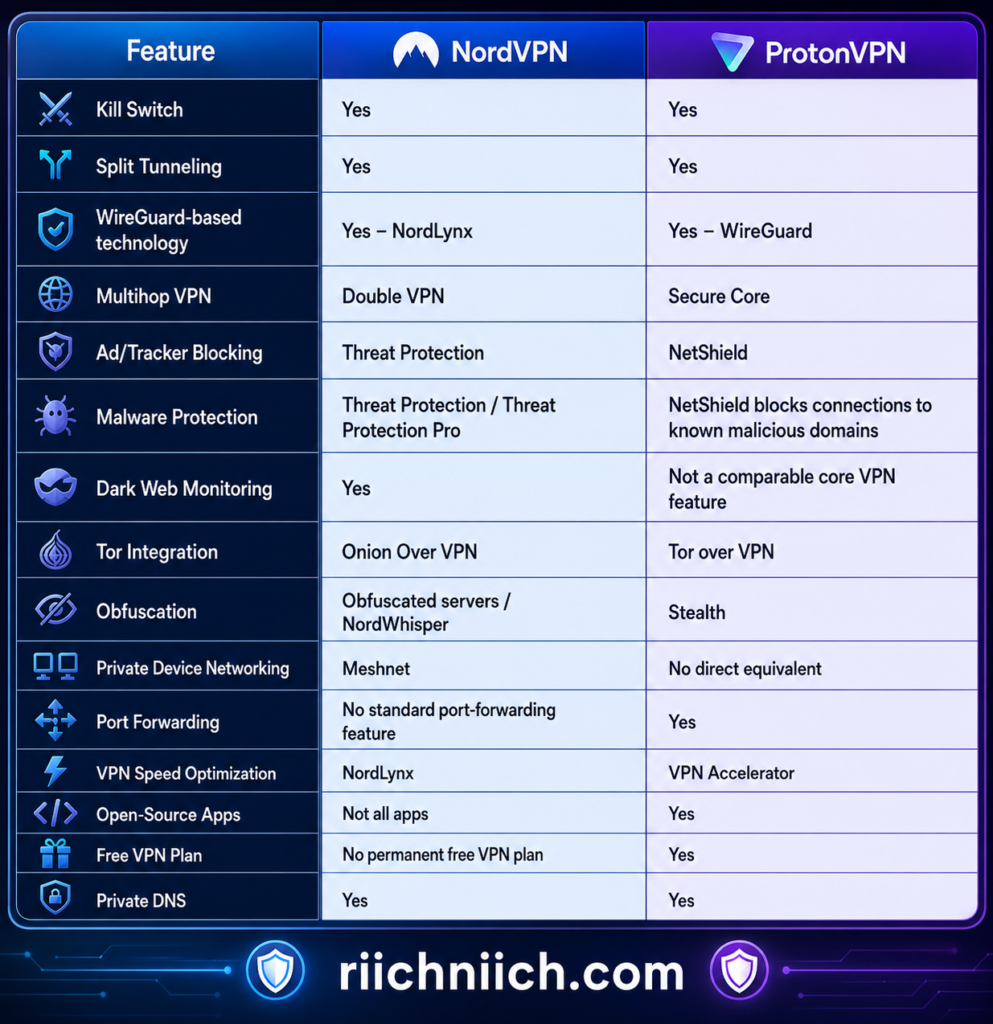
Feature availability can vary by operating system and subscription tier, so buyers should verify the specific feature they need before purchasing.
NordVPN’s Standout Features
One of NordVPN’s biggest advantages is that its subscription can provide more than a traditional VPN connection.
Threat Protection Pro is a good example. On supported devices and eligible plans, it can block ads, trackers, malicious URLs and known scam websites, scan downloaded files for malware, and identify certain application vulnerabilities. Importantly, Threat Protection Pro can perform these functions without requiring an active VPN connection.
That makes NordVPN particularly attractive if you want your VPN subscription to contribute to your broader everyday cybersecurity setup rather than simply encrypting your internet connection.
Meshnet is another unusual feature. It lets you establish encrypted connections between compatible devices, creating a private network that can be useful for remote access, file sharing, gaming, and accessing another device over the internet. NordVPN’s documentation also explains that Meshnet traffic routing can let another device effectively act as your VPN server.
NordVPN also offers Double VPN, which sends your traffic through two VPN servers instead of one, along with Onion Over VPN and specialized obfuscated servers for users who need additional privacy or help disguising VPN traffic.
For buyers comparing NordVPN vs ProtonVPN security and looking for a large collection of security-related extras in one service, these features give NordVPN a strong argument.
ProtonVPN’s Standout Features
ProtonVPN’s feature set becomes especially interesting for buyers who place privacy and advanced VPN controls above additional cybersecurity extras.
Its signature feature is Secure Core. Instead of sending your traffic directly through a single VPN server, Secure Core first routes it through hardened infrastructure in Switzerland, Iceland, or Sweden before sending it to a second VPN server. Proton says these Secure Core servers are owned and operated by the company and use full-disk encryption.
This makes Secure Core particularly relevant when evaluating NordVPN vs ProtonVPN privacy. NordVPN has Double VPN for multi-server routing, while ProtonVPN has built an especially privacy-focused architecture around its Secure Core system.
ProtonVPN also offers NetShield, a DNS-filtering feature designed to block ads, trackers, and malware domains.
Another standout is VPN Accelerator. Proton says the technology uses several techniques to improve performance—including changes to VPN protocol processing, network routing, congestion handling, and packet forwarding—and can produce particularly large improvements on long-distance connections.
ProtonVPN also offers something that may matter considerably to more advanced users: port forwarding. Its current feature lineup includes port forwarding for improving certain P2P connections and accessing resources through the VPN.
Then there is Stealth, Proton’s custom obfuscation protocol designed to make VPN traffic more difficult to detect on networks that attempt to block VPN connections.
Which VPN Has Better Features?
For most buyers, NordVPN vs ProtonVPN comes down to what kind of features you actually value rather than which provider can produce the longest feature list.
NordVPN has the edge for buyers who want a broader cybersecurity package. Threat Protection Pro, Dark Web Monitor, Meshnet, Double VPN, specialized servers, and its other security tools make it particularly appealing if you want one subscription to handle several aspects of your online protection.
ProtonVPN has the edge for buyers who prioritize advanced VPN-specific privacy controls. Secure Core, open-source apps, Stealth, port forwarding, NetShield, VPN Accelerator, and its strong emphasis on transparency create an excellent package for privacy-conscious and more technically demanding users. Proton states that all of its VPN apps are open source and independently audited.
For buyers specifically searching for NordVPN vs ProtonVPN free, ProtonVPN also has a major advantage: it offers a permanent free VPN tier. However, many of ProtonVPN’s advanced capabilities require a paid subscription, so the free plan should not automatically be considered equivalent to the full premium service.
If your priority is getting the best VPN for security with a wider collection of everyday cybersecurity extras, I would give NordVPN the feature advantage for the average buyer. If your priority is the best VPN for privacy, open-source transparency, advanced routing controls, or port forwarding, ProtonVPN may be the better fit.
That distinction is important because the winner of NordVPN vs ProtonVPN should ultimately be determined by which features you will actually use—not simply which VPN has more of them.
NordVPN vs ProtonVPN Pricing and Overall Value
Pricing can make or break a VPN purchase, especially because the lowest advertised monthly price usually requires paying for a longer subscription upfront. In NordVPN vs ProtonVPN, both services reward longer commitments, but their pricing strategies are noticeably different.
As of August 2026, NordVPN’s official pricing page lists its 2-year Basic plan at $3.49 per month, billed at $94.23 for the first 27 months because the current offer includes three extra months. Its 1-year Basic plan is $5.49 per month, while paying month-to-month costs $14.99 per month. NordVPN also sells higher-priced Complete and Prime plans with additional cybersecurity and identity-protection features. Prices and promotions can change.
ProtonVPN has an immediate pricing advantage for anyone who doesn’t want to pay at all: Proton VPN Free costs $0. Its current VPN Plus promotion lists a 2-year introductory price of $2.99 per month, billed at $71.76 for the first 24 months. Proton states that it subsequently renews at $83.88 every 12 months.
That makes the NordVPN vs ProtonVPN pricing comparison more complicated than simply looking at the lowest number.
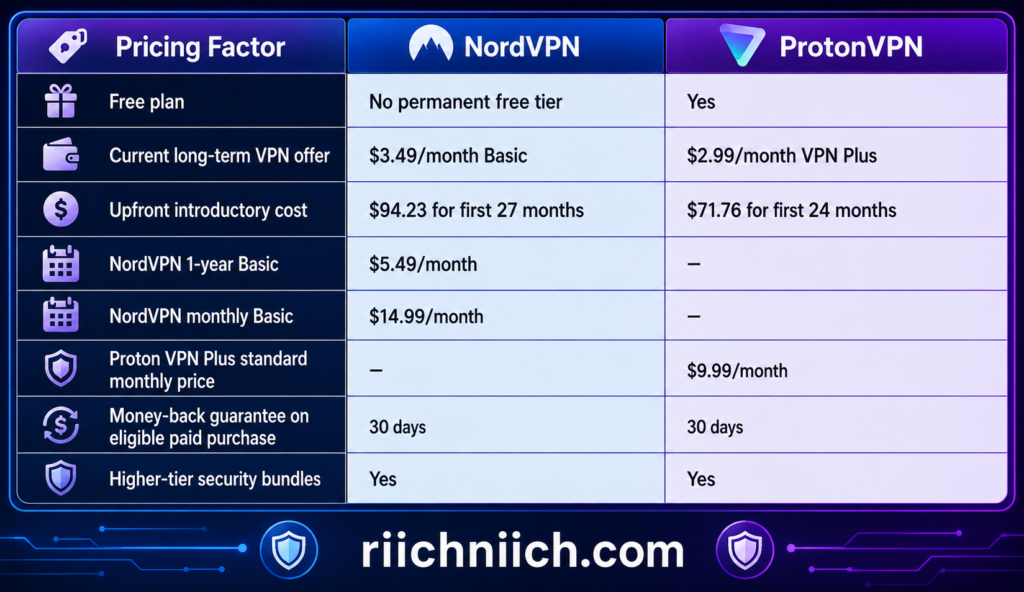
🚨 ALL prices in this blog article are promotional/current prices rather than permanent prices, and taxes, billing terms, renewals, and available offers can affect what you actually pay. Check the providers’ checkout pages before purchasing.
NordVPN Pricing: What Are You Paying For?
NordVPN currently separates its consumer offering into Basic, Complete, and Prime tiers.
Basic is the straightforward choice if you primarily want NordVPN’s VPN service. The current 2-year offer costs $3.49 per month and includes three extra months.
Complete moves beyond a traditional VPN. NordVPN’s current 2-year Complete plan costs $4.49 per month and adds features such as a password manager, 1 TB of cloud storage, additional monitoring, anti-malware and browsing protection, and ad and tracker blocking.
Prime currently costs $7.49 per month on the 2-year offer and adds Coveron identity protection to the package.
That creates an interesting buyer decision.
If you already pay separately for a password manager, cloud storage, or other security services, one of NordVPN’s higher tiers could potentially consolidate several subscriptions. But if you only want a VPN, paying extra for features you won’t use doesn’t necessarily represent better value.
See NordVPN’s current plans and pricing
ProtonVPN Pricing: Free vs Paid
ProtonVPN takes a different approach because you can start using the service without purchasing anything.
The Proton VPN Free plan has no data limits or advertisements. Proton says its free service is funded by paying subscribers rather than advertising or selling user information.
That gives ProtonVPN a significant advantage for people researching NordVPN vs ProtonVPN free plan options. NordVPN does not offer a comparable permanent free tier.
However, Proton’s free plan isn’t equivalent to Proton VPN Plus. Paying unlocks the broader premium server network and features such as streaming support, P2P/BitTorrent support, Secure Core, NetShield, and additional premium capabilities.
In other words, Proton Free is excellent for getting basic VPN protection without another subscription, while Proton VPN Plus is the more appropriate comparison against NordVPN for someone shopping for a full-featured premium VPN.
See Proton VPN’s current pricing
Don’t Ignore Renewal Pricing
This is one of the most important parts of the NordVPN vs ProtonVPN pricing comparison.
A heavily discounted introductory price doesn’t necessarily tell you what the service will cost over several years.
For example, NordVPN currently states that its $94.23 27-month Basic offer renews at $139.08 per year. Proton’s current $71.76 24-month VPN Plus promotion states that it renews at $83.88 every 12 months.
That’s why I recommend looking at three numbers before buying any VPN:
Initial price → total upfront payment → renewal price
A service that looks only a dollar cheaper per month can become considerably more or less expensive once introductory promotions expire.
Which Offers Better Overall Value?
For NordVPN vs ProtonVPN, there isn’t one value winner for every buyer.
ProtonVPN offers exceptional value for budget-conscious users. You can start with Proton Free without entering a paid subscription, and its current long-term VPN Plus promotion is aggressively priced. If your main objective is obtaining a strong VPN without buying a larger cybersecurity bundle, ProtonVPN is particularly compelling.
NordVPN offers stronger value for buyers who want more security tools bundled together. Its higher tiers combine the VPN with additional tools such as malware and browsing protection, monitoring, a password manager, cloud storage, and—in the Prime tier—identity protection.
So, if you’re asking which is better NordVPN or ProtonVPN strictly from a price perspective, I would currently give ProtonVPN the advantage.
If you’re asking which offers the better combination of VPN functionality and additional cybersecurity features, NordVPN becomes much more competitive, especially if those extras would replace services you would otherwise purchase separately.
For buyers comparing NordVPN vs ProtonVPN paid plans, the best value therefore depends less on which company advertises the lowest monthly number and more on which features you will actually use after you subscribe.
That is the number that ultimately matters.
NordVPN vs ProtonVPN Free Plan: Can You Use Either VPN for Free?
If you are looking at NordVPN vs ProtonVPN specifically because you want VPN protection without another monthly subscription, there is a clear winner: ProtonVPN offers a permanent free plan, while NordVPN does not offer a permanent free VPN tier.
Proton VPN Free can be used indefinitely without paying. Proton currently provides unlimited data, no ads, no activity logging, and no artificial speed limits on its free plan. You can protect one device at a time, although the free service has fewer server choices and fewer advanced features than Proton VPN Plus.
Before choosing a free option based on price alone, it is worth understanding the bigger differences between a free vs paid VPN, including the limitations you may encounter with servers, features, streaming, device support, and overall performance.
NordVPN takes a different approach. According to NordVPN’s support documentation, purchases made directly through its website do not include a free trial. Instead, new purchases are covered by a 30-day money-back guarantee under its applicable refund terms. NordVPN does offer a free trial for eligible Android users who obtain it through Google Play, limited to one trial per customer.
That makes the NordVPN vs ProtonVPN free plan comparison relatively straightforward:

What Do You Get With Proton VPN Free?
ProtonVPN’s free tier is unusually capable for a service that doesn’t require a subscription.
You get unlimited bandwidth and data, and Proton says it doesn’t impose artificial speed limits on free users. The same strict no-logs policy and strong encryption standards used by paid customers also apply to free accounts.
Proton’s current free plan also includes core protections such as:
- Kill Switch
- Stealth VPN protocol
- Strong VPN encryption
- No activity logs
- No advertisements
- Unlimited data
- DNS leak protection
- Access to free VPN servers
There is an important catch, however.
Free users don’t get the same control or capabilities as Proton VPN Plus customers. Proton’s current free-plan system connects users to free servers in a limited number of countries, and changing servers can involve randomized selection and cooldown periods.
Premium features such as Secure Core, P2P/BitTorrent support, NetShield, the full global server network, premium streaming support, and connections for up to 10 devices require a paid plan.
Can You Try NordVPN Without Keeping the Subscription?
Yes, but this should not be confused with a permanent free VPN.
NordVPN says customers purchasing through its website can use its 30-day money-back guarantee to evaluate the service and request a refund within the eligible period if they aren’t satisfied.
Eligible Android users have another option. NordVPN currently offers a free trial when the subscription is obtained through Google Play. The trial is administered through Google Play, and NordVPN limits it to one free trial per customer.
For someone who already expects to buy a premium VPN, NordVPN’s refund period gives you an opportunity to evaluate the paid product. But if your goal is to use a VPN for months or years without paying, ProtonVPN is clearly the better fit.
Is Proton VPN Free Good Enough, or Should You Pay?
This is where buyer intent becomes important in NordVPN vs ProtonVPN.
If you mainly want to encrypt your connection, hide your IP address, improve privacy on public Wi-Fi, or occasionally use a VPN for general browsing, Proton VPN Free may be all you need. There is no reason to purchase a premium subscription simply because one exists if the free plan already handles your needs.
However, the calculation changes considerably if you’re buying a VPN for more demanding use.
Proton only guarantees streaming support on its paid plans, and P2P/BitTorrent, Secure Core, NetShield, its much larger server network, highest speeds, and protection for up to 10 devices are premium features.
That means someone searching for the best VPN for streaming, a VPN for multiple devices, or advanced privacy features should compare paid NordVPN against paid ProtonVPN, rather than comparing NordVPN against Proton’s restricted free tier.
Which Free Option Wins?
For the NordVPN vs ProtonVPN free comparison, ProtonVPN wins easily.
It isn’t merely a short trial. Proton VPN Free is designed as an ongoing $0 service with unlimited data, no ads, and no activity logging.
But that does not automatically mean ProtonVPN wins the overall NordVPN vs ProtonVPN comparison.
Think of Proton VPN Free as an excellent entry point. If basic private browsing is enough, you may never need to upgrade. If you want premium streaming capabilities, P2P support, more server control, advanced privacy features, faster premium infrastructure, or protection across multiple devices, then the buying decision changes to NordVPN vs ProtonVPN paid plans.
And that’s where features, speed, security, privacy, and overall value become much more important than the word “free.”
NordVPN vs ProtonVPN Speed: Which VPN Is Faster?
Speed is one of the most important factors when choosing a premium VPN. A secure connection is useful, but you probably don’t want noticeable buffering, slow downloads, lag during gaming, or sluggish websites every time you turn your VPN on.
In NordVPN vs ProtonVPN, both providers have invested heavily in technologies designed to minimize the performance loss caused by VPN encryption and routing. NordVPN relies heavily on NordLynx, its implementation built around WireGuard, while ProtonVPN combines WireGuard with VPN Accelerator to improve connection performance.
For most buyers, I would give NordVPN a slight overall advantage for speed, particularly if consistently fast performance for streaming, downloads, gaming, and everyday browsing is a major purchasing priority. However, ProtonVPN is also extremely competitive, and the VPN that performs fastest for you can vary considerably based on your location, internet provider, server choice, server load, protocol, and distance from the VPN server.
NordVPN vs ProtonVPN Speed at a Glance
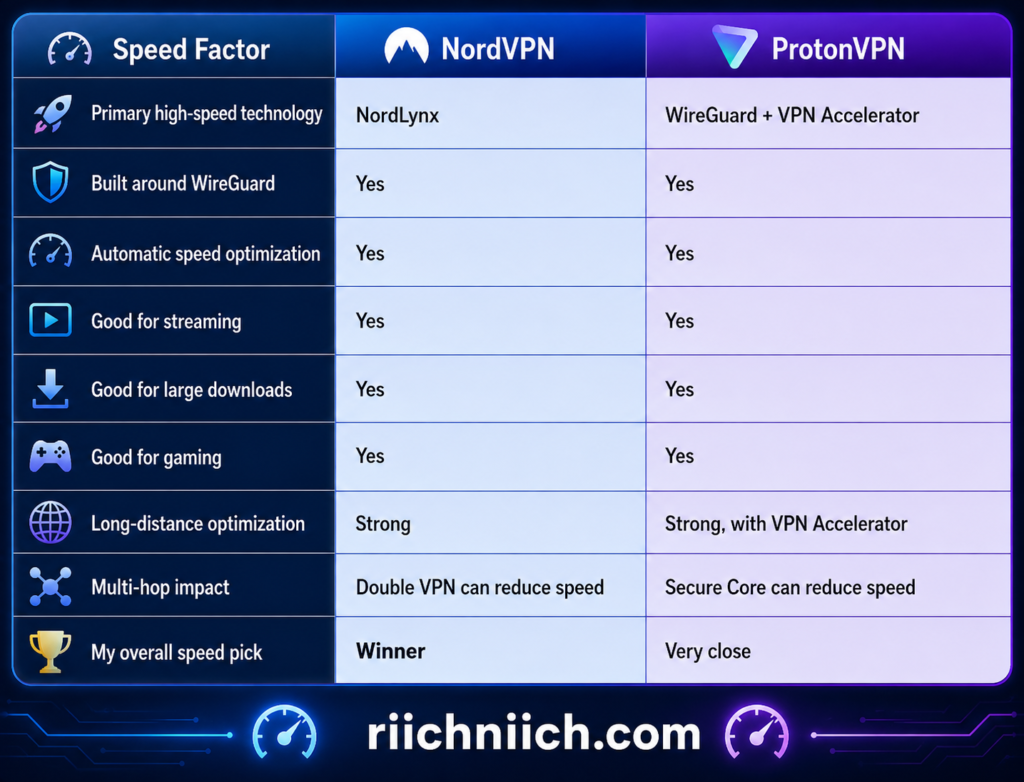
This table shouldn’t be interpreted as a guarantee that NordVPN will be faster on every device or connection. VPN speeds can change substantially from one test to another, which is why single speed-test numbers can be misleading.
Why NordVPN Is So Fast
NordVPN’s primary performance advantage comes from NordLynx.
NordLynx is built around the WireGuard protocol and is designed to provide fast VPN connections while addressing privacy considerations associated with a standard WireGuard implementation. NordVPN currently recommends NordLynx and uses it by default in most of its apps.
NordVPN specifically recommends NordLynx for speed-dependent activities such as streaming, gaming, and downloading large files.
That matters when evaluating NordVPN vs ProtonVPN speed because VPN protocols can have a noticeable effect on performance. Older protocols can still have important uses, but WireGuard-based technology is designed to be much leaner.
NordVPN also conducts continuous performance testing across different server locations and protocols. The company notes that server location, network congestion, and your underlying internet connection can all affect the speeds you actually experience.
Why ProtonVPN Is Also Extremely Competitive
ProtonVPN shouldn’t be dismissed simply because NordVPN gets our overall speed advantage.
ProtonVPN supports WireGuard and combines it with its proprietary VPN Accelerator technology. Proton says VPN Accelerator is designed to reduce latency, overcome CPU limitations, and improve performance when network conditions are less than ideal.
Proton states that VPN Accelerator can improve VPN speeds by up to 400% in certain circumstances, particularly on long-distance connections or networks experiencing packet loss. This doesn’t mean your normal internet connection suddenly becomes four times faster. The claim refers to improving VPN performance relative to the connection without Proton’s acceleration technology under applicable conditions.
VPN Accelerator is also enabled automatically in ProtonVPN’s major apps, so buyers don’t need to manually configure it to receive its benefits.
Server Distance Can Matter More Than the VPN Brand
This is an important point when comparing NordVPN vs ProtonVPN.
Suppose NordVPN connects you to a heavily congested server hundreds of miles away while ProtonVPN connects you to a lightly loaded server near your location. ProtonVPN could easily produce the faster connection in that particular situation.
The opposite could also happen.
Distance increases the amount of time your data needs to travel, while congestion, server load, your original internet connection, and the selected VPN protocol can further affect performance. ProtonVPN specifically recommends using a geographically close server with a low server load when maximizing speed.
This is why I would avoid choosing a VPN based solely on a website claiming something like:
“VPN A achieved 847 Mbps while VPN B achieved 762 Mbps.”
Those numbers might be accurate for that specific test, but they don’t guarantee you’ll receive the same results at home.
What About Secure Core and Double VPN?
Both providers offer advanced routing features that can trade some speed for additional privacy.
ProtonVPN’s Secure Core routes your traffic through additional privacy-focused infrastructure. Proton itself recommends disabling Secure Core when maximum performance is more important because the additional routing introduces extra latency.
NordVPN’s Double VPN similarly routes traffic through two VPN servers rather than one.
These modes aren’t necessarily what you should use when streaming a movie or trying to minimize gaming latency. They’re designed for situations where the additional privacy layer is worth accepting some performance overhead.
For normal high-speed browsing, streaming, downloads, or gaming, a nearby standard server using NordLynx or WireGuard will generally make more sense.
NordVPN vs ProtonVPN for Streaming Speed
If you’re purchasing a VPN primarily for streaming, both services have the underlying technology necessary for high-bandwidth connections.
ProtonVPN says its premium servers support high-speed connections and recommends WireGuard for fast performance. Its VPN Accelerator can also help when connecting across longer distances.
NordVPN recommends NordLynx specifically for activities requiring fast connections, including streaming.
For the best VPN for streaming, I would give NordVPN the slight performance advantage, but this category is close enough that speed shouldn’t be your only consideration. Streaming-service compatibility, server availability, location choices, and reliability should also influence your purchase.
NordVPN vs ProtonVPN for Gaming Speed
Gaming places more emphasis on latency than raw download speed.
A 500 Mbps connection with high latency can provide a worse gaming experience than a much slower connection with low latency. Connecting to a nearby VPN server is therefore particularly important.
NordVPN specifically identifies NordLynx as its preferred protocol for gaming and other speed-sensitive activities.
ProtonVPN’s WireGuard implementation is also lightweight, while VPN Accelerator is designed partly to reduce latency and improve performance across difficult or long-distance connections.
For competitive gaming, I would still lean toward NordVPN, but I wouldn’t expect one provider to win every game, server, or geographic location.
Which Is Faster: NordVPN or ProtonVPN?
When considering the entire NordVPN vs ProtonVPN speed matchup, NordVPN gets our overall recommendation for buyers who put maximum performance near the top of their list.
NordLynx is specifically optimized around WireGuard’s lightweight architecture, and NordVPN positions it as its fastest protocol for demanding activities such as streaming, gaming, and downloading large files.
But the margin isn’t large enough to call ProtonVPN slow.
Far from it.
ProtonVPN’s combination of WireGuard and VPN Accelerator makes it a strong performer, and VPN Accelerator becomes particularly interesting if you frequently connect to distant servers or use networks where packet loss and latency create performance problems.
So for buyers comparing NordVPN vs ProtonVPN, our speed verdict is:
Winner for overall speed: NordVPN
Best alternative for long-distance optimization: ProtonVPN
Best protocol choices for speed: NordLynx for NordVPN and WireGuard for ProtonVPN
If speed is your single biggest purchasing priority, I would lean toward NordVPN. If privacy features such as Secure Core and Proton’s broader privacy philosophy matter more to you, ProtonVPN remains fast enough that performance alone probably shouldn’t stop you from choosing it.
NordVPN vs ProtonVPN Security: Which Offers Better Protection?
Security is where NordVPN vs ProtonVPN becomes especially competitive. Both VPNs provide strong encryption, modern VPN protocols, kill switches, DNS leak protection, multi-hop connections, and additional tools designed to reduce online threats. Neither service should be considered weak from a security standpoint.
A VPN can be especially useful when connecting to unfamiliar networks, and understanding the public Wi-Fi dangers you may encounter can help you see why encrypted connections matter when you’re away from home.
If you regularly access financial accounts while traveling, you should also understand whether public Wi-Fi is safe for banking before signing into your bank account from a hotel, airport, coffee shop, or other shared network.
The bigger difference is how they approach protection.
NordVPN has increasingly expanded beyond VPN encryption into broader cybersecurity protection. Its security tools include Threat Protection Pro, Double VPN, Onion Over VPN, obfuscated servers, Dark Web Monitor, private DNS, and multiple kill-switch options.
ProtonVPN takes a more privacy-centered approach. It combines strong encryption with Secure Core, full-disk encryption on its servers, forward secrecy, open-source applications, independent security audits, NetShield, DNS leak protection, and a kill switch.
For the average buyer comparing NordVPN vs ProtonVPN security, I would give NordVPN a slight overall advantage because of its broader collection of cybersecurity tools. However, ProtonVPN may be more appealing if your definition of security emphasizes infrastructure, transparency, open-source software, and advanced privacy protections.
NordVPN vs ProtonVPN Security at a Glance
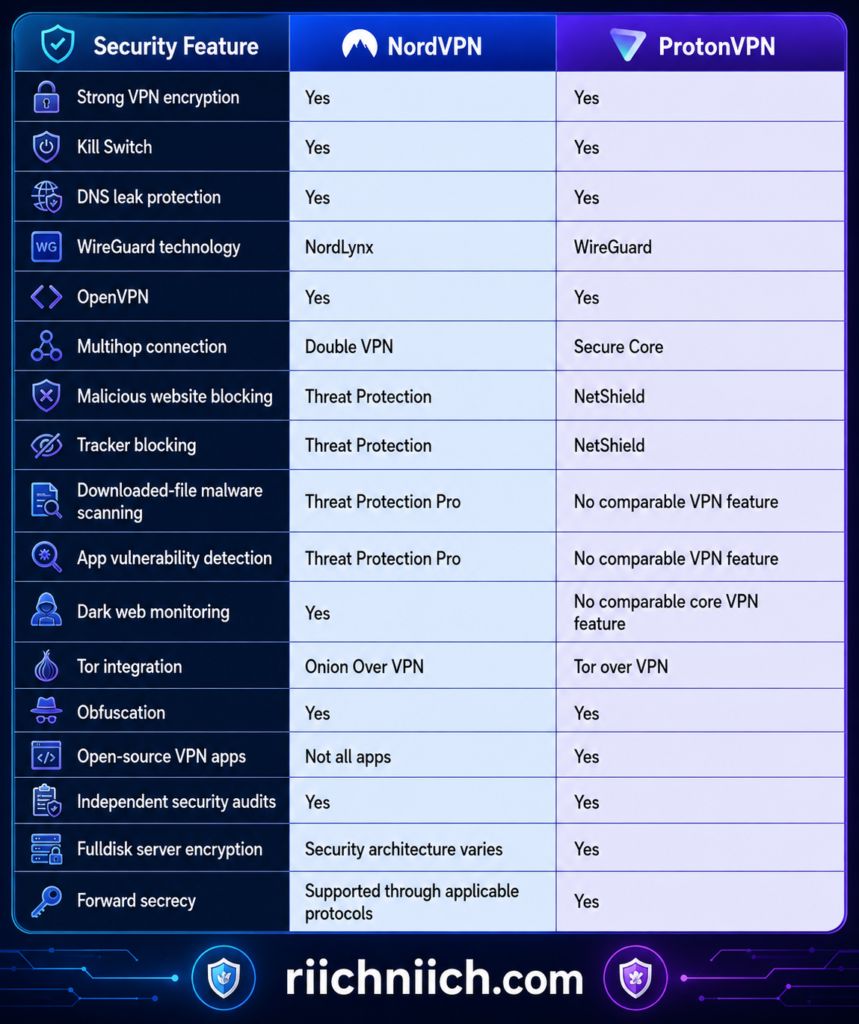
Feature availability can differ by device, operating system, application version, and subscription level. Buyers should check the specific feature they need before purchasing.
NordVPN’s Biggest Security Advantage: Threat Protection Pro
One of the most significant differences in NordVPN vs ProtonVPN is NordVPN’s Threat Protection Pro.
On supported Windows and macOS configurations, Threat Protection Pro can block malicious URLs, scams, ads, and trackers. It can also scan downloaded files for malware and check applications for known security vulnerabilities. Unlike the standard Threat Protection feature, Threat Protection Pro can continue operating even when you aren’t connected to a NordVPN server.
NordVPN’s anti-malware component can inspect downloaded files and warn you when it identifies potentially dangerous content. The company says the system uses signature-based detection, machine learning, and an optional cloud-based scanner.
That is important from a buyer’s perspective.
A VPN primarily protects the connection between your device and the VPN server. It doesn’t automatically make every website, download, email, or application safe. Adding threat-detection features gives NordVPN a broader security role than a traditional VPN alone.
ProtonVPN’s Biggest Security Advantage: Secure Core
ProtonVPN’s strongest differentiating security feature is Secure Core.
Secure Core routes your internet traffic through a hardened Proton-controlled server before sending it through a second VPN server. Proton currently operates Secure Core infrastructure in Switzerland, Iceland, and Sweden.
The idea is to reduce the risk associated with a compromised exit server.
Proton says it installs and operates its Secure Core infrastructure itself, uses full-disk encryption, and houses these servers in high-security data centers.
For ordinary browsing, most people probably don’t need Secure Core running constantly. The additional routing can also affect performance. But for users with elevated privacy requirements, the architecture gives ProtonVPN a compelling advantage.
Kill Switch Protection
A kill switch is one of the most important VPN security features because it helps prevent your real IP address and unencrypted traffic from becoming exposed if the VPN connection unexpectedly drops.
Both providers include one.
NordVPN offers different implementations depending on the platform. For example, Windows users can use an Internet Kill Switch to stop internet connectivity when disconnected from NordVPN or an App Kill Switch that closes specified applications when VPN protection is lost.
ProtonVPN provides a kill switch across its apps and also offers an Always-on VPN function designed to reconnect automatically when the VPN connection is interrupted. Proton also offers a permanent kill-switch mode on supported platforms.
For most buyers, both providers handle this essential security requirement well.
Encryption and VPN Protocols
Strong encryption is another area where you shouldn’t choose a VPN based solely on marketing language.
ProtonVPN states that its protocols use established open-source encryption standards including AES-256 and ChaCha20, while supporting protocols such as WireGuard and OpenVPN. Proton also uses forward secrecy, which generates new encryption keys between sessions so that compromising one key doesn’t expose previous sessions.
NordVPN likewise uses strong encryption and supports several protocols, including OpenVPN and its WireGuard-based NordLynx protocol. It also offers NordWhisper for environments where conventional VPN connections may be restricted.
For the average buyer, encryption isn’t a meaningful reason to reject either service. Both provide modern security protocols suitable for everyday VPN use.
ProtonVPN Has an Important Transparency Advantage
One area where ProtonVPN stands out in the NordVPN vs ProtonVPN security comparison is software transparency.
ProtonVPN makes its applications open source, meaning its source code can be examined publicly. The company also commissions independent security audits and publishes audit information.
Open-source software doesn’t automatically guarantee that software is secure, but it provides another level of transparency because independent researchers can examine how the applications work.
That could make ProtonVPN particularly attractive if you are searching for the best VPN for privacy and value transparency almost as highly as the security features themselves.
Threat Protection vs NetShield
Both VPNs also attempt to stop potentially harmful content before it reaches you, but their capabilities aren’t identical.
ProtonVPN’s NetShield uses DNS filtering to block advertisements, trackers, and domains associated with malware.
NordVPN’s standard Threat Protection similarly provides DNS-based blocking for ads, trackers, and unsafe domains while connected to NordVPN. Threat Protection Pro goes considerably further on supported systems by adding downloaded-file malware scanning, malicious URL detection, scam warnings, and application vulnerability detection.
For buyers searching for the best VPN for security, this is one of the reasons I give NordVPN the advantage.
However, neither should be treated as permission to abandon basic cybersecurity practices. Keep your operating system and applications updated, use strong unique passwords, enable multifactor authentication where available, and remain cautious about suspicious links and downloads.
Double VPN vs Secure Core
Another interesting part of NordVPN vs ProtonVPN is multi-hop protection.
NordVPN’s Double VPN routes your connection through two VPN servers instead of one.
ProtonVPN’s Secure Core also uses multi-server routing, but its architecture emphasizes hardened entry servers that Proton operates in privacy-friendly jurisdictions before traffic reaches the exit VPN server.
Both approaches add another layer between your real connection and the final VPN exit point.
For everyday Netflix streaming or casual web browsing, that additional routing will often be unnecessary. But users dealing with heightened surveillance or more sensitive online activities may place considerably more value on it.
Which Offers Better Security: NordVPN or ProtonVPN?
For NordVPN vs ProtonVPN, our security winner for the average buyer is NordVPN—but by a narrow margin.
The reason isn’t that ProtonVPN lacks strong security. ProtonVPN actually has several outstanding security advantages, including Secure Core, full-disk server encryption, open-source applications, published independent audits, forward secrecy, NetShield, and strong VPN protocols.
NordVPN gets the overall advantage because its protection extends further beyond the VPN tunnel. Threat Protection Pro’s malware scanning, scam and malicious-site protection, tracker blocking, application vulnerability detection, Dark Web Monitor, Double VPN, kill-switch controls, and other security tools create a broader package.
So our NordVPN vs ProtonVPN security verdict is:
Best overall security package: NordVPN
Best for security transparency and hardened privacy infrastructure: ProtonVPN
Best for malware and malicious-site protection: NordVPN
Best for open-source transparency: ProtonVPN
Best multi-hop architecture for highly privacy-conscious users: ProtonVPN’s Secure Core
If you want your VPN subscription to double as a broader collection of everyday cybersecurity tools, NordVPN provides more value. If you prioritize open-source applications, hardened infrastructure, advanced privacy architecture, and transparency, ProtonVPN may actually be the better purchase for you.
That distinction is why the overall NordVPN vs ProtonVPN winner ultimately depends on whether you want the broadest security toolkit or the strongest emphasis on VPN privacy architecture.
NordVPN vs ProtonVPN Privacy: Which VPN Protects Your Data Better?
Privacy is arguably the most important category in NordVPN vs ProtonVPN because using a VPN means shifting a significant amount of trust from your internet provider to the VPN company. Your VPN provider sits between your device and the wider internet, so its logging practices, jurisdiction, transparency, infrastructure, and handling of account data all deserve scrutiny before you subscribe.
Both providers perform extremely well here. NordVPN operates under Panama’s jurisdiction and maintains an independently verified no-logs policy. ProtonVPN operates under Swiss jurisdiction, maintains its own audited no-logs policy, publishes its applications as open source, and offers privacy-focused infrastructure such as Secure Core.
If privacy is your main reason for using a VPN, our guide to the Best VPN for Privacy explains the features you should prioritize before choosing a provider.
NordVPN remains an excellent privacy choice, but ProtonVPN’s combination of Swiss jurisdiction, open-source applications, published audits, Secure Core infrastructure, and repeated independent no-logs audits creates an unusually transparency-focused package.
A VPN is only one part of protecting your privacy, so if you want to reduce how easily your browsing activity and personal information can be connected back to you, our guide on how to stay anonymous online covers additional privacy steps you can take.
NordVPN vs ProtonVPN Privacy at a Glance

The important point is that both providers have gone beyond simply putting “no logs” on a marketing page. Each has subjected its logging practices to independent examination. NordVPN announced its sixth independent no-logs assurance engagement in February 2026, while ProtonVPN announced its fifth consecutive annual no-logs audit in June 2026.
NordVPN’s No-Logs Policy
NordVPN states that it doesn’t log users’ browsing activity or connection data while they use its VPN service. Its privacy practices have also been independently examined multiple times.
Its sixth no-logs assurance engagement was performed by Deloitte Lithuania at the end of 2025. Deloitte examined NordVPN’s infrastructure, configurations, deployment processes, and several types of servers—including standard VPN, Double VPN, obfuscated, and Onion Over VPN servers—and concluded that the examined systems and operations were designed and implemented in accordance with NordVPN’s no-logs statement.
That’s meaningful for buyers.
A VPN company can write virtually anything into its marketing materials. Repeated independent examination provides additional evidence that the provider’s technical practices align with its stated policy.
NordVPN says certain account information still needs to be retained to operate the service, including an email address, username, and transaction or order information associated with payments and refunds. However, it states that this account information isn’t linked to your VPN activity.
ProtonVPN’s No-Logs Policy
ProtonVPN also maintains a strict no-logs policy.
According to ProtonVPN, it doesn’t log websites you visit, internet traffic, your IP address, session lengths, or location information associated with VPN usage. DNS queries are routed through its encrypted VPN tunnel and resolved on Proton’s servers rather than relying on third-party DNS providers.
ProtonVPN’s no-logs practices have undergone annual independent audits. Its latest 2026 assessment was performed by Securitum and examined server infrastructure and operational practices rather than simply reviewing the wording of the privacy policy. Proton says this was its fifth consecutive annual no-logs audit.
Another important advantage is that ProtonVPN applies its no-logs policy to free users as well as paying subscribers.
That matters if you are comparing NordVPN vs ProtonVPN free plan options because choosing ProtonVPN’s free tier doesn’t mean accepting a different activity-logging policy simply because you aren’t paying.
Panama vs Switzerland: Does Jurisdiction Matter?
Jurisdiction is frequently discussed when comparing VPNs because a provider is ultimately subject to the laws governing its operation.
NordVPN operates under the jurisdiction of Panama. NordVPN says Panama doesn’t impose mandatory data-retention requirements on VPN providers that would require NordVPN to store activity logs.
ProtonVPN is based in Switzerland. Proton states that Swiss law doesn’t require ProtonVPN to retain VPN connection logs. Its July 2026 transparency report also says foreign requests must go through the appropriate Swiss legal process before Proton can be compelled to respond.
Both jurisdictions therefore provide meaningful advantages for privacy-focused VPN operations.
But jurisdiction shouldn’t be the only factor you consider.
A favorable jurisdiction means much less if a company has poor technical practices. That’s why the independent audits, infrastructure, applications, and actual logging practices of NordVPN vs ProtonVPN matter just as much as where the companies operate.
ProtonVPN’s Open-Source Advantage
This is one of the clearest differences in the NordVPN vs ProtonVPN privacy comparison.
All ProtonVPN applications are open source.
That means researchers, developers, and other interested parties can examine the source code rather than relying entirely on Proton’s description of how its software works. Proton also commissions independent security audits and makes audit results available publicly.
Open-source software isn’t automatically secure simply because the source code is visible. Vulnerabilities can still exist.
The advantage is transparency.
For privacy-conscious buyers, the ability for independent experts to examine the software provides another mechanism for holding the provider accountable.
NordVPN has also moved toward greater openness in some areas. Its Linux CLI has been open source for years, and NordVPN says the Linux GUI source code is now available for public inspection as well. However, this doesn’t currently match ProtonVPN’s across-the-board open-source approach to its VPN apps.
For this category, ProtonVPN wins.
Secure Core Gives ProtonVPN Another Privacy Advantage
ProtonVPN’s Secure Core becomes especially relevant when discussing privacy rather than simply security.
A standard VPN connection typically routes your traffic through one VPN server before it reaches its destination.
Secure Core adds another layer.
Your connection first passes through Proton-controlled Secure Core infrastructure in Switzerland, Iceland, or Sweden before exiting through another VPN server. Proton says it owns and operates these Secure Core servers and places them in physically secure locations.
The purpose is to make it more difficult for an attacker who compromises an exit server or its surrounding network to trace traffic back to your original IP address.
NordVPN offers Double VPN, which similarly provides multi-hop routing through two VPN servers. That is an excellent privacy feature, but Proton’s hardened Secure Core infrastructure is particularly compelling for buyers whose threat model places a high value on multi-hop privacy.
For ordinary browsing, you probably don’t need Secure Core running constantly. The additional routing can reduce performance. But having it available gives ProtonVPN an important privacy advantage for people who need it.
What Can Your ISP See When You Use a VPN?
Regardless of whether you choose NordVPN or ProtonVPN, it’s important to understand what a VPN actually hides.
When connected properly, the VPN encrypts the traffic between your device and the VPN server. Your internet provider can generally see that you’re communicating with a VPN server and can observe connection-related information such as the amount of traffic being transmitted, but it shouldn’t be able to see the websites you’re visiting through the encrypted tunnel simply by inspecting that VPN traffic.
The VPN provider then becomes an important part of the trust equation.
That’s precisely why no-logs policies matter so much.
You don’t want to hide browsing activity from your ISP only to hand an easily identifiable browsing history to your VPN provider instead.
Does a VPN Make You Completely Anonymous?
No—and this distinction is important when shopping for the best VPN for privacy.
Neither NordVPN nor ProtonVPN can make you completely anonymous online.
If you sign into Google, Facebook, Amazon, your bank, or another account, that service still knows you’re logged into your account. Browser fingerprinting, cookies, tracking pixels, malware, account activity, and information you voluntarily provide can also identify or track you in ways that changing your IP address doesn’t prevent.
A VPN is therefore best viewed as one layer of privacy protection, not an invisibility switch.
That shouldn’t discourage you from buying one. It simply means you should purchase a VPN for what it actually does: encrypting your connection to the VPN server, hiding your normal public IP address from destination websites, reducing what your ISP can observe about your browsing destinations, and providing additional privacy tools depending on the provider.
Which Protects Your Privacy Better?
This is one of the few categories where our NordVPN vs ProtonVPN recommendation shifts clearly toward ProtonVPN.
Privacy winner: ProtonVPN
NordVPN deserves substantial credit. Its no-logs claims have now undergone six independent assessments, it operates under Panama’s jurisdiction, provides Double VPN and DNS leak protection, and publishes transparency information.
But ProtonVPN gets the overall privacy advantage because it combines:
- Swiss jurisdiction
- A strict no-logs policy
- Five consecutive annual no-logs audits
- Open-source VPN applications
- Publicly available audit information
- Secure Core infrastructure
- DNS leak protection
- No-logs protection for free and paid users
- A recently updated transparency report
ProtonVPN’s 2026 no-logs audit is particularly significant because the auditors examined the actual server infrastructure and configurations rather than simply reviewing what Proton promises in its privacy policy.
For buyers whose number-one priority is privacy and transparency, I would choose ProtonVPN.
For buyers who want excellent privacy combined with the broader cybersecurity toolkit discussed earlier—such as Threat Protection Pro, Dark Web Monitor, and other security extras—NordVPN remains extremely competitive.
That makes this an important distinction in the overall NordVPN vs ProtonVPN decision: NordVPN currently gets our edge for the broader security package, while ProtonVPN gets our edge for privacy and transparency.
NordVPN vs ProtonVPN Server Network and Locations
A VPN’s server network matters because it affects where you can connect, how easily you can find a nearby server, connection performance, and the number of geographic locations available when you want a different IP address.
In NordVPN vs ProtonVPN, both providers now operate unusually large global networks, but they have expanded them in different ways. NordVPN’s current server directory advertises servers across 224 locations, with particularly broad city-level coverage in major markets such as the United States. ProtonVPN currently lists 20,681 servers across 148 countries and 191 locations. These figures change as providers add or remove infrastructure, so they should be treated as a snapshot rather than permanent numbers.
For buyers evaluating NordVPN vs ProtonVPN servers, the headline server count isn’t the only number that matters. You should also consider whether the provider has servers near you, whether your desired country is available, how many cities you can choose from, whether locations are physical or virtual, and whether specialized servers are available.
NordVPN vs ProtonVPN Server Network at a Glance

The raw numbers shouldn’t automatically determine your purchase. A network with 20,000 servers isn’t necessarily twice as useful to you as one with 10,000. Server distribution and location are often more important than the total server count.
NordVPN’s Server Network
NordVPN’s network provides particularly broad geographic choice. Its current directory advertises 224 locations spread across the Americas, Europe, Asia-Pacific, Africa, and the Middle East.
One of NordVPN’s strongest advantages is its city-level coverage in certain countries.
In the United States, for example, NordVPN’s current server directory lists 55 cities, including Atlanta, Boston, Chicago, Dallas, Denver, Houston, Los Angeles, Miami, Nashville, New York, Phoenix, San Francisco, Seattle, and many others.
That can be useful if you don’t simply want a “United States” connection but want to select a server closer to a specific region.
A larger selection of nearby cities can also help with performance. Generally, connecting to a geographically closer server can reduce the distance your traffic needs to travel, although your actual VPN speed will also depend on congestion, routing, your ISP, protocol, and other factors.
ProtonVPN’s Server Network Has Become Enormous
ProtonVPN has dramatically expanded its network.
At the time of writing, Proton’s official server directory lists 20,681 servers in 148 countries across 191 locations, including 18,062 Plus servers available to paying VPN Plus customers.
That is an impressive footprint.
Proton’s paid network includes servers throughout North America, South America, Europe, Asia, Africa, Oceania, and the Middle East. Its current directory includes major markets such as the United States, Canada, United Kingdom, Germany, France, Switzerland, Australia, Japan, Singapore, Mexico, Brazil, and many others.
The United States is particularly substantial: Proton’s current directory lists 6,105 servers across 22 U.S. cities. The United Kingdom has 849 servers across six cities, while countries including Switzerland, Germany, France, Canada, Japan, and Australia also have substantial server deployments.
For someone shopping for the best VPN for multiple locations, ProtonVPN’s geographic expansion makes it much more competitive than its older reputation as a smaller privacy-focused VPN might suggest.
Physical vs Virtual Server Locations
This is something buyers should understand before assuming every country listed on a VPN website contains physical hardware operated inside that country.
NordVPN distinguishes between physical servers and virtual servers in its server directory. A physical location means the hardware is physically located in the country or city you select. A virtual location provides an IP address associated with the selected country even though the underlying infrastructure may be located elsewhere.
ProtonVPN uses a similar concept called Smart Routing.
For some countries where hosting physical VPN infrastructure may be difficult or undesirable, Proton can provide an IP address associated with that country while operating the physical server from another location. For example, its current Smart Routing documentation identifies several countries whose servers are physically hosted in places such as London, Madrid, Singapore, Miami, Bucharest, and Marseille.
This isn’t inherently a bad thing.
Virtual locations can substantially increase geographic coverage, particularly in countries where operating physical VPN infrastructure may present security, reliability, regulatory, or infrastructure challenges.
However, if the physical location of the server matters to you, check the provider’s server directory instead of assuming the displayed country always represents the physical hardware location.
ProtonVPN Secure Core Changes the Server Comparison
One reason server count alone doesn’t tell the entire NordVPN vs ProtonVPN story is Proton’s Secure Core infrastructure.
Proton currently lists 126 Secure Core servers serving 68 countries. Secure Core sends your traffic through hardened Proton-operated infrastructure before it reaches the final VPN server.
The core infrastructure is located in privacy-friendly jurisdictions including Switzerland, Iceland, and Sweden. Proton says it owns, ships, installs, and operates its Secure Core servers itself, with the infrastructure housed in highly secure facilities.
This isn’t primarily about getting the fastest possible connection.
It’s about providing an additional privacy layer.
For buyers prioritizing NordVPN vs ProtonVPN privacy, Secure Core therefore makes Proton’s network architecture particularly attractive even if you never need thousands of different servers.
NordVPN Offers Its Own Specialized Server Options
NordVPN approaches specialized infrastructure differently.
Depending on the location, NordVPN’s server directory provides access to server types including:
Regular servers for everyday VPN use.
P2P servers optimized for peer-to-peer traffic.
Double VPN servers that route traffic through two VPN servers.
Obfuscated servers designed to make VPN traffic more difficult to identify.
Dedicated IP servers for customers who purchase a dedicated IP.
Onion Over VPN servers for routing VPN traffic into the Tor network.
NordVPN’s official directory lets you see which server types are supported in individual countries rather than assuming every specialized option is available everywhere.
For someone comparing NordVPN vs ProtonVPN for torrenting, streaming, privacy, or other specialized uses, this is more meaningful than simply asking which provider owns the larger network.
Why More Servers Don’t Automatically Mean Faster Speeds
It is tempting to look at ProtonVPN’s 20,000-plus advertised servers and conclude that it must therefore be faster.
That’s not how VPN performance works.
Server count is only one factor. Your speed can also depend on:
- Distance to the VPN server
- Server congestion
- VPN protocol
- Your original internet connection
- ISP routing
- Server hardware
- Network capacity
- Whether you’re using multi-hop routing
- The destination you’re connecting to
ProtonVPN says its Plus servers provide connectivity of up to 10 Gbps in most locations, while NordVPN also operates high-capacity server infrastructure and automatically recommends servers based partly on factors such as location and load.
This is why the earlier NordVPN vs ProtonVPN speed comparison matters separately from the server-count comparison.
Which VPN Has the Better Server Network?
The NordVPN vs ProtonVPN server-network category is extremely close because the two providers excel in different ways.
NordVPN gets our edge for location flexibility, particularly because its current network advertises 224 locations and offers extensive city-level choice in important markets. Its 55 U.S. city locations are a good example of how useful that geographic granularity can be.
ProtonVPN gets the edge for sheer advertised server quantity and broad country coverage. Its current network of 20,681 servers across 148 countries is massive, and its Secure Core infrastructure adds another dimension for privacy-focused buyers.
So our NordVPN vs ProtonVPN server network verdict is:
Best for city-level location flexibility: NordVPN
Largest advertised server count: ProtonVPN
Best specialized privacy infrastructure: ProtonVPN
Best selection of clearly organized specialized server types: NordVPN
Best overall server network: Tie — for different reasons
If you are deciding whether NordVPN or ProtonVPN is worth buying, don’t choose based on server count alone. Check whether the VPN has servers where you actually need them.
For someone who frequently changes cities or wants extensive U.S. location selection, I would lean toward NordVPN. For someone who values a massive international footprint, extensive country coverage, and privacy-focused infrastructure such as Secure Core, ProtonVPN is exceptionally compelling.
That makes the server network one of the strongest categories for both services in the overall NordVPN vs ProtonVPN comparison.
NordVPN vs ProtonVPN for Streaming: Which Is Better for Netflix and Other Services?
Streaming is one of the biggest reasons people buy a VPN, and NordVPN vs ProtonVPN is an especially close comparison for anyone who wants to watch Netflix, Disney+, Amazon Prime Video, Max, or other streaming platforms while keeping their connection private.
Both VPNs have strong streaming capabilities. NordVPN combines fast servers with SmartPlay, a feature specifically designed to make accessing streaming services easier while maintaining VPN encryption. ProtonVPN supports an extensive range of streaming platforms through its paid plans and offers Plus servers, VPN Accelerator, and up to 10 simultaneous VPN connections.
For most buyers looking for the best VPN for streaming, however, I give NordVPN a slight overall advantage. ProtonVPN is an excellent streaming VPN, but NordVPN’s SmartPlay technology, strong performance, and straightforward streaming experience make it our preferred option for entertainment-heavy households.
NordVPN vs ProtonVPN Streaming Comparison

Streaming-platform compatibility can change because services continually update how they detect VPN connections. No VPN should therefore be treated as guaranteed to work with every platform, server, region, and device indefinitely.
NordVPN for Netflix
If Netflix is one of your main reasons for buying a VPN, NordVPN is particularly appealing because SmartPlay is integrated directly into the service.
SmartPlay combines VPN technology with Smart DNS functionality to help NordVPN work with streaming platforms while preserving the encryption provided by the VPN connection. You don’t normally need to activate SmartPlay manually—it works automatically when using NordVPN.
That simplicity is valuable.
Instead of requiring the average user to understand DNS settings or manually configure special streaming features, NordVPN handles much of the process behind the scenes.
This is one reason I would lean toward NordVPN for buyers who want a VPN that can serve primarily as a Netflix VPN without requiring much technical setup.
However, Netflix itself warns that VPN connections can sometimes trigger proxy/VPN errors. Netflix also says VPNs aren’t supported for live events or its ad-supported experience.
So even with NordVPN, you may occasionally need to switch servers or troubleshoot the connection.
ProtonVPN for Netflix
ProtonVPN is also a very capable choice for Netflix.
Proton states that customers on paid plans can use its Plus servers for Netflix streaming and specifically documents Netflix support across numerous countries. Its current guidance includes local Netflix support in markets such as the United States, United Kingdom, Canada, Australia, Japan, France, Germany, India, Italy, South Korea, Switzerland, and others.
ProtonVPN also combines several features that make it attractive for streaming:
10 Gbps Plus servers in many locations provide substantial network capacity.
VPN Accelerator is designed to improve VPN performance, particularly over long-distance connections.
Unlimited bandwidth means you don’t have a monthly VPN data allowance to worry about.
Up to 10 simultaneous connections makes the service practical for households using several devices.
ProtonVPN specifically promotes its paid service for 4K Netflix streaming and says its VPN Accelerator can increase VPN connection speeds by up to 400% under certain conditions. That figure should not be interpreted as meaning your internet connection will become four times faster than its normal ISP speed; it refers to Proton’s optimization of VPN performance under relevant conditions.
What About Disney+, Amazon Prime Video, Max, and Other Services?
Netflix isn’t the only streaming platform worth considering in NordVPN vs ProtonVPN.
NordVPN’s SmartPlay functionality is intended to improve compatibility with streaming platforms generally. NordVPN also provides SmartDNS for devices where installing a traditional VPN app may not be practical, although NordVPN warns that SmartDNS itself doesn’t provide the same VPN protection and doesn’t support every service available through a full NordVPN connection.
ProtonVPN has built an especially extensive streaming directory.
Its current streaming documentation lists support for services including:
- Netflix
- Amazon Prime Video
- Disney+
- Max
- Hulu
- BBC iPlayer
- Apple TV+
- Paramount+
- Peacock
- ESPN+
- YouTube TV
- F1 TV
- DAZN
- Sling TV
- ITV
- MLB.TV
It also documents many country-specific streaming platforms beyond these major services.
This is actually one area where ProtonVPN deserves significant credit. Its streaming documentation is exceptionally detailed, making it relatively easy to check whether the specific service you use is officially supported before purchasing.
NordVPN’s SmartPlay Is a Major Streaming Advantage
SmartPlay is one of the strongest reasons to choose NordVPN if streaming represents a large portion of your VPN usage.
It combines two concepts: VPN protection and Smart DNS functionality.
Smart DNS alone can help streaming devices access content associated with different regions, but it doesn’t provide VPN encryption. NordVPN’s SmartPlay integrates Smart DNS technology into the encrypted VPN experience instead.
The biggest benefit is convenience.
You aren’t purchasing NordVPN solely because it has thousands of servers. You’re buying an ecosystem designed to make switching between everyday browsing, privacy protection, and entertainment relatively painless.
For someone searching for NordVPN vs ProtonVPN for Netflix, that usability advantage matters.
Can You Stream With ProtonVPN Free?
Technically, ProtonVPN doesn’t impose a blanket block preventing free users from attempting Netflix streaming. However, Proton specifically warns that Netflix often blocks IP addresses belonging to its free servers and therefore doesn’t guarantee Netflix access through Proton Free. Guaranteed streaming support is associated with eligible paid plans and Plus servers.
This is an important distinction.
ProtonVPN Free is one of ProtonVPN’s biggest advantages for people who simply need basic VPN protection without paying. But if your primary reason for getting a VPN is streaming Netflix and other subscription services, I wouldn’t choose the free tier for that purpose.
I’d treat ProtonVPN Free as a way to experience the service rather than as your long-term streaming solution.
NordVPN doesn’t offer a permanent free VPN plan, so this particular comparison is straightforward: serious streaming with either provider is essentially a paid-service use case.
Which VPN Is Better for 4K Streaming?
Both can handle 4K streaming when your underlying internet connection is fast enough.
The more important question is how much speed the VPN connection retains.
VPN encryption and server routing can reduce connection speeds to some degree. That’s why the fast protocols and network infrastructure discussed earlier in this NordVPN vs ProtonVPN comparison become especially important for 4K streaming.
ProtonVPN promotes 10 Gbps Plus servers and VPN Accelerator specifically for high-speed streaming.
NordVPN relies on its high-speed network, NordLynx protocol, and SmartPlay functionality to provide a fast streaming experience.
If your normal internet connection is already borderline for high-resolution streaming, however, neither VPN can magically compensate for an inadequate ISP connection.
Streaming on TVs and Multiple Devices
Another consideration when choosing the best VPN for streaming is where you actually watch television.
Most households don’t stream exclusively from laptops anymore.
You may have a smart TV in the living room, Fire TV in a bedroom, an iPad, smartphones, gaming devices, and several computers.
Both providers accommodate multi-device households.
ProtonVPN supports up to 10 simultaneous VPN connections with paid plans and provides apps for platforms including Android TV, Amazon Fire TV, and Apple TV.
NordVPN also allows up to 10 devices simultaneously and provides apps for major desktop, mobile, and TV platforms.
For a household with several people streaming simultaneously, either provider should therefore be sufficient for many typical setups.
What Happens If Netflix Detects Your VPN?
No matter which service wins the NordVPN vs ProtonVPN for streaming comparison, there is something buyers need to understand:
Streaming VPN compatibility can change.
Netflix actively detects VPN and proxy connections. Its official support documentation says VPN users may sometimes be limited to titles for which Netflix has worldwide licensing, and Netflix can display a VPN/proxy error when it detects certain connections.
That means even a VPN that works perfectly today could have a particular server blocked later.
Both NordVPN and ProtonVPN publish troubleshooting instructions for situations where Netflix doesn’t work. Common solutions include reconnecting, changing servers, clearing browser or DNS caches, restarting the VPN app, or contacting support.
This is another reason I wouldn’t choose a VPN based on claims that it “always” works with Netflix. No reputable provider can realistically guarantee permanent compatibility with every streaming platform under every circumstance.
Is Using a VPN With Netflix Allowed?
There’s another distinction worth understanding.
Using a VPN is not inherently illegal in most countries, but streaming platforms can establish their own rules governing how their services are used.
Netflix’s own documentation says a VPN can make your device appear to be connecting from somewhere other than your physical location. Netflix also restricts VPN usage for its ad-supported experience and live events.
So when using either provider, you should follow the streaming platform’s current terms and applicable laws.
Which VPN Is Better for Streaming?
For this category of NordVPN vs ProtonVPN, our recommendation is:
Streaming winner: NordVPN
The margin isn’t huge.
ProtonVPN has become an extremely capable streaming VPN. Its paid Plus servers, extensive international network, VPN Accelerator, 10 simultaneous connections, and unusually comprehensive list of supported streaming platforms make it a legitimate alternative for people who want strong privacy and streaming in one subscription.
But NordVPN gets our overall streaming advantage because SmartPlay is purpose-built to simplify the streaming experience, its performance is strong, and its combination of VPN apps and SmartDNS provides flexibility across different entertainment devices.
If Netflix, Disney+, Amazon Prime Video, and other streaming services are among your biggest reasons for purchasing a VPN, I would lean toward NordVPN.
If privacy and transparency remain your first priorities but you also want excellent streaming capabilities, ProtonVPN is the stronger alternative.
That distinction is becoming important in the overall NordVPN vs ProtonVPN comparison: ProtonVPN has been winning some of the privacy-focused categories, while NordVPN’s combination of speed, SmartPlay, and streaming-oriented convenience gives it the advantage for buyers who spend a lot of time watching movies and TV online.
NordVPN vs ProtonVPN for Torrenting
If peer-to-peer file sharing is important to you, NordVPN vs ProtonVPN becomes one of the closest comparisons in this article. Both VPNs support P2P traffic, hide your real IP address from other peers, encrypt traffic between your device and the VPN server, and include kill-switch protection.
There is, however, an important difference for serious torrent users: ProtonVPN supports port forwarding on its paid plans, while NordVPN’s consumer VPN service does not offer traditional port forwarding. ProtonVPN also provides P2P servers and detailed instructions for binding compatible torrent clients to the VPN interface.
NordVPN counters with a particularly simple approach. Its standard servers now support P2P traffic, so recent versions of the NordVPN apps no longer require users to hunt for a separate P2P server category.
For casual torrenting, either VPN is an excellent choice. But for buyers specifically searching for the best VPN for torrenting, I give ProtonVPN the overall advantage because of its port-forwarding support and P2P-focused controls.
NordVPN vs ProtonVPN Torrenting Comparison
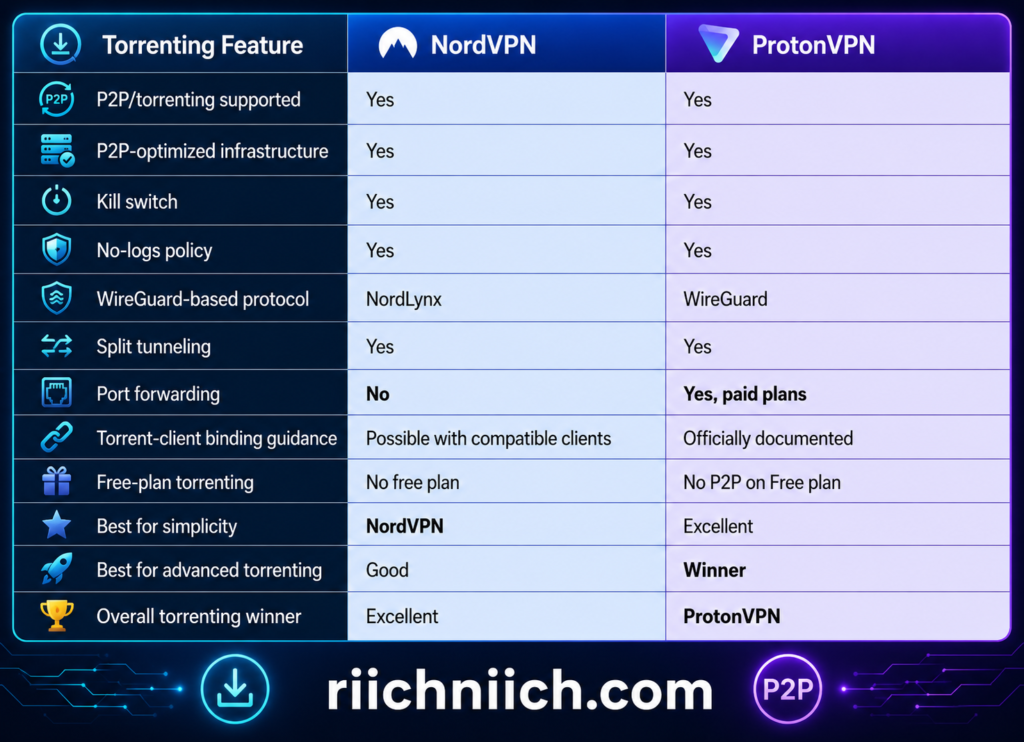
Torrenting With NordVPN
NordVPN has made P2P usage considerably simpler.
Older versions of NordVPN separated standard and P2P servers inside the application. NordVPN has since changed this arrangement: all standard NordVPN servers now support P2P activity, so you can connect to a standard server without manually searching for a dedicated P2P category.
That makes NordVPN appealing to buyers who don’t want to spend much time configuring their VPN before downloading files.
Connect to NordVPN, enable the kill switch, choose an appropriate server, and use your preferred legitimate P2P application.
NordVPN’s NordLynx protocol is also particularly useful here because torrenting often involves transferring large files. A VPN that introduces excessive speed loss can turn an otherwise quick download into a frustrating experience.
The major limitation is port forwarding.
NordVPN doesn’t provide traditional port forwarding through its regular consumer VPN service. For many casual torrent users, this won’t matter. But advanced P2P users may prefer having an incoming port available because it can improve connectivity with other peers in some torrent swarms.
Torrenting With ProtonVPN
ProtonVPN takes a more feature-heavy approach.
Its P2P servers are specifically configured to support peer-to-peer traffic, including BitTorrent. When connected to one of these servers, other peers see the VPN server’s IP address rather than your normal public IP address. Proton identifies compatible servers with a P2P symbol inside its applications.
Proton currently advertises more than 20,000 P2P-capable servers across 140+ countries, along with high-capacity infrastructure, VPN Accelerator, a kill switch, split tunneling, and port forwarding.
For someone comparing NordVPN vs ProtonVPN for torrenting, that combination is difficult to ignore.
Proton also officially documents how to bind supported BitTorrent clients to the VPN interface. Binding can prevent the torrent client from transferring traffic over your regular internet connection rather than the VPN connection if the configuration is set up correctly.
This is a more advanced feature, but it’s valuable for users who want tighter control over their P2P setup.
ProtonVPN’s Port Forwarding Is a Major Advantage
This is the biggest differentiator in this category.
ProtonVPN supports port forwarding on paid plans. Its current apps provide port forwarding on Windows, macOS, and Linux, and Proton also documents manual configurations using OpenVPN and WireGuard.
Why does that matter?
When you’re behind a VPN, unsolicited incoming connections are normally blocked. Port forwarding creates a controlled route through the VPN firewall that allows incoming connections to reach a particular application.
For P2P applications, that can improve connectivity with other peers and potentially improve torrent performance in situations where accepting incoming connections is beneficial.
Proton specifically states that its port-forwarding feature can increase the number of peers available for P2P connections and potentially improve performance.
That doesn’t mean every torrent will suddenly download faster. Torrent performance depends on factors including the number of seeders, peer availability, your internet connection, server load, protocol, and distance from the VPN server.
But for an advanced torrent user choosing between NordVPN vs ProtonVPN, having port forwarding available is a legitimate advantage.
Why a Kill Switch Matters for Torrenting
A kill switch is important with any VPN, but it becomes particularly useful during P2P file sharing.
Imagine downloading a large legal torrent that takes an hour to complete. Your VPN connection unexpectedly drops halfway through.
Without appropriate protection, your torrent client could continue transferring data through your normal internet connection. That could expose your real public IP address to peers.
A kill switch is designed to prevent this by blocking internet traffic when the VPN connection unexpectedly fails.
ProtonVPN’s kill switch blocks traffic if the VPN connection drops, protecting the user’s IP address and DNS queries from leaking onto the regular connection. Proton also provides an Advanced Kill Switch on Windows and Linux that can prevent internet access unless ProtonVPN is connected.
NordVPN also offers kill-switch functionality, making this an important protection available from both providers.
For buyers looking for a secure VPN for torrenting, I would consider a properly configured kill switch essential rather than optional.
ProtonVPN Goes Further With Torrent-Client Binding
One of ProtonVPN’s most interesting features for advanced P2P users isn’t actually a special VPN technology.
It’s the ability to bind compatible torrent clients to the ProtonVPN network interface.
For example, Proton provides instructions for compatible applications such as qBittorrent and Vuze. When configured correctly, the torrent client transfers data only through the selected ProtonVPN interface.
This creates another layer of protection against accidental IP exposure.
Proton makes an important point in its own documentation: choosing the wrong network interface could expose your real IP address, even when a kill switch is enabled. Therefore, users should follow the configuration instructions carefully rather than changing advanced settings without understanding them.
For most casual users, this level of configuration isn’t necessary.
But for serious P2P users, ProtonVPN’s combination of a kill switch, port forwarding, and torrent-client binding gives it one of the strongest technical setups in the NordVPN vs ProtonVPN comparison.
What About Torrenting Speed?
Speed is another reason this comparison is so close.
NordVPN’s NordLynx protocol is built around WireGuard technology and is designed to provide high VPN performance. That makes NordVPN an attractive option for large file transfers.
ProtonVPN combines WireGuard with high-capacity P2P servers and VPN Accelerator. Proton says most of its P2P infrastructure uses high-speed connections of up to 10 Gbps, although your actual download speed will still be limited by your own internet connection and other network conditions.
Neither provider can guarantee that every torrent will be fast.
Torrent speeds are heavily affected by the torrent itself. A well-seeded legal torrent could download extremely quickly, while a poorly seeded file might remain slow regardless of how fast your VPN is.
That is why the earlier NordVPN vs ProtonVPN speed comparison should be considered alongside this P2P category.
Can You Torrent With ProtonVPN Free?
This is an important limitation.
Although ProtonVPN has a permanent free plan, P2P file sharing is reserved for paid ProtonVPN plans. Proton’s official P2P documentation identifies P2P servers as a paid-plan feature.
Port forwarding is also restricted to paid plans.
Therefore, don’t choose ProtonVPN Free specifically because you want a free torrenting VPN.
NordVPN doesn’t have a permanent free plan either.
For someone purchasing a VPN primarily for regular P2P activity, NordVPN vs ProtonVPN for torrenting is essentially a comparison between their paid services.
Does a VPN Make Torrenting Legal?
A VPN doesn’t change the legality of the files you download.
BitTorrent itself is simply a peer-to-peer file-transfer protocol and has legitimate uses, including distributing open-source software and other lawfully shared large files.
Copyright law still applies when you’re connected to a VPN.
A VPN should therefore be used to improve privacy and security during legitimate P2P activity—not as a way to justify downloading copyrighted material without authorization.
Which VPN Is Better for Torrenting?
For this category of NordVPN vs ProtonVPN, our recommendation is:
Torrenting winner: ProtonVPN
NordVPN is still an excellent option, particularly for buyers who value simplicity. Standard NordVPN servers now support P2P, and the combination of NordLynx, a kill switch, a large server network, and strong privacy protections makes it well suited to everyday P2P use.
But ProtonVPN gets our overall advantage for torrenting because its paid service provides a more complete set of P2P-specific tools:
- Dedicated P2P support
- Port forwarding
- Kill-switch protection
- Torrent-client binding guidance
- WireGuard support
- VPN Accelerator
- High-capacity P2P servers
- Split tunneling
- A strict no-logs policy
The deciding feature is port forwarding. Users who don’t know what port forwarding is probably won’t miss it, which makes NordVPN perfectly reasonable for casual torrenting. But buyers who actively use P2P networks and want greater control over peer connectivity have a compelling reason to choose ProtonVPN.
So if torrenting is only an occasional part of your VPN usage, NordVPN remains a strong choice—especially if its speed, streaming capabilities, and broader security features appeal to you.
If P2P file sharing is one of your primary reasons for purchasing a VPN, I would choose ProtonVPN.
That gives ProtonVPN another important win in the overall NordVPN vs ProtonVPN comparison, particularly for privacy-focused and technically advanced users who want more control over how their P2P connections operate.
NordVPN vs ProtonVPN for Gaming
Gaming changes what matters in a VPN comparison. For streaming, you may care most about accessing services and maintaining enough bandwidth for 4K video. For gaming, latency, connection stability, server distance, NAT behavior, and protection against IP exposure can matter more than headline download speeds.
In NordVPN vs ProtonVPN, both services are capable gaming VPNs, but they appeal to slightly different buyers. NordVPN is the easier recommendation for most gamers because NordLynx, its extensive location selection, and straightforward apps make it simple to connect to a nearby VPN server and start playing. ProtonVPN, however, offers advanced gaming-friendly options including Moderate NAT and port forwarding on paid plans.
For most people looking for the best VPN for gaming, I would give NordVPN a slight overall advantage because of its combination of performance and simplicity. Advanced PC gamers who specifically need NAT controls or port forwarding may find ProtonVPN more attractive.
NordVPN vs ProtonVPN Gaming Comparison
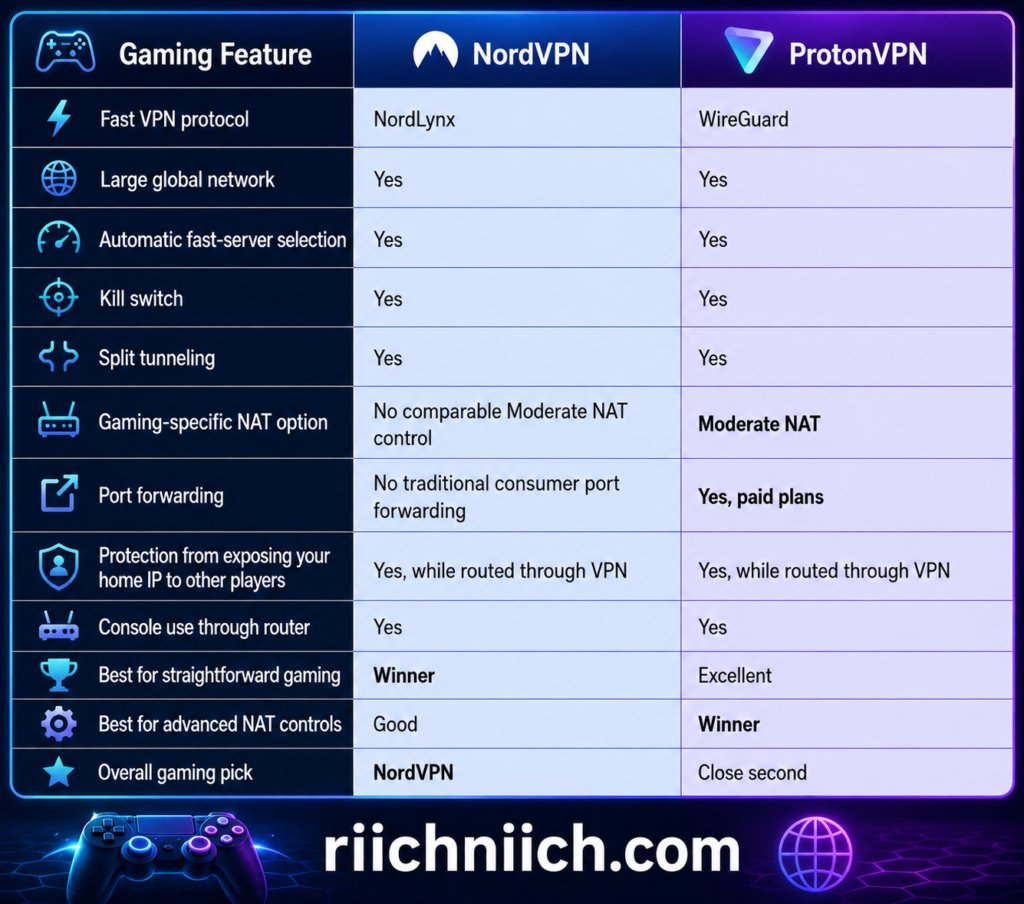
The biggest mistake would be choosing either service simply because it advertises more servers. When gaming, the quality and distance of the server you connect to can matter considerably more than the total number of servers worldwide.
Why Ping Matters More Than Raw Speed for Gaming
Suppose your normal internet connection provides 500 Mbps download speeds.
That sounds impressive, but if connecting through a distant VPN server pushes your ping from 25 milliseconds to 120 milliseconds, competitive gaming can feel considerably worse even though you still have plenty of bandwidth.
Ping measures how long it takes data to travel between your device and its destination and return.
Lower is generally better.
A VPN normally adds another stop between your device and the gaming server:
Your device → VPN server → game server.
That additional routing means a VPN usually cannot be expected to lower your ping. In some unusual situations, a VPN may find a more efficient route around poor ISP routing and improve latency, but buyers shouldn’t purchase a VPN expecting it to be a universal ping-reduction tool.
This is where NordVPN vs ProtonVPN speed becomes particularly relevant for gamers. Both use modern, performance-focused VPN protocols, but choosing a nearby server is still one of the most important things you can do.
Why NordVPN Works Well for Gaming
NordVPN’s biggest gaming advantage is straightforward performance.
NordLynx is NordVPN’s WireGuard-based protocol designed to provide high VPN speeds without sacrificing the privacy protections expected from the service. Combined with NordVPN’s extensive geographic coverage, it gives gamers plenty of opportunities to choose a VPN location near themselves or their game’s infrastructure.
That matters because distance can increase latency.
For example, if you’re physically located in Texas and playing on a U.S. game server, routing your VPN connection through Europe would usually make little sense. Connecting through a nearby U.S. NordVPN location would generally be the more logical starting point.
NordVPN also gives gamers access to features such as a kill switch and split tunneling on supported platforms.
Split tunneling can be particularly useful for gaming.
You might decide to route your game through NordVPN while allowing another application to use your normal connection—or do the opposite, keeping your game outside the VPN tunnel while protecting selected applications.
For buyers who don’t want to spend time configuring NAT settings, ports, or other advanced networking features, this simplicity is a significant advantage.
ProtonVPN Has a Secret Weapon for Multiplayer Gaming: Moderate NAT
ProtonVPN has a particularly interesting feature for gamers called Moderate NAT.
By default, ProtonVPN uses Strict NAT because it provides stronger privacy characteristics. However, strict NAT can sometimes interfere with the direct connections required by multiplayer games.
Proton says potential symptoms include:
- High ping
- Slower connections
- Difficulty joining multiplayer games
- Problems hosting games
- Voice-chat problems with teammates
Paid ProtonVPN subscribers can switch to Moderate NAT, which Proton says can resolve these types of multiplayer connectivity problems by allowing more direct connections with other users.
This gives ProtonVPN a genuine advantage for certain gamers.
The tradeoff is privacy. Proton explains that Moderate NAT slightly reduces privacy compared with its default Strict NAT configuration because of how connections are mapped. For people who aren’t experiencing gaming problems, Proton recommends leaving Strict NAT enabled.
That is a good example of why the best VPN for gaming isn’t necessarily the VPN with the highest benchmark number. Sometimes the networking controls available to you matter just as much.
ProtonVPN Also Supports Port Forwarding
The other advanced advantage ProtonVPN brings to NordVPN vs ProtonVPN for gaming is port forwarding.
Port forwarding allows certain incoming internet connections to pass through the VPN’s firewall to your device.
Although the feature is more commonly associated with P2P file sharing, Proton explicitly notes that port forwarding can also improve performance for some online gaming situations. The feature is available with paid ProtonVPN plans on supported desktop platforms.
This won’t be necessary for the average person playing Call of Duty, Fortnite, Minecraft, or another mainstream multiplayer title.
But it gives advanced users another networking option that NordVPN doesn’t currently match with traditional port forwarding on its standard consumer VPN service.
There is one important limitation:
ProtonVPN doesn’t allow Moderate NAT and port forwarding to be used simultaneously.
You therefore need to choose the feature appropriate for your particular gaming setup rather than simply switching everything on.
Can a VPN Protect You From DDoS Attacks While Gaming?
A VPN can provide an important layer of protection because the game or other players generally see the VPN server’s public IP address rather than your home IP address when the relevant traffic is routed through the VPN.
This can be useful in gaming environments where another player might otherwise obtain your public IP address and target your connection with a distributed denial-of-service attack.
However, this shouldn’t be interpreted as absolute DDoS immunity.
A VPN can hide your home IP from services and peers reached through the VPN connection, but it doesn’t make your device or accounts invulnerable. Account security, strong passwords, multifactor authentication, updated software, and avoiding suspicious downloads remain important.
For privacy-conscious gamers comparing NordVPN vs ProtonVPN security, both services provide a meaningful advantage over exposing your regular public IP during appropriately routed online activity.
Can a VPN Get You Easier Game Lobbies?
You may encounter VPN marketing or social-media posts claiming that changing locations can automatically give you “bot lobbies,” easier opponents, or guaranteed matchmaking advantages.
I wouldn’t buy either VPN for that reason.
Modern matchmaking systems can consider numerous factors beyond IP location, and game developers continually change their matchmaking algorithms. A VPN cannot guarantee easier opponents.
Similarly, using a VPN to manipulate regional pricing, evade game restrictions, or circumvent a game’s rules can conflict with a publisher’s terms.
For NordVPN vs ProtonVPN, the stronger buyer-intent reasons for gaming are privacy, IP protection, network flexibility, and secure connections—not promises of guaranteed easier matches.
Can You Use NordVPN or ProtonVPN on PlayStation and Xbox?
Game consoles generally don’t provide the same native VPN-app experience available on Windows, macOS, Android, and iOS.
Instead, gamers commonly need to configure the VPN through a compatible router or share a VPN connection from another device.
This makes router compatibility worth considering if your primary gaming machine is an Xbox, PlayStation, Nintendo Switch, or another console rather than a gaming PC.
The benefit of router-level protection is that the console’s traffic can pass through the VPN without requiring a dedicated VPN application on the console itself.
The downside is complexity.
Router VPN setups require more configuration, and routing every device through the VPN may be unnecessary. For many console gamers, using a VPN only when there’s a specific privacy or networking reason will make more sense than leaving it enabled continuously.
Should You Leave Your Gaming VPN Connected All the Time?
Not necessarily.
If you are playing a game where latency matters more than IP privacy, test the game both with and without the VPN.
For example:
Normal connection: 22 ms ping
VPN connection: 28 ms ping
That difference may be virtually unnoticeable.
But:
Normal connection: 25 ms ping
VPN connection: 105 ms ping
In that situation, the privacy benefit may not justify the latency penalty for a fast competitive match.
The key is choosing the closest suitable VPN server and testing your real-world results.
This is another reason NordVPN gets a slight usability advantage. Someone who simply wants to connect to a nearby fast server and start gaming has relatively little configuration to worry about.
Which VPN Is Better for Competitive Gaming?
For competitive gaming, I would lean toward NordVPN.
Competitive gamers generally prioritize:
Low latency. Every unnecessary network hop can matter.
Stable connections. Sudden performance fluctuations can be worse than slightly lower maximum speeds.
Nearby servers. Geographic proximity gives you a better chance of maintaining reasonable latency.
A lightweight protocol. NordLynx is particularly well suited to this type of usage.
That doesn’t mean ProtonVPN performs poorly. WireGuard is also an excellent protocol, and ProtonVPN can automatically select fast servers through its connection profiles.
But for someone who wants a VPN primarily for everyday online gaming without configuring advanced networking settings, NordVPN would be our first choice.
Which VPN Is Better for Advanced PC Gamers?
This is where our recommendation changes.
ProtonVPN is more interesting for advanced PC gamers.
Its paid plans provide controls including:
Moderate NAT — potentially useful when Strict NAT causes multiplayer connection problems.
Port forwarding — useful for applications or gaming configurations that benefit from accepting incoming connections.
Split tunneling — allowing selected applications to use or bypass the VPN.
WireGuard — providing a fast, lightweight VPN protocol.
VPN Accelerator — designed to reduce performance losses associated with VPN routing.
Proton’s Windows application puts features including port forwarding, split tunneling, VPN Accelerator, protocol selection, and NAT controls into its connection settings.
That makes ProtonVPN particularly attractive if you’re comfortable tweaking network settings rather than simply pressing Connect.
Which VPN Is Better for Gaming?
For this category of NordVPN vs ProtonVPN, our recommendation is:
Gaming winner: NordVPN — by a small margin.
NordVPN gets our overall pick because its combination of NordLynx, extensive server-location flexibility, straightforward apps, split tunneling on supported devices, and generally simple connection process makes it an excellent fit for the typical gamer who wants speed, privacy, and minimal configuration.
But this category comes with an important exception.
If you’re an advanced PC gamer dealing with NAT-related multiplayer problems or you specifically need port forwarding, ProtonVPN may actually be the better VPN for your setup. Its Moderate NAT feature was designed specifically to address connectivity issues that can affect multiplayer gaming, while its paid port-forwarding functionality adds another level of network control.
So the buyer decision is relatively simple:
Choose NordVPN if you want the better all-around gaming experience with minimal setup.
Choose ProtonVPN if you want more advanced control over NAT behavior and incoming connections.
For most buyers comparing NordVPN vs ProtonVPN for gaming, I would choose NordVPN. But ProtonVPN’s specialized networking features make this much closer than the final winner might suggest.
NordVPN vs ProtonVPN Apps and Ease of Use
A VPN can offer excellent security and privacy, but those advantages mean much less if the software is frustrating to use. For most buyers, a VPN should be something you can install, sign into, connect, and largely forget about.
In NordVPN vs ProtonVPN, both providers do an excellent job with usability. They offer dedicated apps across major desktop, mobile, browser, and streaming platforms, and both paid services allow up to 10 simultaneous connections.
The biggest difference is their approach. NordVPN feels more streamlined for beginners, while ProtonVPN exposes more of its privacy and connection controls to users who want them.
For the average buyer looking for the easiest VPN to use, I give NordVPN a slight advantage. ProtonVPN isn’t difficult, but its additional controls make it particularly attractive to people who like customizing how their VPN works.
NordVPN vs ProtonVPN Ease of Use at a Glance

Both VPNs cover an impressive range of devices. NordVPN currently provides applications for Windows, macOS, Linux, Android, iOS, Apple TV, Android TV, and Fire TV, along with browser extensions for Chrome, Firefox, and Edge. ProtonVPN supports Windows, macOS, Linux, Android, iPhone/iPad, Chromebook, Apple TV, Android TV, Fire TV, Chrome, Firefox, and other configurations.
NordVPN Is Extremely Easy to Get Started With
One of NordVPN’s biggest strengths is that you don’t need to understand much about VPN technology to use it.
The basic process is straightforward:
- Create your NordVPN account.
- Download the appropriate app.
- Install it.
- Sign in.
- Connect to a VPN server.
NordVPN provides installation guides for Windows, macOS, Linux, Android, Android TV, iOS, tvOS, Fire TV, and browser extensions.
You can let NordVPN choose an appropriate server rather than manually examining server lists every time you connect.
That’s important from a buyer perspective.
A VPN shouldn’t require the average person to understand WireGuard, OpenVPN, DNS servers, obfuscation, tunneling protocols, or network routing just to protect a laptop at a coffee shop.
NordVPN lets beginners start with the basics while keeping more advanced options available when they’re needed.
ProtonVPN Is Also Beginner-Friendly
ProtonVPN may have a reputation as a privacy-focused service for technical users, but its apps have become much more approachable.
You don’t need to understand Secure Core, port forwarding, NAT behavior, or VPN protocols to use it.
ProtonVPN’s basic workflow is just as simple:
- Install ProtonVPN.
- Sign into your Proton account.
- Use Quick Connect.
- Let ProtonVPN select a suitable server.
Proton says its apps can automatically connect you to the fastest VPN server for your location, while users who want greater control can manually select a specific server available under their plan.
That creates a useful two-layer experience.
Beginners can simply connect.
Advanced users can dig deeper.
And that is arguably ProtonVPN’s biggest usability strength.
NordVPN’s Interface Is Better for People Who Just Want the VPN to Work
For many buyers, NordVPN’s strongest usability characteristic is how little interaction it requires.
If your goal is simply:
“Protect my connection.”
You can open the app, connect, and continue using your device.
You can still manually choose locations and configure additional security features, but the service doesn’t require you to become a VPN expert.
This is especially helpful if you’re buying a VPN for several members of a household.
A technologically experienced user might enjoy configuring every setting. Your spouse, parent, or teenager may simply want to know which button makes the VPN work.
NordVPN’s approach suits that type of household particularly well.
ProtonVPN Gives Advanced Users More Control
ProtonVPN becomes more interesting when you start exploring beyond Quick Connect.
Depending on your platform and plan, ProtonVPN provides controls for features such as:
- Secure Core
- Split tunneling
- Kill switch
- Protocol selection
- Port forwarding
- Moderate NAT
- VPN Accelerator
- Custom connection behavior
For example, Proton’s split-tunneling feature currently supports Windows, macOS, Linux, Android, Android TV, and its browser extension. Users can configure connections so specific apps or IP addresses either use or bypass the VPN tunnel.
That’s useful if you want your browser protected by the VPN while another application uses your regular internet connection—or vice versa.
The important thing is that Proton doesn’t force you to use these advanced controls.
You can ignore them completely and use Quick Connect.
That balance between simple everyday operation and advanced customization makes ProtonVPN one of the strongest choices for buyers who expect their VPN needs to grow over time.
Which Has the Better Mobile Apps?
Both providers are strong choices for smartphones and tablets.
NordVPN offers dedicated apps for Android and iOS, while ProtonVPN provides apps for Android and iPhone/iPad. Both make it relatively easy to connect without manually configuring VPN settings inside your phone’s operating system.
For everyday use, either service should be comfortable for someone who regularly switches between a laptop and smartphone.
This matters because a VPN subscription shouldn’t protect only the computer sitting on your desk.
Your smartphone may connect to hotel Wi-Fi, airport Wi-Fi, coffee-shop networks, and other connections outside your home. Having the same VPN account available across devices makes it much easier to maintain consistent protection.
ProtonVPN does have one notable advantage for privacy-focused buyers: its major VPN apps are open source. Proton also states that its apps are available across all major platforms.
That doesn’t necessarily make ProtonVPN easier to operate, but it reinforces the transparency advantage discussed earlier in this NordVPN vs ProtonVPN comparison.
What About Apple TV, Android TV, and Fire TV?
Both providers have moved well beyond computers and smartphones.
NordVPN supports Apple TV, Android TV, and Fire TV, allowing users to install dedicated applications on compatible streaming devices rather than relying entirely on complicated router configurations.
ProtonVPN also provides apps for Apple TV, Android TV, and Fire TV. Its Android TV interface, for example, lets you select a country and automatically connects to a fast server in that location.
Proton’s Apple TV app similarly allows users to select a country or choose the fastest available country using a television remote.
This makes both VPNs much more practical for the average household.
If you’re buying a VPN partly for streaming, you shouldn’t need to drag a laptop into the living room every time you want to use it.
Both Allow Up to 10 Simultaneous Connections
This category is essentially a tie.
NordVPN allows up to 10 simultaneous device connections per account.
ProtonVPN’s paid plans also allow up to 10 simultaneous connections.
That means one subscription could potentially protect your:
Laptop
Desktop
Phone
Tablet
Work laptop
Apple TV
Android TV
Second phone
Family member’s laptop
Another household device
For many individuals and smaller households, ten simultaneous connections should be plenty.
NordVPN also notes that installing the VPN on a compatible router can protect devices connected through that router while the router itself counts as one VPN connection.
So neither service has a decisive advantage based purely on simultaneous connections.
NordVPN’s Browser Extensions Add Another Convenience Advantage
NordVPN provides browser extensions for Chrome, Firefox, and Edge.
These are useful when you want to protect browser traffic without routing everything on your computer through the full VPN application.
NordVPN explains that its browser extension doesn’t require administrator privileges and can secure only browser traffic. It also supports excluding selected websites from the protected connection.
ProtonVPN offers browser extensions for Chrome and Firefox and similarly allows users to protect browser traffic without necessarily routing every application through the VPN.
NordVPN gets a small compatibility advantage here because it also officially supports Edge.
For most buyers, however, I wouldn’t choose between these VPNs based on browser extensions alone.
ProtonVPN Free Makes It Easier to Try the Service
ProtonVPN has one major usability advantage that shouldn’t be overlooked:
You can actually use ProtonVPN without purchasing it first.
Proton’s permanent free VPN plan includes no advertising and no data limit.
That gives potential customers an unusually low-risk way to evaluate ProtonVPN’s interface.
You can install the application, see whether you like the layout, test Quick Connect, and determine whether ProtonVPN feels comfortable on your devices before deciding whether its premium features justify upgrading.
NordVPN doesn’t have an equivalent permanent free plan.
For a buyer who is hesitant about committing money before trying the software, ProtonVPN clearly has the advantage.
Which VPN Is Easier for Beginners?
For beginners, our choice is:
NordVPN.
Not because ProtonVPN is difficult—it isn’t.
NordVPN simply feels more focused on getting ordinary users connected quickly without exposing them to more technical information than they need.
If you’re purchasing your first VPN, or you’re recommending a VPN to someone who isn’t particularly comfortable changing network settings, NordVPN is the easier service for me to recommend.
Install it, sign in, connect, and let the application handle most of the decisions.
Which VPN Is Better for Advanced Users?
Here our recommendation reverses.
ProtonVPN gets the advantage for advanced users.
Its combination of connection profiles, Secure Core, extensive split-tunneling controls, port forwarding, Moderate NAT, protocol selection, and other connection settings provides more opportunities to customize how the VPN behaves.
And Proton manages to offer these capabilities without making Quick Connect difficult for beginners.
This distinction is important because “ease of use” doesn’t always mean fewer features.
Sometimes the best interface is one that remains simple until you decide you want more control.
ProtonVPN does that exceptionally well.
Which VPN Has Better Apps and Ease of Use?
For this category of NordVPN vs ProtonVPN, our recommendation is:
Apps and ease-of-use winner: NordVPN — by a small margin.
Both providers support virtually every major platform an average buyer is likely to use. Both allow up to 10 simultaneous connections on their applicable paid services, both have TV apps, both offer browser extensions, and both let beginners connect without understanding the technical details behind a VPN.
But the buyer decision comes down to what type of user you are.
Choose NordVPN if you want: a polished, straightforward VPN experience that requires minimal configuration and works well across computers, phones, browsers, and TVs.
Choose ProtonVPN if you want: an easy VPN that also gives you deeper control over how connections work, along with open-source apps and a permanent free tier that lets you experience the service before upgrading.
For the average person buying a VPN for the first time, NordVPN gets our recommendation for ease of use.
For privacy enthusiasts and technically inclined buyers who enjoy adjusting their connection settings, ProtonVPN may actually provide the better app experience.
That makes this another close category in the overall NordVPN vs ProtonVPN comparison: NordVPN wins on simplicity, while ProtonVPN wins on customization and transparency.
NordVPN vs ProtonVPN for Multiple Devices
Most people no longer need a VPN for just one computer. A typical household may have laptops, smartphones, tablets, smart TVs, streaming devices, gaming systems, and other connected hardware sharing the same internet connection.
That makes simultaneous connections an important part of NordVPN vs ProtonVPN.
The good news is that both NordVPN and ProtonVPN Plus currently allow up to 10 simultaneous VPN connections. NordVPN lets you use one subscription across 10 devices at the same time, while ProtonVPN Plus also supports up to 10 simultaneous connections.
For the average individual or household, that’s likely enough. However, there are some important differences once you start considering routers, families, browser extensions, free accounts, and households with more than 10 connected devices.
NordVPN vs ProtonVPN Multiple-Device Comparison
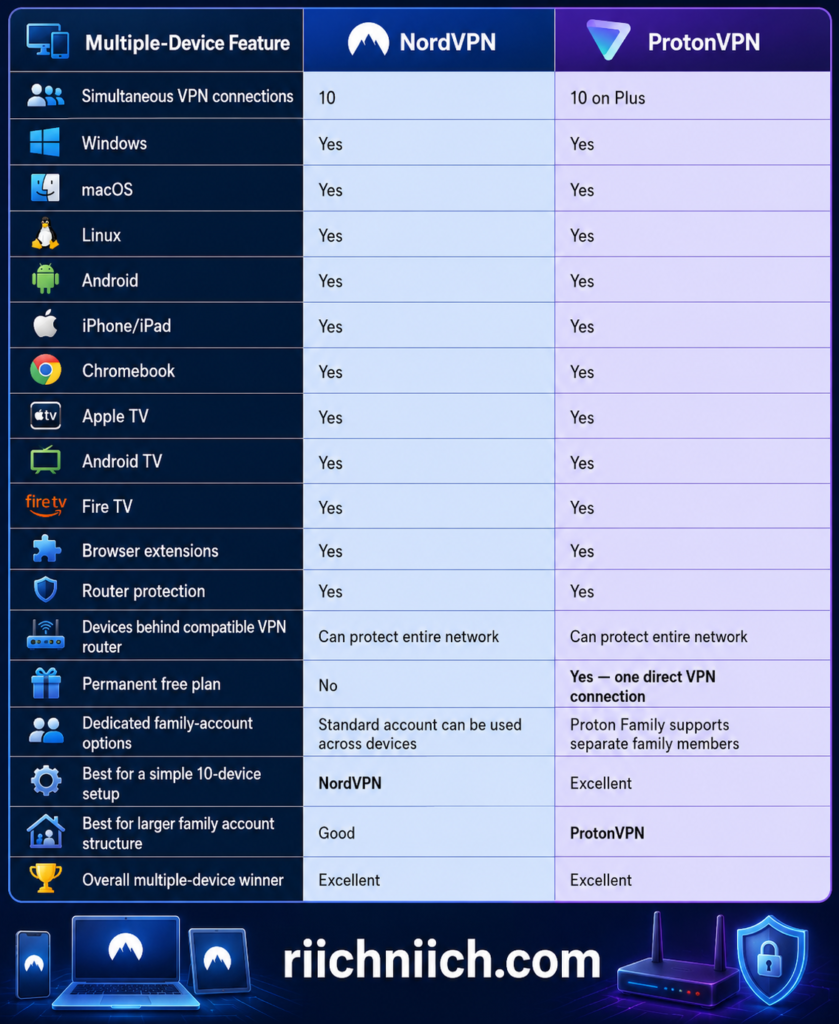
The basic result is therefore a tie at 10 simultaneous connections, but that number doesn’t tell the entire story.
NordVPN Protects Up to 10 Devices at Once
NordVPN allows 10 simultaneous VPN connections with one subscription. You don’t need to purchase a separate NordVPN subscription for your laptop, phone, tablet, and television.
For example, one subscription could potentially cover your:
- Windows desktop
- MacBook
- Personal smartphone
- Work smartphone
- iPad
- Family member’s laptop
- Android tablet
- Apple TV
- Fire TV
- Second family member’s phone
That’s already a substantial amount of coverage.
More importantly, those devices don’t all need to connect to the same NordVPN location. NordVPN says devices can use different available servers and server types, subject to certain connection rules.
That means one person could be using NordVPN on a laptop while another family member connects a smartphone through a different VPN server.
For buyers who simply want the best VPN for multiple devices without complicated account management, NordVPN’s approach is easy to understand.
ProtonVPN Plus Also Supports 10 Simultaneous Connections
ProtonVPN Plus matches NordVPN with up to 10 simultaneous VPN connections.
Proton currently provides support across Windows, macOS, Linux, Android, iPhone and iPad, Chromebook, Apple TV, Android TV, Fire TV, and browsers.
This makes ProtonVPN just as practical for someone who moves between several devices during the day.
You might use ProtonVPN on your laptop while working, keep it connected on your smartphone when you leave home, and use another connection on your television at night.
You don’t have to log out of one device every time you want to protect another—as long as you stay within the applicable connection limit.
One difference is ProtonVPN Free.
ProtonVPN’s Free plan provides one VPN connection at a time, while ProtonVPN Plus increases that allowance to 10.
That reinforces a point from the earlier NordVPN vs ProtonVPN free plan comparison: ProtonVPN Free is useful for testing the service or protecting a single device, but a multi-device household will get substantially more flexibility from a paid plan.
What Happens If You Have More Than 10 Devices?
This is where router support becomes extremely valuable.
Imagine a household with:
Four smartphones
Three laptops
Two tablets
Three smart TVs
Two streaming devices
Two gaming consoles
You already have 16 devices.
Buying a VPN with 10 simultaneous connections might initially sound insufficient.
But you don’t necessarily need to install the VPN application individually on every device.
Instead, both NordVPN and ProtonVPN can be configured on compatible VPN routers.
Once the router establishes the VPN connection, devices using that router can have their internet traffic routed through the VPN without each device needing its own individual VPN app.
NordVPN says a router configured with NordVPN counts as one connection, while the devices connected through it can be protected by the router’s VPN connection.
ProtonVPN takes a similar approach. Proton says installing ProtonVPN on a compatible router protects devices connected through that router, including devices that don’t normally support VPN applications.
That dramatically changes the NordVPN vs ProtonVPN for multiple devices comparison.
A VPN Router Can Protect Devices That Don’t Have VPN Apps
Router protection isn’t only about getting around a simultaneous-device limit.
It can also solve another problem:
Some internet-connected devices don’t support native VPN applications.
A compatible VPN router can extend VPN protection to devices such as certain smart TVs, game consoles, streaming hardware, and other connected devices.
NordVPN explains that configuring its service on a compatible router can protect the devices using that network, including hardware that doesn’t normally support VPN apps.
ProtonVPN similarly explains that router installation can protect devices such as smart TVs and gaming consoles that don’t have native ProtonVPN applications.
However, router installation isn’t necessarily beginner-friendly.
Your router needs to support an appropriate VPN client configuration. ProtonVPN currently requires a compatible router that supports OpenVPN or WireGuard as a client, while NordVPN provides configuration instructions for compatible router platforms and manufacturers.
Don’t assume the router supplied by your internet provider will automatically work. Proton specifically notes that many ISP-provided routers don’t support the required VPN configurations.
For beginners, installing the VPN app directly on individual devices is generally easier.
ProtonVPN Has an Interesting Advantage for Families
Here’s where ProtonVPN becomes particularly interesting.
A standard ProtonVPN Plus subscription provides up to 10 connections, but the broader Proton ecosystem also offers family-oriented account structures.
Proton states that members of Proton Family can each have their own account and, when VPN connections are enabled, each family-group member receives up to 10 VPN connections.
That’s fundamentally different from simply sharing the same VPN login across everyone’s devices.
For example, a family structure can provide separate Proton accounts while still giving individual members access to their own VPN connections under the applicable family subscription.
This could be much more attractive for a larger household where several adults or older children want separate accounts rather than everyone using one set of credentials.
It does not mean ordinary ProtonVPN Plus subscribers automatically receive multiple sets of 10 connections. The expanded per-member arrangement applies to eligible Proton family or organizational plans.
For buyers specifically searching for a VPN for families, this is an important distinction.
Browser Extensions Can Count Differently Than You Expect
There’s another detail worth understanding when calculating how many devices you need.
A browser extension can count as its own active VPN connection.
ProtonVPN explicitly states that its browser extension counts toward the 10 simultaneous connections available with ProtonVPN Plus. If two separate browsers are simultaneously using ProtonVPN’s extension, they count as two active VPN connections—even if they’re running on the same physical computer.
That means “10 connections” doesn’t always equal “10 physical gadgets.”
For most households, this probably won’t become an issue. But someone running several browsers, computers, phones, TVs, and other devices simultaneously could hit the connection limit sooner than expected.
Which Is Better for One Person With Lots of Devices?
For an individual with several devices, I would give NordVPN a slight usability advantage.
Suppose you have:
A desktop
A laptop
A smartphone
A tablet
A work laptop
An Apple TV
A Fire TV
That’s seven devices.
Both services can handle the setup comfortably.
But NordVPN’s straightforward 10-device allowance, broad platform support, and simple apps make it especially easy for someone who just wants one VPN subscription across their personal technology.
Install the app, sign into the same NordVPN account, and connect.
If you eventually exceed 10 devices at home, you can consider moving some or all of your network protection to a compatible router.
Which Is Better for a Family?
This answer is more complicated.
For a smaller family sharing fewer than 10 simultaneous VPN connections, NordVPN is extremely convenient. NordVPN explicitly notes that its 10-device allowance can enable account use within families.
For a larger family that wants separate accounts and substantially more potential simultaneous connections, Proton’s broader Family structure becomes more compelling.
This is an important distinction between device sharing and account sharing.
If everyone is comfortable using the same VPN account, NordVPN’s straightforward approach works extremely well.
If you want individual family members to maintain separate Proton identities while still receiving VPN access, an eligible Proton family plan provides a more structured solution.
Which VPN Is Better for Multiple Devices?
For this category of NordVPN vs ProtonVPN, there isn’t a meaningful winner based solely on standard paid-plan simultaneous connections.
Standard multiple-device result: Tie
Both give typical paid VPN buyers up to 10 simultaneous connections, both support a wide range of popular devices, and both can be installed on compatible routers to extend protection across a home network.
The better choice depends on your household:
Choose NordVPN if you want a straightforward VPN subscription for up to 10 simultaneously connected devices and prioritize simplicity across computers, smartphones, tablets, browsers, and TVs.
Choose ProtonVPN Plus if you also need up to 10 simultaneous connections but prefer Proton’s privacy-focused ecosystem and advanced controls.
Consider Proton Family if you’re protecting a larger household and want separate family-member accounts rather than simply sharing one VPN account. Eligible family members can each receive up to 10 VPN connections.
Use a compatible VPN router with either provider if you have a large number of devices or want VPN coverage for hardware that can’t run a native VPN application.
For the typical buyer comparing NordVPN vs ProtonVPN for multiple devices, I’d call this category a tie. NordVPN has the edge in straightforward simplicity, while ProtonVPN becomes especially attractive when you expand the comparison beyond a single Plus account and consider its family-account structure.
Most importantly, neither provider forces an average buyer to purchase separate VPN subscriptions for every phone, laptop, tablet, and television in the house. That makes both NordVPN and ProtonVPN strong options for today’s multi-device households.
NordVPN vs ProtonVPN Customer Support
Customer support probably isn’t the first feature you think about when choosing a VPN, but it can become extremely important the moment something stops working. Connection failures, streaming problems, router configuration, billing questions, subscription cancellations, and app errors can all require help beyond a basic troubleshooting guide.
In the NordVPN vs ProtonVPN comparison, both providers now offer strong support systems, including 24/7 assistance. The biggest difference is how readily their live-chat options are available depending on the plan you choose.
NordVPN vs ProtonVPN Customer Support Compared

For most paying customers, the difference is smaller than it might initially appear because both companies provide 24/7 live-chat support.
NordVPN Offers 24/7 Live Chat and Email Support
One of NordVPN’s biggest customer-service advantages is straightforward access to assistance.
NordVPN provides 24/7 customer support through live chat and email for issues involving setup, troubleshooting, billing, and other service-related questions.
Its support process includes an AI chatbot that can initially attempt to resolve the problem. If the chatbot can’t solve the issue, the customer can be transferred to a NordVPN support agent. NordVPN describes live chat as its fastest support option.
That can be valuable when you’re dealing with something time-sensitive.
Imagine you’re about to stream a live event and your VPN won’t connect. Or you’re traveling and suddenly can’t establish a secure connection on your laptop.
Instead of submitting a ticket and waiting for an email response, live chat gives you a way to begin troubleshooting immediately.
NordVPN also says its email support team generally responds within 24 hours, making email a better option when the problem isn’t urgent or requires a more detailed explanation.
ProtonVPN Now Offers 24/7 Live Chat for Paid Customers
ProtonVPN’s support has become considerably more competitive.
ProtonVPN currently offers 24/7 live chat to everyone with a paid ProtonVPN plan. According to Proton, the chats are handled by its in-house support team, although it uses Zendesk to manage support requests.
Paid customers can start a live-chat session through their Proton account or from ProtonVPN’s website after signing in.
Proton also says it maintains support operations across multiple locations to provide 24/7 assistance and that human support remains part of its system even as it incorporates AI tools for common questions.
That’s an important consideration for buyers comparing NordVPN vs ProtonVPN customer service, because ProtonVPN shouldn’t be viewed as an email-only support service.
For paying subscribers, you can get real-time assistance from either provider.
What About ProtonVPN Free Customer Support?
This is where an important difference appears.
ProtonVPN offers a permanent free VPN plan, but its 24/7 live-chat feature is reserved for users with paid ProtonVPN plans.
Free users aren’t completely without support.
Proton provides an extensive online support center covering topics such as:
- Getting started
- VPN applications
- Installation
- Streaming
- ProtonVPN features
- Troubleshooting
- Accounts and billing
Users can also submit a support request through ProtonVPN’s contact form or contact support by email.
This creates another buyer-intent reason to consider upgrading from ProtonVPN Free to ProtonVPN Plus.
You’re not simply paying for more VPN servers and premium features. A paid plan also gives you access to 24/7 live-chat support when you need direct assistance.
Which Has the Better Help Center?
Both companies have extensive self-service support libraries.
NordVPN’s Support Center contains guides covering installation, connectivity problems, account management, billing, router configuration, and common VPN troubleshooting.
ProtonVPN similarly maintains a detailed knowledge base covering installation, apps, streaming, advanced VPN features, troubleshooting, billing, and account management.
This matters because many VPN problems don’t actually require contacting customer service.
If you need to install a VPN on a new device, configure a router, understand why a particular feature isn’t working, or change account settings, there’s a good chance you’ll find instructions in one of these knowledge bases.
For beginners, however, having live chat available can still be reassuring. A technical article might explain what to do, but a support representative can help when you aren’t sure which troubleshooting procedure applies to your situation.
Neither VPN Should Be Chosen for Phone Support
If speaking with customer service over the phone is important to you, this is one area where neither service stands out.
NordVPN explicitly states that it does not provide phone support, instead directing customers toward live chat and email.
ProtonVPN primarily directs customers toward live chat, its support request system, email, and its online knowledge base.
For most VPN problems, this isn’t necessarily a major disadvantage. Technical support often involves sharing error messages, configuration instructions, screenshots, or links to setup guides, which can actually be easier through chat or email.
But buyers who strongly prefer telephone customer service should know about this limitation before purchasing.
Customer Support Also Matters When You Want a Refund
Support isn’t only important when something breaks.
It also matters when you decide the VPN simply isn’t right for you.
Both services provide a 30-day money-back guarantee on eligible purchases, although their specific terms and payment-method restrictions should always be reviewed before subscribing.
NordVPN states that new subscriptions are covered by its 30-day money-back guarantee and provides a refund process through its customer-support system.
ProtonVPN similarly provides a 30-day money-back guarantee for paid plans. Proton directs eligible customers who purchased through its website to contact customer support when requesting a refund. Certain payment methods can have different restrictions.
For a buyer who hasn’t decided between NordVPN vs ProtonVPN, having a refund window reduces some of the risk of testing the service yourself.
Which VPN Has Better Customer Support?
For the customer-support category of NordVPN vs ProtonVPN, I would give NordVPN a slight advantage, but this is a much closer competition than buyers might expect.
Choose NordVPN if customer support is a major purchasing factor and you want a straightforward combination of 24/7 live chat, email assistance, and an extensive troubleshooting library. NordVPN’s support system is particularly attractive for beginners who want easy access to assistance when something goes wrong.
Choose ProtonVPN if you’re purchasing a paid ProtonVPN plan and want 24/7 live chat backed by an extensive privacy-focused support ecosystem. Paid ProtonVPN customers now have access to real-time live-chat assistance, significantly narrowing the customer-service difference between these two VPNs.
The main limitation appears if you’re staying with ProtonVPN Free, since 24/7 live chat is specifically offered to paid ProtonVPN subscribers.
Customer Support Winner: NordVPN — by a slight margin.
For buyers deciding between the two, customer service probably shouldn’t be the deciding factor by itself. Both paid services provide strong support options. But if you want the most straightforward support experience possible—particularly as a first-time VPN buyer—NordVPN gets the edge in this category.
NordVPN vs ProtonVPN Money-Back Guarantee
A money-back guarantee is especially valuable when buying a VPN because performance can vary depending on your internet connection, devices, location, router, and the services you use. Reading reviews can help narrow your options, but testing a VPN on your own devices is ultimately the best way to determine whether it works for you.
Fortunately, the NordVPN vs ProtonVPN money-back guarantee comparison is extremely competitive. Both NordVPN and ProtonVPN currently offer a 30-day money-back guarantee on eligible paid subscriptions, giving new customers an opportunity to test premium features before fully committing.
NordVPN vs ProtonVPN Money-Back Guarantee Compared
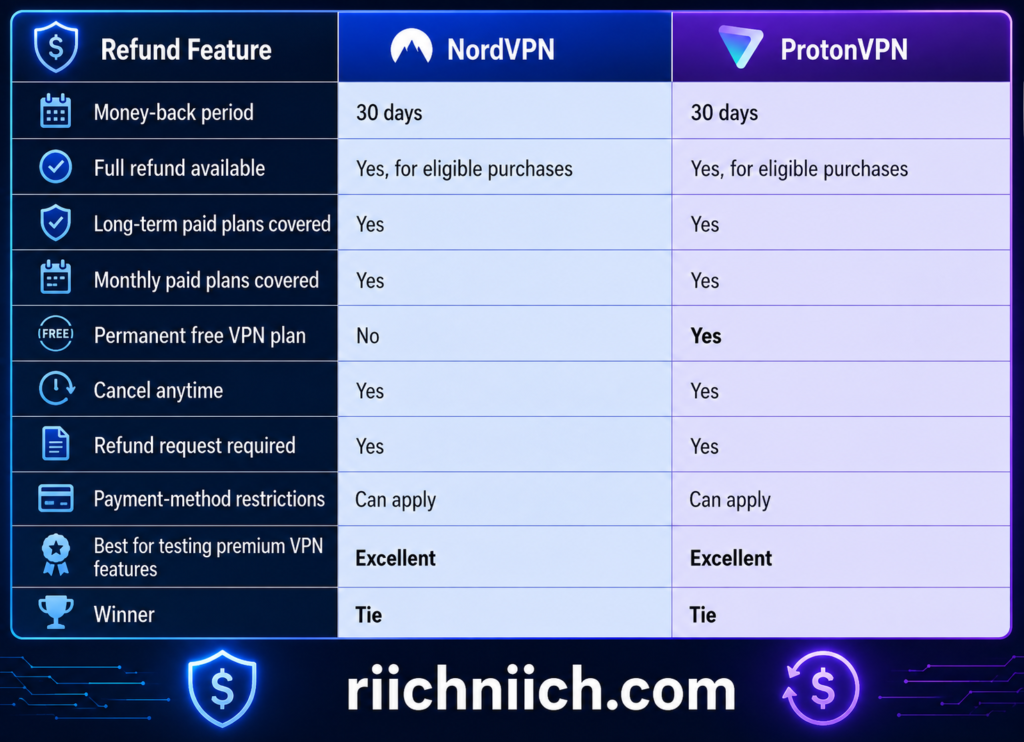
On the surface, this category is essentially even. However, buyers should understand that canceling a subscription and requesting a refund aren’t necessarily the same thing.
How NordVPN’s 30-Day Money-Back Guarantee Works
NordVPN currently provides a 30-day money-back guarantee with its paid plans. Its pricing page states that customers who want a refund must request one within 30 days of the initial purchase.
That gives you enough time to test NordVPN under the conditions that actually matter to you.
Instead of simply installing the VPN and using it once, you could test:
- Everyday web browsing
- Video streaming
- Download and upload speeds
- Gaming latency
- Public Wi-Fi connections
- Smartphone performance
- Laptop performance
- Multiple simultaneous devices
- Different VPN server locations
- Specialty security features
This makes the guarantee particularly useful for someone comparing NordVPN vs ProtonVPN before committing to a longer subscription.
For example, if you’re considering a two-year NordVPN plan because the introductory monthly equivalent is lower than purchasing month-to-month service, the guarantee gives you an initial testing window.
NordVPN states that customers who aren’t satisfied can contact its 24/7 customer support and request a refund within the applicable 30-day period.
Don’t Confuse Canceling NordVPN With Requesting a Refund
This is one of the most important details for buyers to understand.
Canceling automatic renewal does not automatically mean you’ve requested your money back.
NordVPN explains that when you cancel auto-renewal, you can continue using the service until the end of your current subscription period. If you actually want your initial purchase refunded under the guarantee, you need to request the refund within the applicable 30-day window.
In other words:
Canceling = stops a future renewal.
Requesting a refund = asks NordVPN to return an eligible payment.
If you’re testing NordVPN specifically because of the money-back guarantee, don’t simply turn off auto-renewal and assume the refund has been processed.
How ProtonVPN’s 30-Day Money-Back Guarantee Works
ProtonVPN also offers a 30-day money-back guarantee on its paid subscriptions. Proton’s current pricing information says customers can cancel their subscriptions at any time and request a refund within the first 30 days under its money-back guarantee.
This means you can purchase ProtonVPN Plus, test its premium functionality, and decide whether the upgrade provides enough value over ProtonVPN Free.
That distinction is particularly useful in this NordVPN vs ProtonVPN comparison because ProtonVPN gives you two different ways to evaluate its service.
You can start with ProtonVPN Free without providing a credit card, but the free version doesn’t include every premium capability. ProtonVPN Plus adds features such as more server choices, streaming support, P2P functionality, NetShield, Secure Core, higher speeds, and additional simultaneous connections.
Therefore, ProtonVPN’s free plan is useful for evaluating the basic experience, while the 30-day money-back guarantee lets you evaluate the premium experience.
ProtonVPN Also Requires You to Request Your Refund
As with NordVPN, you shouldn’t assume that canceling ProtonVPN automatically triggers a refund.
Proton explains that canceling a paid VPN subscription normally means the subscription expires at the end of the current billing cycle. If you purchased within the previous 30 days and want your money returned under the guarantee, you need to request a refund.
For subscriptions purchased directly through ProtonVPN’s website, Proton instructs eligible customers to contact its customer-support team.
There are also payment-method considerations.
For example, Proton currently states that it cannot issue refunds for cash or bank-transfer payments. Purchases made through app stores can also involve different procedures.
That’s why you should always check the current refund terms for your payment method before purchasing solely because of the money-back guarantee.
Which VPN Gives You the Better Risk-Free Trial?
Strictly comparing the premium money-back guarantees, NordVPN vs ProtonVPN is a tie.
Both offer:
30 days to evaluate an eligible paid subscription.
That is enough time for most buyers to conduct a meaningful real-world comparison.
But ProtonVPN has an additional advantage that technically sits outside the money-back guarantee itself: its permanent free plan.
ProtonVPN Free has no data or time limits, although premium functionality is reserved for paid subscriptions.
NordVPN doesn’t offer an equivalent permanent free VPN plan.
Therefore, buyers who absolutely don’t want to enter payment information before trying a VPN have an easier starting point with ProtonVPN Free.
On the other hand, if you specifically want to test premium VPN functionality, the comparison becomes much closer because both providers give eligible paying customers the same 30-day refund window.
What Should You Test During the 30 Days?
Don’t waste the refund period simply browsing the internet occasionally.
If you’re choosing between NordVPN vs ProtonVPN, use those 30 days to determine whether the VPN actually solves the problems you’re paying it to solve.
Test the VPN during your normal routine.
Connect from your home Wi-Fi. Try it on cellular data. Use the apps on your computer and smartphone. Test the streaming services you already pay for while traveling where permitted. Connect several devices simultaneously. Compare nearby and distant servers. Check whether your normal internet speeds remain acceptable.
If gaming matters to you, measure your latency.
If privacy matters most, test the kill switch and other security settings.
If you’re buying a VPN for travel, make sure the applications are easy enough to use that you’ll realistically keep the VPN enabled when connecting to hotel, airport, or coffee-shop Wi-Fi.
A VPN can look impressive on a feature comparison chart and still be the wrong choice for your specific setup.
Which Has the Better Money-Back Guarantee?
For this category of NordVPN vs ProtonVPN, the result is:
Money-Back Guarantee Winner: Tie
NordVPN provides a 30-day money-back guarantee for eligible initial purchases, while ProtonVPN provides a 30-day money-back guarantee for eligible paid subscriptions.
Choose NordVPN if you’re already leaning toward NordVPN and want to test its premium service across your own devices before committing to keeping the subscription.
Choose ProtonVPN if you like having both a permanent free option for basic testing and a 30-day money-back guarantee when upgrading to its premium VPN features.
The most important buying takeaway is simple: you don’t have to make your final NordVPN vs ProtonVPN decision entirely from specifications and reviews. Both providers give eligible customers a 30-day window to evaluate their paid VPN service in real-world conditions.
That makes this category essentially equal—and gives buyers a much safer way to determine which VPN deserves their subscription.
NordVPN vs ProtonVPN Pros and Cons
After comparing pricing, speed, security, privacy, servers, streaming, torrenting, gaming, apps, multiple-device support, customer service, and refund policies, the NordVPN vs ProtonVPN decision becomes much easier when you look at the strengths and weaknesses of each service side by side.
Both are strong premium VPNs, but they appeal to slightly different buyers. NordVPN offers a particularly well-rounded combination of speed, usability, streaming support, security features, and additional cybersecurity tools. ProtonVPN stands out for its privacy-first approach, open-source apps, Secure Core infrastructure, and unusually capable permanent free plan.
Here are the major pros and cons to consider before buying.
NordVPN Pros
Fast performance
Speed is one of NordVPN’s strongest selling points. NordVPN uses its NordLynx protocol and a large server network to provide high-speed VPN connections. For buyers who regularly stream, game, download large files, or use a VPN throughout the day, maintaining strong connection speeds can make a major difference in everyday usability.
Strong security features
NordVPN goes well beyond basic VPN encryption. Its feature set includes a kill switch, Double VPN, Onion Over VPN, obfuscated servers, private DNS, split tunneling, and other security tools.
That makes NordVPN particularly appealing if you’re searching for the best VPN for security and privacy but still want something relatively easy to operate.
Good for streaming
NordVPN’s SmartPlay technology is designed to make secure streaming easier without requiring additional configuration. That combination of speed and streaming functionality is one reason NordVPN can be particularly attractive to entertainment-focused buyers.
Up to 10 simultaneous device connections
One NordVPN account currently supports up to 10 simultaneous device connections. You can also configure NordVPN on a compatible router, which can extend protection to devices connected through your home network.
Beginner-friendly
NordVPN is a strong choice for someone who doesn’t want to spend much time configuring a VPN. Install the application, sign in, select a server—or use automatic connection—and you’re ready to go.
That simplicity matters because even advanced security features aren’t particularly valuable if they’re too complicated for the average customer to use.
Additional cybersecurity features
NordVPN has increasingly expanded beyond a traditional VPN. Depending on the plan, its offerings can include ad and tracker blocking, anti-malware and browsing protection, dark-web monitoring, password management, cloud storage, and other cybersecurity tools.
For someone looking to consolidate several digital-security tools under one subscription, that can increase the overall value.
30-day money-back guarantee
NordVPN gives eligible new subscribers a 30-day money-back guarantee, providing an opportunity to test the paid service before making the final decision to keep it.
NordVPN Cons
No permanent free plan
This is one of NordVPN’s clearest disadvantages in the NordVPN vs ProtonVPN comparison.
ProtonVPN offers a permanent free tier, while NordVPN focuses on paid subscriptions. Buyers who want to test basic VPN protection indefinitely without paying have a significant reason to consider ProtonVPN instead.
Best prices generally require longer commitments
NordVPN’s advertised monthly equivalent can become much cheaper when purchasing a long-term plan. However, that means paying for a larger subscription period upfront.
The initial promotional price can also differ substantially from the renewal price, so buyers should check both numbers rather than judging value entirely from the headline monthly equivalent.
Some cybersecurity features require higher-tier plans
Not every feature advertised within the broader Nord ecosystem comes with the least expensive VPN subscription. Features such as password management, additional monitoring, cloud storage, and other protections can depend on the plan purchased.
Before buying, compare the actual plan features rather than assuming everything NordVPN offers is included with the entry-level subscription.
Feature selection can feel overwhelming
NordVPN’s extensive cybersecurity ecosystem is an advantage, but it can also create complexity.
Someone who only wants a VPN may not care about cloud storage, identity monitoring, password management, dark-web monitoring, or other bundled features. For those buyers, selecting between several subscription tiers can feel more complicated than necessary.
ProtonVPN Pros
Excellent privacy-focused design
Privacy is at the center of ProtonVPN’s identity.
ProtonVPN is based in Switzerland, uses a no-logs approach, provides strong encryption, DNS leak protection, a kill switch, and other privacy protections. Its applications are also open source across major platforms.
For privacy-focused buyers evaluating NordVPN vs ProtonVPN, those characteristics can make ProtonVPN especially attractive.
Secure Core provides additional protection
Secure Core is one of ProtonVPN’s standout premium features.
Instead of sending your traffic directly through a standard VPN server, Secure Core can route it through hardened infrastructure in privacy-friendly jurisdictions before it reaches an exit server. Proton says it owns and operates its Secure Core servers and houses them in high-security data centers.
This additional routing can be valuable for people with heightened privacy requirements, although most ordinary VPN users won’t need Secure Core enabled constantly.
Permanent free VPN plan
This is arguably ProtonVPN’s biggest competitive advantage.
ProtonVPN Free has no data limit and no artificial speed limit, although free servers can become busy and premium functionality remains restricted to paid plans.
That makes ProtonVPN one of the more interesting options for someone searching for a free VPN vs paid VPN and who isn’t ready to purchase a subscription immediately.
Free users still receive core privacy protections
Proton says its no-logs policy and encryption standards also apply to free users.
That’s important because a free VPN shouldn’t require sacrificing the fundamental privacy protections that made you want a VPN in the first place.
Open-source apps
ProtonVPN provides open-source applications for major platforms including Windows, macOS, Linux, Android, iOS, and others.
For technically minded users who value transparency and independent scrutiny, this is a meaningful advantage.
Up to 10 devices with ProtonVPN Plus
Upgrading to ProtonVPN Plus increases the simultaneous connection allowance to as many as 10 devices, putting it directly alongside NordVPN for ordinary multi-device use.
Large global server network
ProtonVPN’s network has expanded considerably. Proton currently reports more than 20,000 servers across over 140 countries, although server counts and locations naturally change as VPN networks expand.
That gives paid subscribers substantial flexibility when choosing VPN locations.
ProtonVPN Cons
The free plan doesn’t include everything
ProtonVPN Free is impressive, but don’t mistake it for ProtonVPN Plus.
Premium features such as Secure Core, streaming support, P2P support, NetShield, the full global server network, and up to 10 simultaneous connections require a paid plan.
For someone who streams heavily, torrents, wants more server locations, or needs many simultaneous connections, upgrading becomes much more compelling.
One simultaneous connection on the Free plan
ProtonVPN Free currently allows one VPN connection at a time, compared with up to 10 connections on ProtonVPN Plus.
That’s perfectly reasonable for someone protecting one laptop or smartphone, but considerably less convenient for a multi-device household.
Secure Core can add extra latency
Secure Core increases privacy by routing traffic through additional infrastructure. The tradeoff is that sending data through multiple VPN servers can add distance and processing to the connection.
Therefore, Secure Core is better viewed as a specialized privacy feature than something every buyer needs to enable for ordinary browsing, streaming, or gaming.
Advanced privacy features may be more than an average buyer needs
ProtonVPN can be particularly appealing to privacy enthusiasts and technically minded users. But someone simply looking for a fast VPN for streaming, traveling, gaming, and everyday Wi-Fi protection may not place as much value on Secure Core or Proton’s broader privacy ecosystem.
That doesn’t make those features bad—it simply changes the value proposition.
NordVPN vs ProtonVPN Pros and Cons at a Glance
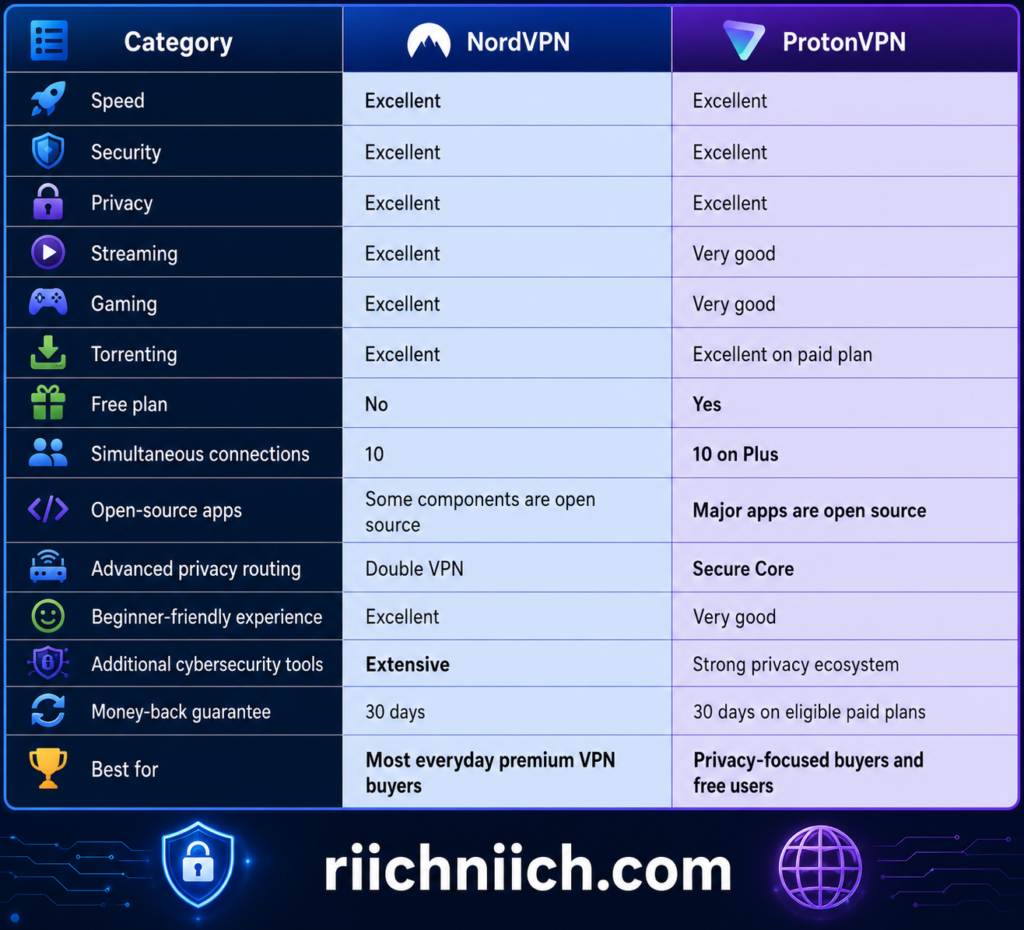
Which VPN Has the Better Pros and Cons?
When everything is considered, NordVPN vs ProtonVPN doesn’t have a bad choice. The better purchase depends on which advantages matter most to you.
Choose NordVPN if you want: fast everyday performance, strong streaming capabilities, easy-to-use apps, gaming and torrenting support, advanced security features, and a broader collection of cybersecurity tools.
Choose ProtonVPN if you want: a privacy-first VPN, open-source applications, Secure Core, a strong Swiss privacy foundation, or one of the most capable permanent free VPN options available.
For the average buyer who wants one premium VPN to handle streaming, gaming, travel, public Wi-Fi, multiple devices, privacy, and everyday internet security, NordVPN has the more balanced overall package.
For someone whose purchasing decision places privacy, transparency, open-source software, and a usable free tier above everything else, ProtonVPN may be the better fit.
Pros and Cons Winner: NordVPN — slight overall advantage.
The important distinction is that NordVPN wins here because of its overall versatility, not because ProtonVPN lacks strong features. ProtonVPN remains the more compelling alternative for privacy-focused buyers, while NordVPN’s combination of speed, usability, entertainment performance, security features, and broader cybersecurity tools gives it the advantage for the typical premium VPN customer.
Who Should Choose NordVPN?
NordVPN is the better choice for buyers who want a fast, versatile premium VPN that performs well across everyday use cases without requiring much technical knowledge. In the broader NordVPN vs ProtonVPN comparison, NordVPN makes the most sense for people who prioritize a balance of speed, streaming, gaming, security, multiple-device support, and ease of use rather than putting advanced privacy features above everything else.
That doesn’t mean everyone should choose NordVPN. ProtonVPN remains particularly attractive for privacy-focused users and people who want a permanent free VPN. But several types of buyers are likely to get more value from NordVPN.
If NordVPN looks like the better fit but you want to compare it with another major alternative before buying, our NordVPN vs Surfshark comparison breaks down their differences in pricing, speed, security, features, and overall value.
Choose NordVPN If You Want a VPN That’s Easy to Use
A VPN shouldn’t require you to understand networking protocols just to protect your internet connection.
NordVPN is designed around a relatively straightforward process: install the app, sign in, and connect. Its current apps are available across major platforms, including Windows, macOS, Linux, Android, and iOS, while browser extensions and support for other devices expand its usefulness.
This makes NordVPN particularly suitable for first-time VPN buyers.
You can still customize protocols, specialty servers, security settings, and other features when you want more control, but you don’t need to configure everything manually before using the service.
For someone comparing NordVPN vs ProtonVPN for beginners, NordVPN’s combination of advanced features and straightforward operation is one of its strongest selling points.
Choose NordVPN If Speed Is One of Your Biggest Priorities
Every VPN introduces some processing because your internet traffic has to travel through an encrypted VPN connection. The question is whether you’ll actually notice the slowdown during normal use.
NordVPN places significant emphasis on performance and currently uses protocols including NordLynx, which is based on WireGuard, alongside OpenVPN and other options.
Fast VPN performance becomes especially important if you regularly:
- Stream high-resolution video
- Download large files
- Play online games
- Make video calls
- Work remotely
- Connect to servers far from your physical location
For a buyer searching for a fast VPN for streaming and gaming, NordVPN should be high on the shortlist.
That doesn’t mean ProtonVPN is slow. Rather, NordVPN’s combination of speed-oriented technology and simple server selection makes it particularly attractive when performance is one of your main purchasing criteria.
Choose NordVPN If Streaming Is Important to You
Streaming is another strong reason to consider NordVPN.
NordVPN includes SmartPlay technology designed to combine VPN encryption with easier access to supported streaming services. Its support documentation also specifically identifies streaming optimization as part of its feature set.
This can make NordVPN a strong choice if you travel frequently and want secure access to services you already subscribe to, subject to those platforms’ terms and geographic availability.
The combination of speed + streaming support + simple apps is important here.
A highly configurable VPN might appeal to enthusiasts, but many buyers simply want to open the app, establish a secure connection, and start watching.
In the NordVPN vs ProtonVPN decision, those buyers are likely to appreciate NordVPN’s more mainstream, all-purpose approach.
Choose NordVPN If You Want to Protect Lots of Devices
NordVPN is also well suited to people whose internet usage extends far beyond one computer.
One subscription currently supports up to 10 simultaneous VPN connections. NordVPN also says configuring the VPN on a compatible router can protect devices using that network while consuming one VPN connection slot.
That makes NordVPN practical for households with combinations of:
Phones, laptops, tablets, desktop computers, televisions, streaming devices, and other connected hardware.
You don’t need to purchase an individual VPN subscription for every compatible device.

Choose NordVPN If You Frequently Use Public Wi-Fi
If you regularly work from coffee shops, airports, hotels, libraries, or other public locations, a VPN can become considerably more useful.
NordVPN encrypts your internet connection between your device and its VPN server, while features such as DNS leak protection and an automatic kill switch provide additional safeguards if you’re concerned about exposing traffic outside the VPN tunnel.
For frequent travelers, that can make NordVPN worth considering.
Instead of remembering to change complicated network settings whenever you leave home, you can connect through the VPN application when using an unfamiliar network.
A VPN doesn’t make unsafe behavior automatically safe—you should still use HTTPS, strong passwords, multi-factor authentication, and normal cybersecurity precautions—but it adds another layer of protection to your connection.
Choose NordVPN If You Want More Than a Basic VPN
Some buyers only want encrypted internet traffic and a different IP address.
Others want a broader collection of cybersecurity tools.
NordVPN increasingly targets the second group.
Even its current Basic plan includes the VPN, scam and phishing protection, support for 10 devices, and Dark Web Monitor. Higher tiers can add protections such as more extensive dark-web monitoring, anti-malware and browsing protection, an ad and tracker blocker, password management, encrypted cloud storage, and—on eligible plans—additional identity-protection services.
This could be valuable if you’re already paying separately for several cybersecurity services and want to consolidate some of them.
However, check the exact subscription tier before buying. Not every NordVPN feature is included with every plan.
Choose NordVPN If You Want Advanced Features Without an Overly Technical Experience
NordVPN isn’t just designed for beginners.
It also provides features that more experienced users can explore, including a kill switch, split tunneling on supported platforms, Double VPN, obfuscated servers, Onion Over VPN, dedicated IP options, and several VPN protocols.
There’s also Meshnet.
Meshnet can create encrypted connections between compatible devices for uses such as remote access, file sharing, gaming, and routing traffic through another device. NordVPN’s documentation says a Meshnet network can include up to 10 devices you own and up to 50 external devices.
That’s an example of where NordVPN can grow with the user.
A beginner can ignore most advanced functionality and simply connect to the VPN. Someone more experienced can start experimenting with specialty servers, protocols, Meshnet, dedicated IP addresses, and other settings.
Choose NordVPN If You Want a Premium VPN Rather Than a Free VPN
This distinction matters considerably in NordVPN vs ProtonVPN.
If your primary requirement is a permanent free VPN, NordVPN isn’t the right choice. ProtonVPN has the obvious advantage because it offers a free tier.
NordVPN is better suited to someone who has already decided they’re willing to pay for a VPN and wants to maximize what they receive from a premium subscription.
That buyer may care more about:
Strong everyday speeds, streaming performance, gaming, broad server availability, multiple-device protection, customer support, advanced security tools, and an easy-to-use interface.
NordVPN’s current paid plans also come with a 30-day money-back guarantee, giving eligible buyers an initial period to determine whether the service performs well with their own devices and internet connection.
Choose NordVPN If You Want an All-Around VPN
This is ultimately NordVPN’s biggest advantage in the NordVPN vs ProtonVPN comparison.
NordVPN isn’t necessarily the choice because every individual feature beats ProtonVPN. Instead, its appeal comes from how many different needs it can satisfy under one subscription.
You should strongly consider NordVPN if you’re looking for:
One VPN for streaming + gaming + travel + public Wi-Fi + privacy + multiple devices + everyday internet security.
That combination makes it especially suitable for someone who doesn’t want separate VPNs for different situations.
A traveler can use it at the airport.
A remote worker can use it at a hotel.
A family can protect multiple devices.
A streamer can use it when traveling.
A gamer can prioritize fast connections.
A privacy-conscious user can enable stronger security features.
And a beginner can largely ignore the technical details and simply connect.
Who Should NOT Choose NordVPN?
NordVPN isn’t automatically the better purchase for everyone.
If your biggest priority is getting a permanent free VPN, ProtonVPN is the more logical option.
Likewise, if your purchasing decision is heavily centered on Proton’s particular privacy philosophy and ecosystem, open-source applications, or Secure Core architecture, ProtonVPN may fit your priorities better.
That’s why the correct answer to NordVPN vs ProtonVPN depends less on which company has the longest feature list and more on how you actually plan to use the VPN.
Bottom Line: Is NordVPN Right for You?
Choose NordVPN if you want the better all-around premium VPN experience for everyday use.
It’s particularly well suited to buyers who want a combination of fast performance, streaming support, gaming capability, strong security, multiple-device protection, easy-to-use apps, and additional cybersecurity features.
NordVPN currently supports up to 10 simultaneous connections, offers numerous advanced security capabilities, provides 24/7 customer support, and backs its paid plans with a 30-day money-back guarantee.
For the average buyer comparing NordVPN vs ProtonVPN, NordVPN makes the most sense if you want a premium VPN that can handle almost everything you throw at it without making everyday use unnecessarily complicated.
ProtonVPN will still be the stronger choice for certain privacy-focused and free-plan users—which is exactly why the next question is important: Who should choose ProtonVPN?
Who Should Choose ProtonVPN?
ProtonVPN is the better choice for buyers who put privacy, transparency, open-source software, and control over their VPN experience near the top of their priority list. In the overall NordVPN vs ProtonVPN comparison, ProtonVPN is particularly compelling for privacy-conscious users, people who want to start with a genuinely usable free VPN, and buyers who already use other Proton privacy products.
ProtonVPN isn’t only for advanced users, though. Its paid VPN Plus plan combines strong privacy protections with streaming support, P2P support, NetShield, Secure Core, a large global server network, and protection for up to 10 devices.
👉 If privacy, open-source apps, Secure Core, and Proton’s privacy-focused approach matter most to you, check ProtonVPN’s current plans here to see which option fits you best.
Choose ProtonVPN If Privacy Is Your #1 Priority
Privacy is where ProtonVPN makes its strongest argument.
ProtonVPN is based in Switzerland and operates under a strict no-logs policy. According to Proton, it doesn’t log the websites you visit, your traffic, your IP address, session lengths, or location-based information that could compromise your privacy.
More importantly, this isn’t simply a marketing claim. ProtonVPN says its no-logs infrastructure has undergone independent audits, with its fifth consecutive annual third-party no-logs audit announced in 2026.
For buyers comparing NordVPN vs ProtonVPN for privacy, this combination of Swiss jurisdiction, no-logs practices, independent audits, and open-source applications gives ProtonVPN an extremely strong privacy-focused value proposition.
Choose ProtonVPN If You Want Open-Source VPN Apps
Transparency matters when you’re trusting a VPN provider with your internet traffic.
ProtonVPN’s applications are open source, allowing security researchers and other technically knowledgeable users to inspect the underlying code. Proton also commissions independent security audits of its full-release software and publishes audit results.
You don’t need to understand source code yourself to benefit from this.
The advantage is that Proton isn’t asking customers to simply accept that its applications work exactly as advertised. Opening the code to external inspection creates another layer of accountability.
For privacy-focused buyers researching the best VPN for privacy, that level of transparency can be a major reason to choose ProtonVPN.
Choose ProtonVPN If You Want Secure Core
ProtonVPN is also an excellent choice if you want additional protection against more sophisticated network threats.
Its Secure Core feature routes VPN traffic through hardened servers in privacy-friendly jurisdictions before sending it through the final VPN server. Proton says it owns its Secure Core servers and places them in countries with strong privacy protections, including Switzerland, Sweden, and Iceland.
This creates an additional layer between you and the final VPN server.
Secure Core won’t be necessary for every buyer. Routing traffic through additional infrastructure can introduce more latency, so someone primarily interested in gaming or maximum everyday speed probably doesn’t need to leave it enabled constantly.
But for journalists, researchers, travelers, activists, business users handling sensitive information, or anyone with a higher-than-average privacy threat model, Secure Core can be a valuable feature.

Choose ProtonVPN If You Want a Free VPN Without a Data Limit
This is one of the clearest differences in NordVPN vs ProtonVPN.
If you’re not ready to purchase a VPN, ProtonVPN is the obvious choice between these two providers because Proton offers a permanent free plan.
ProtonVPN Free currently has no data limit and no time limit. Proton also states that the free service has no ads and that its core no-logs protections apply to free users.
That’s particularly valuable if you’re searching for a free VPN for privacy but don’t want to immediately commit to a paid subscription.
There are limitations, however.
The Free plan provides one simultaneous connection and doesn’t include premium features such as Secure Core, NetShield, P2P support, the complete server network, or guaranteed streaming support.
So think of ProtonVPN Free as a strong entry point—not a replacement for everything available with ProtonVPN Plus.
Choose ProtonVPN If You Want to Try Before You Buy
ProtonVPN Free also gives cautious buyers an advantage that goes beyond saving money.
You can actually use the service before deciding whether ProtonVPN deserves your money.
That means you can install the application, evaluate the interface, test basic connections, see how it performs on your devices, and determine whether you like Proton’s overall approach without immediately purchasing a long-term subscription.
If you eventually decide you need premium functionality, ProtonVPN Plus expands the service considerably with more servers and locations, Secure Core, streaming support, P2P, NetShield, higher-speed servers, and up to 10 simultaneous connections.
Proton also advertises a 30-day money-back guarantee for its paid VPN plans.
For buyers who dislike purchasing software before they’ve had an opportunity to experience it, that’s a compelling path:
Start free → evaluate ProtonVPN → upgrade only if the premium features are worth paying for.
Choose ProtonVPN If You Want More Control Over Your Privacy
ProtonVPN becomes even more compelling once you move beyond its basic VPN functionality.
Depending on the platform and plan, ProtonVPN offers privacy and security features including:
- Secure Core
- Kill switch
- DNS leak protection
- NetShield
- Tor over VPN
- Split tunneling
- Stealth protocol
- Alternative routing
- Smart Protocol
- IPv6 protection
Proton’s Stealth protocol is specifically designed to help disguise VPN traffic on networks that attempt to block VPN connections, while Smart Protocol can automatically probe a network for configurations that work.
Those capabilities make ProtonVPN especially interesting for travelers and people using the internet in environments where ordinary VPN connections may face restrictions.
Choose ProtonVPN If You Want Built-In Ad and Tracker Blocking
Paid ProtonVPN plans also include NetShield Ad-blocker.
NetShield uses DNS filtering to prevent your device from connecting to domains associated with ads, trackers, and malware. Proton says NetShield is available across platforms on VPN Plus and its other paid VPN plans.
That doesn’t replace dedicated antivirus software, and buyers shouldn’t treat it as one.
But blocking known tracking, advertising, and malicious domains before they load adds another useful privacy and security layer to your everyday browsing.
Proton also expanded NetShield in 2026 to block subdomains in addition to root domains, which the company says substantially increased the number of ads and trackers it can block.
Choose ProtonVPN If You Already Use the Proton Ecosystem
ProtonVPN becomes especially attractive if you already use—or want to use—other Proton privacy products.
The broader Proton ecosystem includes services such as Proton Mail, Proton Pass, Proton Drive, and Proton Calendar. Proton’s Unlimited subscription combines premium versions of several of these services with ProtonVPN.
That changes the value calculation.
Someone who only wants a VPN may be perfectly satisfied purchasing VPN Plus.
But someone who also wants encrypted email, password management, cloud storage, and other privacy tools may find greater value in consolidating several services within Proton’s ecosystem.
This is an important distinction in NordVPN vs ProtonVPN because you’re not necessarily comparing two standalone VPN applications anymore. You’re potentially choosing between two broader cybersecurity and privacy ecosystems.
Choose ProtonVPN If You Need Protection Across Multiple Devices
ProtonVPN isn’t limited to privacy enthusiasts sitting behind one computer.
ProtonVPN Plus currently supports up to 10 simultaneous connections, putting it directly alongside NordVPN’s 10-device allowance for ordinary paid subscribers.
That makes ProtonVPN practical for someone with a combination of laptops, smartphones, tablets, televisions, and other compatible devices.
For example, you could protect your phone while traveling, your laptop while working, and multiple devices at home without purchasing separate VPN subscriptions.
The Free plan is much more restrictive at one simultaneous connection, so buyers with several devices have another strong reason to consider upgrading to ProtonVPN Plus.
Choose ProtonVPN If You Want Privacy Without Giving Up Mainstream VPN Features
One misconception would be assuming ProtonVPN sacrifices everyday usability because of its heavy privacy focus.
Its paid plans still include many of the features mainstream VPN buyers expect.
ProtonVPN Plus currently includes secure streaming, P2P and BitTorrent support, high-speed servers, a large international server network, split tunneling, browser extensions, NetShield, Secure Core, and support for up to 10 devices.
So the choice isn’t necessarily:
Privacy OR everyday usability.
With ProtonVPN Plus, you’re getting a privacy-focused VPN that can still handle many normal entertainment, travel, downloading, and multi-device requirements.
That’s what makes the NordVPN vs ProtonVPN decision genuinely competitive.
Choose ProtonVPN If Transparency Matters More Than Convenience
Some buyers simply want the easiest VPN possible.
Others want to know more about who operates the VPN, what information it records, where the company is based, whether its applications can be independently examined, and whether its privacy claims have been externally tested.
If you fall into the second group, ProtonVPN is particularly compelling.
Proton’s 2026 transparency report says it received 47 legally binding orders through June 2026 requesting identifying information related to VPN connections. Proton says all 47 were denied because it didn’t possess the connection logs necessary to provide the requested identifying information.
That kind of real-world transparency is valuable when evaluating a service whose primary product is privacy.
Who Should NOT Choose ProtonVPN?
ProtonVPN isn’t necessarily the better purchase if your main priority is simply getting the most convenient all-around premium VPN for streaming, gaming, travel, and everyday use.
Those buyers may prefer NordVPN’s broader mainstream positioning and combination of VPN functionality with additional cybersecurity tools.
Likewise, don’t choose ProtonVPN Free simply because it’s free if you actually need premium features.
If you need the complete server network, P2P support, guaranteed streaming support, Secure Core, NetShield, high-speed Plus servers, or 10 simultaneous connections, ProtonVPN Plus is the more appropriate comparison against NordVPN.
Comparing paid NordVPN against ProtonVPN Free can otherwise create a misleading picture of what ProtonVPN’s premium service actually offers.
Bottom Line: Is ProtonVPN Right for You?
Choose ProtonVPN if privacy and transparency are your biggest priorities.
It’s particularly well suited to buyers who want Swiss privacy protections, a strict no-logs policy, independently audited and open-source apps, Secure Core, advanced privacy controls, and the ability to start with a permanent free plan before upgrading.
For someone comparing NordVPN vs ProtonVPN, ProtonVPN is also an excellent choice if you already use Proton Mail, Proton Pass, Proton Drive, or other products within Proton’s privacy ecosystem.
ProtonVPN is best for: privacy-first users, transparency-focused buyers, free VPN users, Proton ecosystem users, and people who want advanced privacy features without sacrificing the capabilities of a full premium VPN.
NordVPN may remain the stronger all-around recommendation for the typical premium VPN buyer, but ProtonVPN has a very clear advantage for a specific type of customer: someone who wants privacy and transparency to drive the purchasing decision rather than simply having the longest list of convenience features.
NordVPN vs ProtonVPN: Which Is Better for Beginners?
If you have never used a VPN before, NordVPN is the easier recommendation for most beginners. In the NordVPN vs ProtonVPN comparison, both providers have user-friendly apps, but NordVPN places more emphasis on simple connections and an all-in-one security experience, while ProtonVPN gives users more privacy-focused controls they can explore as they become comfortable with VPN technology. Both providers let users establish a VPN connection without manually configuring protocols or servers.
For a first-time VPN buyer who mainly wants to install an app, connect, and stay protected, NordVPN has the edge. ProtonVPN, however, has one major beginner advantage: its free plan allows someone to learn how a VPN works before paying for a subscription.
Why NordVPN Is Easier for Most Beginners
A beginner shouldn’t need to understand VPN protocols, encryption standards, DNS servers, or server configurations before protecting their internet connection.
NordVPN’s apps are designed around a straightforward process: install the application, sign in, and connect to a VPN server. Its applications are available across major platforms, including Windows, macOS, Android, iOS, and Linux, and NordVPN supports up to 10 devices with one subscription.
That makes NordVPN particularly appealing to someone searching for an easy-to-use VPN for beginners.
You can connect without spending time configuring advanced settings, while features such as a Kill Switch, DNS leak protection, Threat Protection, and SmartPlay can handle additional security and convenience functions in the background.
For many new VPN users, that’s exactly what they need.
Install → Connect → Browse.
You can learn about the more advanced features later.
ProtonVPN Is Also Beginner-Friendly
ProtonVPN shouldn’t be mistaken for a VPN designed exclusively for advanced privacy enthusiasts.
Proton specifically describes its applications as having a simple, intuitive interface that allows users to browse privately with a single click. Its mobile apps also offer Quick Connect, which automatically chooses an appropriate server rather than requiring the user to understand server selection.
So if you’re comparing NordVPN vs ProtonVPN for beginners, either service can work.
The difference becomes more noticeable once you start exploring everything inside the apps.
ProtonVPN places considerable emphasis on privacy-oriented features such as Secure Core, Tor over VPN, Stealth, Smart Protocol, alternative routing, custom connection profiles, and open-source applications.
Those are valuable features, but someone purchasing their first VPN service may not immediately understand when—or why—they should use them.
NordVPN also has advanced features, but its core experience makes it relatively easy to ignore those options until you actually need them.
ProtonVPN Has One Huge Beginner Advantage: You Can Start Free
This is where ProtonVPN makes the NordVPN vs ProtonVPN decision more interesting.
ProtonVPN offers a permanent free tier with no data or time limits, no advertising, and access to core privacy protections.
That’s excellent for someone who has never used a VPN and isn’t sure whether they need one.
Instead of immediately purchasing a subscription, you can:
- Install ProtonVPN.
- Connect to the free service.
- Browse with it for several days.
- Learn what having a VPN changes.
- Decide whether premium VPN features are worth paying for.
The free plan doesn’t include everything available with ProtonVPN Plus. Paid users receive access to additional features and broader capabilities, including more locations, streaming support, and protection for up to 10 devices.
Still, for a beginner who wants to try a VPN before buying one, ProtonVPN has the advantage.
Which VPN Requires Less Technical Knowledge?
NordVPN wins.
You don’t need to know what NordLynx, OpenVPN, DNS, Double VPN, or split tunneling means before using NordVPN.
The application can handle the basic VPN connection while you gradually learn what the additional features do.
ProtonVPN can also be extremely simple when using Quick Connect. However, its emphasis on features such as Secure Core, Stealth, Smart Protocol, Tor over VPN, and alternative routing means there’s more for a curious beginner to understand once they start exploring the service.
That’s not necessarily a disadvantage.
In fact, users who become more privacy-conscious over time may appreciate having those options available.
But if the buying question is simply:
“Which VPN can I start using without knowing anything about VPNs?”
NordVPN gets the slight advantage.
Which VPN Is Easier for Everyday Browsing?
NordVPN is also slightly better suited to the buyer who wants a VPN to work quietly in the background.
Once connected, features such as DNS leak protection and Kill Switch help maintain the protected connection, while Threat Protection can block ads, trackers, and unsafe domains. Depending on the subscription and platform, Threat Protection Pro can add protections against malicious websites and downloaded malware.
That gives beginners several security tools without requiring multiple complicated applications.
This is becoming an increasingly important part of NordVPN’s positioning. In 2026, NordVPN expanded its emphasis beyond the traditional VPN itself toward an all-in-one digital security application incorporating VPN protection, malware defenses, and monitoring tools.
For a beginner, consolidation can be valuable because there are fewer separate cybersecurity concepts to manage.
Which Is Easier for Streaming?
For beginners primarily purchasing a VPN for streaming, NordVPN’s approach is particularly straightforward.
Its SmartPlay technology is designed to make secure streaming work without requiring additional manual configuration.
That matters because a new VPN user probably doesn’t want to troubleshoot protocols and advanced network settings just to watch a show.
ProtonVPN’s paid service also supports streaming, so this isn’t a case where one VPN can stream and the other cannot.
Instead, NordVPN gets the beginner advantage because its overall product experience places strong emphasis on making these everyday use cases require as little configuration as possible.
Which Is Easier for Someone Who Wants More Security Than Just a VPN?
NordVPN becomes even more compelling here.
Many beginners aren’t buying a VPN because they’re passionate about VPN technology. They’re buying one because they want to feel safer online.
NordVPN’s security tools can extend beyond simply changing your IP address.
For example, Threat Protection can block ads, trackers, and unsafe domains, while supported versions of Threat Protection Pro can identify malicious websites and scan downloaded files for malware.
That makes NordVPN easier to understand from a buyer’s perspective:
You’re purchasing broader online protection, not merely access to a VPN server.
ProtonVPN takes a somewhat different approach. Its strongest selling points revolve around privacy, transparency, encryption, Secure Core, open-source applications, and advanced control over how your VPN connection operates.
Both approaches are valuable.
They’re simply designed to appeal to somewhat different buyers.
Beginners Who Should Choose NordVPN
Choose NordVPN if you’re new to VPNs and want the easiest path toward a full premium service.
It’s particularly well suited if you want:
- A straightforward VPN application
- Easy server connections
- Strong speeds for everyday internet use
- Streaming without complicated configuration
- Protection across multiple devices
- Additional cybersecurity features
- An application you can use without understanding advanced VPN terminology
NordVPN currently supports up to 10 devices per subscription, making it practical for someone who wants to protect a laptop, phone, tablet, and other compatible devices without purchasing separate subscriptions.
For the typical first-time premium VPN buyer, that’s a very balanced package.
Beginners Who Should Choose ProtonVPN
Choose ProtonVPN if you’re a beginner but already know that privacy is your primary concern.
It’s especially attractive if you:
- Want to start with a free VPN
- Don’t want a data limit on the free plan
- Prefer open-source applications
- Value Swiss privacy protections
- Want advanced privacy features available as you learn
- Already use other Proton services
- Want greater control as your VPN knowledge increases
ProtonVPN Free is particularly useful for someone who’s still asking, “Do I actually need to pay for a VPN?”
You can answer that question through experience rather than committing money immediately. Proton says its free plan has no data or time limits, while retaining core protections including its no-logs policy and Kill Switch.
NordVPN vs ProtonVPN for Beginners: The Winner
For most first-time buyers, NordVPN wins this category.
The deciding factor isn’t that ProtonVPN is difficult—it isn’t.
Instead, NordVPN offers an especially approachable combination of easy setup, simple connections, streaming convenience, multi-device support, and additional cybersecurity tools that makes it easier for someone to purchase one service and start protecting their everyday internet activity.
ProtonVPN deserves serious consideration if you’re hesitant to spend money because its unlimited free plan gives beginners an excellent way to experience a VPN before upgrading. It’s also arguably the more appealing starting point for someone whose buying decision revolves primarily around privacy, open-source software, and transparency.
Beginner winner: NordVPN
Best for beginners who want to start free: ProtonVPN
Ultimately, the NordVPN vs ProtonVPN choice for beginners comes down to what you want from your first VPN. Choose NordVPN if you want the easiest all-around premium experience. Choose ProtonVPN if you want to start free or prioritize privacy-focused controls from day one.
NordVPN vs ProtonVPN: Which Offers the Best Value for Your Money?
When it comes to overall value, NordVPN is the better buy for most people who are ready to pay for a premium VPN, while ProtonVPN offers exceptional value for privacy-focused users and anyone who wants to start with a genuinely useful free plan.
In the NordVPN vs ProtonVPN comparison, value shouldn’t be judged by price alone. The better question is: What are you actually getting for the money you spend?
NordVPN combines its VPN with additional security and monitoring features, while ProtonVPN puts greater emphasis on privacy, transparency, open-source apps, and advanced VPN functionality. Both paid services support up to 10 simultaneous connections.
For the average buyer looking for the best VPN for the money, NordVPN gets the overall advantage.
NordVPN Gives You More Than a Basic VPN
One of NordVPN’s biggest value advantages is that you’re not simply paying to change your IP address.
Even NordVPN’s Basic plan currently includes its high-speed VPN, scam and phishing protection, protection for 10 devices, and Dark Web Monitor for up to five email addresses. Higher-tier plans expand the package with additional security and monitoring capabilities.
That matters when determining whether a VPN subscription is actually worth paying for.
Instead of thinking:
“How much does this VPN cost?”
Think:
“How many useful security tools am I getting for that price?”
For someone who wants VPN protection for browsing, streaming, travel, public Wi-Fi, and everyday online privacy, NordVPN packages a substantial amount of functionality into one subscription.
At the time of writing, NordVPN’s official pricing page lists its two-year Basic plan at $3.49 per month for the introductory term, while Complete is listed at $4.49 per month. Promotional pricing and renewal rates can change, so readers should always verify the current offer before purchasing.
ProtonVPN Delivers Excellent Value for Privacy-Focused Buyers
ProtonVPN approaches value differently.
Instead of loading the service primarily with broader cybersecurity extras, ProtonVPN concentrates heavily on the VPN and privacy experience itself.
ProtonVPN Plus currently includes 20,000+ servers across 140+ countries, up to 10 simultaneous connections, NetShield for blocking ads, trackers, and malware, Secure Core, streaming support, P2P/BitTorrent support, split tunneling, browser extensions, strong encryption, DNS leak protection, and its strict no-logs policy.
That’s an impressive premium VPN package.
Someone who primarily wants privacy, VPN security, advanced server options, and transparency may therefore consider ProtonVPN Plus the better value even if another service costs less during a promotion.
ProtonVPN’s apps are also open source, which adds another layer of transparency for buyers who consider that important when choosing a privacy service.
In other words, ProtonVPN isn’t necessarily trying to win the NordVPN vs ProtonVPN value battle by packing in the most unrelated extras.
Its value comes from offering a particularly comprehensive privacy-focused VPN.
ProtonVPN Has the Best Value If Your Budget Is $0
There’s one category ProtonVPN wins easily:
Free VPN value.
ProtonVPN maintains a free plan with unlimited data, a strict audited no-logs policy, strong encryption, DNS leak protection, a kill switch, and access to servers in 10 countries, although the service selects the free server location and limits users to one VPN connection at a time.
That’s significant because many people searching for the best affordable VPN aren’t necessarily ready to buy anything.
If your budget is currently zero, ProtonVPN gives you a legitimate way to start protecting your connection without immediately paying for a subscription.
That makes the value decision straightforward:
Best paid value for most users: NordVPN
Don’t Choose Based on the Lowest Advertised Price Alone
VPN pricing can be misleading if you only look at the large monthly number displayed on a promotional page.
Long-term plans often advertise an effective monthly rate, but you generally pay for the introductory subscription period upfront. Promotional rates can also differ from renewal pricing.
For example, NordVPN’s current two-year Basic promotion lists $3.49 per month but shows a total of $94.23 for the first 27 months, with three promotional months included.
That’s why buyers comparing NordVPN vs ProtonVPN pricing should examine:
- The total upfront cost
- Length of the initial subscription
- Introductory monthly equivalent
- Renewal price
- Included features
- Number of simultaneous connections
- Money-back guarantee
- Whether premium features require a higher plan
A VPN that costs slightly more but replaces another security service you would have purchased separately could ultimately provide better value.
Likewise, paying for additional features you’ll never use doesn’t make a service a bargain.

Which Gives You Better Value Across Multiple Devices?
This category is essentially a tie.
NordVPN allows 10 simultaneous VPN connections with one subscription.
ProtonVPN Plus also supports up to 10 devices simultaneously.
That means either service can cover a typical collection of personal devices.
Imagine someone has:
- Two smartphones
- Two laptops
- A desktop computer
- Two tablets
- A streaming device
They could potentially protect all eight simultaneously without purchasing another VPN subscription.
For families and multi-device households, this dramatically improves the value proposition compared with paying separately for VPN protection on individual devices.
NordVPN Offers Better Value for the Typical Everyday User
For most consumers, NordVPN’s biggest advantage is versatility.
A typical VPN buyer probably wants some combination of:
privacy + security + streaming + speed + public Wi-Fi protection + multiple-device support + easy setup.
NordVPN addresses all of those use cases while also including additional security functionality depending on the selected plan.
Its current service supports up to 10 simultaneous devices, SmartPlay for streaming, dedicated apps across major platforms, browser extensions, security protections, and 24/7 customer support.
That makes NordVPN particularly attractive for someone who doesn’t want to become a VPN expert.
You can purchase the service for everyday online protection and still have more advanced functionality available if you eventually need it.
For this type of customer, NordVPN vs ProtonVPN leans toward NordVPN on overall value.
ProtonVPN Offers Better Value for Privacy Enthusiasts
The winner changes if your priorities are different.
Someone deeply concerned about privacy may care much more about Secure Core, open-source applications, a strict no-logs policy, advanced protocols, DNS leak protection, Tor over VPN, and Proton’s privacy-focused ecosystem than additional general cybersecurity tools.
ProtonVPN is built around those priorities.
Its paid service combines privacy features with mainstream VPN capabilities such as streaming, P2P support, browser extensions, 10 simultaneous connections, and a large international server network.
That’s why I wouldn’t describe ProtonVPN as having “worse value.”
It has different value.
For someone whose number-one reason for purchasing a VPN is privacy, ProtonVPN may actually deliver more value for every dollar spent because more of its feature set directly matches that person’s priorities.
Proton Unlimited Changes the Value Equation
There’s another scenario where Proton becomes especially interesting.
If you’re already considering other Proton services, comparing only NordVPN against ProtonVPN Plus doesn’t tell the entire story.
Proton Unlimited bundles premium access to Proton VPN with services including Proton Mail, Proton Pass, Proton Drive, Proton Calendar, Proton Docs, and Proton Sheets.
That can make Proton’s ecosystem substantially more valuable for someone who wants to consolidate multiple privacy services.
Instead of separately purchasing a:
VPN + password manager + encrypted email service + cloud storage service,
you can potentially consolidate several of those needs under one Proton subscription.
This won’t make sense for everyone.
But for someone already invested in Proton’s ecosystem, ProtonVPN may become the better long-term value.
Consider What You Would Actually Pay for Separately
Here’s one of the easiest ways to decide between the two.
Before purchasing either VPN, write down which features you would actually pay money for if they weren’t included.
If your list looks like this:
VPN + streaming + threat protection + dark web monitoring + simple everyday security
NordVPN probably provides the stronger value.
If your list looks more like:
VPN + Secure Core + open-source software + privacy-focused infrastructure + advanced connection controls
ProtonVPN probably provides greater value.
And if your list is simply:
“I need a trustworthy VPN, but I don’t want to pay anything yet.”
Start with ProtonVPN Free.
This approach prevents you from paying extra for impressive-sounding features that you may never actually use.
Both Services Reduce the Financial Risk of Trying Them
There’s also value in being able to test a paid service without committing permanently.
NordVPN provides a 30-day money-back guarantee for eligible new subscriptions.
Proton states that its paid VPN plans also come with a 30-day money-back guarantee.
That gives buyers an opportunity to test real-world factors that specifications can’t completely answer.
You can evaluate:
connection speed, streaming performance, app usability, device compatibility, server availability, and overall reliability on your own internet connection.
That’s far more useful than choosing a VPN solely because one provider claims to have a particular feature.
NordVPN vs ProtonVPN Value: Final Breakdown
For the typical premium VPN buyer, NordVPN offers the better overall value for your money.
Its combination of strong VPN functionality, easy everyday use, streaming support, 10 simultaneous connections, security tools, monitoring features, and competitive long-term promotional pricing creates a strong all-around package.
But ProtonVPN wins two important value categories.
ProtonVPN is the better value for users who want a permanent free VPN, and ProtonVPN Plus may offer better value for buyers whose purchasing decision is primarily driven by privacy, transparency, Secure Core, open-source apps, and advanced VPN controls.
Best overall value for most buyers: NordVPN
Best value for privacy-focused buyers: ProtonVPN
Best free value: ProtonVPN Free
Ultimately, the NordVPN vs ProtonVPN value decision isn’t about finding the VPN with the lowest price. It’s about finding the service whose features you’ll actually use. If you want an easy-to-use premium VPN with a broad set of security tools, NordVPN is the stronger buy for most people. If privacy features and transparency matter more—or you want to start without spending anything—ProtonVPN provides exceptional value in its own right.
Frequently Asked Questions About NordVPN vs ProtonVPN

Choosing between two premium VPN services can be difficult because the better option depends on what you actually want to protect, how many devices you use, whether you stream or download files, and how much you’re willing to spend. These frequently asked questions address some of the biggest buying questions readers may still have after comparing NordVPN vs ProtonVPN.
Is NordVPN Better Than ProtonVPN?
For most people looking for a premium all-around VPN, NordVPN is the better overall choice. It combines a straightforward VPN experience with strong security features, streaming support, 10 simultaneous connections, Dark Web Monitor, scam and phishing protection, and additional cybersecurity features depending on the plan you purchase.
Before choosing it, you can also read our full Is NordVPN Worth It? review for a closer look at its features, performance, security, and overall value.
However, that doesn’t mean ProtonVPN is inferior.
ProtonVPN is particularly attractive for buyers who prioritize privacy, open-source software, advanced VPN controls, and access to a genuinely useful free plan. ProtonVPN Plus also supports 10 simultaneous devices and adds premium capabilities such as streaming, NetShield, P2P support, and access to its much larger paid server network.
Best overall for most buyers: NordVPN
Best for privacy-focused buyers: ProtonVPN
Is ProtonVPN Safer Than NordVPN?
Both are strong choices for protecting internet traffic, so I wouldn’t recommend choosing NordVPN vs ProtonVPN based on the assumption that one is simply “safe” and the other isn’t.
NordVPN provides encrypted VPN connections along with a Kill Switch, private DNS, split tunneling, Double VPN, and a no-logs policy. It also offers additional protections such as Threat Protection, with capabilities varying by platform and subscription.
ProtonVPN emphasizes privacy-oriented technology such as its strict no-logs policy, Kill Switch, Secure Core, Stealth protocol, and open-source applications.
The better choice therefore depends on your priorities. ProtonVPN has a particularly compelling privacy and transparency story, while NordVPN provides a broader collection of everyday cybersecurity features.
Is NordVPN or ProtonVPN Better for Privacy?
For a buyer who places privacy above everything else, ProtonVPN gets the advantage.
ProtonVPN’s privacy-focused approach includes a strict no-logs policy and open-source applications, while premium plans provide additional privacy capabilities such as Secure Core.
NordVPN is also a privacy-focused VPN and says independent experts verify its no-logs claims. Its service includes features such as Double VPN, Kill Switch, private DNS, and IP protection.
So this isn’t a case where NordVPN provides poor privacy.
Rather, ProtonVPN’s broader identity as a privacy-first service makes it especially appealing to buyers who want transparency and privacy controls to be the central focus of their VPN purchase.
Does ProtonVPN Have a Free Plan?
Yes, and this is one of ProtonVPN’s biggest advantages in the NordVPN vs ProtonVPN comparison.
ProtonVPN Free has no data or time limits, doesn’t display ads, maintains its strict no-logs policy, and includes core protections such as Kill Switch and Stealth.
However, the free plan is more limited than ProtonVPN’s paid options. Proton says free users have one VPN connection and don’t receive all the advanced functionality available with paid plans.
If you’re searching for the best free VPN because you aren’t ready to purchase a subscription, ProtonVPN is the obvious choice between these two services.
Does NordVPN Have a Free Plan?
No. NordVPN doesn’t offer an equivalent permanent free VPN plan.
Instead, NordVPN provides a 30-day money-back guarantee on eligible new subscriptions, allowing you to purchase the service and request a refund within the applicable period if it isn’t right for you.
That makes the purchasing decision fairly straightforward.
If you want to use a VPN indefinitely without paying, ProtonVPN Free is the better option.
If you’re prepared to purchase a premium VPN and want a broader all-around security package, NordVPN becomes more compelling.
Which Is Faster: NordVPN or ProtonVPN?
Both VPNs are designed for high-speed connections, but NordVPN gets the edge if maximum performance is one of your biggest buying priorities.
VPN speed isn’t determined solely by the provider, however. Your distance from the VPN server, selected protocol, internet connection, server load, device, and network conditions can all affect performance.
That’s why VPN speed tests should never be treated as a guarantee that you’ll receive identical results at home.
If speed is critical, test the VPN using the same devices and internet connection you normally use rather than relying entirely on benchmark numbers.
Is NordVPN or ProtonVPN Better for Streaming?
For the typical streaming-focused buyer, NordVPN gets the advantage.
NordVPN includes SmartPlay, which is designed to make secure streaming easier without requiring additional manual configuration.
ProtonVPN’s paid plans also support streaming. Proton notes that while it doesn’t block streaming sites for free users, it only guarantees streaming support on eligible paid plans.
That distinction is important.
If you’re buying ProtonVPN specifically for streaming, compare NordVPN against ProtonVPN Plus, rather than assuming ProtonVPN Free provides the same streaming experience as the paid service.
Is NordVPN or ProtonVPN Better for Torrenting?
Both paid VPNs can be suitable for legitimate P2P file sharing, but ProtonVPN restricts its dedicated P2P/BitTorrent functionality to paid plans. Proton directs paid users to servers optimized for P2P traffic.
NordVPN also provides specialized functionality and strong speeds that make it attractive for P2P users.
Regardless of which VPN you choose, a VPN doesn’t make copyright infringement legal. You remain responsible for ensuring that the files you download and share comply with applicable laws.
Which Is Better for Gaming?
NordVPN is the stronger choice for most gamers, particularly buyers who prioritize fast connections and want additional networking functionality.
NordVPN also offers Meshnet, which allows users to create private encrypted networks that can be used for activities including LAN gaming.
However, VPN gaming performance is heavily dependent on latency.
Connecting to a distant VPN server can increase ping regardless of which provider you use. For the best results, gamers should generally choose a nearby server and test different connection options to find the configuration that provides the lowest latency.
How Many Devices Can NordVPN Protect?
NordVPN currently allows up to 10 simultaneous VPN connections under one subscription.
That should be enough for many individual users and households.
For example, you could potentially protect several phones, laptops, tablets, and other compatible devices without purchasing additional VPN subscriptions.
NordVPN can also be configured on a compatible VPN router, allowing devices connected through that router to benefit from the VPN connection.
How Many Devices Can ProtonVPN Protect?
ProtonVPN’s paid plans support up to 10 simultaneous devices, putting it on equal footing with NordVPN in this category. ProtonVPN Free is limited to one VPN connection.
Therefore, buyers comparing NordVPN vs ProtonVPN for multiple devices shouldn’t make the decision based on the connection limit alone.
NordVPN: up to 10 simultaneous connections
ProtonVPN paid: up to 10 simultaneous connections
ProtonVPN Free: one connection
The better question is which provider offers the features you want across those devices.
Which VPN Is Easier for Beginners?
NordVPN is our recommendation for most beginners.
Its core experience is straightforward: download the application, sign in, connect, and let the VPN handle most of the technical work.
NordVPN’s official pricing information describes the setup as a one-click connection without requiring manual configuration.
ProtonVPN is also user-friendly, but it offers a larger collection of privacy-focused options that new users may eventually want to learn about.
There is one major exception.
If you’re a complete beginner who doesn’t want to spend money until you understand how a VPN works, ProtonVPN Free is an excellent starting point.
Does NordVPN Block Ads and Trackers?
Yes. NordVPN’s Threat Protection can block ads, trackers, and unsafe domains using DNS filtering while you’re connected to NordVPN.
Threat Protection Pro adds more advanced functionality on supported platforms, including blocking malicious URLs and trackers, scanning downloaded files for malware, and checking applications for security vulnerabilities.
Availability can vary by device, operating system, and subscription, so buyers should check the exact features included with the plan they’re considering.
This broader security functionality is one reason NordVPN performs well when comparing the best VPN for overall online security.
Does ProtonVPN Block Ads and Trackers?
Paid ProtonVPN plans include NetShield, which can block ads, trackers, and malware-related domains.
That gives ProtonVPN buyers another layer of protection beyond simply encrypting their internet connection.
However, NetShield and several other premium capabilities aren’t part of the basic ProtonVPN Free experience, so buyers should compare the exact Free and Plus feature sets before deciding whether upgrading is worthwhile.
Do NordVPN and ProtonVPN Have a Money-Back Guarantee?
Yes.
NordVPN provides a 30-day money-back guarantee for eligible new subscriptions.
ProtonVPN says its paid plans also come with a 30-day money-back guarantee.
This is useful because specifications can’t tell you exactly how a VPN will perform on your own devices and internet connection.
During the applicable guarantee period, test the things that actually matter to you: connection speed, streaming, applications, server availability, everyday browsing, and device compatibility.
Always read the current refund terms before purchasing because eligibility requirements can change.
Which VPN Offers Better Value for Money?
For the typical buyer purchasing a premium VPN, NordVPN offers the better overall value because its subscription combines VPN functionality with additional security and monitoring features.
NordVPN’s current plans include a secure VPN, protection for 10 devices, scam and phishing protection, and Dark Web Monitor, with additional functionality available on higher tiers.
ProtonVPN may provide better value if you’re primarily paying for privacy-focused VPN functionality rather than a broader security package.
And if your budget is $0, ProtonVPN wins automatically because its unlimited free plan doesn’t impose data or time limits.
Can I Trust NordVPN and ProtonVPN?
Both are established VPN services with substantial security and privacy features, but no VPN should be treated as a magic anonymity button.
A VPN can encrypt traffic between your device and the VPN server and conceal your public IP address from the websites you visit, but it doesn’t prevent every form of tracking, phishing, malware, account compromise, or identity theft.
Your overall security still depends on practices such as using strong unique passwords, enabling multi-factor authentication, keeping software updated, and being cautious about suspicious links and downloads.
A VPN should therefore be one layer of your cybersecurity strategy—not your entire strategy.
Is ProtonVPN Worth Paying for If the Free Version Is Available?
Yes, if you actually need the premium features.
ProtonVPN Free is impressive because it doesn’t impose data or time limits. But ProtonVPN’s paid plans substantially expand the service with 10 simultaneous connections, the full premium server network, guaranteed streaming support, P2P support, NetShield, and other advanced capabilities.
If you only need basic encrypted browsing on one device, the free plan may be sufficient.
If you want ProtonVPN as your primary everyday VPN across multiple devices, ProtonVPN Plus makes considerably more sense.
Should I Buy NordVPN or ProtonVPN?
For most readers comparing NordVPN vs ProtonVPN with the intention of purchasing a premium VPN, I recommend NordVPN.
NordVPN provides a strong balance of speed, security, streaming functionality, easy setup, 10 simultaneous connections, Dark Web Monitor, and additional cybersecurity capabilities.
Choose ProtonVPN instead if privacy and transparency are your highest priorities, you prefer its privacy-focused feature set, or you want to begin with a free VPN before deciding whether a paid subscription is worthwhile.
The simplest way to make the decision is:
Choose NordVPN if you want the stronger all-around premium VPN package.
Choose ProtonVPN if you prioritize privacy-focused features or want the best free option between the two.
That’s ultimately what makes NordVPN vs ProtonVPN such a close comparison: both are strong VPN choices, but they’re strongest for somewhat different types of buyers.
Conclusion: NordVPN vs ProtonVPN
After comparing pricing, speed, security, privacy, server networks, streaming, torrenting, gaming, apps, device support, customer service, free plans, and overall value, the winner of NordVPN vs ProtonVPN for most buyers is NordVPN.
That does not mean ProtonVPN is a weaker VPN. In fact, ProtonVPN is one of the more compelling alternatives for buyers who place privacy, transparency, open-source software, and advanced privacy features above everything else. Its permanent free plan also gives it an advantage NordVPN simply doesn’t offer.
But if you’re ready to pay for a premium VPN and want the strongest balance of speed, ease of use, streaming, security features, multi-device protection, and overall value, NordVPN is the better all-around purchase.
NordVPN Is the Better Choice for Most Buyers
The biggest reason NordVPN wins this comparison is balance.
Some VPNs excel at privacy but aren’t as convenient for everyday users. Others concentrate heavily on streaming or speed but provide fewer security tools.
NordVPN combines several of these priorities into one service.
Its current offering includes a high-speed VPN, protection for up to 10 devices simultaneously, scam and phishing protection, Dark Web Monitor, Kill Switch, split tunneling, Double VPN, SmartPlay, private DNS, Meshnet, and additional cybersecurity capabilities depending on the subscription tier.
If you want to build a more complete security setup beyond a VPN, our guide to the best cybersecurity tools covers additional tools that can help protect your devices, accounts, identity, and personal information online.
That makes NordVPN particularly attractive if you want one subscription capable of handling several everyday situations:
Browsing at home. Traveling. Using public Wi-Fi. Streaming. Gaming. Protecting multiple devices. Blocking online threats. Improving your online privacy.
You don’t need to be a cybersecurity expert to take advantage of those protections.
That’s an important factor when deciding which VPN is actually worth buying.
ProtonVPN Is the Better Choice for Privacy-First Buyers
ProtonVPN wins a different type of customer.
If your primary reason for buying a VPN is privacy, ProtonVPN deserves serious consideration.
Its apps are open source and independently audited, while ProtonVPN offers privacy-focused features such as Secure Core, Kill Switch, Always-on VPN, strong encryption, DNS leak protection, and a strict no-logs policy. ProtonVPN also operates from Switzerland and emphasizes transparency as a core part of its service.
Secure Core is particularly noteworthy because it can route your connection through an additional hardened server before sending your traffic to its final destination.
For an everyday user, that may be more protection than necessary.
For someone with a higher privacy threat model—or simply someone who wants more control over how their VPN protects them—it can be an important buying feature.
That’s why the privacy category of NordVPN vs ProtonVPN goes to ProtonVPN.
NordVPN Offers the Stronger All-Around Premium Package
If you’re paying for a VPN, you probably want to use it for more than one purpose.
That’s where NordVPN becomes especially competitive.
NordVPN currently supports up to 10 simultaneous connections and offers servers across more than 224 locations. It also combines traditional VPN functionality with features such as Dark Web Monitor and additional anti-malware, browsing, ad-blocking, password-management, monitoring, and cloud-storage capabilities on higher subscription tiers.
This makes NordVPN easier to recommend to someone who asks:
“I just want a really good VPN that can handle almost everything. Which one should I buy?”
For that buyer, NordVPN is our choice.
ProtonVPN Has an Advantage Nobody Should Ignore: Free
There’s one area where the winner is extremely clear.
If you don’t want to spend money, choose ProtonVPN.
ProtonVPN Free has no data or time limits. Proton also says its free service has no ads, maintains its strict no-logs policy, and includes core security features such as Kill Switch and Stealth.
That’s considerably different from a short free trial.
You can continue using ProtonVPN Free without eventually being forced to purchase ProtonVPN Plus simply because a trial period expires.
There are tradeoffs. The free plan protects one device at a time and doesn’t provide all the premium capabilities available with ProtonVPN Plus. Upgrading adds the full premium server network, streaming support, P2P support, NetShield, Secure Core, and protection for up to 10 devices.
Still, the winner for someone searching for a free VPN with unlimited data is easy:
What About ProtonVPN Plus?
This is where the comparison becomes much closer.
ProtonVPN Plus isn’t merely the paid version of a basic free VPN.
The premium service currently provides access to more than 20,000 servers across 140+ countries, its highest VPN speeds, streaming support, NetShield, priority support and live chat, and protection for up to 10 devices.
So if you’re comparing NordVPN vs ProtonVPN, the fairest premium comparison is:
NordVPN paid plan vs ProtonVPN Plus
—not NordVPN versus ProtonVPN Free.
Once you make that comparison, both become capable premium VPN services.
NordVPN still gets our overall recommendation because of its balance of speed, convenience, streaming, security features, and overall everyday usability.
ProtonVPN Plus becomes the better choice when privacy features and transparency carry more weight in your purchasing decision.
Which One Gives You More for Your Money?
For the average premium VPN buyer, NordVPN.
NordVPN’s current plans demonstrate how the company has expanded beyond a traditional VPN. Its Basic tier includes the VPN, scam and phishing protection, 10 simultaneous connections, and Dark Web Monitor, while higher tiers add substantially more cybersecurity functionality.
ProtonVPN’s value proposition is different.
You’re getting a privacy-focused VPN with advanced features, a massive premium server network, streaming support, NetShield, Secure Core, 10-device support, and the option to integrate the VPN into Proton’s broader privacy ecosystem.
That leads to a simple value distinction:
NordVPN gives the average buyer more all-around utility.
ProtonVPN gives the privacy-focused buyer more specialized privacy value.
Pricing and promotions change frequently, so don’t choose based solely on the advertised monthly equivalent. Compare the total upfront payment, renewal cost, included features, and how many of those features you’ll actually use before subscribing.
The Most Important Question Isn’t Which VPN Has More Features
It’s easy to get lost comparing dozens of specifications.
Instead, ask yourself:
What am I actually buying a VPN to accomplish?
If you want an easy-to-use VPN for everyday browsing, travel, streaming, public Wi-Fi, multiple devices, and broader online security, NordVPN makes more sense.
If you primarily want a VPN because you’re serious about privacy, value open-source applications, want Secure Core, or don’t want to pay anything yet, ProtonVPN makes more sense.
That distinction matters more than simply counting features.
NordVPN vs ProtonVPN: Final Scorecard
Here’s how I would summarize the entire NordVPN vs ProtonVPN comparison:
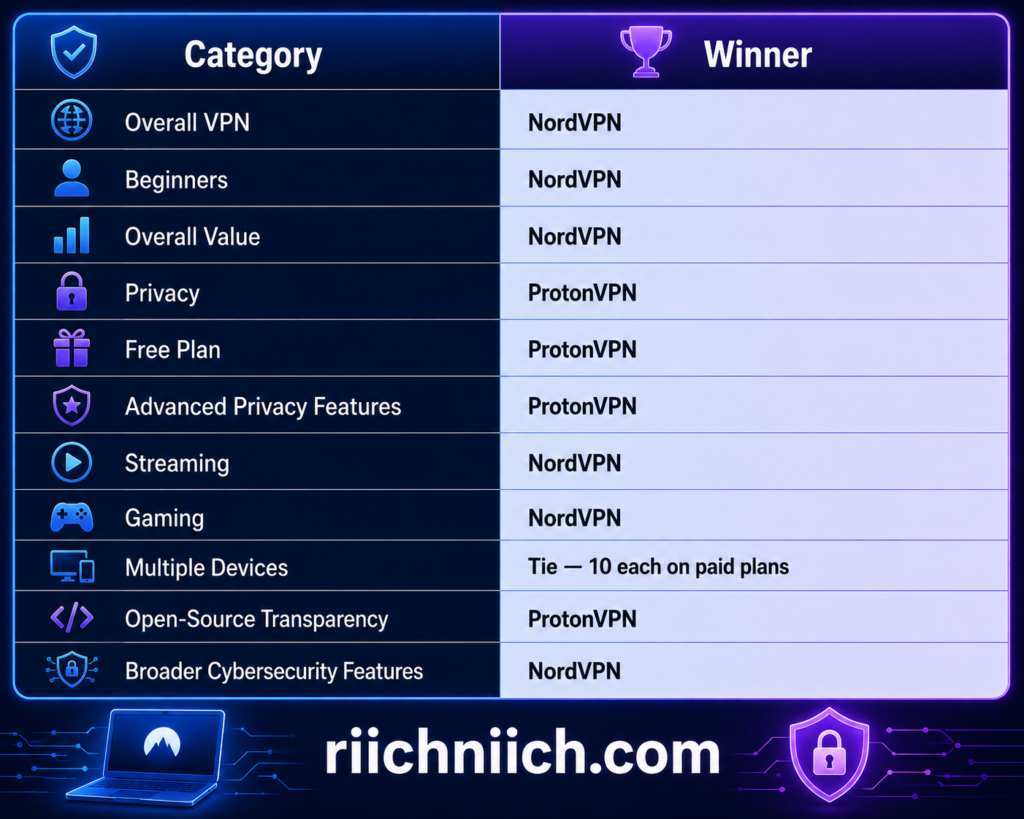
Neither provider wins every category—and that’s exactly why your priorities matter.
Who Should Buy NordVPN?
Choose NordVPN if you want the best all-around premium VPN for most people.
It’s our preferred option if you prioritize a combination of:
Fast connections, straightforward apps, streaming, gaming, multiple-device protection, public Wi-Fi security, privacy, and additional cybersecurity tools.
NordVPN also supports 10 simultaneous connections, meaning a single subscription can protect a typical collection of phones, laptops, tablets, and other compatible devices.
For someone who doesn’t want to spend hours researching every VPN setting and simply wants a capable premium service, NordVPN is the easier recommendation.
Who Should Buy ProtonVPN?
Choose ProtonVPN if privacy is driving your purchasing decision.
It’s particularly compelling if you want:
Open-source applications, Secure Core, strong privacy controls, a strict no-logs approach, Swiss jurisdiction, or the ability to use a legitimate free VPN without data or time limits.
ProtonVPN also makes sense if you already use or plan to use Proton’s broader ecosystem. Proton Unlimited combines premium access to Proton VPN with other Proton products such as Proton Mail, Proton Pass, Proton Drive, Proton Calendar, Proton Docs, and Proton Sheets.
That can substantially change the value calculation for someone trying to build a broader privacy-focused setup.
Final Winner: NordVPN
After looking at the complete NordVPN vs ProtonVPN comparison, NordVPN is our overall winner for most buyers.
It’s the VPN I would recommend to someone who wants the strongest balance of speed, security, streaming, ease of use, multi-device support, everyday functionality, and overall premium value.
ProtonVPN remains an excellent alternative—and in two situations, I would choose it instead.
Choose ProtonVPN if privacy is your absolute top priority.
Choose ProtonVPN Free if you aren’t ready to pay for a VPN.
Everyone else should strongly consider NordVPN.
Both providers offer 30-day money-back guarantees on eligible paid plans, giving buyers an opportunity to evaluate the service on their own devices before making a long-term decision.
So, if you’ve reached the end of this NordVPN vs ProtonVPN comparison and you’re still undecided, use this final rule:
Buy NordVPN if you want the better all-around premium VPN. Choose ProtonVPN if you want the more privacy-focused option or need a free VPN.
For the majority of buyers, NordVPN is the winner.