

NordVPN vs ExpressVPN is one of the toughest VPN comparisons because both services offer strong security, fast connections, privacy protection, streaming support, and apps for popular devices. But which VPN is actually the better choice in 2026?
In this comparison, we’ll break down NordVPN and ExpressVPN across price, speed, security, privacy, streaming, Netflix, gaming, server coverage, device support, and overall value. Whether you’re looking for better online privacy, safer public Wi-Fi, or a VPN for everyday streaming and browsing, this guide will help you decide which service is worth your money.
By the end, you’ll know exactly which VPN comes out ahead—and whether NordVPN or ExpressVPN is the better fit for you.
Table of Contents
NordVPN vs ExpressVPN: 🔥 Quick Answer
If you are trying to decide between these two VPNs, NordVPN vs ExpressVPN is a close comparison, but NordVPN is our pick for most buyers. It combines a strong VPN with a broader collection of security and privacy features, supports up to 10 simultaneous device connections, and offers competitively priced long-term plans. ExpressVPN remains a strong alternative, particularly for buyers who value a streamlined VPN experience and its Lightway protocol.
🚨 ALL prices in this blog article are promotional/current prices rather than permanent prices, and taxes, billing terms, renewals, and available offers can affect what you actually pay. Check the providers’ checkout pages before purchasing.
For shoppers focused on price, the difference is worth examining carefully. At the time of writing, NordVPN advertises its two-year Basic plan at $3.49 per month, billed at $94.23 for the first 27 months, while ExpressVPN advertises its two-year Basic introductory offer at $2.99 per month, billed at $83.72 for the first 28 months. However, promotional prices, included months, renewal rates, and available plans can change, so you should compare the total cost at checkout rather than choosing based only on the advertised monthly figure.
ExpressVPN also now offers multiple subscription tiers rather than a single standard package. Depending on the tier, it supports 10, 12, or 14 simultaneous VPN connections, while NordVPN supports up to 10 devices simultaneously with one account. That makes ExpressVPN worth considering if protecting a larger number of devices at the same time is important to you.
Where NordVPN becomes especially attractive is its collection of additional privacy and security tools. Depending on the feature and plan, NordVPN offers options such as Threat Protection, Dark Web Monitor, Double VPN, Onion Over VPN, obfuscated servers, Meshnet, a kill switch, and DNS leak protection. ExpressVPN counters with features including Lightway, tracker and malicious-site protection on eligible tiers, and additional cybersecurity tools in its higher-level plans.
Quick buying recommendation: Choose NordVPN if you want a feature-rich VPN with strong security tools and good overall value. Choose ExpressVPN if you particularly value its Lightway technology, straightforward VPN experience, or need the higher simultaneous-device limits available with certain ExpressVPN plans.
It is also important to remember what you are buying. A VPN can encrypt traffic between your device and the VPN server and help protect your connection on unsecured networks, but it does not make you completely anonymous online. The Federal Trade Commission’s VPN guidance (FTC) recommends researching a VPN provider carefully because using a VPN effectively shifts a significant amount of trust to that provider.
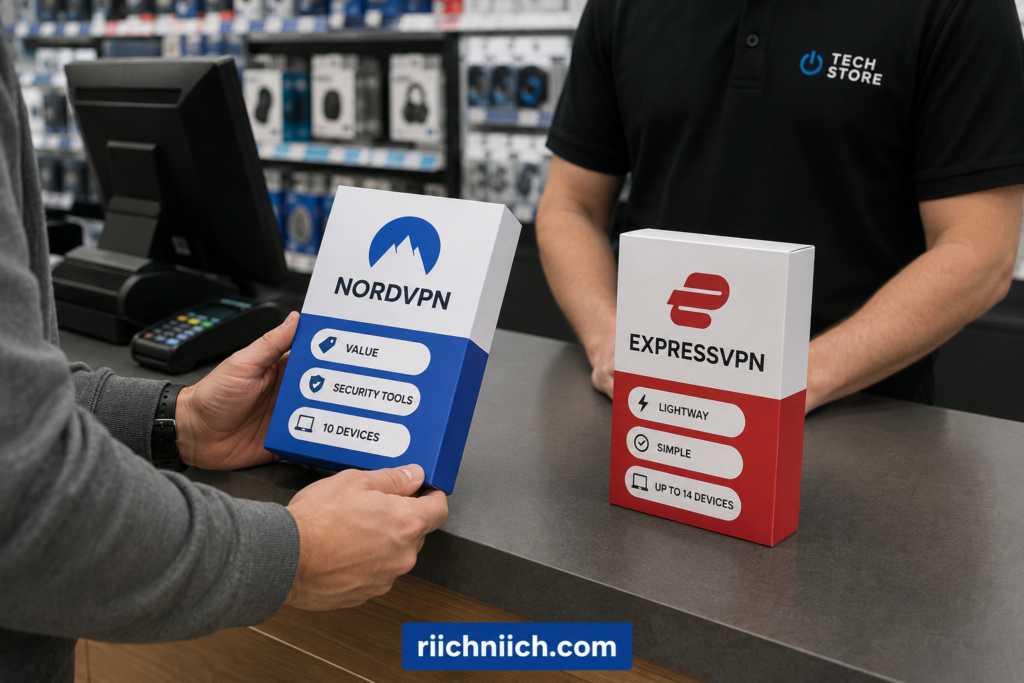
NordVPN vs ExpressVPN: Key Differences at a Glance
When comparing NordVPN vs ExpressVPN, both services cover the VPN essentials, but they take somewhat different approaches. NordVPN emphasizes a larger collection of advanced security and privacy tools, while ExpressVPN emphasizes simplicity, its proprietary Lightway protocol, broad device support, and higher simultaneous-connection limits on its upper-tier plans.
Here are the most important differences to consider before buying:
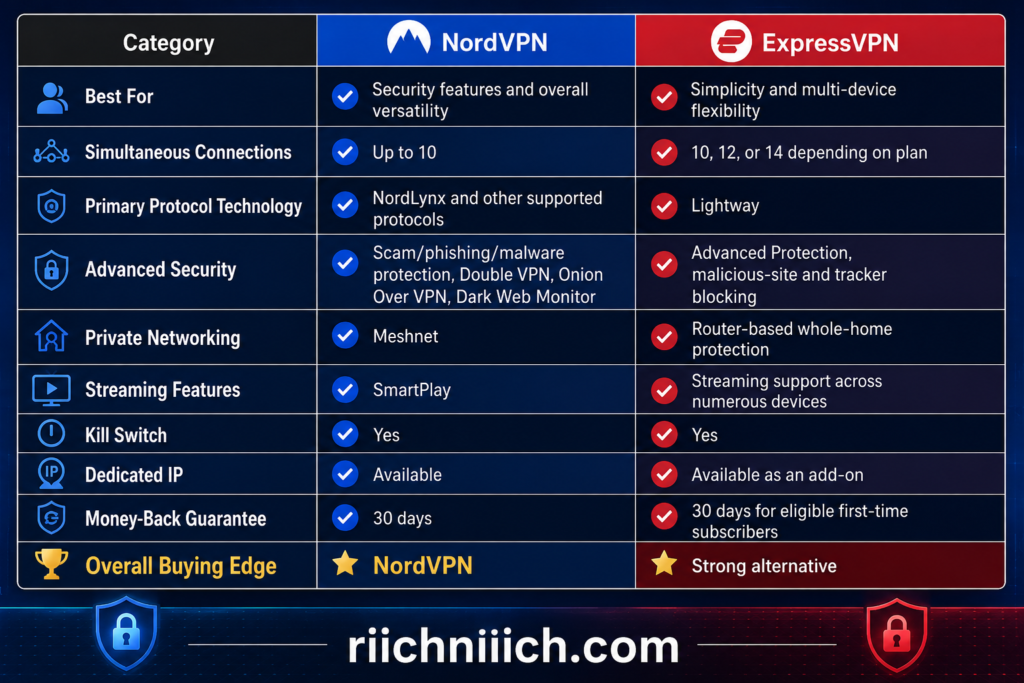
NordVPN’s biggest advantage is the number of security features packed around the core VPN. Its current feature set includes Dark Web Monitor, Double VPN, Onion Over VPN, obfuscated servers, Meshnet, a kill switch, private DNS, split tunneling, and additional scam, phishing, and malware protections. Some features and availability depend on the operating system and subscription.
ExpressVPN takes a different approach. Its Lightway protocol is designed around fast, reliable connections, including quick reconnection when moving between networks. ExpressVPN also offers native apps across major desktop, mobile, streaming, and TV platforms. Depending on the subscription tier, buyers can connect 10, 12, or 14 devices simultaneously, compared with NordVPN’s limit of 10 simultaneous devices.
That device difference could matter more than it initially appears. Someone protecting a laptop, desktop, phone, tablet, smart TV, and a few family devices could quickly accumulate simultaneous connections. ExpressVPN’s Pro tier gives buyers more room with up to 14, although NordVPN also allows a compatible router to protect devices connected through it while using one device slot.
For buyers primarily interested in security features and overall versatility, NordVPN has the advantage in NordVPN vs ExpressVPN. Features such as Double VPN, Dark Web Monitor, Onion Over VPN, obfuscated servers, and Meshnet give users several tools beyond simply changing their IP address and encrypting their internet connection.
ExpressVPN makes more sense for someone who prioritizes an uncomplicated VPN experience, wants Lightway, or needs more than 10 simultaneous VPN connections through a higher-tier subscription. Its router support is another notable benefit because a VPN-enabled router can protect devices that may not normally support VPN software directly.
At a glance, NordVPN is the stronger all-around choice for most buyers in this comparison, while ExpressVPN remains compelling for users who prioritize ease of use, Lightway, and additional simultaneous connections. However, the better purchase ultimately depends on what matters most to you—we’ll compare price, speed, security, privacy, streaming, gaming, and other major differences individually below.
NordVPN vs ExpressVPN Pricing and Plans
Price can be one of the biggest deciding factors in NordVPN vs ExpressVPN, but looking only at the advertised monthly price can be misleading. Both VPNs offer introductory discounts on longer subscriptions, multiple plan tiers, and higher renewal prices after the initial promotional period. For buyers, the better question is what you actually receive for the total amount you pay.
As of August 2026, both providers offer Basic, mid-tier, and premium options. NordVPN currently calls its tiers Basic, Complete, and Prime, while ExpressVPN offers Basic, Advanced, and Express Pro. Both also sell monthly, one-year, and two-year options.
Here is a quick NordVPN vs ExpressVPN price comparison based on the two-year introductory offers available at the time of writing:
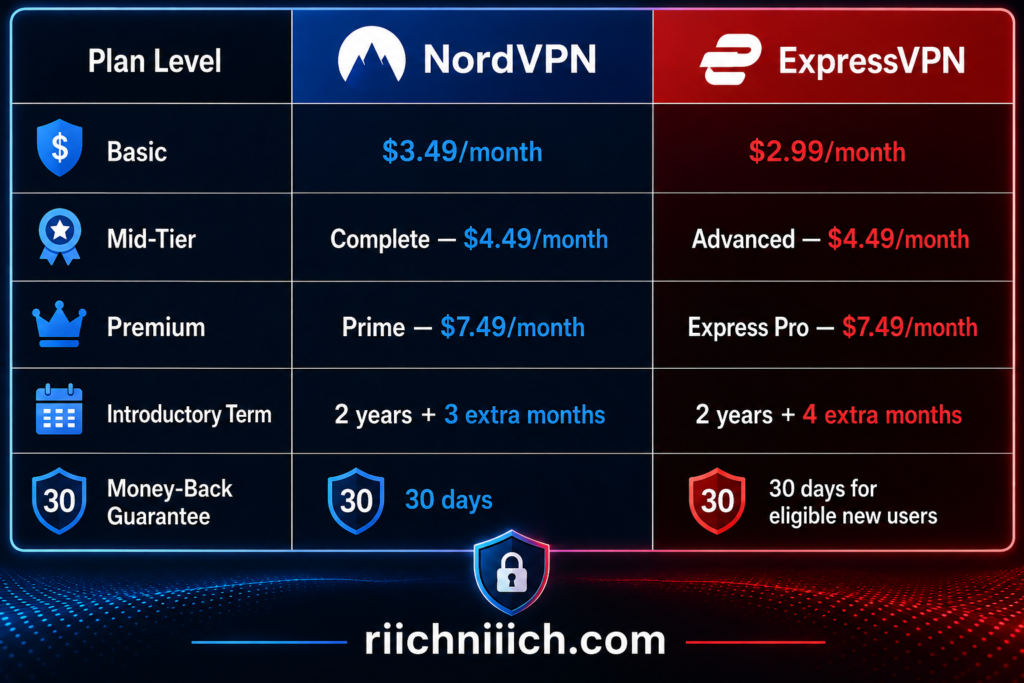
🚨 These are introductory prices rather than permanent monthly rates, and the longer plans require upfront payment. NordVPN specifically notes that its one-year and two-year subscriptions are paid in full when purchased.
NordVPN Pricing
NordVPN’s Basic two-year plan currently costs $3.49 per month, with the introductory offer totaling $94.23 for the first 27 months. It includes the core VPN service and is the most straightforward choice for someone who mainly wants VPN protection. The plan currently renews at $139.08 per year.
Moving up to NordVPN Complete increases the introductory price to $4.49 per month, or $121.23 for the first 27 months. Complete expands beyond the standard VPN with additional cybersecurity features, a password manager, and 1 TB of cloud storage. Its currently disclosed renewal price is $219.48 per year.
The Prime plan currently costs $7.49 per month, totaling $202.23 for the first 27 months. It includes the Complete features plus Coveron identity protection benefits, subject to applicable terms. Its currently listed renewal price is $296.28 per year.
For most people comparing NordVPN vs ExpressVPN specifically because they need a VPN, NordVPN Basic should provide the core service without making you pay for extras you may never use. Complete becomes more appealing if you also need its additional cybersecurity tools and password manager.
ExpressVPN Pricing
ExpressVPN’s pricing structure has changed significantly from the days when the service primarily revolved around one subscription. Buyers can now choose among Basic, Advanced, and Express Pro.
The ExpressVPN Basic two-year introductory offer currently costs $2.99 per month, totaling $83.72 for the first 28 months. After that introductory period, the current checkout page says it automatically renews at $99.95 annually. Basic provides the VPN for up to 10 simultaneous connections along with Lite Protection and limited private email relay features.
ExpressVPN Advanced currently costs $4.49 per month, or $125.72 for the first 28 months, before renewing at the currently disclosed rate of $119.95 annually. It expands the package with 12 simultaneous VPN connections, Advanced Protection, an unlimited password manager, and additional benefits. Some Identity Defender features are limited to U.S. customers.
At the top is Express Pro, currently advertised at $7.49 per month, totaling $209.72 for the first 28 months. Its currently disclosed renewal rate is $199.95 annually. Pro increases the limit to 14 simultaneous VPN connections and includes additional privacy and cybersecurity features, including a dedicated IP.
If you’re wondering whether you need to pay for either service at all, our free vs paid VPN comparison explains what you typically gain by choosing a premium VPN instead.
Which One Gives You More for Your Money?
This is where the NordVPN vs ExpressVPN price comparison gets interesting. At the Basic level, ExpressVPN currently has the lower introductory price: $2.99 versus NordVPN’s $3.49 per month. Their mid-tier introductory monthly prices are currently identical at $4.49, while their premium tiers are both advertised at $7.49 per month.
However, cheapest does not automatically mean best value.
NordVPN remains particularly attractive for buyers who want VPN protection combined with a broader selection of cybersecurity tools. ExpressVPN has also expanded well beyond a traditional VPN, however, particularly with Advanced and Express Pro. Buyers should therefore compare the features they will actually use instead of automatically choosing the lowest advertised price.
There is another number you should check before buying: the renewal price. Introductory VPN discounts can look excellent, but the price after the promotional term can be considerably higher. Both providers disclose renewal information, and NordVPN explicitly states that its prices are regularly updated.
Buying tip: Before purchasing either service, check the provider’s checkout page for the total upfront charge, introductory term, included free months, renewal price, and renewal frequency. Those numbers give you a much better picture of the real NordVPN vs ExpressVPN cost than the large monthly promotional price alone.
For buyers primarily looking for a VPN rather than an entire security suite, the Basic plans are the logical starting point. Move to Complete, Advanced, Prime, or Express Pro only when the additional features justify the extra cost for your needs.
NordVPN vs ExpressVPN Features
The feature comparison is where NordVPN vs ExpressVPN starts to separate more clearly. Both provide the core tools you would expect from a premium VPN—including encrypted connections, kill switches, split tunneling, threat blocking, and proprietary high-performance protocols—but NordVPN puts more emphasis on specialized privacy and cybersecurity tools, while ExpressVPN focuses heavily on making its protections simple to use across everyday devices.
Here is a quick look at some of the major features:

🚨 Feature availability can vary by subscription tier, operating system, and device, so buyers should check their intended plan and devices before purchasing.
NordVPN Features
NordVPN’s biggest selling point is that it has grown into much more than a basic IP-changing VPN.
At its core, NordVPN provides encryption, DNS leak protection, an automatic Kill Switch, split tunneling, private DNS, and multiple VPN protocols. Its protocol choices include NordLynx, which is built around WireGuard, along with OpenVPN and NordVPN’s newer NordWhisper protocol.
But the more interesting features appear when you move beyond basic VPN protection.
Double VPN routes your connection through two VPN servers rather than one. This adds another layer of protection, although most everyday users probably won’t need it for routine browsing.
Onion Over VPN combines the VPN connection with the Tor network. Your traffic first passes through NordVPN before entering Tor, allowing users who need additional privacy to access the Onion network without separately connecting through the Tor Browser.
Obfuscated servers are designed to disguise VPN traffic so it resembles ordinary internet traffic. This is a more specialized feature, but it can be useful in environments where VPN connections are restricted.
Then there is Meshnet, one of NordVPN’s more unusual features. Meshnet lets you create an encrypted private network between devices, which can be useful for remote device access, file sharing, collaborative work, or LAN gaming.
NordVPN also includes Dark Web Monitor, which can alert you when information associated with you is detected in known data leaks. Depending on the subscription and platform, NordVPN provides additional scam, phishing, malware, tracker, and ad protection as well.
That collection of tools is a major reason NordVPN has an advantage for buyers who want their VPN subscription to handle more than encrypted browsing.
ExpressVPN Features
ExpressVPN takes a slightly different approach.
One of its standout technologies is Lightway, ExpressVPN’s proprietary VPN protocol. Lightway is designed to establish connections quickly, remain stable when switching between Wi-Fi and mobile networks, and operate efficiently on mobile devices. ExpressVPN also supports other protocol options, including OpenVPN.
ExpressVPN also includes an Internet Kill Switch. If the VPN connection unexpectedly drops, the feature blocks unencrypted traffic until protection is restored. On Windows, macOS, and Linux, the Internet Kill Switch is enabled by default, and ExpressVPN also provides kill-switch functionality on Android and iOS.
Another useful feature is split tunneling. Instead of forcing everything through the VPN, you can choose which supported apps or traffic use the encrypted tunnel and which use your regular internet connection. This can be particularly convenient when an app, local printer, smart-home device, or service doesn’t work properly through a VPN.
ExpressVPN has also expanded its security features considerably.
Its Advanced Protection suite can block malicious websites, intrusive ads, trackers, and adult content. However, availability depends partly on your plan: ExpressVPN says the malicious-site blocker, ad blocker, and adult-site blocker are available across its plans, while tracker blocking requires Advanced or Express Pro.
That makes ExpressVPN more than just a simple VPN, even though its interface and overall approach continue to emphasize ease of use.
Which VPN Has Better Features?
For pure feature depth, NordVPN vs ExpressVPN favors NordVPN.
ExpressVPN covers the important fundamentals and adds some genuinely useful extras, particularly Lightway, Advanced Protection, split tunneling, and its increasingly flexible kill-switch functionality.
NordVPN, however, provides more specialized tools for users who want additional control over privacy and security. Double VPN, Onion Over VPN, obfuscated servers, Dark Web Monitor, Meshnet, and its broader threat-protection tools create a deeper feature set around the VPN itself.
Winner for Features: NordVPN
From a buyer’s perspective, though, don’t pay for features simply because the list is longer. If you primarily want a VPN that is straightforward to connect and use, ExpressVPN still makes a strong case. But if you want your subscription to provide more advanced privacy and cybersecurity capabilities beyond the basic VPN tunnel, NordVPN offers the stronger overall package.
NordVPN vs ExpressVPN Speed
Speed matters when choosing a VPN because every VPN adds some processing and routing between your device and the internet. In NordVPN vs ExpressVPN, both services are built for high-speed connections, but NordVPN has the stronger overall speed case for buyers who prioritize maximum performance, while ExpressVPN remains highly competitive and has some particularly interesting technology of its own.
Your actual results will vary. VPN speed depends on your original internet connection, physical distance from the VPN server, server congestion, protocol, device, Wi-Fi quality, and even background applications consuming bandwidth. Because of those variables, a speed result from someone else’s computer should never be treated as the exact speed you will receive.
NordVPN Speed
NordVPN’s primary performance advantage is NordLynx, its VPN protocol based on WireGuard. NordVPN designed NordLynx to provide the performance advantages of WireGuard while addressing privacy considerations associated with the underlying protocol.
NordVPN also says its network uses 10 Gbps server infrastructure, unlimited VPN bandwidth, load balancing, and automatic server selection designed to connect users with an appropriate server based partly on proximity and latency.
There is independent testing behind the speed claims as well. NordVPN reports that testing by West Coast Labs found NordLynx exceeding 817 Mbps in its testing environment and ranking first overall across the tested scenarios. That does not mean you should expect an 817 Mbps connection at home—your baseline internet connection and testing conditions still determine what speeds are possible.
For someone buying a VPN for 4K streaming, large downloads, video calls, gaming, or other bandwidth-heavy activities, NordLynx is an important reason to put NordVPN near the top of the list.
ExpressVPN Speed
ExpressVPN’s answer to NordLynx is Lightway, its proprietary VPN protocol.
Lightway was designed to establish VPN connections quickly while remaining efficient and stable, particularly when a device moves between networks. For example, switching between Wi-Fi and mobile data doesn’t necessarily require rebuilding the connection from scratch. ExpressVPN has since rewritten Lightway in Rust and made its core code open source.
ExpressVPN also operates high-bandwidth server infrastructure. The company says its network includes 10 Gbps and 40 Gbps servers, along with unlimited VPN bandwidth.
An especially interesting development for speed-focused buyers is Lightway Turbo. Instead of using only one data path through the VPN tunnel, Lightway Turbo uses multi-lane tunneling to transmit more data simultaneously. At the time of writing, ExpressVPN says the feature is available on Windows, with additional platforms planned.
That makes ExpressVPN particularly appealing to someone who values fast connection establishment and smooth transitions between networks, such as a person frequently moving between home Wi-Fi, public Wi-Fi, and cellular data.
What Can Affect Your VPN Speed?
Even the fastest VPN cannot make every connection perform identically.
The NordVPN vs ExpressVPN speed you experience can change significantly depending on the server you select. Connecting to a nearby server will generally provide better performance than routing your traffic through a server thousands of miles away. Server congestion can also reduce performance when too many users compete for available capacity.
For the fastest everyday connection, start with a nearby server and the provider’s performance-oriented protocol—NordLynx for NordVPN or Lightway for ExpressVPN. If the VPN suddenly seems slow, compare your VPN connection against your normal internet connection before assuming the VPN itself is responsible.
Which VPN Is Faster?
For buyers making a decision based primarily on performance, NordVPN vs ExpressVPN gives the speed advantage to NordVPN.
Winner for Speed: NordVPN
NordLynx has a strong performance-oriented design, NordVPN has invested heavily in high-capacity infrastructure, and independent testing cited by NordVPN provides additional evidence for its performance claims. ExpressVPN is certainly not a slow alternative, however. Lightway is designed specifically around speed, efficiency, rapid connections, and connection stability, and Lightway Turbo makes the performance competition even more interesting.
If maximum VPN speed is one of your biggest purchasing priorities, we would choose NordVPN. If you care almost as much about fast reconnections and maintaining a smooth VPN connection while switching between networks, ExpressVPN’s Lightway technology makes it a strong alternative.
NordVPN vs ExpressVPN Security
Security is one of the most important parts of the NordVPN vs ExpressVPN comparison. After all, a VPN is supposed to create an encrypted connection between your device and the VPN server so that your internet traffic is better protected from people trying to monitor the network you are using.
Both NordVPN and ExpressVPN have strong security foundations. They offer modern VPN protocols, kill switches, DNS leak protection, malicious-site protections, and additional security technologies. The biggest difference is their approach: NordVPN provides more specialized security tools, while ExpressVPN has invested heavily in its Lightway protocol and RAM-only TrustedServer infrastructure.
Here is a quick NordVPN vs ExpressVPN security comparison:

Feature availability can vary by operating system, VPN protocol, and subscription, so buyers should verify support for the devices they intend to use.
NordVPN Security
NordVPN’s security begins with its VPN protocols. NordLynx is NordVPN’s WireGuard-based protocol and is designed to balance strong security with high performance. NordVPN also supports OpenVPN and offers NordWhisper, which is designed to help VPN traffic work on networks that restrict traditional VPN connections.
If NordVPN’s security features are a major reason you’re considering the service, our NordVPN vs ProtonVPN comparison shows how NordVPN stacks up against another security-focused VPN.
NordVPN then builds several additional layers around the encrypted connection.
Its Automatic Kill Switch can stop internet traffic if the VPN connection unexpectedly drops, reducing the risk of your traffic leaving the device without VPN protection. DNS leak protection is designed to keep DNS requests from escaping the encrypted VPN tunnel.
NordVPN also offers Double VPN, which sends traffic through two VPN servers instead of one. Most buyers will not need Double VPN for ordinary browsing or streaming, but it gives privacy-focused users another option when they want an additional layer between their device and the destination.
Onion Over VPN provides another specialized option by combining a NordVPN connection with the Onion network. Meanwhile, obfuscated servers can help disguise VPN traffic on networks where VPN usage is restricted.
NordVPN’s broader protection tools can also check downloaded files for malware and block harmful websites, scams, and phishing attempts, depending on the feature, plan, platform, and configuration being used.
For buyers who want more than basic VPN encryption, this collection of specialized tools is a major advantage.
ExpressVPN Security
ExpressVPN takes security just as seriously, but some of its most interesting technology works behind the scenes.
ExpressVPN uses AES-256-GCM encryption and its Lightway protocol incorporates perfect forward secrecy, meaning encryption keys are regularly replaced rather than relying indefinitely on the same keys. The core Lightway library is also open source, allowing outside researchers to examine the technology.
One of ExpressVPN’s biggest security advantages is TrustedServer.
Instead of relying on conventional servers that continually write information to hard drives, ExpressVPN’s TrustedServer technology runs the VPN server software entirely in RAM. ExpressVPN says data is wiped whenever a server reboots, while the entire software stack is reinstalled during startup. This approach reduces the risk of information remaining on a physical hard drive and helps ensure servers run a consistent software configuration.
ExpressVPN also provides an internet kill switch, private DNS, malicious-site protection, and additional threat-blocking capabilities.
Lightway itself deserves particular attention for security-conscious buyers. In addition to conventional cryptography, Lightway includes post-quantum protection by default, using ML-KEM, the NIST-standardized post-quantum key-encapsulation mechanism.
What About Post-Quantum Security?
This is becoming an important difference to understand when evaluating VPN security.
Today’s encryption remains extremely strong against conventional computers, but researchers are preparing for the possibility that sufficiently powerful quantum computers could eventually threaten some existing cryptographic systems.
Both VPN providers have already started addressing that future risk.
NordVPN offers post-quantum encryption through NordLynx across multiple supported platforms. However, NordVPN notes that its post-quantum feature is not compatible with certain configurations, including OpenVPN, dedicated IP connections, obfuscated servers, and Meshnet.
ExpressVPN integrates post-quantum protection directly into Lightway and currently uses ML-KEM. ExpressVPN says this protection is enabled by default when using Lightway.
For everyday buyers, post-quantum encryption probably should not be the only reason to purchase either VPN. But its presence shows that both providers are actively preparing their security architecture for emerging cryptographic threats.
Why VPN Security Matters on Public Wi-Fi
A VPN becomes particularly useful when you connect through networks you don’t control.
Public Wi-Fi at airports, hotels, coffee shops, and other shared locations can introduce additional security risks. The U.S. Cybersecurity and Infrastructure Security Agency (CISA) recommends using a VPN or another authorized secure-access solution when connecting through third-party networks in its guidance for federal mobile users.
That doesn’t mean a VPN makes you invincible. You still need strong passwords, multi-factor authentication, updated software, phishing awareness, and appropriate endpoint protection. A VPN should be viewed as one layer of your overall security strategy, not a replacement for everything else.
Which VPN Has Better Security?
The NordVPN vs ExpressVPN security comparison is much closer than a simple feature checklist might suggest.
ExpressVPN deserves significant credit for TrustedServer, Lightway, perfect forward secrecy, open-source protocol code, and default post-quantum protection through Lightway. Its RAM-only server architecture is particularly compelling for buyers concerned about what could remain on a physical VPN server.
NordVPN, however, gives security-conscious users more specialized tools to choose from. Double VPN, Onion Over VPN, obfuscated servers, DNS leak protection, an Automatic Kill Switch, malware and phishing protection, and optional post-quantum protection create an unusually deep security toolkit.
Winner for Security: NordVPN — by a narrow margin
For the average buyer choosing between NordVPN vs ExpressVPN, we would give NordVPN the edge if advanced security features and flexibility are your biggest priorities. ExpressVPN is still an excellent security-focused choice, particularly if TrustedServer and Lightway’s built-in post-quantum protection appeal to you.
The important takeaway is that neither service wins simply because it uses the word “secure.” Look at the technologies behind the VPN, the protections available on your devices, and which security features you will actually use before deciding which subscription offers the better value.
NordVPN vs ExpressVPN Privacy
Privacy is one of the most important considerations in NordVPN vs ExpressVPN because using a VPN means placing a significant amount of trust in the VPN provider itself. Your internet service provider may no longer be able to see the websites you visit through the encrypted VPN tunnel, but the VPN provider becomes an important part of that connection. That makes logging policies, company jurisdiction, server architecture, and independent audits especially important when deciding which VPN to buy.
Both NordVPN and ExpressVPN have strong privacy credentials. Both maintain no-logs policies, operate from privacy-friendly jurisdictions, use infrastructure designed to minimize retained information, and have submitted important privacy claims to independent audits.
Here are the major privacy differences at a glance:
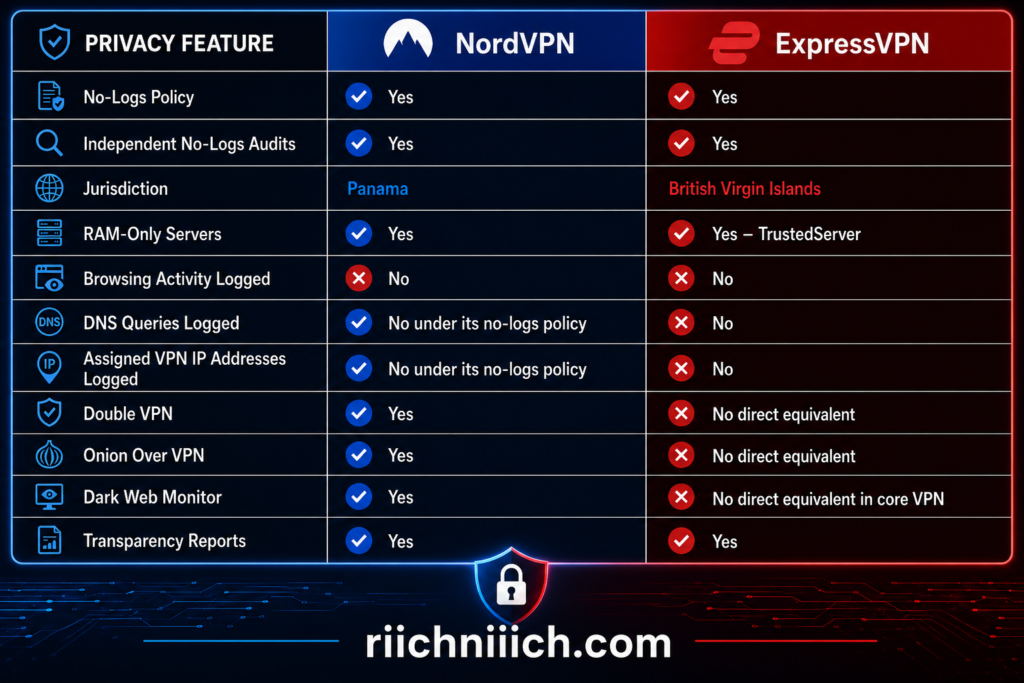
🚨 Privacy features and policies can change, so it is worth checking the provider’s current privacy documentation before purchasing.
NordVPN Privacy
NordVPN operates under the jurisdiction of Panama. NordVPN says Panama does not impose data-retention requirements applicable to VPN providers, making its location an important part of its privacy strategy.
More importantly, NordVPN maintains a no-logs policy.
According to NordVPN, it does not log users’ online activity. It does retain certain information necessary to operate accounts, such as an email address, username, encrypted login credentials, and transaction or order information used for purposes such as refunds. NordVPN says this account information is not linked to what you do while connected to its VPN.
For buyers, however, a company simply saying it does not keep activity logs should not be enough.
NordVPN has repeatedly submitted its no-logs practices to independent examinations. Its first reviews were performed by PwC Switzerland, while later assessments were conducted by Deloitte. NordVPN says its no-logs practices have now undergone six independent reviews, including its sixth verification in 2025.
That repeated verification matters because a privacy policy is ultimately a promise. Independent examinations provide additional evidence that the provider’s actual systems and practices align with that promise.
ExpressVPN Privacy
ExpressVPN takes a similarly strong approach but has one particularly important privacy technology: TrustedServer.
ExpressVPN is based in the British Virgin Islands and states that it does not retain browsing history, traffic destinations or metadata, DNS queries, or the IP addresses assigned to customers while connected to its VPN.
TrustedServer reinforces that policy at the infrastructure level.
Instead of storing its VPN server software and information on conventional hard drives, ExpressVPN’s TrustedServer architecture runs entirely in RAM. Because RAM requires power to retain information, the server’s data is cleared when it reboots. The software stack is then reloaded from a controlled read-only image.
This is an important distinction for privacy-conscious buyers. Rather than relying solely on company policy, ExpressVPN has designed its server infrastructure to reduce the amount of persistent information that can remain on its servers.
ExpressVPN has also subjected TrustedServer and its privacy claims to independent examination.
In its 2025 assessment, KPMG evaluated ExpressVPN’s TrustedServer architecture and privacy controls as of February 28, 2025. KPMG provided reasonable assurance that the systems operated as designed, with no identified issues concerning the technical safeguards intended to prevent activity logging.
ExpressVPN’s broader audit history is extensive as well. Its Trust Center documents independent examinations covering its no-logs practices, TrustedServer infrastructure, Lightway protocol, desktop and mobile applications, browser extensions, router products, and other services.
Independent Audits Matter
This is one area where NordVPN vs ExpressVPN is particularly competitive.
A no-logs policy is difficult for an ordinary customer to verify independently. You cannot simply open a VPN app and determine whether something is secretly being stored on a company’s servers.
Third-party audits therefore provide another layer of accountability.
NordVPN says its no-logs practices have undergone six independent reviews, while ExpressVPN has built a broad audit program covering its privacy policies and underlying technologies. ExpressVPN reported in May 2026 that it had reached 27 independent security audits across its products and technologies. That figure is broader than no-logs audits alone, so it should not be interpreted as 27 separate no-logs verifications.
For buyers comparing VPN privacy, repeated independent testing is preferable to relying entirely on marketing claims.
Does a VPN Make You Anonymous?
No.
This distinction is important when considering NordVPN vs ExpressVPN privacy.
A VPN can hide your destination traffic from your internet service provider and replace your public-facing IP address with the VPN server’s IP address. However, your ISP can generally still determine that you are communicating with a VPN server and see information such as the amount of traffic being transmitted.
Websites can also identify you through other methods. If you sign into Google, Facebook, Amazon, or another personal account while using a VPN, for example, the service can still know that you are logged into that account.
Cookies, browser fingerprinting, account logins, malware, tracking technologies, and information you voluntarily provide can all affect your online privacy.
That is why a VPN should be considered a privacy tool—not an invisibility cloak.
Which VPN Is Better for Privacy?
The privacy battle in NordVPN vs ExpressVPN is extremely close.
NordVPN has several advantages for privacy-focused users. Its Panama jurisdiction, independently reviewed no-logs policy, Double VPN, Onion Over VPN, obfuscated servers, and other specialized privacy features make it particularly attractive to buyers who want more control over how their VPN connection operates.
ExpressVPN counters with an excellent privacy architecture. Its British Virgin Islands jurisdiction, audited no-logs claims, extensive independent audit history, and especially its TrustedServer RAM-only infrastructure make a compelling argument for users who prioritize minimizing persistent server data.
Winner for Privacy: Tie
Unlike the feature and speed categories, we would not give either VPN a decisive privacy victory. NordVPN offers more specialized privacy tools, while ExpressVPN’s TrustedServer architecture and extensive auditing program are significant strengths.
For buyers deciding between NordVPN vs ExpressVPN, privacy should therefore be considered a strength of both services. If you want more advanced privacy options such as Double VPN and Onion Over VPN, NordVPN has the advantage. If RAM-only infrastructure and ExpressVPN’s extensive independent audit program are particularly important to you, ExpressVPN makes an equally compelling case.
NordVPN vs ExpressVPN Server Network and Locations
A large VPN server network gives you more choices when deciding where your internet connection should appear to originate. In NordVPN vs ExpressVPN, both providers now have extensive global coverage, but their networks have expanded significantly in 2026, making older comparisons you may find online outdated.
As of August 2026, NordVPN reports 8,400+ servers across 167+ countries, while ExpressVPN reports servers in 113 countries across 214 selectable server locations. NordVPN’s current server directory lists 224 locations overall.
One important distinction: server count and server-location count are not the same measurement. ExpressVPN does not publish a directly comparable total number of individual servers on its current server-location page, so it would be misleading to compare NordVPN’s 8,400+ server figure directly against ExpressVPN’s 214 locations.
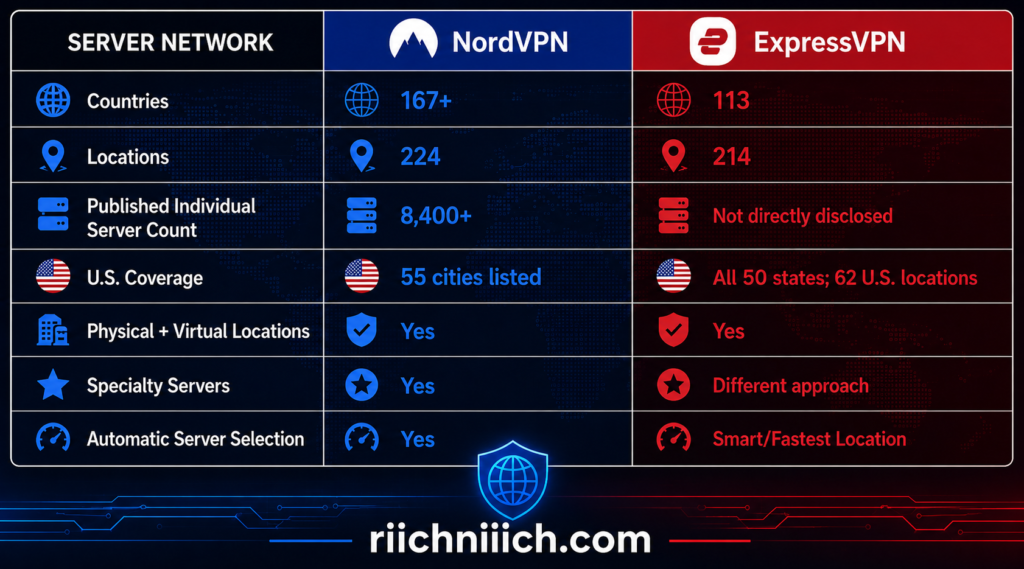
For buyers comparing NordVPN vs ExpressVPN server locations, the takeaway is straightforward: NordVPN currently offers broader country coverage, while ExpressVPN remains particularly impressive in the United States and provides extensive global location coverage of its own.
NordVPN Server Network
NordVPN’s network has become considerably larger geographically.
The company currently reports more than 8,400 servers in over 167 countries, covering the Americas, Europe, Asia-Pacific, Africa, and the Middle East.
In the United States alone, NordVPN’s current server directory lists 55 cities, including Atlanta, Boston, Chicago, Dallas, Denver, Houston, Los Angeles, Miami, New York, Phoenix, San Francisco, Seattle, and many others.
NordVPN also provides several different types of servers rather than treating every connection exactly the same. Depending on the country, users may find options including:
- Regular VPN servers
- P2P servers
- Obfuscated servers
- Double VPN servers
- Dedicated IP servers
- Virtual locations
This is especially useful for buyers who want more control over how they connect rather than simply selecting a country.
For example, someone who wants ordinary browsing protection can use a regular server, while someone who needs to disguise VPN traffic may use an obfuscated server where supported. Double VPN can route traffic through two VPN servers, while a dedicated IP provides an IP address assigned specifically to the subscriber as a paid option.
ExpressVPN Server Network
ExpressVPN takes a somewhat different approach to describing its network.
As of August 2026, ExpressVPN reports servers in 113 countries across 214 selectable server locations worldwide. Its network covers the Americas, Europe, Asia-Pacific, the Middle East, and Africa.
ExpressVPN’s U.S. coverage is particularly notable. The provider expanded its network to include server locations in all 50 U.S. states, with 62 U.S. locations announced as part of that expansion.
That could be valuable for someone who frequently travels around the United States or wants greater control over the state through which their VPN connection is routed.
ExpressVPN also tries to simplify server selection.
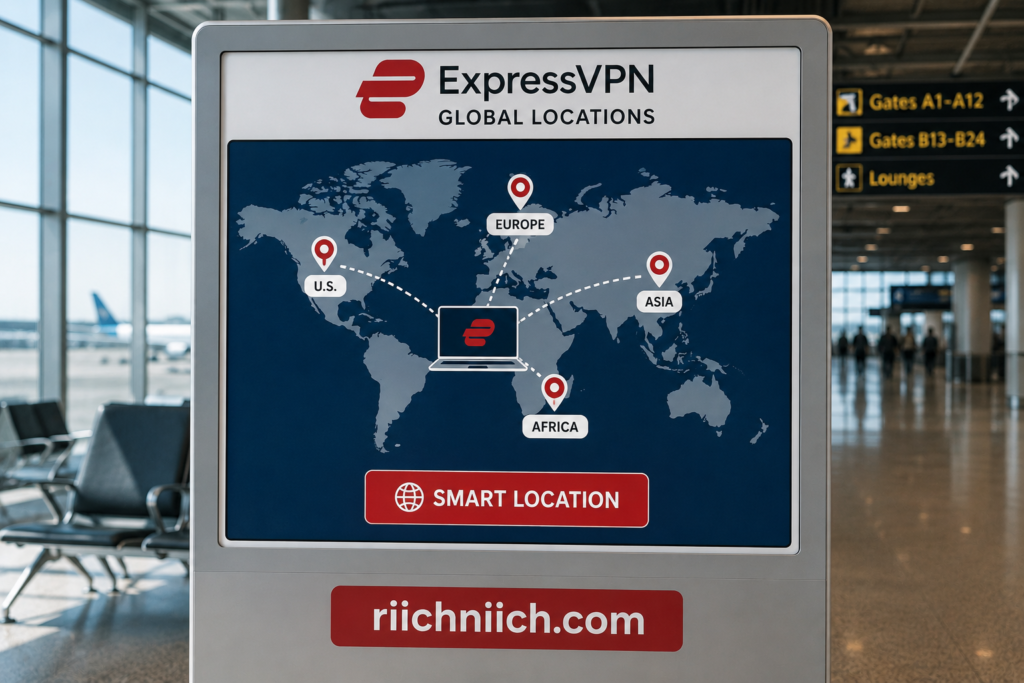
On desktop and routers, its Smart Location feature evaluates factors such as download speed, latency, and distance to select an appropriate location automatically. Its Android and iOS apps now use Fastest Location, which can suggest up to five locations based on current network conditions.
That means you don’t necessarily have to understand the technical differences between dozens of locations. If your main priority is getting a good connection, ExpressVPN can help select one automatically.
Physical vs Virtual Server Locations
There is another important detail buyers should understand when looking at the NordVPN vs ExpressVPN server network: a listed VPN location does not always mean the physical hardware is sitting inside that country.
Both providers use virtual server locations in some places.
With a virtual location, the IP address corresponds to the location you select, but the physical server handling the connection may be located somewhere else.
NordVPN’s server directory clearly distinguishes between virtual and physical locations.
ExpressVPN similarly explains that, for most locations, the physical server and registered IP address are in the same country. For a smaller number of virtual locations, the IP address corresponds to the selected country while the physical server is located elsewhere.
Virtual locations are not automatically a negative. They can allow VPN providers to offer IP addresses in countries where maintaining physical infrastructure may be difficult or undesirable. But if physical server location matters to you, check the provider’s server directory before connecting.
Why Server Location Matters
The closest VPN server will often provide the best performance because your traffic has less physical distance to travel. ExpressVPN specifically recommends choosing the closest available location when multiple servers are available within the country you need.
However, the closest server isn’t always the one you need.
You might deliberately choose another location when traveling, accessing services from your home region, testing how a website appears in another market, or obtaining an IP address associated with a particular country.
This is why geographic coverage can be more useful than simply having an enormous raw server count. Ten thousand servers concentrated in relatively few countries would not necessarily provide more location flexibility than a smaller network spread across significantly more countries.
Which VPN Has the Better Server Network?
For this category, NordVPN vs ExpressVPN gives the advantage to NordVPN.
Winner for Server Network and Locations: NordVPN
NordVPN currently covers 167+ countries compared with ExpressVPN’s 113, while also publishing a network of more than 8,400 individual servers. It also offers an extensive selection of specialized server types.
ExpressVPN should not be overlooked, however. Its 214 server locations across 113 countries, coverage across all 50 U.S. states, Smart Location technology, and growing 40 Gbps server deployment make it a highly competitive network.
From a buyer’s perspective, NordVPN is the better choice if broad international country coverage and specialized servers are priorities. ExpressVPN becomes especially attractive if you want extensive U.S. location choices or prefer having the VPN automatically help select an appropriate server.
NordVPN vs ExpressVPN for Streaming
Streaming is one of the biggest reasons people shop for a VPN, and NordVPN vs ExpressVPN is a strong matchup in this category. Both providers support major streaming platforms, offer apps for popular streaming devices, and have technologies designed to keep streaming connections fast and reliable.
For most buyers, however, NordVPN gets a slight overall advantage for streaming because SmartPlay is built directly into its VPN apps, works automatically when you connect, and combines streaming-focused DNS technology with the privacy and encryption of the VPN connection. ExpressVPN remains an excellent alternative, especially for households that value broad streaming-device and router support.
Here is a quick look at NordVPN vs ExpressVPN for streaming:
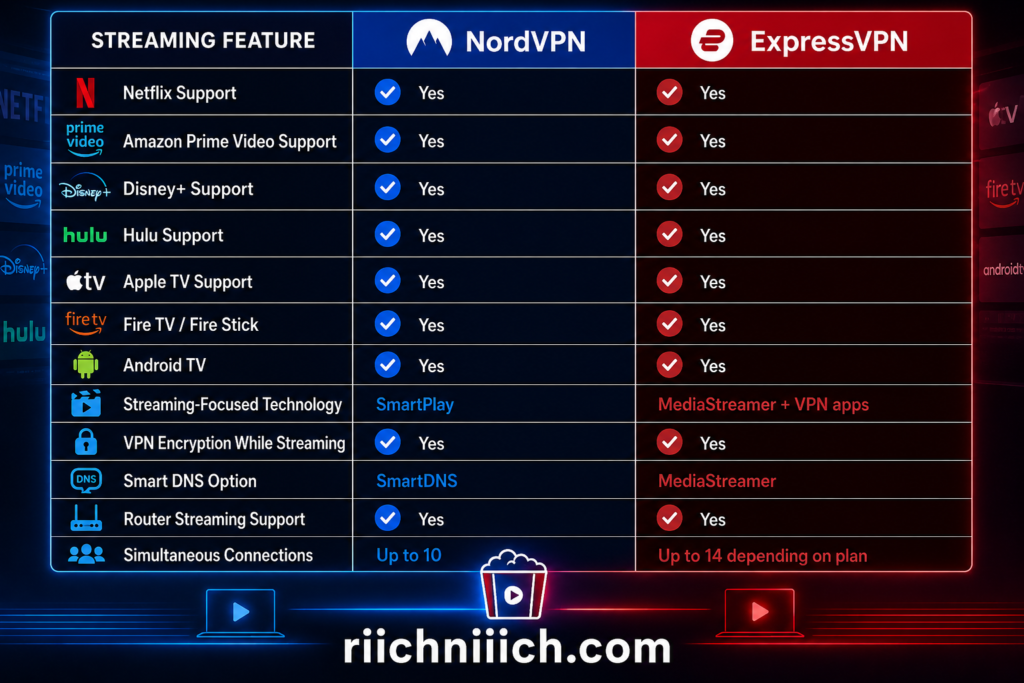
Streaming availability can change, and individual platforms may impose geographic or account restrictions. You should use either VPN in accordance with the streaming service’s terms and applicable laws.
NordVPN for Streaming
NordVPN’s standout streaming feature is SmartPlay.
SmartPlay combines SmartDNS technology with the VPN connection. When you connect through a NordVPN app, SmartPlay automatically operates in the background—there is no separate setting you need to activate. Your IP address is hidden and your traffic remains encrypted while SmartPlay assists with secure access to your streaming content.
That simplicity is a major advantage.
You don’t need to decide whether to activate a special “streaming mode” every time you want to watch a movie. Connect to an appropriate NordVPN server, open your streaming service, and SmartPlay handles its part automatically.
NordVPN says its streaming support works with major streaming services worldwide. Its SmartDNS documentation specifically lists services such as Amazon Prime Video, Disney+, Max, Paramount+, Peacock, and Netflix Originals among supported SmartDNS services.
NordVPN’s NordLynx protocol is another advantage for streaming. Since streaming—particularly 4K video—requires a fast and stable connection, minimizing the performance loss introduced by VPN encryption can make a noticeable difference.
There is one important distinction to understand: SmartPlay and SmartDNS are not identical.
SmartPlay operates with the VPN, meaning your traffic remains encrypted and your IP address is hidden. NordVPN’s standalone SmartDNS option is intended primarily for devices that do not support the NordVPN app, but SmartDNS itself does not provide VPN encryption or hide your IP address.
For privacy, use the full NordVPN connection whenever your streaming device supports it.
ExpressVPN for Streaming
ExpressVPN is also built with streaming in mind.
Its current support documentation lists compatibility with services including Netflix, Amazon Prime Video, Disney+, Apple TV+, Hulu, BBC iPlayer, HBO, Showtime, and Sling TV.
Device support is another ExpressVPN strength.
ExpressVPN supports computers and smartphones as well as Amazon Fire TV, Fire Stick, Apple TV, Android TV devices, Chromecast with Google TV, smart TVs, and compatible wireless routers. That gives buyers multiple ways to protect streaming devices around the home.
ExpressVPN also offers MediaStreamer, its smart DNS feature.
MediaStreamer can be useful on certain devices that cannot run a full VPN application. However, like NordVPN’s standalone SmartDNS feature, MediaStreamer is not a VPN. ExpressVPN specifically notes that it does not provide the same privacy and security benefits as an encrypted VPN connection.
ExpressVPN’s router support is particularly useful for a streaming-heavy household. Installing ExpressVPN on a compatible router can extend VPN protection to connected televisions, streaming boxes, game consoles, and other devices. ExpressVPN’s router software can also group devices and connect those groups through different VPN server locations.
That could be a meaningful advantage for a household where several people stream simultaneously on different devices.
Streaming Speed Matters Too
A VPN can affect internet speed because your traffic must be encrypted and routed through a VPN server before reaching its destination.
For streaming, that means the difference between a strong VPN connection and a poor one can show up as longer loading times, reduced video quality, or buffering.
The good news is that both services have performance-oriented protocols: NordLynx with NordVPN and Lightway with ExpressVPN.
Whichever VPN you choose, connecting to a nearby server is generally the best starting point when streaming content from your own region. ExpressVPN, for example, specifically recommends selecting the closest available server when several locations are available in the country you need.
For a 4K streaming household, we would prioritize three things: fast protocol performance, nearby server availability, and native support for the devices you actually watch on.
What About Streaming Restrictions?
No VPN can guarantee permanent access to every streaming service.
Streaming platforms regularly change their systems, licensing arrangements, geographic restrictions, and VPN-detection methods. A server that works correctly with a service today may encounter problems later.
ExpressVPN’s current Netflix troubleshooting documentation, for example, provides several steps when Netflix does not work properly while connected, including changing VPN server locations, signing out and back into Netflix, trying a browser, and contacting support.
This is worth considering before buying either VPN. Instead of assuming that any provider will work perfectly with every streaming platform forever, choose a VPN with good device support, multiple server choices, and responsive customer support when problems occur.
You should also follow the streaming platform’s terms of use. ExpressVPN’s current guidance instructs users to connect to a server location matching the country where they are currently located when accessing streaming services.
Which VPN Is Better for Streaming?
For NordVPN vs ExpressVPN for streaming, we give NordVPN a narrow win.
Winner for Streaming: NordVPN
SmartPlay is the deciding factor. It is automatically integrated into NordVPN’s apps and combines streaming-oriented DNS technology with an encrypted VPN connection. Pair that with NordLynx, broad server coverage, and support for major streaming services, and NordVPN offers an excellent package for someone buying a VPN primarily for streaming.
ExpressVPN is extremely close. Its Lightway protocol, extensive streaming-device support, MediaStreamer option, and particularly strong router capabilities make it an attractive alternative for a home filled with TVs and streaming devices.
From a buyer’s perspective, choose NordVPN if you want a straightforward combination of speed, SmartPlay, streaming support, and VPN security. Choose ExpressVPN if your priority is flexible streaming-device support and whole-home router integration.
The next comparison—NordVPN vs ExpressVPN for Netflix—deserves its own section because Netflix performance and compatibility can be more complicated than general streaming support.
NordVPN vs ExpressVPN for Netflix
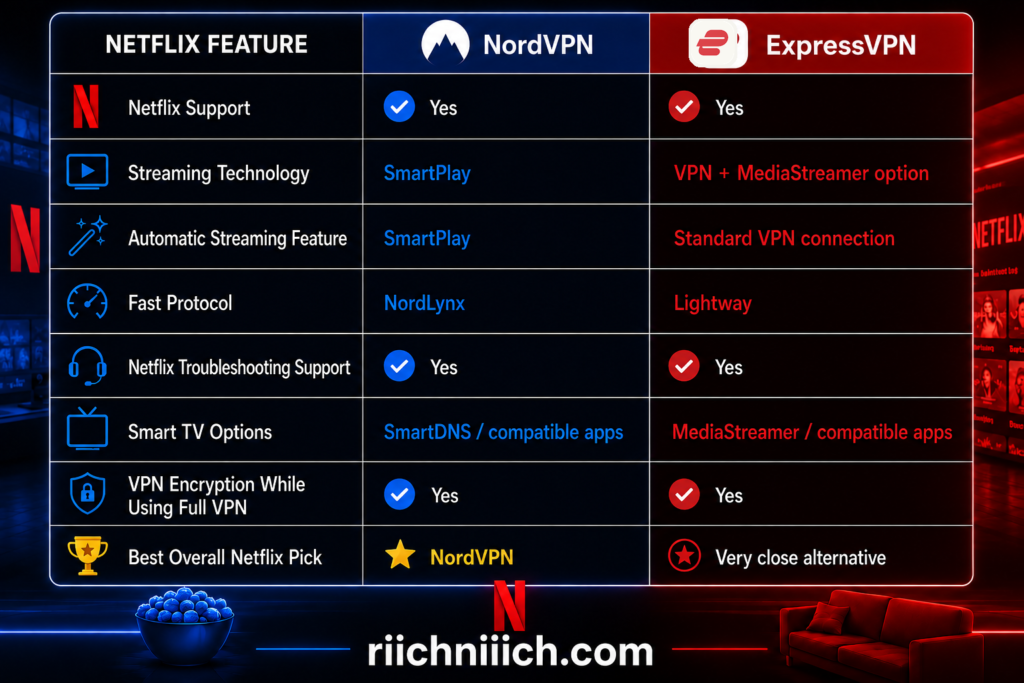
Netflix deserves its own category in the NordVPN vs ExpressVPN comparison because VPN compatibility with Netflix can be unpredictable. Both NordVPN and ExpressVPN provide technologies designed to support secure streaming, but Netflix itself places restrictions on VPN usage that buyers should understand before purchasing either service.
For Netflix specifically, NordVPN gets a slight advantage because SmartPlay is automatically integrated into its VPN apps, requiring no separate configuration. ExpressVPN is still a strong Netflix option, with dedicated Netflix support documentation, multiple supported streaming devices, and specific troubleshooting guidance when a VPN connection causes problems.
NordVPN for Netflix
NordVPN’s biggest advantage for Netflix is SmartPlay.
SmartPlay is built directly into every NordVPN app and activates automatically when you connect to a VPN server. It combines SmartDNS technology with the VPN connection, meaning it can change DNS servers while also hiding your IP address and encrypting your traffic.
There is nothing extra to activate.
If you install NordVPN on a compatible laptop, smartphone, tablet, or television, connect to the VPN, and then open Netflix, SmartPlay operates automatically in the background. This makes NordVPN particularly appealing to buyers who don’t want to spend time configuring separate streaming features.
NordVPN also provides specific troubleshooting documentation for situations where Netflix doesn’t work while connected to NordVPN. The provider recommends steps such as checking that you are properly connected and testing for DNS leaks when problems occur.
That troubleshooting support matters because Netflix-VPN compatibility can change.
ExpressVPN for Netflix
ExpressVPN also explicitly supports Netflix streaming through its VPN service.
Its current Netflix documentation provides setup instructions across computers, smartphones, Amazon Fire TV, Fire Stick, Android TV, Chromecast with Google TV, Apple TV, and other configurations.
ExpressVPN recommends using a server location appropriate for your physical country and, when multiple locations exist within that country, choosing one close to your actual location. Its current Netflix troubleshooting guide even provides specific U.S. server-location suggestions when U.S. customers encounter Netflix problems.
ExpressVPN also provides MediaStreamer for certain devices that cannot run a traditional VPN application.
However, there is an important distinction: MediaStreamer is a smart DNS service, not a VPN. It does not provide the same encryption and privacy protections you receive when streaming through the full ExpressVPN application.
If your device supports the ExpressVPN app, using the actual VPN connection is the better choice when privacy and security are priorities.
Netflix Has Its Own VPN Restrictions
This is the most important caveat in the entire NordVPN vs ExpressVPN for Netflix comparison.
Netflix officially states that when you connect through a VPN, you may only be shown titles for which Netflix has worldwide licensing. Netflix also says VPNs are not supported for live events or its ad-supported experience.
Netflix can also display a VPN or proxy error when it detects that your connection is going through one. Its recommended solution in that situation is to disable the VPN.
This means neither NordVPN nor ExpressVPN can guarantee that Netflix will always work perfectly while the VPN is connected.
Netflix changes its systems, and VPN providers update theirs. A connection that works without trouble today could require changing servers or troubleshooting later.
Netflix also states that its catalog varies by country and that using a VPN can hide your region.
What If Netflix Stops Working With Your VPN?
Don’t immediately assume you bought the wrong VPN.
If Netflix displays a VPN or proxy warning while you are connected, start by confirming that the VPN is connected to an appropriate server in your physical country. You can then try reconnecting, selecting another nearby server, restarting Netflix, or signing out and back into the Netflix app.
ExpressVPN’s current troubleshooting process, for example, recommends changing VPN server locations, signing out and back into Netflix, restarting the device, trying Netflix through a web browser, and contacting support if the problem continues.
NordVPN likewise maintains dedicated Netflix troubleshooting documentation, which is useful when SmartPlay or the VPN connection isn’t behaving as expected.
Having 24/7 customer support and multiple server choices therefore becomes more important for Netflix users than simply choosing the VPN with the longest feature list.
Which VPN Is Better for Netflix?
For NordVPN vs ExpressVPN for Netflix, we give NordVPN a narrow victory.
Winner for Netflix: NordVPN
The deciding factor is SmartPlay. Because it is automatically integrated into NordVPN’s VPN applications, you get streaming-oriented DNS technology alongside the encrypted VPN connection without having to configure a separate feature. Combined with NordLynx and NordVPN’s extensive server network, it creates a strong package for buyers who regularly stream Netflix.
ExpressVPN remains very competitive. Its Netflix-specific support, Lightway protocol, extensive device compatibility, MediaStreamer option, and detailed troubleshooting resources make it a strong alternative—particularly for households streaming Netflix across several types of devices.
For someone specifically asking which VPN should I buy for Netflix, we would choose NordVPN if Netflix is one of your major priorities. Just don’t buy any VPN expecting guaranteed access to every Netflix title or region. Netflix controls its platform and VPN policies, so compatibility can change regardless of which provider you choose.
NordVPN vs ExpressVPN for Gaming
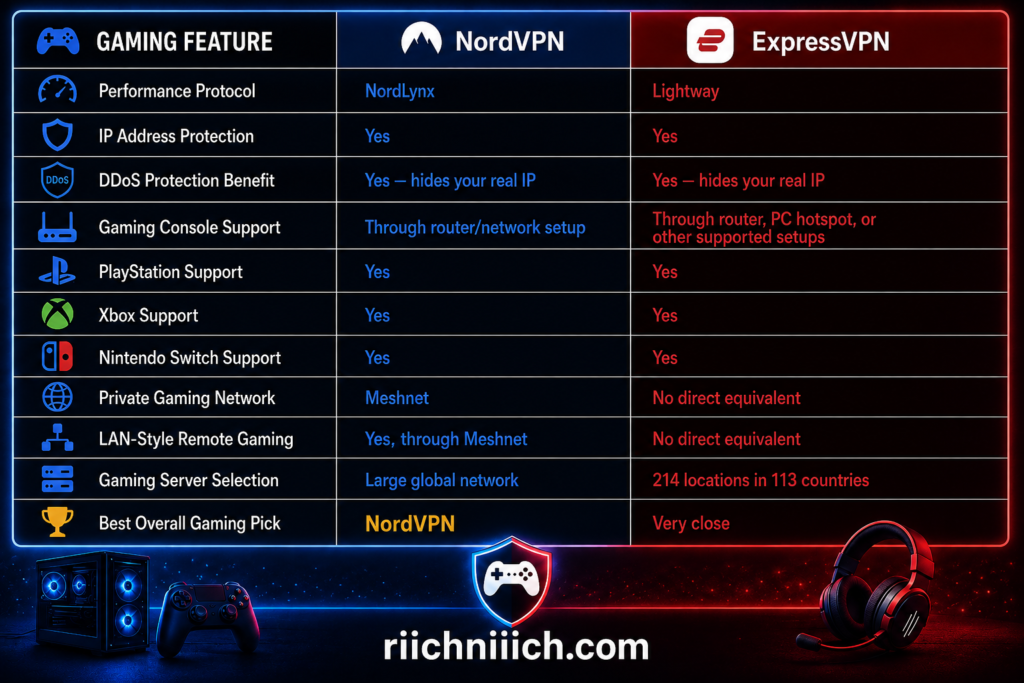
Gaming puts different demands on a VPN than ordinary web browsing. Download speed matters, but latency, connection stability, server distance, and protection against IP-based attacks can be even more important. In NordVPN vs ExpressVPN, both services are strong choices for gaming, but NordVPN has a slight overall advantage for buyers because of NordLynx, its extensive server network, and the unusual gaming possibilities offered by Meshnet. ExpressVPN comes very close with Lightway, high-capacity servers, and particularly good console support.
Here is the NordVPN vs ExpressVPN for gaming comparison at a glance:
NordVPN for Gaming
NordVPN’s main advantage for traditional online gaming is NordLynx.
NordLynx is built around WireGuard and designed to deliver fast VPN performance without sacrificing security. For gaming, that matters because additional VPN overhead can increase latency. The less unnecessary delay the VPN introduces, the better.
But NordVPN has another feature that makes it particularly interesting for gamers: Meshnet.
Meshnet allows devices in different physical locations to communicate through an encrypted private network. NordVPN specifically documents using Meshnet for multiplayer gaming and private game servers. Because devices can communicate directly through Meshnet, users can create LAN-style gaming environments even when players are not physically on the same local network.
NordVPN provides Meshnet guides for games and applications including Minecraft, Stardew Valley, Quake III Arena, Team Fortress 2, Palworld, Factorio, and remote game streaming through Moonlight. Port forwarding is not required for devices to communicate through Meshnet.
That is a very different benefit from simply connecting to a VPN server before launching Call of Duty or Fortnite.
For ordinary gamers, NordLynx and nearby servers will be more important. But for people who host private game servers, play LAN-style multiplayer games remotely, or experiment with remote gaming setups, Meshnet gives NordVPN an advantage that ExpressVPN does not directly match.
ExpressVPN for Gaming
ExpressVPN has put considerable effort into gaming support.
Its biggest performance feature is Lightway, a proprietary protocol designed to minimize connection overhead while maintaining fast, reliable VPN connections. Lightway can also reconnect quickly when the underlying internet connection changes or temporarily drops, which is useful for mobile gaming.
ExpressVPN currently operates servers with 10 Gbps and 40 Gbps capacity and offers 214 locations across 113 countries. Its Smart Location feature can automatically help select a suitable nearby VPN server.
Console support is another strength.
PlayStation, Xbox, and Nintendo Switch generally do not run conventional VPN applications directly. ExpressVPN provides several ways around this limitation, including sharing a VPN connection from a computer or using a compatible VPN-enabled router. ExpressVPN publishes dedicated setup guidance for PlayStation, Xbox, and Nintendo Switch.
ExpressVPN’s Aircove router is particularly relevant to console gamers because ExpressVPN is built into the router, allowing consoles and other devices connected through it to benefit from the VPN without installing a VPN app directly on the console.
Can a VPN Lower Your Ping?
Sometimes—but you should not buy a VPN expecting it to magically lower your ping.
Ping measures how long data takes to travel between your device and the game server and return. Adding a VPN server normally creates an additional stop along that route, which can increase latency.
There are exceptions.
If your internet service provider is routing your gaming traffic inefficiently, connecting through a strategically located VPN server could potentially create a better route to the game server. ExpressVPN acknowledges this possibility but does not claim that a VPN will always reduce latency.
For most gamers, the safest strategy is simple: connect to a VPN server close to your physical location or close to the game’s server and compare your ping before and after connecting.
If your normal connection gives you 25 ms latency and the VPN increases it to 70 ms, there is little reason to use that particular VPN server for competitive gaming. Try another nearby server or disconnect the VPN when you do not need its protection.
VPNs and DDoS Protection for Gaming
This is one of the more compelling reasons competitive gamers may want a VPN.
A distributed denial-of-service (DDoS) attack attempts to overwhelm a network with traffic, potentially knocking the targeted connection offline.
A VPN helps by hiding your home IP address behind the VPN server’s IP address. ExpressVPN specifically identifies IP masking as protection against targeted DDoS attacks during gaming.
That can be valuable in competitive environments where exposing your real IP address could make your home connection a target.
However, a VPN does not make your gaming account itself immune to attacks. You should still use a strong unique password, enable multi-factor authentication when the gaming platform supports it, and be cautious with suspicious links sent through gaming chats.
What About Cloud Gaming?
Cloud gaming makes latency even more important.
Traditional online gaming runs the game locally on your computer or console while exchanging information with remote servers. Cloud gaming goes further: the actual game is running remotely, and the video feed must be continuously streamed back to your device while your controller inputs travel in the opposite direction.
Even small delays can therefore become noticeable.
ExpressVPN specifically supports cloud-gaming use cases and recommends connecting to a nearby server because shorter distances generally produce lower latency.
The same principle applies when using NordVPN: choose a nearby server and a performance-oriented protocol such as NordLynx.
For serious cloud gaming, latency should take priority over choosing an exotic VPN location.
Should You Use a VPN to Change Gaming Regions?
A VPN can change the IP location that a gaming service sees, but that does not mean every use is permitted.
Game publishers and platforms can have rules concerning regional pricing, matchmaking, purchases, competitions, or other location-based features. ExpressVPN’s Xbox guidance, for example, warns that using a VPN to exploit regional price differences can result in account penalties.
Before using either VPN to change your apparent gaming region, check the game’s and platform’s current terms.
Using a VPN for privacy, DDoS protection, or securing your connection is very different from using one to circumvent purchasing or competitive restrictions.
Which VPN Is Better for Gaming?
The NordVPN vs ExpressVPN for gaming comparison is another close one, but we give the overall advantage to NordVPN.
Winner for Gaming: NordVPN
NordLynx provides a performance-focused VPN protocol, NordVPN’s broad server network gives gamers plenty of connection choices, and Meshnet is the differentiator. Its ability to create encrypted private networks between remote devices provides interesting possibilities for private servers, LAN-style multiplayer gaming, and remote game streaming.
ExpressVPN could actually be the better purchase for certain console gamers. Lightway, dedicated PlayStation/Xbox/Switch guidance, high-capacity servers, PC hotspot sharing, and Aircove router integration create an unusually polished console-gaming setup.
From a buyer’s perspective, choose NordVPN if you want the strongest combination of speed, gaming flexibility, and Meshnet. Choose ExpressVPN if easy console integration and router-based gaming protection are higher priorities.
Most importantly, don’t choose a gaming VPN based on promises of magically lower ping. For competitive gaming, test nearby servers yourself—the VPN that gives your connection the lowest stable latency is ultimately the one that matters most.
NordVPN vs ExpressVPN for Torrenting
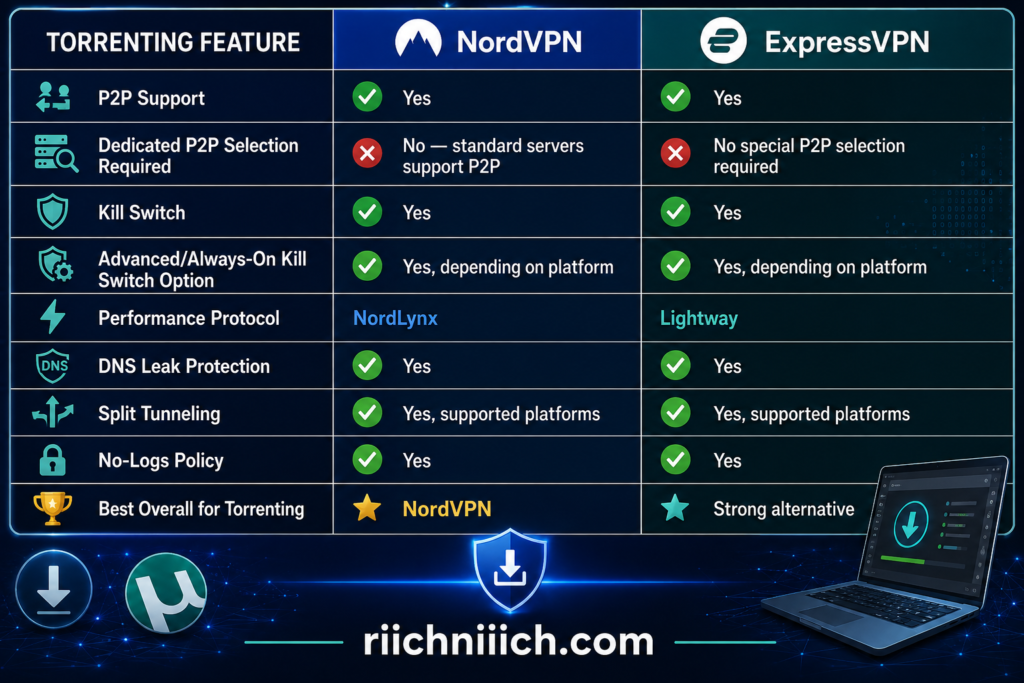
For people who use peer-to-peer file sharing for legitimate purposes, NordVPN vs ExpressVPN offers two strong options. Both services encrypt your connection, hide your regular public IP address behind a VPN server, provide kill-switch protection, and support performance-oriented VPN protocols. The biggest difference for torrenting is that NordVPN now supports P2P traffic across all of its standard servers, making it especially easy to connect and start a legitimate P2P transfer.
For most buyers comparing NordVPN vs ExpressVPN for torrenting, we give NordVPN the advantage. Its combination of widespread P2P support, NordLynx, DNS leak protection, and flexible Kill Switch options creates a strong package for frequent peer-to-peer file sharing.
NordVPN for Torrenting
NordVPN has made P2P file sharing considerably simpler.
In the past, NordVPN applications included a separate category of P2P servers. That has changed. NordVPN now states that all standard NordVPN servers support P2P activity, so you no longer need to search for a dedicated P2P server before connecting.
This is useful for buyers because you can focus on selecting an appropriate nearby server rather than worrying about whether that particular server supports P2P traffic.
NordVPN also offers NordLynx, its WireGuard-based protocol. For large legitimate file transfers, a performance-oriented protocol matters because VPN encryption and routing can introduce additional overhead. NordVPN’s broad server network also gives you many locations from which to find a suitable connection.
Another major advantage is NordVPN’s Kill Switch.
On Windows, NordVPN offers both an Internet Kill Switch and an App Kill Switch. The Internet Kill Switch can stop your internet connection when you are disconnected from NordVPN, while the App Kill Switch can terminate specific programs if VPN protection is lost.
For example, a user could configure the App Kill Switch for a P2P client. If the VPN connection disappears, NordVPN can close the designated application rather than allowing it to continue communicating through the user’s regular connection.
That extra control gives NordVPN an important advantage for privacy-conscious P2P users.
ExpressVPN for Torrenting
ExpressVPN also provides the core protections buyers should look for when using P2P applications: an encrypted VPN connection, IP-address masking, private DNS, a no-logs policy, and kill-switch protection.
Its Internet Kill Switch is particularly useful for P2P transfers.
If the ExpressVPN connection unexpectedly fails, the Internet Kill Switch blocks internet traffic until the VPN connection is restored. ExpressVPN says the feature is available on Windows, Mac, Linux, routers, Android, and iOS, although its implementation varies between platforms.
ExpressVPN also provides an Advanced Internet Kill Switch on Windows, Mac, and Linux. Instead of protecting you only after an active VPN connection unexpectedly drops, this option can block internet traffic whenever the VPN is not connected.
That distinction could be valuable for someone who wants to make sure a P2P application never accidentally communicates through the regular internet connection.
Lightway is another advantage. ExpressVPN designed its proprietary protocol around fast connections and rapid reconnection, which complements the kill switch when temporary network interruptions occur.
Why a Kill Switch Is Important for Torrenting
The kill switch is one of the features we would prioritize when shopping for a VPN for P2P file sharing.
When connected to a P2P network, your device communicates with other peers. If your VPN unexpectedly disconnects while the P2P application continues running, traffic could potentially fall back to your normal internet connection.
A kill switch is designed to prevent that exposure.
NordVPN and ExpressVPN both provide strong solutions, but their advanced options are slightly different. NordVPN’s Windows App Kill Switch can close designated applications when the VPN connection disappears, while ExpressVPN’s Advanced Internet Kill Switch on supported desktop platforms can block all internet traffic whenever the VPN is inactive.
Neither approach is inherently better for everyone. If you want application-level control, NordVPN’s implementation is attractive. If you want an always-on rule that prevents the computer from accessing the internet without the VPN, ExpressVPN’s Advanced Internet Kill Switch is compelling.
What About Split Tunneling?
Both VPNs also provide split-tunneling capabilities on supported platforms, but you should be careful with this feature when privacy is the priority.
Split tunneling lets certain applications use the VPN while others connect through your regular internet connection. That can be convenient, but incorrect configuration can defeat the purpose of using the VPN for a particular application.
NordVPN also warns that its Internet Kill Switch and Split Tunneling can interact in ways users should understand. Under its current implementation, the Internet Kill Switch takes priority when both features are enabled, potentially blocking traffic that Split Tunneling would otherwise exclude from the VPN.
For someone buying a VPN primarily for P2P transfers, simplicity is often better: connect the entire device through the VPN unless you have a specific reason to configure split tunneling.
Does a VPN Make Torrenting Legal?
No. This is an important distinction when evaluating NordVPN vs ExpressVPN for torrenting.
Peer-to-peer technology itself has legitimate uses. People can use P2P networks to distribute open-source software, public-domain material, authorized media, large datasets, and files they have permission to share.
However, a VPN does not give you permission to download copyrighted material without authorization.
The U.S. Copyright Office states that uploading or downloading copyright-protected works without authorization can infringe the copyright owner’s reproduction or distribution rights.
NordVPN similarly states that its service should not be used to bypass copyright regulations.
The purpose of using a VPN for legitimate P2P activity should therefore be protecting your connection and privacy, not attempting to make unauthorized downloading legal.
Which VPN Is Better for Torrenting?
For NordVPN vs ExpressVPN for torrenting, our pick is NordVPN.
Winner for Torrenting: NordVPN
NordVPN’s biggest advantage is how straightforward P2P support has become. All standard servers now support P2P activity, meaning you no longer need to search for a special P2P category. Add NordLynx, DNS leak protection, a broad server network, and flexible Kill Switch options, and NordVPN provides an excellent combination for legitimate peer-to-peer transfers.
ExpressVPN is still a strong alternative. Lightway is designed for fast, stable connections, while its Internet Kill Switch and Advanced Internet Kill Switch provide excellent safeguards against traffic accidentally leaving the VPN tunnel.
From a buyer’s perspective, choose NordVPN if you want simple P2P support across standard servers, NordLynx performance, and flexible application-level protection. Choose ExpressVPN if an always-on advanced kill switch and Lightway better match the way you use your computer.
For most buyers specifically searching for a VPN for frequent, legitimate P2P transfers, though, NordVPN offers the better overall combination of convenience, performance, and control.
NordVPN vs ExpressVPN for Traveling
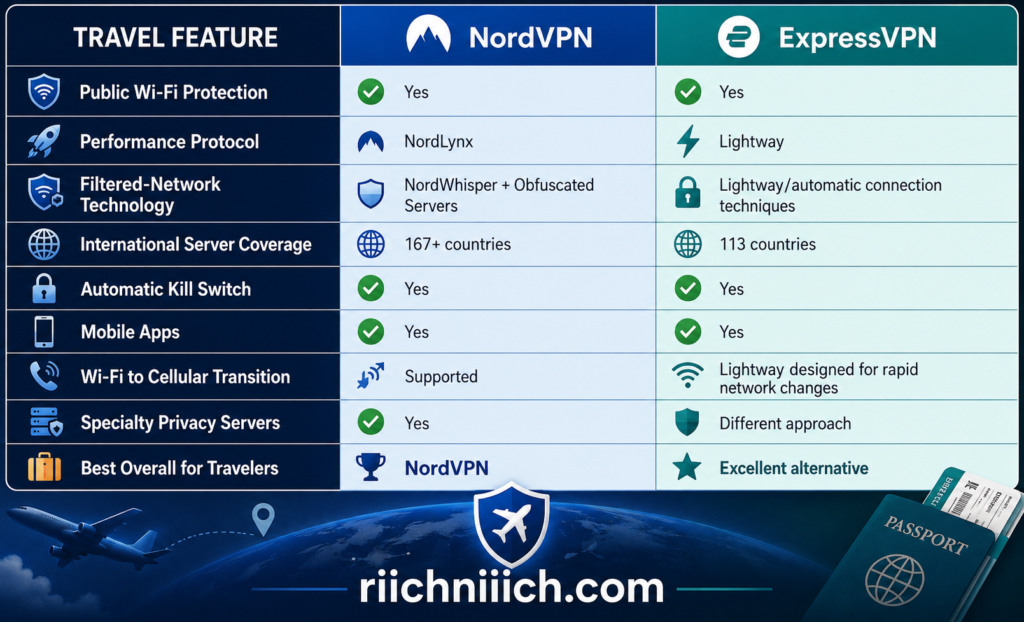
Travel is one of the situations where a VPN can become especially useful. Airports, hotels, cafés, convention centers, and other destinations often mean connecting to networks you do not control. In NordVPN vs ExpressVPN, both services are well suited for travelers, but they have different strengths: NordVPN offers specialized tools for filtered networks and broader country coverage, while ExpressVPN’s Lightway protocol is particularly well designed for devices that frequently move between Wi-Fi and cellular networks.
Before connecting at an airport, hotel, or café, it is also worth understanding the Dangers of Public Wi-Fi and why protecting the connection matters even when the network looks legitimate.
For most travelers, we give NordVPN a slight overall advantage because of its extensive international server coverage, NordWhisper protocol, obfuscated servers, and broader collection of security features.
NordVPN for Traveling
NordVPN has several features that become particularly useful once you leave your normal home network.
The first is its server network. With coverage across more than 167 countries, travelers have a large selection of locations available when connecting from different parts of the world. NordVPN also distinguishes between physical and virtual server locations and provides specialty servers in supported countries.
However, NordWhisper may be the more important travel feature.
NordWhisper was specifically developed for networks that restrict or filter conventional VPN connections. NordVPN says these types of filters can appear on Wi-Fi networks at airports, cafés, hotels, conferences, offices, and campuses. NordWhisper makes VPN traffic resemble ordinary web traffic, helping the connection work when traditional VPN protocols are being filtered.
That makes it particularly useful for frequent travelers.
Imagine arriving at an airport, connecting to its Wi-Fi, and discovering that your normal VPN connection will not establish. Instead of simply abandoning the VPN, you can switch to NordWhisper and try connecting again.
NordVPN also offers Obfuscated Servers, which are specifically designed for networks where VPN traffic is restricted. NordVPN is currently upgrading these connections to use NordWhisper, with the goal of improving speed, reliability, and the number of available locations on restrictive networks.
ExpressVPN for Traveling
ExpressVPN has a different advantage for people constantly moving between networks: Lightway.
A traveler’s phone may connect to hotel Wi-Fi in the morning, cellular data in the taxi, airport Wi-Fi later, and another cellular network after landing.
Lightway was designed to handle network changes efficiently. ExpressVPN explains that when a device changes networks—for example, moving between Wi-Fi and mobile data—Lightway can maintain or rapidly re-establish the VPN connection rather than forcing the user through a cumbersome reconnection process.
That may sound like a minor convenience, but it can become important during frequent travel.
ExpressVPN also maintains extensive international server coverage. Travelers can select from 214 locations across 113 countries, giving them plenty of options when they need a nearby connection.
ExpressVPN also maintains specific troubleshooting procedures for users traveling in countries with significant internet restrictions. Its current support guidance recommends using the ExpressVPN app rather than manual configurations for optimized performance in those environments and directs travelers to its support team when censorship prevents normal connectivity.
Public Wi-Fi Is Where a Travel VPN Becomes Especially Useful
You do not necessarily know who manages every network you encounter while traveling.
A hotel network may be legitimate. An airport hotspot may be legitimate. A café network may be legitimate.
But the important difference is that you do not control those networks.
A VPN creates an encrypted tunnel between your device and the VPN server. This reduces the amount of useful information that someone monitoring the local network can observe about the traffic traveling through that tunnel.
However, a VPN does not replace other travel-security practices.
You should still use HTTPS websites, keep your devices updated, enable multi-factor authentication, avoid unknown downloads, and verify the actual network name before connecting. A VPN is another security layer—not permission to trust every Wi-Fi network you encounter.
Restricted Networks and Countries Require Extra Planning
This is where the NordVPN vs ExpressVPN for traveling comparison becomes more complicated.
VPN laws and restrictions vary around the world. Some countries restrict VPN providers, block VPN connections, regulate VPN usage, or prohibit certain uses.
A VPN working perfectly at home also does not guarantee it will work normally after you arrive somewhere with aggressive network filtering.
NordVPN’s current troubleshooting guidance for countries with internet restrictions recommends trying NordWhisper first, followed by obfuscated servers and other connection methods when necessary.
ExpressVPN similarly maintains special troubleshooting procedures for users in countries with high levels of internet censorship.
For international travelers, the smartest approach is to research local VPN laws before departure and install and update your VPN apps before entering a country where VPN websites or app stores may be restricted.
Do not assume that because VPN use is legal where you live, the same rules apply everywhere you travel.
Download Your VPN Before You Leave
This simple step can prevent a lot of frustration.
If you already know you will use a VPN during an international trip, install the app on your phone, laptop, and tablet before departure. Sign in, update the application, confirm that your subscription works, and test the VPN on your home network.
You should also know where the Kill Switch and protocol settings are located.
That way, if hotel or airport Wi-Fi rejects a normal VPN connection, you are not trying to learn the application’s advanced settings while standing in a terminal with a weak internet connection.
For NordVPN users, knowing how to switch between NordLynx and NordWhisper is particularly useful. NordVPN specifically recommends NordWhisper when conventional VPN protocols struggle on filtered networks.
Which VPN Is Better for Traveling?
For NordVPN vs ExpressVPN for traveling, we give NordVPN the overall win—but ExpressVPN is extremely close.
Winner for Traveling: NordVPN
NordVPN’s broader international country coverage, NordWhisper, obfuscated connections, Kill Switch, specialty servers, and additional security features give travelers a particularly flexible toolkit. NordWhisper is the biggest differentiator because it was specifically designed to help establish VPN connections on filtered networks such as those travelers may encounter at airports, hotels, cafés, and conferences.
ExpressVPN may actually be the better purchase for a particular type of traveler: someone who is constantly moving between networks. Lightway’s ability to handle transitions between Wi-Fi and cellular connections makes it particularly attractive for smartphones and other mobile devices.
From a buyer’s perspective, choose NordVPN if you want broad international server coverage, strong public Wi-Fi protection, and additional tools for filtered networks. Choose ExpressVPN if you prioritize simple mobile connectivity and smooth transitions between different networks while traveling.
For frequent international travelers who want the most versatile overall package, though, NordVPN is our pick in this category.
NordVPN vs ExpressVPN Device Compatibility
Device compatibility matters because most people are no longer protecting just one computer. A typical household may have Windows laptops, Macs, iPhones, Android phones, tablets, smart TVs, streaming devices, game consoles, and browsers that all connect to the internet. In NordVPN vs ExpressVPN, both providers cover the major platforms extremely well, but ExpressVPN has a slight advantage for buyers who want especially broad router, streaming-device, and manual-configuration support.
NordVPN supports native apps for Windows, macOS, Linux, Android, iOS, Apple TV, Android TV, and Fire TV, plus extensions for Chrome, Firefox, and Edge. NordVPN also provides setup options for Xbox, PlayStation, Nintendo Switch, Chromecast, Raspberry Pi, Chromebook, and routers.
ExpressVPN supports Windows, Mac, Linux, Chromebook, Android, iOS, Fire tablets, routers, Apple TV, Android TV, Fire TV, Chromecast with Google TV, browsers, game consoles, and several smart-TV configurations.
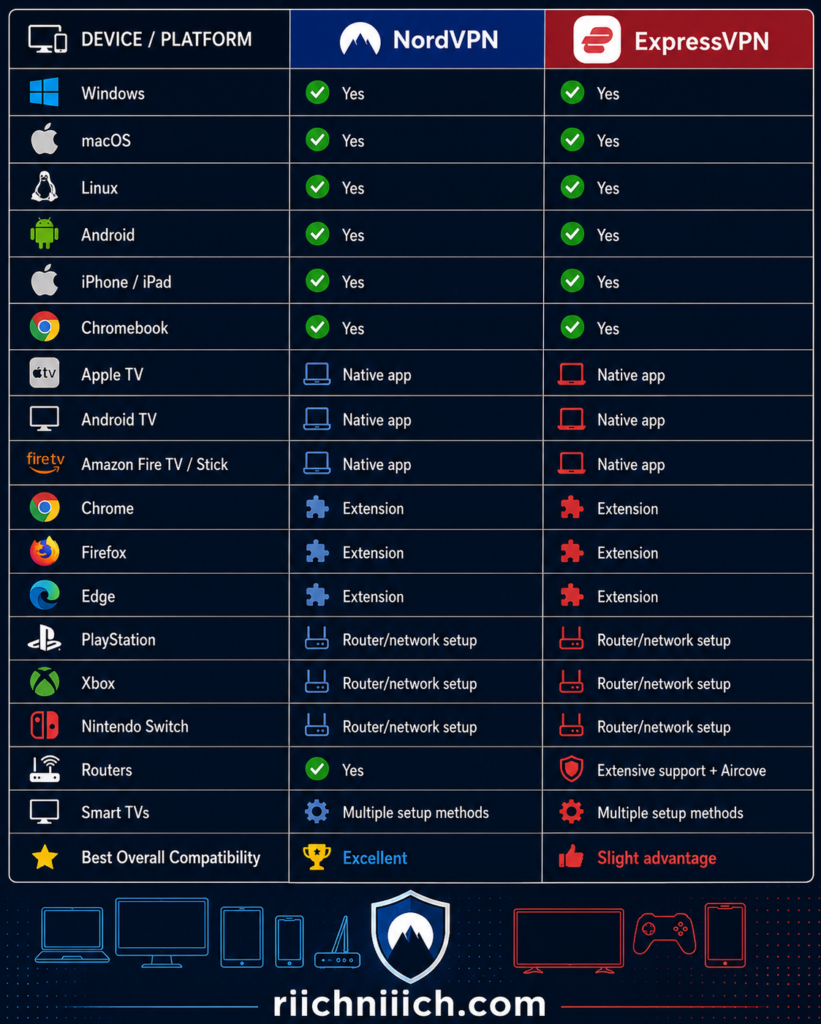
NordVPN Device Compatibility
NordVPN covers nearly every mainstream device category most buyers are likely to own.
The native NordVPN application is available for Windows, macOS, Linux, Android, iPhone and iPad, Apple TV, Android TV, and Amazon Fire TV. NordVPN also provides browser extensions for Chrome, Firefox, and Microsoft Edge.
That means a household could potentially install NordVPN directly on a Windows laptop, MacBook, Android phone, iPhone, Fire TV Stick, and Apple TV without relying on complicated manual configurations.
For devices where a conventional VPN application cannot be installed, NordVPN provides other setup options.
Gaming consoles such as Xbox, PlayStation, and Nintendo Switch can use NordVPN through methods such as a VPN-enabled router or a shared VPN connection. Smart TVs without native VPN support can similarly be protected through a router, shared Windows connection, or SmartDNS depending on the device.
This makes NordVPN compatible with far more devices than its native-app list alone might suggest.
ExpressVPN Device Compatibility
ExpressVPN is equally impressive on mainstream devices but goes especially deep when it comes to home entertainment and router configurations.
Its official compatibility list includes Windows, Mac, Linux, Chromebook, Android, iOS, Amazon Fire tablets, routers, Amazon Fire TV, Fire Stick, Apple TV, Chromecast with Google TV, and Android TV devices.
ExpressVPN also provides configuration options for devices that cannot install its VPN application directly, including PlayStation, Xbox, Nintendo Switch, Roku, Chromecast, and certain smart TVs.
Apple TV users get a native ExpressVPN application on tvOS 17 and later. Older Apple TV hardware that cannot run the app can still have alternative options through MediaStreamer or a router running ExpressVPN.
Router compatibility is another major strength.
ExpressVPN supports its own Aircove and Aircove Go routers, along with compatible Asus, Linksys, and Netgear routers. It also documents manual configurations for additional router platforms.
That router support becomes particularly valuable when you have devices that cannot run a VPN app themselves.
What About Smart TVs?
Smart TVs are where NordVPN vs ExpressVPN Device Compatibility becomes more complicated.
Some television platforms allow native VPN applications, while others do not.
NordVPN offers native applications for Android TV, Amazon Fire TV, and Apple TV, while other smart TVs may require SmartDNS, a VPN-enabled router, or another connection-sharing method.
ExpressVPN similarly provides native applications for major streaming platforms including Apple TV, Android TV, Amazon Fire TV, Fire Stick, and Chromecast with Google TV. For platforms such as Samsung and LG smart TVs that do not run the native ExpressVPN app, ExpressVPN documents MediaStreamer configurations.
Remember that SmartDNS-style services are not substitutes for an encrypted VPN connection. They can be useful for compatible streaming devices, but if your goal is privacy and encryption, running the actual VPN app or protecting the device through a VPN-enabled router is preferable.
Browser Compatibility
Both services also support major browsers, but there is an important distinction between browser protection and device-wide VPN protection.
NordVPN provides extensions for Chrome, Firefox, and Edge. Its browser extension protects browser traffic rather than automatically protecting every application running on the computer.
ExpressVPN provides browser-extension support across Chrome, Firefox, Edge and additional Chromium-based browsers on supported desktop operating systems. Its current compatibility documentation includes Chrome, Firefox, Vivaldi, Chromium, Brave, and Microsoft Edge.
If you want protection across your entire computer—including email applications, cloud-storage programs, games, and other software—the full VPN application generally makes more sense than relying exclusively on a browser extension.
What About Older Devices?
Compatibility is not simply a question of whether a provider supports Windows, Android, or iOS. The operating-system version matters too.
For example, the current ExpressVPN Windows application requires Windows 10 or newer. Its Mac app requires macOS 11 or newer, Android requires version 7 or above, and the latest iOS app requires iOS 15 or above. ExpressVPN provides some legacy or manual alternatives for certain older computers.
NordVPN similarly maintains minimum operating-system requirements and legacy support for certain older platforms. Its current Windows documentation supports Windows 10 64-bit version 1607 and later and Windows 11, while also documenting legacy support for older Windows systems.
This is worth checking before buying either VPN if you have older hardware.
Do not assume that because a VPN advertises Windows, Mac, iPhone, or Android compatibility, every old version of that operating system will run the newest application.
Router Compatibility Can Solve the Device Problem
A router can dramatically expand the usefulness of either VPN.
Instead of installing a VPN individually on every compatible device, you can configure a supported router so devices using that network benefit from the router’s VPN connection.
This can be particularly helpful for game consoles, smart TVs, streaming boxes, smart-home devices, and other hardware that cannot install a conventional VPN application.
ExpressVPN has an especially polished approach here because of its router ecosystem, including Aircove. Its compatibility documentation also covers supported Asus, Linksys, Netgear, and manually configured router platforms.
NordVPN can also be installed on compatible routers and specifically recommends router configuration when users want to protect more devices or hardware that does not support the NordVPN application directly.
For a household filled with connected devices, router compatibility may therefore matter more than whether one VPN supports one additional application.
Which VPN Has Better Device Compatibility?
For NordVPN vs ExpressVPN Device Compatibility, we give ExpressVPN a very narrow victory.
Winner for Device Compatibility: ExpressVPN
NordVPN already covers practically every important consumer platform. Windows, macOS, Linux, Android, iOS, Apple TV, Android TV, Fire TV, browsers, routers, consoles, Chromecast, Chromebook, and Raspberry Pi are all accounted for through either native applications or alternative configurations.
ExpressVPN edges ahead because its compatibility ecosystem is particularly extensive. It supports the major desktop and mobile operating systems, native apps on major streaming platforms, numerous browser environments, game-console configurations, smart-TV alternatives, and a particularly mature router ecosystem.
ExpressVPN also supports up to 14 simultaneous VPN connections depending on the subscription plan, although simultaneous connection limits deserve their own comparison in the next section rather than being treated as the same thing as device compatibility.
From a buyer’s perspective, choose NordVPN if you primarily use mainstream computers, phones, tablets, streaming devices, and consoles and want its broader collection of security features.
Choose ExpressVPN if you have an unusually diverse collection of devices or if router-based, smart-TV, and home-entertainment compatibility are major priorities.
The difference is small, but for sheer flexibility across a complicated household of connected devices, ExpressVPN gets the win for device compatibility.
NordVPN vs ExpressVPN Simultaneous Connections
Simultaneous connections can make a surprisingly big difference when choosing between NordVPN vs ExpressVPN. A VPN may work on dozens of device types, but the simultaneous connection limit determines how many of those devices can actively use the VPN at the same time.
NordVPN currently allows up to 10 simultaneous device connections with one account. ExpressVPN uses a tiered system: Basic supports 10 devices, Advanced supports 12, and Express Pro supports 14 simultaneous connections.
That gives ExpressVPN the advantage for buyers with larger households or many devices—although you may have to purchase a higher-tier ExpressVPN plan to get that advantage.
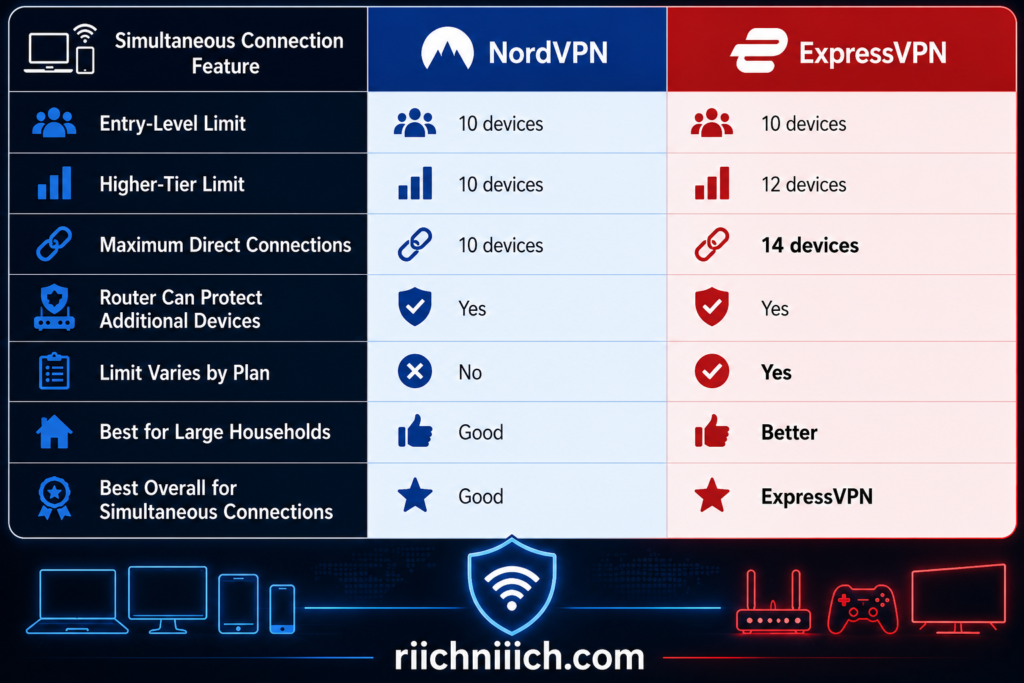
How Many Devices Can Use NordVPN at the Same Time?
A single NordVPN account currently supports 10 devices connected to the VPN simultaneously.
For many individuals and smaller households, 10 connections should be plenty.
For example, you could potentially have NordVPN running simultaneously on:
- Two smartphones
- Two laptops
- Two tablets
- Two smart TVs
- One desktop computer
- One additional streaming device
That reaches the 10-device limit.
The advantage is simplicity. You do not need to purchase a more expensive NordVPN subscription tier simply because you want the maximum number of simultaneous connections. The 10-device allowance applies to a single NordVPN account.
There is one technical detail worth knowing. NordVPN says that when several devices connect to the same VPN server, they may need to use different VPN protocols. If you reach that limitation, another device can simply connect to a different NordVPN server.
How Many Devices Can Use ExpressVPN at the Same Time?
ExpressVPN takes a different approach.
As of August 2026, the number of simultaneous VPN connections depends on which ExpressVPN subscription you purchase:
ExpressVPN Basic — 10 simultaneous connections
ExpressVPN Advanced — 12 simultaneous connections
Express Pro — 14 simultaneous connections
This gives ExpressVPN a clear numerical advantage over NordVPN—but only on the higher tiers.
A Basic subscription and NordVPN are tied at 10 simultaneous connections. Upgrade to ExpressVPN Advanced, and you gain two additional connections. Express Pro increases the advantage to four.
ExpressVPN gives an example of how a 14-device Pro subscription could cover six iPhones, four iPads, and four MacBooks simultaneously, or another combination of up to 14 devices.
For a large family, technology-heavy household, or someone carrying several connected devices for work and personal use, those extra connections could matter.
Device Compatibility and Simultaneous Connections Are Not the Same Thing
This distinction is easy to miss when comparing NordVPN vs ExpressVPN simultaneous connections.
Device compatibility tells you which types of devices can run or use the VPN.
Simultaneous connections tell you how many devices can actively connect through the VPN at one time.
You could install a VPN application on more devices than your simultaneous-connection allowance. The restriction applies when those devices attempt to maintain VPN connections at the same time.
For example, owning 15 compatible devices does not necessarily mean you need 15 simultaneous connections. If only five or six normally use the VPN at once, NordVPN’s 10-device allowance could already be more than enough.
This is important from a buyer-intent perspective because paying more simply to obtain a larger device allowance makes little sense if you will never use it.
What Happens If You Need More Than 10 or 14 Connections?
This is where routers become important.
NordVPN says a compatible router configured with NordVPN uses one device slot, while devices connected through that router can receive VPN protection through the router.
That can dramatically change the calculation.
Instead of separately connecting a television, streaming device, game console, laptop, and other compatible hardware, you could have those devices connect through the VPN-enabled router.
ExpressVPN provides a similar solution. If you need more than 14 simultaneous connections, ExpressVPN recommends using another subscription, sharing a VPN connection through a Windows computer, or setting up ExpressVPN on a router. Devices connected through the VPN router do not each consume another direct ExpressVPN connection slot.
For a large household, router support can therefore be more valuable than simply comparing 10 devices against 14.
Do You Actually Need 14 Simultaneous Connections?
Probably not if you are a single user with a normal collection of devices.
Suppose you regularly use a phone, laptop, tablet, desktop computer, and smart TV. Even if every device were connected simultaneously, that would only be five connections.
NordVPN’s 10-device limit would leave plenty of room.
The difference becomes more meaningful for a family.
Imagine four people each carrying a smartphone and laptop. That is already eight devices. Add two tablets and you have reached NordVPN’s 10-device limit. A couple of additional devices could then make ExpressVPN Advanced or Pro more convenient.
This is why NordVPN or ExpressVPN should not be chosen based purely on the larger number.
Ask yourself a more practical question:
How many devices in my household will actually be connected to the VPN at the same time?
If the answer is 10 or fewer, the simultaneous connection limit alone gives you little reason to choose ExpressVPN over NordVPN.
If the answer is 11–14, ExpressVPN becomes the stronger option.
Which VPN Is Better for Simultaneous Connections?
For NordVPN vs ExpressVPN Simultaneous Connections, ExpressVPN wins.
Winner for Simultaneous Connections: ExpressVPN
NordVPN’s 10-device allowance is still generous and should be sufficient for many individuals, couples, and smaller households. You can also configure NordVPN on a compatible router to extend VPN protection to additional devices without consuming individual slots for every device behind that router.
But ExpressVPN provides more flexibility for buyers who genuinely need a larger number of direct connections. Basic matches NordVPN at 10 devices, Advanced increases that to 12, and Express Pro reaches 14 simultaneous connections.
That makes the buying decision fairly straightforward.
If 10 simultaneous devices are enough, don’t choose between these VPNs based on connection limits alone. Consider price, speed, security, privacy, streaming, and the other categories in this NordVPN vs ExpressVPN comparison.
If you regularly need more than 10 devices actively connected, ExpressVPN has the clear advantage. And if you need substantially more than either service’s direct-device allowance, a VPN-enabled router may be the more practical solution than counting individual connections.
NordVPN vs ExpressVPN Apps and Ease of Use
A VPN can offer excellent security and speed, but those benefits matter less if the application is frustrating to use. In NordVPN vs ExpressVPN, both providers have polished apps for beginners, but their approaches are noticeably different. NordVPN gives you more ways to interact with servers and security tools, while ExpressVPN emphasizes a cleaner, more streamlined connection experience.
For buyers who prioritize simplicity above everything else, ExpressVPN has the slight advantage for ease of use. NordVPN, however, may be the better choice if you want an easy-to-use app that also gives you quicker access to advanced VPN and security features.
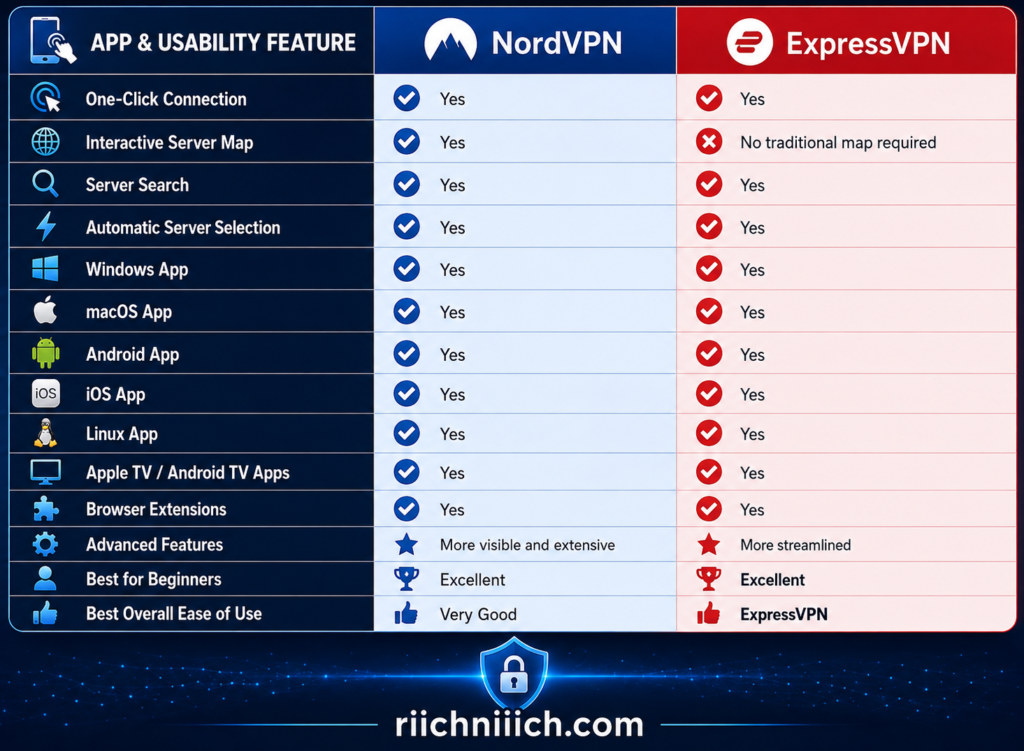
NordVPN Apps and Interface
NordVPN has significantly redesigned its apps over time, and its current interface tries to balance simplicity with access to a large collection of features.
Getting connected is straightforward.
After installing the NordVPN app and signing in, users can select Secure my connection to automatically connect to an appropriate server based on their location. You can also select a location from NordVPN’s interactive map or search for a particular country or server.
That gives you three easy approaches:
Automatic connection: Let NordVPN choose.
Map: Select a location visually.
Search: Find the country or server yourself.
This flexibility is useful because different users think about VPN locations differently. Someone new to VPNs may simply press the connection button, while an experienced user may prefer searching for a specific location.
NordVPN also redesigned its macOS application in 2026 to reduce unnecessary distractions and place commonly used connection options more prominently. Its interactive map was restored to the macOS application in June 2026, allowing users to zoom, drag, and connect directly through the map.
ExpressVPN Apps and Interface
ExpressVPN takes an even more streamlined approach.
Its applications are built around the basic task most VPN users perform repeatedly:
Open the VPN → choose a location → connect.
ExpressVPN’s current app setup provides one-click or one-tap connections, server selection across 113 countries, Lightway, split tunneling on supported platforms, Internet Kill Switch protection, automatic connection options, threat blocking, and other controls without requiring users to manually configure a traditional VPN connection.
ExpressVPN also offers useful quality-of-life features.
On Windows, for example, users can enable auto-connect, allowing ExpressVPN to launch and connect automatically when the computer starts. ExpressVPN also supports shortcuts that can launch frequently used apps or websites directly from the VPN interface.
Its Windows application even provides Compact Mode, which reduces the size of the interface when you want the VPN controls to occupy less space on your desktop.
These aren’t revolutionary features, but they reinforce ExpressVPN’s main usability strength: it generally tries to keep the process of using a VPN out of your way.
Which VPN Is Easier for Beginners?
For someone buying their first VPN, ExpressVPN has the slight advantage.
The reason is not that NordVPN is difficult.
It isn’t.
NordVPN’s basic connection process is extremely straightforward, and a beginner can simply use its automatic connection option without touching most of the advanced settings.
The difference is that NordVPN offers a larger collection of features and connection options. As users begin exploring the application, they may encounter settings for different protocols, specialty connections, Meshnet, additional threat protection, split tunneling, Kill Switch controls, and other security features.
Those tools add value, but they also create more things to learn.
ExpressVPN’s application is more focused on making the core VPN experience simple. Its recommended app setup lets users connect or disconnect with a click or tap while still providing access to advanced options when needed.
For someone who wants to install a VPN, press Connect, and stop thinking about it, ExpressVPN’s design is hard to beat.
NordVPN Is Better for Users Who Like More Control
Ease of use does not always mean having fewer options.
Some buyers actually find a feature-rich interface easier because important controls are available without requiring separate software.
NordVPN is a good example.
The interactive server map provides a visual way to choose locations, while search lets you find countries and servers directly. Its apps also provide access to NordVPN’s broader security ecosystem.
This can make NordVPN more attractive if you enjoy adjusting how your VPN works.
For example, one day you might simply use the automatic connection option. Another day you might select a particular country. Later, you might need NordWhisper on a restrictive network or explore another specialized security feature.
NordVPN gives you room to grow without requiring you to understand everything on the first day.
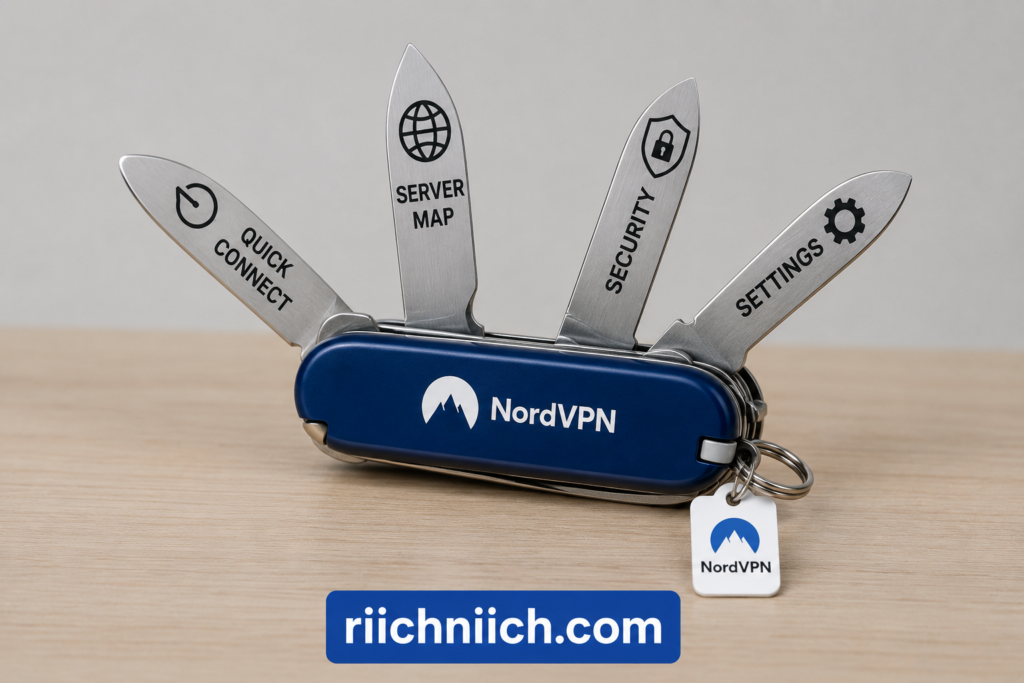
ExpressVPN Is Better for Users Who Want Simplicity
ExpressVPN’s greatest usability strength is that it rarely makes the basic VPN process feel complicated.
The recommended app setup provides automatic connection capabilities, server selection, Lightway, Kill Switch protection, split tunneling on supported platforms, and security controls within a single interface.
Installation is also straightforward across the major platforms.
ExpressVPN’s current setup process generally involves signing into your account, downloading the appropriate application, installing it, activating it, and connecting. Android users can download the app through Google Play or Galaxy Store, while iPhone and iPad users can obtain it through Apple’s App Store where available.
ExpressVPN’s Windows and Mac apps also support automatic updates, reducing the amount of manual maintenance required to keep the application current.
For someone who does not care about exploring every advanced VPN option, this simplicity has genuine value.
Mobile App Experience
The NordVPN vs ExpressVPN mobile app comparison is extremely close.
Both providers offer dedicated applications for Android and iOS and are designed around quick connections rather than forcing users through complicated manual configurations.
ExpressVPN’s Lightway protocol is particularly relevant to mobile users because it was designed to provide lightweight, reliable VPN connections, including when users are moving between different networks.
NordVPN gives mobile users access to its broader VPN ecosystem while maintaining a simple basic connection process.
For everyday mobile use, neither service should present much difficulty. If you can install a normal smartphone application, sign in, and press a connection button, you should be able to use either VPN.
The choice comes down more to minimalism versus additional controls.
Browser Extensions vs Full VPN Apps
Both providers also offer browser-based options, but buyers should understand that a browser extension and a full VPN application are not necessarily equivalent.
NordVPN specifically explains that its browser extension secures browser traffic, whereas the full NordVPN application protects the device’s internet connection more broadly. NordVPN currently provides extensions for Chrome, Edge, and Firefox.
For most buyers, the full VPN app should be the starting point.
If you are protecting a laptop, for example, you probably want protection to extend beyond Chrome or Firefox to other internet-connected applications running on the computer.
A browser extension can still be convenient when you specifically want browser-level controls.
Which VPN Has the Better Apps?
This depends on what you mean by “better.”
If better means more ways to select servers and more advanced security functionality, NordVPN has the advantage.
If better means the cleanest possible experience for someone who simply wants to connect and get on with their day, ExpressVPN has the advantage.
That distinction is important in a NordVPN vs ExpressVPN review because an app with more features is not automatically easier to use—and an app with fewer visible controls is not automatically less capable.
Both providers have reached the point where the fundamental VPN experience is simple enough for beginners.
The real difference is how much control they put in front of you.
Which VPN Is Easier to Use?
For NordVPN vs ExpressVPN Apps and Ease of Use, we give ExpressVPN a narrow victory.
Winner for Apps and Ease of Use: ExpressVPN
ExpressVPN’s strength is simplicity. Its apps emphasize fast connections, easy server selection, automatic connection options, Lightway, and straightforward access to important security features. The Windows application’s Compact Mode and shortcuts are good examples of features designed to make the VPN convenient without unnecessarily complicating the interface.
NordVPN comes extremely close and may actually be the better purchase for users who want more control. Its automatic connection option keeps the basic experience simple, while the interactive map, search tools, specialty connection options, and broader security ecosystem provide more room for advanced users.
From a buyer’s perspective, choose ExpressVPN if your priority is simplicity, minimal setup, and an interface that stays out of your way.
Choose NordVPN if you want an app that remains beginner-friendly while giving you more visible control over servers, protocols, and additional security features.
The usability difference is small, but for someone asking NordVPN or ExpressVPN purely based on which one is easier to use, ExpressVPN gets the win.
NordVPN vs ExpressVPN Customer Support
Customer support is easy to overlook when choosing a VPN—until your connection suddenly stops working, a streaming service refuses to load, or you have a billing problem. In NordVPN vs ExpressVPN, both providers offer extensive online support centers and 24/7 live chat, so buyers are well covered regardless of which service they choose.
The difference is small, but ExpressVPN gets a slight advantage for its streamlined support experience and particularly detailed troubleshooting resources. NordVPN counters with 24/7 live chat, email support, a large knowledge base, and clearly documented escalation from its chatbot to a human agent.
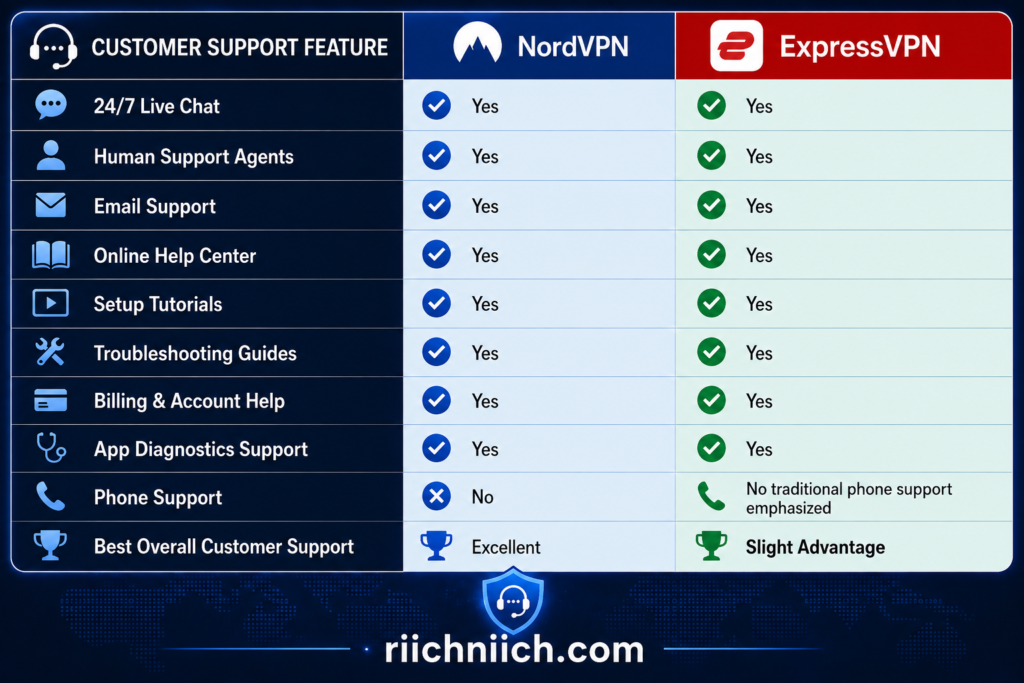
NordVPN Customer Support
NordVPN provides several ways to solve problems without leaving users entirely dependent on self-service documentation.
Its customer support is available 24/7 through live chat and email. When you start NordVPN’s live chat, you initially interact with its AI chatbot. If the chatbot cannot resolve the issue, NordVPN says you can be transferred to one of its support agents.
That escalation option is important.
Automated support can be useful for simple questions, but buyers should still have access to a person when dealing with a more complicated connection, account, or billing problem.
NordVPN also says live chat is its fastest support method. Email is available for issues that do not require an immediate response, and NordVPN says its support team will respond to email inquiries within 24 hours. NordVPN does not offer telephone support.
NordVPN’s Help Center
You may not need to contact NordVPN support at all.
Its Support Center organizes information into major categories including VPN troubleshooting, installation and features, account management, billing and subscriptions, and other Nord Security products.
The troubleshooting library addresses common problems such as:
- VPN connection failures
- Websites or applications not working
- Streaming problems
- Slow VPN connections
- Internet disconnections
- NordVPN application problems
- Application logs and screenshots
- Common VPN errors
This type of documentation matters because many VPN problems have relatively simple solutions. Switching protocols, selecting another server, restarting an application, checking a setting, or updating the VPN software can sometimes solve the issue without waiting for a support representative.
For buyers who prefer solving problems themselves, NordVPN provides a strong knowledge base.
ExpressVPN Customer Support
ExpressVPN also provides 24/7 live-chat support, and its Support Center prominently directs customers to live assistance when self-service troubleshooting does not solve the problem.
The support center is divided into straightforward areas for setting up ExpressVPN, troubleshooting problems, managing an account, and learning how the service works.
That organization makes it relatively easy to move from:
Problem → Troubleshooting Guide → Live Support
without searching through unrelated information.
ExpressVPN’s live chat can be accessed directly from its website, and the company says customers can contact its support team at any time through the chat interface.
ExpressVPN’s Troubleshooting Resources
ExpressVPN’s troubleshooting documentation is one of its strengths.
Its support library covers connection problems across Android, iOS, Mac, Windows, and Linux, including situations where the VPN connects but internet access stops, the VPN repeatedly disconnects, proxy settings interfere with connections, or applications produce connection errors.
ExpressVPN also regularly updates individual troubleshooting guides. For example, its current connection guide covers problems such as being stuck in the connecting state or receiving an “Unable to Connect” error and directs users in highly censored locations to contact support when standard troubleshooting does not work.
This is particularly useful for beginners because the support system does not assume that every customer understands VPN protocols, DNS settings, or network configurations.
ExpressVPN Has a Useful Diagnostic Support Feature
ExpressVPN has another support feature worth mentioning: diagnostic information can be shared with its support team.
On supported platforms, ExpressVPN provides diagnostic tools that can help its support team understand technical problems. On Windows, for example, users can access support through the application, enable debug logging, generate diagnostic information, save the report, and provide it to live support.
Android users can similarly contact support through the application or copy diagnostic information for live chat.
This may not matter when you’re asking a basic billing question.
But if the VPN suddenly stops connecting, crashes, or behaves strangely on a particular computer, diagnostics can give the support team more information than a message saying, “My VPN isn’t working.”
What Happens When Your VPN Stops Working?
This is where the NordVPN vs ExpressVPN customer support comparison becomes more important than it may initially appear.
Imagine you purchase a two-year VPN subscription and six months later your VPN suddenly refuses to connect.
You do not want to spend hours searching random forums for a solution.
With either provider, the logical process is:
1. Search the official support center.
2. Follow the troubleshooting instructions for your device.
3. Contact 24/7 live chat if the problem continues.
Both companies provide that basic support structure. NordVPN’s troubleshooting center covers connection problems, slow speeds, streaming issues, app problems, and other common errors, while ExpressVPN maintains similarly detailed device-specific troubleshooting documentation.
For someone deciding NordVPN or ExpressVPN, that is reassuring. Neither service leaves paying customers with documentation as their only option.
Which VPN Has Better Customer Support?
For NordVPN vs ExpressVPN Customer Support, this category is extremely close, but we give ExpressVPN a slight victory.
Winner for Customer Support: ExpressVPN
NordVPN provides practically everything most customers need: 24/7 live chat, human-agent escalation, email support, troubleshooting guides, setup instructions, billing assistance, and a comprehensive Support Center.
ExpressVPN matches the most important parts of that experience with 24/7 live chat and an extensive support library, but its highly structured troubleshooting guides and integrated diagnostic-support options give it a slight edge when a technical problem becomes more complicated.
That does not mean customer support should be the deciding factor for most buyers.
If NordVPN is already winning your NordVPN vs ExpressVPN comparison based on price, security, speed, privacy tools, or other features, its customer support is strong enough that we would not switch to ExpressVPN solely for support.
But if customer service is especially important to you—and you want straightforward 24/7 access combined with extensive troubleshooting documentation and diagnostic tools—ExpressVPN gets the narrow win for customer support.
NordVPN vs ExpressVPN: Which Offers Better Value?
Price tells you how much a VPN costs. Value tells you what you actually get for that money. That distinction is important in NordVPN vs ExpressVPN because both providers now offer multiple subscription tiers with additional cybersecurity features beyond the basic VPN.
Based on current August 2026 pricing, ExpressVPN Basic actually has the lower introductory price. However, when we compare the complete package—VPN performance, security features, privacy tools, server coverage, specialty features, and pricing—NordVPN offers better overall value for most buyers.

ExpressVPN Basic Is Actually Cheaper
This is important because ExpressVPN has historically had a reputation for being one of the more expensive VPNs.
Its current pricing changes that comparison considerably.
At the time of writing, the 2-year ExpressVPN Basic introductory offer costs $2.99 per month, billed as $83.72 for the first 28 months, including four extra months. It then renews at $99.95 annually.
NordVPN Basic currently costs $3.49 per month on its 2-year introductory offer, billed as $94.23 for the first 27 months, including three extra months. It renews at $139.08 annually.
So if your NordVPN vs ExpressVPN price comparison is based strictly on getting the core VPN service at the lowest current introductory price, ExpressVPN Basic wins.
That is a meaningful change in the buying decision.
ExpressVPN Basic also includes 10 simultaneous connections, Lightway, post-quantum protection, Lite Protection for ads and malicious sites, and the option to purchase a dedicated IP separately.
But Lowest Price Does Not Automatically Mean Best Value
This is where the NordVPN vs ExpressVPN value comparison gets more interesting.
NordVPN Basic includes the core VPN service with access to NordVPN’s VPN infrastructure and features such as NordLynx, Kill Switch, split tunneling on supported platforms, Double VPN, SmartPlay, private DNS, Meshnet, and other connection options. NordVPN also allows 10 simultaneous device connections.
Meshnet is particularly unusual.
It allows users to create encrypted private networks between devices for purposes such as file sharing, remote access, and LAN-style gaming. That is not something every buyer needs, but it adds functionality without requiring you to purchase another VPN subscription.
ExpressVPN Basic takes a somewhat more streamlined approach. You still get the core ExpressVPN service, Lightway, 10 simultaneous connections, post-quantum protection, Lite Protection, multiplatform applications, and access to ExpressVPN’s server network.
If all you want is a high-quality VPN and you do not care about NordVPN’s additional tools, ExpressVPN Basic can actually represent better value at current pricing.
If you intend to use those additional NordVPN capabilities, the value equation shifts toward NordVPN.
The Mid-Tier Plans Are Almost Identically Priced
The comparison becomes especially interesting one level above Basic.
NordVPN Complete currently costs $4.49 per month on its 2-year introductory offer, or $121.23 for the first 27 months.
ExpressVPN Advanced also costs $4.49 per month on its current 2-year introductory offer, or $125.72 for the first 28 months.
That makes this an excellent apples-to-apples buying comparison.
NordVPN Complete adds features including anti-malware and browsing protection, bank transaction monitoring, monitoring for information such as email addresses, phone numbers, credit cards and national ID/SSN data, call and message protection, an ad and tracker blocker, a password manager, and 1 TB of cloud storage. Availability and specific features can vary by platform or region.
ExpressVPN Advanced includes 12 simultaneous VPN connections, Advanced Protection, ExpressKeys password management, expanded ExpressMailGuard features, and—on qualifying longer-term plans—Identity Defender features for U.S. customers and a short-duration eSIM benefit.
At virtually the same introductory monthly price, buyers should therefore look closely at which extras they would actually use.
What About the Premium Plans?
At the premium level, the introductory monthly prices again line up surprisingly closely.
NordVPN Prime currently starts at $7.49 per month on its 2-year introductory offer, totaling $202.23 for the first 27 months.
Express Pro is also currently $7.49 per month, totaling $209.72 for the first 28 months.
But these plans increasingly become cybersecurity bundles rather than simple VPN subscriptions.
NordVPN Prime builds on the Complete package and adds Coveron identity-protection benefits, subject to eligibility and applicable terms.
Express Pro includes 14 simultaneous VPN connections, a dedicated IP, Advanced Protection, ExpressKeys, expanded ExpressMailGuard capabilities, Identity Defender benefits for eligible U.S. customers, ExpressAI, and an eSIM benefit on qualifying longer-term subscriptions.
At this level, asking which plan has “more features” becomes less useful.
The better question is:
Would you actually pay for these services separately?
If you need a VPN, password manager, identity monitoring, cloud storage, or related security products anyway, bundling them can create significant value.
If you only need a VPN, buying a premium cybersecurity bundle simply because it contains more features could mean spending money on services you never use.
Renewal Price Matters More Than the Advertisement
This is one of the most important buyer-intent considerations in the entire NordVPN vs ExpressVPN pricing comparison.
Introductory prices are designed to look attractive.
But a VPN subscription may remain on your credit card for years.
NordVPN’s current 2-year Basic offer renews at $139.08 per year, while ExpressVPN Basic’s current 2-year introductory offer renews at $99.95 annually. Higher tiers have different renewal prices.
That means you should not look only at:
“$2.99/month”
or:
“$3.49/month.”
Look at four numbers before buying:
Introductory monthly equivalent → Initial amount charged → Length of introductory period → Renewal price
That gives you a much more realistic picture of the NordVPN vs ExpressVPN cost over time.
Prices and promotional terms can change, so check the checkout page before purchasing rather than relying indefinitely on a price quoted in any review.

Both Give You a Refund Window
Another factor improving the value of both services is their money-back guarantees.
NordVPN currently includes a 30-day money-back guarantee with its listed plans.
ExpressVPN also offers eligible new customers who purchase directly through its website a 30-day money-back guarantee. ExpressVPN notes that subscriptions purchased through Apple’s App Store or Google Play are subject to those stores’ refund policies rather than ExpressVPN’s standard guarantee.
That gives buyers an opportunity to evaluate something no comparison article can perfectly predict:
how the VPN performs on your actual internet connection and devices.
You can test the servers you normally use, the websites and streaming services you access, your everyday applications, and the speeds you receive at home or while traveling.
That real-world experience should matter more than a provider’s marketing claims.
Which VPN Gives You More for Your Money?
The answer depends on what kind of buyer you are.
If you want the lowest-priced core VPN option based on today’s 2-year introductory offers, ExpressVPN Basic has the advantage at $2.99 per month versus NordVPN Basic at $3.49 per month. ExpressVPN Basic also currently has the lower listed annual renewal price.
If you want a VPN with a broader collection of built-in networking and security capabilities, NordVPN becomes more compelling.
NordVPN’s combination of NordLynx, specialty connection options, Meshnet, SmartPlay, Double VPN, Kill Switch protection, broad server coverage, and its expanding cybersecurity ecosystem creates a lot of functionality within one subscription.
ExpressVPN’s value proposition is different. It emphasizes Lightway, TrustedServer, straightforward applications, strong device and router support, up to 14 simultaneous connections on Express Pro, and increasingly comprehensive cybersecurity bundles on its higher tiers.
So the best VPN NordVPN or ExpressVPN decision should not be made on price alone.
Which Offers Better Value?
For NordVPN vs ExpressVPN, we give NordVPN the overall win for value—but with an important exception.
Winner for Overall Value: NordVPN
NordVPN offers an unusually broad combination of VPN functionality, security features, specialty connection options, server coverage, streaming capabilities, Meshnet, and additional cybersecurity tools. For a buyer who intends to use more than the bare essentials, that combination makes NordVPN the stronger all-around value.
However, ExpressVPN Basic wins the pure VPN price comparison at the time of writing. Its current 2-year introductory offer is cheaper than NordVPN Basic, includes 10 simultaneous connections, and has a lower listed annual renewal price.
That creates a very clear buying recommendation:
Choose NordVPN if you want the best overall combination of VPN performance, security features, specialty tools, and long-term usefulness.
Choose ExpressVPN Basic if you mainly want a high-quality VPN at the lowest current introductory price between these two providers.
Choose one of the higher-tier plans only if you will genuinely use the extra cybersecurity services included with it.
For most buyers asking NordVPN vs ExpressVPN which is better for the money, we would still choose NordVPN because you are getting more than a basic encrypted connection. But ExpressVPN’s new pricing makes this competition much closer than it once was—and price-conscious buyers should no longer automatically assume NordVPN is the cheaper option.
Who Should Choose NordVPN?
After comparing the major categories in NordVPN vs ExpressVPN, NordVPN makes the most sense for buyers who want more than a simple VPN connection. It combines its core VPN service with advanced connection options, streaming tools, private networking features, and additional cybersecurity protections in one ecosystem.
NordVPN is particularly worth considering if security features, server flexibility, streaming, gaming, travel, and overall value matter more to you than having the absolute simplest VPN interface.
Choose NordVPN If You Want More Security Features
Security-focused buyers are one of the strongest matches for NordVPN.
Beyond encrypting your internet connection and hiding your regular IP address, NordVPN provides features including Kill Switch, Double VPN, Onion Over VPN, obfuscated servers, private DNS, split tunneling, and scam, phishing, and malware protection, although feature availability can vary by device and subscription.
Its scam, phishing, and malware protection can block malicious URLs, trackers and ads, warn about suspected scam websites, and scan downloads for malware on supported platforms. Some of these protections can operate even without an active VPN connection.
That makes NordVPN attractive if your buying decision is based on VPN protection plus additional cybersecurity tools, rather than simply changing your IP address.

Choose NordVPN If You Want Fast Everyday Performance
If speed is high on your list when deciding NordVPN or ExpressVPN, NordVPN deserves serious consideration.
NordLynx is NordVPN’s WireGuard-based protocol and is the default protocol in its apps. NordVPN specifically recommends NordLynx for speed-dependent activities such as gaming.
That makes NordVPN particularly suitable for people who regularly:
Stream video.
Play online games.
Download or upload large legitimate files.
Make video calls.
Work remotely.
Use the VPN continuously throughout the day.
No VPN can guarantee the same performance for every user because speed depends on your original internet connection, server distance, network congestion, device, protocol, and other factors. But if NordVPN vs ExpressVPN speed is one of your biggest purchasing considerations, NordVPN’s performance-oriented NordLynx protocol is a major reason to put it near the top of your list.
Choose NordVPN If You Stream Frequently
NordVPN is also a particularly good fit for households that regularly stream movies and television.
Its SmartPlay technology is integrated into NordVPN apps and works automatically after connecting to a VPN server. SmartPlay combines streaming-oriented DNS functionality with the privacy and encryption of the VPN connection, so there is no separate SmartPlay feature that users need to activate manually.
That simplicity helped NordVPN win the Netflix category earlier in this NordVPN vs ExpressVPN comparison.
For buyers who want a VPN that can protect their connection without adding unnecessary steps before movie night, SmartPlay is a useful advantage.
Choose NordVPN If You Want Meshnet
Meshnet is one of the strongest reasons to choose NordVPN if you will actually use it.
Instead of connecting only to NordVPN’s traditional VPN servers, Meshnet allows compatible devices in different locations to communicate through an encrypted private network. NordVPN documents uses including remote access, file sharing, gaming, accessing devices on a remote LAN, and routing internet traffic through another Meshnet device.
For example, Meshnet could be useful if you want to:
Access your own computer remotely.
Connect with friends for LAN-style gaming.
Share files between trusted devices.
Reach devices on your home network while away.
Route traffic through another device you control.
Meshnet can include up to 10 devices belonging to you plus up to 50 external devices.
Most ordinary VPN users will never need that capability. But for gamers, remote workers, technically inclined users, or people who frequently access devices in different locations, Meshnet gives NordVPN functionality that goes well beyond a conventional VPN subscription.
Choose NordVPN If You Travel Frequently
Frequent travelers are another strong match for NordVPN.
Its NordWhisper protocol was designed for restrictive local network environments, including filtered Wi-Fi networks that can be encountered at airports, cafés, hotels, conferences, offices, and campuses. NordWhisper is currently supported on Windows, Android, Linux, iOS, and macOS.
NordVPN also provides obfuscated server functionality for situations where conventional VPN traffic faces restrictions.
That doesn’t mean NordVPN will work everywhere or that VPN use is permitted everywhere. Travelers should always check the laws and rules applicable at their destination.
But if you routinely move between hotels, airports, cafés, workplaces, and other networks you do not control, NordVPN’s combination of NordLynx, NordWhisper, Kill Switch protection, and multiple connection options makes it a particularly versatile travel VPN.
Choose NordVPN If You Want More Control
ExpressVPN won the ease-of-use category because its interface emphasizes simplicity.
But that doesn’t automatically make it the better choice for everyone.
If you like having more control over how your VPN operates, NordVPN may actually provide the better experience.
Depending on the platform, NordVPN gives users access to options such as NordLynx, NordWhisper, OpenVPN, Double VPN, obfuscated connections, Kill Switch settings, split tunneling, Meshnet, Dark Web Monitor, and additional security controls.
You don’t have to use all of them.
A beginner can still open NordVPN and connect without digging into advanced settings. But those additional capabilities are there if your needs become more sophisticated later.
That makes NordVPN particularly attractive to someone who wants a VPN they are unlikely to outgrow quickly.
Choose NordVPN If 10 Devices Are Enough
NordVPN currently allows up to 10 devices to connect simultaneously using one account.
ExpressVPN can exceed that number on its higher tiers, so households requiring 11–14 direct simultaneous VPN connections may prefer ExpressVPN.
But many people simply don’t need that many.
If you have a phone, laptop, tablet, smart TV, desktop, and several additional devices, NordVPN’s 10-device allowance may already provide plenty of capacity.
NordVPN also states that a compatible router configured with its VPN uses one device slot while protecting devices connected through that router, providing another option for households with larger numbers of connected devices.
So don’t pay more solely for additional simultaneous connections unless you genuinely need them.
Choose NordVPN If You Want the Better All-Around Package
This is ultimately the biggest reason NordVPN has performed so well throughout the NordVPN vs ExpressVPN review.
ExpressVPN has won several individual categories, particularly where simplicity, device flexibility, and higher simultaneous-connection limits matter.
But NordVPN repeatedly scores well across the entire comparison.
It combines a fast protocol, extensive server coverage, advanced VPN options, SmartPlay, Meshnet, Kill Switch protection, Double VPN, obfuscated connections, private DNS, additional cybersecurity tools, apps across major platforms, and support for up to 10 simultaneous connections.
That combination makes NordVPN particularly compelling for someone who doesn’t want to choose a VPN based on one feature alone.
NordVPN Is Best For These Buyers
You should strongly consider NordVPN if you want:
- A feature-rich VPN without making everyday connections difficult
- NordLynx for speed-sensitive activities
- More advanced security and privacy controls
- SmartPlay for convenient secure streaming
- Meshnet for private networking, gaming, remote access, or file sharing
- NordWhisper for restrictive networks while traveling
- Up to 10 simultaneous VPN connections
- A VPN that extends into a broader cybersecurity ecosystem
- Strong overall value rather than choosing solely on the cheapest price
For buyers asking is NordVPN better than ExpressVPN, the answer depends on what you value most. ExpressVPN remains an excellent choice, especially if simplicity, router integration, or more than 10 direct simultaneous connections are priorities.
But if you want the stronger all-around combination of performance, security features, streaming tools, networking capabilities, and flexibility, NordVPN is the better choice for most buyers in this comparison.
Who Should Choose ExpressVPN?
After comparing the major categories in NordVPN vs ExpressVPN, ExpressVPN is the better choice for buyers who prioritize simplicity, device flexibility, router-friendly protection, higher simultaneous connection limits, and a VPN that requires very little day-to-day management.
NordVPN may provide the stronger overall collection of advanced VPN tools, but not everyone needs more features. Some buyers simply want to install a VPN, connect quickly, and have it work consistently across their phones, computers, TVs, and home network.
That is where ExpressVPN becomes particularly attractive.
Choose ExpressVPN If You Want the Simplest Experience
One of ExpressVPN’s biggest advantages is usability.
Its apps are designed around a straightforward process:
Open the app → choose a location → connect.
You still get advanced technology underneath that simple interface, including Lightway, an Internet Kill Switch, private DNS, leak protection, split tunneling on supported platforms, and automatic obfuscation on supported platforms.
But you don’t have to understand or configure all of those technologies just to use the VPN.
That makes ExpressVPN particularly appealing to:
- First-time VPN buyers
- People who don’t enjoy adjusting technical settings
- Family members who need something simple
- Users who want VPN protection running quietly in the background
If you’re asking should I get NordVPN or ExpressVPN and your biggest priority is simplicity, ExpressVPN is probably the better fit.

Choose ExpressVPN If You Use Lots of Devices
ExpressVPN is also a strong choice for larger households and people with a lot of technology.
Its current subscription tiers allow:
Basic — 10 simultaneous connections
Advanced — 12 simultaneous connections
Express Pro — 14 simultaneous connections
That means ExpressVPN Advanced and Pro exceed NordVPN’s 10-device direct simultaneous-connection allowance.
Imagine a household with four people.
Each person could have a smartphone and laptop, giving you eight devices before counting tablets, smart TVs, streaming devices, or other hardware.
In that situation, having 12 or 14 direct connections becomes much more useful.
However, don’t automatically pay for Express Pro simply because 14 sounds better than 10. If your household never has more than eight devices connected simultaneously, those additional slots provide little practical value.
Choose ExpressVPN If You Want Strong Router Support
ExpressVPN becomes especially interesting when you want to protect an entire household.
ExpressVPN supports VPN use on compatible wireless routers, including its own router solutions and supported third-party hardware. More importantly, devices connected through an ExpressVPN-enabled router can receive VPN protection while the router counts as a single VPN connection.
That can be extremely useful for devices that aren’t convenient to manage individually.
Instead of thinking about installing and managing a VPN application on every piece of hardware, the router can become the central point of protection.
This makes ExpressVPN particularly attractive for households filled with:
Smart TVs.
Streaming devices.
Computers.
Phones.
Tablets.
Gaming systems.
Other internet-connected devices.
For a buyer who wants whole-home VPN coverage, ExpressVPN’s router ecosystem deserves serious consideration.
Choose ExpressVPN If You Frequently Switch Between Wi-Fi and Mobile Data
ExpressVPN’s Lightway protocol is another reason mobile users and travelers may prefer it.
Lightway was designed to connect quickly, operate efficiently, and handle transitions between networks. ExpressVPN specifically highlights its ability to switch smoothly between Wi-Fi and mobile networks while using fewer system resources.
Think about how often your phone changes connections during an ordinary day.
You leave home Wi-Fi.
Your phone switches to cellular data.
You arrive at work and join Wi-Fi.
You leave again and return to cellular.
Later, you connect to another network.
A protocol designed with those transitions in mind can be particularly valuable for people who spend much of their day moving around rather than sitting on one network.
That makes ExpressVPN a strong candidate for travelers, commuters, remote workers, and heavy smartphone users.
Choose ExpressVPN If You Want a Dedicated IP Included With a Premium Plan
A dedicated IP can be useful for certain buyers who want a more consistent online identity while still using VPN protection.
Ordinary VPN servers typically assign IP addresses shared by multiple users. That privacy model has advantages, but frequently changing or shared IP addresses can sometimes trigger additional CAPTCHA challenges or login verification.
ExpressVPN’s current Express Pro subscription includes a dedicated IP, while Basic and Advanced customers can purchase one as an optional add-on.
ExpressVPN says dedicated IP addresses can help provide more consistent login behavior for services such as remote-work platforms and other accounts that may react to frequently changing IP addresses.
You certainly don’t need a dedicated IP just to use a VPN.
But if that feature is already on your shopping checklist, including it in Express Pro makes the premium tier more attractive.
Choose ExpressVPN If You Prefer Automated Security
Some VPN users enjoy manually choosing protocols and experimenting with advanced connection settings.
Others don’t.
ExpressVPN leans toward making more of the security experience automatic.
For example, ExpressVPN says its obfuscation can activate automatically on supported platforms when network filters or firewalls interfere with VPN traffic. Its Internet Kill Switch is also designed to block internet traffic if the VPN connection unexpectedly drops.
That philosophy fits the broader ExpressVPN experience:
protect the connection without constantly asking the user to manage it.
This can be particularly appealing if you’re buying a VPN for relatives who aren’t technically inclined.
You may appreciate advanced controls.
Your parents, spouse, or other family members may simply want a button that says Connect.
ExpressVPN is particularly good at serving that second type of user.
Choose ExpressVPN If TrustedServer Appeals to You
Privacy-conscious buyers may also appreciate ExpressVPN’s TrustedServer technology.
ExpressVPN says its VPN servers operate using volatile RAM rather than traditional hard-drive-based storage. Because RAM requires power to retain information, server data is cleared when the server reboots. ExpressVPN also says each reboot reloads its verified server software.
TrustedServer doesn’t mean you suddenly become anonymous online. A VPN cannot prevent websites from identifying you when you sign into your accounts, and other tracking techniques can still exist.
But RAM-only server architecture is a meaningful privacy and infrastructure feature.
If NordVPN vs ExpressVPN privacy is one of your biggest considerations, TrustedServer is one of ExpressVPN’s strongest selling points.
Choose ExpressVPN If You Want More Than a VPN
ExpressVPN’s newer subscription structure has also changed who should consider the service.
ExpressVPN now offers Basic, Advanced, and Express Pro, with increasingly broad cybersecurity tools as you move up the tiers.
Depending on the plan, these can include features or services such as:
ExpressKeys for password management.
ExpressMailGuard for email privacy.
Advanced Protection against ads, trackers, and malicious sites.
Identity Defender features for eligible U.S. customers.
Dedicated IP on Express Pro.
ExpressAI on Express Pro.
eSIM benefits on qualifying Advanced and Pro subscriptions.
This means ExpressVPN is no longer just competing as a standalone VPN.
Higher tiers increasingly resemble broader online privacy and cybersecurity packages.
However, evaluate these extras carefully before buying. A feature only adds value if you’re actually going to use it.
Choose ExpressVPN If You Want the Cheapest Current Basic Plan
This is another reason some buyers should seriously consider ExpressVPN.
Based on current August 2026 pricing, ExpressVPN Basic’s 2-year introductory offer is $2.99 per month, billed as $83.72 for the first 28 months. It then renews at $99.95 annually.
That makes ExpressVPN Basic particularly attractive to someone who doesn’t need a large collection of additional cybersecurity products.
Basic still includes the core VPN service, 10 simultaneous connections, Lite Protection, and access to ExpressVPN’s primary VPN technologies.
This is why the NordVPN vs ExpressVPN price comparison should not rely on ExpressVPN’s historical reputation for being expensive.
Current pricing should always be checked immediately before purchasing because VPN promotions and renewal terms can change.
ExpressVPN Is Best for These Buyers
You should strongly consider ExpressVPN if you want:
- An exceptionally simple VPN experience
- Lightway for fast, efficient everyday connections
- Easy transitions between Wi-Fi and mobile networks
- Strong support for phones, computers, TVs, and routers
- Up to 14 simultaneous connections on Express Pro
- Whole-home VPN protection through a compatible router
- TrustedServer RAM-only server technology
- A dedicated IP included with Express Pro
- Additional privacy and cybersecurity services on higher tiers
- A VPN you can install and use without constantly adjusting settings
For someone asking is ExpressVPN better than NordVPN, there are definitely situations where the answer is yes.
If your priorities are simplicity, device flexibility, router integration, mobile-friendly connections, or more than 10 simultaneous direct connections, ExpressVPN may be the better purchase.
NordVPN remains the stronger choice for buyers who want more advanced VPN controls and specialty features. But more features don’t automatically make a product better for every person.
If your ideal VPN is one you can install, connect, and largely forget about, ExpressVPN is one of the strongest choices in this NordVPN vs ExpressVPN comparison.
NordVPN vs ExpressVPN: Pros and Cons

Looking at the pros and cons side by side makes the buying decision in NordVPN vs ExpressVPN much easier. Both are premium VPN services with strong security, modern protocols, broad device support, and additional privacy tools, but they are designed for somewhat different buyers.
NordVPN’s biggest strengths are its extensive security features, NordLynx, Meshnet, specialty connection options, SmartPlay, and overall versatility. ExpressVPN’s biggest advantages are its simple apps, Lightway protocol, TrustedServer technology, strong device support, and up to 14 simultaneous connections on its highest tier.
Neither VPN wins every category, so the better choice depends on which advantages you will actually use.
NordVPN Pros
1. Excellent collection of security features
NordVPN goes well beyond basic VPN encryption. Its current feature set includes an Automatic Kill Switch, DNS leak protection, scam, phishing and malware protection, Double VPN, Onion Over VPN, obfuscated connections, Dark Web Monitor, and additional privacy tools.
This makes NordVPN particularly attractive if security is one of your biggest priorities in a NordVPN vs ExpressVPN security comparison.
2. NordLynx is built for performance
NordLynx is NordVPN’s WireGuard-based protocol and is designed to combine strong security with fast VPN performance.
For buyers who regularly stream, game, download large legitimate files, make video calls, or keep a VPN running throughout the day, NordLynx is one of NordVPN’s biggest selling points.
3. Meshnet adds functionality beyond a traditional VPN
Meshnet allows you to create a private encrypted network between compatible devices.
That can be useful for remote device access, secure file sharing, work, and LAN-style gaming.
Most VPN users won’t need Meshnet every day, but it gives NordVPN functionality that goes beyond simply connecting to a VPN server.
4. Strong streaming features
NordVPN’s SmartPlay technology helps streamline secure streaming without requiring users to manually activate a separate feature.
That is one reason NordVPN performed strongly in the NordVPN vs ExpressVPN streaming and Netflix comparisons earlier in this review.
5. More options for advanced users
NordVPN supports multiple protocols and connection methods, including NordLynx, NordWhisper, OpenVPN, Double VPN, Onion Over VPN, and obfuscated connections.
You don’t have to use those features, but having them available gives more experienced users additional control.
6. Strong overall feature-to-price value
NordVPN combines VPN protection with a growing cybersecurity ecosystem. Depending on the subscription tier, buyers can obtain additional malware protection, monitoring, password-management, storage, and other security-related capabilities.
For someone looking for more than a bare-bones VPN, that can make NordVPN particularly attractive.
NordVPN Cons
NordVPN has plenty of strengths, but there are several reasons a buyer might prefer ExpressVPN.
1. The app contains more features to learn
NordVPN remains beginner-friendly, but its larger collection of security features, server options, protocols, and additional tools means there is simply more to explore.
Someone who only wants to press Connect and forget about the VPN may prefer ExpressVPN’s more streamlined approach.
2. Limited to 10 direct simultaneous connections
NordVPN currently supports up to 10 simultaneous device connections per account.
Ten should be plenty for many users.
However, ExpressVPN Advanced allows 12 simultaneous connections and Express Pro allows 14.
That gives ExpressVPN an advantage for large households with many devices actively using the VPN at once.
3. Some features depend on the device or subscription
Not every NordVPN feature works identically across every operating system, and some of its broader cybersecurity services require higher subscription tiers.
Buyers should therefore check whether the particular features they want are available on their devices and included with the plan they’re considering.
4. More features can be unnecessary for basic VPN users
Meshnet, Double VPN, Onion Over VPN, advanced monitoring, and other tools add value—but only if you use them.
If your entire VPN routine is:
Open app → Connect → Browse
then some of NordVPN’s advantages may not matter enough to influence your purchase.
ExpressVPN Pros
1. Exceptionally easy to use
ExpressVPN’s biggest strength is simplicity.
Its applications make the basic VPN process straightforward while still providing important security technologies underneath the interface.
For someone buying their first VPN, that simplicity can be a genuine advantage.
2. Lightway is designed for an always-connected world
ExpressVPN’s proprietary Lightway protocol is available across Android, iOS, Windows, Mac, Linux, and routers. It is designed for quick connections, efficiency, stability, and smoother transitions when devices switch between networks.
That makes ExpressVPN particularly attractive for smartphone users, commuters, travelers, and anyone frequently moving between Wi-Fi and cellular networks.
3. TrustedServer provides RAM-only server infrastructure
ExpressVPN’s TrustedServer technology runs its VPN servers using RAM and is designed so that server data is cleared with each reboot rather than persisting on conventional hard drives. The server software stack is also reinstalled at startup.
That is one of ExpressVPN’s strongest privacy and infrastructure features.
4. Up to 14 simultaneous connections
ExpressVPN’s current plans support different numbers of simultaneous connections:
Basic — 10 devices
Advanced — 12 devices
Express Pro — 14 devices
If you have a large household or simply own a lot of connected devices, those additional slots can be valuable.
5. Excellent device coverage
ExpressVPN provides apps or support across computers, smartphones, smart TVs, streaming devices, routers, and gaming systems. Its current feature documentation lists support across Windows, Mac, Android, iOS, Linux, browsers, smart TVs, Fire TV, Android TV, Apple TV, PlayStation, and Xbox, among others.
6. ExpressVPN Basic is competitively priced
ExpressVPN is no longer automatically the expensive option in this comparison.
At the time of writing, its 2-year Basic introductory offer is $2.99 per month, billed as $83.72 for the first 28 months, before renewing at $99.95 annually.
That makes ExpressVPN much more competitive for buyers who want the core VPN service without paying for a large cybersecurity bundle.
ExpressVPN Cons
ExpressVPN also has tradeoffs buyers should consider.
1. Fewer specialty VPN features than NordVPN
ExpressVPN covers the VPN essentials extremely well, but NordVPN offers a broader selection of specialized connection tools.
Features such as Meshnet, Double VPN, Onion Over VPN, and NordWhisper give NordVPN additional options for buyers who want more control over how their VPN connection operates.
ExpressVPN’s simplicity is a strength, but advanced users may prefer NordVPN’s larger toolkit.
2. More simultaneous connections require higher tiers
The headline figure of 14 simultaneous connections applies to Express Pro.
ExpressVPN Basic supports 10—which ties NordVPN—while Advanced increases the allowance to 12.
So don’t buy ExpressVPN solely because you’ve seen “14 devices” advertised without checking which subscription includes it.
3. Premium tiers can become expensive
Express Pro includes significantly more than the basic VPN, but its additional features come at a higher price.
If you only need encrypted VPN connections, paying for a premium cybersecurity bundle may not represent good value.
4. Some extras have eligibility or plan restrictions
ExpressVPN’s newer bundles include features such as ExpressKeys, ExpressMailGuard, Identity Defender, dedicated IP, ExpressAI, and eSIM benefits, but availability varies by tier, subscription duration, and—in some cases—location. For example, ExpressVPN currently limits Identity Defender to U.S. customers.
That means buyers should examine the exact plan contents rather than assuming every advertised ExpressVPN feature comes with every subscription.
NordVPN vs ExpressVPN Pros and Cons at a Glance

The table highlights the central difference in this NordVPN vs ExpressVPN comparison:
NordVPN emphasizes versatility.
ExpressVPN emphasizes simplicity.
That distinction matters more than simply counting features.
Which VPN Has the Better Pros and Cons Balance?
When everything is considered, NordVPN has the stronger overall pros-to-cons balance for most buyers.
Its disadvantages are relatively minor if 10 simultaneous connections are enough for your household. In return, you get NordLynx, SmartPlay, Meshnet, multiple protocols, advanced security tools, specialty connections, and a broad privacy and cybersecurity ecosystem.
ExpressVPN remains extremely competitive.
If you value easy-to-use apps, Lightway, TrustedServer, broad device support, or 12–14 simultaneous connections, its advantages may matter more than NordVPN’s additional tools.
So if you’re asking NordVPN vs ExpressVPN which is better, the pros and cons point toward a fairly simple conclusion:
Choose NordVPN if you want the more feature-rich, customizable, all-around VPN package.
Choose ExpressVPN if you want the simpler VPN experience, excellent device flexibility, and the option for more simultaneous direct connections.
Neither service has a deal-breaking weakness for the average buyer. The decision comes down to whether you value more tools and control or greater simplicity and device flexibility.
For most buyers, NordVPN has the stronger overall balance of advantages, which keeps it slightly ahead as this NordVPN vs ExpressVPN comparison approaches the final decision.
Is NordVPN Better Than ExpressVPN?
For most buyers, yes—NordVPN is better than ExpressVPN overall, but the difference is not large enough to make ExpressVPN the wrong choice.
Throughout this NordVPN vs ExpressVPN comparison, NordVPN has consistently offered the stronger combination of security features, connection options, streaming tools, gaming capabilities, server coverage, Meshnet, and overall versatility. ExpressVPN counters with simpler apps, excellent Lightway performance, TrustedServer infrastructure, strong router support, and up to 14 simultaneous connections on its higher-tier plans.
So the better VPN depends partly on what you are buying it for. But if we had to recommend one VPN for the widest range of users, NordVPN would be our choice.
Why NordVPN Is Better for Most Buyers
The biggest reason NordVPN comes out ahead is that it does more without becoming overly difficult to use.
NordVPN includes features such as NordLynx, NordWhisper, SmartPlay, Meshnet, Kill Switch protection, Double VPN, Onion Over VPN, obfuscated connections, private DNS, Dark Web Monitor, and additional security protections, although availability can vary by platform and plan.
Many buyers will never use every one of those tools.
That is fine.
The advantage is that the features are available when your needs change.
You may initially purchase NordVPN simply to protect your connection on public Wi-Fi. Later, you may use SmartPlay for streaming, Meshnet for connecting your own devices remotely, or specialty connection options for particular networks.
Meshnet, for example, can create encrypted connections between devices for remote work, file sharing, gaming, and other network-based activities. It supports up to 10 of your own devices plus 50 external devices.
That flexibility is one of NordVPN’s strongest advantages.
NordVPN Wins More of the Important Categories
When answering is NordVPN better than ExpressVPN, it helps to look beyond any single feature.
Based on the categories covered throughout this comparison, the overall picture looks like this:
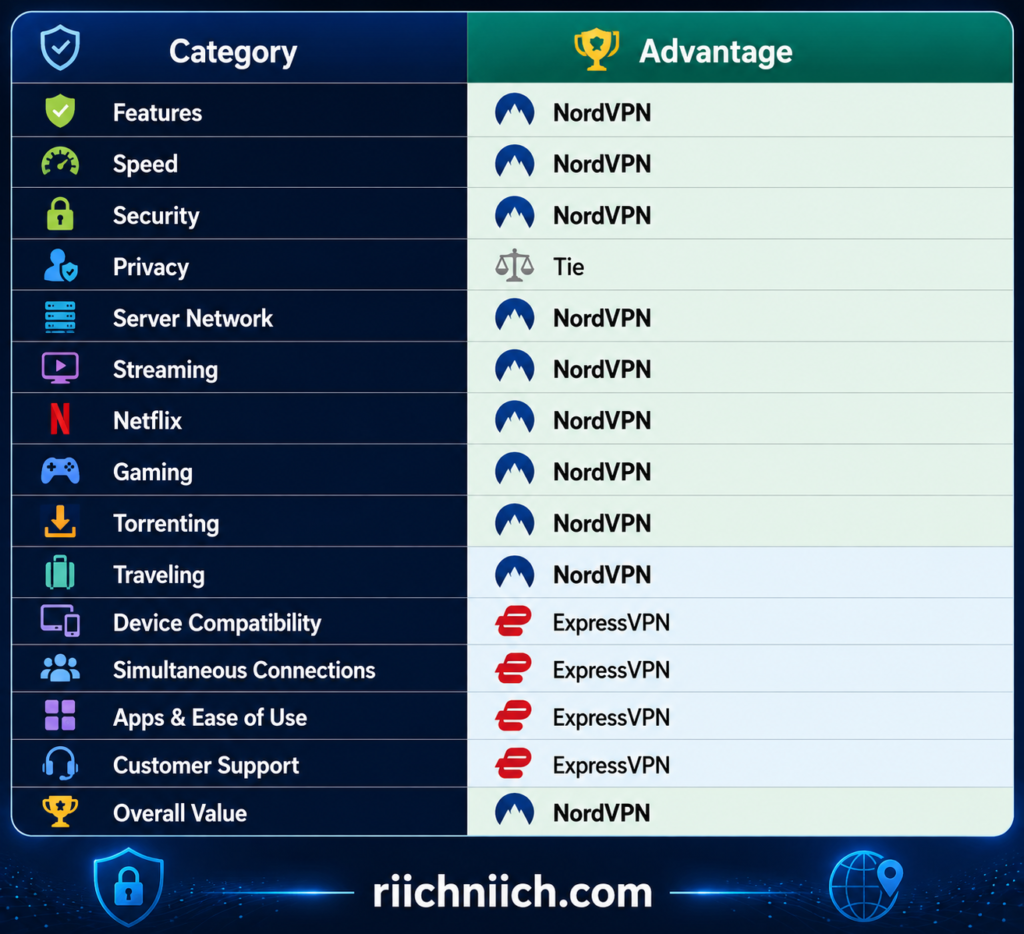
This doesn’t mean NordVPN destroys ExpressVPN in every category it wins.
Quite the opposite.
Many of these comparisons are close. The difference is that NordVPN wins more of the categories that directly affect how versatile the VPN is once you start using it for different purposes.
That makes NordVPN easier to recommend as the better all-around purchase.
NordVPN Is Better If You Want More Control
Another major difference in ExpressVPN vs NordVPN is philosophy.
ExpressVPN emphasizes simplicity.
NordVPN gives you more options.
NordVPN supports multiple connection technologies and specialty features, allowing buyers to choose different approaches depending on what they are doing. Its feature set includes NordLynx, NordWhisper, Double VPN, Onion Over VPN, Meshnet and other connection and privacy tools.
You don’t need to be a cybersecurity expert to use NordVPN.
You can still open the app and connect normally.
But if you eventually want more control, the additional functionality is already there.
That makes NordVPN particularly appealing to buyers who want a VPN they can continue using as their privacy and security needs become more advanced.
NordVPN Is Better for Buyers Who Want More Than a Basic VPN
This may be the most important distinction.
If all you need is:
Connect → Encrypt traffic → Change IP address → Disconnect
then either VPN can handle the job.
But NordVPN’s advantage becomes more noticeable when you start asking for additional capabilities.
For example:
Want private networking between your own devices? Meshnet.
Want streaming assistance built into the VPN experience? SmartPlay.
Want traffic routed through two VPN servers? Double VPN.
Want a protocol designed for restrictive network environments? NordWhisper.
Want additional malware, scam, phishing, ad, and tracker protection? NordVPN offers those capabilities, with exact coverage depending on your plan and platform.
That is why NordVPN’s value isn’t determined solely by its subscription price.
You’re buying into a broader collection of networking and cybersecurity capabilities.
But ExpressVPN Is Better in Several Important Areas
NordVPN winning overall does not mean everyone should buy NordVPN.
ExpressVPN has legitimate advantages.
One of the biggest is simultaneous connections.
NordVPN allows up to 10 simultaneous devices per account.
ExpressVPN currently supports:
Basic — 10 devices
Advanced — 12 devices
Express Pro — 14 devices
For a large household with more than 10 devices regularly connected to the VPN simultaneously, ExpressVPN can therefore be the better choice.
ExpressVPN also deserves credit for its underlying technology. Lightway’s core library is open source, includes post-quantum support, and ExpressVPN has developed Lightway Turbo for multi-lane tunneling, currently available on Windows. Its TrustedServer architecture is designed to wipe server data with every reboot.
And ExpressVPN’s simpler approach can be a genuine advantage for beginners.
More features are only beneficial when you actually want them.
ExpressVPN May Be Better If You Just Want a VPN
There is another important buyer-intent consideration.
ExpressVPN Basic is currently less expensive than NordVPN Basic on their advertised 2-year introductory offers.
ExpressVPN Basic is currently advertised at $2.99 per month, totaling $83.72 for the first 28 months, then renewing at $99.95 annually.
NordVPN Basic is currently advertised at $3.49 per month, totaling $94.23 for the first 27 months, with a currently listed renewal price of $139.08 per year.
That creates an interesting situation.
If you’re asking NordVPN vs ExpressVPN which is better because you want the broader feature package, NordVPN has the advantage.
But if you’re asking:
“Which one gives me a good VPN for the lowest current introductory price?”
ExpressVPN Basic deserves serious consideration.
VPN promotions change frequently, so always check the current price and renewal terms immediately before purchasing.
When Is ExpressVPN Better Than NordVPN?
ExpressVPN may be the better purchase if you:
- Want the simplest possible VPN experience.
- Need 11–14 simultaneous direct connections.
- Prefer ExpressVPN’s router ecosystem.
- Frequently move between Wi-Fi and mobile networks and value Lightway’s design.
- Prefer TrustedServer’s RAM-based server architecture.
- Don’t expect to use NordVPN’s specialty tools.
- Want ExpressVPN Basic at its lower current introductory price.
These are not minor advantages.
For the right buyer, they can completely reverse the recommendation.
That is why the answer to is NordVPN better than ExpressVPN should never simply be “yes” without explaining who is buying the VPN.
Is NordVPN Better Than ExpressVPN for the Money?
For most buyers who want more than basic VPN protection, NordVPN offers the better overall package.
Its advantage comes from combining the VPN itself with a wider selection of security, networking, streaming, and specialty connection features.
However, ExpressVPN currently complicates the NordVPN vs ExpressVPN price comparison because its Basic introductory plan is cheaper.
So we would separate price from value.
ExpressVPN Basic currently has the lower introductory price.
NordVPN offers the stronger overall feature-to-value proposition for buyers who will use its additional capabilities.
That distinction matters.
Buying the VPN with the most features isn’t good value if you never use those features. Likewise, saving a few dollars isn’t necessarily good value if you later discover that the cheaper option doesn’t provide a capability you need.
So, Is NordVPN Better Than ExpressVPN?
Yes—for most buyers, NordVPN is better than ExpressVPN overall.
The advantage isn’t based on one dramatic feature. It comes from how well NordVPN performs across the entire NordVPN vs ExpressVPN comparison.
NordVPN combines strong performance with NordLynx, SmartPlay, Meshnet, specialty connection options, extensive security features, broad server coverage, streaming capabilities, gaming features, and a larger overall toolkit.
ExpressVPN remains the better choice for certain buyers, particularly those who prioritize simplicity, higher simultaneous connection limits, router integration, Lightway, or its lower-priced current Basic introductory offer.
But if you’re standing at checkout asking should I get NordVPN or ExpressVPN and you want the strongest all-around recommendation:
Choose NordVPN.
It offers the better balance of performance, security, features, flexibility, and overall value for the widest range of users.
ExpressVPN is excellent.
NordVPN is simply the more complete package.
Is ExpressVPN Better Than NordVPN?
In some important situations, yes—ExpressVPN is better than NordVPN. But for most buyers comparing NordVPN vs ExpressVPN, we would still give NordVPN the overall advantage.
ExpressVPN becomes the better purchase when your priorities are simplicity, more simultaneous device connections, strong router and device support, Lightway, TrustedServer technology, or a lower-priced Basic plan. ExpressVPN has also expanded beyond a traditional VPN by adding password management, email privacy, identity protection, dedicated IP options, and other tools to its higher subscription tiers.
The important question is not whether ExpressVPN has more features overall. It is whether ExpressVPN’s particular advantages match how you intend to use your VPN.
ExpressVPN Is Better for Simplicity
This is probably ExpressVPN’s clearest advantage.
ExpressVPN is designed to make everyday VPN use straightforward. Its apps give users access to important features such as Lightway, Internet Kill Switch protection, server selection, leak protection, and other security controls without making the basic connection process feel overly complicated.
That makes ExpressVPN particularly appealing to someone purchasing a VPN for the first time.
NordVPN is not difficult to use, but it gives you considerably more to explore. NordLynx, NordWhisper, Meshnet, Double VPN, Onion Over VPN, obfuscated connections, Dark Web Monitor, and other tools expand what you can do with the service.
For an advanced user, that is an advantage.
For someone who simply wants:
Install → Connect → Stay Protected
ExpressVPN may be the better fit.

ExpressVPN Is Better If You Have More Than 10 Devices
ExpressVPN has another clear advantage when comparing NordVPN vs ExpressVPN simultaneous connections.
ExpressVPN currently allows:
Basic — 10 simultaneous connections
Advanced — 12 simultaneous connections
Express Pro — 14 simultaneous connections
This matters for larger households.
Imagine two parents and three children. If everyone has a phone and laptop, you’ve already reached 10 devices. Add tablets or other individually connected devices and you could exceed that number quickly.
ExpressVPN Advanced and Pro provide additional breathing room.
However, this advantage only matters if you actually need it. ExpressVPN Basic’s 10-device allowance does not provide a connection-count advantage over NordVPN’s current 10-device limit.
So if you’re asking is ExpressVPN better than NordVPN specifically for a technology-heavy household, the answer can be yes—particularly with Advanced or Express Pro.
ExpressVPN Is Better for People Who Want Lightway
Lightway is one of ExpressVPN’s biggest technological advantages.
ExpressVPN designed Lightway to provide fast, secure connections while using a streamlined codebase. More importantly for everyday users, Lightway is designed to reconnect quickly when switching between Wi-Fi and cellular networks and use fewer system resources.
That makes Lightway particularly appealing for:
Frequent travelers.
Smartphone users.
Remote workers.
Commuters.
People regularly switching networks.
Someone working from a laptop at home all day may not care much about quickly transitioning between Wi-Fi and mobile networks.
Someone moving between a hotel, airport, cellular connection, coffee shop, and conference center might care a lot.
If that sounds like how you use your devices, ExpressVPN’s Lightway experience may be more valuable to you than NordVPN’s additional specialty features.
ExpressVPN Is Better If You Prefer TrustedServer
Privacy-focused buyers also have a strong reason to consider ExpressVPN: TrustedServer.
ExpressVPN says TrustedServer operates entirely on volatile RAM rather than writing the server’s operating system and applications to conventional hard drives. Because RAM loses its contents when power is removed, information on the server is wiped when it is rebooted. ExpressVPN also reloads the software stack when the server starts.
This reduces the risk of information or unwanted software persisting on a server.
That doesn’t mean a VPN makes you anonymous online, nor does it mean TrustedServer alone makes ExpressVPN universally more private than NordVPN.
In fact, the broader NordVPN vs ExpressVPN privacy comparison remains extremely close.
But if RAM-only server architecture is high on your personal VPN checklist, TrustedServer is one of ExpressVPN’s strongest selling points.
ExpressVPN May Be Better If You Only Want the Core VPN
This is where the NordVPN vs ExpressVPN price comparison becomes particularly interesting.
ExpressVPN’s reputation as the automatically more expensive choice no longer tells the full story.
At the time of writing, ExpressVPN Basic’s 2-year introductory offer costs $2.99 per month, billed as $83.72 for the first 28 months. It then renews at the currently listed price of $99.95 annually.
NordVPN Basic’s current 2-year introductory offer costs $3.49 per month, totaling $94.23 for the first 27 months, before renewing at the currently listed $139.08 per year.
That means ExpressVPN Basic currently has both the lower introductory price and lower listed annual renewal price between these two Basic plans.
This matters if you don’t care about NordVPN’s broader collection of specialty tools.
If your requirements are essentially:
A fast VPN
Strong encryption
10 simultaneous connections
Easy apps
Reliable everyday protection
then ExpressVPN Basic becomes a very compelling purchase.
VPN promotions and renewal prices can change, so always verify the current checkout terms immediately before buying.
ExpressVPN Is Better for Buyers Who Want Fewer Decisions
More features do not automatically equal a better product.
NordVPN provides an impressive selection of additional options, including Double VPN, Onion Over VPN, Meshnet, obfuscated servers, multiple protocols, Dark Web Monitor, and other security capabilities.
But every additional feature creates another choice.
Some people enjoy that.
Others don’t.
ExpressVPN is a better fit for the second group.
You can still access important security functionality, but the overall experience is geared toward keeping everyday VPN use straightforward.
This becomes especially relevant if you’re purchasing a VPN for someone else.
A technically inclined user may appreciate NordVPN’s larger toolkit.
A parent, spouse, employee, or relative who has never used a VPN may appreciate ExpressVPN’s simpler approach.
ExpressVPN Is Better If Its Extra Services Match Your Needs
ExpressVPN has also evolved beyond being a simple VPN.
Its current Basic, Advanced, and Pro subscription structure adds progressively more privacy and cybersecurity tools.
Depending on the tier and subscription term, these can include ExpressKeys password management, ExpressMailGuard email relay features, Identity Defender for eligible U.S. customers, dedicated IP, ExpressAI, Advanced Protection, and eSIM benefits.
Express Pro, for example, currently includes 14 simultaneous VPN connections, a dedicated IP, ExpressKeys, expanded ExpressMailGuard functionality, Identity Defender for eligible U.S. customers, Advanced Protection, and ExpressAI. Longer-term qualifying subscriptions also include an eSIM benefit.
That does not automatically make Express Pro good value.
The key question is:
Would you actually use those extras?
If yes, bundling them together may make sense.
If not, paying for the premium tier just because it has a longer feature list probably isn’t necessary.

Where NordVPN Is Still Better
This is where the answer to is ExpressVPN better than NordVPN becomes more nuanced.
ExpressVPN wins specific categories.
NordVPN wins the broader all-around comparison.
NordVPN currently provides features including NordLynx, NordWhisper, SmartPlay, Meshnet, Double VPN, Onion Over VPN, obfuscated connections, Kill Switch protection, split tunneling, private DNS, and additional security capabilities.
Meshnet alone creates possibilities that extend beyond a conventional commercial VPN. It can connect devices directly through encrypted tunnels for uses such as remote access, file sharing, work, and LAN-style gaming.
That broader toolkit is why NordVPN remains our overall winner in NordVPN vs ExpressVPN.
ExpressVPN does fewer specialized things—but what it does, it generally makes very easy to use.
When Is ExpressVPN Better Than NordVPN?
ExpressVPN is likely the better purchase if you:
- Prioritize simplicity over advanced customization.
- Need 12 or 14 simultaneous connections through Advanced or Pro.
- Frequently move between Wi-Fi and cellular networks.
- Specifically value Lightway.
- Prefer ExpressVPN’s TrustedServer RAM-only architecture.
- Want a straightforward VPN without needing NordVPN’s specialty tools.
- Find ExpressVPN Basic’s current pricing more attractive.
- Want particular extras included with ExpressVPN’s higher subscription tiers.
Those are meaningful advantages.
They are simply advantages that apply more strongly to certain types of buyers.
So, Is ExpressVPN Better Than NordVPN?
Yes—for the right buyer, ExpressVPN is better than NordVPN.
But if the question is which VPN we would recommend to the largest number of people, NordVPN still comes out ahead.
The difference is straightforward.
ExpressVPN is better for simplicity.
ExpressVPN is better if you need more than 10 direct simultaneous connections.
ExpressVPN is better if Lightway and TrustedServer are particularly important to you.
ExpressVPN Basic is currently cheaper than NordVPN Basic on the advertised 2-year introductory offers.
NordVPN, however, offers the broader collection of VPN and networking capabilities, including Meshnet, SmartPlay, specialty connection options, and additional security features.
So for buyers asking NordVPN vs ExpressVPN which is better, our recommendation remains:
Choose ExpressVPN if you want a simple, polished VPN experience with excellent device flexibility and fewer decisions to make.
Choose NordVPN if you want the more versatile all-around package with a broader selection of advanced features and specialty tools.
ExpressVPN doesn’t need to beat NordVPN in every category to be the better purchase for you. If its strengths line up with the way you actually use a VPN, ExpressVPN can absolutely be the smarter choice.
Should You Get NordVPN or ExpressVPN?
If you are trying to decide should I get NordVPN or ExpressVPN, our recommendation after comparing NordVPN vs ExpressVPN across pricing, features, speed, security, privacy, streaming, gaming, devices, apps, and customer support is straightforward:
Most buyers should get NordVPN.
ExpressVPN is still an excellent VPN, and for certain buyers it is actually the better choice. But NordVPN provides the stronger overall combination of security features, performance, streaming capabilities, specialty tools, server flexibility, and long-term usefulness.
The easiest way to decide is not to ask which VPN has the longest feature list. Ask which one better matches what you will actually do with it.
Get NordVPN If You Want the Best All-Around Package
NordVPN is our first choice for someone who wants one VPN that can handle a wide range of situations.
If you’re considering buying it, read our complete guide on whether NordVPN is worth it for a closer look at its features, pricing, and overall value.
Its current feature set includes NordLynx, NordWhisper, Kill Switch protection, DNS leak protection, Double VPN, SmartPlay, Meshnet, split tunneling, and additional scam, phishing, and malware protection, although some features vary by platform and subscription.
That gives NordVPN considerable flexibility.
You can buy it today because you want more privacy on public Wi-Fi, then later use it for streaming, gaming, traveling, remote device access, or more advanced security needs.
NordVPN’s SmartPlay, for example, works automatically when you connect through the NordVPN app and combines streaming functionality with VPN encryption.
Meshnet goes even further by letting you create a private encrypted network between devices for activities such as file sharing, remote access, work, and LAN gaming.
Those are meaningful extras if you want more than a basic VPN tunnel.

Get ExpressVPN If Simplicity Matters Most
Not everyone needs that many options.
ExpressVPN is the better choice if your ideal VPN experience is:
Install it.
Connect it.
Forget about it.
ExpressVPN still provides serious technology underneath that straightforward experience. Lightway is its proprietary VPN protocol, with an open-source core library, post-quantum support, perfect forward secrecy, and Lightway Turbo multi-lane tunneling currently available on Windows.
ExpressVPN also offers TrustedServer, which runs its VPN servers using RAM rather than writing server data to conventional hard drives. The software stack is reinstalled when a server starts, and information in RAM is wiped with each reboot.
So choosing ExpressVPN for simplicity does not mean sacrificing important security technology.
It means choosing a VPN that emphasizes making those technologies easier to live with.
Get NordVPN If You Want More Security and Networking Tools
For buyers comparing NordVPN vs ExpressVPN security, both services provide strong fundamental protection.
The difference is that NordVPN gives you more specialized options.
NordVPN currently supports NordLynx, NordWhisper, OpenVPN, and IKEv2/IPsec alongside features including Kill Switch protection, DNS leak protection, Double VPN, private DNS, Meshnet, and additional threat protections.
NordWhisper is particularly interesting for people who travel or regularly encounter restrictive networks. NordVPN designed the protocol for filtered network environments such as airports, cafés, hotels, offices, campuses, and conferences.
You may never need some of these features.
But if you do, having them already included in the NordVPN ecosystem is valuable.
That is one reason NordVPN is the safer recommendation for buyers who don’t yet know exactly how their VPN needs may change over the next several years.
Get ExpressVPN If You Have a Lot of Devices
ExpressVPN has the advantage if you regularly need more than 10 direct simultaneous VPN connections.
Its current subscription structure provides:
Basic — 10 simultaneous connections
Advanced — 12 simultaneous connections
Express Pro — 14 simultaneous connections.
NordVPN currently provides 10 simultaneous connections.
That means ExpressVPN Basic doesn’t give you an advantage over NordVPN in this category.
ExpressVPN Advanced and Pro do.
If you live alone or have a relatively small collection of devices, this probably shouldn’t influence your purchase.
If you have a large family with phones, tablets, laptops, and other connected devices all using the VPN simultaneously, those extra ExpressVPN connections could be genuinely useful.
Get NordVPN If Streaming and Gaming Are Major Priorities
NordVPN is particularly easy to recommend to someone who regularly streams or games.
SmartPlay is automatically integrated into NordVPN’s applications, so there is no separate feature to activate when securely streaming.
NordVPN also offers Meshnet, which creates encrypted private networks between devices and can be used for LAN-style gaming and other direct-device networking scenarios.
Combine those features with NordLynx, and NordVPN provides an attractive package for entertainment-focused buyers.
This does not mean ExpressVPN is poor for streaming or gaming. Lightway is designed around fast, reliable VPN performance, and ExpressVPN supports a broad collection of platforms including smart TVs, Fire Stick, Android TV, Apple TV, PlayStation, and Xbox.
But if NordVPN vs ExpressVPN for Netflix, streaming, and gaming are central to your buying decision, we would lean toward NordVPN because of the broader combination of tools available.
Get ExpressVPN If You Want the Lower-Priced Basic Plan Right Now
This is one area where buyers should not rely on ExpressVPN’s old reputation for being more expensive.
At the time of writing, ExpressVPN Basic’s current 2-year introductory offer costs $2.99 per month, totaling $83.72 for the first 28 months, before renewing at $99.95 annually.
NordVPN Basic’s current 2-year introductory offer costs $3.49 per month, totaling $94.23 for the first 27 months, before renewing at $139.08 per year.
So if your NordVPN vs ExpressVPN price comparison comes down purely to:
“Which Basic plan costs less right now?”
ExpressVPN wins.
That’s especially compelling if you only want the core VPN and don’t expect to use NordVPN’s additional specialty features.
However, VPN promotions change frequently. Always verify the introductory charge, subscription length, renewal price, and included features before purchasing.
Don’t Choose Based on Price Alone
This is where many VPN buyers make a mistake.
A difference of a few dollars per month may look important while you’re shopping, but you could use the VPN for years.
The better question is:
Which service will I actually be happier using?
Suppose NordVPN costs slightly more at checkout, but you regularly use Meshnet, SmartPlay, specialty connection options, and its additional security tools.
In that situation, paying more may deliver better value.
Now imagine you never touch any of those features.
You simply connect to the VPN every morning and disconnect at night.
In that case, ExpressVPN Basic’s lower current price and simpler experience may make more sense.
The cheapest VPN is not automatically the best value. The VPN with the most features isn’t automatically the best value either.
Value comes from paying for features you actually use.
A Simple Way to Choose Between NordVPN and ExpressVPN
If you’re still wondering NordVPN vs ExpressVPN which should I choose, use this quick decision guide:
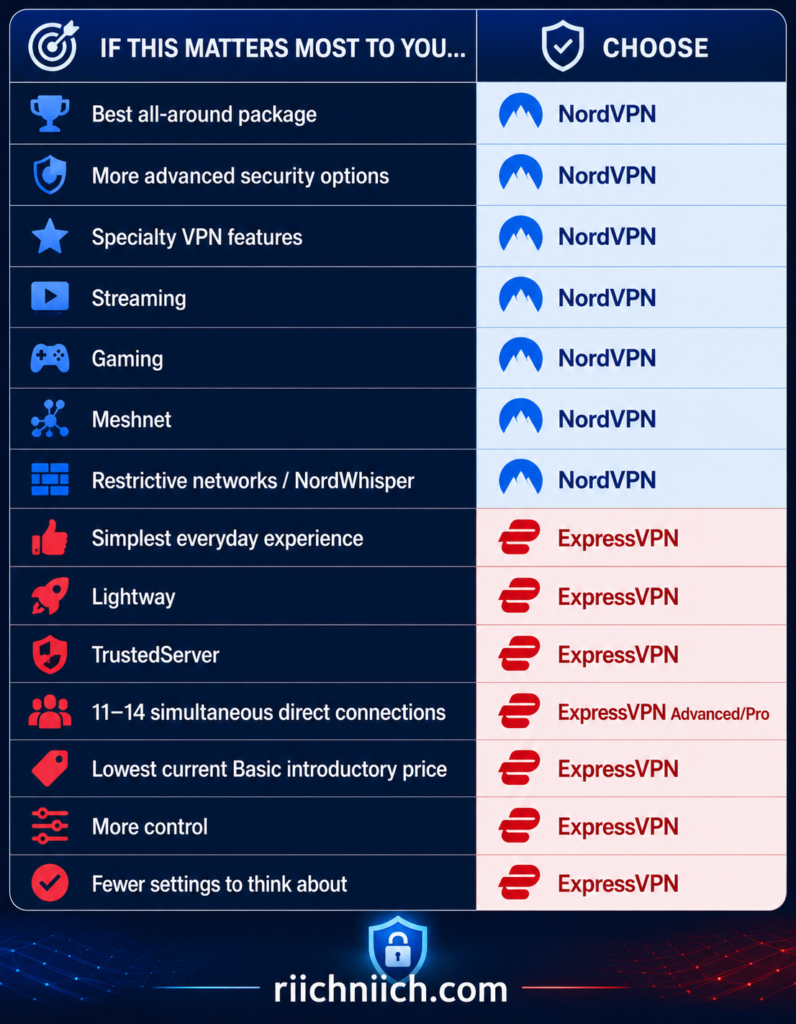
The table also shows why this isn’t a one-sided comparison.
ExpressVPN has several legitimate advantages.
NordVPN simply matches the needs of a wider range of buyers.
What I Would Choose
If we were buying one of these services based on the entire NordVPN vs ExpressVPN comparison, we would choose NordVPN.
Not because ExpressVPN is significantly worse.
It isn’t.
We would choose NordVPN because its advantages cover more situations.
NordVPN gives you the straightforward VPN functionality most people need today while also providing tools you may find useful later, including Meshnet, SmartPlay, NordWhisper, Double VPN, and a broader collection of security capabilities.
ExpressVPN would be our choice instead if we specifically wanted the simpler experience, Lightway, TrustedServer, more than 10 simultaneous direct connections, or its lower-priced current Basic introductory offer.
That distinction makes the buying decision much easier.
Should You Get NordVPN or ExpressVPN?
For most people asking should I get NordVPN or ExpressVPN, get NordVPN.
Before making your final decision, you can also compare NordVPN vs Surfshark to see whether another lower-cost NordVPN alternative better fits your needs.
It provides the stronger overall balance of performance, security, streaming, gaming, advanced features, specialty connection options, and flexibility. NordVPN’s current feature set gives you room to do more with the service if your needs expand later.
But there are clear exceptions.
Get ExpressVPN if simplicity is your top priority, you need 12–14 simultaneous direct connections, you specifically prefer Lightway or TrustedServer, or you want the lower-priced Basic subscription based on the current offers.
Get NordVPN if you want the more versatile VPN and expect to use advanced security, streaming, gaming, travel, or networking features.
If you’re still completely undecided and simply want to know best VPN NordVPN or ExpressVPN, our pick is:
NordVPN for most buyers.
If you want the stronger all-around VPN with more security, streaming, and networking features, check NordVPN’s current deal here before choosing your plan.
ExpressVPN wins several important categories, but NordVPN’s broader capabilities make it the more complete purchase and the service we would recommend first when someone doesn’t have one highly specific requirement pushing them toward ExpressVPN.
Frequently Asked Questions About NordVPN vs ExpressVPN
If you are still deciding between the two services, these frequently asked questions cover some of the most important buying considerations in NordVPN vs ExpressVPN, including speed, security, privacy, streaming, gaming, devices, pricing, and overall value.
Is NordVPN Better Than ExpressVPN?
For most buyers, NordVPN is the better all-around choice.
NordVPN combines its core VPN service with NordLynx, SmartPlay, Meshnet, Double VPN, Onion Over VPN, obfuscated connections, NordWhisper, Kill Switch protection, and additional security tools. It currently supports up to 10 simultaneous devices.
ExpressVPN remains an excellent alternative, especially if you prioritize simplicity, Lightway, TrustedServer, or more simultaneous connections on its higher tiers.
So, is NordVPN better than ExpressVPN? For the widest range of buyers, we would say yes. But ExpressVPN can be better for particular users.
Is ExpressVPN Better Than NordVPN?
ExpressVPN is better than NordVPN in several specific situations.
Consider ExpressVPN if you want:
- A particularly simple VPN experience
- 12 simultaneous connections with Advanced
- 14 simultaneous connections with Express Pro
- Lightway
- Strong router support
- TrustedServer technology
- A lower-priced Basic plan based on the current offers
ExpressVPN’s current plans allow 10 connections with Basic, 12 with Advanced, and 14 with Express Pro.
Therefore, the answer to is ExpressVPN better than NordVPN depends heavily on what you value. ExpressVPN doesn’t win the entire comparison, but its advantages could make it the better purchase for you.
Which Is Faster: NordVPN or ExpressVPN?
Both VPNs are designed for high-speed connections, but NordVPN gets the overall advantage for speed in this comparison.
NordVPN uses NordLynx, which is based on WireGuard, while ExpressVPN uses its proprietary Lightway protocol.
However, VPN speed can change significantly depending on your internet connection, device, server location, distance, network congestion, and protocol.
That means you should not expect one VPN to be faster in every location and on every device.
For buyers comparing NordVPN vs ExpressVPN speed, we would choose NordVPN overall, while ExpressVPN remains highly competitive.
Which Is More Secure: NordVPN or ExpressVPN?
Both provide strong security, but NordVPN has the advantage if you want more security options.
NordVPN offers an Automatic Kill Switch, DNS leak protection, Double VPN, Onion Over VPN, obfuscated connections, multiple VPN protocols, private DNS, and additional scam, phishing, and malware protections.
ExpressVPN counters with Lightway, an Internet Kill Switch, private DNS, TrustedServer infrastructure, post-quantum protection, and additional threat-blocking features depending on the subscription tier.
For the average buyer, either service provides a strong security foundation.
But in NordVPN vs ExpressVPN security, NordVPN gets the edge because of its broader selection of specialized security and connection tools.
Which Is Better for Privacy: NordVPN or ExpressVPN?
This category is much closer.
Both services have built their products around privacy-focused VPN infrastructure and no-logs policies, and both have undergone independent assessments of aspects of their services.
NordVPN is based in Panama, while ExpressVPN is based in the British Virgin Islands. ExpressVPN also uses its TrustedServer RAM-only server architecture.
Rather than declaring one significantly more private, we would call NordVPN vs ExpressVPN privacy essentially a tie for the typical buyer.
If privacy is your main reason for buying a VPN, our guide to the Best VPN for Privacy compares additional options and the privacy features that matter most.
Remember that a VPN does not make you completely anonymous online. Websites can still identify you when you log into accounts, and cookies, browser fingerprinting, malware, and other tracking techniques are separate privacy issues.
Which Is Better for Streaming?
NordVPN gets the slight advantage for streaming.
One of the main reasons is SmartPlay.
SmartPlay is automatically built into NordVPN’s apps. NordVPN says it combines SmartDNS functionality with VPN protection, meaning your IP address is hidden and your connection remains encrypted while using it.
ExpressVPN is also a strong streaming VPN with broad device support.
But for the overall NordVPN vs ExpressVPN streaming comparison, SmartPlay helps push NordVPN slightly ahead.
Is NordVPN or ExpressVPN Better for Netflix?
We would choose NordVPN for Netflix, although both are capable options.
NordVPN’s SmartPlay works automatically when you connect through the NordVPN app, so there is nothing additional to activate.
However, streaming-service availability can change, and services may restrict VPN use or particular content while a VPN is active.
So no VPN should be purchased solely because you expect permanent access to a particular Netflix library.
For NordVPN vs ExpressVPN for Netflix, NordVPN gets the narrow advantage because of the combination of SmartPlay, NordLynx, and its overall streaming experience.
Which Is Better for Gaming?
NordVPN is our pick for gaming.
Both VPNs offer fast protocols, but NordVPN adds Meshnet, which lets compatible devices connect through private encrypted networks and can be used for LAN-style gaming.
That gives NordVPN an interesting advantage for certain gamers.
However, remember that a VPN cannot magically improve your internet connection. Routing traffic through a VPN server can add latency, particularly when connecting to a distant server.
For the best gaming experience, selecting a nearby VPN server is usually the sensible starting point.
In NordVPN vs ExpressVPN for gaming, we would choose NordVPN overall.
Which Is Better for Torrenting?
For legitimate peer-to-peer file transfers, NordVPN gets the slight advantage.
NordVPN combines P2P support with NordLynx, Kill Switch protection, DNS leak protection, and other security features. ExpressVPN is also a strong option with Lightway and Internet Kill Switch protection.
Whichever VPN you choose, using a VPN does not make copyright infringement legal. Only download and share files you have the legal right to access or distribute.
Which VPN Is Better for Traveling?
For frequent travelers, this is close, but we would choose NordVPN overall.
NordWhisper was developed for restrictive network environments, while NordVPN also provides obfuscated connection options.
ExpressVPN has an advantage of its own: Lightway is designed for efficient connections and smooth network transitions, which can be useful when moving between Wi-Fi and cellular connections.
If you travel frequently, install and update your VPN before leaving home, particularly if you are traveling somewhere with internet restrictions.
You should also check local laws because VPN regulations vary by country.
How Many Devices Can NordVPN and ExpressVPN Protect?
NordVPN currently allows up to 10 simultaneous connections with one subscription. A compatible router can protect additional connected devices while using one device slot.
ExpressVPN currently allows:
Basic — 10 devices
Advanced — 12 devices
Express Pro — 14 devices
Therefore, ExpressVPN wins the NordVPN vs ExpressVPN simultaneous connections comparison.
However, ExpressVPN Basic and NordVPN are tied at 10.
The advantage only appears when moving to ExpressVPN Advanced or Express Pro.
Which VPN Is Easier to Use?
ExpressVPN gets the slight advantage for ease of use.
NordVPN is still beginner-friendly, but its broader collection of protocols, specialty connections, security features, and networking tools gives users more options to explore.
ExpressVPN’s experience is particularly well suited to someone who wants to open the app, choose a location, connect, and continue with their day.
For technically inclined buyers, NordVPN’s additional controls may actually be preferable.
For beginners, ExpressVPN’s simplicity can be the advantage.
Is ExpressVPN More Expensive Than NordVPN?
Not necessarily.
This is one of the most important changes buyers should understand when researching NordVPN vs ExpressVPN price.
At the time of writing, ExpressVPN Basic’s 2-year introductory offer is $2.99 per month, totaling $83.72 for the first 28 months and currently renewing at $99.95 annually.
ExpressVPN Advanced is currently $4.49 per month for its 2-year introductory offer, while Express Pro is $7.49 per month.
So you should not automatically assume ExpressVPN is the more expensive VPN.
Pricing, promotional periods, included months, and renewal rates can change. Always check the current checkout terms before purchasing.
Which VPN Offers Better Value?
For most buyers, NordVPN offers better overall value, particularly if you plan to use its additional features.
NordVPN’s advantage comes from the combination of its core VPN with features such as Meshnet, SmartPlay, specialty connections, Dark Web Monitor, and additional security tools.
ExpressVPN may provide better value if you primarily want a simple core VPN or specifically need its higher simultaneous-connection limits.
This is why NordVPN vs ExpressVPN value should not be judged solely by the monthly price.
A feature only has value if you actually use it.
Do NordVPN and ExpressVPN Have a Kill Switch?
Yes.
Both services provide Kill Switch functionality designed to prevent unprotected internet traffic if the VPN connection unexpectedly drops.
NordVPN’s Automatic Kill Switch is part of its security feature set.
A Kill Switch is particularly useful when you want to avoid accidentally continuing an online session after losing your encrypted VPN connection.
Can I Use NordVPN or ExpressVPN on Public Wi-Fi?
Yes. Both can be used when connecting through public Wi-Fi.
A VPN encrypts traffic between your device and the VPN server, adding another privacy layer to your internet connection.
If you use financial accounts while traveling, read our guide on whether public Wi-Fi is safe for online banking before signing into sensitive accounts on shared networks.
However, a VPN is not a substitute for good security habits.
The FTC recommends keeping devices and software updated, using strong passwords, enabling two-factor authentication where available, and remaining alert for scam websites and other threats.
Can NordVPN or ExpressVPN Make Me Completely Anonymous?
No.
This is an important limitation to understand before buying either VPN.
A VPN can hide your IP address from websites and encrypt traffic between your device and the VPN server, but it does not eliminate every method companies or other parties can use to identify you.
For example, if you connect to a VPN and then sign into your Google, Facebook, Amazon, or banking account, the service still knows which account you are using.
Cookies, browser fingerprinting, account activity, malware, and information you voluntarily provide can also affect privacy.
Think of a VPN as an important privacy and security tool, not an invisibility cloak.
Should I Get NordVPN or ExpressVPN?
For most buyers, get NordVPN.
Choose NordVPN if you prioritize:
More advanced features.
More specialty connection options.
SmartPlay.
Meshnet.
Streaming and gaming versatility.
A broader all-around VPN toolkit.
Choose ExpressVPN if you prioritize:
Simplicity.
Lightway.
TrustedServer.
12–14 simultaneous connections on higher tiers.
A straightforward everyday VPN experience.
If your question is simply best VPN NordVPN or ExpressVPN, NordVPN remains our overall recommendation.
ExpressVPN wins enough categories that it can absolutely be the better purchase for certain users. But NordVPN’s broader combination of security, performance, streaming, networking, and specialty features gives it the advantage for the widest range of buyers.
That is ultimately what makes NordVPN vs ExpressVPN such a close comparison: ExpressVPN may be the better fit for a specific type of buyer, while NordVPN is the stronger all-around recommendation for most people.
Conclusion: NordVPN vs ExpressVPN
After comparing NordVPN vs ExpressVPN across pricing, features, speed, security, privacy, server coverage, streaming, Netflix, gaming, torrenting, travel, device compatibility, simultaneous connections, apps, customer support, and overall value, NordVPN is our overall winner for most buyers.
ExpressVPN is an excellent VPN and wins several meaningful categories. Its simple apps, Lightway protocol, TrustedServer technology, strong device ecosystem, and higher simultaneous-connection limits on Advanced and Pro make it a compelling alternative. ExpressVPN currently allows 10 connections on Basic, 12 on Advanced, and 14 on Express Pro.
But when the entire NordVPN vs ExpressVPN comparison is considered rather than one individual feature, NordVPN offers the more complete package.
Why NordVPN Wins Overall
NordVPN’s biggest advantage is versatility.
It can function as a straightforward everyday VPN, but it also gives buyers access to a deeper collection of security, privacy, streaming, and networking tools.
Its current capabilities include NordLynx, NordWhisper, SmartPlay, Meshnet, Automatic Kill Switch, DNS leak protection, Double VPN, Onion Over VPN, obfuscated connections, Dark Web Monitor, and additional scam, phishing, and malware protections.
NordVPN also supports 10 simultaneous connections and offers specialty servers and multiple protocols for buyers who want more control over their VPN experience.
That combination is difficult to ignore.
You don’t have to use every feature for NordVPN to be worthwhile. You can simply press Connect and use it like a traditional VPN.
But if your needs change, there is considerably more available.

NordVPN Is the Better Choice for Buyers Who Want More Features
The strongest argument for choosing NordVPN is not simply that it has “more features.”
It is that several of those features serve very different purposes.
NordLynx is designed for fast VPN performance.
SmartPlay is built into NordVPN apps and combines VPN protection with technology designed to make secure streaming easier.
Meshnet lets compatible devices create private encrypted connections for uses such as remote access, file sharing, and LAN-style gaming.
NordWhisper provides another protocol option alongside NordLynx and OpenVPN.
Double VPN routes traffic through two VPN servers.
Onion Over VPN combines the VPN connection with the Tor network.
Obfuscated connections are designed to make VPN traffic resemble ordinary internet traffic.
This gives NordVPN more ways to adapt to different situations.
For someone who expects to use a VPN for several years, that flexibility adds significant value.
NordVPN Has a Strong Performance Advantage
Speed was another important consideration in this NordVPN vs ExpressVPN review.
NordVPN’s NordLynx protocol is based on WireGuard and designed specifically around fast VPN performance. NordVPN also says its infrastructure includes 10 Gbps servers and unlimited bandwidth. In testing cited by NordVPN from West Coast Labs, NordLynx exceeded 817 Mbps in the tested scenarios.
That doesn’t mean your connection will reach 817 Mbps.
Real-world VPN performance depends on your original internet speed, server distance, device, Wi-Fi conditions, protocol, network congestion, and other factors.
ExpressVPN is certainly not slow. Lightway is designed for fast connections and efficient network switching, and ExpressVPN says its network includes 10 Gbps and 40 Gbps server infrastructure.
But based on the overall NordVPN vs ExpressVPN speed comparison covered in this article, NordVPN gets our advantage.
NordVPN Is the Better Pick for Streaming
NordVPN also receives our recommendation for buyers who regularly stream.
The standout feature here is SmartPlay.
SmartPlay is automatically built into NordVPN’s apps and is designed to help users securely access their streaming subscriptions while maintaining VPN encryption. There is no separate SmartPlay switch you have to activate.
NordVPN also combines SmartPlay with NordLynx and broad device support, including dedicated apps for platforms such as Android TV.
ExpressVPN remains highly capable for streaming and supports major platforms including Apple TV, Fire Stick, Android TV, computers, phones, and routers.
But for NordVPN vs ExpressVPN streaming and NordVPN vs ExpressVPN for Netflix, we would give NordVPN the narrow overall advantage.
Streaming availability can change, however, and streaming services may restrict VPN usage. Buyers should not assume permanent access to any particular catalog simply because a VPN works with it today.
ExpressVPN Still Wins in Important Areas
A good final verdict shouldn’t pretend NordVPN wins everything.
It doesn’t.
ExpressVPN is the better option for several types of buyers.
Its apps emphasize simplicity, while its Lightway protocol is designed for speed, reliability, lower resource use, and smooth transitions when switching between Wi-Fi and cellular networks. Lightway’s core code is open source, and the protocol includes post-quantum protection.
TrustedServer is another major strength. ExpressVPN’s server technology runs on volatile RAM, with data wiped during reboot and the software stack reloaded rather than allowing information to persist on traditional server hard drives.
And ExpressVPN clearly wins if you need more than 10 simultaneous direct connections:
ExpressVPN Basic — 10
ExpressVPN Advanced — 12
Express Pro — 14
If those advantages matter more to you than NordVPN’s additional specialty tools, ExpressVPN can absolutely be the better purchase.
ExpressVPN Also Has a Surprising Price Advantage
The NordVPN vs ExpressVPN price comparison produces one of the more surprising results in this review.
At the time of writing, NordVPN Basic’s 2-year introductory offer is $3.49 per month, totaling $94.23 for the first 27 months. The currently listed renewal price is $139.08 per year.
ExpressVPN Basic’s current 2-year introductory offer is $2.99 per month, totaling $83.72 for the first 28 months. Its currently listed renewal price is $99.95 annually.
So if you’re comparing only the current Basic plans, ExpressVPN is cheaper both initially and at the currently listed annual renewal rate.
That matters.
ExpressVPN’s historical reputation for being the expensive choice should not automatically determine your decision today.
However, VPN promotions can change quickly. Check the current introductory charge, renewal rate, included months, taxes, and plan features before purchasing.
NordVPN vs ExpressVPN: Final Scorecard
After reviewing the categories throughout this article, here is our final NordVPN vs ExpressVPN 2026 scorecard:

These wins should not all be treated as equally large.
Several categories were extremely close.
But NordVPN wins more of the categories that make a VPN versatile across different use cases, which is why it takes the overall recommendation.
Who Should Buy NordVPN?
Choose NordVPN if you want the best all-around VPN between these two services.
It is particularly well suited to buyers who prioritize:
- Strong security features
- Fast VPN performance
- Streaming
- Gaming
- Meshnet
- SmartPlay
- Specialty connection options
- More advanced VPN controls
- A broader security and privacy toolkit
- Overall versatility
NordVPN is also the safer recommendation if you don’t have one specific requirement driving your purchase.
If someone simply asked me NordVPN or ExpressVPN—which should I buy?, NordVPN would be our first recommendation.
Who Should Buy ExpressVPN?
Choose ExpressVPN if your priorities are different.
ExpressVPN makes more sense if you want:
- A particularly simple VPN experience
- Lightway
- TrustedServer
- Strong router and device support
- 12 or 14 simultaneous connections with a higher tier
- Smooth transitions between Wi-Fi and cellular networks
- The lower-priced current Basic introductory offer
- A VPN with fewer specialty settings to think about
ExpressVPN is especially appealing to people who don’t want to spend time learning what every VPN feature does.
Its strength is not having the largest toolbox.
Its strength is making VPN protection easy to use consistently.
Which Should You Buy?
If you’re asking NordVPN vs ExpressVPN which should I choose, here’s the simplest answer:
Buy NordVPN if you want the better all-around package.
Buy ExpressVPN if simplicity and device flexibility matter more than having additional specialty features.
For buyers focused heavily on NordVPN vs ExpressVPN price, ExpressVPN Basic currently deserves serious consideration because its advertised introductory and renewal pricing is lower than NordVPN Basic’s current offer.
For buyers focused on NordVPN vs ExpressVPN value, however, we still favor NordVPN because its broader feature set provides more ways to use the service.
The right decision ultimately depends on whether those extra capabilities matter to you.
Final Recommendation
The final winner of NordVPN vs ExpressVPN is NordVPN.
Not by a landslide.
ExpressVPN is too good in too many areas for that.
But NordVPN offers the stronger overall balance of speed, security, streaming, gaming, advanced VPN features, specialty connections, and flexibility. Its combination of NordLynx, SmartPlay, Meshnet, NordWhisper, Double VPN, Onion Over VPN, obfuscated connections, and additional security tools gives buyers a service that can adapt to considerably more than basic VPN use.
ExpressVPN remains our alternative recommendation for buyers who value simplicity, Lightway, TrustedServer, more simultaneous connections, or its current Basic pricing.
But if you have reached the end of this NordVPN vs ExpressVPN review and still cannot decide, our recommendation is simple:
Choose NordVPN.
It is the VPN we would pick for the widest range of buyers and the stronger overall purchase in this comparison.
